
 By
By 
Contents
Python is one of the most widely used programming languages for app development, powering the backends of Instagram, Spotify, Uber, and Dropbox. According to a Statista report, 57.9% of developers use Python to build robust backends for their applications.
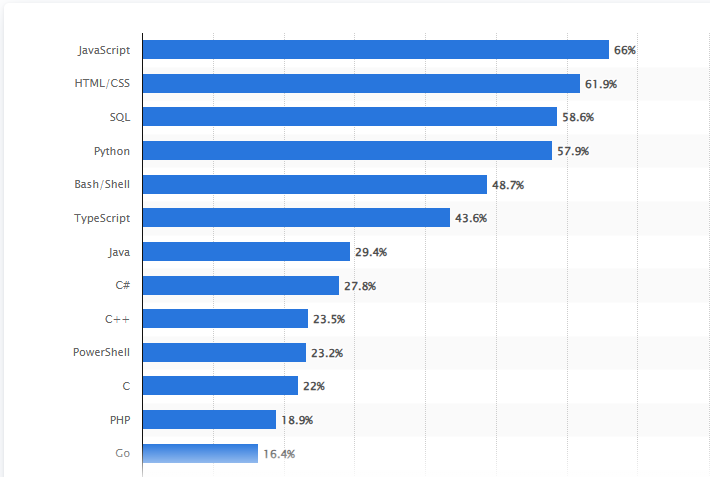
The language is preferred for its readable syntax, rapid development speed, and an ecosystem of free libraries. These strengths make Python a practical choice for building web apps, data-driven tools, AI-powered solutions, and cross-platform mobile apps.
However, Python is not natively supported on Android or iOS. Python mobile app development requires GUI frameworks such as Kivy and BeeWare to translate code into mobile-ready packages. This means choosing the right framework and understanding the platform limitations is critical before starting development.
As a top mobile app development company, Space-O Technologies has built 4400+ apps using technologies including Python, Swift, Kotlin, and React Native. This guide covers everything you need to know about using Python for app development, from frameworks and libraries to cost, limitations, and step-by-step instructions on how to develop a mobile app using Python.
By the end, you will know when Python is the right choice, which are the best programming language alternatives, and how to avoid common pitfalls.
What is Python?
Python is a high-level, open-source, general-purpose programming language designed for readability and rapid development. Created by Guido van Rossum in 1991, it supports object-oriented, procedural, and functional programming paradigms.
As of 2026, Python holds the #1 position on the TIOBE Index, making it the most popular programming language globally. Its popularity stems from a clean syntax that reduces development time, an extensive standard library, and strong community support.
Python runs on Windows, macOS, and Linux and can be extended to mobile platforms through specialized frameworks. It is widely used in web development, data science, artificial intelligence, machine learning, automation, and now increasingly in mobile app development.
Can Python Be Used for Mobile App Development?
Yes, Python can be used for mobile app development, but it requires GUI frameworks such as Kivy or BeeWare to compile Python code into native mobile packages. The Python interpreter executes code at runtime, and neither Android nor iOS supports this interpreted approach natively.
Instead, each app framework acts as a translation bridge between Python and the mobile APIs of each platform. The process differs for Android and iOS.
Python for Android app development
Python Android app development requires converting Python code into Java-based bytecode that Android can execute. Here is how the translation process works:
- Android’s native languages are Kotlin and Java. Python needs a translation layer to run on the Android operating system.
- BeeWare’s Briefcase tool compiles Python code into CPython bytecode, then translates it into Java bytecode packaged as an APK.
- Chaquopy integrates Python directly into Android Studio projects. It allows Python and Kotlin/Java to work side by side within a single native app.
- Buildozer packages Kivy-based Python apps into Android APK files for distribution on the Google Play Store.
Python frameworks can access some Android features through platform-specific bindings. However, deep access to device sensors, GPS, camera access, and push notifications may not work as reliably as native app development with Kotlin.
Python for iOS app development
Python iOS app development requires a macOS device with Xcode installed. The deployment process involves additional configuration compared to native Swift development.
- Kivy is the primary framework for building Python apps on iOS. It translates Python code and deploys via Xcode on macOS.
- BeeWare also supports Python iOS development through Briefcase, packaging Python code into native iOS binaries.
- Toga (BeeWare’s UI library) renders native UI components on iOS, giving apps a platform-specific look and feel.
- App permissions, touch interface controls, and offline mode require additional setup compared to native Swift workflows.
Native mobile app development with Swift remains the stronger choice for consumer-facing iOS apps. Apps that demand tight platform integration, native performance, and complex animations perform better with Swift.
When to choose Python for mobile app development
Python works well on mobile when the app’s core value is logic, data, or AI rather than platform-specific UI. Here are the best use cases:
- Internal business tools and admin dashboards that prioritize functionality over native aesthetics.
- Data-driven apps that process analytics, reports, or ML model outputs on the device.
- Prototypes and MVPs where speed to market matters more than native performance.
- Backend-heavy apps where Python powers the server and a lightweight mobile client displays the results.
For consumer-facing apps that require complex animations, real-time processing, or deep hardware integration, native development with Swift (iOS) or Kotlin (Android) remains the stronger path.
Stop Guessing! Build Your Python App the Right Way
Share your app idea with our Python development consultants. Get expert guidance on frameworks, architecture, and deployment strategy for your project.

Types of Apps You Can Build With Python
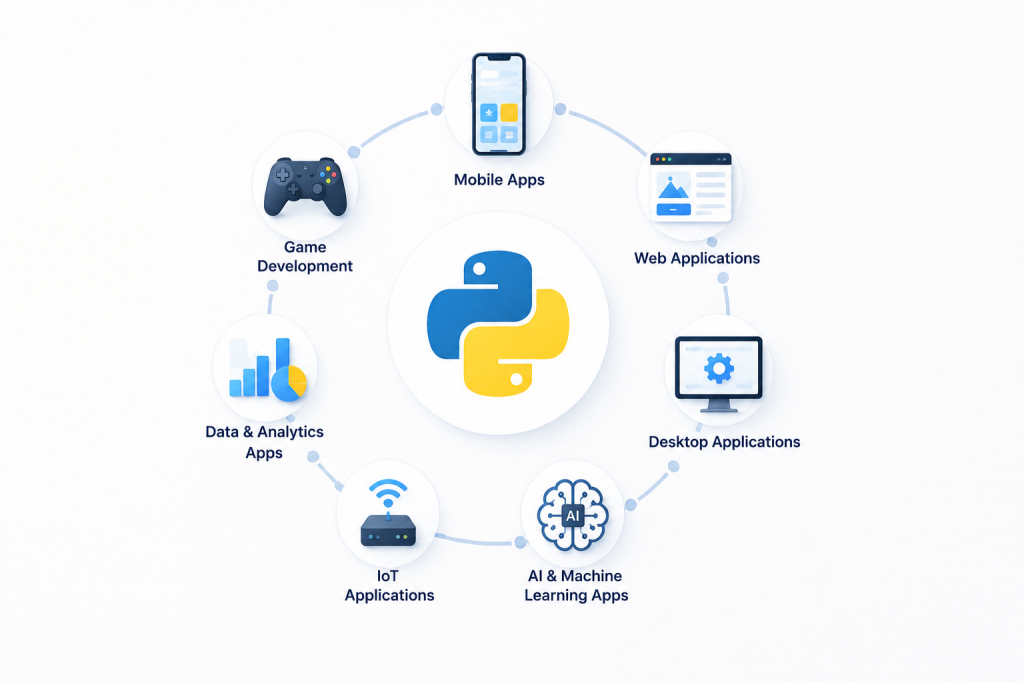
Python supports the development of mobile apps, web applications, desktop software, AI-powered tools, data analytics platforms, games, and IoT solutions. The type of app determines which Python framework and libraries are most suitable.
Mobile apps
Frameworks like Kivy and BeeWare allow developers to build cross-platform mobile apps from a single codebase. This approach lets teams maintain one shared code repository that generates mobile UI for both Android and iOS. However, there are some performance trade-offs compared to native development.
Web applications
Django, Flask, and FastAPI are the primary frameworks for Python web development. These power backends for high-traffic platforms, RESTful APIs, content management systems, and SaaS products.
Desktop applications
Python supports desktop app development through frameworks like PyQt, Tkinter, and wxPython. These are commonly used for internal enterprise tools, utilities, and data management applications.
AI and machine learning apps
Python dominates AI and ML development with libraries like TensorFlow, PyTorch, scikit-learn, and Keras. The growing role of Artificial Intelligence in mobile app development has made these tools essential for building recommendation engines, chatbots, image recognition, and predictive analytics. Access to leading machine learning platforms makes Python the default choice for AI-driven apps.
Data-driven and analytics apps
Libraries like Pandas, NumPy, and Matplotlib make Python ideal for building dashboards, reporting tools, and business intelligence platforms. Financial institutions use Python for mobile banking app development, risk analysis, and algorithmic trading systems.
Game development
Python supports game prototyping and development through libraries like Pygame and Panda3D. Games like Battlefield 2 and EVE Online have used Python for scripting, level design, and interaction logic.
IoT applications
Python integrates well with IoT devices for real-time monitoring, sensor data collection, and automation. Its lightweight nature and library support for hardware interfaces make it suitable for connected device ecosystems.
Don’t Let the Wrong Tech Stack Delay Your Launch
Whether you need a data-driven dashboard, AI-powered tool, or cross-platform mobile app, our Python developers build solutions that match your business goals and timeline.
Why Use Python for Mobile App Development? [7 Key Benefits]
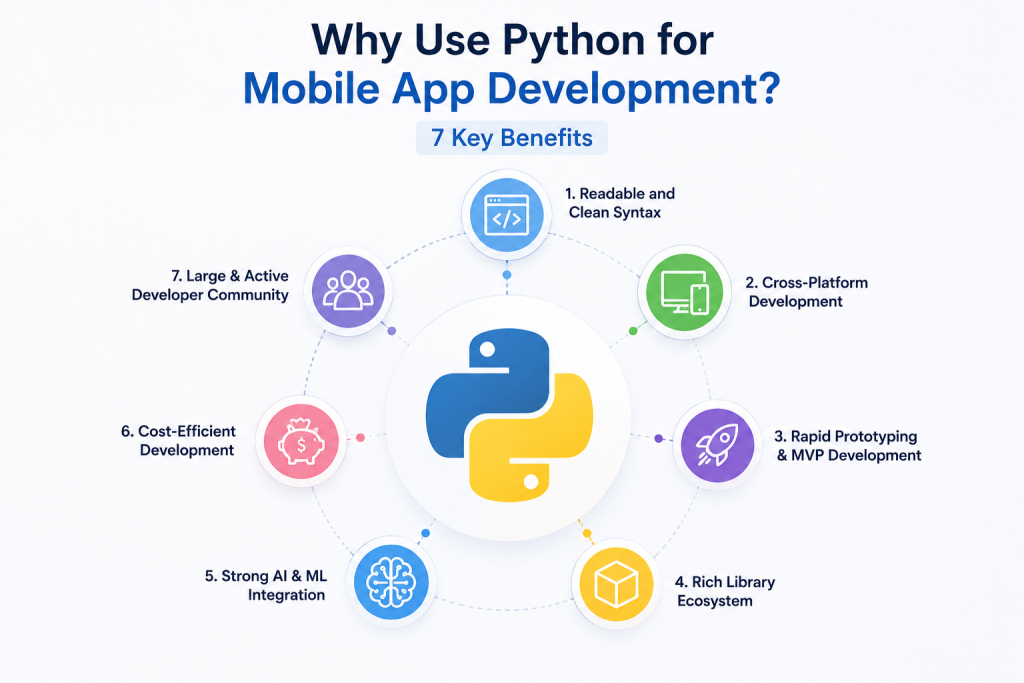
Python offers faster development cycles, lower costs, cross-platform compatibility, and access to a massive library ecosystem, making it a strong choice for app development. Here are the seven primary benefits.
1. Readable and clean syntax
Python’s syntax was designed for readability. Developers can understand and modify each other’s code without extensive onboarding. This reduces debugging time, simplifies code reviews, and speeds up feature development. The language combines dynamic typing and binding to keep code concise and manageable.
2. Cross-platform development
Python allows developers to write one codebase and deploy it across Android, iOS, Windows, macOS, and Linux. This cross-platform app development approach eliminates the need for separate development teams for startups looking to release on both platforms simultaneously. Python’s cross-platform GUI toolkit supports consistent behavior across devices.
3. Rapid prototyping and MVP development
Python’s simple syntax and extensive library support allow developers to build prototypes and MVPs faster than most compiled languages. Building an app with Python is ideal for testing concepts, validating ideas, and launching early versions to gather user feedback.
4. Rich library ecosystem
The Python Package Index (PyPI) hosts over 400,000 packages covering everything from web frameworks to image processing. Developers can use pre-built modules instead of writing code from scratch, which reduces development time significantly.
5. Strong AI and ML integration
Python is the default language for artificial intelligence and machine learning. Libraries like TensorFlow, PyTorch, and scikit-learn integrate directly into Python apps, enabling features like smart recommendations, document recognition, and predictive analytics.
6. Cost-efficient development
A single Python team can handle backend, data processing, and mobile deployment. The language is open-source, so there are no licensing fees. Combined with faster development speed and code reusability, Python reduces both upfront and long-term development costs.
7. Large and active developer community
Python’s community is one of the largest in software development. This means extensive documentation, thousands of tutorials, active forums, and frequent updates to libraries and frameworks. Finding experienced Python developers is easier and faster compared to niche languages.
Get a Production-Ready Python App Built From Scratch
Our developers build Python backends, REST APIs, and full-stack mobile apps using Django, Flask, and FastAPI. Share your requirements and get a detailed project estimate.
Top Python Frameworks for App Development
Python frameworks provide pre-built modules, architectural patterns, and tools that accelerate app development. The right framework depends on whether you are building a mobile app, web application, or API.
1. Kivy (cross-platform mobile development)
Kivy is an open-source Python framework for building multi-touch, cross-platform mobile applications. It uses OpenGL ES2 for GPU acceleration and high-performance graphics rendering. Kivy supports deployment on Android, iOS, Windows, macOS, Linux, and Raspberry Pi.
Kivy has its own custom UI toolkit, which means apps look consistent across all platforms but do not use native UI elements. This can be an advantage for apps requiring a uniform design or a limitation for apps where native look and feel matters.
Best for: Cross-platform apps with custom UIs, touch-based interfaces, games, and interactive prototypes.
2. BeeWare / Toga (native UI, cross-platform)
BeeWare is a collection of tools and libraries for building native apps in Python. Its core UI library, Toga, uses the native UI components of each platform. This means a BeeWare app on iOS looks and behaves like a native iOS app, and the same app on Android uses Android’s native widgets.
BeeWare’s Briefcase tool packages Python code into native binaries for each platform. For Python iOS development, BeeWare uses Toga’s native UI components alongside complex libraries like NumPy, Pandas, and SciPy.
Best for: Business apps, internal tools, and apps where native look and feel is important.
3. Django (web and backend development)
Django is a high-level Python web framework that follows the model-template-view architecture. It includes built-in authentication, admin panels, ORM, and security features. Instagram, Pinterest, and Disqus use Django for their backends.
Best for: Full-featured web apps, content management systems, SaaS platforms, and RESTful APIs.
4. Flask (lightweight backend development)
Flask is a micro-framework that gives developers full control over components and architecture. It is lighter than Django and works well for small to medium applications, microservices, and API development.
Best for: Simple web apps, microservices, REST APIs, and projects where minimal overhead is needed.
5. FastAPI (high-performance APIs)
FastAPI is a modern framework for building APIs with Python. It supports asynchronous programming, automatic data validation, and auto-generated documentation. It is one of the fastest Python frameworks available.
Best for: Real-time APIs, mobile app backends, data pipelines, and microservices.
6. Pyramid
Pyramid is a flexible, scalable framework that works equally well for small and large applications. It supports both URL routing and traversal, making it adaptable to different project architectures.
Best for: Projects that need to scale from simple to complex without switching frameworks.
7. Flet (Python apps with Flutter UI)
Flet enables developers to build interactive, multi-platform apps using Python while leveraging Flutter for the frontend rendering layer. Python handles the backend logic, and Flutter renders the mobile UI with native-quality visuals.
Flet simplifies the developer workflow by removing the need to learn Dart or JavaScript. The framework supports web, desktop, and mobile targets from a single Python codebase. It is gaining traction for building internal tools, dashboards, and admin panels.
Best for: Developers who want Flutter-quality UI without leaving the Python ecosystem.
8. Chaquopy (Python inside Android Studio)
Chaquopy is a plugin that integrates Python directly into Android Studio projects. It allows Android developers to call Python code from Java or Kotlin and vice versa. This makes it ideal for adding Python-based AI/ML features to existing Android apps.
Unlike Kivy or BeeWare, Chaquopy does not replace native Android development. Instead, it supplements Python Android app development by embedding the language as a secondary runtime within a native Android project. The Python SDK and standard libraries run alongside the Android SDK.
Best for: Adding Python-powered features (ML models, data processing) to existing native Android apps.
Top Python Libraries for Mobile App Development
Python libraries provide pre-written code for specific tasks, from data processing and image manipulation to machine learning and database management. Using the right libraries reduces development time and improves app functionality.
| Library | Category | Use Case |
| NumPy | Data Processing | Numerical computing, arrays, mathematical operations |
| Pandas | Data Analysis | Data manipulation, CSV/Excel processing, analytics dashboards |
| TensorFlow | Machine Learning | Neural networks, deep learning, AI model training |
| PyTorch | Machine Learning | Research-oriented ML, computer vision, NLP |
| scikit-learn | Machine Learning | Classification, regression, clustering, predictive analytics |
| Pillow | Image Processing | Image resizing, filtering, format conversion |
| Requests | HTTP/Networking | Making HTTP requests, consuming APIs, web scraping |
| SQLAlchemy | Database | ORM for SQL databases, data modeling |
| Pygame | Game Development | 2D game creation, graphics rendering, audio |
| Matplotlib | Data Visualization | Charts, graphs, data plotting |
For Android-specific development, Python developers often combine these libraries with the best Android libraries to extend app functionality further.
Hire Dedicated Python Developers for Your Next Project
Scale your development team with pre-vetted Python developers experienced in Django, FastAPI, Kivy, and BeeWare. Flexible engagement models with no long-term contracts.
Python for Backend in Mobile Apps
The most common real-world use of Python in mobile app development is on the backend, where Django or Flask APIs power native Swift, Kotlin, or React Native frontends. Only 2 to 4% of Python developers ship directly to mobile. However, mobile app development with Python on the backend serves millions of users daily. This backend-driven approach is the most proven path for Python mobile app development at scale.
How does this architecture work
This architecture separates frontend development (built in native or cross-platform languages) from backend development (built in Python). The two layers communicate through RESTful or GraphQL APIs, enabling seamless API integration between the mobile client and server.
Here is how the request flow works in a typical Python backend mobile architecture:
- The mobile app (built in Swift, Kotlin, or React Native) sends REST API requests to a Python backend server.
- The Python backend receives the request, processes the business logic, and queries the database using Django ORM or SQLAlchemy.
- If the app requires intelligent features, the backend runs ML models using TensorFlow, PyTorch, or scikit-learn at this stage.
- The backend returns structured data in JSON format through the API response.
- The mobile app receives the JSON payload and renders it in its native UI on the device.
This approach lets teams leverage app development using Python’s strengths in data processing, AI/ML, and rapid backend development while maintaining native performance on the mobile device.
Why companies choose Python for mobile backends
Python offers several advantages over Node.js, Java, or Go for mobile app backends:
- Rapid API development. Django REST Framework and FastAPI allow developers to build production-ready APIs faster than most backend alternatives.
- AI/ML integration. Python’s library ecosystem (TensorFlow, PyTorch, Pandas) integrates directly into backend services without requiring separate microservices.
- Data processing at scale. Python handles large datasets, analytics pipelines, and real-time processing efficiently for data-heavy mobile apps.
- Single backend language. Teams can use one Python codebase for API endpoints, data processing, ML models, and admin dashboards.
- Faster time to market. Python’s readable syntax and pre-built modules reduce backend development time by 30 to 40% compared to Java.
Real examples of Python backend architecture
Major tech companies rely on Python backends to power their mobile apps. Here is how each company uses Python:
- Instagram uses Django (Python) for its entire backend, serving over 2 billion monthly active users. The mobile apps are built natively for iOS and Android. All server-side logic, authentication, feed algorithms, and data processing run on Python.
- Spotify uses Python for backend services, data analysis, and its recommendation engine. Python’s data processing capabilities power features like Discover Weekly and Radio.
- Uber relies on Python for data analytics, surge pricing algorithms, and backend services that handle geolocation and real-time processing for over 100 million users.
- Netflix uses Python extensively for its content recommendation engine, data pipelines, and internal tools that manage global streaming infrastructure.
Understanding API development with Python is essential for building this type of backend-driven mobile architecture.
Confused About the Right Language for Your App?
Our team has built 4400+ apps across Python, Swift, Kotlin, and more. Share your project requirements and get a technology recommendation tailored to your goals.
Python Mobile App Development: Step-by-Step Process
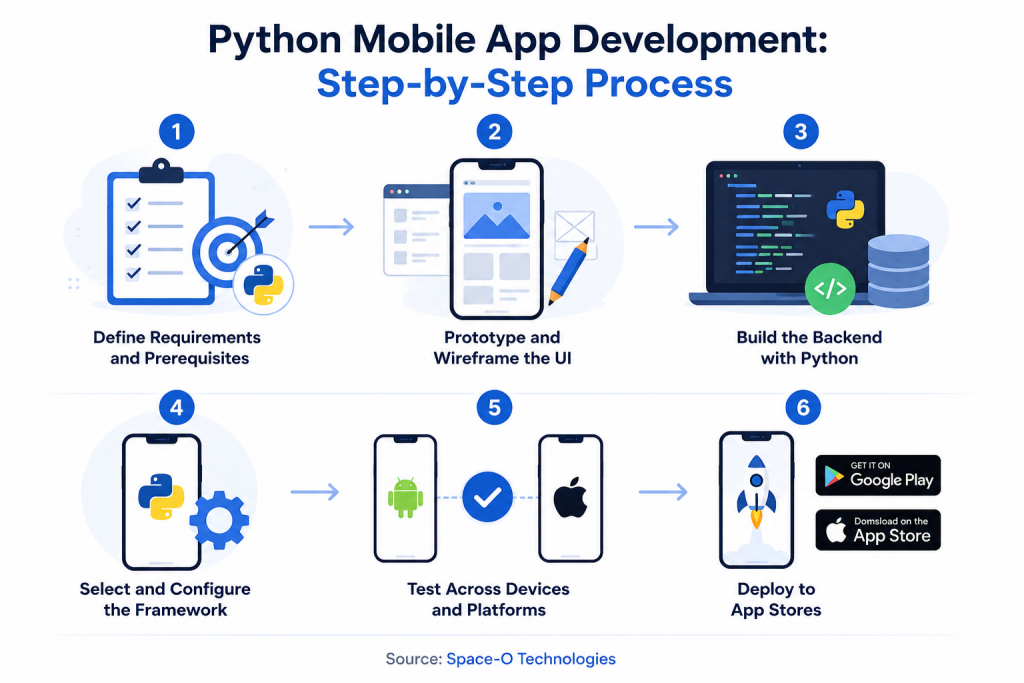
Building a mobile app with Python involves six steps: requirement planning, prototyping, backend coding, framework selection, testing, and deployment. Following the correct mobile app development process ensures smoother execution and fewer rework cycles.
Step 1: Define requirements and prerequisites
Start by outlining the app’s purpose, target audience, core features, and platform targets (Android, iOS, or both). Successful mobile app development in Python requires defining the technology stack early, including the Python version, framework, database, and any third-party integrations.
You will need a development machine compatible with Python, a mobile device for testing, and a macOS device if targeting iOS. Create a dedicated project folder and set up a virtual environment to manage dependencies cleanly.
Step 2: Prototype and wireframe the UI
Map out the user flow, screen layouts, and navigation structure. Python’s simplicity makes prototyping faster than most languages. Use tools like Figma or Sketch for UI/UX wireframes, then plan how each screen will translate to your chosen Python framework’s UI toolkit.
This step helps identify usability issues early, before writing any production code.
Step 3: Build the backend with Python
Code the server-side logic, database models, API endpoints, and business rules using Django, Flask, or FastAPI. Handle database integration using SQLAlchemy or Django ORM. Ensure smooth data flow between the graphical user interface and the server.
For apps requiring image processing, use libraries like Pillow or PyTesseract. For AI features, integrate TensorFlow or scikit-learn at this stage.
Step 4: Select and configure the framework
Choose the right GUI framework based on your platform targets. Kivy works well for cross-platform deployment with custom UIs. BeeWare (Toga) is better for apps requiring native platform appearance.
Install the framework package and configure it to work with your project. This step bridges your Python backend code with the mobile platform’s native APIs.
Step 5: Test across devices and platforms
Python supports test-driven development with frameworks like PyTest and unittest. Run unit tests, integration tests, and UI tests across both Android and iOS devices.
Test for performance, memory usage, battery consumption, and edge cases. Cross-platform testing is especially important, as framework behavior can vary between operating systems.
Step 6: Deploy to app stores
App packaging is handled by Buildozer (for Kivy) or Briefcase (for BeeWare), which compile Python code into platform-specific binaries. Submit the APK to Google Play and the IPA to the Apple App Store following each platform’s review guidelines. This build and deployment step is more involved than standard native workflows.
After launch, monitor crash reports, user feedback, and performance metrics. Plan for regular updates and maintenance.
To scale development faster, consider hiring dedicated Python developers who can handle both backend and mobile deployment.
Python vs Other Programming Languages for App Development
Python competes with Swift, Kotlin, Java, and JavaScript for mobile app development, but each language excels in different scenarios. Understanding these differences helps you choose the right tool for your project.
| Factor | Python | Kotlin | Swift | Java | JavaScript (React Native) |
| Primary Use | Backend, AI/ML, cross-platform | Android native | iOS native | Android, enterprise | Cross-platform mobile |
| Performance | Moderate | High | Very High | High | High |
| Learning Curve | Low | Moderate | Moderate | Moderate | Moderate |
| Cross-Platform | Yes (Kivy/BeeWare) | Limited (KMP) | No | No | Yes |
| AI/ML Support | Excellent | Limited | Good (CoreML) | Moderate | Limited |
| Community Size | Very Large | Growing | Moderate | Very Large | Very Large |
1. Python vs Kotlin
Kotlin is Google’s official language for Android app development. It compiles natively, delivers superior performance on Android, and provides full access to Android APIs. Python requires a translation layer (BeeWare) to run on Android, which adds overhead.
Choose Kotlin for production-grade Android apps. Choose Python when you need rapid prototyping, AI/ML integration, or backend development for Android apps.
Learn more about how Kotlin features compare with Python for specific use cases.
2. Python vs Swift
Swift is Apple’s official language for iOS, macOS, watchOS, and tvOS development. It compiles to native binaries, is 8.4x faster than Python in execution, and offers deep integration with Apple frameworks like UIKit, SwiftUI, and Core ML. For native iOS app development services, Swift remains the industry standard.
Choose Swift for consumer-facing iOS apps. Choose Python for cross-platform MVPs, data-heavy apps, or when your backend team already works in Python. Python iOS app development works best when the app’s core value is data processing or AI, not platform-specific UI.
3. Python vs Java
Java has been Android’s primary language for over a decade. It has a mature ecosystem, strong backward compatibility, and extensive Android support. Python offers simpler syntax, faster development speed, and better AI/ML tooling.
Choose Java for enterprise Android apps and legacy system integration. Choose Python for startups prioritizing speed to market, data science apps, and cross-platform development.
4. Python vs JavaScript (React Native) and Flutter
React Native (JavaScript) and Flutter (Dart) are the two dominant cross-platform mobile frameworks. Both use native components, have large ecosystems, and deliver near-native application performance. Python’s mobile frameworks (Kivy, BeeWare) are less mature by comparison.
Choose React Native or Flutter for cross-platform consumer apps with demanding UI requirements. Choose Python when backend logic, data processing, or ML is the core of the app.
Choosing Python for mobile development depends on your app’s complexity and performance needs. For a deeper comparison of native application development versus cross-platform approaches, understanding these trade-offs is essential.
How Much Does Python App Development Cost?
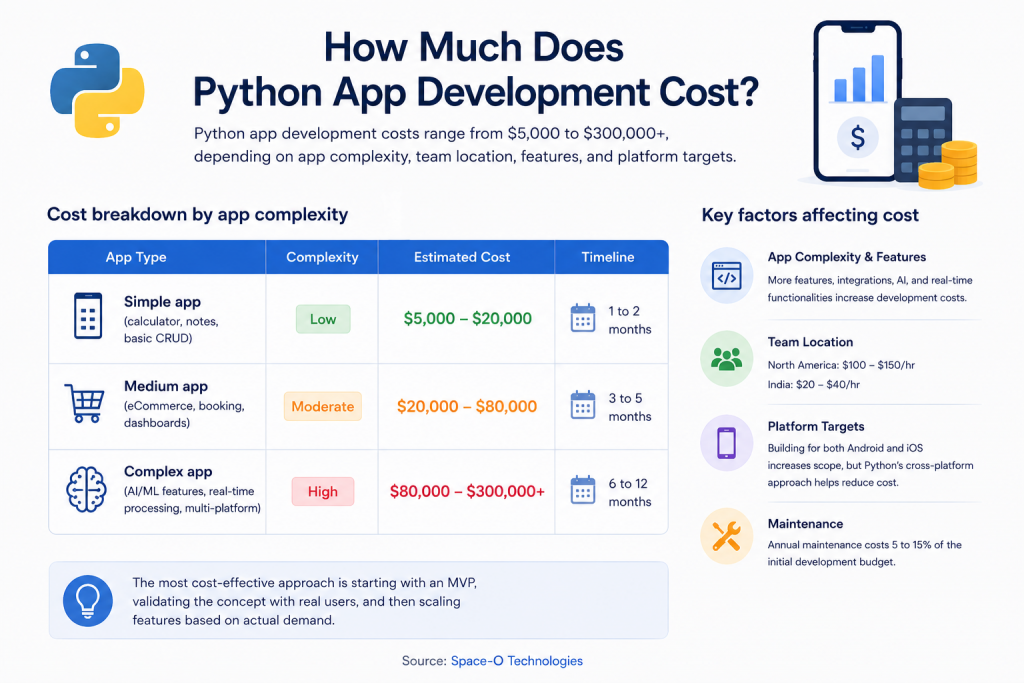
Python app development costs range from $5,000 to $300,000+, depending on app complexity, team location, features, and platform targets. The final cost depends on whether you are building a simple MVP or an enterprise-grade solution.
Cost breakdown by app complexity
| App Type | Complexity | Estimated Cost | Timeline |
| Simple app (calculator, notes, basic CRUD) | Low | $5,000 to $20,000 | 1 to 2 months |
| Medium app (eCommerce, booking, dashboards) | Moderate | $20,000 to $80,000 | 3 to 5 months |
| Complex app (AI/ML features, real-time processing, multi-platform) | High | $80,000 to $300,000+ | 6 to 12 months |
Key factors affecting cost
- App complexity and features drive the largest portion of the cost. Apps with basic functionality (forms, lists, data display) cost less than apps requiring AI models, payment gateways, real-time notifications, and third-party integrations.
- Team location significantly impacts hourly rates. Developers in North America charge $100 to $150/hour, while developers in India charge $20 to $40/hour for comparable quality.
- Platform targets also matter. Building for both Android and iOS increases the scope. Mobile app development with Python’s cross-platform capabilities can reduce this cost compared to building two separate native apps.
- Ongoing maintenance costs 5 to 15% of the initial development budget annually. This covers bug fixes, security patches, feature updates, and performance optimization.
These estimates vary based on project scope and team structure. For a broader breakdown of software development costs across technologies, compare Python against other stacks. The most cost-effective approach to app development with Python is starting with an MVP, validating the concept with real users, and then scaling features based on actual demand.
Challenges and Limitations of Using Python for App Development
Python’s interpreted nature, lack of native mobile support, and performance overhead create challenges for mobile app development that developers must plan for. These are the key limitations of Python for mobile app development. Understanding them helps you decide whether Python mobile app development is the right fit for your project.
1. Performance limitations
Python is slower than compiled languages like Swift, Kotlin, and C++. The interpreter adds overhead that can impact application performance, especially for computation-heavy tasks, animations, and real-time processing.
How to mitigate performance issues
- Use Cython or PyPy to compile performance-critical code sections into optimized machine code.
- Offload heavy computations to C/C++ extensions using Python’s ctypes or cffi libraries.
- Move intensive processing to the backend (Django/Flask API) and keep the mobile client lightweight.
- Use asynchronous programming with FastAPI or asyncio to handle concurrent requests without blocking.
- Profile the app regularly using cProfile to identify and fix bottlenecks early.
2. No native mobile support
Android and iOS do not natively support Python. Building a mobile app in Python requires frameworks like Kivy and BeeWare to bridge this gap. These tools add complexity to the build process, increase app size, and may not support all platform-specific APIs.
How to work around native support gaps
- Use BeeWare’s Toga library for native UI components that match each platform’s look and feel.
- Adopt a backend-first architecture where Python powers the server and a native frontend handles the mobile UI.
- Use Chaquopy to embed Python within a native Android Studio project for specific features like ML or data processing.
- Limit Python to backend logic and prototyping, then migrate the frontend to Swift or Kotlin for production.
3. Global Interpreter Lock (GIL)
Python’s GIL allows only one thread to execute at a time. This limits true multi-core parallelism, which can be a bottleneck for apps requiring concurrent processing.
How to handle GIL restrictions
- Use the multiprocessing module instead of threading to run tasks across multiple CPU cores.
- Leverage asyncio for I/O-bound operations like API calls, file reads, and database queries.
- Offload CPU-intensive tasks to background workers using Celery or Redis queues.
- Consider using sub-interpreters (available in Python 3.12+) for improved thread-level concurrency.
4. Larger app size
Python apps packaged through Kivy or BeeWare tend to be larger than their native equivalents. The framework, interpreter, and bundled libraries add to the final package size.
How to reduce app size
- Remove unused libraries and modules from the build configuration before packaging.
- Use Buildozer’s exclude patterns to strip unnecessary dependencies from the final APK.
- Compress assets (images, fonts, media) using tools like TinyPNG or ImageOptim before bundling.
- Consider Flet as an alternative framework, which produces leaner builds for simple UI applications.
5. Limited mobile-specific community
Python’s overall community is massive, but the mobile-specific community is much smaller. Finding solutions for mobile-specific bugs, framework-specific issues, or platform-specific workarounds can take more effort than Swift or Kotlin development.
How to navigate community limitations
- Follow the official Kivy and BeeWare GitHub repositories for issue tracking and documentation updates.
- Join dedicated Discord and Slack channels for Kivy, BeeWare, and Flet developer communities.
- Contribute to open-source Python mobile projects to build expertise and connect with active maintainers.
- Hire developers with specific experience in Python mobile frameworks rather than general Python developers.
6. App Store deployment complexity
Packaging Python apps for the App Store and Google Play is more complex than native development. Tools like Buildozer and Briefcase simplify this, but the process still requires more configuration steps than standard Xcode or Android Studio workflows.
How to simplify deployment
- Use Briefcase for a streamlined build and deployment pipeline across Android, iOS, and desktop targets.
- Automate the packaging process using CI/CD tools like GitHub Actions or GitLab CI with Buildozer commands.
- Test app packaging early in the development cycle to catch configuration issues before the final build.
- Follow BeeWare’s official deployment guides for platform-specific signing, provisioning, and submission requirements.
Every programming language has trade-offs for mobile development. Python’s limitations are real but manageable with the right architecture and framework choices. Most challenges disappear entirely when Python is used on the backend to power native mobile frontends through REST APIs.
Turn Your Python App Idea Into a Working Product
Space-O Technologies offers end-to-end Python mobile app development services with 140+ developers and 4400+ apps delivered. Get a free consultation and project estimate today.
Best Practices for Python Mobile App Development
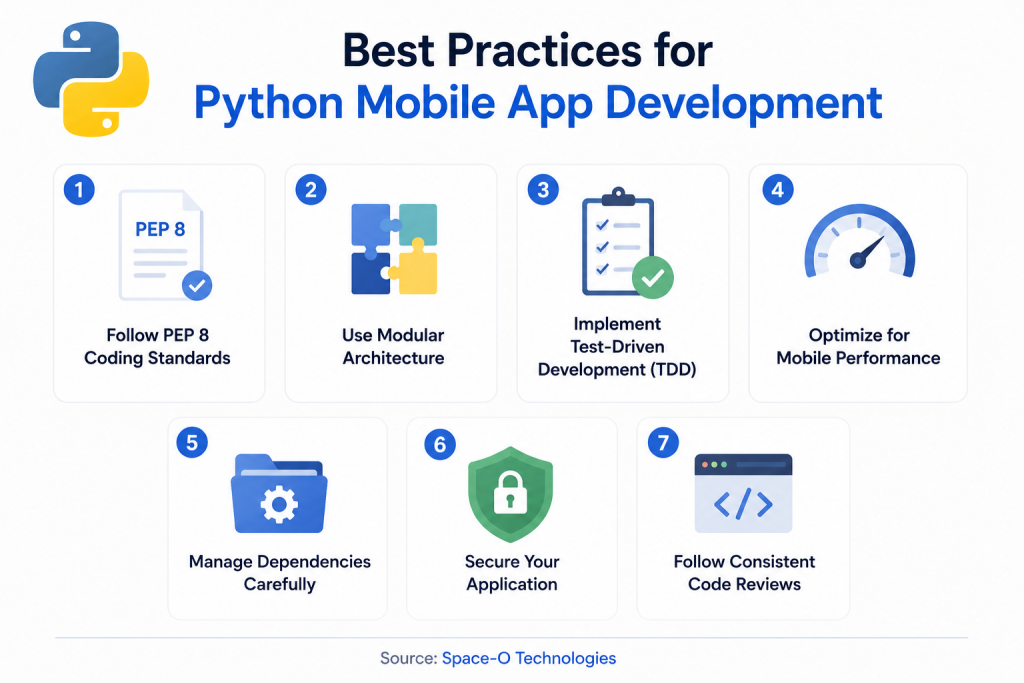
Following Python development best practices ensures cleaner code, faster performance, fewer bugs, and smoother deployment across platforms. These practices apply to both mobile and web Python projects.
Follow PEP 8 coding standards
PEP 8 is Python’s official style guide. It covers naming conventions, indentation, line length, and code structure. Consistent adherence to PEP 8 makes code readable, maintainable, and easier for teams to collaborate on.
Use modular architecture
Break the application into independent modules with clear responsibilities. This approach makes testing, debugging, and feature additions faster. Each module can be developed and deployed independently.
Implement test-driven development (TDD)
Write tests before writing feature code. Use PyTest or unittest for automated testing. Aim for at least 80% code coverage to catch bugs early and reduce issues throughout the app lifecycle.
Optimize for mobile performance
Minimize memory usage, avoid unnecessary computations, and use profiling tools like cProfile to identify bottlenecks. For mobile apps, test on low-end devices to ensure acceptable performance across the user base.
Manage dependencies carefully
Use virtual environments (venv or conda) to isolate project dependencies. Pin library versions in a requirements.txt file to prevent compatibility issues during deployment.
Secure your application
Use HTTPS for all data transmission, hash and salt passwords, validate all user inputs, and keep libraries updated. Python frameworks like Django include built-in security features for CSRF protection, SQL injection prevention, and authentication.
These practices apply whether Python handles the full mobile app or only the backend. Starting with PEP 8, modular architecture, and automated testing from day one prevent costly rewrites as the project scales.
Future of Python for App Development
Python’s role in app development will expand significantly over the next few years as mobile frameworks mature, AI becomes standard in apps, and interpreter-level performance improvements roll out. The future of Python for mobile app development looks promising as tools like BeeWare and Flet close the gap with native frameworks.
1. GIL removal will unlock mobile performance
Python 3.13 introduced an experimental free-threaded mode that disables the Global Interpreter Lock. Once this feature reaches stable release, Python apps will be able to use true multi-core parallelism. This will directly address one of the biggest performance bottlenecks in Python mobile app development, enabling smoother animations, faster data processing, and better responsiveness on mobile devices.
2. BeeWare and Flet are approaching production readiness
BeeWare’s Toga library is actively working toward a stable 1.0 release with full native UI support across Android, iOS, and desktop. Once stable, it will significantly simplify Python Android app development and Python iOS development from a single codebase. Flet is expanding its mobile capabilities with Flutter-powered rendering that delivers near-native visual quality. As these frameworks stabilize, Python will become a more viable option for production-grade mobile apps, not just prototypes and MVPs.
3. On-device AI will increase Python’s mobile relevance
The shift toward running AI models directly on mobile devices (edge AI) plays to Python’s strengths. Libraries like TensorFlow Lite and ONNX Runtime already support on-device inference. As on-device ML becomes standard for features like real-time translation, voice commands, and image recognition, Python’s dominance in model training will keep it central to the mobile AI pipeline.
4. WebAssembly will bring Python to mobile browsers
Projects like Pyodide and PyScript are enabling Python to run directly in web browsers through WebAssembly. This opens a new path for mobile app development in Python, where progressive web apps run inside the mobile browser without requiring native packaging at all. This approach could bypass the App Store and Google Play entirely for certain use cases.
5. Backend-first approach to Python mobile app development
The trend toward API-driven mobile apps (native frontends consuming Python backends) will continue to grow. This architecture is becoming the default approach to Python for mobile app development at production scale. It leverages Python’s backend strengths while keeping mobile performance native. As FastAPI and Django REST Framework continue adding features, this pattern will only strengthen.
App development using Python will only get easier as GIL removal, maturing frameworks, on-device AI, and WebAssembly close the gap between Python and native mobile languages over the next two to three years.
Partner with Space-O Technologies to Build Powerful Mobile Apps With Python
Python continues to grow as one of the most versatile programming languages for app development. Its strengths in backend development, AI/ML integration, rapid prototyping, and cross-platform deployment make it a practical choice for startups, enterprises, and development teams.
The key is choosing the right approach. Understanding how to make a mobile app with Python starts with selecting the right architecture. Use Kivy or BeeWare for direct Python deployment, or build a Python backend (Django/Flask) that powers a native frontend. For web apps, Django and FastAPI provide production-ready frameworks.
Space-O Technologies is a competent mobile app development company. The team has the resources and infrastructure to develop robust backends and full-stack apps using Python. Having built more than 4400+ mobile apps, the company stands strong in building solutions with advanced features.
If you are planning to build a mobile app solution for your business, connect with an experienced app development consultant right away.
Frequently Asked Questions
What types of mobile apps can I build with Python?
Python supports the development of cross-platform mobile apps, data-driven dashboards, AI-powered tools, internal business applications, prototypes, and MVPs. Frameworks like Kivy and BeeWare allow developers to build a mobile app in Python for both Android and iOS from a single codebase. Python is especially effective for apps that rely on data processing, machine learning, or backend intelligence rather than complex native UI interactions.
Why choose Python for mobile app development instead of Java, Swift, or Kotlin?
Python offers faster development speed, simpler syntax, lower costs, and stronger AI/ML integration compared to Java, Swift, or Kotlin. Choose Python for mobile app development when rapid prototyping, cross-platform deployment, or backend-driven architecture is the priority. Java, Swift, and Kotlin remain better choices for performance-intensive, consumer-facing apps that require deep native platform access.
How do Python-based mobile frameworks (Kivy, BeeWare, PyQt) compare to native frameworks?
Kivy, BeeWare, and PyQt enable cross-platform mobile app development with Python but do not match native frameworks in performance or platform API coverage. Kivy uses a custom UI toolkit with GPU acceleration, while BeeWare renders native UI components through Toga. PyQt is more suited for desktop applications. For production-grade mobile apps, native frameworks with Swift or Kotlin still deliver superior performance and tighter platform integration.
When is Python a good choice for building an app (prototype, MVP, production)?
Python is an excellent choice for prototypes and MVP development projects where speed to market matters more than native performance. Building an app with Python is fastest during the validation stage, when the goal is to test concepts and gather user feedback. For production apps, Python works best on the backend, powering REST APIs, while native or cross-platform frontends handle the mobile UI.
Where can I deploy and distribute mobile apps built with Python (app stores, enterprise)?
Python apps can be deployed to the Google Play Store and the Apple App Store using packaging tools like Buildozer and Briefcase. Buildozer compiles Kivy apps into Android APKs. Briefcase packages BeeWare apps into native binaries for both Android and iOS. For enterprise distribution, Python apps can also be deployed internally through MDM platforms or private app stores without public listing.
What are the performance limitations and trade-offs of Python mobile apps?
Python mobile apps are slower than native apps, consume more memory, and produce larger package sizes due to the bundled interpreter and framework libraries. The Global Interpreter Lock limits true multi-threading. App development in Python also faces trade-offs around limited access to platform-specific APIs and less reliable touch interface behavior. These trade-offs are manageable for data-heavy or backend-driven apps but significant for animation-heavy consumer products.
How do I access device features (camera, GPS, sensors) from Python code?
Python accesses device features like camera, GPS, and sensors through platform-specific bindings provided by frameworks like Kivy, BeeWare, and Chaquopy. Kivy’s Plyer library offers a cross-platform API for accessing camera, GPS, accelerometer, and notifications on both Android and iOS. Chaquopy provides direct access to Android APIs from Python code within an Android Studio project. However, coverage varies by framework, and some features may require custom native bridges.
What tools and workflows integrate Python backends with native mobile frontends?
Django REST Framework, Flask, and FastAPI are the primary tools for building Python backend APIs that serve native mobile frontends. The workflow involves building REST or GraphQL API endpoints in Python, then consuming them from Swift, Kotlin, or React Native mobile clients. App development using Python on the backend handles authentication, database integration, ML inference, and business logic, while the native frontend manages the mobile UI and device interactions.
Why is Python popular for backend services and ML integration in mobile apps?
Python dominates mobile backend development because of its rapid API development speed, mature frameworks like Django and FastAPI, and unmatched AI/ML library ecosystem. Libraries like TensorFlow, PyTorch, and scikit-learn integrate directly into Python backends. Mobile app development with Python on the backend powers apps like Instagram, Spotify, and Uber. The language’s readable syntax also reduces development time by 30 to 40% compared to Java-based backends.
How do I package and compile a Python app for iOS and Android (build tools, signing)?
Buildozer and Briefcase are the primary tools for packaging Python apps into native binaries for Android and iOS. For Python Android app development, Buildozer compiles Kivy projects into signed APKs ready for Google Play. For Python iOS app development, Briefcase generates Xcode projects that require a macOS device and an Apple Developer account for signing. Both tools handle dependency bundling, but the signing and provisioning process follows standard platform-specific requirements set by Google and Apple.



 All our projects are secured by NDA




 4.8
4.8

