
 By
By 
Wondering how to build custom software from scratch for your business? You’re exploring one of the most strategic decisions that can give you a competitive edge in today’s digital economy. Building software from scratch means developing a custom application tailored to your unique business requirements, starting with a clean slate rather than adapting pre-built solutions.
According to Precedence Research, the global custom software development market is valued at USD 53.02 billion in 2025. It is expected to reach USD 334.49 billion by 2034, reflecting the surging demand for tailored digital solutions.
When you build custom software for business operations, you gain complete control over functionality, design, user experience, and scalability, advantages that off-the-shelf products simply cannot provide. Companies like Netflix, Amazon, and Spotify chose to build custom software that addresses their specific operational challenges, gaining a competitive advantage in the process.
Based on our experience as a leading custom software development company, we have created this guide explaining how to develop a custom software solution. Whether you are exploring custom software development for small businesses or enterprise-level platforms, learn how to define requirements, design architecture, select the right technology stack, manage software development teams, and deploy your solution successfully while gaining a realistic understanding of the costs and timelines for your project.
Table of Contents
- What is Custom Software Development?
- When Should You Build Custom Software Instead of Buying?
- Custom Software vs. Off-the-Shelf Software: A Direct Comparison
- Key Benefits of Building Custom Software From Scratch
- Types of Custom Software You Can Build
- Step-by-Step Guide to Build Custom Software
- Deployment Strategies for Custom Software
- Common Mistakes to Avoid When You Build Custom Software
- How Much Does It Cost to Build Software from Scratch?
- How to Measure ROI of Your Custom Software
- How to Choose the Right Custom Software Development Partner
- What Are the Top Methodologies to Build Custom Software?
- AI and Emerging Technologies in Custom Software Development
- Why Choose Space-O Technologies to Build Custom Software Solutions?
- FAQs
What is Custom Software Development?
Custom software development is the process of designing, building, and maintaining software tailored to a specific organization’s needs and workflows. Unlike off-the-shelf products like Microsoft Office or Adobe Photoshop, custom software adapts to your business rather than forcing your team to work around pre-built features.
The custom software development process covers designing, developing, deploying, and maintaining the application, all shaped by your company’s branding, integration needs, and operations. For example, McDonald’s uses custom POV technology to serve millions of customers with personalized orders at scale.
Key reasons businesses choose custom software over ready-made alternatives:
- Tailored fit: Aligns with your exact business processes.
- Scalability: Grows alongside your company as operations expand.
- Seamless integration: Connects with existing systems and third-party tools without compatibility issues.
- Stronger security: Reduces cyberattack exposure since the application is unique to your business.
Before you finalize the software development plan, let’s discuss the scenarios of building software instead of buying.
When Should You Build Custom Software Instead of Buying?
Build custom software when off-the-shelf solutions cannot support your unique workflows, limit your ability to scale, or fail to meet strict security and compliance standards. Custom development provides a proprietary competitive advantage. Buying is better suited for standard operations where speed-to-market and limited budgets are the primary focus.
1. Your workflows don’t fit generic tools
Custom software maps directly to how your business operates instead of forcing your team to adapt to a vendor’s system. When operational processes are fundamentally different from industry standards, off-the-shelf software creates workarounds, extra manual steps, and wasted time. Custom development eliminates these friction points by building features around your exact workflows.
2. Your tools cannot connect or scale
Custom development creates unified systems where CRM, ERP, and legacy databases communicate through seamless API connections. Disconnected tools cause data silos and manual transfers that increase errors and slow decision-making. Custom software also eliminates the exponential user-based and storage-based pricing hikes that come with scaling on SaaS platforms.
3. Security and compliance requirements exceed standard software
Industries like fintech, healthcare, and legaltech need total control over infrastructure, hosting, and compliance protocols. Custom software lets you implement role-based access, data encryption, and audit trails tailored to regulations like HIPAA, GDPR, or PCI DSS. You own your security architecture instead of depending on a third-party vendor’s update schedule.
4. Licensing costs exceed the value you receive
Over a 3 to 5 year period, cumulative licensing costs for commercial software can exceed the investment required to build a custom solution. Subscription fees grow with every new user, module, or storage tier. With custom software, you own the product outright and eliminate recurring fees entirely.
Custom software becomes a strategic investment when off-the-shelf solutions no longer support your growth, workflows, or compliance needs.
Unsure if Custom Software Is Right for You?
Compare your business needs, scalability, integrations, and budget before committing to development. Get expert guidance on the right approach.

Custom Software vs. Off-the-Shelf Software: A Direct Comparison
Choosing between custom-built software and off-the-shelf tools is a foundational business decision. Knowing how to create custom software helps you evaluate both options with confidence. This table highlights the key differences across cost, control, and scalability.
| Factor | Custom Software | Off-the-Shelf Software |
|---|---|---|
| Customization | Fully tailored to your workflows | Limited to vendor-provided options |
| Upfront Cost | Higher initial investment | Lower cost through subscriptions |
| Long-term Cost | No recurring license fees | Licensing grows with users and modules |
| Scalability | Scales without vendor restrictions | Depends on vendor roadmap and pricing |
| Integration | Connects directly with existing systems | May need workarounds or middleware |
| Security | Full control over architecture | Relies on vendor updates and shared infrastructure |
| Ownership | Complete ownership of source code and IP | Vendor retains ownership |
| Time to Deploy | Months of development | Days or weeks |
| Competitive Edge | Unique features create market differentiation | Competitors access the same software |
Choose to develop custom software when your workflows, compliance needs, or growth plans demand a solution no packaged product can deliver. Starting with an MVP lets you validate core features before committing to a full build.
Can’t Decide Between Custom and Off-the-Shelf Software?
Compare your business needs, ownership goals, scalability, and long-term costs. Get expert guidance before choosing the wrong software approach.
Key Benefits of Building Custom Software From Scratch
Investing in custom software delivers long-term advantages that off-the-shelf solutions simply cannot match. Here are the core benefits that make custom development a strategic business decision.
1. Complete ownership with no recurring license fees
When you build custom software, you own the entire codebase. There are no monthly subscription costs that increase as your team grows. You control the update timeline, feature additions, and system modifications without waiting for a vendor. This ownership turns your software into a long-term business asset rather than an ongoing expense.
2. Higher operational efficiency and productivity
Custom software is designed around your actual workflows, not generic processes. Your team completes tasks faster because the system supports their natural work patterns. Automated processes replace repetitive manual work, reducing human error and freeing employees to focus on higher-value activities. Businesses that create custom software often see measurable productivity gains within the first few months of deployment.
3. Stronger security and regulatory compliance
With custom software, you define the security architecture from the ground up. You control user access levels, data encryption methods, and audit logging based on your specific compliance requirements. Unlike shared platforms, where a single vulnerability can expose thousands of businesses, your custom system has a unique codebase that is significantly harder to breach.
4. Seamless integration with existing systems
Custom software connects with your current tools, databases, and third-party APIs without the compatibility issues common with off-the-shelf products. Whether you need API integration with your CRM, ERP, payment gateway, or legacy systems, the development team builds these connections directly into the architecture. This eliminates data silos and creates a unified technology ecosystem.
Now that you understand the core benefits of building custom software from scratch, the next step is to see how the development process actually unfolds. A clear, structured approach ensures your investment translates into a scalable, high-performing solution aligned with your business goals.
Types of Custom Software You Can Build
Custom software takes many forms depending on your business goals and operational needs. Before you build custom software, understanding these categories helps define the right solution.
| Type | Business Purpose | Common Examples | Key Advantage |
|---|---|---|---|
| Web Applications | Deliver services accessible through any browser | CMS platforms, dashboards, booking portals | Cross-device access without installation |
| Mobile Applications | Provide on-the-go access via smartphones | Banking apps, delivery apps, fitness trackers | Native device features and high engagement |
| SaaS Platforms | Offer subscription-based cloud-hosted software | Project management, CRM, analytics tools | Scalable delivery with recurring revenue |
| Desktop Software | Handle complex tasks requiring offline access | Accounting tools, design software, data analysis | High performance for resource-heavy tasks |
| APIs | Enable different systems to share data | Payment gateways, mapping, social integrations | Seamless connectivity across platforms |
| AI and ML Applications | Automate decisions and extract data insights | Chatbots, fraud detection, recommendation engines | Predictive capabilities and smarter operations |
| Embedded Software | Control hardware devices in real time | IoT sensors, automotive systems, smart devices | Direct hardware interaction and automation |
| Progressive Web Apps | Combine web and mobile in a single codebase | E-commerce stores, news platforms, productivity tools | App-like experience without app store dependency |
The type you choose shapes your technology stack, budget, and development timeline. Many businesses combine multiple types of custom business software, connecting them through APIs to create a unified ecosystem.
We developed Brakes Off, aviation MRO software combining a native iOS app with a cloud backend. Technicians run inspections offline in hangars, and records sync once the device reconnects.
Not Sure Which Custom Software Fits Your Needs?
Define the right solution based on your users, workflows, platforms, and business goals. Get expert guidance before choosing your development approach.
Step-by-Step Guide to Build Custom Software
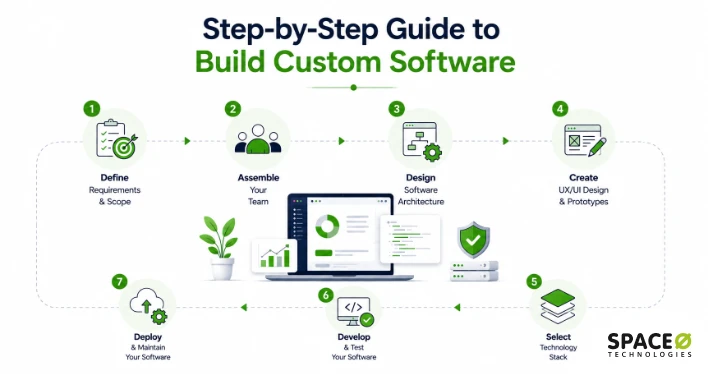
Building custom software follows a 7-step process: defining requirements, assembling a team, designing architecture, creating UX/UI prototypes, selecting technology, developing and testing, and deploying with ongoing maintenance. Here is how each step works.
Step 1: Define your requirements and scope
Learning how to make your own software starts with listing the core business challenges you need to solve. These include managing employee data, increasing efficiency, or automating workflows.
Then translate those challenges into user stories and specific features: CRM, accounting modules, task scheduling, security, and integration with existing systems. Without CRM alone, 79% of marketing leads never convert into sales. Focus on building a minimum viable product first to prevent scope creep.
Step 2: Assemble your development team
A complete team includes a project manager, business analyst, software architect, frontend and backend developers, UX/UI designers, QA engineers, and DevOps engineers. Frontend development and backend development require distinct skill sets, so choosing the right team structure matters. Three sourcing options are available.
| Approach | Best For | Trade-off |
|---|---|---|
| In-house | Long-term projects | Full control, but higher cost and longer hiring cycles |
| Outsourcing | Time-sensitive or specialized work | Faster start and cost-effective, but requires clear communication |
| Hybrid | Complex projects needing both | Balanced costs, but needs coordination across teams |
Many successful projects keep product owners in-house while outsourcing software development for technical execution. To scale quickly, hiring dedicated software developers avoids long recruitment cycles.
Step 3: Design software architecture
Your architect breaks the system into independent modules (authentication, data processing, business logic, integrations) and selects an architecture pattern: monolithic for simpler apps, microservices for complex systems needing independent scaling, or serverless for variable-usage applications. This phase also covers database design, data structure, API design, security measures, and cloud infrastructure planning. For guidance, software development consulting helps define the right technical approach.
Step 4: Create UX/UI design and prototypes
The design process follows four stages: UX research (stakeholder interviews, user personas), wireframing (low-fidelity screen layouts), UI design (high-fidelity mockups with brand styling), and interactive prototyping (clickable simulations for testing workflows). Reviewing wireframes early catches usability issues during design, which costs significantly less than fixing them after development.
Step 5: Select your technology stack
| Layer | Options |
|---|---|
| Frontend | React, Angular, or Vue.js for web. React Native or Flutter for cross-platform mobile |
| Backend | Node.js, Python (Django/FastAPI), Java (Spring Boot), or .NET |
| Database | PostgreSQL or MySQL for relational data. MongoDB for document storage. Redis for caching |
| DevOps | Git/GitHub, Jira, Jenkins or GitHub Actions (CI/CD), Selenium or Jest (testing) |
Balance innovation with reliability. Consider existing team expertise, security requirements, scalability needs, and long-term maintenance costs.
Step 6: Develop and test your software
This is the longest step in the software development process. Sign an NDA to protect your proprietary information before development begins. Maintain regular contact with project managers to keep everything on track. After development, the QA team runs functional testing (unit, regression, integration, API, UI) and non-functional testing (performance, scalability, compatibility, security, usability). Bugs are fixed and re-tested until quality matches original requirements.
Step 7: Deploy and maintain your software
Deploy the software to the live environment and train end-users on the system. Confirm beforehand whether your development partner offers ongoing software maintenance services covering bug fixes, security patches, and feature updates. For businesses needing to replace outdated architecture or adopt modern tech stacks, application modernization services offer a long-term approach.
Need a Software Development Partner?
Get experienced developers to handle technical execution without lengthy hiring cycles. Build with a team that can support your project from start to launch.
Deployment Strategies for Custom Software
Deploying custom software requires a clear strategy to minimize downtime and reduce risk for end users. When building software applications at scale, the right deployment approach depends on your availability requirements and user base size.
| Strategy | How It Works | Best For | Risk Level |
|---|---|---|---|
| Recreate | Shuts down the old version entirely, then deploys the new one | Internal tools with flexible downtime windows | High |
| Rolling | Replaces instances one at a time while keeping the old version active | Applications needing continuous availability | Low to Medium |
| Blue-Green | Maintains two environments; switches traffic after verifying the new version | Mission-critical systems requiring instant rollback | Low |
| Canary | Releases to a small user subset first, then expands gradually | Large-scale apps testing impact before full rollout | Low |
| A/B Testing | Routes different user groups to different versions for comparison | Products testing new features or UI changes | Low |
Most enterprise teams use blue-green or canary deployments for major releases. Pairing any strategy with cloud hosting, automated rollback procedures, and a CI/CD pipeline ensures smoother, lower-risk updates.
Common Mistakes to Avoid When You Build Custom Software
Even well-funded projects fail when teams overlook critical planning and execution steps. Whether you are learning how to create software or scaling an existing product, understanding these mistakes helps you avoid costly setbacks.
Skipping the discovery phase
The discovery phase is where your team defines business objectives, gathers functional and non-functional requirements, and creates a software requirements specification (SRS). Skipping this step forces developers to make assumptions that lead to feature creep and scope creep later. A structured discovery phase typically takes 2 to 4 weeks and produces a clear project roadmap, feasibility analysis, and stakeholder alignment. This small upfront investment prevents expensive rework during development.
Setting unrealistic deadlines
Rushing the development timeline forces teams to cut corners on architecture, testing, and documentation. This creates technical debt that compounds over time and leads to unstable software that requires constant fixes after launch. Instead of setting arbitrary deadlines, work with your development partner to establish realistic milestones based on the actual technical scope. A well-planned timeline with iterative sprints delivers working features consistently without sacrificing quality.
Underestimating quality assurance
Software testing is not a one-time activity at the end of development. Effective QA runs in parallel with every sprint and includes unit testing, integration testing, regression testing, and user acceptance testing (UAT). When teams treat QA as an afterthought, bugs slip into production and damage user trust. A dedicated QA process with automated and manual testing catches issues early when they are cheaper and easier to fix.
Ignoring post-launch maintenance and iteration
Software is never truly “finished.” After deployment, your system needs ongoing monitoring, bug fixes, security patches, and feature updates. Many businesses focus entirely on the launch and fail to budget for continuous maintenance. Without a CI/CD pipeline for smooth updates and a dedicated support plan, even well-built software degrades over time. Discuss maintenance terms with your development partner before the project begins to ensure long-term system stability.
Avoiding common development mistakes can save significant time, budget, and operational setbacks. Once you understand what not to do, the next logical step is evaluating the actual cost involved in building software from scratch and planning your investment realistically.
Want to Avoid Costly Software Development Mistakes?
Get expert guidance on requirements, architecture, testing, and delivery. Reduce rework, delays, and unexpected costs with the right development approach.
How Much Does It Cost to Build Software from Scratch?
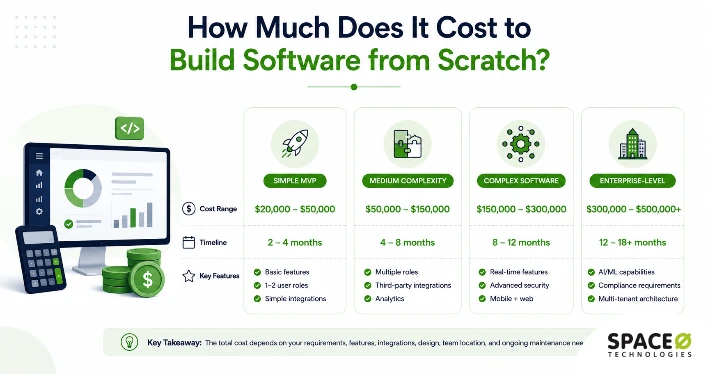
One of the first questions businesses ask when considering custom development is about budget. The cost to build custom software varies widely depending on your project’s scope, but understanding the investment breakdown helps you plan effectively and avoid surprises.
Building a software application from the ground up typically ranges from $20,000 for simple MVPs to $500,000+ for complex enterprise systems. Let’s break down what influences these costs and what you should expect at each level.
Cost breakdown by project complexity
The complexity of your project is the primary cost driver. Simple applications with basic features cost significantly less than enterprise platforms with advanced capabilities:
| Project Type | Cost Range | Timeline | Key Features |
|---|---|---|---|
| Simple MVP | $20,000–$50,000 | 2–4 months | Basic features, 1–2 user roles, simple integrations |
| Medium Complexity | $50,000–$150,000 | 4–8 months | Multiple roles, third-party integrations, analytics |
| Complex Software | $150,000–$300,000 | 8–12 months | Real-time features, advanced security, mobile + web |
| Enterprise-Level | $300,000–$500,000+ | 12–18+ months | AI/ML, compliance requirements, multi-tenant architecture |
What drives your custom software development costs?
Beyond complexity, several specific factors significantly impact your final budget. Understanding how to build your own software cost-effectively means knowing where money goes:
| Factor | Impact on Cost | Example |
|---|---|---|
| Feature Complexity | +15–30% per advanced feature | Real-time chat, AI integration, video calling |
| User Roles | +20% per additional role | Admin, user, manager, support staff |
| Platform Coverage | +40–60% for multi-platform | iOS + Android vs. web only |
| Design Customization | $5K–$80K range | Template-based vs. custom animations |
| Compliance Requirements | +25–35% | HIPAA, GDPR, PCI DSS, SOC 2 |
| Third-Party Integrations | 40–200 hours each | Payment gateways, ERP/CRM systems |
Each additional user role, platform, or integration compounds costs. A marketplace with buyer, seller, and admin roles costs more than custom small business software with a single-user interface.
Smart budget optimization tips
While costs can add up quickly, these strategic approaches help you build quality software without overspending:
- Start with MVP: When you create custom software, launch with core features first, reducing initial costs by 30-50%. Add enhancements after validating with real users.
- Prioritize features: Focus on the 20% of features delivering 80% of business value first.
- Plan integrations early: Budget adequately upfront to avoid cost overruns from underestimated integration complexity.
Understanding these factors helps you plan realistic budgets. Custom software development for small businesses and enterprises alike requires smart planning to deliver business value without breaking the bank.
How to Measure ROI of Your Custom Software
Developing custom software is a significant investment. Measuring return on investment validates that spending and helps prioritize future development decisions.
| Metric | What It Measures | How to Calculate |
|---|---|---|
| Labor Cost Savings | Reduction in manual work hours through automation | (Hours saved per month) x (average hourly cost) |
| Licensing Cost Elimination | Savings from replacing subscription-based tools | Total annual licensing fees removed after migration |
| Revenue Impact | Increase in sales, conversions, or customer retention | Compare revenue before and after software launch |
| Productivity Gains | Faster task completion and fewer process bottlenecks | (Old process time – new process time) / old process time |
| Error Reduction | Fewer manual errors and rework cycles | Compare error rates before and after deployment |
| Time to Market | Speed of delivering new features to customers | Average release cycle time before vs. after launch |
A simple ROI calculation framework
ROI (%) = [(Total Benefits – Total Costs) / Total Costs] x 100
Total benefits include labor savings, eliminated licensing fees, increased revenue, and productivity gains. Total costs cover development, infrastructure, training, and ongoing maintenance.
Track these metrics at 6, 12, and 24 months post-launch. Most custom software for small business and mid-market operations delivers positive ROI within 12 to 18 months.
Unsure What Your Software Project Will Cost?
Get a realistic estimate based on features, integrations, complexity, platforms, and timeline. Plan your budget before committing to development.
How to Choose the Right Custom Software Development Partner
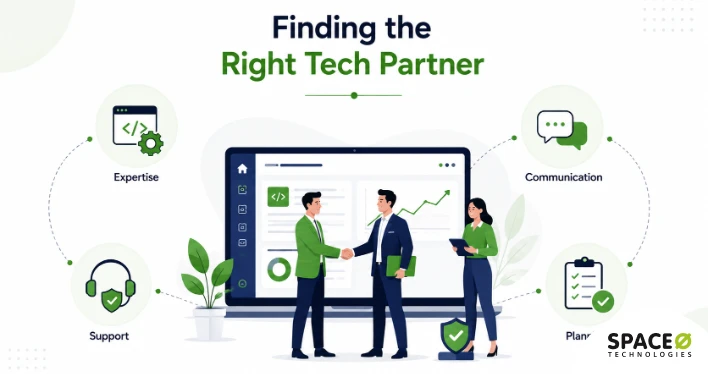
The development partner you choose directly impacts the quality, timeline, and long-term success of your project. Whether you are exploring how to create a software company or improve an existing product, a wrong choice leads to missed deadlines and budget overruns. Here is what to evaluate.
Evaluate technical expertise and industry experience
Review the company’s portfolio and case studies to confirm they have built software similar to what you need. Look for experience in your specific industry, whether it is healthcare, fintech, logistics, or e-commerce. A partner with domain knowledge understands your compliance requirements, user expectations, and operational challenges without needing extensive onboarding. Ask for references from past clients and verify the outcomes they delivered.
Assess the communication and project management approach
Transparent communication prevents most project failures. Ask how the team manages progress updates, sprint reviews, and stakeholder feedback. Look for partners who use established project management tools like Jira or Trello and communication platforms like Slack or Microsoft Teams. Regular sprint demos and documented progress reports ensure you always know where your investment is going and can course-correct early if needed.
Confirm post-launch support and maintenance terms
Software requires ongoing updates, bug fixes, and security patches after deployment. Before signing a contract, clarify whether the custom software developer offers post-launch maintenance services and what those terms include. A reliable partner provides dedicated support for monitoring system performance, releasing updates through a CI/CD pipeline, and adapting the software as your business evolves. Without a clear maintenance agreement, you risk launching software that degrades over time.
Prepare your project before the first meeting
Come prepared with clear business goals, a prioritized list of must-have versus nice-to-have features, a realistic budget range, and identified key stakeholders who will participate in the discovery and feedback phases. This preparation accelerates the scoping process and helps your development partner deliver accurate estimates. The more clarity you bring to the first conversation, the smoother the entire development journey becomes.
Choosing the right development partner is only part of the equation—how they execute your project matters just as much. Understanding the most effective software development methodologies helps ensure your project is delivered efficiently, transparently, and aligned with your business goals.
Still Looking for the Right Development Partner?
Work with experienced developers who understand your goals, technical requirements, communication needs, and long-term roadmap.
What Are the Top Methodologies to Build Custom Software?
Custom software development methodologies are structured frameworks that guide how your development team plans, builds, tests, and deploys your application. The methodology you choose directly impacts your project’s flexibility, timeline, cost, and how well the final product aligns with your business goals.
Here are the most widely used methodologies for custom software development.
Agile Methodology
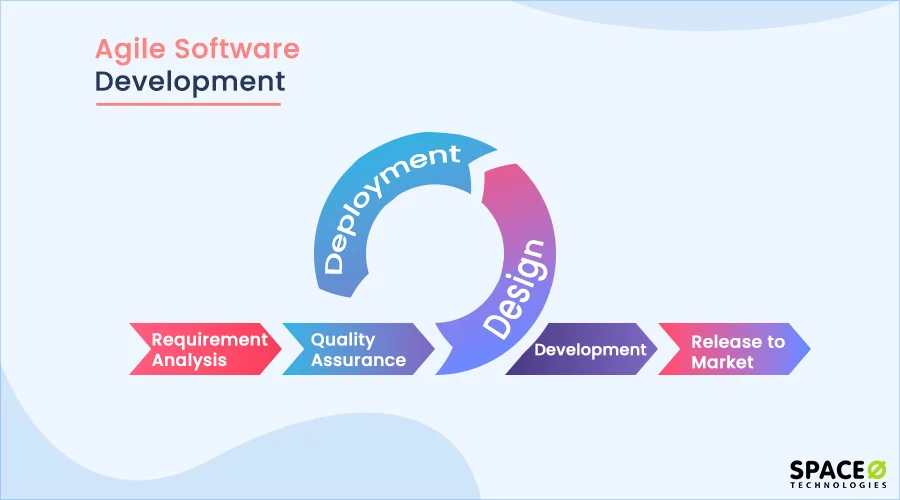
Agile is an iterative development framework that divides the entire project into small, manageable cycles called sprints, each typically lasting one to four weeks. At the end of every sprint, the team delivers a working, tested increment of the software.
This methodology works best for fast-paced projects, startups, and applications where requirements evolve frequently based on user feedback.
Agile also has two popular variants. Scrum focuses on daily collaboration, clearly defined team roles like the Scrum Master, and structured sprint planning. Kanban, on the other hand, uses visual boards to manage continuous workflows and prioritize tasks in real time.
Waterfall Methodology
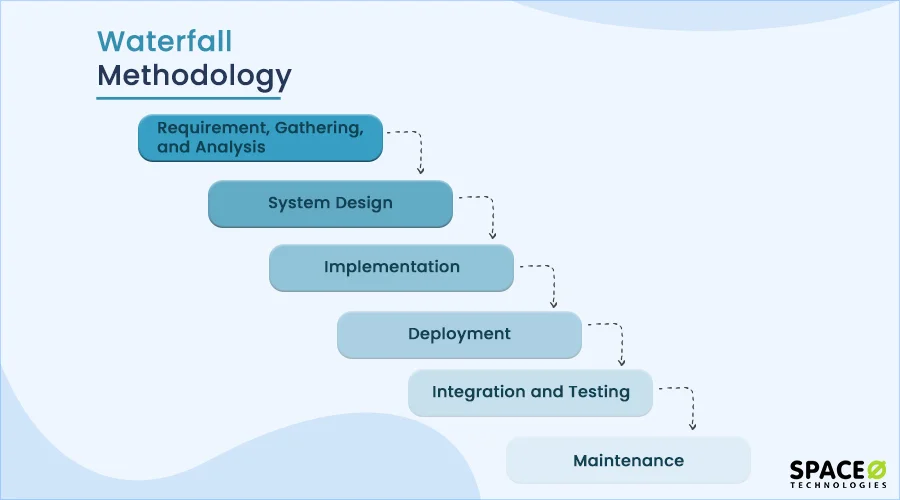
Waterfall follows a traditional, strictly sequential approach. Each phase of the project (requirements gathering, design, implementation, testing, and deployment) must be fully completed before the next phase begins.
This methodology follows the traditional software development lifecycle (SDLC) and suits projects with well-defined, stable requirements or strict regulatory compliance needs. It offers high predictability but lacks flexibility when changes are needed mid-development.
DevOps Methodology
DevOps bridges the gap between development and IT operations teams. It emphasizes automation, continuous integration, and continuous deployment (CI/CD). This makes DevOps essential for developing software applications that require rapid, reliable release cycles.
This approach is ideal for SaaS platforms, web applications, and products that require frequent updates or rely heavily on cloud infrastructure.
Prototype Methodology
The prototype methodology focuses on quickly building a scaled-down working model of the software. This prototype validates UX design decisions by gathering immediate feedback from users and stakeholders, which then shapes the final product.
It works best for innovative projects where end users have difficulty articulating their requirements upfront.
Lean Methodology
Borrowed from manufacturing principles, the Lean framework prioritizes maximizing value while eliminating waste. Teams developing a software product with Lean typically build a minimum viable product with only the core features. They launch quickly and use real customer usage data to guide future development.
This methodology is best for bootstrapped startups or projects that need to validate a new market hypothesis before committing to full-scale development.
AI and Emerging Technologies in Custom Software Development
The approach to building custom software is shifting with the rise of AI-powered development tools and cloud-native infrastructure. Businesses that leverage these during the custom software development process gain meaningful speed advantages.
1. AI-assisted development tools
AI coding assistants like GitHub Copilot accelerate development by generating code suggestions in real time. Teams use these tools to cut repetitive coding tasks, catch bugs earlier, and shorten code review cycles.
AI-powered testing tools also generate test cases automatically. This reduces QA timelines and catches edge cases manual testing often misses.
2. Low-code and no-code platforms
Low-code platforms let teams build internal tools and workflow automation with minimal hand-coding. These work best for rapid prototyping and validating concepts before full-scale development.
Complex enterprise applications still require traditional development for performance, security, and scalability needs.
3. AI integration within custom software products
Beyond the build process, AI features are becoming standard within custom software itself. Common integrations include chatbots, predictive analytics, and computer vision for image processing.
Space-O Technologies offers AI development services to embed intelligent capabilities into custom applications. Understanding how to build custom software today means evaluating these technologies during the planning phase.
Want to Add AI to Your Custom Software?
Identify practical AI opportunities across automation, analytics, chatbots, and intelligent workflows. Get expert guidance on where AI can create value.
Why Choose Space-O Technologies to Build Custom Software Solutions?
Space-O Technologies brings over 15 years of experience in custom business software development across industries like healthcare, logistics, fintech, and e-commerce. Our team of 100+ developers, designers, and QA engineers has completed 4,500+ projects for startups, mid-sized businesses, and enterprises worldwide. Every solution we build starts with a deep understanding of your business goals, user expectations, and technical requirements, so the final product fits your operations, not the other way around.
What sets us apart is how we work with you throughout the process. You get a dedicated project manager, real-time progress tracking, and regular sprint demos so you always know where your project stands. We follow software development best practices that keep timelines predictable and give you flexibility to refine features as you go.
Beyond launch, we provide ongoing support and maintenance to keep your software secure and aligned with your evolving needs. If you are working with outdated systems, our application modernization services can help you upgrade legacy software without disrupting your workflows. Book a free consultation today to discuss your project and get a detailed development roadmap tailored to your goals.
FAQs About Building Custom Software
Can I build my own software?
Yes. Building custom software does not require personal coding skills. A clear understanding of your business problem, target users, and required features is enough to lead a project. The actual development is handled by a software development team that covers architecture, coding, testing, and deployment. Your role as the business owner is to define goals, prioritize features, and provide feedback during each development sprint.
What is the 80/20 rule in programming?
The 80/20 rule in programming states that 80% of a software’s value comes from 20% of its features. Also known as the Pareto Principle, it guides teams to identify and build the highest-impact features first. In custom software development, this means launching with core functionality, gathering user feedback, and then adding secondary features based on actual usage patterns rather than assumptions.
What are the 7 phases of SDLC?
The seven phases of the Software Development Life Cycle (SDLC) are:
- Planning: Define project scope, goals, and feasibility
- Requirements Analysis: Document functional and non-functional requirements
- Design: Create system architecture, database structure, and UI wireframes
- Development: Write and compile the source code
- Testing: Validate functionality, performance, and security
- Deployment: Release the software to the live environment
- Maintenance: Apply updates, fix bugs, and optimize performance post-launch
How long does it take to build custom software from scratch?
Development timelines vary by complexity:
- Simple MVP: 2 to 4 months (basic features, 1 to 2 user roles)
- Medium complexity: 4 to 8 months (multiple integrations, analytics, role-based access)
- Complex software: 8 to 12 months (real-time features, multi-platform, advanced security)
- Enterprise-level: 12 to 18+ months (AI/ML, compliance, multi-tenant architecture)
Starting with an MVP and expanding in phases reduces time to market.
What is a software requirements specification (SRS) document?
An SRS is a formal document that defines what the software must do and how it should perform. It typically includes:
- Functional requirements (features and user workflows)
- Non-functional requirements (performance, security, scalability)
- User roles and access levels
- System integration points
- Acceptance criteria for testing
Creating an SRS during the discovery phase prevents scope creep and aligns all stakeholders before development begins.
What is the difference between custom software and SaaS?
Custom software is built for one business, fully owned by that business, with no recurring license fees. SaaS is a subscription-based product shared across multiple businesses with limited customization. Key differences:
- Ownership: Custom gives full source code ownership. SaaS access ends when the subscription stops.
- Customization: Custom is fully tailored. SaaS offers only vendor-provided configuration options.
- Cost structure: Custom requires higher upfront investment. SaaS has lower entry cost but accumulating subscription fees.
- Security control: Custom allows full control over data and architecture. SaaS relies on shared vendor infrastructure.
How do I choose the right technology stack for my custom software?
Select your technology stack based on these five factors:
- Project type: Web, mobile, desktop, or multi-platform
- Scalability needs: Expected user load and data volume
- Integration requirements: APIs, third-party tools, and legacy systems
- Team expertise: Languages and frameworks your team already knows
- Long-term maintenance: Community support and developer availability
Common choices include React or Angular (frontend), Node.js or Python (backend), PostgreSQL or MongoDB (database), and AWS or Azure (cloud hosting).
Is it worth building custom software for a small business?
Yes, when off-the-shelf tools create more problems than they solve. Custom software is worth the investment if:
- Current tools force manual workarounds that waste employee time
- Licensing fees across multiple tools exceed $2,000 to $5,000 per month
- Your workflows require features no existing product offers
- Data security or compliance needs are not met by shared platforms
An MVP approach keeps the initial investment between $20,000 and $50,000, allowing small businesses to validate the solution before scaling further.



 All our projects are secured by NDA




 4.8
4.8

