
 By
By 
Contents
Every business wants faster customer support, better lead conversion, and lower operational costs. AI chatbots deliver all three, and building one has never been more accessible. Whether you choose a no-code platform or work with a custom development team, the process follows a clear path from planning to deployment.
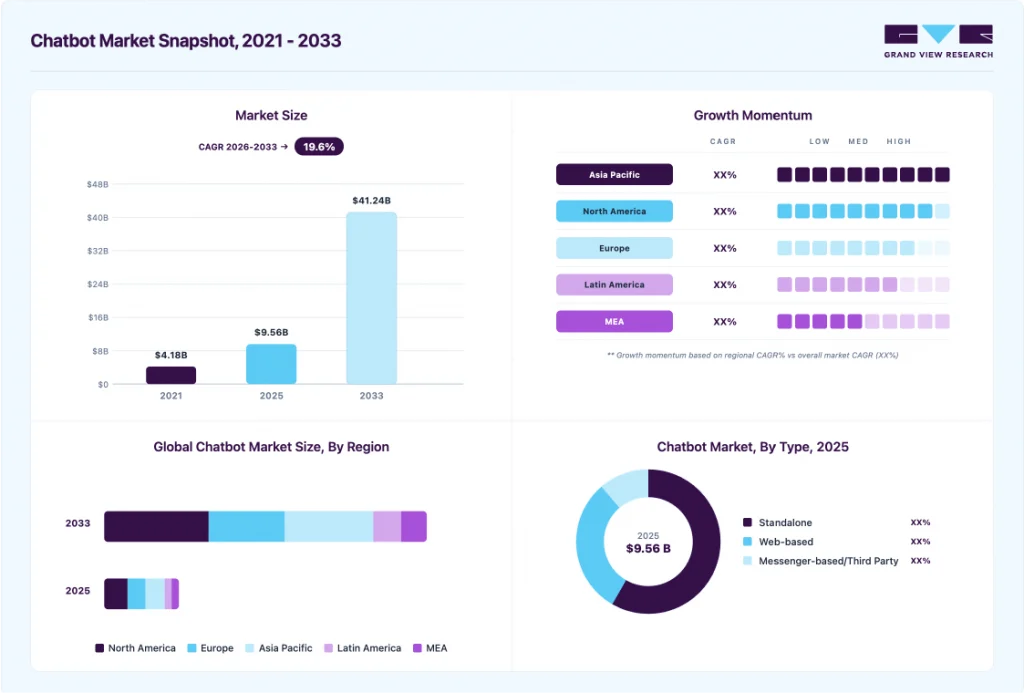
According to Grand View Research, the global chatbot market reached $9.6 billion in 2025 and is projected to hit $41.2 billion by 2033, growing at a CAGR of 19.6%. 62% of consumers now prefer chatbots over waiting for human agents, making chatbot adoption a competitive necessity rather than an optional upgrade.
At Space-O Technologies, we have built AI-powered chatbot solutions for e-commerce, recruitment, and customer support. Drawing from our experience across these projects, this guide covers the AI chatbot development process, realistic cost considerations, and common mistakes to avoid. For businesses with specific workflows, integrations, or industry requirements, our custom AI chatbot development services can help turn these requirements into a production-ready chatbot.
What Is an AI Chatbot and How Does It Work?
An AI chatbot is a software program that uses artificial intelligence to hold a text or voice conversation that sounds like a real person. Instead of following pre-written script rules, it understands human language, figures out what you want, and creates clear answers in real time.
A well-trained bot pulls answers from your custom knowledge base. That means it responds with business-specific information rather than generic advice. For types and core concepts, read our guide on what an AI chatbot is.
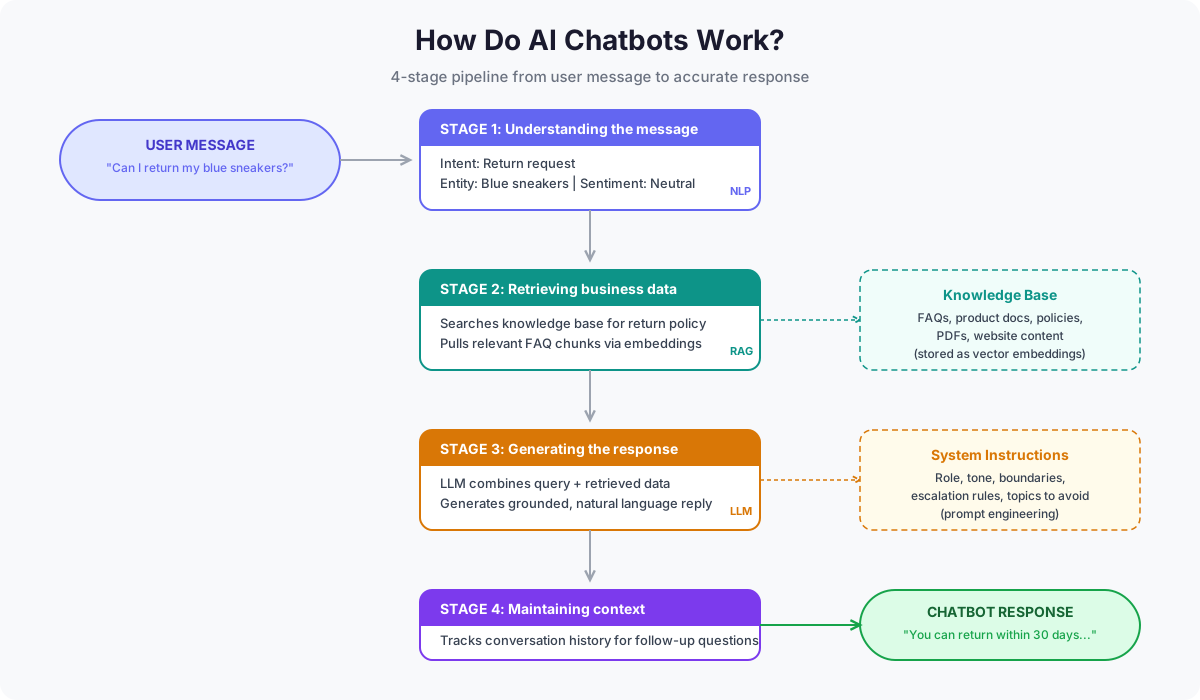
Six things happen between your message and the reply from the chatbot.
- You send the message: Typed into a web widget, spoken to a voice assistant, or sent through WhatsApp or Slack.
- The system reads meaning, not keywords: It separates the action you want from the details you gave. “Return the blue sneakers I ordered last week” splits into a return request, a product, and a timeframe.
- It checks what came before: Session history stays loaded, so “how long does the refund take?” still points at returns rather than opening a fresh topic.
- It searches your records: Your documents, FAQs, and order data get scanned for passages that match the question. Skip this and the model invents specifics from general training data.
- It composes the answer: A large language model turns those retrieved passages into plain language, shaped by rules you set for tone, length, and off-limits topics.
- It hands off when stuck: Low confidence scores or flagged phrases route the conversation to a human agent instead of guessing.
Retrieval quality is where most chatbot projects succeed or fail. It determines whether answers are accurate or merely plausible-sounding. For a deeper look at the technologies behind modern AI applications, explore our guide on AI development.
Ready to Build an AI Chatbot for Your Business?
Share your chatbot requirements with our AI development team. Get a free consultation covering use case validation, model selection, and a clear project estimate.

How to Make an AI Chatbot Step by Step?
AI chatbot development succeeds or fails on data, not on model choice. The language model handles fluency, while your knowledge base, integrations, and system prompt decide whether answers are correct. Here is the full sequence, from scoping to post-launch improvement.
Step 1. Define the answer set and the success metric
Write out the questions the chatbot must handle and the correct answer for each, pulled from ticket logs rather than a brainstorm. Fifty verified pairs are a workable starting set, and they also serve as your evaluation dataset later. If your team cannot write the correct answer, neither can the bot.
| Action | Strategic Focus | Why It Matters |
|---|---|---|
| Ticket volume audit | Rank your top 20 support queries by frequency and handling cost | Points the build at expensive, repeatable work instead of edge cases |
| Containment target | Set a resolution goal, benchmarked at 40% to 65% for a well-configured RAG chatbot | Gives the project a pass or fail number instead of a vague quality goal |
| Channel and data inventory | List target channels plus the CRM, ERP, or order systems the bot must reach | Surfaces integration effort while it can still change the budget |
Step 2. Choose your development path
This decision drives cost, timeline, and how far you can customize later. Both paths are valid, and the split is about control rather than budget size. Confirm which types of AI chatbots fit before you commit.
Option A: No-code platform
- Best for: FAQ automation, lead capture, and support deflection with standard integrations.
- Tools: Voiceflow, Botpress, Dialogflow CX, and Amazon Lex.
- Trade-off: Fast to launch and visually managed, but limited on custom logic and subject to usage-based billing that grows with volume.
Option B: Custom development
- Best for: Proprietary data processing, deep system integration, and regulated environments needing self-hosting.
- Stack: Python backend, an LLM provider API, LangChain or LlamaIndex for orchestration, and a vector database such as Pinecone, Chroma, Weaviate, or pgvector.
- Trade-off: Full control over retrieval and data residency, with infrastructure ownership as the ongoing cost.
Step 3. Design the conversation flow and escalation paths
Flow design outweighs model selection. A weak flow on a strong model underperforms a strong flow on a modest one. Map the successful route for each use case, then map what happens when it fails.
- Happy path: The shortest route from question to resolved answer.
- Fallback response: Exact wording for when retrieval returns nothing useful.
- Escalation triggers: Low confidence, repeated failed attempts, or flagged terms such as cancel, complaint, or legal.
- Handoff context: The transcript and account data that passes to the agent, so customers never repeat themselves.
Treat escalation as a feature. A bot that refuses to release a conversation it cannot resolve frustrates users faster than one that admits the limit.
Step 4. Prepare the knowledge base before ingesting it
Source content sets the accuracy ceiling on either development path. Retrieval cannot recover an answer your documentation states ambiguously or contradicts elsewhere.
- Split by topic: One document covers one subject with a descriptive title.
- Retire superseded content: Outdated policies compete with current ones and sometimes win.
- Tag everything: Product line, region, effective date, and access level let the retriever filter before it ranks.
- Resolve contradictions: Reconcile conflicting departmental answers before ingestion, not after users find them.
Teams that skip this step spend the next quarter debugging retrieval when the real problem sits in the source files.
Step 5. Develop retrieval and generation as separate layers
Wire the retriever first and query it directly, with no chat interface attached. Check whether the correct passage surfaces for every question from step one.
Isolation matters here. Once a model sits in front of retrieval, its fluency hides retrieval failures behind confident prose. Grounding responses in retrieved content reduces the 40%-60% factual correction rate of ungrounded LLM chatbots to under 10%, but only when the retriever returns the correct passage.
Select the model on latency, context window, and cost per conversation rather than benchmark scores. Provider pricing shifts often, so build a swappable model layer instead of hard-coding one vendor.
Step 6. Customize behavior through the system prompt
The system prompt is a build artifact, not a configuration detail. It carries three jobs.
- Role and scope: State what the assistant is and which topics it owns.
- Behavior boundaries: Restrict it explicitly, covering competitor comparisons, pricing commitments, and any advice the business is not authorized to give.
- Failure handling: Specify the exact response when retrieval returns nothing, along with the escalation path and confidence threshold, commonly near 0.70.
Keep temperature low for support use cases, since factual accuracy matters more than varied phrasing.
Step 7. Integrate with live business systems
Static documents answer policy questions. Order status, account balance, and appointment availability require live API calls into your CRM, ERP, or order database.
This is the most underestimated line item in any chatbot budget. Connecting to other business systems adds 20% to 50% of total project cost, and regulated builds for healthcare or finance add another 25% to 35%. Our guide to healthcare chatbot development breaks down those compliance-driven integration costs in detail.
Step 8. Test across edge cases and attack paths
Test against real documentation rather than sample content, since retrieval behaves differently on live data.
- Edge cases: Empty messages, mixed-language input, and multi-intent questions.
- Prompt injection: Attempt to override the system prompt and confirm the boundaries hold.
- Integration failure: Verify graceful behavior when an API times out or returns an error.
- Load and regression: Check performance under concurrency and after every prompt change.
- User acceptance: Real customers surface phrasing that internal QA never produces.
Step 9. Deploy in phases
Release to one channel and one audience segment before full rollout. A phased launch contains the blast radius and produces real conversation data quickly.
Website deployment usually means embedding a JavaScript widget snippet. Messaging channels such as WhatsApp or Slack require webhook configuration inside the provider’s developer console. Confirm logging and analytics fire before the first real user arrives.
Step 10. Monitor and continuously improve
Launch produces the data the build phase never had. Unmonitored chatbot performance degrades within months, so the review cadence is part of the product.
| Action | Strategic Focus | Why It Matters |
|---|---|---|
| Low-confidence log review | Examine conversations that fell below threshold or escalated | Shows exactly which content or intents are missing |
| Human-in-the-loop correction | Reviewers fix failed responses and feed them back into training | Closes the loop with real user phrasing instead of assumed phrasing |
| Scheduled retraining | Refresh the model and knowledge base on a fixed cadence | Regular updates improve accuracy by 18% to 32% over models trained once |
| Maintenance budget | Reserve 15% to 20% of build cost annually | Funds the work that keeps containment from sliding |
Follow this order and every conversation feeds the next improvement cycle. Skip the sequence, and accuracy slides as products change, policies update, and user language moves on.
8 Essential AI Chatbot Features for Smarter Conversations
Feature lists are easy to write and hard to build. These eight decide whether a chatbot resolves queries or just deflects them politely.
1. Grounded answer generation
Responses come from your documents and records rather than the model’s training data. This is the single feature separating a business chatbot from a general assistant. Without it, the bot invents plausible specifics about your policies.
2. Multi-turn context retention
Session memory carries earlier turns forward, so follow-up questions resolve correctly. Ask about a return policy, then ask how long refunds take, and the bot connects the two instead of starting over.
3. Live system lookups
Order status, account balance, and booking availability pull from your CRM, ERP, or order database in real time. Static documents answer policy questions only. Account-specific answers require integration.
4. Transactional actions
Beyond answering, the bot books, reschedules, updates records, and processes returns through authenticated API calls. This moves it from a deflection tool to an operational system. Every action needs an audit trail. AI chatbots for online stores rely on this most, handling returns, exchanges, and order edits.
5. Confidence-based escalation
Below a set threshold, the bot hands off rather than guessing. The handoff should carry the full transcript and account context, so customers never repeat what they already typed.
6. Scope guardrails
Explicit boundaries stop the bot from discussing competitor pricing, making commitments, or giving regulated advice your business is not authorized to provide. Guardrails belong in the system prompt, not in post-launch patches.
7. Omnichannel deployment
The same logic serves a website widget, WhatsApp, Slack, and in-app chat. Channel-specific bots fragment your maintenance load and drift apart within months.
8. Conversation analytics
Containment rate, escalation reasons, and unanswered questions, all reported by topic. Without topic-level breakdown, you know performance dropped but not which content to fix.
These eight features are not a checklist to buy against. Grounded generation and live lookups depend on integration work, while guardrails and escalation depend on decisions made during conversation design. Every one of them carries a failure mode that shows up in production, not in the demo.
Common Challenges in AI Chatbot Development
1. Scope creep before the first conversation
Teams plan for twenty use cases, five languages, and eight integrations in version one. The build stretches past its timeline and launches without ever meeting a real user. Overscoping is the most common budget mistake in chatbot projects, and it compounds because every added use case multiplies the testing surface.
How to fix it
- Cap the first release at two or three highest-volume queries.
- Ship to one channel and one audience segment, then expand on usage data.
- Move every deferred feature to a written phase two list, so it is postponed rather than argued over again.
- Tie each phase two item to a trigger, such as a volume threshold or a containment target, so expansion follows evidence.
2. No agreed definition of success
Projects launch with no baseline for ticket volume, resolution time, or CSAT. Six months later, nobody can prove whether the chatbot helped. Session counts and message volume feel like progress but measure activity rather than resolution, which is why dashboards often look healthy while support load stays flat.
How to fix it
- Record pre-launch numbers for ticket volume, handling time, and satisfaction.
- Set a containment target before development starts, benchmarked at 40% to 65% for a well-configured RAG chatbot.
- Track cost per resolved conversation alongside containment, since a bot that resolves more while costing more is not a win.
- Agree which conversations should always escalate, so containment is never chased at the customer’s expense.
3. Source content nobody owns
The knowledge base pulls from documentation that contradicts itself, sits out of date, or lives across five departments with no single owner. Retrieval surfaces the wrong passage and the model answers confidently anyway. Grounding responses in retrieved content cuts factual errors sharply, but only when the retriever returns the correct passage, so content quality caps the entire system.
How to fix it
- Name one owner per content domain before ingestion begins.
- Audit for contradictions between departments and resolve them at the source.
- Retire superseded documents instead of leaving them to compete with current ones.
- Tag every document with effective date and review cadence.
- Benchmark retrieval accuracy against a fixed test set at launch and quarterly, since a drop signals content drift before users report it.
4. Conversation design treated as optional
Development starts before anyone maps fallback paths, escalation triggers, or handoff behavior. Users hit dead ends, the team redesigns mid-build, and UX costs double. A weak flow on a strong model consistently underperforms a strong flow on a modest one, which makes design a higher-leverage investment than model selection.
How to fix it
- Allocate 10% to 15% of total budget to conversation design before writing code.
- Map flows in Voiceflow, Botmock, or Figma so stakeholders approve behavior before development.
- Write fallback and escalation copy as deliverables, not placeholders.
- Define what transcript and account context passes to the human agent, so customers never repeat themselves.
5. Model chosen before the use case is clear
An LLM gets selected for ticket routing that a lightweight classifier handles at a fraction of the cost. Or a rule-based bot gets pushed into open-ended support and needs a full rebuild. Provider pricing also moves faster than most project timelines, so a stack hard-coded to one vendor can lose its cost advantage before launch.
How to fix it
- Match architecture to conversation complexity, not to what sounds advanced.
- Run a cost-per-conversation estimate at expected volume before committing.
- Route simple intents to a smaller model and reserve the flagship model for open-ended queries.
- Build a swappable model layer so provider pricing changes do not force a rewrite.
6. Launch treated as the finish line
Post-launch budget gets cut, log review never gets scheduled, and accuracy slides as products and policies change. The chatbot becomes the thing customers route around. Unmonitored performance degrades within months, and the decline is gradual enough that nobody notices until containment has already fallen.
How to fix it
- Reserve 15% to 25% of build cost annually for maintenance.
- Schedule low-confidence log review on a fixed cadence, not on complaint volume.
- Have reviewers correct failed responses and feed them back into training, since real user phrasing differs from what the team assumed.
- Feed corrected responses back into the evaluation set so fixes are permanent.
Scoping for these challenges upfront costs less than fixing them after launch. Understanding where the money actually goes is the difference between a realistic budget and a surprised one.
How Much Does It Cost to Develop an AI Chatbot?
AI chatbot development costs range from $3,000 for a basic rule-based bot to $300,000 or more for an enterprise-grade system. Most mid-market businesses invest between $20,000 and $80,000.
Chatbot type drives the range. Rule-based bots run $3,000 to $15,000, NLP-driven builds $15,000 to $50,000, and RAG-powered systems $50,000 to $150,000. Integrations and maintenance sit on top of those figures.
For a full breakdown by type, phase, and industry, read our guide on AI chatbot development cost.
Best Practices for Developing an AI Chatbot
Most chatbot advice repeats the build steps in different words. These six are the practices that separate chatbots holding a 60% containment rate from ones stuck at 25%.
1. Ground every answer in your own data
Never let the model answer from training data alone. Retrieval-grounded architecture keeps responses tied to your documented policies, product records, and support history. This one decision does more for accuracy than any model upgrade.
2. Build the evaluation set before the chatbot
Write fifty verified question-and-answer pairs from real ticket logs first. Run them after every prompt change, content update, and model swap. Without a fixed test set, you cannot tell whether a change helped or quietly broke something.
3. Design the failure path with the same care as the success path
Fallback wording, escalation triggers, and handoff context deserve as much attention as the happy path. Users forgive a bot that cannot answer. They do not forgive one that guesses confidently or refuses to release the conversation.
4. Constrain scope explicitly in the system prompt
State what the assistant covers, what it declines, and what it says when retrieval returns nothing. Implicit boundaries fail under pressure. Regulated industries need these limits written before the first live conversation, not patched after an incident. Banking chatbot solutions face the tightest version of this rule. A single unauthorized rate quote or balance commitment creates real regulatory exposure.
5. Treat the knowledge base as a maintained product
Assign ownership, set a review cadence, and retire superseded content on schedule. Accuracy degrades because documentation drifts, not because the model changes. Most teams budget for development and forget the content operations that keep it working.
6. Instrument for topic-level analytics from day one
Track containment, escalation reasons, and unanswered questions broken down by subject. Aggregate numbers tell you performance dropped. Topic-level data tells you which article to rewrite, which is the difference between a dashboard and a fix.
Following these practices is straightforward to describe and difficult to execute without prior chatbot builds behind you. That experience gap is usually what the partner decision is really about.
How to Select the Best AI Chatbot Development Company
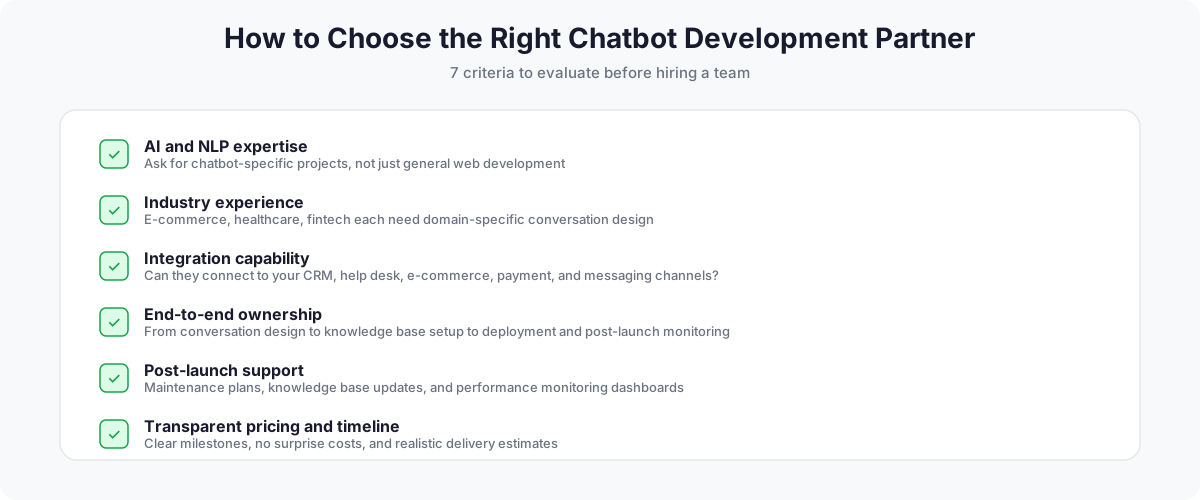
The right partner brings AI expertise, delivers end-to-end ownership, and stays involved after launch. Start by shortlisting AI chatbot development agencies with proven conversational AI projects, then evaluate each against the criteria below.
- AI and NLP expertise: Ask for chatbot-specific projects in the portfolio. General web development experience does not translate to building conversational AI. Your partner should demonstrate hands-on experience with LLMs, prompt engineering, RAG architectures, and vector databases.
- Industry experience: A team that has built chatbots for e-commerce understands order tracking workflows. Healthcare projects require HIPAA awareness. Fintech needs compliance-aware conversation design. Our team built GPT-Vix, an AI-powered recruitment platform that uses NLP to screen candidates, automate initial interview conversations, and qualify applicants based on job requirements. GPT-Vix demonstrates how chatbot technology adapts beyond customer support into specialized business workflows.
- Integration capability: Can the team connect the chatbot to your CRM, help desk, e-commerce platform, payment gateway, and messaging channels? Ask about specific API integration experience. Explore our approach to hiring a dedicated development team for complex AI projects.
- End-to-end ownership: The best partners handle everything from conversation design and knowledge base setup to deployment and post-launch monitoring. Avoid teams that only write code and leave you to figure out the rest.
- Post-launch support and maintenance: Chatbots need ongoing tuning. Ask about maintenance plans, knowledge base update processes, and performance monitoring dashboards.
- Transparent timeline and pricing: Clear milestones, no surprise costs, and realistic delivery estimates signal a mature development partner.
- MVP-first approach: A good partner recommends starting with a focused scope (your top 30 FAQs), launching, learning from real conversations, and then expanding. Partners who want to build everything at once before launching are a red flag.
Why Partner with Space-O Technologies to Make an AI Chatbot
Space-O Technologies has built AI products since OpenAI’s API became commercially viable, not since chatbots became a marketing category. eComChat interprets shopper queries against a live product catalog, and GPT Vix applies OpenAI models to recruitment screening. Both required the retrieval design and system integration this guide describes, decisions our AI chatbot consulting services work through with clients before any code gets written.
Since 2010, our teams have connected applications to CRMs, ERPs, and legacy databases across healthcare, logistics, fintech, and retail. That integration depth is where most chatbot projects stall. Businesses that need capacity rather than a full build can hire dedicated chatbot developers and slot them into an existing team. With ISO 9001 and ISO 27001 certifications and a 97% client retention rate, we scope the architecture before development starts and stay through the retraining cycles that follow launch.
Frequently Asked Questions
How do you develop an AI chatbot from scratch?
You develop an AI chatbot by defining the questions it must answer, grounding it in your own data, and testing retrieval before adding a conversational interface. Start with verified question-and-answer pairs from real ticket logs. Choose between a no-code platform and a custom stack. Prepare your knowledge base, build retrieval, connect live business systems, then deploy to one channel first. Post-launch monitoring turns real conversations into ongoing improvements.
What are the steps to develop an AI chatbot?
The workflow runs through ten stages: define scope, choose your development path, design conversation flows, prepare data, develop retrieval and generation, customize the system prompt, integrate business systems, test, deploy, and monitor. The order matters more than the count. Data preparation before development and integration before testing prevent the rework that stalls most projects.
What technology is used to develop an AI chatbot?
Custom AI chatbots typically use Python with an LLM provider API, LangChain or LlamaIndex for orchestration, and a vector database such as Pinecone, Chroma, Weaviate, or pgvector. Managed platforms including Dialogflow CX, Amazon Lex, Voiceflow, and Botpress bundle these layers. Both approaches need REST or GraphQL APIs for CRM and ERP connections, plus cloud hosting on AWS, Azure, or GCP.
How do I choose an AI model for my chatbot?
Choose based on latency, context window, data residency, and cost per conversation rather than benchmark scores. Support chatbots need fast, cheap models since retrieval supplies the facts. Complex reasoning or long document handling justifies a larger model. Regulated industries may require self-hosted or region-locked deployment. Build a swappable model layer, because provider pricing and capabilities shift frequently.
How do you train an AI chatbot?
Most business chatbots are never trained in the machine learning sense. They use a pre-trained model guided by a system prompt and grounded in your documents through retrieval-augmented generation. Fine-tuning adjusts the model’s weights on labeled examples, which costs more and suits tone consistency or specialized formats. Start with prompting and RAG. Fine-tune only if retrieval quality is already strong and gaps remain.
Can I develop an AI chatbot without training an AI model?
Yes, and most production chatbots are built this way. Pre-trained models from OpenAI, Anthropic, and Google are accessed through APIs, then shaped with prompt engineering and connected to your content through retrieval. No-code platforms package the same components in a visual builder. Building a model from scratch is rarely justified outside research or highly specialized domains.
How do you connect an AI chatbot to business data?
Documents connect through retrieval, and live records connect through APIs. Policies, FAQs, and manuals are chunked, embedded, and stored in a vector database the chatbot searches at query time. Order status, account balances, and booking availability require authenticated API calls into your CRM, ERP, or order database. Legacy systems without modern endpoints need custom middleware.
How do you test an AI chatbot before deployment?
Test against your verified question set on live data, not sample content. Coverage should include answer accuracy, hallucination checks, conversation flow, prompt injection attempts, integration failure handling, load performance, and escalation triggers. Beta testing with real customers surfaces phrasing internal QA never produces. Every prompt change needs a regression run against the same set.
How do you deploy an AI chatbot on a website or mobile app?
Website deployment embeds a JavaScript widget snippet in your site’s HTML. Mobile apps use an SDK or a webview pointed at the chat endpoint. Messaging channels such as WhatsApp and Slack require webhook configuration in the provider’s developer console. Confirm logging and analytics fire before the first real user arrives, then release to one channel and audience segment at a time.
How long does it take to develop an AI chatbot?
A focused FAQ chatbot takes four to eight weeks, while an enterprise build with multiple integrations runs three to six months. Integration scope drives the timeline more than chatbot complexity does. Knowledge base preparation is the most commonly underestimated phase. Regulated deployments in healthcare or finance add time for compliance review and security testing.
How can I improve an AI chatbot after deployment?
Review low-confidence conversations weekly and feed corrections back into your knowledge base. Track containment rate, escalation reasons, and unanswered questions by topic, since aggregate numbers show that performance dropped without showing what to fix. Schedule content refreshes as products and policies change. Budget 15% to 20% of build cost annually for this work.
Should I build an AI chatbot in-house or hire an AI chatbot development company?
Build in-house if you already have ML engineers, data infrastructure, and capacity for ongoing maintenance. Hire a partner if this is your first chatbot, integration scope is significant, or you need it in production this quarter. Most failures trace to integration and knowledge base work rather than model selection, which is where prior build experience matters most.



 All our projects are secured by NDA




 4.8
4.8

