
 By
Contents
- Automate repetitive, rule-based, high-volume tasks first, such as lead entry, reminders, and drafting.
- Design every automation as four layers: trigger, AI processing, action, and human approval.
- Choose a custom-coded build when workflows need proprietary databases, compliance controls, or specialized interfaces.
- Data preparation typically takes 20% to 30% of an AI project budget; maintenance adds 15% to 25% yearly.
Key Takeaways
Build a custom AI app to automate repetitive business tasks when packaged software falls short. Each automation chains a trigger, an AI step, an action, and a human sign-off. Since 2010, Space-O Technologies has delivered AI-powered custom software to 1,200+ clients.
Your team probably retypes form data, chases follow-ups, and summarizes the same reports weekly. Packaged tools stall at your proprietary database, approval rules, and compliance needs. Our AI app development services are built for that gap.
This guide walks through five steps, from picking tasks to choosing a partner. You will also see what a build costs and who owns it. If you are still deciding, compare custom AI vs. off-the-shelf options first.
Step 1: Identify the Tasks to Automate
Start with repetitive, rule-based, or high-volume tasks that consume your team’s time every week. These tasks have structured inputs, clear decision rules, and enough volume to justify a build. Most first automations fall into four categories.
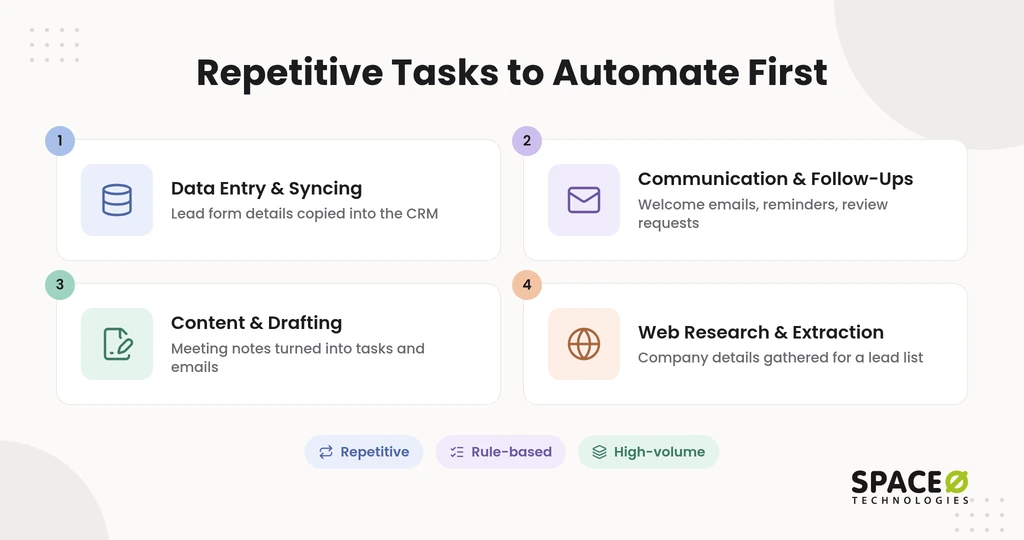
| Task type | Example | What the AI step does |
|---|---|---|
| Data entry and syncing | Lead form details copied into the CRM | Extracts, validates, and maps fields before the record is written. |
| Communication and follow-ups | Welcome emails, review requests, and payment reminders | Drafts each message in your tone for the right contact. |
| Content and drafting | Meeting notes turned into tasks and client emails | Summarizes, classifies, and drafts from the source text. |
| Web research and extraction | Company details gathered for a lead list | Reads pages or documents and returns structured fields. |
Choose one category where you can count the volume and the hours it takes today. That baseline tells you whether the build pays off, as our guide to AI development business efficiency explains. Once you have a target task, the next decision is how much of it needs a custom build.
Step 2: Decide What You Need Built Custom
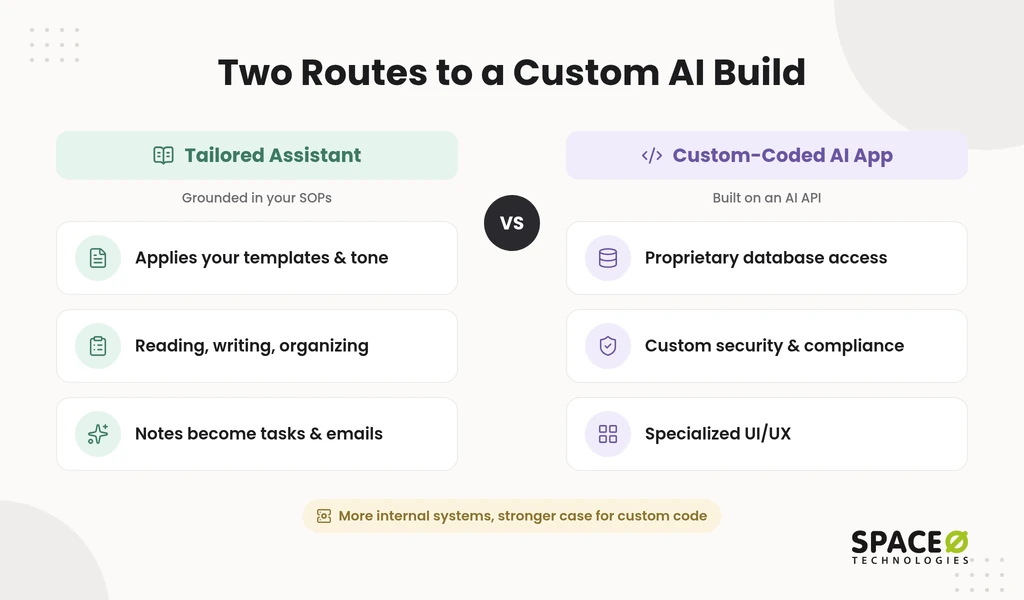
Build custom when the workflow depends on data, rules, or interfaces that off-the-shelf software cannot reach. Rigid tools work until a task needs your proprietary database, a specific compliance control, or a specialized interface. Two build routes cover most custom needs. Our guide to pre-built vs custom AI models explains the model choice behind each one.
A tailored assistant grounded in your SOPs
A tailored assistant applies your standard operating procedures (SOPs), templates, and tone of voice to daily work. It suits teams whose repetitive work is mostly reading, writing, and organizing information.
- How it works: We train or ground the assistant on your SOPs and templates, using the method that fits your budget.
- Use case: Messy meeting notes become project board tasks and draft client emails for review.
A custom-coded AI app on an AI API
A custom-coded app is the most flexible and scalable route, built on an AI application programming interface (API). You choose this route when the automation must live inside your own systems, and the model choice is covered in our open-source LLM vs proprietary API comparison.
- How it works: The app calls OpenAI, Anthropic, or Ollama-run open-source models from a Python or Node.js backend.
- Use case: This route fits deep integration with proprietary databases, custom security and compliance needs, and specialized UI/UX.
The more your workflow touches internal systems, the stronger the case for a custom-coded app. Whichever route you pick, the workflow itself follows the same four-layer pattern.
Step 3: Core Components of a Custom AI Workflow
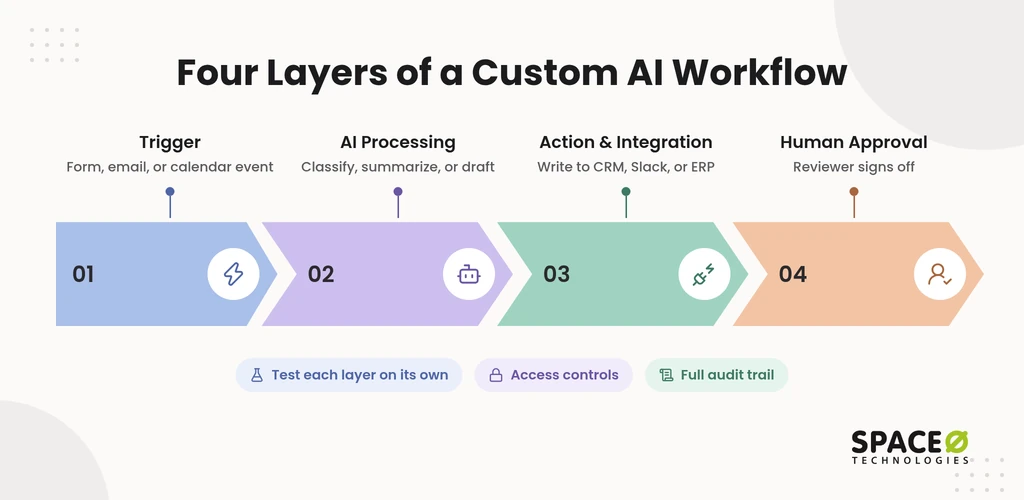
Every custom AI workflow runs on four layers: a trigger, AI processing, an action, and human approval. Workflows break down in production when a layer is vague or missing, and the action layer depends on sound third-party integration for AI applications. Defining each layer separately lets you test, monitor, and change it on its own.
Trigger.
- How it works: An event, such as a web form submission, inbound email, or calendar event, starts the workflow.
- Use case: A new lead fills in the contact form on your website.
AI processing layer.
- How it works: A model classifies, summarizes, or drafts from the input, guided by one narrow instruction.
- Use case: The model flags whether a support ticket is urgent and summarizes it in two sentences.
Action and integration.
- How it works: API integration writes the result into your systems, such as the CRM, Slack, or the ERP.
- Use case: The workflow updates a customer relationship management (CRM) record, posts a Slack alert, or generates an invoice.
Human-in-the-loop approval.
- How it works: A named reviewer approves sensitive output before it leaves the workflow.
- Use case: A finance lead signs off on a final financial report or a client-facing contract.
Example: from web form to CRM entry to Slack alert
A single lead form shows all four layers working in sequence. A prospect submits your website form, which triggers the workflow. The AI layer reads the free-text message and writes a summary with a priority label.
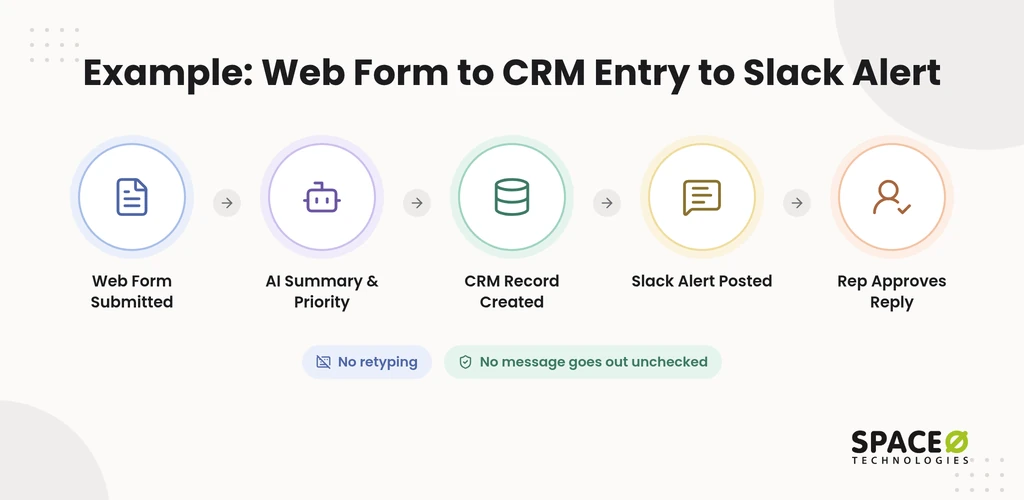
The action layer creates the CRM record and posts an alert in the sales team’s Slack channel. If the AI also drafts a reply, a sales rep approves it before the prospect sees it. No one retypes the lead, and no message goes out unchecked.
Approval checkpoints, access controls, and audit trails
Any automation that writes into your CRM, enterprise resource planning (ERP), or legacy systems should ship with sign-off and logging built in. We place approval checkpoints in the workflow design itself. The AI absorbs the repetitive volume, and a qualified reviewer still approves each output before it shapes a final decision. Our AI agent governance framework shows how to tier approvals by risk.
Access controls limit what each step can read or change. An audit trail records every action the automation takes. For finance and inventory workflows, our guide to custom ERP software development shows how those systems are structured for integration.
With the architecture defined, the next question is budget.
Not Sure Which Task to Automate First?
Our AI consulting team reviews your candidate workflows, data, and existing systems, then recommends a first pilot with a human approval checkpoint built in.

Step 4: What a Custom Build Costs and Who Owns It
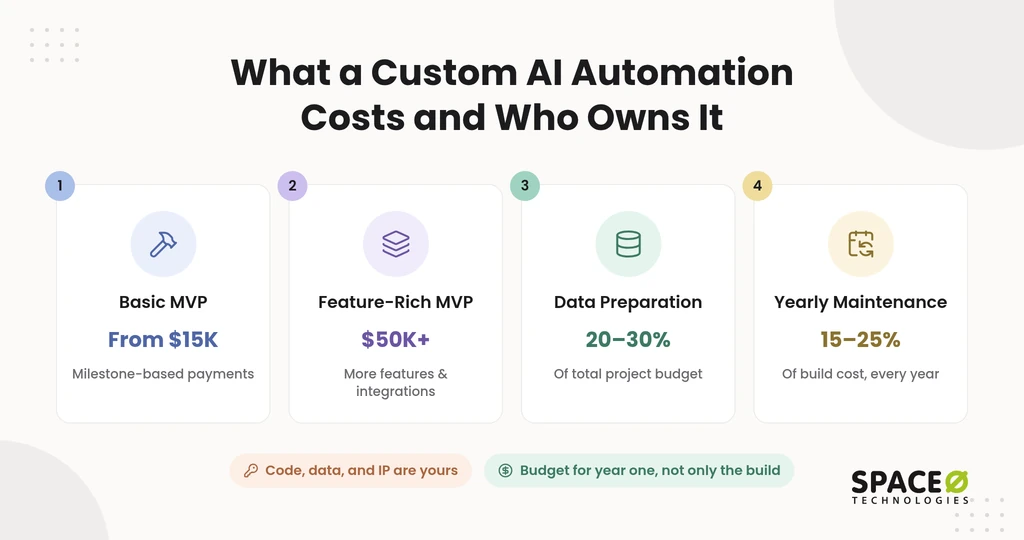
A basic MVP with Space-O Technologies starts from $15,000, and a feature-rich MVP can reach $50,000 or more. Our MVP development services page sets that minimum viable product (MVP) range, with each payment tied to a delivered milestone. For full AI builds, our AI development cost guide puts delivery at 2 to 3 months for simple AI solutions, 4 to 8 months for mid-level applications, and 6 to 12 months for enterprise systems.
A quote that covers only the build hides the costs that surface after your automation goes live. Data preparation, integrations, and ongoing model spend climb fast once a cheap pilot reaches production. Below: what drives the build, what running it costs, and who owns it.
What drives the build cost
Expect data preparation and integrations to take a large share of the build budget. The AI development cost guide puts data collection and preparation at 20%-30% of the total project budget. For task automation, cleaning inputs, wiring integrations, and production engineering usually outweigh the model itself.
Workflow depth moves the price too. Space-O Technologies’ LLM integration cost guide prices a RAG or tool-using integration at $15,000 to $60,000 and an agentic workflow at $50,000 to $150,000. Each system the automation connects to adds integration and testing work. Auditing your data before scoping keeps those costs predictable.
What it costs to run after launch
Plan for annual maintenance of 15% to 25% of the original build cost, every year. Space-O Technologies reports this range for AI builds. Infrastructure and API usage add to the total on top of maintenance.
- Data infrastructure: The AI development cost guide budgets $500 to $5,000 a month, and our guide to data management for AI app development covers recurring data-layer costs.
- Monitoring: The same guide plans $300 to $2,000 a month across enterprise systems.
- Model usage: API fees grow with volume, though the LLM integration cost guide notes that prompt caching, batch processing, and model routing can cut token spend substantially.
Before any automation goes live, we wrap its model in an evaluation suite that tracks accuracy, hallucination rate, bias, latency, and cost, then keep monitoring it continuously.
Who owns the finished app?
At completion, the source code, data, and intellectual property (IP) behind your automation become yours. Space-O Technologies signs a non-disclosure agreement (NDA) before any project begins, and owning the app leaves future hosting and vendor choices with you.
Budget for the first year, not only the build. Once the budget is clear, the remaining choice is how to work with a build partner.
Step 5: Choose How to Engage a Build Partner
Choose the engagement model that matches how settled your scope is. Some teams know exactly which workflow to automate, while others refine it as results come in. Space-O Technologies offers four engagement models.
| Engagement model | Best for | How scope and cost are set | What you own at the end |
|---|---|---|---|
| Fixed Cost | A first automation MVP with a clearly defined workflow. | Scope, timeline, and budget are agreed upfront, with milestone-based payments. | All source code, data, and IP. |
| Time & Material | Workflows whose requirements will change as you learn. | Cost follows actual effort as the scope evolves. | All source code, data, and IP. |
| Dedicated Team | A long-term build covering several automations. | A team is assigned to your roadmap for the length of the engagement. | All source code, data, and IP. |
| Staff Augmentation | CTOs adding AI engineers to an in-house team. | Vetted engineers join your sprints and tools, while we handle vetting and onboarding. | All source code, data, and IP. |
We deliver with 140+ in-house developers and have shipped 300+ software solutions. We also report 97% client retention. A fixed-cost MVP is a low-risk first step. You can move to a dedicated AI agent development team as more workflows follow.
Start With One Workflow and a Scoped Estimate
The safest first move is one well-chosen workflow, scoped and priced before any build starts. Share the task, the systems it touches, and where human approval matters. We return a free, expert-reviewed estimate, and you can start with a fixed-cost MVP.
When you have a workflow in mind, schedule a scoping call with our AI team. You leave the call knowing the build route, the four layers, and the first-year budget.
Frequently Asked Questions
How long does it take to build a custom AI automation app?
Space-O Technologies’ MVP development services page puts a simple MVP at 4 to 8 weeks, while complex MVPs with several integrations or custom functionality run 3 to 4 months. Full AI builds take longer: 2 to 3 months for simple solutions and up to 6 to 12 months for enterprise systems. Every extra system the workflow connects to lengthens integration and testing.
Can a custom AI app work with my existing CRM and ERP?
Yes. The action layer connects through API integration, so results land in the systems your team already uses. Legacy systems without modern APIs may need a connector built first.
Which business tasks should stay with a human?
Keep a human approver on anything that commits money, signs terms, or speaks for your company. That includes final financial reports, client-facing contracts, and sensitive customer messages. The AI can prepare the draft, but a person signs off.
Should I use OpenAI, Anthropic, or an open-source model?
Choose by data sensitivity, cost per request, and the accuracy the task needs. Hosted models from OpenAI or Anthropic suit most text tasks. Open-source models run through Ollama can be self-hosted when data must stay inside your environment.
Is a custom AI app worth it for a small or mid-sized business?
It is worth it when a high-volume task depends on your own data or systems. If a packaged tool already covers the task end to end, a custom build adds little. Start with one workflow whose time savings you can measure.
What data does an AI automation need to work well?
It needs consistent inputs, examples of correct outputs, and the rules your team follows today. Sample tickets, past emails, and SOP documents are typical starting points. Gaps and inconsistencies in that data absorb most of the preparation budget.
Can I add more automations after the first one?
Yes. Once the trigger, AI, action, and approval layers exist, new workflows can reuse the same integrations and controls. Each new workflow still needs its own evaluation before release.



 All our projects are secured by NDA




 4.8


