
 By
Contents
- AI development cuts manual work first: data entry, invoice processing, and scheduling are the quickest wins.
- Real-time analysis and demand forecasting help teams plan inventory and repair equipment before failures occur.
- Rebuilding a process around AI delivers larger gains than adding a tool to an old workflow.
- Pilots reach production when grounding, evaluation, and human review are scoped from the first sprint.
Key Takeaways
AI development improves business efficiency by automating routine tasks and speeding up analysis. It also sharpens forecasting and customer support. Your team then spends its time on work that needs judgment.
Most leaders do not doubt the payoff. They doubt that their own project will reach it. Rebuilding a process around AI delivers the biggest gains, which custom AI development enables.
Space-O Technologies has built AI-powered custom software since 2010. As an AI development company, we build these systems for startups, SMEs, and enterprises. This guide covers six efficiency gains, how to measure them, and when to build.
Key Ways AI Development Improves Business Efficiency
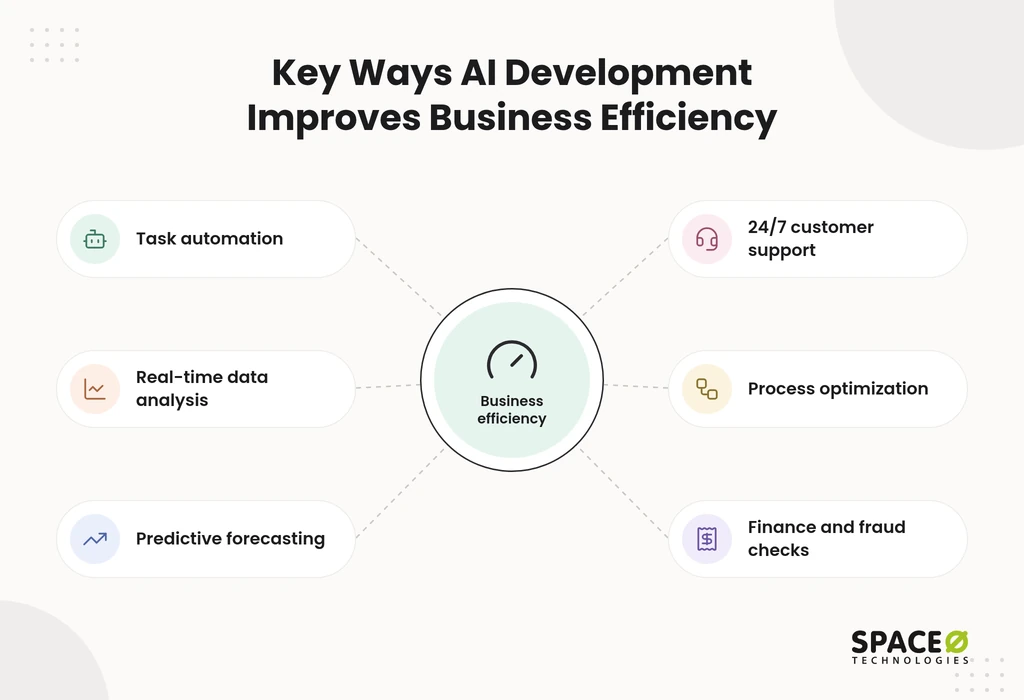
AI development raises efficiency through six repeatable mechanisms, and task automation comes first. Each one targets a cost your team already carries, such as slow reports, missed forecasts, or ticket backlogs. The gains compound when automation, analysis, and forecasting work together.
1. Task automation
AI automates repetitive, high-volume work such as data entry, invoice processing, and scheduling. It runs without fatigue and makes fewer input errors than manual keying. The real payoff is people spending time where judgment matters, not fewer people. Freed staff move to higher-value, strategic work such as problem-solving, client relationships, and planning. That shift lowers operational cost and keeps experienced people on decisions only they can make.
2. Real-time data analysis and faster decisions
Machine learning models analyze large datasets in real time, so decisions no longer wait for manual reports. They surface patterns, flag anomalies, and summarize trends far faster than spreadsheet review. Generative AI adds plain-language summaries of documents, meetings, and notes. Real-time reporting means leaders act on current data instead of last month’s numbers. A person still checks any output that drives a consequential decision.
3. Predictive analytics and forecasting
Predictive models forecast demand, inventory needs, and equipment failures before they become costly. Demand forecasting helps your team plan stock and staffing ahead of the busy season. In the supply chain, the same models guide inventory optimization and reorder timing. Predictive maintenance reads sensor and equipment data. Your team then repairs machines proactively instead of reacting to breakdowns and unplanned downtime.
4. Customer support around the clock
AI chatbots and agents handle routine customer inquiries 24/7 and route complex cases to people. Natural language processing (NLP) lets them answer order, billing, and account questions in plain language. Triage happens instantly, so response times shrink and your support team focuses on issues that need judgment. Our AI chatbot development work grounds each bot in your own company data.
5. Intelligent process optimization
The deepest efficiency gains come from rebuilding core processes around AI, not bolting a tool onto them. AI-powered project tools assign tasks, track progress, and catch errors before they reach customers. PwC’s 2026 AI Jobs Barometer found productivity growth is 40% higher at companies most exposed to AI. A redesigned workflow also lets you scale operations without growing headcount at the same rate.
6. Finance operations and fraud detection
In finance operations, AI scans every invoice for anomalies and possible fraud before payment. It spots invoices that qualify for early-payment discounts, which improves cash flow. It also automates tax calculations across jurisdictions and lowers the risk of audit penalties. Accounts payable staff then review flagged exceptions instead of checking every line by hand. The next section shows how these six mechanisms land for different kinds of businesses.
Where AI Efficiency Shows Up by Type of Business
The same six mechanisms land differently depending on your stage and your systems. A founder needs one lever in market fast. An enterprise needs AI that fits platforms it already runs.
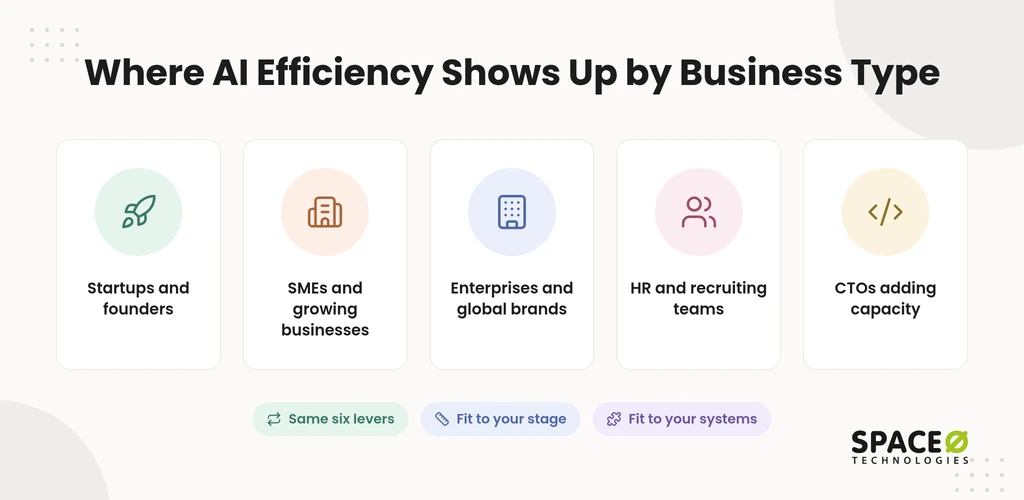
- Startups and founders: Use software development for startups to launch a web, iOS, and Android MVP with one efficiency lever. Scope it as fixed cost or time and material, then grow it into version two without a rebuild. Apps we built include Glovo, which secured $1.2 billion, and Fyule Video Lab, which secured $1.4 million.
- SMEs and growing businesses: Replace spreadsheets with a custom CRM mapped to your workflow. Connect ERP, CRM, and payment tools through APIs so data stops being re-keyed by hand.
- Enterprises and global brands: Rebuild an on-premises desktop system as a cloud web platform on AWS, Azure, or GCP. Implement or migrate ServiceNow IT Service Management (ITSM) and IT Operations Management (ITOM) to automate internal workflows.
- HR and recruiting teams: Automate candidate screening with AI recruitment software such as GPT Vix. Keep human review on every hiring decision the system informs.
- CTOs adding capacity: Staff an AI engineering pod of vetted dedicated developers. Add them to your sprints, repositories, and tools without a full hiring cycle.
Across these segments, Space-O Technologies has delivered 300+ software solutions with 140+ in-house developers. We have served 1,200+ clients and report 97% client retention. Many projects stumble before they ship, and the next section covers why.
Ready to Ship Your First AI Efficiency Win?
Tell us the workflow bottleneck costing your team the most time. Our AI engineers will scope the right solution and send a free, expert-reviewed plan.

From Pilot to Production: Why Most AI Efficiency Projects Stall
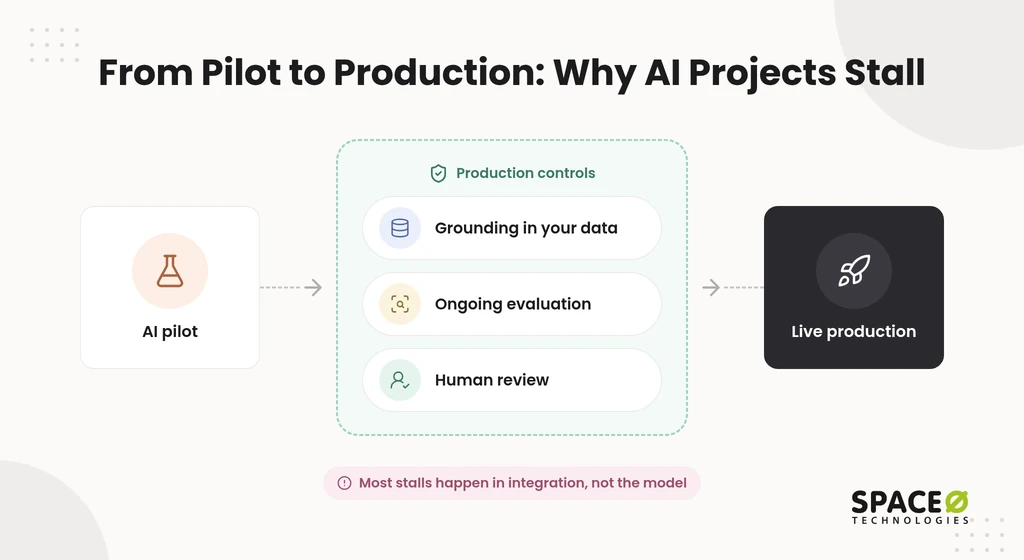
Most AI efficiency gains fail in the integration, not in the model. The pilot works in a demo and breaks on contact with real workflows and real data. Our generative AI integration services connect models to the systems and data your team already uses.
Gartner predicted at least 30% of generative AI projects would be abandoned after proof of concept by 2025. That is why the controls below decide whether a pilot reaches production.
Which controls get AI into production?
Production AI rests on three controls: grounding, evaluation, and human review. Teams that skip any one of them usually stall at the pilot stage.
- Grounding: The model answers from your own company data, not generic training data, which keeps outputs accurate and relevant.
- Evaluation: An efficiency gain only counts once the model passes ongoing checks for accuracy, hallucination rate, bias, latency, and cost. Continuous monitoring keeps those checks running after launch.
- Human review: Automation handles the volume, but a qualified human reviews and approves before any output influences a final decision. This applies to hiring, lending, clinical, and legal calls.
Together, these three controls decide whether a pilot survives contact with real workflows.
How do we shorten the path to production?
We start with retrieval-augmented generation (RAG) before fine-tuning for most efficiency use cases. RAG grounds the system in your data faster and at lower cost. We settle that architecture during discovery, before the build begins.
AI also compresses the build itself. AI-assisted code generation, automated testing, and proactive debugging shorten development cycles and reduce bugs. One team covers requirements analysis, UI/UX design, agile development, QA, deployment, and maintenance. Once these controls are in place, the next question is how you prove the gain.
How to Measure AI Efficiency Gains
Measure AI efficiency against a baseline you record before launch, not against vendor claims. Many teams skip the baseline and later cannot show what changed. Track a few metrics per workflow from the first week of live use.
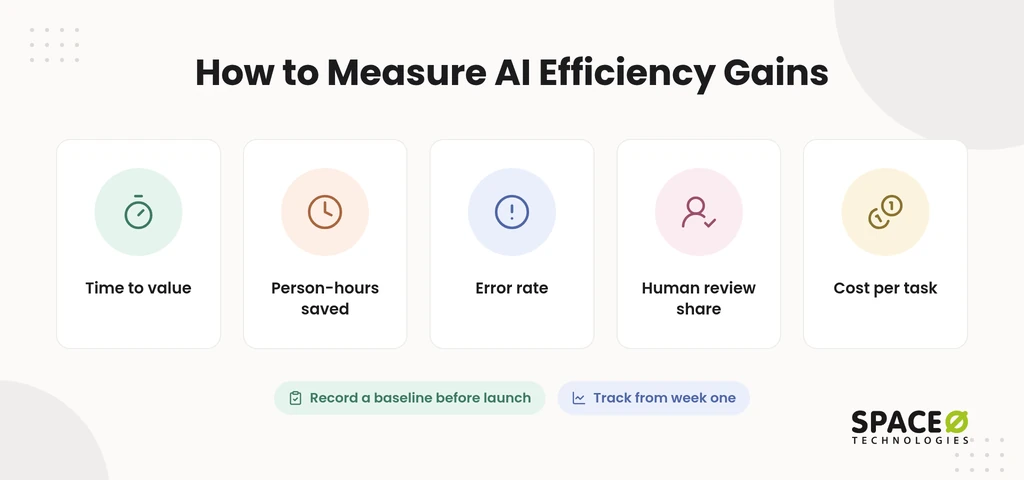
- Time to value: Count the weeks from kickoff until the system runs on real data in a live workflow.
- Person-hours saved: Count the manual hours removed per week against the pre-launch baseline.
- Error rate: Compare the share of outputs needing correction with the manual error rate.
- Human review share: Track the percent of cases routed to a person to see where the model still needs help.
- Cost per task: Divide total run cost by completed tasks, including infrastructure and model usage fees.
Impact at a glance by workflow
Each workflow has its own manual cost, its own AI change, and its own metric. Use this table to pick the baseline you record first.
| Workflow | Manual effort today | What AI changes | How to measure |
|---|---|---|---|
| Data entry and invoice processing | Staff re-key documents into systems | Extracts and posts data automatically | Person-hours saved, error rate |
| Reporting and analysis | Analysts compile weekly or monthly reports | Real-time dashboards and anomaly flags | Time from data to decision |
| Demand and inventory planning | Forecasts built from spreadsheets | Predictive models update forecasts continuously | Forecast error, stockout count |
| Customer support | Agents answer every routine ticket | Chatbots resolve routine inquiries 24/7 | Response time, share resolved without escalation |
| Equipment maintenance | Repairs after breakdowns | Failure prediction from sensor data | Unplanned downtime hours |
| Finance operations | Manual invoice checks and tax lookups | Anomaly scanning and automated tax calculations | Exceptions caught, discounts captured |
Run costs belong in the same scorecard. Our AI development cost guide covers ranges by project tier, including ongoing maintenance. With a baseline in hand, you can decide whether to buy a tool or build your own.
Off-the-Shelf Tools or Custom AI Development?
Off-the-shelf tools win on speed to start, and custom AI development wins when the workflow is yours alone. Many teams buy a tool, then find it cannot reach their CRM, billing system, or approval rules. The table below sets out the trade-off.
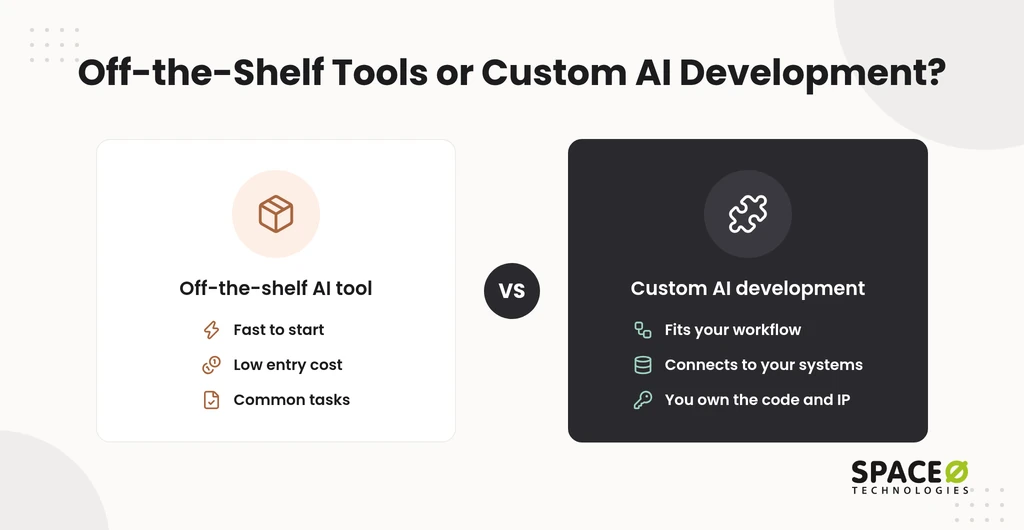
| Factor | Off-the-shelf AI tools | Custom AI development |
|---|---|---|
| Time to start | Fast: sign up and configure | Longer: discovery, build, and testing come first |
| Entry cost | Low subscription entry cost | Higher upfront build cost |
| Workflow fit | Generic workflows the vendor designed | Built around your own process and rules |
| Integration | Limited to the vendor’s connectors | Connects to your CRM, ERP, and billing systems |
| Ownership | The vendor owns the code and roadmap | You own the code, data, and IP at handover |
| Typical fit | Common tasks such as drafting and summarizing | Core workflows that set your business apart |
The trade-offs between custom AI vs. off-the-shelf shift as your workflow grows more specific.
Where an outside build partner fits
An outside build partner fits when off-the-shelf tools stop working, and your team lacks AI capacity. Space-O Technologies works as a full-cycle build partner, with discovery, design, build, and maintenance under one team. We sign an NDA before every project.
All source code, data, and IP transfer to you at completion. You choose among four engagement models: Dedicated Team, Time & Material, Fixed Cost, and Staff Augmentation. Our compliance posture covers HIPAA-ready frameworks for healthcare AI engagements.
Which department or bottleneck costs your team the most time today? Tell us whether you want to adapt an off-the-shelf tool or build custom AI, and share your workflow with our AI team for a free, expert-reviewed estimate.
Frequently Asked Questions
How does AI improve efficiency in businesses?
AI improves efficiency by automating repetitive work and analyzing data in real time. It also forecasts demand and equipment failures and handles routine customer inquiries around the clock. Staff then spend their time on work that needs human judgment.
How is AI used in business, and which industries benefit?
Common uses include predictive maintenance, invoice review, customer support, and candidate screening. Manufacturing, finance, retail, and HR teams all benefit. Predictive maintenance reads sensor data so teams can repair equipment before breakdowns. Finance teams scan invoices for fraud. Recruiters automate screening while a human reviews every hiring decision.
Is it better to add AI to an existing workflow or redesign it?
Use a simple decision rule. If the task is common across companies, such as drafting or summarizing, an off-the-shelf tool is usually enough. Slot it into your current workflow. If the workflow sets your business apart and depends on your CRM, ERP, and billing systems, redesign it. Either way, record a baseline before launch so you can show which choice paid off.
What kinds of efficiency tasks can AI handle today?
AI today handles five kinds of efficiency work: task automation, faster decisions, predictive maintenance, customer support, and workflow redesign. Automation covers data entry, invoicing, and scheduling. Machine learning forecasts demand and flags anomalies faster than manual review. Chatbots answer routine customer questions around the clock and hand complex cases to people.
Which tasks should a business automate with AI first?
Start with high-volume, rule-based work such as data entry, invoice processing, and scheduling. These tasks have clear baselines, so you can show the gain quickly. Add forecasting and support automation once the first workflow runs reliably.
How long does it take to see efficiency gains from AI?
Gains show up once the system runs on real data inside real workflows. A focused proof of concept shows early results before a full build. Record a baseline first so you can measure the change.
Why do AI efficiency projects stall before production?
Pilots stall when data is poor, risk controls are weak, or the value is unclear. Grounding, evaluation, and human review close those gaps. Scope all three in the first sprint before you approve a build.
How much does AI development cost?
Cost depends on scope, data readiness, and integrations. Our AI development cost guide puts data preparation at 25% to 40% of the total project budget. Annual maintenance typically adds 15% to 25% of the build cost. Share your workflow for a free, expert-reviewed estimate.



 All our projects are secured by NDA




 4.8


