
 By
Contents
- Separate gateway, stateless services, retrieval, and model access so each layer scales on its own.
- Put every model provider behind one internal interface to avoid vendor lock-in and swap models freely.
- Add queues, caching, and model routing only when queue depth, latency, or token spend demands them.
- Start with a single agent and split only for a different tool set, model, or security boundary.
Key Takeaways
Many AI apps work well in a demo and then strain under real users. Token bills climb, responses slow, and one provider outage can take everything offline. A scalable AI app architecture prevents this by letting each layer grow on its own.
Space-O Technologies has built AI-powered custom software since 2010 for 1,200+ clients. Our 140+ in-house developers apply these patterns through our AI development services. That experience shapes the layers, pillars, and scaling triggers in this guide.
This guide covers core layers, four pillars, and when to add each as traffic grows. It also covers agent topology, hosted versus self-hosted models, and high-stakes controls. If you are still shaping the product, start with how to build an AI app.
Core Layers of a Scalable AI App Architecture
A scalable AI app architecture has nine layers, each with one job and its own scaling path. When every function lives in one process, a spike in model calls slows login, search, and billing together. Separation of concerns fixes this problem. You can update, scale, or replace each layer below without breaking the rest of the system.
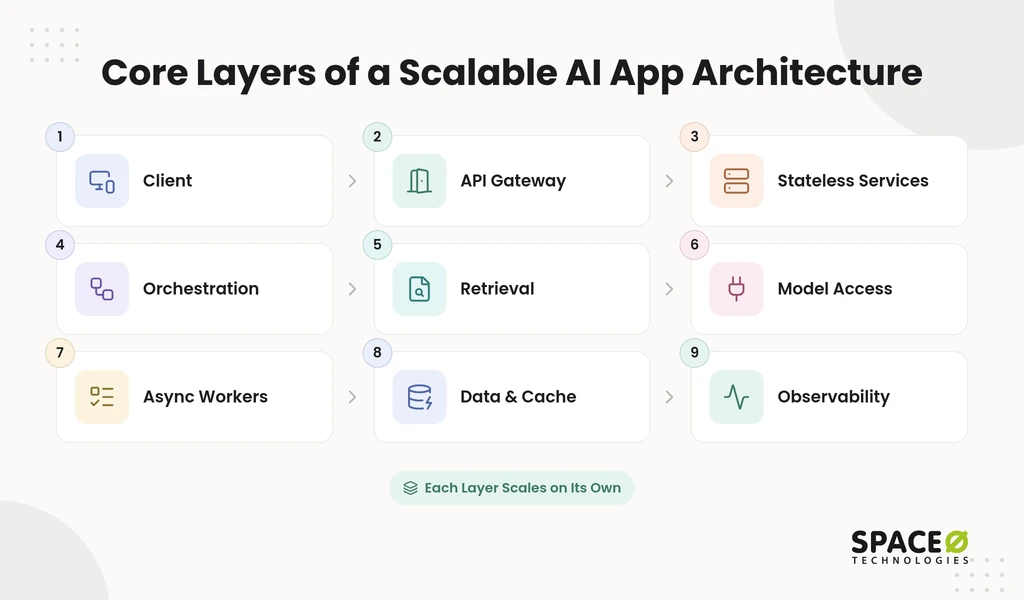
- Client layer: A React.js web app or mobile client sends requests and streams responses back to the user. It holds no secrets and calls only the gateway.
- API gateway: An application programming interface (API) gateway enforces rate limiting, authentication, and input validation before any request reaches a model. A load balancer behind it spreads traffic across healthy instances.
- Stateless application services: FastAPI or Node.js services run business logic and don’t hold onto session data between requests. Any instance can serve any user, so this tier can scale horizontally.
- Orchestration layer: This layer builds prompts, calls tools, and manages agent loops. It decides which context the model sees and which step runs next.
- Retrieval layer: Retrieval-augmented generation (RAG) fetches relevant documents from a vector database such as pgvector, Pinecone, Qdrant, or Milvus. Answers grounded in your own data stay current and checkable.
- Model access layer: One internal interface wraps every provider, such as OpenAI, Anthropic, or a self-hosted vLLM model. That is API integration for AI applications done once, behind one module. Application code never calls a vendor SDK directly.
- Async workers: A message queue such as Celery, RabbitMQ, or Kafka hands heavy jobs to background workers. Embedding runs, document parsing, and long agent loops leave the request path.
- Data and cache layer: PostgreSQL stores transactional state, while Redis caches frequent responses and embeddings. Semantic caching answers near-duplicate prompts without a new model call.
- Observability layer: Tracing records every prompt, token count, latency, error, cost, and model version. Tools such as LangSmith, Prometheus, and Grafana make each request traceable from day one.
Microservices are optional at this point. The layers are logical boundaries first, and they become separate deployables only when one needs to scale alone. The next section adds the rules that protect these layers.
Four Pillars That Keep a Scalable AI App Running
Four pillars keep an AI app stable under load: provider isolation, retrieval, security gates, and failure handling. Layers describe where code lives. Pillars describe the rules that stop cost and failure from spreading across the system. A team that skips one pillar usually discovers the gap in production.
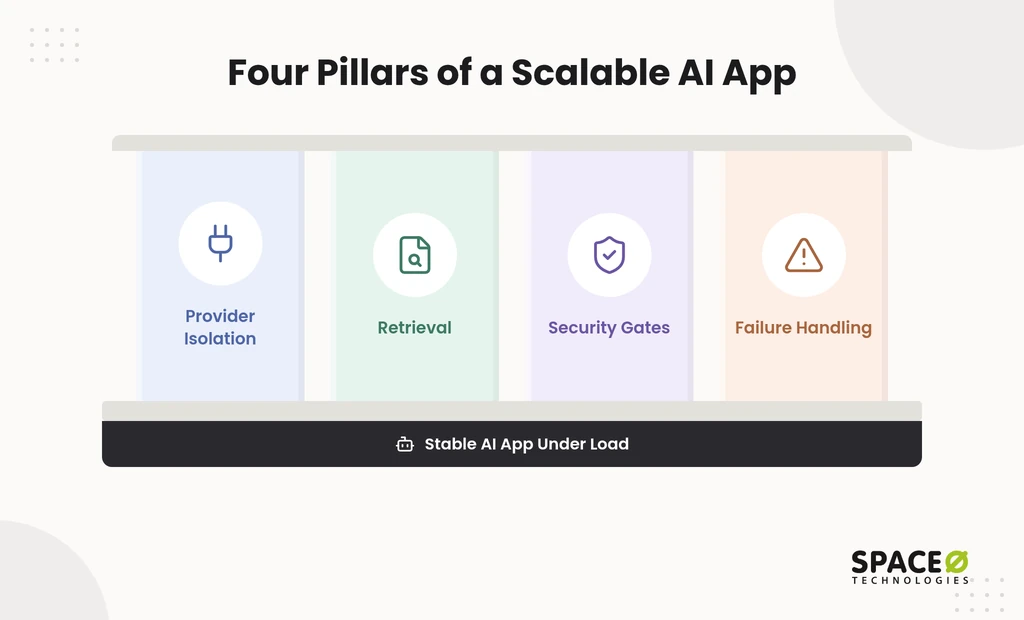
- Provider isolation: Put every model provider behind one dedicated module. This step avoids vendor lock-in and lets you swap AI models or add a fallback without rewriting the app.
- Retrieval: Ground answers in your own data through RAG, backed by sound data management for AI app development and a vector database. Pass minimum viable context, because every extra token adds cost and latency.
- Security gates: Unprotected AI endpoints invite system abuse and runaway token bills. The gateway controls described in the core layers block both before a model is called.
- Failure handling: Treat every AI output as inherently unreliable. Set timeouts, catch malformed JavaScript Object Notation (JSON), validate against a Pydantic schema, and fall back safely.
With the pillars in place, the next question is timing. Version one does not need every layer.
How to Architect an AI App for Scale: When to Add Each Layer
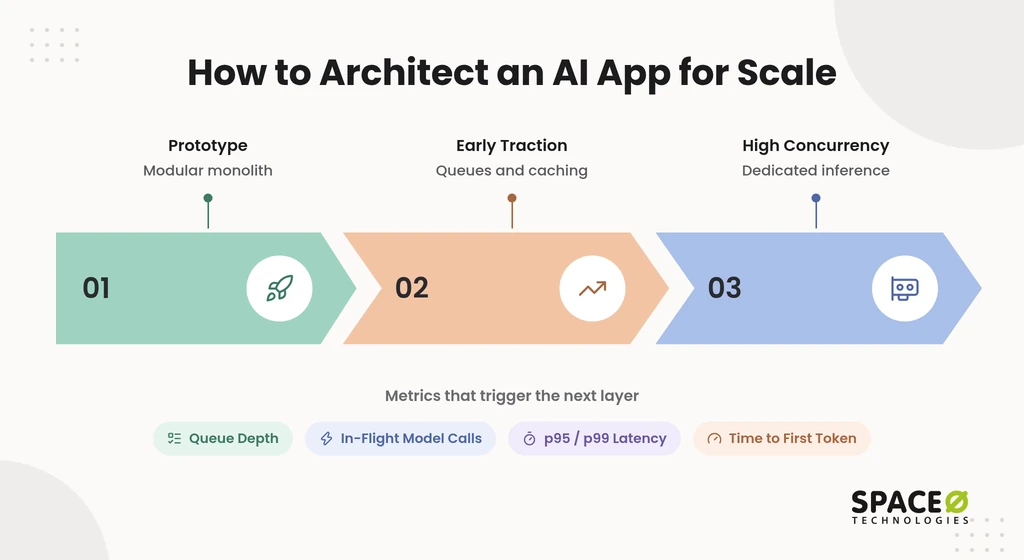
To architect an AI app for scale, start small and add each layer only when a metric forces it. Version one is a modular monolith on a hosted model API. That is the usual first step when scaling an AI proof of concept. Queues, caching, routing, and dedicated inference come later. Each one is tied to a trigger you can measure, such as queue depth or 95th percentile (p95) latency.
Many teams either overbuild on day one or rebuild under pressure. Both paths waste budget. The table below ties each stage to the signal that justifies the next investment.
| Stage | Architecture | Trigger to move on | What to add next | Main cost driver |
|---|---|---|---|---|
| Prototype | Modular monolith, hosted model API, PostgreSQL, a vector database, basic tracing | Real users arrive, and in-flight model calls start to queue | Gateway rate limits, provider interface, output validation | Engineering time and data preparation |
| Early traction | Stateless services behind a load balancer, message queue, and workers | p95 latency or queue depth climbs, and token spend becomes a budget line | Redis semantic caching, model routing | Token usage |
| High concurrency | Independently scaled services in Docker on Kubernetes | 99th percentile (p99) latency, time to first token, or graphics processing unit (GPU) throughput breaks budget | Dedicated inference or GPU workers on vLLM, per-tenant token budgets | Compute and GPU hours |
Triggers for each scaling stage
Four metrics tell you when the architecture must change. Each metric points to a specific layer, so you spend on the bottleneck. Many teams use the same approach to scale a web application.
- Queue depth: A growing backlog means workers cannot keep up. Add workers first, then move the heaviest jobs onto their own queue.
- In-flight model calls: Concurrent calls near your provider’s rate limit cause throttling. Add a queue, retry with backoff, and wire a second provider into the model interface.
- p95 and p99 latency: These percentiles show what your slowest users actually feel. Rising tails point to caching, routing, or a split-out service.
- Time to first token: This metric measures how long users wait before a streamed answer starts. When it slips, move simple requests to smaller, faster models.
Model routing to control token costs
Model routing sends simple requests to small, fast models and reserves large reasoning models for hard ones. Routing every call to one large reasoning model is one of the costliest habits in a growing AI app. Intent classification, extraction, and reformatting rarely need the largest model. A router in the model access layer makes this choice per request.
The price gap makes routing worth the effort. Space-O Technologies’ LLM integration cost guide prices efficient open-weight models at $0.05 to $1.00 per million tokens. Frontier models run $15 to $75. The same guide notes that caching, batching, and routing can cut token spend once a workload is live.
What each stage costs
Cost shifts from engineering at the prototype stage to tokens, then to compute, as traffic grows. GPU workloads, low-latency responses, and hybrid or on-premises hosting raise both build and monthly costs. Plan for that jump before the high-concurrency stage arrives.
Our AI development cost breakdown gives planning figures for each stage. Key cost drivers include data quality, model complexity, and integration depth.
- Prototype: Data collection and preparation is a major early cost. A basic MVP (minimum viable product) starts from $15,000 on our MVP development services page. A feature-rich MVP can reach $50,000 or more, with payments tied to deliverables.
- Early traction: Token spend becomes the main variable cost as traffic grows. That is why caching and routing arrive at this stage.
- High concurrency: Compute and GPU hours become the main cost. Once you serve your own models, quantization can shrink the compute each request needs.
- Every stage: Annual maintenance is a recurring cost on top of the build, and monitoring adds a monthly line item.
The same stage discipline applies to high-volume products in general. Glovo, an on-demand delivery app we built, has passed 50M+ downloads.
Know Which Layer Your AI App Needs Next
Our AI engineers review your traces, latency, and token spend, then add the layer your metrics demand. Tell us your traffic goals for a scoped review.

Once the stages are clear, the next design choice is how many agents the orchestration layer runs.
Single-Agent vs Multi-Agent: When to Split
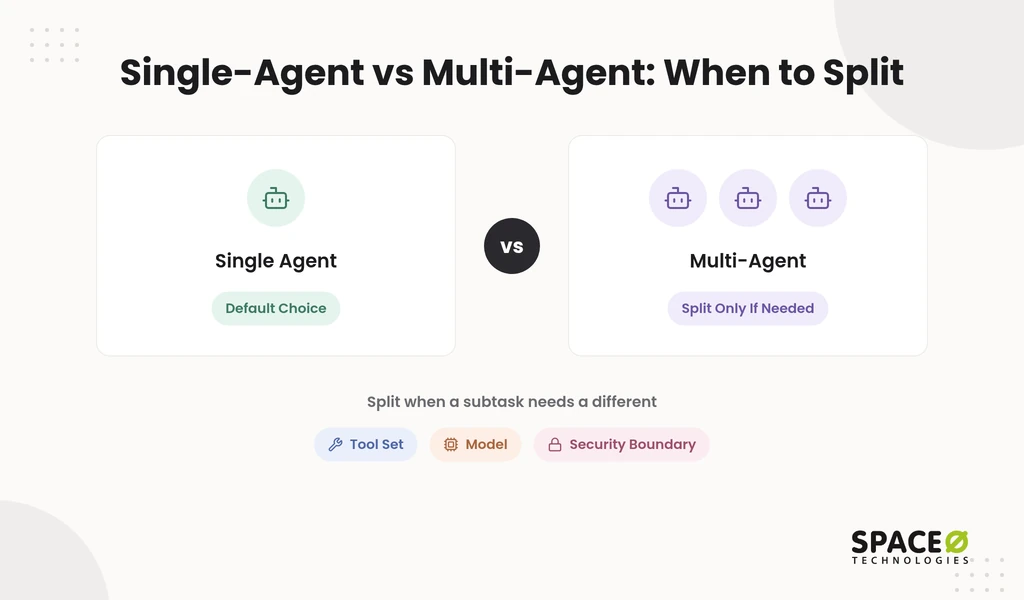
One agent is the right default. A second agent earns its cost only when a subtask passes the three-part test below. A single agent is one model, one loop, one tool registry. You get one conversation history, one prompt to debug, and one trace. Every added agent adds a serialization hop and raises the latency floor. Keep AI agent orchestration as simple as the workflow allows.
Topology also changes the build budget. Space-O Technologies’ LLM integration cost guide prices an agentic workflow at $50,000 to $150,000. It prices an enterprise multi-agent system at $150,000 to $500,000+.
A simple three-part test shows when a subtask deserves its own agent.
The three-part split test
Split a subtask into its own agent only when it passes at least one of these three tests.
- Different tool set: The subtask needs tools the main agent should never touch. Payment or record-update APIs are common examples.
- Different model: The subtask performs best on a specialized or smaller model. That model then needs its own evaluation and its own trace.
- Different security boundary: The subtask handles data that other agents must not see. Protected health information is a typical case.
Inside each agent, the ReAct pattern runs a think, act, observe loop until the task is done. This loop is one of several AI agent architecture patterns. Topology settled, the next decision is where the models themselves run.
Hosted API vs Self-Hosted Models
Hosted model APIs win on speed to launch, while self-hosted models win on data control and steady high volume. The open-source LLM vs proprietary API choice depends on traffic shape, data sensitivity, and GPU capacity. The table compares both on the factors that change scaling decisions.
| Factor | Hosted API (OpenAI, Anthropic) | Self-hosted (vLLM on your GPUs) |
|---|---|---|
| Setup effort | Low, an API key and the model interface | High, GPU provisioning, serving, and autoscaling |
| Cost pattern | Pay per token, so cost rises with usage | Pay for compute, so cost rises with capacity |
| Scaling | Provider handles capacity within your rate limits | Your team scales GPU workers and queues |
| Data control | Data leaves your environment under provider terms | Data stays inside your infrastructure |
| Best fit | Prototype and early traction | Steady high volume or strict data rules |
Self-hosting moves cost rather than removing it. Space-O Technologies’ LLM integration cost guide notes that a self-hosted deployment trades API fees for hardware and operational burden. The model interface from the first pillar keeps this decision reversible. You can launch on a hosted API and move a workload in-house when the metrics justify it.
Scaling AI in Regulated or High-Stakes Workflows
High-stakes AI workflows need human-in-the-loop checkpoints, guardrails, and audit logs built into the architecture, not added later. Moving a pilot into production is where budget and risk both jump. A wrong output in a lending, clinical, or claims workflow costs far more than a slow one. These controls belong in the orchestration and observability layers from the start. An AI agent governance framework formalizes them.
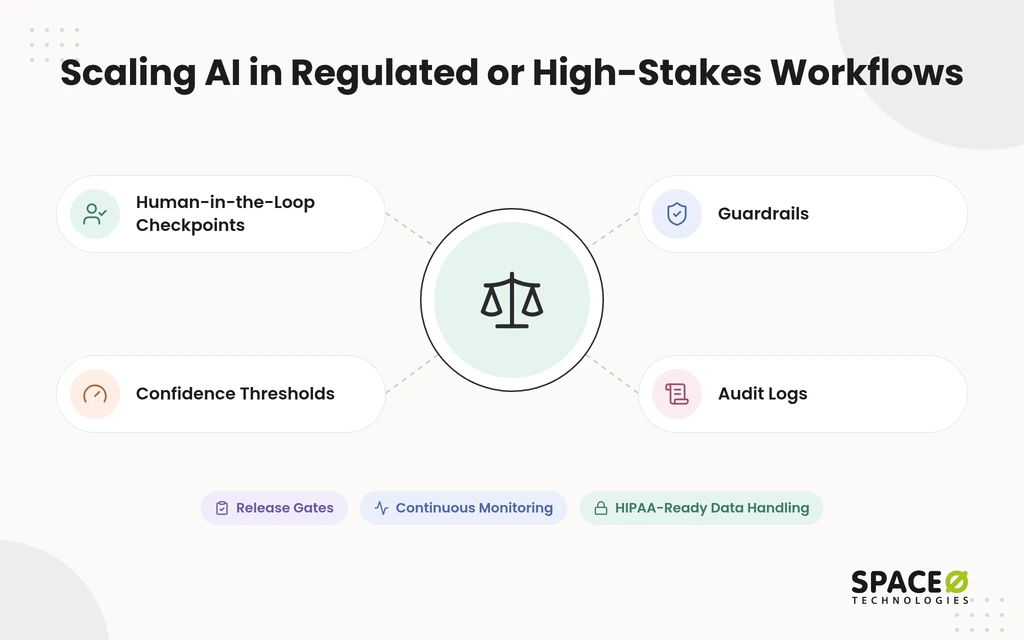
- Human-in-the-loop checkpoints: Place a human approval step wherever an AI decision carries real business or safety risk. People approve consequential actions, and the model only proposes them.
- Confidence thresholds: Score the confidence of each output before release. Route anything below the acceptable threshold to a human reviewer.
- Guardrails: Check inputs and outputs against policy before they reach users or downstream systems. Block or rewrite responses that break those rules.
- Audit logs: Record each decision with its prompt, retrieved context, model version, and reviewer. That record answers auditors and speeds up debugging.
- Release gates: Each production model passes an evaluation suite covering accuracy, hallucination rate, bias, latency, and cost. Continuous monitoring stays in place after launch.
Healthcare teams should design for HIPAA-compliant handling of protected health information from day one. HIPAA is the Health Insurance Portability and Accountability Act. In practice, that means encryption, strict access controls, and careful review of any model provider that touches patient data.
How Space-O Technologies Delivers Scalable AI Apps
Space-O Technologies matches the engagement model to your scale stage, so the contract fits the architecture. We have developed 300+ software solutions and report 97% client retention. We sign a non-disclosure agreement (NDA) before every project. All source code, data, and intellectual property (IP) built during a project transfer to you at completion.
| Engagement model | Best scale stage | Why it fits |
|---|---|---|
| Fixed Cost | Prototype or scoped MVP | Scope, timeline, and budget are agreed up front |
| Time & Material | Early traction with evolving AI scope | Scope can shift as traces and metrics reveal what to build next |
| Dedicated Team | Long-term build at high concurrency | A stable team owns the architecture as it grows |
| Staff Augmentation | Any stage with a skills gap | AI or backend engineers join your in-house team |
Your scale stage should decide the model, even when you hire AI developers for one skills gap. The last step before any build is a clear scope.
Scope Your AI App Architecture Before You Build
Four answers shape your first architecture: app type, expected traffic, model hosting, and data sensitivity. These answers decide which layers you build now and which ones wait for a trigger.
- App type: Define whether you need a chat assistant, document workflow, action-taking agent, or embedded AI feature.
- Expected traffic: Estimate peak concurrent users, requests per minute, and your target p95 latency.
- Model hosting: Decide between managed APIs, self-hosted models, or both behind one interface.
- Data sensitivity: Confirm whether the app touches regulated or customer-confidential data.
Bring these four answers to us for a free, expert-reviewed estimate. You will leave with a scoped plan for your first release.
Frequently Asked Questions
What is scalable AI app architecture?
Scalable AI app architecture splits an AI product into independent layers that grow separately. Typical layers are the client, gateway, services, retrieval, model access, queues, and observability. This design keeps traffic spikes and model costs from breaking the whole app.
What are the core layers of an AI application?
Nine layers: client, API gateway, stateless services, orchestration, retrieval, model access, async workers, data and cache, and observability. Each layer has one job and scales on its own.
How do you build a scalable AI app?
Start with a modular monolith on a hosted model API, then add layers only when a metric demands them. Add queues when queue depth climbs, caching when latency or token spend rises, and dedicated inference at high concurrency.
What is semantic caching in an AI app?
Semantic caching returns a stored response when a new prompt means nearly the same thing as one already answered. No model call is made. Add Redis semantic caching once p95 latency or queue depth climbs.
What does a vector database add to an AI app?
A vector database lets the retrieval layer search your documents, so RAG gives the model current, checkable context. Unlike caching or routing, it is not a later add-on. Common options include pgvector, Pinecone, Qdrant, and Milvus.
Should an AI app use a single agent or multiple agents?
Use a single agent by default. Split into more agents only when a subtask needs a different tool set, model, or security boundary. Each added agent adds latency and another trace to debug.
Should you use a hosted API or self-hosted models?
Choose a hosted API for fast launch and early traction. Choose self-hosted models for strict data control or steady high volume. A shared model interface lets you move a workload later.
How much does a scalable AI app cost?
Cost depends on scope, data readiness, and traffic. A basic MVP starts at $15,000, and a feature-rich MVP can reach $50,000 or more. Token and compute costs then grow with usage.



 All our projects are secured by NDA




 4.8


