
 By
By 
- A custom web application is browser-based software built for one organization’s specific workflows and goals.
- Custom solutions differ from off-the-shelf software, websites, and SaaS products in flexibility, ownership, and scalability.
- The development process follows seven structured phases, from requirement analysis through deployment and maintenance.
- Development costs range from $15,000 to $150,000+ based on complexity, features, and technology requirements.
- The timeline spans 2 to 12+ months depending on project scope, design complexity, and integration needs.
Key Takeaways
Every business runs on processes that generic software cannot fully support. Spreadsheets, manual workflows, and off-the-shelf tools often create gaps that slow down operations.
Custom web application development solves this problem by building software around specific business requirements. Instead of adapting workflows to fit a tool, the tool adapts to fit the business.
The global custom software development market reached USD 65.06 billion in 2026, according to a report by Precedence Research. This growth reflects how organizations across industries invest in tailored software solutions. Around 72% of enterprises now prioritize custom application development to improve efficiency, as noted by Business Research Insights.
This guide covers everything about custom web application development in a practical, structured format. It explains what custom web apps are, how they compare to alternatives, and what the development process involves. It also covers development cost, timeline, technology choices, risks, and how to choose the right development partner.
Table of Contents
- What Is a Custom Web Application?
- Custom Web Apps vs Off-the-Shelf Software vs Websites
- Key Benefits of Custom Web Application Development
- Types of Custom Web Applications You Can Build
- Step-by-Step Web Application Development Process
- Technology Stack for Custom Web App Development
- Features to Integrate in Your Web Application
- Industry Use Cases and Real-World Examples
- Cost of Developing a Custom Web Application
- Timeline for Web Application Development
- Common Risks and How to Avoid Them
- How to Choose a Custom Web App Development Company
- Why Choose Space-O Technologies?
- Ready to Develop a Custom Web Application?
- FAQs About Custom Web App Development
What Is a Custom Web Application?
A custom web application is software accessed through a web browser and built for one specific organization. It addresses unique business workflows, data requirements, and user needs that off-the-shelf tools cannot fully support.
Unlike pre-built software designed for broad audiences, a custom web app is developed from scratch. It aligns with how a specific business operates rather than forcing process changes. The application can integrate with existing tools, databases, and third-party platforms already in use.
The core purpose of building a custom web application includes:
- Automating complex, repetitive tasks that are currently handled manually or through spreadsheets
- Centralizing data from multiple systems into one unified platform for better visibility
- Creating branded customer-facing portals that reflect the company’s identity and service model
- Integrating with existing CRM, ERP, payment, or communication tools through secure APIs
- Scaling operations without hitting the feature limits or licensing restrictions of generic software
A standard website presents static or semi-dynamic information to visitors. A custom web application, on the other hand, lets users perform tasks and interact with data. Users can log in, submit forms, manage records, run reports, and trigger workflows directly from the browser.
This distinction matters for businesses evaluating their digital strategy. A company that needs a marketing presence may only need a website. A company that needs to manage operations, customer data, or internal workflows typically needs a custom web application.
Custom Web Apps vs Off-the-Shelf Software vs Websites
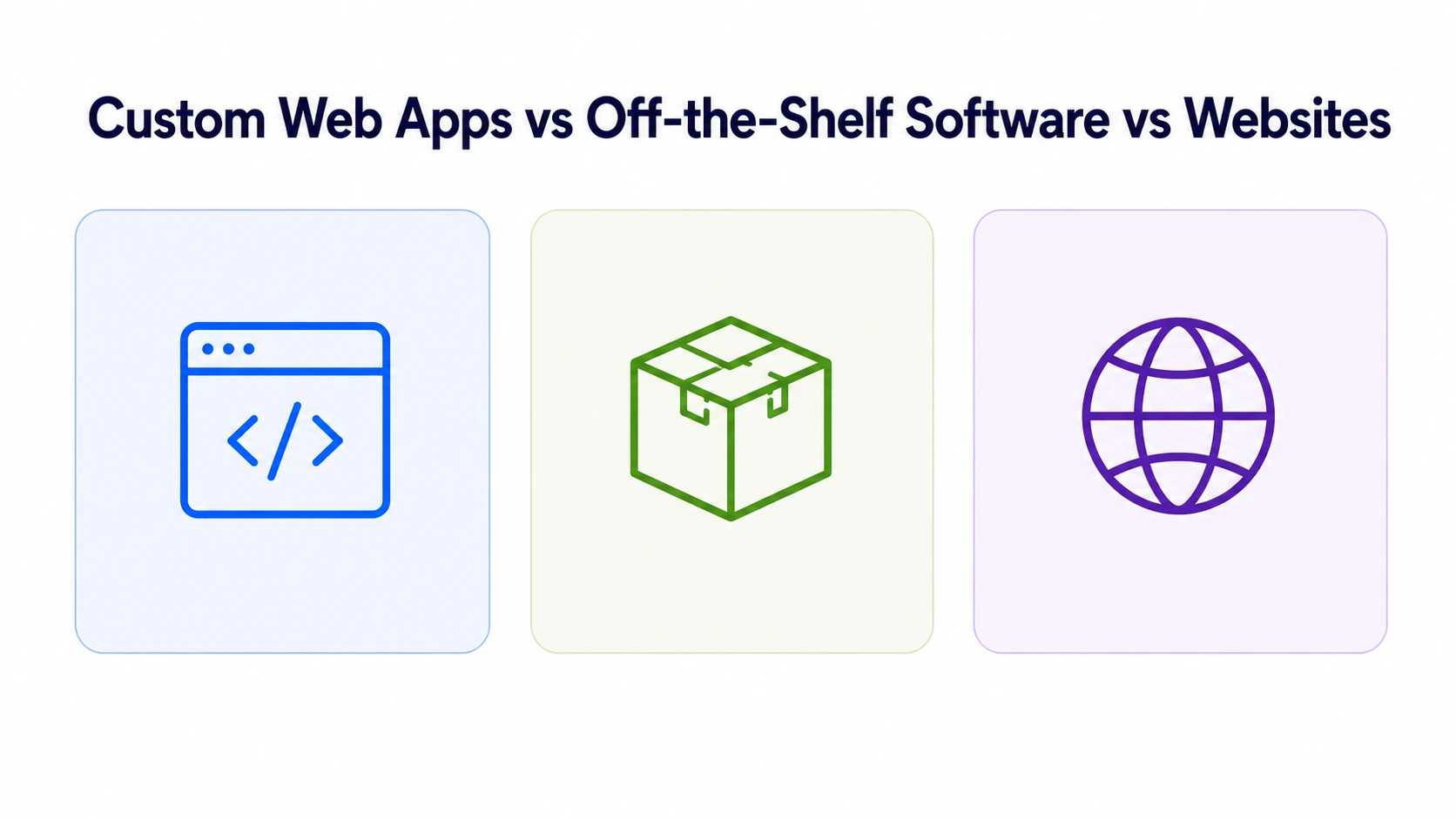
Choosing between custom development, off-the-shelf software, and a standard website is one of the first decisions businesses face. Each option serves a different purpose, and the right choice depends on specific operational needs.
The comparison below highlights the key differences:
| Factor | Custom Web Application | Off-the-Shelf Software (SaaS) | Standard Website |
|---|---|---|---|
| Purpose | Built for specific business workflows and processes | Designed for broad, general-purpose use across industries | Presents information and content to visitors |
| Flexibility | Fully customizable to exact requirements | Limited to features provided by the vendor | Customizable in design but limited in functionality |
| Scalability | Scales based on architecture decisions made during development | Scales within the vendor’s infrastructure and pricing tiers | Limited scalability for complex operations |
| Ownership | Full ownership of code, data, and infrastructure | Vendor owns the platform; access is subscription-based | Ownership of content and design assets |
| Integration | Connects with any system through custom APIs | Integrations depend on the vendor’s supported connectors | Limited integration capabilities |
| Cost model | One-time development cost plus ongoing maintenance | Recurring monthly or annual subscription fees | One-time build cost with periodic updates |
| Time to launch | Weeks to months depending on complexity | Days to weeks for initial setup | Days to weeks for basic sites |
| Security control | Full control over security measures and compliance | Dependent on the vendor’s security practices | Basic security managed by hosting provider |
| Long-term cost | Lower over time without recurring license fees | Accumulates over years through subscription payments | Minimal ongoing costs for simple sites |
When to choose custom development
A business may need custom web application development when existing software cannot match its workflows. Reliance on spreadsheets, manual data transfers, or disconnected tools are common indicators. The need for integration across multiple systems also points toward a custom solution.
When off-the-shelf software is sufficient
If the business need is common, well-defined, and does not require deep customization, SaaS tools can work. Examples include basic email marketing, simple project management, or standard accounting tasks.
When a website is enough
Businesses that primarily need a digital presence for marketing, branding, or content publishing can start with a website. A website becomes insufficient when users need to log in, complete transactions, or interact with data.
Key Benefits of Custom Web Application Development
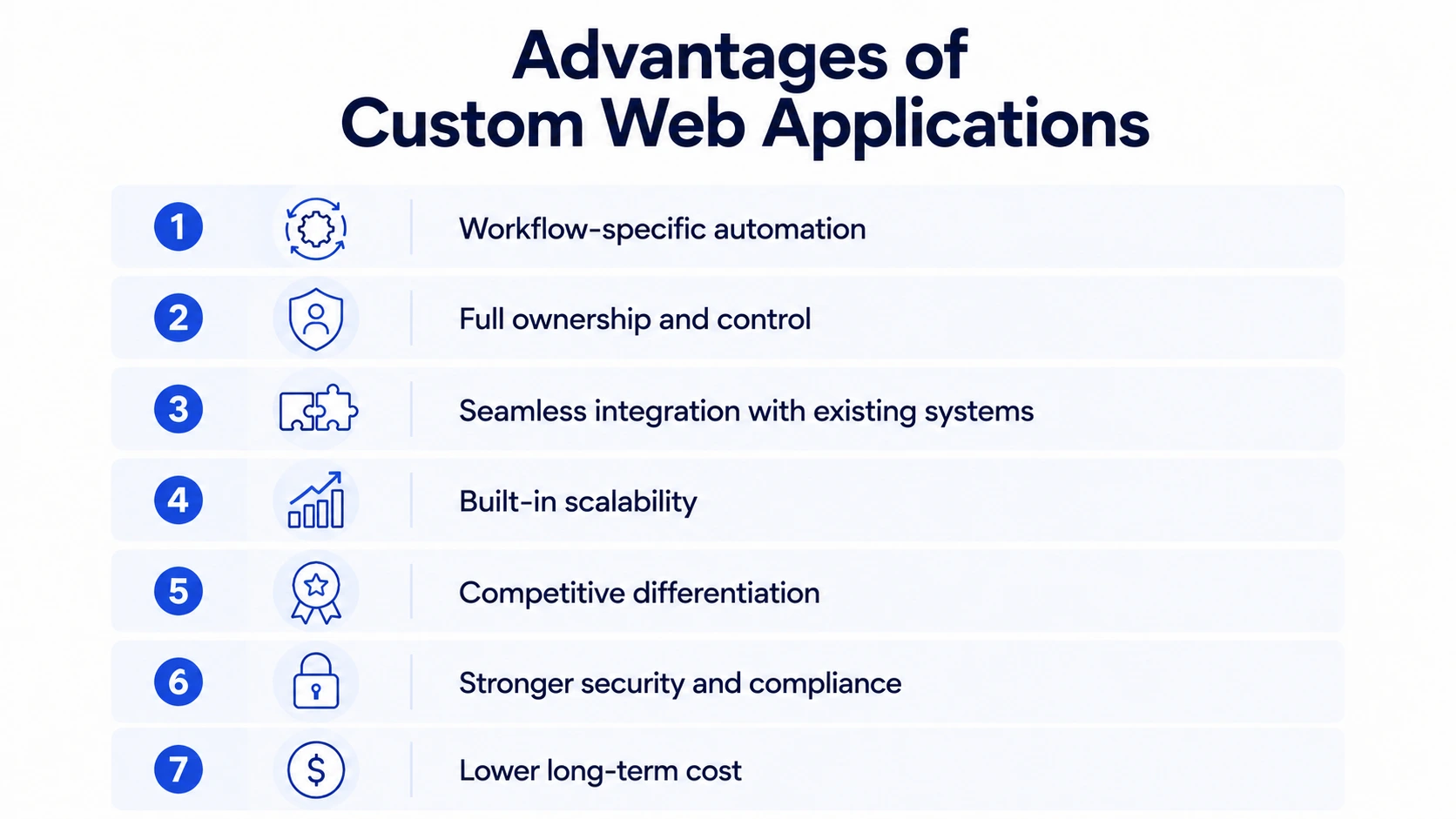
Investing in custom web software development delivers advantages that off-the-shelf solutions cannot replicate. The benefits compound over time as the application evolves with the business.
1. Workflow-specific automation
Generic software forces businesses to adapt processes to fit the tool’s structure. A custom web application does the opposite. It automates tasks based on how the organization actually operates. This eliminates manual workarounds, reduces human error, and improves overall efficiency.
2. Full ownership and control
With a custom application, the business owns the codebase, data, and infrastructure entirely. There is no dependency on a vendor’s pricing changes, feature removals, or sunset decisions. This ownership provides long-term stability and independence.
3. Seamless integration with existing systems
Custom web applications connect with CRMs, ERPs, payment gateways, and third-party APIs. These integrations are built to match the exact data flow requirements of the business. Unlike off-the-shelf tools that support limited connectors, custom apps integrate with any system.
4. Built-in scalability
Architecture decisions made during development determine how the application handles growth. Custom applications can use microservices, cloud-native infrastructure, and load balancing from the start. This means the application handles increased users, transactions, and data without performance issues.
5. Competitive differentiation
A custom web application enables features and user experiences that competitors using generic tools cannot offer. Branded portals, unique workflows, and personalized dashboards create differentiation in the market.
6. Stronger security and compliance
Custom development allows full control over security protocols, data storage, and access management. Applications can be built to meet specific compliance standards such as HIPAA, GDPR, or PCI DSS. Security measures are embedded throughout the development lifecycle, not added as an afterthought.
7. Lower long-term cost
Off-the-shelf software accumulates subscription fees year after year. A custom application involves a one-time development cost with predictable maintenance expenses. Over a multi-year period, the total cost of ownership is often lower for custom solutions.
Types of Custom Web Applications You Can Build
Custom web applications vary in purpose, architecture, and complexity. Understanding the different types helps identify what best fits a specific business requirement.
By business function
-
Customer portals: Secure, login-based platforms where customers access accounts, track orders, or submit requests. These portals reduce support tickets and improve customer self-service capabilities.
- Customer relationship management (CRM) systems: Applications that track leads, manage sales pipelines, and store customer interaction history. Custom CRMs are built around the specific sales process and customer lifecycle stages.
- eCommerce platforms: Online stores with custom product catalogs, checkout flows, payment integrations, and inventory management. Custom eCommerce development handles complex pricing, multi-vendor setups, and unique product configurations.
- Web portals for internal operations: Portals that connect employees, departments, and partners through a shared platform. Custom web portal development supports role-based access, data sharing, and workflow management.
- Learning management systems (LMS): Platforms that deliver online courses, track learner progress, and issue certifications. Custom LMS applications serve corporate training programs or commercial education businesses.
- SaaS products: Multi-tenant applications designed for commercial distribution to external customers. SaaS development requires subscription management, user provisioning, and multi-tier access controls.
Enterprise resource planning (ERP) systems: Centralized platforms that manage finance, inventory, procurement, and HR across departments. Custom ERPs align with the exact operational structure of the business.
By technical architecture
- Single-page applications (SPAs): Applications that load a single HTML page and dynamically update content without full-page reloads. SPAs deliver fast, responsive experiences similar to desktop applications.
- Progressive web applications (PWAs): Web applications that offer offline capabilities, push notifications, and app-like behavior. Progressive web app development bridges the gap between web and native mobile experiences.
- Multi-page applications (MPAs): Traditional web applications where each user action loads a new page from the server. MPAs work well for content-heavy platforms and applications with complex navigation structures.
- Enterprise web applications: Large-scale, multi-module applications designed for complex organizational workflows. Enterprise web application development involves advanced security, role-based permissions, and system-wide integrations.
For a deeper look at application categories, refer to the guide on types of web applications.
Build a Custom Web App That Fits Your Business
Whether it is a customer portal, SaaS product, or internal operations tool, the right architecture matters. Share your requirements and get expert guidance on the best approach.

Step-by-Step Web Application Development Process
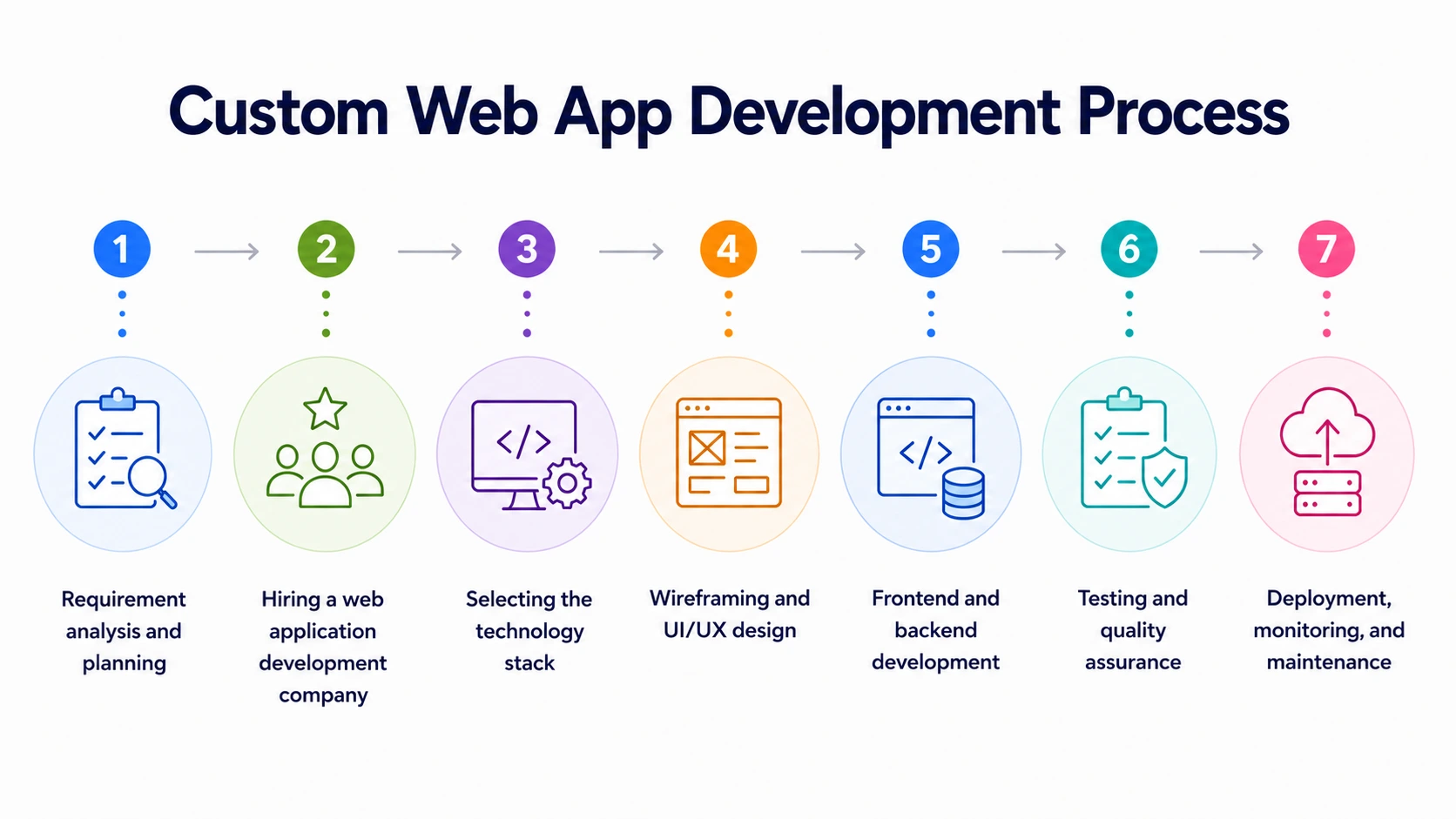
Developing a custom web application follows a structured, phased approach. Each phase builds on the previous one to reduce risk and keep the project aligned with business objectives.
-
Requirement analysis and planning
This is the foundation phase where business goals, user needs, and technical requirements are documented. The outcome is a clear project scope that all stakeholders agree on before development begins.
Key activities in this phase include:
- Defining the primary business problem the application will solve
- Identifying target users and mapping their key workflows
- Listing required features and prioritizing them for the initial release
- Researching competitor applications to identify gaps and opportunities
- Estimating budget, timeline, and resource requirements
A detailed scope document produced during this phase prevents costly rework later. Businesses that skip thorough planning often face scope creep and budget overruns during development. Refer to the complete software development process guide for a deeper breakdown.
-
Hiring a web application development company
After planning is complete, the next step is selecting a development partner with relevant experience. The right company brings both technical expertise and industry knowledge to the project.
Factors to evaluate when choosing a partner include:
- Proven experience delivering similar custom web application development projects
- Proficiency in relevant technologies, frameworks, and programming languages
- Transparent pricing models with no hidden costs
- Clear communication practices and regular progress updates
- Strong portfolio with verifiable client references and case studies
- Understanding of Agile development methodology and iterative delivery
- Secure coding practices and data protection standards for regulated industries
Space-O Technologies has skilled and experienced custom web application developers with expertise in building enterprise web apps for healthcare, education, and travel. The cost to hire web developers varies based on experience level, location, project complexity, and engagement model.
-
Selecting the technology stack
The development team selects technologies based on project requirements, scalability needs, and long-term maintainability. The technology stack covers frontend, backend, databases, hosting, and DevOps tools.
Components Technologies Front-end Languages HTML, CSS, JavaScript Front-end Frameworks React.js, Angular, Vue.js Back-end Languages Python, Java, Ruby, Node.js, PHP Back-end Frameworks Django (Python), Spring Boot (Java), Ruby on Rails (Ruby), Express.js (Node.js), Laravel (PHP) Databases (Relational) MySQL, PostgreSQL, MS SQL Databases (NoSQL) MongoDB, CouchDB Server & Hosting AWS, Google Cloud, Azure; Server Technologies: Nginx, Apache Middleware & APIs RESTful APIs, GraphQL Authentication & Security OAuth, JWT, SSL/TLS Development Tools Version Control: Git (GitHub, Bitbucket); CI/CD: Jenkins, Travis CI, CircleCI Mobile Responsiveness Bootstrap, Foundation Performance & Monitoring Google Lighthouse, New Relic Scalability Microservices, Serverless Computing, Docker, Kubernetes The choice within each category depends on the application’s requirements, team expertise, and scalability goals. For a detailed comparison of available options, refer to the guide on top web application frameworks.
-
Wireframing and UI/UX design
Business analysts create wireframes that map out the application’s structure, screen flow, and core interactions. These visual blueprints ensure all stakeholders share a unified vision before any code is written.
The UI/UX design team then transforms wireframes into high-fidelity prototypes. Tools like Figma or Adobe XD are used to create interactive mockups. This step validates the user experience before development begins, saving significant time and cost.
-
Frontend and backend development
This phase is where designs and planned features become a working application. Frontend developers build the user interface using HTML, CSS, and JavaScript frameworks. Backend developers handle server-side logic, database architecture, and API integrations.
Most custom web application development projects follow Agile methodology with two-week sprint cycles. This iterative approach delivers working features incrementally instead of waiting for a single, final release. Regular progress updates ensure the product stays aligned with the original vision.
During this phase, the project manager provides regular updates about progress. These updates ensure that the product aligns with the initial vision. Feedback at each sprint review ensures the final product resonates with business goals.
-
Testing and quality assurance
After development, the QA team conducts thorough testing to identify bugs, performance issues, and security vulnerabilities. Testing happens across multiple dimensions:
- Functional testing: Verifies that every feature works as specified
- Usability testing: Confirms the application is intuitive for target users
- Performance testing: Checks response times, load handling, and scalability
- Security testing: Identifies vulnerabilities and validates data protection measures
- Cross-browser testing: Ensures consistent behavior across Chrome, Safari, Firefox, and Edge
The development team fixes all identified issues before deployment. A thorough code review ensures the codebase meets quality standards and is maintainable long-term. For strategies on handling increased user traffic, refer to the guide on how to scale a web application.
-
Deployment, monitoring, and maintenance
The application is deployed to a production environment using cloud hosting platforms like AWS, Google Cloud, or Azure. The DevOps team configures servers, domains, SSL certificates, and monitoring tools.
Key deployment activities include:
- Selecting a hosting provider that suits the web app’s performance requirements
- Registering a domain name that reflects the application’s identity and purpose
- Deploying the application using Git, CI/CD pipelines, or deployment scripts
- Implementing analytics tools to track user behavior and identify improvement areas
Post-launch, the development team monitors performance, tracks user behavior through analytics, and addresses issues as they arise. Ongoing maintenance includes security patches, bug fixes, performance optimization, and feature enhancements. Industry benchmarks suggest budgeting 15-20% of the initial development cost annually for maintenance.
Turn Your Web App Idea Into a Working Product
From requirement analysis to deployment, the right development team makes the difference. Share your vision and receive a detailed project roadmap and technology recommendation.
Technology Stack for Custom Web App Development
The technology stack determines how the application performs, scales, and integrates with other systems. Selecting the right combination of frontend, backend, database, and DevOps tools is a foundational decision.
- Frontend technologies: Frontend frameworks control what users see and interact with in the browser. React.js currently holds the largest market share among frontend frameworks. Angular and Vue.js are strong alternatives depending on project complexity and team expertise.
- Backend technologies: Backend technologies handle business logic, data processing, and server-side operations. Node.js works well for real-time applications. Laravel (PHP) and Django (Python) are proven choices for data-driven enterprise applications. Spring Boot (Java) handles high-transaction enterprise systems.
- Database management: Relational databases like PostgreSQL and MySQL handle structured data with complex relationships. NoSQL databases like MongoDB work better for unstructured data and high-volume document storage.
- Cloud and DevOps: Cloud platforms like AWS, Google Cloud, and Azure provide hosting, scaling, and managed services. DevOps practices using Docker, Kubernetes, and CI/CD pipelines ensure continuous integration and deployment.
The right technology stack depends on the application’s purpose, expected user load, and integration requirements. Decisions made during this phase directly affect long-term performance, cost, and maintainability.
Features to Integrate in Your Web Application
The features integrated into a custom web application must align with the target audience’s needs and core business objectives. Here is a comprehensive list of essential and advanced features to consider:
| Features | Description |
|---|---|
| User Authentication | Secure login with role-based access controls, SSO, and multi-factor authentication |
| Search Functionality | Fast, filtered search that helps users find content, products, or data quickly |
| User Dashboard | Personalized interface displaying relevant metrics, settings, and activity history |
| Contact & Feedback Forms | Structured input forms for inquiries, support requests, or user feedback |
| Notifications | Email, SMS, or in-app alerts that keep users informed about updates and actions |
| eCommerce Capabilities | Product listings, shopping cart, checkout flow, and payment processing |
| Analytics & Reporting | Dashboards showing user behavior, business metrics, and application performance |
| Real-time Interactions | Live chat, instant messaging, or collaborative editing features |
| Third-party Integrations | Connections with CRMs, ERPs, marketing tools, and external platforms |
| APIs | Secure interfaces that enable communication with other software and services |
| Multi-language & Multi-currency Support | Localization features for serving global audiences |
| Advanced Security Protocols | Encryption, two-factor authentication, and compliance-ready access controls |
| Progressive Web App Features | Offline access, push notifications, and native app-like performance |
| Machine Learning & AI Integration | Chatbots, predictive analytics, recommendation engines, and automated classification |
| Subscription & Billing | Recurring payment management, plan tiers, invoicing, and usage tracking |
| File Upload & Management | Document storage, preview, version control, and access management |
Feature prioritization should be based on the application’s primary purpose, user requirements, and budget constraints. Starting with a minimum viable product (MVP) that includes core features allows faster launch and iterative improvement.
Industry Use Cases and Real-World Examples
Custom web applications serve different purposes across industries. The examples below illustrate how tailored software solves industry-specific challenges.
Healthcare
A hospital or clinic may need a patient portal that simplifies appointment scheduling and medical record access. Custom healthcare web applications integrate with electronic health record (EHR) systems and comply with HIPAA regulations. Features like secure messaging, prescription management, and telehealth video calls improve patient outcomes.
Space-O Technologies developed Conduet-Med, a cloud-based on-demand doctor app that connects concierge patients with board-certified physical and mental health experts from anywhere. The platform enables patients to submit medical inquiries, view doctor availability, and receive consultations through video, audio, or secure messaging, making remote healthcare more accessible and convenient.
eCommerce and retail
Online retailers need custom platforms that handle unique product configurations, complex pricing, and multi-vendor management. A custom eCommerce application can integrate inventory management, personalized recommendations, and real-time analytics into one system.
Space-O Technologies built eComChat, an AI-powered search solution for eCommerce platforms. The application improved search speed by 23% using OpenAI integration. This demonstrates how custom development creates competitive advantages that template-based stores cannot match.
Education and eLearning
Educational institutions and edtech startups need platforms for course delivery, student engagement, and progress tracking. Custom LMS applications support video content, quizzes, certifications, and multi-device access.
Space-O Technologies developed online learning platform Fyule Video Lab, an eLearning platform that secured $1.4 million in funding. The platform was built using Flutter, PHP, Laravel, and MySQL, serving iOS, Android, and web users.
On-demand services
On-demand businesses need real-time matching, order tracking, and payment processing tailored to their specific service model. Custom applications for delivery, booking, and ride-sharing support complex logistics that generic platforms cannot handle.
Space-O Technologies built Glovo, an on-demand delivery application that secured $1.2 billion in funding and reached over 30 million downloads. Apple selected Glovo for its “Best of 2016” award, and publications including TechCrunch, Financial Times, and Bloomberg covered the application.
Business operations
Internal operations teams need custom dashboards, booking systems, and workflow management tools. These applications centralize data, automate approvals, and track performance across departments.
Space-O Technologies developed Daymera, a booking management platform that handles staff scheduling, service listings, booking requests, and performance monitoring. The application streamlines service-oriented business operations through a single, centralized interface.
AI-powered recruitment
HR departments need intelligent tools for candidate screening, interview scheduling, and unbiased hiring decisions. Custom AI recruitment platforms automate repetitive tasks while improving hiring quality.
Space-O Technologies built GPT Vix, an AI-driven recruitment platform using OpenAI’s ChatGPT, Whisper, and Synthesia. The application handles natural language processing for candidate evaluation, video-to-text conversion for interviews, and text-to-video generation for communication.
How Much Does It Cost to Develop a Custom Web Application?
The final cost depends on the application’s complexity, design requirements, feature scope, and the experience level of the development team. Refer to the table below for estimated costs based on application complexity:
| Web App Type | Estimated Cost | Examples |
|---|---|---|
| Simple web apps | $15,000 – $25,000 | Blogging platform, portfolio website, local business directory |
| Medium web apps | $25,000 – $45,000 | eCommerce application, online learning platform, event booking system |
| Complex web apps | $50,000 – $150,000+ | CRM system, ERP system, healthcare management platform, SaaS product |
Several factors influence the final development cost:
- Feature complexity: Advanced features like AI, real-time collaboration, and multi-tenant architecture increase development hours
- Design requirements: Custom UI/UX design with interactive prototypes costs more than template-based approaches
- Technology stack: Certain technologies require specialized developers at higher hourly rates
- Integration count: Each third-party integration (payment, CRM, analytics) adds development effort
- Compliance requirements: Meeting HIPAA, GDPR, or PCI standards involves additional security work
- Team location: Developer rates vary by region, from $25/hour in offshore markets to $150+/hour in North America
Ongoing maintenance typically costs 15-20% of the initial development investment per year. This covers security updates, server costs, bug fixes, and incremental feature improvements.
Please note, the costs listed above are estimates. For an exact quote based on specific project requirements, kindly get in touch.
How Much Time Does It Take to Develop a Custom Web Application?
The timeline varies based on design complexity, integration requirements, and scope changes during development. The table below provides estimated timelines by development phase:
| Development Phase | Simple Web App | Medium Web App | Complex Web App |
|---|---|---|---|
| Project Planning | 1-2 weeks | 1-2 weeks | 2-3 weeks |
| UI/UX Design | 2-4 weeks | 4-8 weeks | 6-9 weeks |
| Frontend Development | 4-8 weeks | 8-16 weeks | 9-12 weeks |
| Backend Development | 4-8 weeks | 8-16 weeks | 12-18 weeks |
| Integration and Testing | 1-2 weeks | 2-3 weeks | 6-9 weeks |
| Refinement and QA | 1-2 weeks | 2-3 weeks | 3-4 weeks |
| Deployment and Launch | 1-2 weeks | 1-2 weeks | 1-2 weeks |
Kindly note, the timelines provided are estimates and may vary based on project complexity and scope changes.
Using Agile methodology with two-week sprints helps manage timeline risk. Each sprint delivers a working feature increment, maintaining progress visibility. This iterative approach allows adjustments without derailing the entire project schedule.
For a complete walkthrough of the development process, refer to the step-by-step guide on how to create a web application.
Get a Realistic Cost and Timeline for Your Web App
Every project is unique. Share your requirements and receive a detailed estimate covering cost, timeline, technology recommendations, and team composition.
Common Risks and How to Avoid Them
Custom web application development projects carry inherent risks that can affect budget, timeline, and product quality. Understanding these risks early allows businesses to plan mitigation strategies before problems arise.
1. Scope creep
Scope creep occurs when new features or requirements are added during development without adjusting budget or timeline. It is the most common reason projects exceed their original estimates.
How to mitigate: Invest heavily in the requirement analysis phase. Document all features in a detailed scope document before development begins. Use a formal change request process for any additions. Prioritize features for a first release and defer non-essential items to future iterations.
2. Budget overruns
Budget overruns result from poor estimation, scope creep, or unforeseen technical complexities. Projects without a fixed budget framework are especially vulnerable.
How to mitigate: Use Agile development with fixed budgets per sprint. This forces feature prioritization and prevents uncontrolled spending. Include a contingency buffer of 15-20% in the initial budget estimate.
3. Poor user adoption
Building an application that technically works but nobody uses is a significant risk. Poor user adoption often results from insufficient user research during the planning phase.
How to mitigate: Involve target users early through interviews, surveys, and prototype testing. Conduct usability testing before launch. Start with a minimum viable product, gather feedback, and iterate based on real usage data.
4. Technical debt
Technical debt accumulates when development teams take shortcuts to meet deadlines. This results in code that works initially but becomes difficult and expensive to maintain over time.
How to mitigate: Prioritize clean, well-documented code throughout development. Conduct regular code reviews. Allocate dedicated time in each sprint for refactoring and technical improvements.
5. Security vulnerabilities
Custom web applications that handle sensitive data face constant security threats. Vulnerabilities in authentication, data storage, or API endpoints can expose user information.
How to mitigate: Implement security best practices from the first line of code. Use SSL/TLS encryption, OAuth or JWT authentication, and role-based access control. Conduct regular vulnerability assessments and penetration testing. Build compliance requirements (HIPAA, GDPR) into the development plan from the start.
How to Choose a Custom Web App Development Company
Selecting the right development company is one of the most impactful decisions in the entire project. The wrong choice leads to delays, budget overruns, and a product that does not meet business requirements.
Key evaluation criteria
- Relevant portfolio and case studies: Review completed projects similar in scope and industry to the planned application. Verified case studies demonstrate the company’s ability to deliver.
- Technical expertise: The development team should have proven experience with the required technology stack. Full-stack capabilities covering frontend, backend, APIs, and cloud deployment are essential.
- Development methodology: Confirm the company follows Agile or Scrum practices with iterative delivery. Regular sprint demos, progress reports, and feedback loops keep the project on track.
- Transparent pricing: The company should provide a clear cost breakdown with no hidden fees. Fixed-price, hourly, and dedicated team models should be available depending on project needs.
- Communication practices: The team should provide regular updates through tools like Slack, Jira, or Microsoft Teams. A dedicated project manager should serve as the primary point of contact.
- Security and compliance: For regulated industries, verify that the company follows secure coding standards and can meet requirements like HIPAA, GDPR, or PCI DSS.
- Post-launch support: Confirm that the company provides maintenance, bug fixes, and feature enhancements after deployment. A clear SLA covering response times and support scope is important.
Questions to ask before signing a contract
- What is your experience with applications of similar complexity and industry?
- Which technologies do you recommend for this project, and why?
- How do you handle scope changes during development?
- What security measures do you implement throughout the development lifecycle?
- What does your post-launch support and maintenance package include?
- Can you provide references from clients with similar project requirements?
Why Choose Space-O Technologies for Custom Web Application Development?
As a trusted custom web app development company, Space-O Technologies brings deep expertise in building scalable web applications. The team has delivered solutions for startups, enterprises, and Fortune 500 brands across multiple industries.
Since 2010, the company has built a track record defined by technical depth and client outcomes:
- 1,200+ clients served globally across healthcare, education, eCommerce, logistics, and more
- 350+ web application projects delivered end-to-end, from planning through deployment
- 140+ in-house developers with expertise in Python, PHP, Java, Node.js, React, and Laravel
- 97% client retention rate, reflecting consistent delivery quality and long-term partnerships
- ISO 9001 and ISO 27001 certified, ensuring quality management and information security standards
- 98% job success score and “Top-Rated Plus” badge on Upwork
- Offices in India, the USA, and Canada for seamless global collaboration
Notable projects include Glovo ($1.2 billion funded), Fyule Video Lab ($1.4 million funded), GPT Vix (AI recruitment platform), and Daymera (booking management system). These projects demonstrate the ability to handle complex custom web application development at scale.
To explore how Space-O Technologies can support a specific project, hire web application developers or book a free consultation with the team.
Ready to Develop a Custom Web Application?
Picking the right custom web application development services provider is critical to turning an app idea into a market-ready product. This guide has covered the complete process of custom web app development, including comparisons, benefits, types, cost, timeline, risks, and how to choose the right partner.
Whether the goal is a dynamic web application, customer portal, B2B/B2C web app, SaaS product, or any other complex web application, Space-O Technologies can help.
For questions or assistance with custom web development services, get in touch with the team. An experienced web app development team with proven expertise across multiple industries is ready to help transform any business requirement into a working product.
Start Your Custom Web Application Project Today
The right development partner makes the difference between a product that works and a product that transforms operations. Share your requirements and get a detailed project plan within 48 hours.
FAQs About Custom Web App Development
What is custom web application development?
Custom web application development is the process of designing, building, and deploying browser-based software tailored to a specific organization’s needs. Unlike off-the-shelf software designed for general use, custom applications address unique workflows, data structures, and business logic. The development process typically follows Agile methodology with iterative delivery across planning, design, development, testing, and deployment phases.
What is the difference between custom web application development and off-the-shelf software?
Off-the-shelf software is a pre-built product designed for broad, general-purpose use across multiple industries. Custom web application development creates software built around a specific organization’s workflows, integrations, and business objectives. Off-the-shelf tools are faster to deploy, but custom applications provide greater flexibility, scalability, and long-term cost efficiency.
What are the benefits of custom web application development for small businesses?
Custom web applications help small businesses automate operations, reduce manual work, and scale more effectively. These applications are built around unique business processes instead of forcing process changes to fit generic software. As the business grows, the application evolves with it, avoiding the feature limitations and escalating subscription costs of off-the-shelf tools.
How do I know if my business needs a custom web application?
A custom web application is often needed when existing software cannot match specific business workflows. Common indicators include heavy reliance on spreadsheets, manual data transfers between systems, or workarounds to compensate for missing features. If the business requires integrations across multiple platforms or a customer-facing portal with unique functionality, custom development is typically the right path.
What types of custom web applications can be built?
Custom web applications span a wide range of business functions and technical architectures. Common types include customer portals, CRM systems, ERP platforms, eCommerce stores, learning management systems, and SaaS products. From a technical perspective, applications can be built as single-page applications (SPAs), progressive web apps (PWAs), or multi-page applications based on specific requirements.
Can I integrate third-party tools into my custom web application?
Yes, custom web applications can integrate with a wide range of third-party platforms and services through APIs. Common integrations include CRM systems like Salesforce, payment gateways such as Stripe and PayPal, ERP platforms, marketing automation tools, and cloud services like AWS and Google Cloud. Custom APIs ensure secure, bidirectional data flow between systems.
How do you ensure the security of a custom web application?
Security is implemented throughout the entire development lifecycle, not just at the end. Measures include SSL/TLS encryption, OAuth or JWT authentication, role-based access control, input validation, and regular vulnerability testing. For regulated industries, compliance requirements such as HIPAA, GDPR, or PCI DSS are built into the architecture from the planning phase.
What is the difference between frontend and backend development?
Frontend development controls the user interface and experience that users interact with in the browser. Technologies include HTML, CSS, JavaScript, and frameworks like React, Angular, or Vue.js. Backend development handles server-side logic, databases, APIs, and integrations using technologies such as Node.js, Python, PHP, or Java. Both layers work together to deliver a complete web application.
What is a progressive web application (PWA)?
A progressive web application is a web app that uses modern browser technology to deliver native app-like experiences. PWAs support offline access, push notifications, and installation on home screens without requiring app store distribution. For many businesses, a PWA offers a cost-effective alternative to building separate iOS and Android native applications.
What development methodology is used for custom web apps?
Most custom web application development projects follow Agile methodology with iterative sprint cycles. Each sprint, typically two weeks, delivers a working feature increment. This approach provides regular visibility into progress, allows adjustments based on feedback, and reduces the risk of delivering a final product that does not meet requirements.
How much does maintenance cost after the web app is launched?
Ongoing maintenance typically costs 15-20% of the initial development investment per year. This covers server hosting, security patches, bug fixes, performance optimization, and incremental feature improvements. Applications that skip regular maintenance accumulate technical debt, which leads to higher costs and reduced performance over time.
Do you provide post-launch support and maintenance?
Yes, post-launch support includes bug fixes, performance monitoring, security updates, and feature enhancements. Space-O Technologies provides ongoing maintenance services to ensure the application remains secure, stable, and aligned with evolving business needs. Support coverage and response times are defined in a clear service agreement before the project begins.



 All our projects are secured by NDA




 4.8
4.8

