
 By
By 
Contents
The vendor management software market is witnessing strong momentum as businesses place greater emphasis on streamlining vendor relationships and operational visibility. According to the ResearchandMarkets report, the market is expected to grow from USD 10.03 billion in 2025 to USD 11.40 billion in 2026, highlighting how rapidly organizations are investing in structured vendor management systems.
This growth reflects a clear shift away from manual coordination and fragmented tools toward centralized vendor portals that improve collaboration, transparency, and control. A well-built vendor portal enables organizations to manage onboarding, documentation, communication, and performance tracking from a single platform while maintaining data security and compliance.
In this blog, we cover everything you need to know to build a successful vendor portal. With 15+ years of experience as a web portal development agency, we have shared insights on the key benefits, essential features, development cost, implementation process, and best practices for building effective vendor portals.
What is Vendor Portal?
Vendor portal development is the process of designing and building a centralized digital platform to manage interactions with vendors, suppliers, and partners. A vendor portal acts as a single access point where vendors can log in to share information, track requests, upload documents, view orders, and communicate with internal teams.
Unlike generic vendor management tools, custom vendor portal development focuses on aligning the portal with specific business workflows, approval hierarchies, and integration requirements. This ensures the portal supports real operational needs such as vendor onboarding, contract management, invoice submission, compliance tracking, and performance monitoring.
A well-developed vendor portal improves transparency and reduces dependency on emails, spreadsheets, and manual follow-ups. It allows organizations to standardize vendor interactions, maintain accurate records, and provide vendors with role-based access to relevant data. For vendors, it offers a self-service experience that speeds up processes and improves collaboration.
Vendor portal development typically includes requirements analysis, user experience design, backend development, security implementation, and integration with existing enterprise systems such as ERP, CRM, and accounting platforms. When built correctly, a vendor portal becomes a scalable foundation for managing vendor relationships efficiently as the business grows.
Why Develop a Custom Vendor Portal: 7 Key Benefits
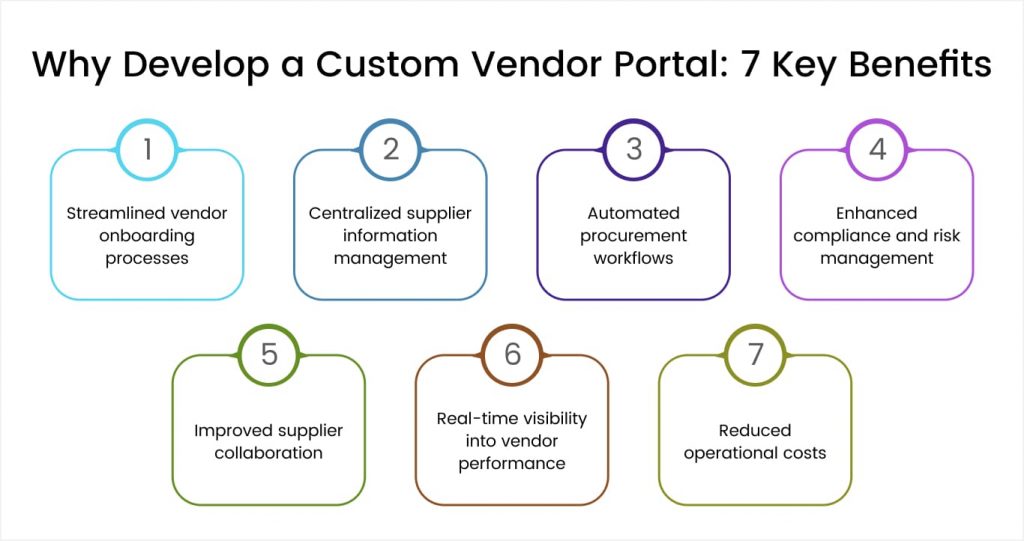
Building a custom vendor portal offers strategic advantages that generic software cannot match. Organizations gain precise control over functionality while addressing unique operational requirements.
1. Streamlined vendor onboarding processes
Manual vendor onboarding consumes significant administrative time. Collecting documents, verifying credentials, and setting up accounts through email exchanges creates delays. Custom portals automate this entire workflow with guided registration processes.
New suppliers complete online registration forms with required documentation. The system validates submissions automatically against your qualification criteria. Approval workflows route applications to appropriate reviewers based on vendor category or risk level. Onboarding that previously took weeks now completes in days.
2. Centralized supplier information management
Scattered vendor data creates operational inefficiencies and compliance risks. Contact details in email threads, contracts in shared drives, and certifications in filing cabinets make information retrieval frustrating. Custom portals consolidate everything into a single searchable repository.
Procurement teams can access complete vendor profiles from a single location. Certificates, contracts, performance history, and communication logs stay organized and up to date. Suppliers update their own information, ensuring accuracy without burdening internal staff.
3. Automated procurement workflows
Manual purchase order processing introduces errors and delays. Paper-based approvals get lost or delayed. Email-based requests lack visibility into status. Custom vendor portals digitize these workflows with built-in automation.
Purchase requisitions flow through configured approval chains automatically. The system notifies approvers and escalates delays. Vendors receive orders instantly and can confirm acceptance online. Every step gets tracked, providing complete procurement visibility.
4. Enhanced compliance and risk management
Regulatory requirements demand documented vendor qualification and monitoring. Insurance certificates expire without warning. Compliance documentation sits unchecked in email archives. Custom portals embed compliance management into daily operations.
Automated alerts notify teams before certifications expire. Required documentation becomes mandatory for vendor activation. Audit trails capture every approval and document submission. Compliance shifts from periodic scrambles to continuous monitoring.
5. Improved supplier collaboration
Effective vendor relationships require consistent communication. Multiple communication channels create confusion. Important updates get missed in email floods. Custom portals establish structured collaboration channels.
Suppliers access announcements, policy updates, and requirements through their portal dashboard. Messaging features keep conversations organized by topic or transaction. Document sharing happens securely within the platform. Collaboration becomes efficient and documented.
6. Real-time visibility into vendor performance
Assessing supplier performance without data leads to subjective decisions. Delivery delays, quality issues, and pricing trends remain invisible without systematic tracking. Custom portals capture performance data automatically through transactions.
Scorecards aggregate delivery accuracy, quality metrics, and responsiveness into actionable insights. Procurement teams quickly identify top performers and problematic suppliers. Data-driven decisions replace gut feelings in vendor management.
7. Reduced operational costs
Manual vendor management requires significant administrative resources. Data entry, document management, and communication handling consume staff time. Custom portals automate repetitive tasks while enabling supplier self-service.
Studies suggest that procurement automation can significantly reduce processing costs. Efficiency gains accumulate as transaction volumes increase. Staff time redirects from administrative tasks to strategic activities.
Looking to Build a Smart Vendor Management Solution?
Space-O Technologies builds vendor portals aligned with your processes, integrations, and security needs.

Core Features of a Custom Vendor Portal
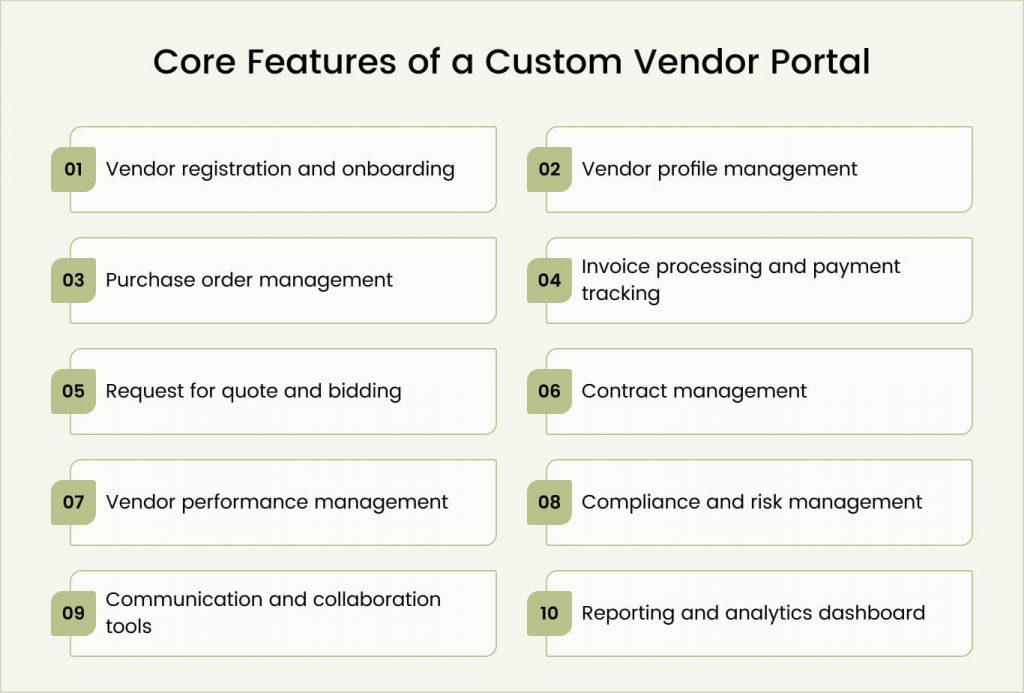
Successful vendor portals combine foundational capabilities with specialized features addressing specific industry requirements. Understanding these components helps prioritize development investments and define project scope.
1. Vendor registration and onboarding
The registration module creates the first impression for new suppliers joining your network. This feature captures essential information while guiding vendors through qualification requirements.
Essential capabilities include:
- Self-service registration forms with customizable data fields.
- Document upload functionality for certificates, insurance, and qualifications.
- Automated validation against predefined qualification criteria.
- Configurable approval workflows with multi-level reviews.
- Welcome communications and portal orientation guidance.
- Duplicate detection to prevent redundant vendor entries.
Effective onboarding reduces friction for suppliers while maintaining qualification standards. Vendors complete requirements independently, reducing back-and-forth communication.
2. Vendor profile management
Comprehensive vendor profiles serve as the single source of truth for supplier information. This feature maintains current data while organizing historical records.
Essential capabilities include:
- Company information sections covering contacts, locations, and capabilities.
- Document libraries for contracts, certifications, and compliance records.
- Bank and payment information management with verification.
- Category and service classifications for searchability.
- Expiration tracking for time-sensitive documentation.
- Change history logging for audit compliance.
Suppliers update their own profiles through self-service access. Automatic notifications alert procurement teams to significant changes requiring review.
3. Purchase order management
Purchase order functionality digitizes procurement transactions between buyers and suppliers. This module handles the complete order lifecycle from creation through receipt.
Essential capabilities include:
- Order creation from requisitions or contracts.
- Configurable approval workflows based on amount or category.
- Automatic transmission of vendor information through the portal.
- Supplier acknowledgment and acceptance tracking.
- Shipping notification and delivery scheduling.
- Goods receipt confirmation and three-way matching.
- Order history and status visibility for both parties.
Integration with ERP systems ensures purchase orders sync with financial systems automatically. Data entry happens once and flows throughout connected platforms.
4. Invoice processing and payment tracking
Invoice management streamlines accounts payable operations while giving suppliers visibility into payments. This feature reduces payment inquiries by providing self-service status access.
Essential capabilities include:
- Electronic invoice submission through the portal.
- Automated matching against purchase orders and receipts.
- Exception handling workflows for discrepancies.
- Approval routing based on configured business rules.
- Payment status visibility for vendors.
- Remittance advice delivery through the portal.
- Early payment discount program management.
Suppliers track their invoices from submission through payment without calling accounts payable. Payment transparency strengthens vendor relationships.
5. Request for quote and bidding
RFQ functionality enables competitive sourcing through structured bidding processes. This module manages the entire solicitation cycle from request creation through award.
Essential capabilities include:
- RFQ creation with detailed specifications and requirements.
- Targeted distribution to qualified vendor categories.
- Online bid submission with supporting documentation.
- Bid comparison tools with weighted scoring.
- Automated evaluation against defined criteria.
- Award notification and contract generation.
- Historical RFQ analytics for sourcing insights.
Structured bidding ensures fair competition while documenting selection decisions. Audit trails support compliance with sourcing process requirements.
6. Contract management
Contract functionality centralizes agreement storage while tracking obligations and renewal dates. This module prevents contract expiration surprises and ensures compliance with terms.
Essential capabilities include:
- Contract repository with version control.
- Key term extraction and searchability.
- Expiration and renewal alerts.
- Amendment tracking and approval workflows.
- Obligation monitoring and milestone tracking.
- Compliance verification against contract terms.
- Integration with sourcing and ordering processes.
Contract visibility helps procurement teams leverage existing agreements and avoid unauthorized purchases. Automated alerts prevent renewals from slipping through cracks.
7. Vendor performance management
Performance tracking captures data across transactions to evaluate supplier effectiveness. This module transforms scattered observations into systematic assessments.
Essential capabilities include:
- Configurable scorecard metrics by vendor category.
- Automated data capture from transactions.
- Manual rating submission for qualitative factors.
- Trend analysis and performance comparisons.
- Performance review workflow support.
- Corrective action tracking for underperformers.
- Recognition programs for top suppliers.
Data-driven performance management improves supplier accountability. Objective metrics replace subjective opinions in vendor evaluations and negotiations.
8. Compliance and risk management
Compliance features embed regulatory requirements into vendor management operations. This module monitors qualification status and flags emerging risks.
Essential capabilities include:
- Compliance checklist management by vendor category.
- Certificate and insurance tracking with expiration alerts.
- Risk scoring based on configurable criteria.
- Audit questionnaire distribution and collection.
- Non-compliance escalation workflows.
- Regulatory reporting and documentation.
- Third-party risk data integration.
Automated compliance monitoring reduces the burden of manual tracking while improving coverage. Organizations maintain qualification standards without dedicated compliance resources.
9. Communication and collaboration tools
Communication features centralize interactions between procurement teams and suppliers. This module organizes conversations while creating documentation trails.
Essential capabilities include:
- Secure messaging between buyers and vendors.
- Announcement broadcasts to vendor groups.
- Document sharing with access controls.
- Task assignment and tracking.
- Meeting scheduling and calendar integration.
- Discussion forums for community engagement.
- Notification preferences and delivery channels.
Structured communication reduces email overload while ensuring important messages reach intended recipients. Audit trails capture every interaction.
10. Reporting and analytics dashboard
Analytics transform transaction data into actionable procurement insights. This module surfaces patterns invisible in day-to-day operations.
Essential capabilities include:
- Configurable dashboards for different user roles.
- Standard procurement reports for spend and activity.
- Custom report builder for unique requirements.
- Data visualization with charts and graphs.
- Scheduled report distribution.
- Export capabilities for external analysis.
- Drill-down functionality for investigation.
Effective analytics reveal cost-reduction opportunities and vendor-consolidation possibilities. Data-driven procurement strategies emerge from systematic analysis.
Get Guidance on Selecting the Right Vendor Portal Features
With 15+ years of experience and 300+ software products delivered, Space-O Technologies helps enterprises build reliable and secure vendor management platforms.
Vendor Portal Development Process: 6 Steps
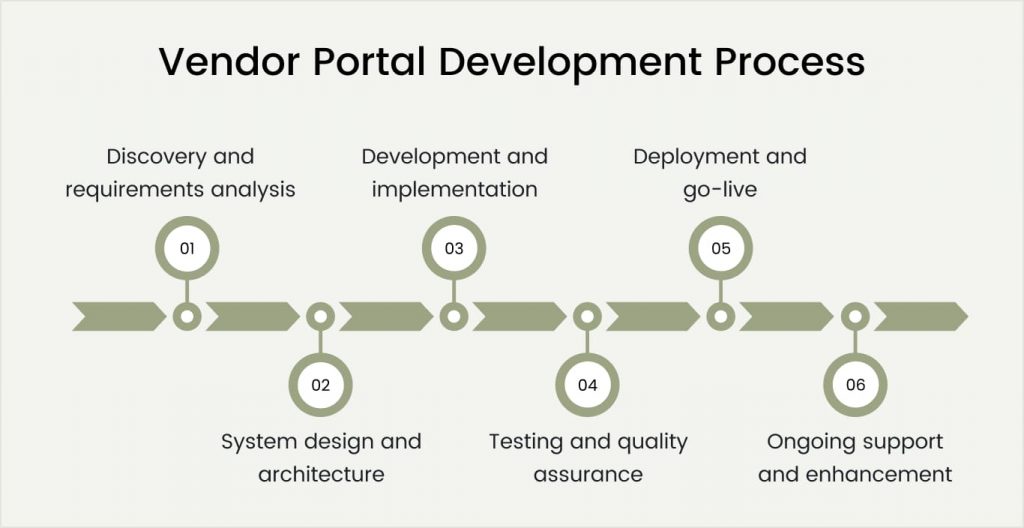
Building an effective vendor portal follows a structured process that balances thorough planning with iterative delivery. Understanding each phase helps set realistic expectations and ensures successful outcomes. For a broader overview of how digital products come together, explore this detailed web development process guide.
Phase 1: Discovery and requirements analysis
Timeline: 4-8 weeks
Discovery establishes the foundation for everything that follows. This phase documents current procurement workflows, identifies pain points, and defines success criteria for the new system.
Key activities
- Stakeholder interviews: Conversations with procurement teams, accounts payable, compliance officers, and supplier-facing staff reveal diverse perspectives on current challenges.
- Workflow documentation: Mapping existing vendor management processes exposes inefficiencies and integration requirements. Visual process flows clarify handoffs and decision points.
- Technical assessment: Evaluation of current systems identifies integration requirements and the scope of data migration. ERP, finance, and compliance systems typically require connection.
- Vendor analysis: Understanding your supplier base characteristics shapes portal design. Small local vendors have different needs than large strategic partners.
- Prioritization workshops: Stakeholders rank features by business value and implementation complexity. This prioritization drives development sequencing.
Discovery delivers comprehensive requirements documentation, technical architecture recommendations, and a prioritized feature roadmap. Thorough discovery prevents expensive rework later.
Phase 2: System design and architecture
Timeline: 3-6 weeks
Design translates requirements into technical specifications. This phase defines system structure, user interfaces, and integration approaches for both internal users and vendors.
Key activities
- Architecture design: Technical architects define database structure, application layers, and infrastructure requirements. Scalability considerations shape foundational decisions. Understanding how to scale a web application helps plan for future growth.
- User interface design: UX designers create wireframes and prototypes visualizing portal behavior for both procurement teams and suppliers. User testing validates designs.
- Integration planning: Detailed specifications define connections with ERP, accounting, and compliance systems. API designs establish data exchange protocols.
- Security design: Authentication mechanisms, encryption standards, and access control models get explicitly defined. Vendor access requires careful security architecture.
Design deliverables include technical specifications, interface mockups, and integration documentation. Stakeholder approval prevents costly mid-development changes.
Phase 3: Development and implementation
Timeline: 12-32 weeks, depending on scope
Development transforms designs into working software. Agile methodologies deliver functionality incrementally, enabling early feedback and course correction. If you want to understand the broader context, learn how to create a web application from concept to deployment.
Key activities
- Sprint-based development: Two-week sprints deliver testable functionality at regular intervals. Product owners review progress and adjust priorities based on emerging needs.
- API development: Integration interfaces get built early to enable connected system testing. ERP and finance system connections often require significant development effort.
- Vendor portal interface: Supplier-facing features receive careful attention for usability. External users need intuitive interfaces that require minimal training.
- Documentation creation: User guides, training materials, and technical documentation are developed alongside the software.
Development follows the prioritized roadmap while maintaining flexibility for scope adjustments. Regular demonstrations keep stakeholders engaged.
Phase 4: Testing and quality assurance
Timeline: 4-8 weeks (overlapping with development)
Comprehensive testing ensures the system meets requirements while maintaining performance and security standards required for vendor-facing applications.
Key activities
- Functional testing: Test cases verify every feature works as specified. Procurement workflows, vendor transactions, and approval processes receive explicit attention.
- Integration testing: End-to-end workflows validate data flows correctly between connected systems. ERP synchronization requires thorough validation.
- Security testing: Penetration testing and vulnerability scanning identify weaknesses in vendor-facing components. External access requires rigorous security validation.
- User acceptance testing: Both internal procurement staff and pilot vendors validate system behavior. Supplier feedback reveals usability issues.
Testing should not be compressed to meet deadlines. Vendor-facing defects damage supplier relationships and portal adoption.
Phase 5: Deployment and go-live
Timeline: 3-6 weeks
Deployment transitions the system from development to production use. Vendor portals require careful rollout planning to manage supplier adoption.
Key activities
- Data migration: Transferring vendor records from legacy systems to the new platform. Validation confirms the accuracy and completeness of migrated data.
- Internal training: Role-based training prepares procurement teams for new workflows. Hands-on practice builds confidence before go-live.
- Vendor onboarding: Phased supplier invitation ensures support capacity matches adoption. Communication campaigns prepare vendors for portal access.
- Go-live support: Intensive support during the initial operational period addresses issues quickly. Help desk resources handle supplier questions.
Phased rollouts reduce risk for large implementations. Starting with a subset of vendors validates processes before broader deployment.
Phase 6: Ongoing support and enhancement
Timeline: Continuous
Post-launch support ensures system stability while enabling continuous improvement. Vendor portals require ongoing attention to maintain value and supplier engagement.
Key activities
- Bug fixes and patches: Issues discovered in production receive prompt resolution. Vendor-facing problems get priority attention.
- Performance monitoring: System health metrics identify capacity needs and performance degradation. Proactive intervention prevents user-facing issues.
- Enhancement development: New feature requests are added to the development backlog for prioritization. The system evolves as business needs change.
- Vendor support: Ongoing supplier assistance ensures adoption success. Help resources and documentation stay current.
Budget for ongoing support from project inception. Portals without maintenance lose supplier engagement over time.
Custom Vendor Portal Development Cost Breakdown
Understanding cost components helps organizations budget accurately and make informed investment decisions. Vendor portal development costs vary based on complexity, features, and integration requirements. For a comprehensive breakdown of web application expenses, read our guide on web app development cost.
Cost by implementation scope
| Scope Level | Development Cost Range | Timeline | Features Included |
|---|---|---|---|
| Basic Portal | $40,000 – $80,000 | 3-5 months | Vendor registration, profile management, document storage |
| Standard Portal | $80,000 – $180,000 | 5-8 months | Basic features + PO management, invoicing, basic reporting |
| Advanced Portal | $180,000 – $350,000 | 8-12 months | Standard features + RFQ/bidding, contract management, analytics |
| Enterprise Portal | $350,000 – $700,000+ | 10-16 months | Advanced features + multi-entity, advanced integrations, compliance modules |
Cost breakdown by development phase
| Phase | Budget Allocation | Activities |
|---|---|---|
| Discovery & Requirements | 8-12% | Stakeholder interviews, workflow documentation, and technical assessment |
| Design & Architecture | 10-15% | UI/UX design, technical architecture, and integration planning |
| Development | 45-55% | Core feature development, integration, and implementation |
| Quality Assurance | 15-20% | Functional testing, security testing, and performance optimization |
| Deployment & Training | 8-12% | Data migration, user training, and vendor onboarding support |
| Project Management | 10-15% | Coordination, communication, and risk management |
Factors that increase development costs
Several variables push costs toward higher ranges:
- Integration complexity: Each external system integration adds $15,000-$60,000, depending on API availability. ERP integrations with SAP or Oracle typically require significant investment.
- Multi-entity support: Organizations with multiple subsidiaries or business units need complex permission structures and data segregation.
- Compliance requirements: Industry-specific regulations add development and testing scope. Healthcare vendor portals need additional security measures.
- Mobile applications: Native iOS and Android apps for suppliers significantly expand development effort compared to responsive web-only solutions.
- Advanced analytics: AI-powered insights, predictive analytics, and custom visualization dashboards add substantial development scope.
Hybrid models combining onshore project management with offshore development optimize both quality and cost. This approach delivers significant savings while maintaining communication effectiveness. For detailed insights on web developer pricing, check out this guide on the cost to hire a web developer.
Ongoing cost considerations
Initial development represents only part of the total ownership cost. Plan for ongoing expenses:
- Annual maintenance: 15-20% of the initial development cost covers bug fixes, security patches, and minor enhancements.
- Infrastructure: Cloud hosting costs range from $500 to $3,000 per month, depending on the vendor, volume, and transaction frequency.
- Support operations: Vendor help desk resources require staffing or outsourcing budget.
- Feature enhancements: Budget $40,000-$120,000 annually for new functionality addressing emerging business needs.
Get an Accurate Vendor Portal Development Estimate
Share your requirements with our technical team for a detailed cost breakdown tailored to your specific needs. We analyze complexity, integration requirements, and vendor base characteristics to provide realistic budget expectations.
Common Challenges in Vendor Portal Development
Even well-planned projects encounter obstacles. Anticipating these challenges enables proactive mitigation rather than reactive crisis management.
Challenge 1: ERP and system integration complexity
Vendor portals must integrate with existing enterprise systems to deliver maximum value. ERP platforms, accounting software, and procurement tools each present integration challenges. Undocumented APIs and legacy systems compound difficulties.
How to overcome this challenge
- Conduct a thorough technical assessment of all integration targets during discovery.
- Budget additional time for legacy system reverse engineering.
- Build data validation layers to handle format inconsistencies.
- Plan parallel operation periods before decommissioning legacy processes.
- Engage specialists familiar with your specific ERP platform.
Challenge 2: Vendor adoption and engagement
Building a portal is only half the challenge. Getting suppliers to actually use it determines success. Vendors comfortable with existing processes resist change, especially smaller suppliers with limited technology resources.
How to overcome this challenge
- Design intuitive interfaces requiring minimal training.
- Provide comprehensive vendor onboarding support and documentation.
- Offer clear value propositions explaining the benefits to suppliers.
- Start with engaged vendors who will champion the platform.
- Consider phased mandates rather than immediate cutover requirements.
Challenge 3: Data migration from legacy systems
Moving historical vendor data creates unexpected challenges. Data quality issues, format inconsistencies, and missing information complicate migration from spreadsheets and legacy systems.
How to overcome this challenge
- Assess data quality early to identify cleanup requirements.
- Develop transformation rules with business stakeholder input.
- Plan multiple migration test cycles before production cutover.
- Establish validation checkpoints throughout migration.
- Consider phased migration starting with active vendors.
Challenge 4: Scope creep and requirement changes
Requirements evolve as stakeholders interact with developing software. Additional feature requests accumulate, expanding the scope beyond initial estimates. Procurement teams discover new needs during development.
How to overcome this challenge
- Establish formal change request processes that assess impact before approval.
- Build contingency budgets of 15-20% for approved scope additions.
- Use phased delivery to defer non-essential features to subsequent releases.
- Maintain clear prioritization criteria tied to business value.
- Document decisions thoroughly to prevent regression of requirements.
Challenge 5: Security and access control complexity
Vendor portals expose internal systems to external users. Balancing supplier access needs with security requirements creates architectural challenges. Each vendor needs appropriate data visibility without exposing sensitive information.
How to overcome this challenge
- Design role-based access control from project initiation.
- Implement data segregation to ensure vendors see only their information.
- Conduct security reviews specifically focused on external access points.
- Plan penetration testing before vendor onboarding begins.
- Establish incident response procedures for security events.
Challenge 6: Multi-stakeholder coordination
Vendor portal projects involve diverse stakeholders with different priorities. Procurement wants efficiency. Finance needs payment accuracy. Compliance requires documentation. IT focuses on security. Conflicting requirements create delays.
How to overcome this challenge
- Establish clear project governance with decision-making authority.
- Create representative steering committees for major decisions.
- Document requirements prioritization criteria agreed by all parties.
- Schedule regular stakeholder alignment meetings.
- Assign dedicated project management resources.
Best Practices for Successful Vendor Portal Development
Following proven practices dramatically increases web portal development success rates. These guidelines represent accumulated wisdom from successful implementations across industries.
1. Start with a thorough discovery
Invest adequate time in understanding current vendor management processes before designing new ones. Rushing discovery creates requirements gaps that surface as expensive changes during development.
Interview stakeholders at every level, from procurement managers to accounts payable clerks. Each perspective reveals different pain points. Observe actual work rather than relying solely on described processes.
Document everything in writing. Visual process maps and decision logs provide reference points throughout development. Verbal agreements create confusion later.
2. Prioritize supplier user experience
Vendor portals succeed or fail based on supplier adoption. Systems that vendors resist using never deliver intended benefits. External users without training must navigate the interface successfully.
Design supplier interfaces that minimize complexity for common tasks. Test designs with actual vendors before development begins. Iterate based on feedback rather than internal assumptions.
Consider the full vendor journey from registration through daily transactions. Friction at any point reduces adoption. Smooth workflows encourage use and build supplier engagement.
3. Plan integrations meticulously
Integration complexity often exceeds initial estimates. Each connected system brings its own data models, authentication requirements, and reliability characteristics.
Map all integration points during discovery. Assess API availability, documentation quality, and vendor support responsiveness. Budget additional time for integrations with poor documentation.
Build integration monitoring and error handling from day one. Integrations fail periodically. Graceful handling and quick notification minimize downstream impact.
4. Build security into the foundation
External user access demands a security architecture from project inception. Authentication, data segregation, and audit logging integrate more effectively when designed from the start.
Engage security expertise early. Vendor-facing applications need specialized attention. External access points require different protection than internal systems.
Document security measures comprehensively. Auditors and customers require evidence of controls that protect supplier data and ensure transaction integrity.
5. Implement phased rollout strategies
Deploying to all vendors simultaneously creates overwhelming support demands. Issues affecting many suppliers damage relationships and slow adoption.
Start with pilot groups of engaged vendors willing to provide feedback. Validate processes with smaller groups before broader deployment.
Phase vendor onboarding based on support capacity. Communicate timelines clearly so suppliers can prepare. Provide adequate training resources for each wave.
6. Measure and optimize continuously
Portal success requires ongoing attention to metrics and user feedback. Supplier engagement, transaction volumes, and error rates reveal opportunities for improvement.
Establish baseline measurements before launch. Track adoption curves and identify struggling vendor segments. Address barriers preventing full utilization.
Conduct periodic vendor satisfaction surveys. Supplier feedback reveals friction points invisible in transaction data. Responsive improvement builds engagement.
7. Plan for ongoing evolution
Vendor portal requirements change as supplier relationships evolve. New compliance requirements, business expansion, and emerging technologies create enhancement needs.
Build systems accommodating change through modular architecture. Clean code practices and comprehensive documentation enable efficient modification.
Budget for ongoing development from project inception. Portals without enhancement resources stagnate and lose supplier engagement.
Build Custom Vendor Portal Software with Space-O Technologies
Custom vendor portal development transforms how enterprises manage supplier relationships. Tailored solutions eliminate the compromises that generic software requires while delivering workflows precisely matched to your procurement operations.
Success requires more than technical capability. Understanding procurement workflows, supplier dynamics, and integration complexity determines whether projects deliver lasting value or become expensive, underutilized systems.
Space-O Technologies brings 15+ years of expertise in custom software development to vendor portal projects. Our web development services team of 200+ professionals has delivered 300+ software solutions across manufacturing, retail, healthcare, and enterprise sectors.
We hold ISO 27001:2022 certification for information security and ISO 9001:2022 for quality management. Our enterprise integration experience ensures your vendor portal connects seamlessly with existing ERP and business systems. Contact our technical consultants to discuss your vendor portal requirements. We provide detailed assessments, realistic cost estimates, and development roadmaps tailored to your supplier management needs.
FAQs on Custom Vendor Portal Development
1. How much does custom vendor portal development cost?
Custom vendor portal development costs range from $40,000 for basic systems to $700,000+ for enterprise platforms.
Basic portals with registration and document management cost $40,000-$80,000. Standard systems adding PO and invoice management cost $80,000-$180,000. Advanced platforms with RFQ, contracts, and analytics cost $180,000-$350,000. Enterprise portals with complex integrations and multi-entity support exceed $350,000.
2. How long does it take to develop a vendor portal?
Development timelines vary from 3-5 months for basic portals to 10-16 months for enterprise implementations. Basic portals with core vendor management features typically take 3-5 months to complete. Standard implementations requiring ERP integration take 5-8 months. Advanced projects with bidding and contract management require 8-12 months. Enterprise deployments across multiple business units take 10-16 months, including phased rollouts.
3. What features are essential in a vendor portal?
Essential vendor portal features include vendor registration and onboarding, profile and document management, purchase order processing, invoice submission and payment tracking, and reporting dashboards. Advanced features include RFQ and bidding functionality, contract management, performance scorecards, compliance monitoring, and ERP system integration. The specific feature set depends on industry requirements and procurement complexity.
4. Should I build a custom vendor portal or buy off-the-shelf software?
Custom development suits organizations with unique procurement workflows, complex integration requirements with existing ERP systems, or specific compliance needs that commercial software cannot address. Off-the-shelf solutions work better for smaller organizations with standard processes, limited budgets, and immediate implementation timelines. Organizations with 50+ active vendors often benefit from custom development through tailored functionality.
5. How do you ensure the security of the vendor portal?
Vendor portal security requires architectural decisions from project inception. Key measures include role-based access control to limit data visibility, secure authentication with multi-factor options, encryption of data at rest and in transit, audit logging of all access and transactions, and regular security testing. External access points receive particular attention since suppliers connect from outside your network perimeter.
6. Can a vendor portal integrate with our ERP system?
Yes, modern vendor portals integrate with ERP systems using APIs and standard data exchange protocols. Common integrations include SAP, Oracle, Microsoft Dynamics, and NetSuite. Integration typically synchronizes vendor master data, purchase orders, invoices, and payment information bidirectionally. Integration complexity depends on your specific ERP system and customizations. Systems with modern APIs integrate more easily than heavily customized legacy platforms.
7. What ongoing support does a vendor portal require?
Vendor portals require continuous maintenance, including bug fixes, security patches, and feature enhancements. Budget 15-20% of the initial development cost annually for maintenance. Additional ongoing costs include cloud hosting ($500-$3,000 monthly), vendor support resources, and enhancement development ($40,000-$120,000 annually). Portals without adequate support lose supplier engagement and require eventual replacement.



 All our projects are secured by NDA




 4.8
4.8

