
 By
Contents
- You can add generative AI to an existing app as a module, without rewriting the codebase.
- Use cloud APIs for heavy reasoning and on-device models for low latency, offline use, and privacy.
- Never ship provider API keys in the app; route every model call through a backend you control.
- Launch one focused feature behind a feature flag, then monitor token cost and latency before expanding.
Key Takeaways
Can AI be added to an existing mobile app? Yes, you can add it without a rebuild. Cloud suits heavy reasoning, while on-device suits speed, offline use, and privacy.
The hard part is rarely the model. Your app already has users, a backend, and a release cycle to protect. Space-O Technologies’ generative AI integration services add an AI layer to apps built by any team.
This guide covers three integration paths, the features teams add first, and a readiness check. Five steps then take you from use case to rollout. Later sections cover running costs, platform differences, and choosing a mobile app development partner.
How AI Is Added to Existing Apps
AI is added to an existing app as a new layer that your current screens call. Three paths exist, and each trades model capability against latency, privacy, and cost. That choice shapes every decision after it, so it helps to know all three first.
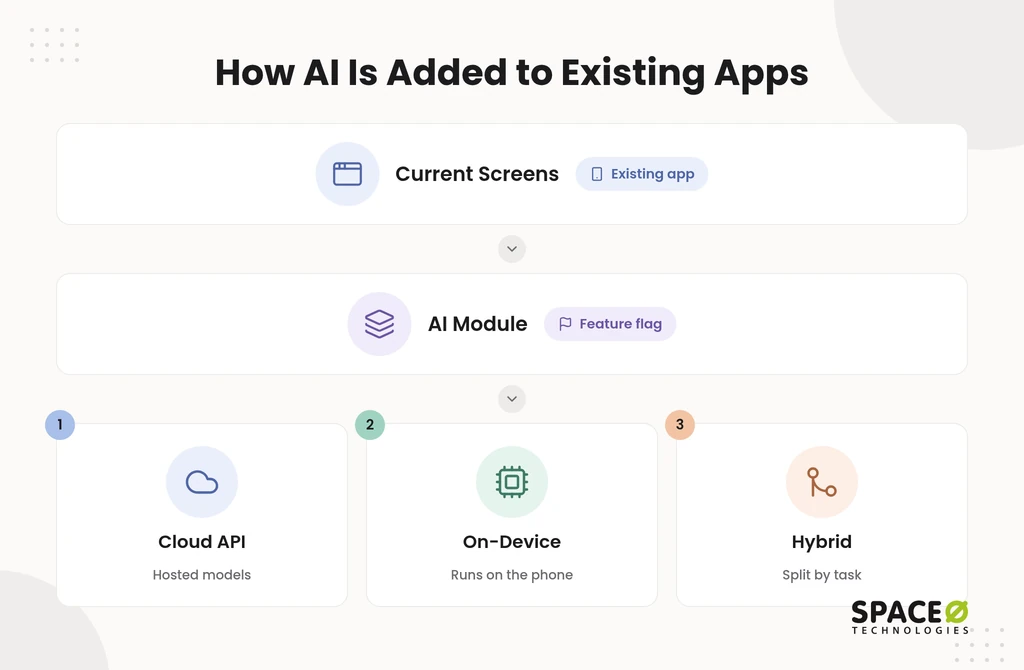
Cloud API path
The cloud path sends a request from your app to a hosted model and returns the result. Common providers include the Gemini API, the OpenAI API, and Anthropic’s Claude. Gemini runs through Vertex AI or Firebase AI Logic on Google Cloud.
Microsoft Azure and AWS also host models for production apps. Firebase AI Logic gives mobile apps access to Gemini models and works with Firebase App Check. App Check helps block unauthorized clients.
- Pros: You get the most capable models and the fastest route to a working feature.
- Cons: Every request adds a network round trip, a usage charge, and data leaving the device.
- Best for: Long-form generation, multi-step reasoning, summaries, and chat assistants.
On-device path
The on-device path runs a smaller model on the phone itself. On iOS, Core ML runs custom models. Apple’s Foundation Models framework exposes the on-device model behind Apple Intelligence. On Android, Gemini Nano, Google ML Kit, and TensorFlow Lite (now LiteRT) cover most tasks. MediaPipe works across both platforms.
- Pros: Responses are fast, work offline, and keep user data on the device.
- Cons: Models are smaller, the app grows larger, and older phones carry more memory load.
- Best for: Smart replies, text classification, image labeling, scanning, and sensitive inputs.
Hybrid path
The hybrid path runs quick or sensitive tasks on the device and sends heavy generation to the cloud. Android’s AI guidance presents on-device, cloud, and hybrid as separate options for exactly this reason. Take a field inspection app as an example. It can label photos on the phone, then ask a cloud model to draft the written report.
- Pros: Each task runs where it performs best, and usage bills stay lower than cloud alone.
- Cons: Two model paths plus routing logic mean more engineering and more testing.
- Best for: Apps that need instant feedback and deep generation in the same workflow.
The right path follows from the feature itself, so the next step is choosing that feature.
Common AI Features You Can Add
The features most teams add first are assistants, personalization, vision, voice, prediction, and search. Each one solves a problem your users already feel, such as waiting for support or struggling to find content. Each one also maps to a known toolkit.
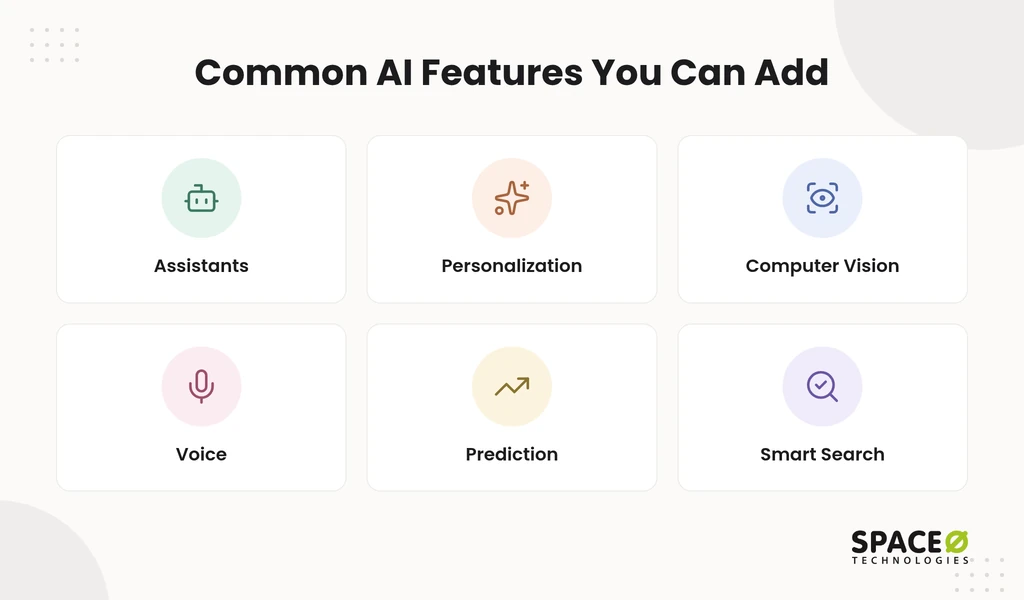
- Chatbots and virtual assistants: A cloud model such as the OpenAI API, Gemini, or Claude answers questions and guides users in the app.
- Personalization and recommendations: A model ranks content, products, or next actions using each user’s in-app behavior.
- Computer vision: ML Kit, Core ML, or MediaPipe handles scanning, image labeling, and text recognition on the device.
- Voice: Speech recognition converts spoken commands into in-app actions or text.
- Predictive analytics: A model forecasts churn, demand, or a user’s next likely action from app data.
- Smart search: Retrieval-augmented generation (RAG) with a vector database grounds answers in your own content.
Our portfolio includes an AI-based image-to-text app for iOS and an AI life coaching app. Whichever feature you pick, your current app has to be ready to support it.
Check Your Existing App Before You Start
Check five areas of your current app before anyone writes AI code. Gaps in older apps surface late and cost more when nobody looks first. A short review now protects the timeline later.
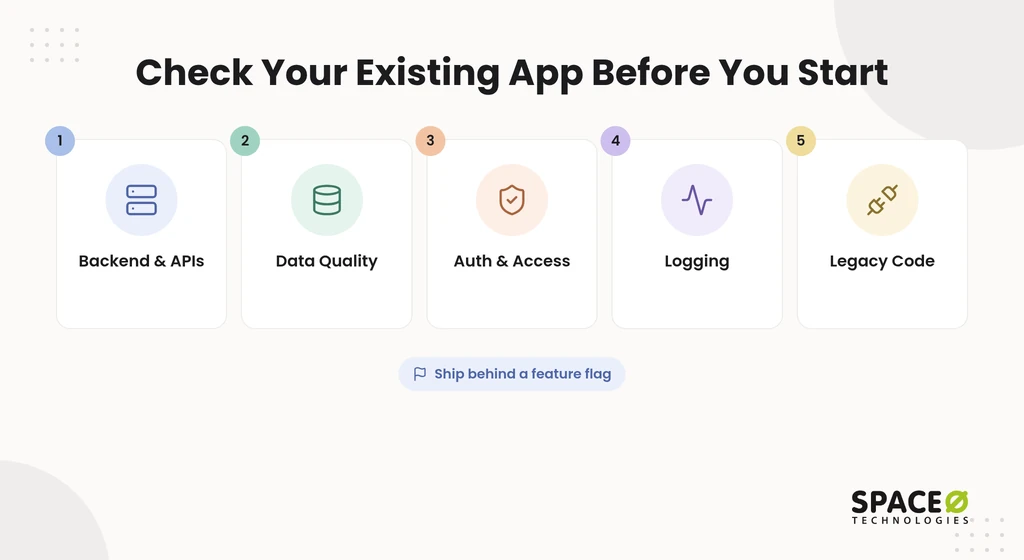
- Backend and API documentation: Confirm that endpoints are documented and can accept a new AI service.
- Data quality: Confirm that the data the feature needs is clean, consistent, and accessible.
- Authentication and access: Confirm that role-based access controls which users can trigger AI calls.
- Logging and observability: Confirm that you can trace every request, response, latency, and error.
- Legacy architecture: Confirm that outdated libraries or tightly coupled code will not block a new module.
Build the AI feature as an isolated module behind a feature flag. If something goes wrong, you switch off one feature, not the whole app. With the groundwork confirmed, the build itself follows five steps.
How to Add AI Features to an Existing Mobile App in 5 Steps
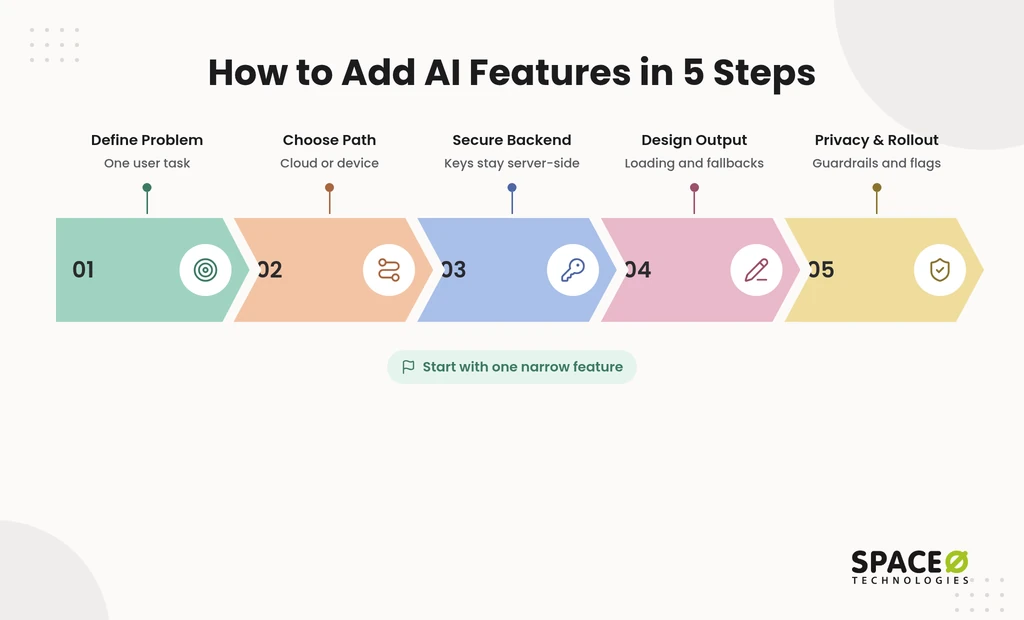
Five steps take an AI feature from idea to live release without disturbing the rest of the app. The steps below keep scope tight and risk visible, starting with the problem rather than the model.
Step 1: Define one user problem to solve
Start with one focused problem your users already have, not with a model. Pick a task that happens often and costs users time, such as filling a long form. Define one measurable outcome, like completion time or drop-off rate. A narrow first feature is easier to test, price, and defend to stakeholders.
Step 2: Choose cloud, on-device, or hybrid
Let the feature pick the path: heavy reasoning points to cloud; speed, offline use, and privacy point to device. Four questions settle most cases.
- Offline need: If the feature must work without a signal, it needs an on-device model.
- Data sensitivity: If inputs include health, financial, or personal data, keep them local where possible.
- Reasoning depth: If the task needs long answers or multi-step logic, it needs a cloud model.
- Response time: If users expect instant feedback while typing or scanning, run that part on the device.
The comparison table further down sets out the full trade-offs side by side.
Step 3: Connect through a secure backend
Never call a model provider directly from the app; route every request through a backend you control. Your app talks to your server, and your server talks to the AI provider. This one decision carries four benefits.
- Key protection: Provider API keys stay on your server instead of inside the shipped app.
- Provider flexibility: You can change models or providers with a backend update, not a new app release.
- Usage control: Rate limits, logging, and response caching live in one place.
- Version safety: Versioned endpoints keep older app builds working while newer builds gain features.
Step 4: Design for variable AI output
AI output changes from one request to the next, so the interface must plan for waiting, partial answers, and failure. Users judge the feature by these moments, not by the model behind it.
- Loading and streaming: Show progress right away, then stream text as it arrives.
- Errors and fallbacks: Show a clear message and a non-AI fallback when the model times out.
- User control: Let users edit, regenerate, or reject any output before it is saved.
- Generative UI: Place AI output inside existing screens, such as a pre-filled form, not only a chat window.
On Android, the Firebase BoM keeps Firebase library versions aligned. A Kotlin ViewModel holds the GenerativeModel call and exposes loading, streaming, and error states to the screen. On iOS, a Swift view model plays the same role. Firebase Remote Config can then change the model name or roll the feature back without shipping a new build.
Step 5: Address privacy, guardrails, and rollout
Protect user data, check output quality, and release gradually so problems stay small. Apps that handle regulated or sensitive data need these controls most. Guardrails work best as one workflow:
- Keep sensitive inputs on the device when the feature allows it.
- Mask personally identifiable information (PII) before any data leaves the device.
- Route heavier work through a server-side gateway that filters unsafe or off-topic output.
- Test for hallucination and bias before every release.
- Require human approval on high-stakes outputs, such as financial or clinical decisions.
At Space-O Technologies, every production model runs inside an evaluation suite. It covers accuracy, hallucination rate, bias checks, latency, and cost, with continuous monitoring in place. Confidence scoring sends any output below an acceptable threshold to a human-review checkpoint.
Declare AI data use in your App Store and Google Play privacy disclosures. Follow the California Consumer Privacy Act (CCPA) for California users. Follow HIPAA for health data, and apply the General Data Protection Regulation (GDPR) if you serve EU users.
- Device testing: Test memory, latency, battery, and app size on the oldest phones you support.
- Gradual release: Release to a small user group first, then expand as quality and cost metrics hold.
- Ongoing monitoring: Fold model and cost checks into your mobile app maintenance services plan.
Once the feature is live, the path you chose in Step 2 decides most of your long-term trade-offs.
Get a Readiness Review for Your Existing App
Share your platform and the feature you want. Our engineers check your backend, data, and authentication, then recommend cloud, on-device, or hybrid with a scoped estimate.

Cloud API vs On-Device vs Hybrid: Side-by-Side Comparison
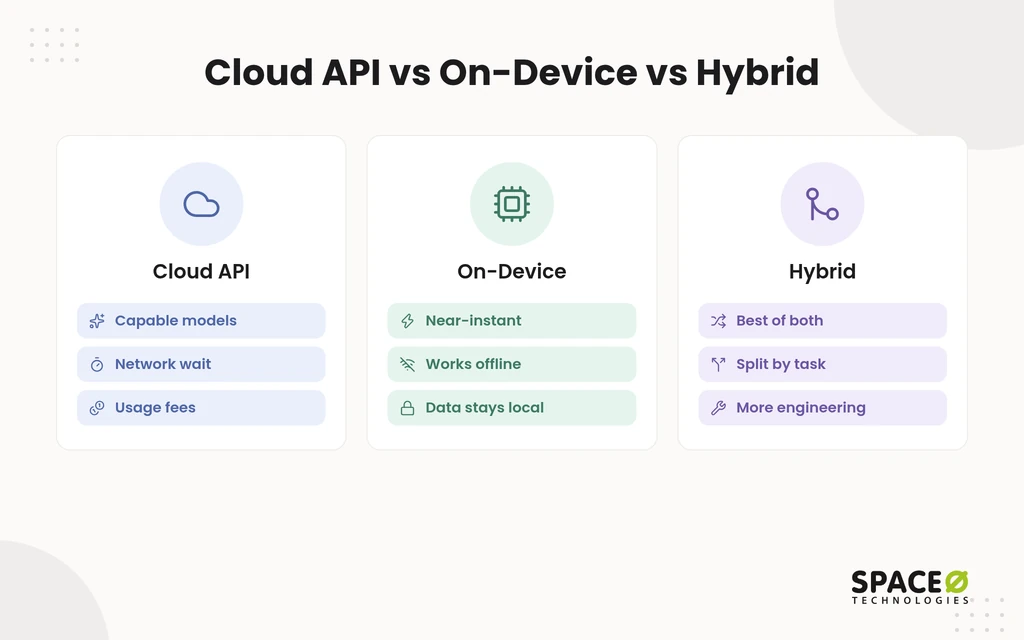
Cloud wins on capability, on-device wins on speed and privacy, and hybrid balances both at a higher build cost. The table compares the three paths on the factors that matter most inside an app that is already live.
| Factor | Cloud API | On-device | Hybrid |
|---|---|---|---|
| Latency | Network round trip on every request | Near-instant, no network | Instant for local tasks, network wait for heavy ones |
| Offline use | Needs a connection | Fully available | Local tasks only |
| Data exposure and privacy | Data leaves the device | Data stays on the device | Sensitive data can stay local |
| Model capability | Largest, most capable models | Smaller models, narrower tasks | Both, split by task |
| Per-request and ongoing cost | Billed per token or request | No usage fee, but model upkeep | Lower usage bills, more engineering |
| App size | Grows only by the SDK | Grows with bundled models | Grows if models are bundled |
| Update path | Server-side, no app release | Model download or app release | Both |
| Rework in an existing app | Lowest: new screens and a backend endpoint | Higher: model packaging and device testing | Highest: two paths plus routing logic |
| Review and guardrail effort | Server-side filtering and data controls | Testing across device models | Both sets of work |
| Best for | Generation, reasoning, and chat | Offline, low-latency, and sensitive tasks | Workflows that need both |
- Cloud API: It needs the least rework in an existing app but carries the highest ongoing usage cost.
- On-device: It removes usage fees and network delay but adds app size and device testing.
- Hybrid: It puts each task where it performs best but needs the most engineering and testing.
The path also sets the shape of your running costs, which is where most budgets go wrong.
What It Costs to Run an AI Feature in an Existing App
The cost of an AI add-on has two parts: the one-time build and the recurring cost of running it. Pilots are cheap, but data preparation, integrations, and ongoing model costs grow quickly once AI reaches production. Budgeting both parts up front prevents a feature from outgrowing its business case.
What drives the build cost
Key cost drivers include data quality, model complexity, and integration depth. In most projects, data work, integrations, and production engineering cost more than the model itself. Space-O Technologies’ AI development cost guide puts generative AI applications at $75,000-$300,000. It puts recommendation engines at $50,000-$150,000. The same guide shows simple AI solutions taking 2-3 months, mid-level applications 4-8 months, and enterprise systems 6-12 months.
What it costs every month and year
Recurring costs continue after launch and grow with usage, data, and compliance needs. The same guide breaks the main lines down as follows.
- Model usage: Cloud providers bill per token or request, so cost rises with every active user. Space-O Technologies’ LLM integration cost guide puts efficient models at 0.05-1.00 per million tokens. Frontier models cost 15-75 per million tokens, and output tokens cost 4-10x more than input.
- Data infrastructure: Budget $500-$5,000 monthly for data infrastructure.
- Monitoring: Plan for $300-$2,000 monthly to track accuracy, latency, and system health across enterprise systems.
- Retraining: Plan $15,000-$60,000 per year on retraining cycles if you maintain custom models.
- Audits: In regulated sectors such as healthcare and finance, each audit can cost $10,000-$40,000 annually, depending on the scope.
- Hosting choices: GPU workloads, low-latency responses, and hybrid or on-premises hosting raise both build and monthly costs.
Our guide to AI integration cost for existing software explains how maintenance and data preparation shares add up over time.
How to keep running costs under control
Most running-cost savings come from sending fewer and smaller requests to the model. Space-O Technologies’ LLM integration cost guide covers three savers. Prompt caching, batch processing, and model routing can cut token spend once a workload is live.
- Token tracking: Log tokens per request and per user to spot expensive prompts early.
- Response caching: Cache repeated prompts so identical questions never hit the model twice.
- Rate limits: Cap requests per user to stop abuse and runaway bills.
- Task routing: Move simple tasks on-device so only heavy generation reaches the cloud.
- Model compression: Quantization shrinks a model so each request needs less compute.
A free, expert-reviewed estimate scopes your own feature against these lines. Your platform then decides how much of the work changes from iOS to Android.
What Changes Across Apple, Android, and Cross-Platform Apps
Cloud features work the same way on every platform, but on-device features depend on each platform’s own toolkit. This matters most when your app runs on both stores. It also matters when it shares one codebase across them.
- iOS with Swift: Core ML runs custom models, and the Foundation Models framework reaches Apple Intelligence’s on-device model on supported devices.
- Android with Kotlin: Gemini Nano and ML Kit run on supported devices, with LiteRT for custom models.
- Flutter and React Native: The backend AI layer is shared, so cloud features are mostly built once across both platforms.
- On-device in cross-platform apps: Each native toolkit sits behind a platform-specific bridge that the shared code calls.
- Parity testing: Test every AI feature on both platforms, because supported devices and model versions differ.
If your team lacks experience on one of these stacks, outside help can close that gap.
When to Bring In a Build Partner
Bring in a partner when your team lacks AI engineers, handles sensitive data, or faces a tight deadline. Many companies that add AI to existing iOS and Android app development services prefer one partner. Whoever you choose, check four things first.
- Production evidence: Ask for AI features running in live apps, not demos.
- Contract terms: Confirm an NDA and full ownership of code and IP before work starts.
- Testing practice: Ask how hallucination, bias, latency, and cost are tested before release.
- Platform coverage: Confirm delivery across Swift, Kotlin, Flutter, and React Native.
Since 2010, Space-O Technologies has served 1,200+ clients and developed 300+ software solutions, with 97% client retention. That work includes Glovo, an on-demand delivery app built by our team. We sign an NDA before every project, and all source code, data, and IP transfer to you at completion. Teams that only need extra capacity can hire generative AI developers to work inside their own sprints.
How a phased engagement reduces risk
A phased engagement limits your spend at each stage until the previous stage proves itself. It usually runs in five stages.
- Run a readiness audit of backend, data, authentication, and logging.
- Build a proof of concept for one feature on a small user group.
- Add middleware and guardrails, including PII masking and output filtering.
- Run cross-platform parity testing on iOS and Android.
- Set up monitoring for quality, latency, and cost after release.
Which engagement model fits your AI add-on
The right engagement model depends on how clear your scope is and how long the work will run. Space-O Technologies offers four models.
| Model | Scope clarity | Team continuity | Ownership | Fits when |
|---|---|---|---|---|
| Dedicated Team | Scope can evolve | Same team for the long term | Client owns code and IP | You plan a roadmap of AI features |
| Time & Material | Scope stays flexible | Team scales with the work | Client owns code and IP | A proof of concept has open questions |
| Fixed Cost | Scope is fixed up front | Team for the project term | Client owns code and IP | One tightly scoped feature is ready |
| Staff Augmentation | You define the scope | Engineers join your team | Client owns code and IP | Your team lacks AI specialists |
- Dedicated Team: It suits a long roadmap, with one team that keeps context across releases.
- Time & Material: It suits a proof of concept, where scope shifts as you learn.
- Fixed Cost: It suits one well-defined feature with a clear budget and timeline.
- Staff Augmentation: It suits teams that need AI skills inside their existing sprints.
Whichever model you pick, two answers from your side shape the plan.
Two Questions to Answer Before You Choose
Your platform and your first feature decide most of the plan. These two answers tell a partner which toolkits apply and which path fits.
- What platform is your app built on? Swift, Kotlin, Flutter, or React Native sets which on-device toolkits are open to you.
- Which feature do you want to add first? The feature’s need for reasoning, speed, or privacy sets the integration path.
Frequently Asked Questions
How is AI used on phones?
On phones, AI runs either on the device or in the cloud. On-device models handle quick, private tasks such as smart replies, text classification, image labeling, and scanning. Cloud models handle long-form generation, summaries, and chat assistants. Apple Intelligence’s on-device model and Gemini Nano are examples of models built into the phone.
What does it mean to integrate AI into an app?
It means adding an AI layer that your existing screens call, rather than rebuilding the app around a model. In practice, the app calls your own backend, never the model provider directly. The backend holds the keys and can swap models without a new app release. A feature flag lets you switch the module off without touching the rest of the app.
Why should businesses prioritize on-device processing for AI?
Prioritize it when a feature must work offline, needs instant feedback, or handles health, financial, or other personal inputs. If none of those apply and the task needs long answers or multi-step reasoning, cloud is usually the better fit. The trade-off is fixed: no per-request usage fees, but a larger app and more device testing.
What should I test on older phones before shipping on-device AI?
Run the Step 5 device checks on the oldest phone you still support. Bundled models strain memory first on that phone. If a task fails the checks, move it to the cloud side of a hybrid setup. Repeat the checks on both platforms, because supported devices and model versions differ.
How much does it cost to add generative AI to an existing mobile app?
Cost has two parts: a one-time build and recurring running costs. Space-O Technologies’ AI development cost guide puts generative AI applications at $75,000-$300,000. It puts recommendation engines at $50,000-150,000. Data infrastructure adds $500-$5,000 monthly, and cloud model usage is billed per token or request.
How long does it take to add generative AI to an existing app?
Timelines depend on scope. Space-O Technologies’ published estimates show simple AI solutions taking 2-3 months, mid-level applications 4-8 months, and enterprise systems 6-12 months. A readiness check of your backend, data, and logging comes first, and a narrow first feature shortens the path.
Do I need to rebuild my app to add generative AI?
No, you do not need to rebuild the app. The AI feature ships as a separate module that your current screens call, placed behind a feature flag. Older apps may need backend, data, or library fixes first, so review those before any AI code is written.
Can generative AI work offline in a mobile app?
Yes, but only with an on-device model. Cloud models need a network connection. A hybrid setup runs local tasks offline and sends heavy generation to the cloud once a connection returns.



 All our projects are secured by NDA





 4.8


