
 By

Contents
- An AI agent in business is autonomous software that plans multi-step work and acts in your systems.
- It works in a loop: perceive, reason and plan, act, then learn and adapt.
- Scoped permissions, audit logs, and human approval keep an agent’s real actions safe.
- Use an agent only when a task needs judgment across several systems.
Key Takeaways
Most business teams lose hours each week to work that spans several systems. A well-built agent takes on that work and finishes it with little supervision. Our AI agent development services build these agents around your workflows.
An AI agent in business is autonomous software, usually powered by a large language model. It plans multi-step tasks and finishes goals with minimal human supervision. A chatbot only answers, and rigid automation follows a fixed script.
This guide explains how business AI agents work and where they pay off. You will see how AI agents make decisions autonomously inside your systems. It also covers risks, costs, and when you do not need an agent.
How an AI Agent Works
An AI agent works by repeating a four-step loop until the goal is done.
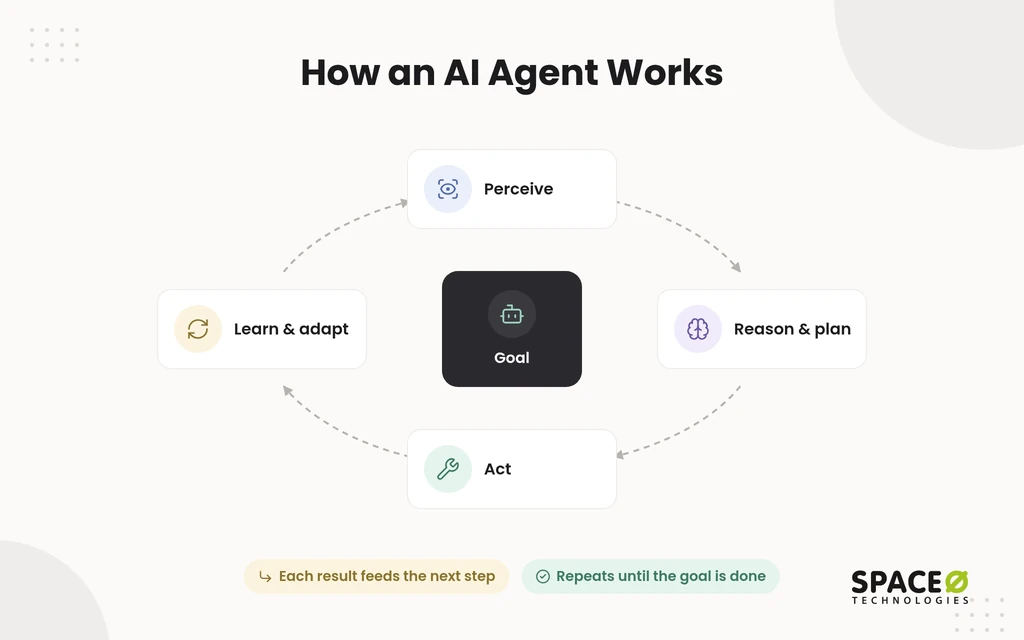
Most business tasks are more than one question. A refund needs an order lookup, a policy check, a payment, and a record update. Autonomous AI systems that reason and act for business handle that chain with the same loop. That loop is how enterprises move manual processes to AI agents. The result of each action becomes the agent’s next input, so the loop corrects itself as it goes.
- Perceive: The agent reads its inputs, such as a support ticket, a new lead, an email, or a database change.
- Reason and plan: The large language model (LLM) breaks the goal into multi-step work and picks the next action.
- Act: The agent calls tools and application programming interfaces (APIs) to read or write data in business systems.
- Learn and adapt: The agent checks the result, stores what it learned, and changes course if a step failed.
On this page, agentic AI, autonomous AI systems, and AI agents mean the same thing. An AI agency is different: a firm that builds or manages agents for other companies.
How Do Autonomous AI Agents Reason and Make Decisions?
Autonomous AI agents reason and make decisions inside the four-step loop above. Named reasoning patterns and confidence checks shape each choice.
Leaders ask this question for a practical reason. They need to trace an agent’s choices through AI agent audit logs before letting it touch real records. Inside the loop, named reasoning patterns shape what the agent thinks before each action.
Which reasoning patterns do AI agents use?
Most production AI agents combine several reasoning patterns, with ReAct as the default.
- ReAct (reason + act): The agent alternates a thought, a tool call, and an observation, so each result shapes the next step.
- Chain-of-Thought: The model writes out intermediate reasoning before acting, which helps with multi-step business logic.
- Self-Ask: The agent poses smaller follow-up questions to itself, answers each one, and then combines the answers into a decision.
- Plan-and-Solve: The agent drafts a full plan first, executes the steps in order, and revises the plan only when needed.
- Tree-of-Thought: The agent explores several candidate paths and keeps the one most likely to reach the goal.
- Reflection: After a failed action, the agent reviews what went wrong and changes course instead of repeating the error.
How does an AI agent pick its next action?
An AI agent picks its next action by weighing the goal, the current state, and its own confidence.
Before each step, a well-built agent answers five questions:
- What is the goal, and which part is still unfinished?
- What did the last tool call return, and did it succeed?
- Which available tool moves the task forward with the least risk?
- Does this action fall inside the agent’s permissions and policy limits?
- Is confidence high enough to act, or should a human decide?
What role do memory and confidence thresholds play?
Memory lets an AI agent track progress across steps, and confidence thresholds tell the agent when to escalate.
- State tracking: The agent records which steps are done. A chat window, by contrast, forgets context once the session ends.
- Short-term memory: The agent holds the current task’s facts, such as the order number, customer tier, and prior tool results.
- Long-term memory: The agent stores durable knowledge, such as policies and past resolutions. It retrieves that knowledge when a new task needs it.
- Confidence thresholds: When certainty drops below a set level, the agent hands the case to a human with its reasoning attached.
What does this look like on a real request?
A late-delivery refund request shows the full decision process in four moves.
- Observe: A customer writes that an order arrived late and asks for a refund.
- Reason: Using ReAct, the agent decides it needs the order record and the refund policy first.
- Act: The agent queries the order system, confirms the delay, and checks the refund amount against policy limits.
- Decide: Inside the limit, the agent issues the refund and closes the ticket. Above the limit, the agent routes the case to a supervisor.
Core Components
Every AI agent has four core components: a reasoning model, tools, memory, and orchestration with controls.
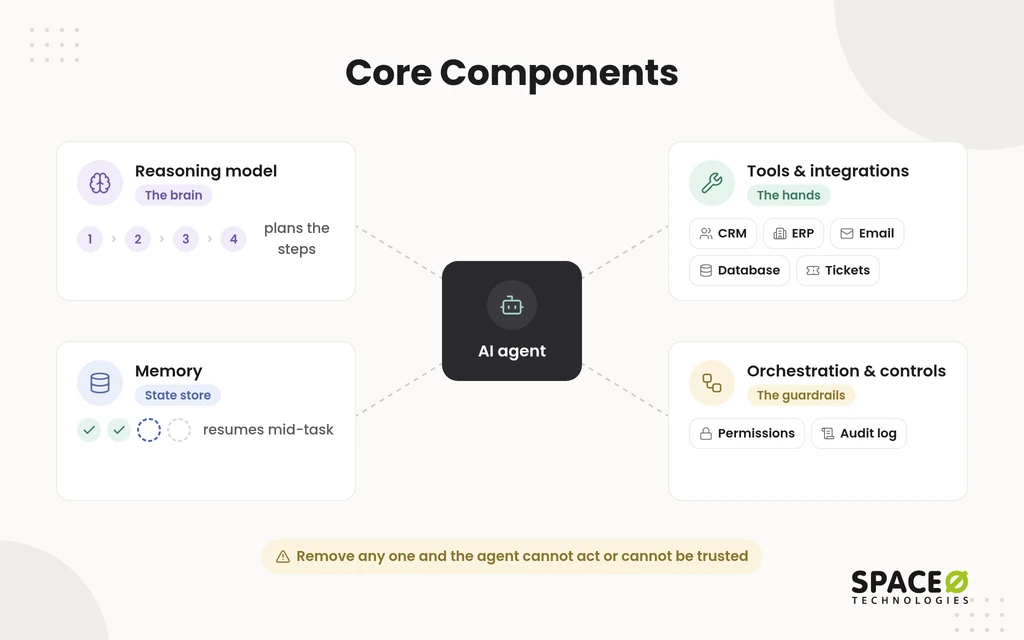
Each component answers a different question about how the agent behaves. If one is missing, the agent either cannot act or cannot be trusted.
- Reasoning model (the brain): An LLM interprets the goal, plans the steps, and chooses which tool to call next.
- Tools and integrations (the hands): API integrations connect the agent to customer relationship management (CRM), enterprise resource planning (ERP), email, databases, and ticketing systems.
- Memory: A state store tracks progress, so the agent can resume multi-step work without losing context.
- Orchestration and controls: An orchestration layer sequences the steps within set permissions and logs each one for audit.
Multi-agent orchestration extends that last component. A large job is split across specialist agents, such as one that researches and one that writes. A single coordinator directs them.
AI Agents, Chatbots, and Automation Compared
An AI agent completes goals, a chatbot answers questions, a copilot suggests, and rule-based automation runs fixed steps.
Buyers sometimes pay for an agent when a simpler tool would do the job. This table shows where each one fits.
| Aspects | Chatbot | Copilot | Rule-based automation | AI agent |
|---|---|---|---|---|
| What it does | Answers questions or drafts text | Suggests next steps to a person | Runs a fixed sequence of steps | Plans and completes a multi-step goal |
| Who decides the steps | The user | The user, helped by suggestions | The developer, in advance | The agent, within set limits |
| Acts in your systems | Reads, if connected | Mostly reads; the person acts | Reads and writes, on a script | Reads and writes, chosen per task |
| Handles the unexpected | Gives a fallback reply | Leaves the problem to the person | Breaks or stops on unexpected input | Re-plans and tries another route |
| Human approval | Rarely needed | The person approves everything | Built into the script | Required for high-impact actions |
The key rows in plain terms:
- A chatbot answers once and stops. An AI agent loops until the work is done.
- Rule-based automation and robotic process automation (RPA) follow fixed rules and break on unexpected input. An AI agent chooses its steps and adapts.
- A copilot suggests actions to a person. An AI agent takes the action itself, behind approval gates for risky steps.
- Generative AI drafts content on request. An AI agent uses that drafting ability as one step toward a larger goal.
If your users mainly need answers rather than actions, a simple chatbot may cover the need at lower risk.
What is agentic workflow automation?
Agentic workflow automation places one or two AI agent steps inside an otherwise fixed, predictable workflow.
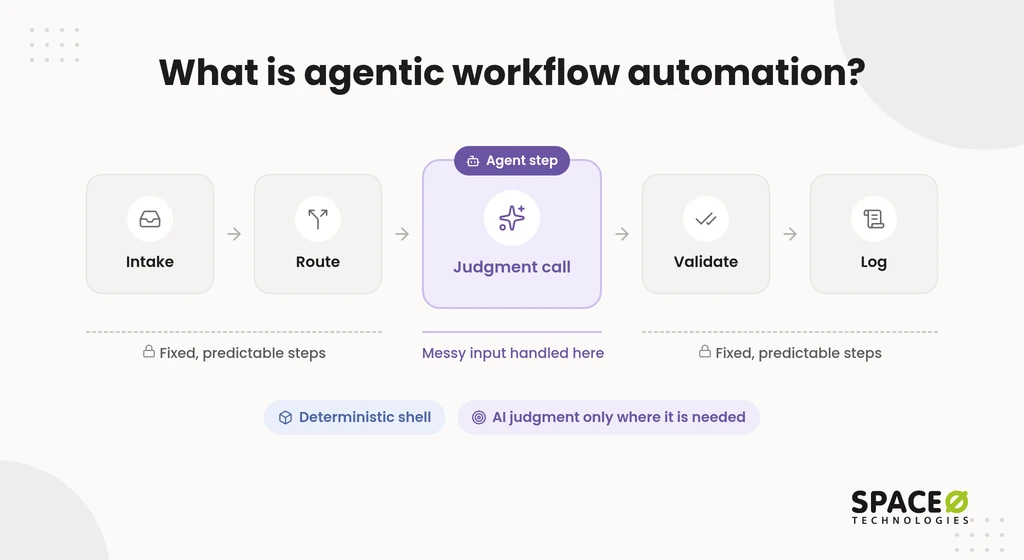
Fully autonomous agents are harder to test because their behavior is non-deterministic. Most workflows need judgment at only one or two points. The deterministic shell handles routing, validation, and logging. The agentic step handles the judgment call, such as reading an unusual request. This agentic workflow automation design keeps behavior predictable and costs bounded while still handling messy inputs.
What Are Enterprise AI Agents?
Enterprise AI agents are autonomous software systems that run multi-step workflows inside a company’s own systems and data.
Large organizations need agents that respect role-based access and permissions, compliance needs, and existing approval chains. An enterprise AI agent works under the controls covered in Risks and Guardrails below. Unlike the assist tools compared above, an enterprise AI agent updates records, creates tickets, and triggers approvals.
The agentic AI meaning in enterprise operations is practical: software that owns a process step under enterprise controls. That scope is why enterprise agents need stricter controls than a simple chatbot. In a PwC survey of 300 senior executives, 79% said AI agents are already being adopted in their companies.
What autonomy levels do enterprise teams use?
Enterprise teams usually move through three autonomy levels and raise agent freedom only as trust is earned.
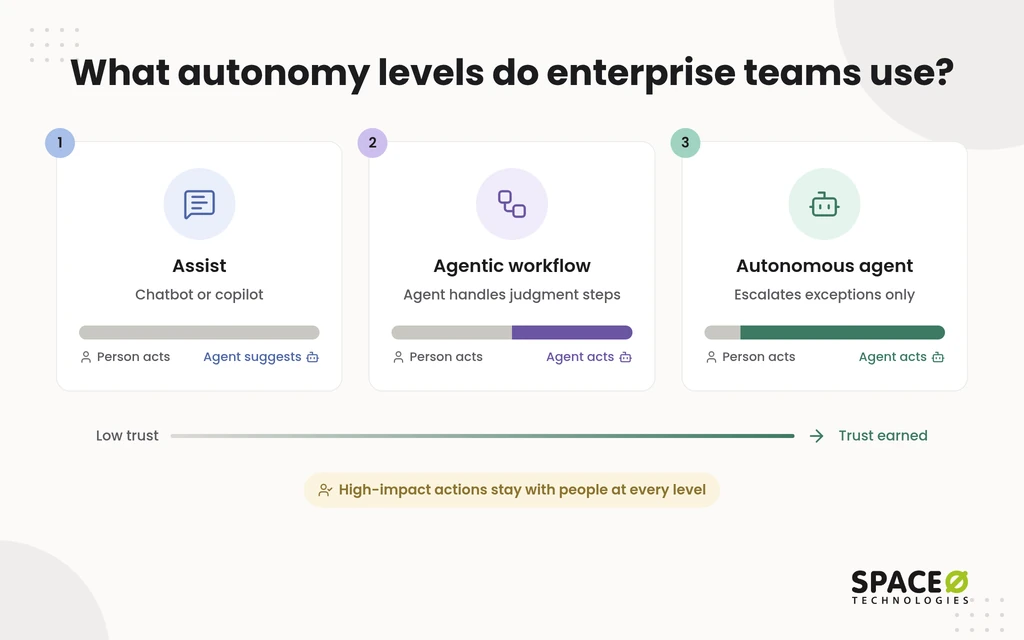
- Assist (chatbot or copilot): The system answers or suggests, and a person performs every action in the business system.
- Agentic workflow: A fixed workflow calls an agent for specific judgment steps, and humans approve consequential outputs.
- Autonomous agent: The agent plans and executes the full task and escalates only exceptions and high-impact actions to people.
Common Business Use Cases
Customer support is often the first use case for agentic AI in business. Sales, finance, and IT follow. Often called digital workers, these agents use artificial intelligence to cut manual labor, such as data entry.
A strong first use case is a high-volume process that crosses several systems and still needs judgment.
- Customer support: The agent checks order status, issues a refund within policy limits, and updates the customer record.
- Sales: The agent researches leads, drafts outreach, and logs every touch in your CRM for the sales team.
- Finance: The agent matches invoices to purchase orders in a connected ERP and flags discrepancies for an accountant to review.
- IT and HR: For information technology (IT) and human resources (HR), the agent routes IT service management (ITSM) tickets in ServiceNow. It also provisions licenses and runs onboarding.
- Procurement: The agent reads supplier invoices in many layouts and checks each one against the matching contract terms.
Autonomous AI coworkers for operations teams
Autonomous AI coworkers for operations teams take over the recurring coordination work that fills a manager’s week.
Think of the agent as a digital team member who handles coordination while people keep the decisions.
- Morning briefings: The agent pulls overnight changes from project, sales, and support systems into one summary.
- Status reports: The agent compiles weekly progress from task trackers and drafts the report for a manager to approve.
- Dependency tracking: The agent watches linked tasks across teams and alerts owners when a delay will block other work.
- Reconciliation: The agent compares inventory counts against order records and lists the mismatches someone needs to resolve.
- Process compliance: The agent confirms that required approvals and sign-offs happened before work moves forward.
Risks and Guardrails
AI agents take real actions with non-deterministic behavior, so every deployment needs scoped permissions, audit logs, and human approval.
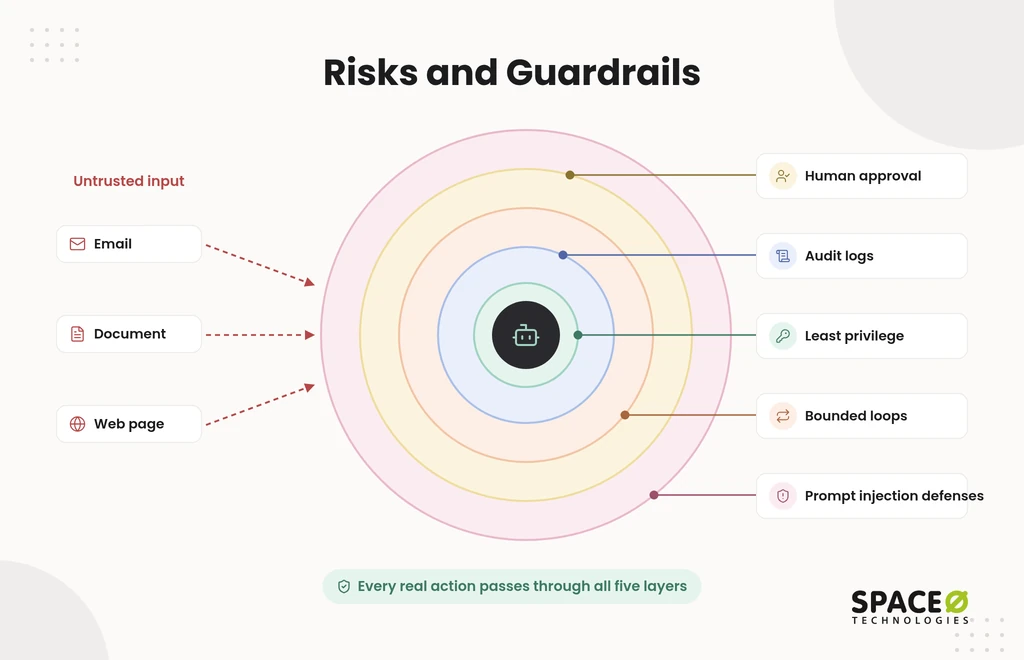
The same input can lead to different steps on different runs. That flexibility helps with messy cases, but it is risky when money is involved. In practice, guardrails come in five layers.
- Least privilege: Give the agent only the access its task needs, using role-based access control (RBAC) in each system.
- Audit logs: Record every tool call, input, and decision, so reviewers can trace exactly why the agent acted.
- Bounded loops: Set rate limits and step limits, so a confused agent cannot repeat actions or run up costs.
- Human approval: Require human-in-the-loop approval for payments, irreversible changes, and messages sent outside the company.
- Prompt injection defenses: Treat emails, documents, and web pages as untrusted input that may carry hidden instructions.
Watch for agent washing too. Agent washing means chatbots relabeled as agents, with no planning, tool use, or decision loop behind the label. Gartner estimates only about 130 of the thousands of agentic AI vendors are real.
When You Do and Don’t Need an AI Agent
You need an AI agent only when a task requires judgment across several systems; predictable tasks belong in plain automation.
Many teams pick the technology first and then look for a task. That order gets expensive, because an agent keeps costing money after launch.
Signs a task needs an AI agent
A task suits an AI agent when inputs vary, steps change by case, and several systems are involved.
- Variable inputs: Requests arrive as free text, emails, or documents in formats that rules cannot fully anticipate.
- Case-by-case steps: The right sequence depends on what earlier lookups return, not on a fixed flowchart.
- Several systems: The work crosses four or five of the tools listed under Core Components.
- Bounded risk: An approval gate can catch mistakes before they reach a customer or the ledger.
Signs plain automation or a chatbot is enough
A single predictable task with fixed inputs is better served by plain automation than by an AI agent.
- Fixed rules: Every case follows the same steps, such as copying form data into a spreadsheet each night.
- Answers only: Users need information, not actions, so an FAQ chatbot covers the need at lower cost and risk.
- Zero variation allowed: Auditors require identical behavior on every run, with no model judgment involved.
What does an AI agent cost to keep running?
Annual AI maintenance typically costs 15% to 25% of the original build cost, and usage fees come on top.
That range, from our AI development cost guide, covers maintenance alone. Infrastructure and LLM API usage add to the total and scale with task volume. Compare the yearly run cost against the hours the agent removes. If the task is rare, the numbers rarely work.
A short AI consulting engagement can score your candidate tasks against this test before any build starts.
Buy Off-the-Shelf or Build Custom
The build-or-buy choice comes down to how many systems the workflow crosses and who must own the code.
Getting agents into production is the hard part, so check each suite’s adoption requirements first:
- Salesforce Agentforce: Adoption requires customer data and processes in Salesforce, plus administrator setup and the right plan licensing.
- ServiceNow AI Agents: Adoption requires workflows on the ServiceNow platform, with administrators configuring agents inside existing ITSM processes.
- Microsoft Copilot Studio: Adoption requires a Microsoft environment, plus makers or developers to configure agents, connectors, and licenses.
- UiPath: Adoption requires an automation program on the UiPath platform, with developers maintaining the automations that agents coordinate.
Each vendor sets pricing through its own plans, so confirm current terms with that vendor. Custom enterprise AI agent development fits workflows that span four or five systems or run on legacy stacks. It also fits company-specific approval flows and teams that need full code and IP ownership.
How Space-O Technologies Builds AI Agents
Space-O Technologies builds custom AI agents around your workflows, data, and approval rules, and then hands you full ownership.
Most custom agents start as an AI agent proof of concept and also need integration work across older systems. We have built AI-powered custom software since 2010. We have served 1,200+ clients and developed 300+ software solutions. Our 140+ in-house developers start every project under a signed NDA. All source code, data, and IP transfer to you at completion. We report 97% client retention.
You choose one of four engagement models: Dedicated Team, Time & Material, Fixed Cost, or Staff Augmentation. Every model we put into production runs inside an evaluation suite. That suite covers accuracy, hallucination rate, bias checks, latency, and cost, with continuous monitoring. People approve consequential decisions.
Map Where an AI Agent Fits Your Workflows
Our engineers review your systems, rank candidate tasks, and return a scoped, expert-reviewed estimate with clear next steps, key risks, and timelines for your team.

Frequently Asked Questions
What are autonomous systems in AI?
Autonomous AI systems are software systems that pursue a goal on their own. In business, it is used interchangeably with AI agent and agentic AI. The practical caveat is that autonomy is a dial, not a switch. Most enterprise teams start at the assist level and grant full autonomy only once trust is earned. Exceptions and high-impact actions stay with people.
How much does enterprise AI cost?
Cost depends on the number of systems, data readiness, and the controls you need. Data preparation typically takes 25% to 40% of the total project budget. Annual AI maintenance then runs 15% to 25% of build cost. Model usage fees add to the total and scale with task volume.
Can an AI agent work with our existing tools?
Yes, through API integrations to the systems listed under Core Components. The decision rule: if the workflow lives mostly inside one vendor’s platform, a suite option may fit. If it crosses many systems or older stacks, plan for a custom build (see Buy Off-the-Shelf or Build Custom).
How do I tell a real AI agent from agent washing when evaluating vendors?
Ask for a live run on one of your own messy inputs, not a scripted demo. A real agent shows its planning step and the tool calls it makes. It also shows how it re-plans when a result is unexpected. A product that only replies with text and never calls a tool is a chatbot.
What are AI agents and how do they work?
AI agents are software systems that pursue a business goal with minimal supervision. They work in a loop: perceive, plan, act through a tool, and learn from the result. The loop repeats until the goal is met or a person must decide.
Can agentic AI be used for workflow automation?
Yes. Agentic AI fits workflows where inputs vary, and steps depend on earlier results. Most teams place one or two agent steps inside a fixed workflow. Predictable tasks with fixed inputs are better served by plain automation.
Why does an autonomous AI agent still need human approval?
Agents take real actions, and their behavior can differ from run to run. Human approval catches errors before they reach a customer or the ledger. Teams usually require sign-off for payments, irreversible changes, and external messages.
How do businesses use AI agents outside customer support?
Businesses use agents in sales, finance, IT, HR, and procurement. A sales agent logs outreach in the CRM. A finance agent matches invoices to purchase orders. An IT agent routes service tickets and provisions licenses.



 All our projects are secured by NDA




 4.8


