
 By
Contents
- Give each AI agent its own service-account identity, never a human operator’s access.
- Enforce permissions at the tool or API layer, because prompts can be talked out of rules.
- Layer role-based, attribute-based, and relationship-based controls for baseline roles, limits, and specific resources.
- Route high-stakes actions to a person for approval before they execute.
Key Takeaways
Role-based access and permissions for AI agents decide what each agent can touch. One over-permissioned agent can refund orders or expose customer records. Most teams find this gap only after launch.
An agent is its own principal, not the person who started it. It needs a service-account identity and limits enforced at the tool layer. Prompts alone cannot hold that line; see AI agent security best practices.
This guide shows how to layer RBAC, ABAC, and ReBAC for production agents. You get a permission matrix, a six-step build path, and direct answers. Space-O Technologies has built AI-powered software since 2010.
Why does traditional RBAC fail for AI agents?
Traditional role-based access control (RBAC) fails for AI agents for three reasons. Agents act on unverified content, chain tasks, and borrow human access.
RBAC was designed for employees who log in, read a screen, and decide. Statista reports 28.6 million active enterprise AI agents in 2025 and forecasts over 2.2 billion by 2030. An agent reads, decides, and acts in one loop. That loop creates three failure modes:
- The “Confused Deputy” problem: An AI agent reads emails, web pages, and support tickets written by other people. Hidden text in that content can trick the agent into using its elevated permissions. The agent then acts as a deputy for whoever wrote the text. For example, a ticket might instruct the agent to refund every open order.
- Accumulated task chains: Permissions stack up as an agent hands work to sub-agents. Each sub-agent handoff can add access the original task never needed. The chain ends up combining rights that no single role should hold, which breaks separation of duties.
- Inheritance risk: An agent that inherits a human operator’s full database or API access holds far more than its job needs. Least privilege gives the agent only function-scoped permissions. For example, an invoice-reader agent reads invoices but cannot edit payment records.
What are the core principles of agent RBAC?
Agent RBAC rests on three principles: a distinct agent identity, enforcement at the tool layer, and layered access models.
Teams usually skip one of the three, and the gap shows up after launch. Each principle is covered below, and the wider stack sits in our AI agent architecture for enterprise systems guide.
How should an AI agent’s identity be set up?
Each AI agent should be a non-person entity (NPE), managed like a service account.
Shared credentials make it impossible to tell which agent took which action. A dedicated NPE identity fixes that with three parts:
- Unique identifier: Every agent has its own ID, so every action traces back to one agent.
- Human owner or supervisor: A named person is accountable for the agent’s scope and behavior.
- Defined lifecycle: The agent is created, reviewed, and retired on a schedule, just like any account.
Where should agent permissions be enforced?
Enforce agent permissions at the tool and application programming interface (API) layer, not through prompt instructions.
A prompt that says “never issue refunds” is guidance the model can be talked out of. An API that rejects the refund call holds firm no matter what the agent was told. The check runs on every request, using the agent’s own identity.
Your team gets this through API integration services that validate the agent’s identity and scope before any tool executes.
How do RBAC, ABAC, and ReBAC work together for agents?
RBAC sets the agent’s baseline role, ABAC adds context, and ReBAC limits the agent to specific shared resources.
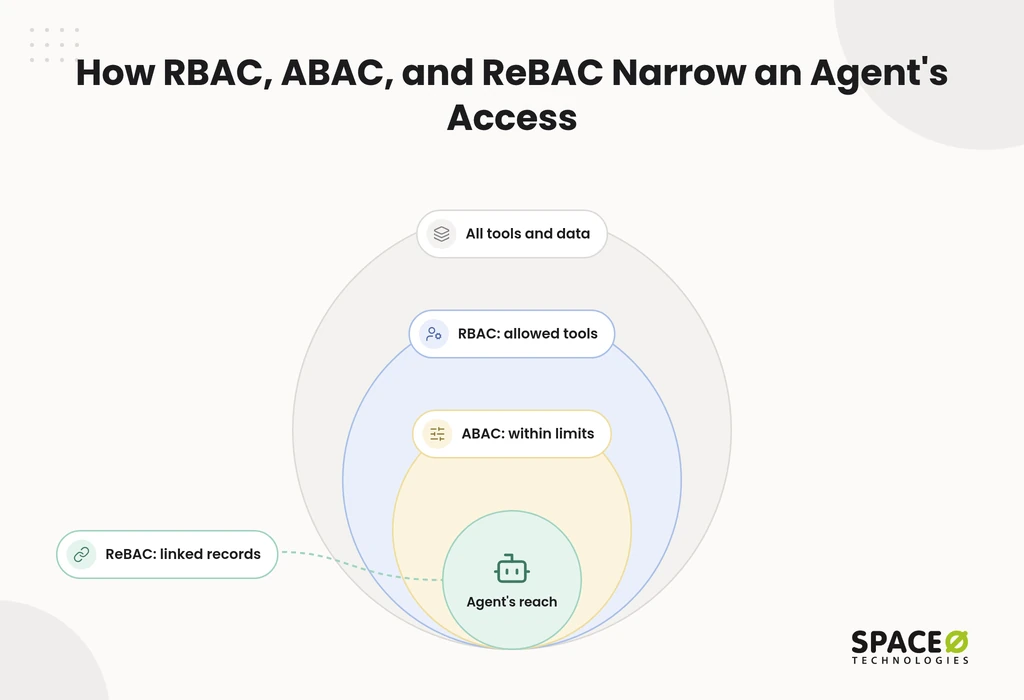
No single model covers every case. Layering all three gives each agent a narrow, checkable scope:
- RBAC (role-based access control): Assigns a baseline role such as invoice-reader or support-agent. The role defines which tools the agent may call at all.
- ABAC (attribute-based access control): Adds contextual attributes such as data classification, refund limits, or time of day. A support agent may issue refunds only up to a set limit.
- ReBAC (relationship-based access control): Grants access based on relationships to specific shared resources. A support agent sees only the orders linked to the ticket it is handling.
Comparing access-control approaches for AI agents
Most production agents need RBAC, ABAC, and ReBAC together, plus human review for high-stakes actions.
Founders and chief technology officers (CTOs) often start with roles only, then add layers after an incident. McKinsey’s State of AI research shows most organizations use AI, yet few have scaled it, so early access design pays off. The table shows what each approach covers before you commit.
| Approach | What it controls | Failure mode it prevents | Fit for multi-tenant SaaS | Fit for regulated workflows |
|---|---|---|---|---|
| RBAC only | Which tools an agent may call | An agent calling tools outside its job | Weak: roles alone do not separate tenants | Weak: no limits on amounts or data classes |
| RBAC + ABAC | Tools, plus limits on amount, data class, and time | Over-limit actions and access to restricted data | Partial: context helps, but tenant boundaries stay loose | Moderate: limits help, but no human sign-off |
| RBAC + ABAC + ReBAC with human review | Tools, context, specific resources, and approval for high-stakes steps | Confused Deputy abuse, cross-tenant access, and unreviewed consequential actions | Strong: each agent sees only its tenant’s resources | Strong: people approve consequential decisions |
If you run a multi-tenant software as a service (SaaS) platform, ReBAC keeps one tenant’s agent out of another tenant’s data.
Permission matrix example: a support agent in production
A permission matrix lists every tool an agent can touch, along with its role, limits, scope, and approval rule.
Abstract principles rarely survive a design review. A matrix turns them into rows your engineers can build, and your auditors can check. The example below covers a support agent in a multi-tenant SaaS product.
| Tool or API | Baseline role (RBAC) | Contextual limit (ABAC) | Resource scope (ReBAC) | Human approval required? |
|---|---|---|---|---|
| Read ticket history | support-agent | Internal and customer data only, PII masked | Tickets in this agent’s assigned queue | No |
| Look up order | support-agent | Personally identifiable information (PII) fields masked | Orders linked to the ticket’s customer | No |
| Issue refund | support-agent | Up to the configured refund limit | Orders linked to the ticket’s customer | Yes, above the refund limit |
| Read invoice | invoice-reader | Read-only finance data, business-hours window | Invoices for the ticket’s account | No |
| Change account email | Not granted | Denied by default | Not applicable | A human performs this action |
| Bulk export customer records | Not granted | Denied by default | Not applicable | Not available to agents |
Two rules sit behind this matrix. First, deny by default: an agent gets only the rows it needs. Second, a sub-agent receives the narrower scope at each handoff, never the combined scope. For multi-agent designs, read single-agent vs multi-agent architecture.
Need This Matrix Built for Your Agent?
Our engineers can turn your tools and approval rules into a working matrix. Share your agent’s scope, and we will map it with you.

How to build agent permissions into production agents
Build agent permissions in six steps, from identity setup to retirement, and enforce each one in code.
Most permission gaps appear between steps, not within them. Run these in order:
- Register the agent as an NPE: Issue a unique ID and name its human owner.
- Map its tools: List every API the agent calls, then remove anything the job does not need.
- Assign the baseline role: Give the agent one function-scoped role, such as support-agent.
- Add ABAC and ReBAC rules: Set limits on amounts, data classes, and time windows, then scope access to specific resources.
- Set human approval thresholds: Route consequential actions to a person before they execute.
- Audit, review, and offboard: Log every tool call against the agent’s ID. Review its scope regularly, and revoke credentials when the agent is retired.
For regulated workflows inside enterprise software, the step 6 log becomes your reviewable record.
Build it with Space-O Technologies
Space-O Technologies builds production AI agents with scoped permissions, tool-layer enforcement, and human review checkpoints.
Our 140+ in-house developers apply this permission model to every agent we ship. We have served 1,200+ clients and delivered 300+ software solutions. Space-O Technologies reports 97% client retention.
Our approach to agent access follows the matrix above:
- Human review for high-stakes decisions: In lending workflows, the agent drafts and gathers evidence while an underwriter approves large exposures.
- Published approval defaults: Hiring, lending, clinical, and legal decisions need a qualified person’s approval. Low-confidence outputs also go to human review.
- No training on client data: Your records stay out of model training.
- PII masking: Sensitive fields are masked before an agent sees them.
- Security posture: Space-O Technologies holds ISO 27001 and ISO 9001 certifications.
- NDA and ownership: Each project starts under an NDA. At completion, all source code, data, and IP transfer to you.
For a full agent build on this permission model, visit our AI agent development company page. To extend your own team, hire AI agent developers. Engagement runs on four models: Dedicated Team, Time & Material, Fixed Cost, or Staff Augmentation.
Get your agent’s permission design reviewed before launch, so you know which actions need limits.
Frequently Asked Questions
What is the difference between AI agent authentication and AI agent access control?
Agent identity tells you which agent is acting, but it says nothing about what it may do. Access control is the separate layer that decides which actions the identified agent is allowed to perform. Each agent is set up as a non-person entity with a unique identifier and a human owner. It also has a defined lifecycle, and every action then traces back to one agent. Access control is enforced at the tool or API layer on every request using that identity. An agent can be correctly identified and still be over-permissioned, so you need both.
Can an AI agent draft a decision without being allowed to approve it?
Yes, you can cap an agent’s role at drafting and evidence retrieval and reserve approval for a person. In one lending workflow, the model drafts the recommendation and rationale. A human underwriter signs off before anything reaches the applicant. Actions such as changing an account email can be denied to the agent entirely and done by a human.
How many tools should an AI agent have access to?
Only as many as the agent’s specific job requires, and there is no fixed number. Start by listing every API the agent can call, and strip out any the job doesn’t need. Default to deny, so the agent holds only the matrix rows it actually needs.
What should be in place before an agent goes live in a regulated workflow?
Before go-live, an agent needs a unique non-person identity, a named human owner, and a defined lifecycle. It also needs a permission matrix with approval thresholds for consequential actions. Every tool call should be logged against the agent’s ID so there is a reviewable record. Sensitive fields such as PII should be masked before the agent sees them.
How do I handle permissions when an agent hands work to sub-agents?
At each handoff, pass the sub-agent only a narrower scope, never the combined permissions of the whole chain. Otherwise, access piles up and breaks separation of duties. Every agent should also keep its own identity and a named human owner accountable for its scope and behavior.



 All our projects are secured by NDA




 4.8


