
 By

Contents
- Function calling is what lets a chatbot’s model take real actions in your CRM.
- Build the upgrade in six steps, starting with a written action list and least-privilege scopes.
- Most CRM failures come from expired tokens, missing write scopes, field mismatches, or broken webhooks.
- Start read-only, run shadow mode, and let code confirm each write by re-reading the record.
Key Takeaways
Upgrading a chatbot to an AI agent means giving its model tools through function calling. You keep your current chat interface and add an action layer behind it. Our AI chatbot development work follows the same order.
The model then runs a plan–act–check loop toward a stated goal. Memory, logging, and human approval keep risky actions under control. Contact our team to scope that control for live customer records.
When CRM work fails, the cause is usually simple. Expired tokens, missing write permissions, field mismatches, and broken webhooks cause most failures. Broader AI integration with CRM software follows the same checks.
Core Architectural Shift: Chatbot vs. AI Agent
A chatbot reacts to a prompt with text, while an AI agent pursues a goal and acts through tools. The chatbot is passive: it answers, then waits. The agent is goal-driven: it plans, calls systems, checks results, and continues until the task is done.
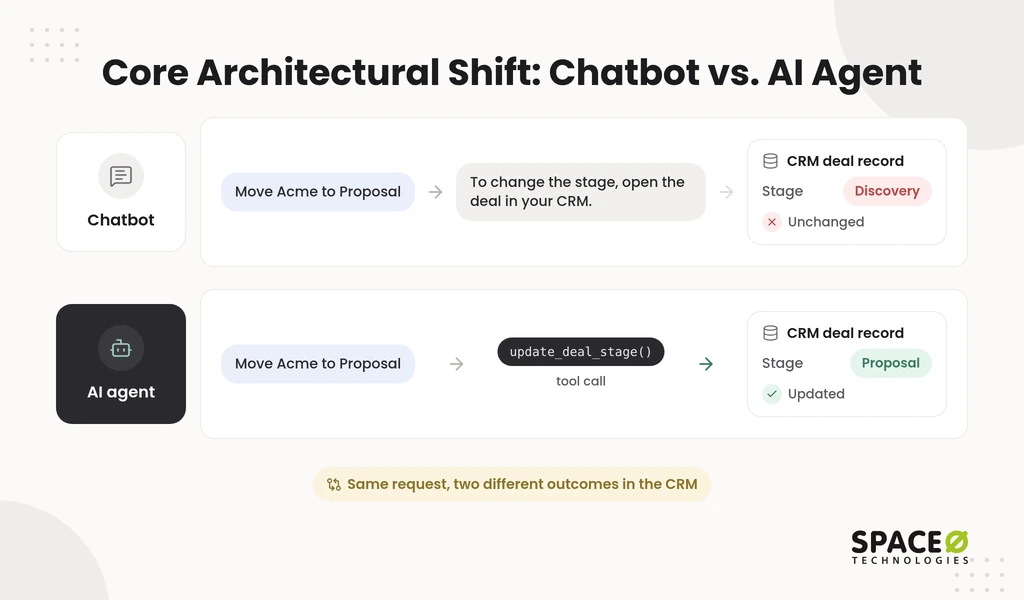
| Dimension | Chatbot | AI agent |
|---|---|---|
| Output | Generated text | Tool calls that change records, plus text |
| Memory | Current conversation only | Task state plus long-term context |
| Autonomy | One turn, then stop | Multi-step, toward a stated goal |
| Control | Content filters | Permissions, approvals, caps, and audit logs |
Chatbot: Prompt → Response → Stop. AI Agent: Goal → Plan → Act → Check → Repeat → Done.
The shift also moves where control lives. With a chatbot, the main risk is a wrong sentence. With an agent, the risk is a wrong write to a live record. That is why role-based access and permissions come first in the steps below.
Gartner predicts that 40% of enterprise apps will include task-specific AI agents by 2026.
Step-by-Step: How to Upgrade
The upgrade takes six steps: scope actions, add tool calling, connect systems, add a loop, add memory, then add guardrails. You usually keep your current conversation layer and build an action layer behind it.
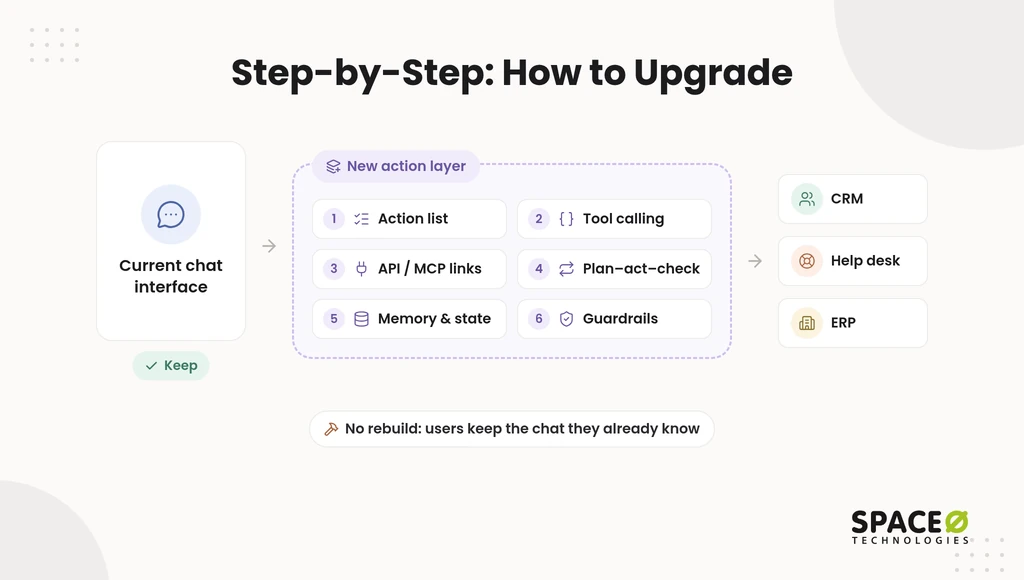
Step 1: Define the action space and permissions
List every action the agent may take and the smallest permission each action needs. Many stalled upgrades skip this step. Teams wire up tools first, then find the bot can edit records nobody meant it to touch.
- What it is: A written action catalog. Each entry names the system, the operation, the data touched, and whether it reads or writes.
- How to do it: Rank actions by business impact. Start with read-only lookups. Grant least-privilege scopes to a dedicated bot service user, never an admin account.
- CRM example: “Look up contact by email” is read-only. “Change deal stage” is a write and needs approval at first.
Step 2: Add tool (function) calling
Function calling is the mechanism that lets the LLM take actions instead of only writing text. The model never touches your CRM directly. It proposes a call, and your code decides whether to run it.
- What it is: You describe each tool with a name, a purpose, and a JavaScript Object Notation (JSON) schema for its arguments. The model returns a tool name and arguments. Your backend runs the call and feeds the result back to the model.
- How to do it: Write specific tool descriptions. Validate every argument against its schema before execution. Return structured errors the model can read and act on.
- CRM example: create_ticket(subject, priority, contact_id) returns a ticket ID that the model uses in its reply.
Step 3: Connect your systems through APIs, MCP, or middleware
Each tool needs a reliable path to a real system: a direct API, an MCP server, or middleware. The path you choose sets how much control you keep over errors and retries.
- What it is: Direct application programming interface (API) calls give the most control. The Model Context Protocol (MCP) gives agents one standard way to find and call tools. Integration platform as a service (iPaaS) middleware, such as Zapier or Make, covers standard flows quickly.
- How to do it: Use refresh-capable OAuth for Salesforce, HubSpot, Zendesk, or Zoho CRM. Keep sandbox and production credentials separate. Test each endpoint alone in Postman or curl before the agent calls it.
- Where it extends: The same pattern reaches enterprise resource planning (ERP) systems and ServiceNow. Our API integration services cover these multi-system connections.
Step 4: Replace single-turn replies with a plan–act–check loop
An agent works toward a goal across several steps and checks each result before it moves on. This loop is what separates an agent from a chatbot that happens to call one tool. Enterprise AI agent development treats this loop as the core of every workflow.
- What it is: The loop runs plan, act, observe, and repeat until the goal is met. ReAct is a common pattern: the model reasons, acts, then reads the result.
- How to do it: Frameworks such as LangChain and LangGraph, CrewAI, or AutoGen manage the loop. Define a clear stop condition. Block the closing message until at least one tool result is on record.
- CRM example: “Log this call” becomes find contact, find open deal, draft note, attach note, and confirm.
Step 5: Add memory and state
Multi-step work needs memory, or the agent repeats steps and loses track of record IDs. Without state, a five-step task can quietly restart at step two.
- What it is: Short-term memory holds the current task: goal, finished steps, and record IDs. Long-term memory, often a vector database, stores past context and reference knowledge.
- How to do it: Store task state in your own database, not only in the prompt. Pass IDs explicitly between steps. Start a fresh thread when a long conversation pushes tool instructions out of the context window.
- CRM example: The deal ID found in step one is reused, unchanged, in step four.
Step 6: Add guardrails, human approval, logging, and caps
Guardrails decide what the agent may do alone, what needs a person, and what gets recorded. This step turns a working demo into something you can run on live customer data. Gartner also predicts that over 40% of agentic AI projects will be canceled by the end of 2027.
- What it is: Human-in-the-loop (HITL) approval covers high-impact actions. Every tool call gets an audit log entry. Each task has step and spend caps, and tokens carry least-privilege scopes.
- How to do it: Route writes with side effects to an approval queue. Log the tool name, arguments, status code, and timestamp. Sanitize inputs against prompt injection. Run risky tools in a sandboxed environment.
- CRM example: A refund or a bulk record update waits for a named approver.
“Our Chatbot Cannot Complete Tasks or Connect to Our CRM”: Causes and Fixes
Most CRM failures trace to four causes: expired credentials, missing write permissions, field or schema mismatches, and broken webhooks. Start by separating two problems. A bot that cannot connect usually has an authentication or endpoint fault. A bot that connects but cannot finish tasks usually has a permission, mapping, or tool-logic fault.
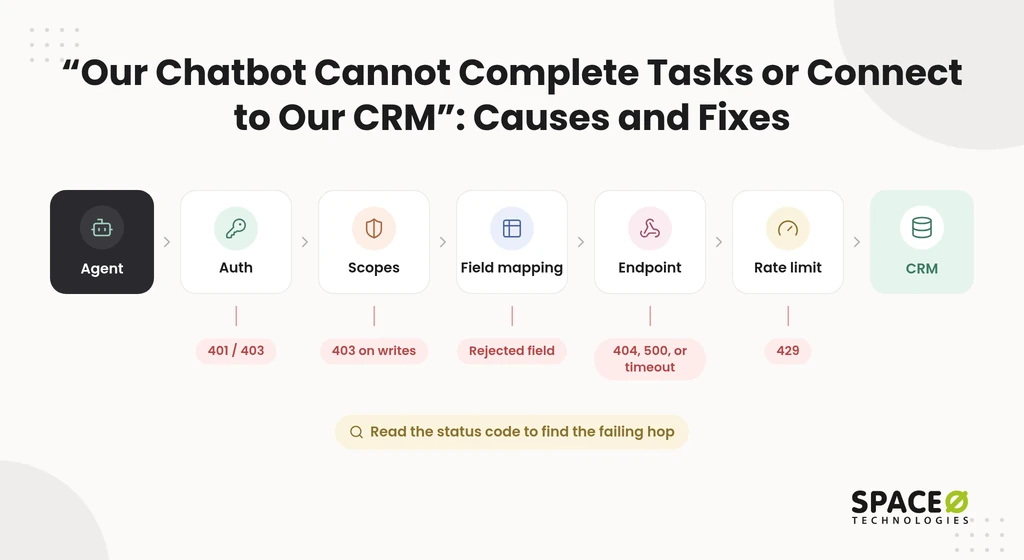
| Symptom | Likely failing hop | First check |
|---|---|---|
| Every call fails right away | Authentication | 401 or 403 in the logs |
| Reads work, writes fail | Scopes or permissions | 403 on write calls only |
| Some records save, others do not | Field mapping or schema | Rejected payload fields |
| Nothing reaches the CRM | Webhook or endpoint | 404, 500, or timeout |
| Fails only at busy hours | Rate limits | 429 responses |
| Bot says “done,” record unchanged | Tool call skipped or failed | Missing log row for that turn |
Expired, revoked, or rotated credentials
Expired, revoked, or rotated API keys and OAuth tokens are a frequent reason a chatbot loses its CRM connection.
- Cause: Tokens expire, keys rotate, and an admin may revoke access during a security review.
- Check: Look for 401 (unauthorized) or 403 (forbidden) on every call, including reads.
- Fix: Re-authorize the connection. Move to refresh-capable OAuth and alert on refresh failures before users notice.
Missing read/write permissions or scopes
A valid token can still lack write scope, so the agent reads records but cannot change them.
- Cause: The integration was authorized with read-only scopes, or the bot service user lacks object-level rights.
- Check: Compare failures by operation. A 403 on writes only points to scopes.
- Fix: Grant explicit read/write scopes for each object the agent touches, and nothing broader.
Field mapping, schema, or payload mismatch
When the chatbot sends data the CRM does not accept, the write fails or saves partially.
- Cause: Renamed fields, wrong data types, missing required fields, or picklist values the CRM rejects. Heavily customized CRMs add mismatched IDs and stale sync.
- Check: Read the CRM’s error body for the rejected field name.
- Fix: Re-map fields to the CRM’s current schema and validate payloads before sending.
Broken webhook, endpoint, or middleware
If calls never reach the CRM, the webhook URL, protocol, or middleware step is usually at fault.
- Cause: A localhost URL left from testing, HTTP instead of HTTPS, a moved endpoint, or a timeout.
- Check: Look for 404, 500, or timeout errors. Timeouts vary by platform, so confirm your vendor’s documented limit.
- Fix: Use public HTTPS endpoints, confirm the path, and return a response before the platform’s timeout.
Rate limits and throttling
An agent that works in testing but fails at peak hours is often hitting the CRM’s API rate limit.
- Cause: Multi-step loops make many calls per task, and bursts exceed the vendor’s quota.
- Check: Look for HTTP 429 (too many requests).
- Fix: Add retries with exponential backoff, batch reads, and cache lookups. Take exact limits from HubSpot, Zendesk, or your CRM’s own documentation.
The bot skips the tool call or reports false success
Sometimes the model decides it has enough information and writes a confident summary without calling the tool.
- Cause: Loose tool instructions, an overloaded context window, or a tool error the model ignored.
- Check: Find the turn in the audit log. No tool-call row means no action happened.
- Fix: Require a tool result before any confirmation. Let code, not the model, write the success message.
Wrong environment, disabled toggle, or routing
A correct setup pointed at the wrong place still fails, so confirm the environment and switches.
- Cause: Sandbox credentials may run in production, or calls may hit the wrong portal. A disabled toggle, a switched-off automation engine, or wrong department routing also blocks actions.
- Check: Confirm the target environment, the integration status, and the department or group ID.
- Fix: Separate configs per environment. Give the bot service user its own department or group. Plan token and schema upkeep as a yearly line in your AI development cost budget.
Permission Tiers, Staged Rollout, and Read-Back Verification
Give the agent its powers in three tiers: read-only, draft with human approval, then autonomous within caps. Most guidance stops at “add human approval.” The harder question is which actions need it and how you prove a write actually landed.
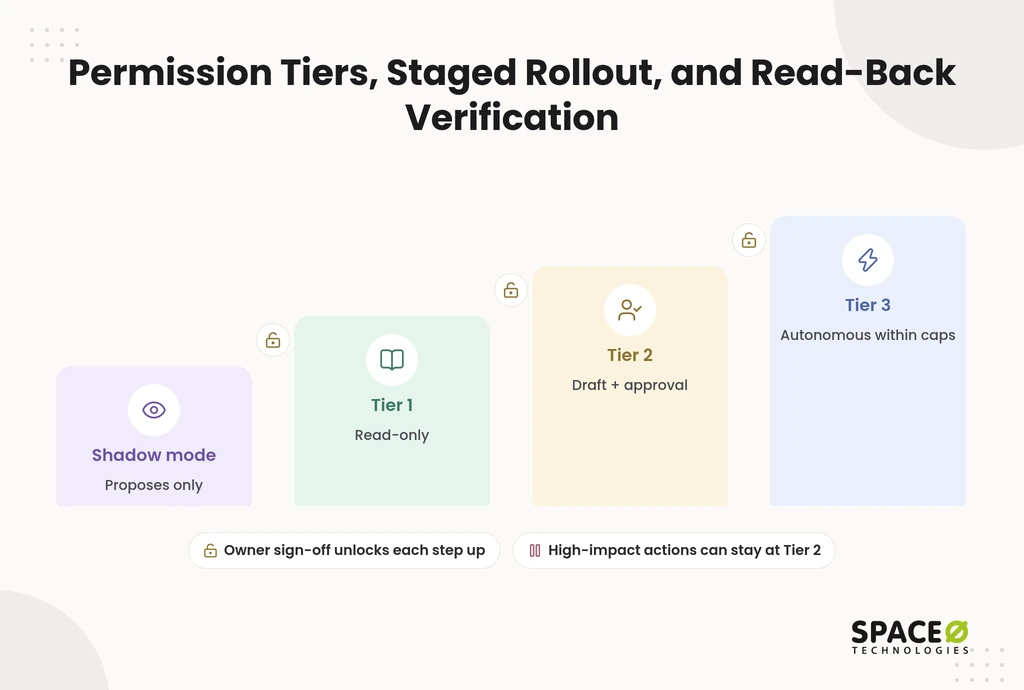
Which actions belong in each tier?
Each tier pairs a set of CRM actions with one control and one failing hop to check first.
| Tier | Example CRM actions | Control | Failing hop when the action does not land |
|---|---|---|---|
| 1. Read-only | Look up a contact, read deal stage, fetch ticket history | Read-only scope on the bot service user, audit log | Authentication (401/403) or wrong environment |
| 2. Draft with human approval | Draft a call note, propose a deal-stage change, prepare a ticket reply | Approval queue; the write runs only after a named person approves | Approval handoff, then field mapping on the final write |
| 3. Autonomous within caps | Update deal stage, create ticket, log activity | Step and spend caps, least-privilege write scopes, audit log, read-back | Rate limits (429), webhook timeout, or a skipped tool call |
An action moves up a tier only when its owner signs off under your human-in-the-loop approval policy. A refund or bulk edit may stay in tier 2 permanently.
Not Sure Which Tier Fits Your First CRM Actions?
Share your CRM and chatbot setup with our team. We will review your action list and recommend a permission tier and rollout order for each one.

What is shadow mode, and why run it first?
Shadow mode runs the agent on real traffic while staff keeps doing the work by hand. The agent proposes each action and logs it, but nothing writes to the CRM.
Your team then compares proposed actions with what people actually did. Mismatches reveal mapping errors, missing tools, and weak instructions. This happens before any customer record is at risk.
How do you prove an action actually happened?
The agent’s “done” message must come from code that re-reads the CRM record, never from the model. This one rule closes the silent-failure gap.
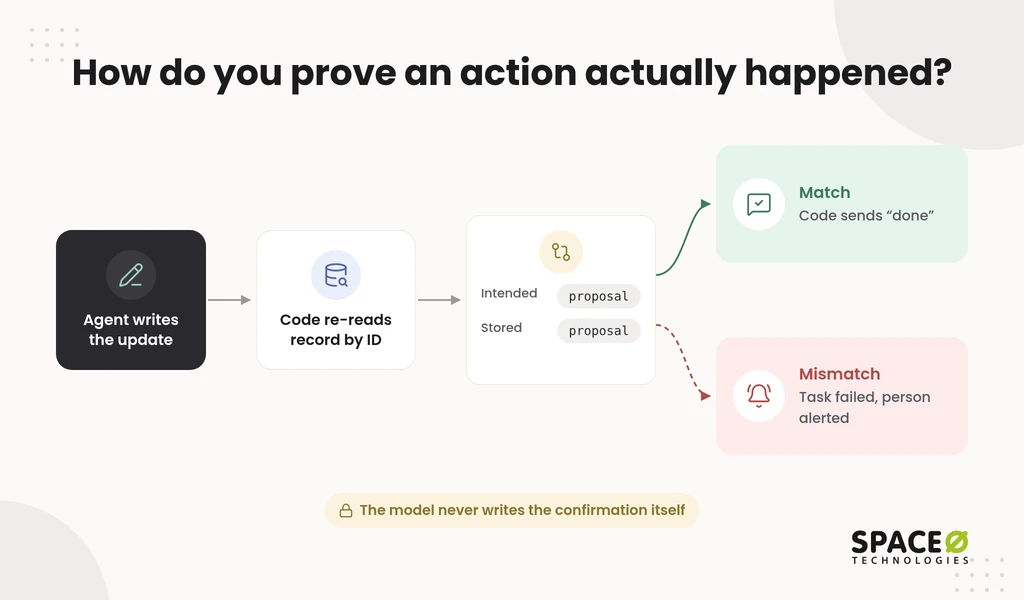
After each write, your code fetches the record by ID. It compares the stored fields with the intended values. Only a match produces the confirmation text. A mismatch marks the task failed and alerts a person.
Build In-House, Use a Connector or Platform, or Work With a Partner
Your route depends on in-house engineering capacity, integration depth, and who should own the code afterward. Each route asks something different of your team.
How do the three routes compare?
In-house builds need engineers, connectors need platform admin work, and a partner build needs your workflow owners’ time.
| Factor | In-house with frameworks | Native connector, no-code platform, or middleware | Custom build with Space-O Technologies |
|---|---|---|---|
| What it requires | Engineers who own LangChain/LangGraph, CrewAI, or AutoGen code, plus hosting and monitoring | Admin setup in each platform; plan gates and add-on costs vary by vendor | Your workflow owners for scoping and approvals |
| Production readiness | Depends on your evaluation, logging, and retry work | Fast for standard CRM use; less control over retries and error handling | Evaluation, monitoring, and human review built in |
| Integration depth | As deep as your team builds | Standard CRM setups | CRM, ERP, ServiceNow, and custom objects |
| Code and IP ownership | Yours | Workflows live inside the vendor’s platform | All source code, data, and IP transfer to you at completion |
| Fits | Teams with engineers and a narrow scope | Standard setups with common CRM actions | Live chatbots writing to several systems under review |
If you build in-house but lack agent specialists, you can hire AI agent developers to join your sprints.
Where does Space-O Technologies fit?
Space-O Technologies fits teams upgrading a live chatbot whose actions must land in CRM, ERP, or ServiceNow. That includes writes to custom objects or to several systems in one task.
We have built AI-powered custom software since 2010. Space-O Technologies has served 1,200+ clients and developed 300+ software solutions. We employ 140+ in-house developers. We run 50+ AI systems in production.
Every model we put into production is wrapped in an evaluation suite. It covers accuracy, hallucination rate, bias checks, latency, and cost, with continuous monitoring in place. A qualified human reviews and approves before any output influences a final decision. Outputs that fail validation are rejected. Low-confidence outputs go to a person for review.
We hold ISO 27001 and ISO 9001 certifications. Our frameworks are HIPAA-ready for healthcare AI engagements. We sign an NDA before every project. You choose from four engagement models: Dedicated Team, Time & Material, Fixed Cost, or Staff Augmentation. Our offices are in Mesa (Arizona, USA), Brampton (Ontario, Canada), and Ahmedabad (India). Our AI agent development practice builds these CRM-connected agents.
What to Gather Before Escalating
A support engineer can usually find the failing hop quickly if you bring these details.
- The CRM name, edition, and license tier, including any API add-on.
- The chatbot or agent platform and its version.
- The exact status code, timestamp, and request ID of a failed call.
- The tool-call payload and response from your AI agent audit logs.
- The target environment: sandbox, staging, or production, and which portal.
- Whether the same call succeeds alone in Postman or curl.
- Recent changes, such as a token rotation, renamed field, or plan change.
Before you open a ticket, answer three questions. Which CRM is the agent writing to? Which platform runs the agent? What exact error code appears in the logs?
Frequently Asked Questions
What are goal-based AI agents?
A goal-based AI agent works toward a stated outcome rather than answering a single prompt and stopping. It loops through planning, acting, checking, and repeating until the goal is met. In a CRM, a request to log a call becomes a short chain of steps. The agent locates the contact and open deal, drafts a note, attaches it, and confirms.
Is HubSpot a type of CRM?
Yes. HubSpot is a CRM platform, in the same category as Salesforce, Zendesk, and Zoho CRM. An AI agent connects to HubSpot through its API, ideally using OAuth that can be refreshed. The scopes granted to the agent should be limited to only the objects it needs.
What changes when you upgrade a chatbot to an agent that acts in your CRM?
A chatbot returns generated text and then waits for the next message from the user. An AI agent pursues a goal across several steps and calls tools that change records. For example, an agent can create a ticket in the CRM and use the returned ticket ID in its reply.
Why is CRM not working?
A chatbot or agent that cannot work with a CRM usually has one of four problems. These are expired or revoked credentials, missing write scopes, field or schema mismatches, or a broken webhook. The status code narrows it down. 401 or 403 on every call means authentication, 403 on writes only means scopes, a rejected payload means mapping, and 404, 500, or timeouts mean an endpoint fault.
How do I keep the agent working after my CRM changes a field or schema?
Update the agent’s tool arguments to match the CRM’s current schema, and check payloads before they are sent. The CRM’s error body names the rejected field. Token and schema upkeep is part of ongoing maintenance, which typically costs 15% to 25% of the build each year.
What is function calling in an AI chatbot?
Function calling lets the model return a tool name and arguments instead of plain text. Your backend runs that call against an API and sends the result back. The model never touches the CRM directly.
Can I upgrade my chatbot without rebuilding it?
Yes. You usually keep the current conversation layer and add an action layer behind it. That layer holds tool definitions, API connections, a plan–act–check loop, memory, and guardrails.
Why does my chatbot say a task is done when the CRM record did not change?
The model probably skipped the tool call or ignored a tool error, then wrote a confident summary. Check the audit log for a tool-call row on that turn. Fix it by letting code write the success message after re-reading the record.



 All our projects are secured by NDA




 4.8


