
 By
By 
Contents
- ChatGPT integration means connecting it to your business systems so it works inside daily workflows.
- Five methods exist: the OpenAI API, native connectors, middleware, RAG, and MCP connectors.
- OpenAI does not train on Business, Enterprise, or API data by default; add masking and human review yourself.
- Quick takeaway: pick your path by how much control you need over data, writeback, and failures.
Key Takeaways
ChatGPT integration means connecting OpenAI models to your business software and workplace tools. It automates workflows and helps teams analyze company data. Customer support is the most common starting point.
Teams use the OpenAI API, native connectors and plugins, or middleware such as Zapier. Each path differs in control, data writeback, and security. This guide compares them and shows where each one stops working.
OpenAI does not train on ChatGPT Business, Enterprise, or API data by default. You still need your own controls for masking, review, and access. Space-O Technologies builds these integrations through our generative AI integration services with those safeguards in place.
What are the key ChatGPT integration methods for business software?
There are five methods: the OpenAI API, native connectors, middleware, retrieval-augmented generation (RAG), and Model Context Protocol (MCP) connectors.
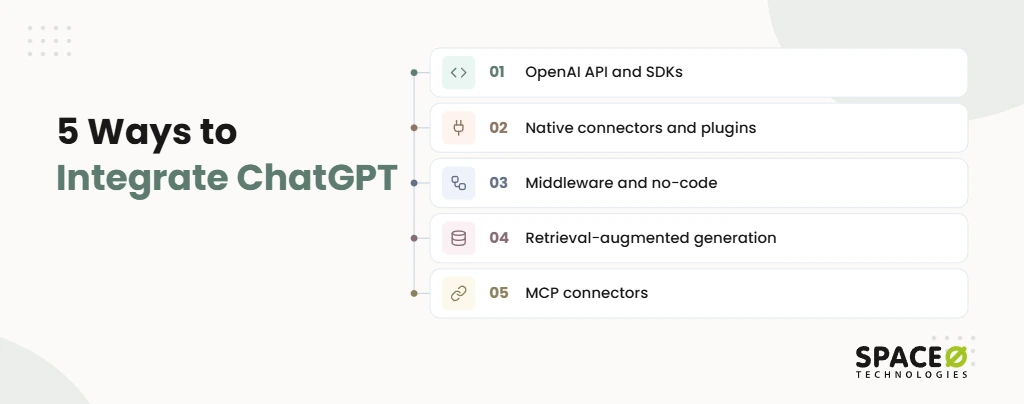
Most teams already have staff using ChatGPT on the side. The problem is that it stays disconnected from the systems where the work happens. Each method closes that gap in a different way.
- OpenAI API and SDKs: Developers call the OpenAI API from custom apps, using Python or Node.js SDKs on the backend and React.js on the front end. Our AI app development using OpenAI service covers this path.
- Native connectors and plugins: ChatGPT Business and Enterprise link to Slack, Google Drive, SharePoint, HubSpot, and Salesforce without code. Add-ins also bring ChatGPT into Microsoft 365 apps such as Word, Excel, Outlook, and Teams.
- Middleware and no-code automation: Zapier can trigger ChatGPT automatically whenever a specific event occurs in one of your connected business systems. Examples include customer relationship management (CRM) systems, enterprise resource planning (ERP) systems, or helpdesk platforms.
- Retrieval-augmented generation (RAG): RAG pulls passages from company documents and databases at query time. ChatGPT then answers from your data, not from model memory.
- Model Context Protocol (MCP) connectors: MCP is an open standard that lets ChatGPT call tools and read data from your systems through custom connectors. Some AI summaries expand MCP as “Machine Connecting Protocol,” but the correct name is Model Context Protocol.
OpenAI’s product names change often. OpenAI’s business pages now say “ChatGPT Business,” while many guides still say “ChatGPT Team.” OpenAI also markets agent products such as ChatGPT Work and Codex. We confirm current plan names and features before scoping any build.
What are the core business use cases for ChatGPT integration?
The four core use cases are customer support, sales and CRM, data analysis and reporting, and internal knowledge assistants.
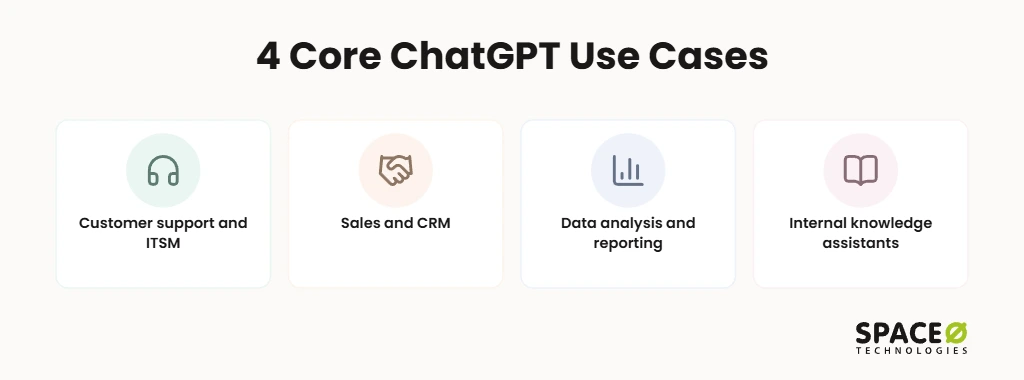
Each one targets a workflow where people spend hours reading, sorting, and summarizing information.
- Customer support and IT service management (ITSM): ChatGPT sorts tickets and drafts replies in Zendesk or ServiceNow for approval. Our ServiceNow implementation services cover the ITSM side.
- Sales and CRM: ChatGPT summarizes account history and drafts follow-ups from Salesforce or HubSpot records. CRM-native assistants such as Salesforce Einstein and HubSpot ChatSpot cover part of this inside the CRM itself.
- Data analysis and reporting: ChatGPT summarizes long reports and answers plain questions about ERP data held in systems such as Odoo. Our ERP software development services connect that data to the model.
- Internal knowledge assistants: Employees get answers grounded in standard operating procedures (SOPs), policies, and documentation, with source files linked.
Is ChatGPT integration secure for company data?
Yes, if you use paid business tiers or the API and add your own controls on top. Security leaders often block AI pilots because nobody can say where the data goes. The answer comes in two layers: what OpenAI commits to, and what your integration adds. Our AI consulting services help your team review data flow and risk before any pilot starts.
What does OpenAI commit to for business data?
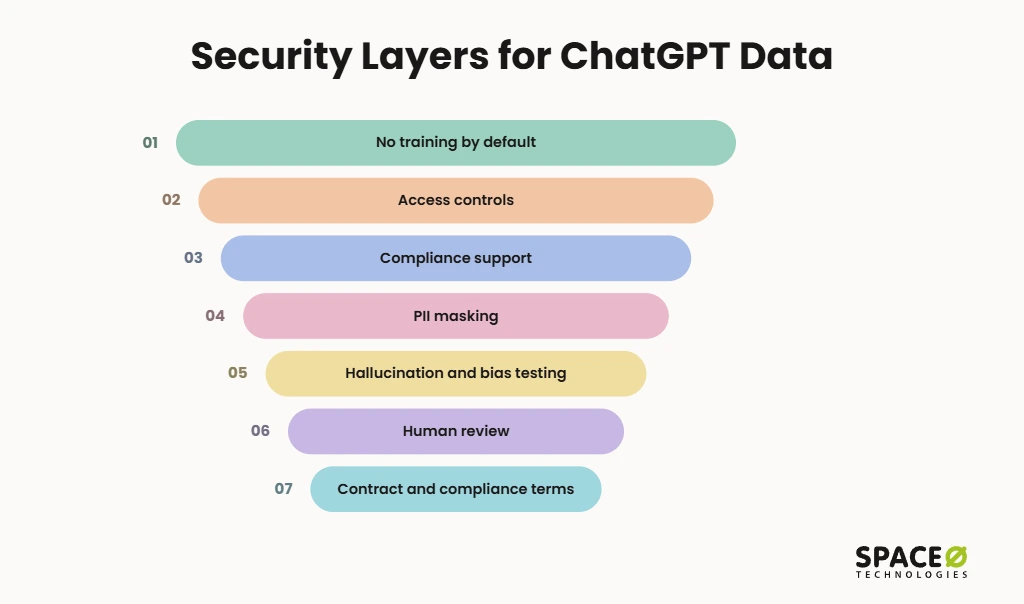
By default, OpenAI does not train its models on data from ChatGPT Business, ChatGPT Enterprise, or the API platform.
- No training by default: Business, Enterprise, and API data stays out of OpenAI model training unless your organization opts in.
- Access controls: Business and Enterprise plans offer single sign-on (SSO), multi-factor authentication (MFA), and audit logs. Check which controls your specific plan includes.
- Compliance support: OpenAI states support for the General Data Protection Regulation (GDPR) and the California Consumer Privacy Act (CCPA).
What controls does Space-O Technologies add to a ChatGPT integration?
We add five safeguards to every integration we build:
- No training on client data: Your records never feed model training in any system we build.
- Personally identifiable information (PII) masking: We strip or mask names, account numbers, and health details before data reaches the model.
- Hallucination and bias testing: We test outputs against known answers before release and keep testing after launch.
- Human review for high-stakes decisions: People approve consequential outputs, such as financial, clinical, or customer-facing actions.
- Contract and compliance terms: We work under an NDA. You get full code and IP ownership, plus an ISO 27001-aligned process and GDPR compliance. Builds are HIPAA-ready under the Health Insurance Portability and Accountability Act.
What are the best practices for implementing ChatGPT in business software?
Start small, clean your data, keep people in the loop, and send the model only what it needs. Gartner links abandoned generative AI projects to poor data quality, weak risk controls, and unclear business value.
- Start with one workflow: Pick one repetitive process and measure time saved and error reduction before expanding.
- Clean your data first: Standardize CRM fields and spreadsheet formats so ChatGPT works from consistent, trustworthy records. Gartner explains what AI-ready data requires.
- Keep human review: Route customer-facing and financial outputs to a person for approval before anything is sent or posted.
- Minimize the data you send: Pass only the fields a task requires, never full customer records or entire databases.
Which ChatGPT integration path should you choose?
Choose the path by how much control you need over data, writeback, and failures. Weighing a build against a ready-made tool? Read our guide to custom AI development vs. off-the-shelf. The table below compares the three main paths on the factors that decide production success.
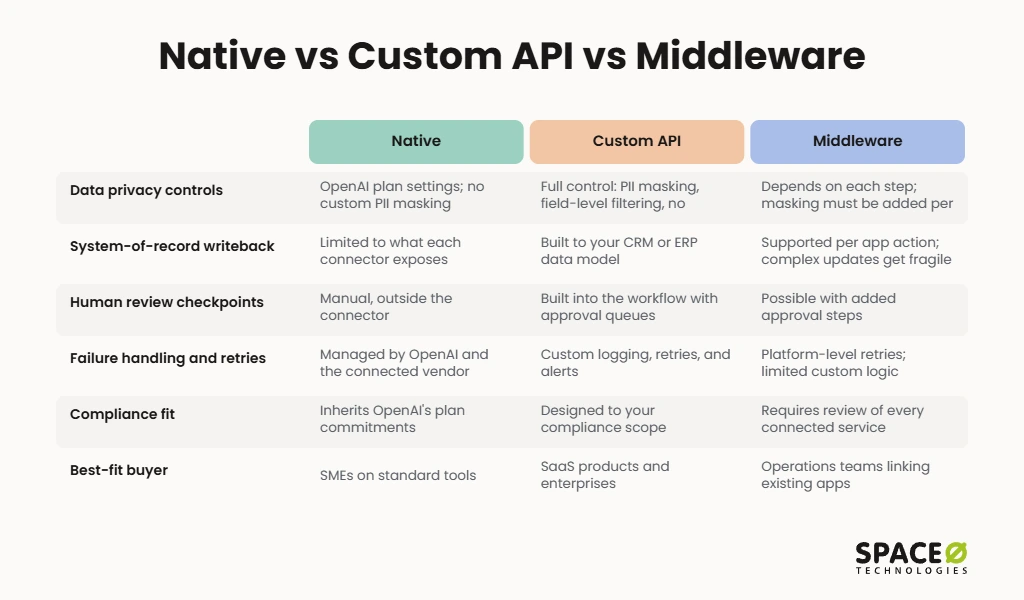
| Factor | Native ChatGPT connectors | Custom OpenAI API build | Orchestrated middleware workflow (Zapier) |
|---|---|---|---|
| Data privacy controls | OpenAI plan settings; no custom PII masking | Full control: PII masking, field-level filtering, no training on client data | Depends on each step; masking must be added per workflow |
| System-of-record writeback | Limited to what each connector exposes | Built to your CRM or ERP data model | Supported per app action; complex updates get fragile |
| Human review checkpoints | Manual, outside the connector | Built into the workflow with approval queues | Possible with added approval steps |
| Failure handling and retries | Managed by OpenAI and the connected vendor | Custom logging, retries, and alerts | Platform-level retries; limited custom logic |
| Compliance fit (GDPR, HIPAA-ready) | Inherits OpenAI’s plan commitments | Designed to your compliance scope | Requires review of every connected service |
| Best-fit buyer | SMEs on standard tools | SaaS products and enterprises | Operations teams linking existing apps |
Where each path stops working at scale:
- Native connectors: They stop working when you need custom logic or writeback the connector does not support.
- Custom OpenAI API build: It stops working when the team lacks owners for monitoring, evaluation, and model updates after launch.
- Middleware workflow: It stops working when chained steps multiply, because errors become hard to trace and fix.
Get Your Free ChatGPT Integration Estimate Today
Tell us about your stack and goals. Our engineers review your systems and send a clear integration recommendation, scoped to your budget, security needs, and timeline.

How does Space-O Technologies deliver ChatGPT integrations?
We start from your business goal, then build the integration path that solves it most cost-effectively. Many teams buy AI tools before deciding which workflow they need to fix. We reverse that order.
- OpenAI Select Partner: We also hold AWS Partner status and have Claude Certified Architects on staff.
- Production AI experience: 30+ AI engineers have built 50+ AI systems now live in production.
- Integration depth: We build API integrations with CRMs, ERPs, payment systems, and third-party platforms.
- ServiceNow delivery: We handle implementation, integration, migration, managed services, and support.
- Client base: We have served 1,200+ clients since 2010.
- Engagement models: You can choose fixed cost, time and material, or a dedicated team.
We serve startups, SMEs, SaaS companies, enterprises, and regulated teams in healthcare and fintech. A dedicated project manager sends you daily updates throughout the build. The free AI development cost calculator returns a custom cost range for your integration.
Every integration follows six steps: assess your applications, data, and workflows; select the model and integration approach. Next, design the architecture, connect AI with your systems, validate performance and security, then deploy and optimize. Testing covers prompts, AI responses, retrieval accuracy, API interactions, data access, security controls, latency, and workflow execution. After launch, we monitor the integration for response quality, model usage, costs, latency, and errors in production. The AI operates within your existing security and access-control framework, not outside the controls you already maintain.
The same approach powers internal knowledge assistants. For a Christian church in New Jersey, Space-O Technologies built, tested, and released a private AI system. It lets staff upload research material and query it in natural language (see our AI development services).
On cost and timing, Space-O Technologies publishes indicative ranges. AI chatbot development cost runs from $3,000 to $300,000+, depending on type and complexity.
With our MVP development services, a simple build takes between 4 and 8 weeks to complete. A complex build takes 3 to 4 months, and a basic MVP starts at $15,000. On the Dedicated Team model, clients pay a fixed monthly fee per resource.
You can hire AI developers matched within 48 hours, with 4 to 6 days from requirements to development kickoff. For token and infrastructure spend, read our LLM integration project cost guide.
Frequently Asked Questions
Can ChatGPT write data back into my CRM or ERP?
Yes, but how much depends on the integration path you choose. Native ChatGPT connectors are limited to what each connector exposes. A custom OpenAI API build can follow your CRM or ERP data model. Middleware such as Zapier supports updates per app action, but complex updates become fragile.
Why integrate ChatGPT instead of letting staff use it on their own?
Integration puts ChatGPT inside your workflows, while standalone use keeps it separate from them. Connected, it can classify tickets, summarize account history, or answer from company documents. Your team also controls what data the model sees.
What do I need in place before connecting ChatGPT to my CRM?
You need one defined, repetitive workflow and clean, standardized CRM fields. Decide which fields the model may see, and pass only the data a task requires. Confirm which access controls your plan includes, such as single sign-on, multi-factor authentication, and audit logs.
How do I trigger ChatGPT automatically from an event in my CRM or helpdesk?
Use middleware or no-code automation such as Zapier to trigger ChatGPT from an event. It can fire when something happens in your CRM, ERP, or helpdesk. Add approval steps where a person should review the output. Review every connected service for compliance, since masking and controls are added per workflow.
How can ChatGPT improve employee onboarding and training?
An internal knowledge assistant answers employee questions from your SOPs, policies, and documentation. Answers are grounded in those files, with the source files linked.
Is it safe to connect ChatGPT to company data?
Yes, if you use a paid business tier or the API and add your own controls. OpenAI does not train on ChatGPT Business, Enterprise, or API data by default. Add PII masking, minimal data in prompts, and human review before outputs reach customers.



 All our projects are secured by NDA




 4.8
4.8

