
 Back
BackSuper Shot 24: Disposable Camera Photography App
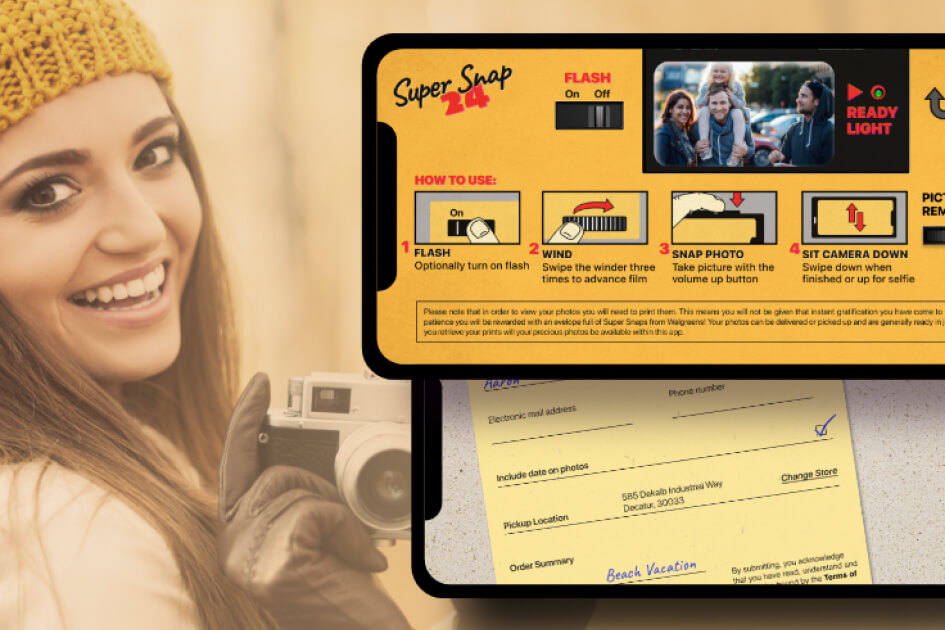
Super Shot 24 recreates the disposable film camera as a mobile app, right down to the constraints that made those cameras worth using. Users buy a virtual camera from an in-app department store, wind it three times before each shot, and wait for a green light. There are 12 or 24 exposures and no way to see them until they are printed. Space-O Technologies built the cross-platform app in React Native from the client’s finished designs, with native widgets in Swift and Kotlin. A print API integration handles the final step, sending completed rolls to a chosen store location for pickup.
Industry
Photography and Consumer Apps
Client From
USA
Platform
iOS and Android
About Super Shot 24
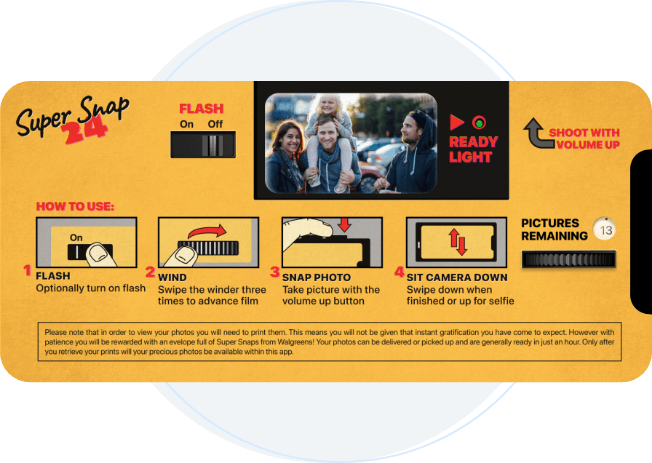
Super Shot 24 gives users a virtual film camera that behaves like the real thing. Navigation runs on physical interactions rather than menus, supported by sound effects, animations, and retro texture that place the whole experience in the 1990s.
The department store theme frames everything. Users pick a camera off the shelf, place it on a conveyor belt, and check out before shooting anything. A free 12-shot camera is available, and a 24-shot camera costs 99 cents with three bonus exposures included. Only one camera roll can be active at a time.
Shots stay hidden until printing. Once the roll is used, a form written in hand-drawn fonts submits the pictures for developing. Users choose a convenient store location, and the print API passes their details across. Photos come back as physical prints.
How We Built the Disposable Camera App
Our client runs a design firm in the USA and builds products that connect real-world behavior to digital experience. He arrived with the UI and UX already complete, so the brief was implementation rather than design. His priority was the retro feel, carried through specific handwritten fonts and authentic sound. Six core modules make up the delivered app.
Cross-Platform Build From Finished Designs
Requirement:
The client needed the app on iOS and Android, working from a design system he had already finalized in detail.
Solution:
We built in React Native to maximize code reuse across both platforms while keeping native-like performance. Working from completed designs shifted the challenge to fidelity, since every font, sound, and animation had to match the client’s intent exactly rather than approximately.
Store Purchase Flow and Camera Selection
Requirement:
Buying the camera had to feel like a purchase rather than a menu selection, since that framing sets up everything afterward.
Solution:
We built the department store flow where users pick a camera off the shelf, place it on the conveyor belt, and check out. In-app purchase handles the 24-shot camera at 99 cents. One active roll at a time is a deliberate constraint, because unlimited cameras would remove the scarcity the product depends on.
Camera Mechanics and Gesture Controls
Requirement:
The shooting experience needed the physical rhythm of a disposable camera, not the instant capture of a phone.
Solution:
Users wind three times before each shot and wait for the green light to fire. The counter shows exposures remaining. Flipping the phone from a downward to upward horizontal position switches to selfie mode. Every interaction is gestural, which is what makes the app feel like an object rather than software.
Home Screen Widget in Native Code
Requirement:
Opening the app and selecting a camera before every shot was too slow. Spontaneous moments were being missed.
Solution:
We built a home screen widget so users shoot directly without entering the app. React Native does not support widgets, so we wrote them natively, using Swift on iOS and Kotlin on Android. The widget solved the speed problem without compromising the React Native codebase everywhere else.
Data Synchronization Across Native and React Native
Requirement:
The widget and the app maintained separate views of the same roll. After eight shots on a 12-exposure camera, the widget failed to show four remaining.
Solution:
React Native stores its data in a local database, which the native widget code could not read consistently. Our developers researched the bridge between the two layers and built synchronization that holds the exposure count accurate across both. A film counter that disagrees with itself breaks the illusion the entire product rests on.
Print Submission and Store Pickup
Requirement:
Photos exist only as prints, so the developing step had to work reliably or the app delivers nothing at all.
Solution:
When a roll finishes, a form rendered in handwritten fonts collects submission details. Users then select a convenient store location for pickup. We integrated the print API so customer information passes directly to the photo lab. Prints are ready within about an hour.
Have a Camera App Concept? Let’s Build It
Bring your idea to Space-O Technologies and work with experienced developers to turn your concept into a market-ready mobile camera app.
Key Features of Super Shot 24
Departmental Store Theme
Buy a camera from an in-app store by taking it off the shelf, placing it on the conveyor belt, and checking out.
Widget Support
Shoot straight from a home screen widget without opening the app, so spontaneous moments are not lost to loading time.
Gesture Controls
Wind the camera three times before each shot and flip the phone horizontally to switch into selfie mode.
Flash On and Off
Toggle the flash directly on the camera body, matching how a physical disposable camera works.
Background Sound Effects
Hear authentic winding, shutter, and flash sounds that recreate the audio character of a film camera.
In-App Purchase
Buy the 24-shot camera for 99 cents, which includes three bonus exposures beyond the standard roll.
Photo Lab Form
Submit a completed roll through a form rendered in handwritten fonts, then choose a store location for pickup.
Push Notifications
Receive updates on roll status, submission confirmation, and when prints are ready to collect.
Benefits the App Delivers
Living in the Moment
There is no editing, filtering, or captioning. What gets captured is what gets printed, which removes the pressure to perfect every shot.
Genuine Retro Experience
Film rolls have largely disappeared, and this brings that experience back without sourcing an analog camera. Photo viewing carries a 1992 Mac OS look throughout.
Physical Prints, Not Files
Completed rolls go to a photo lab and come back as prints. Photos become objects again rather than files on a device.
Scarcity That Changes Behavior
A fixed number of exposures makes each one count. Users think before shooting in a way that unlimited storage never encourages.
Who This Photography App Serves
Retro and Analog Photography Enthusiasts
Casual Photographers Seeking Less Pressure
Users Nostalgic for 1980s and 1990s Culture
Event and Party Photographers
Younger Users Discovering Film Aesthetics
Photo Printing and Lab Businesses
Consumer App Publishers
Design-Led Product Studios
Technology Stack We Used
Cross-Platform Framework
 React Native
 JavaScript
iOS Widget
 Swift
Swift
Android Widget
 Kotlin
Third-Party Integrations
 Print Lab API
Our Role in the Super Shot 24 Project
Space-O Technologies converted the client’s completed designs into a working product across both platforms.
Design-to-Code Implementation
Cross-Platform App Development
Native Widget Engineering
Print API Integration and QA Testing
Your Camera App Needs the Right Development Team
Get the technical expertise, product guidance, and development support needed to turn a unique camera concept into a reliable mobile product.
Related Case Studies
Photographer Booking App Like Uber
An on-demand booking app connecting customers with local photographers, covering availability, service radius, and in-app payment.
ReadGenie: OpenAI-based Image-to-Text App
ReadGenie is a reading assistant app that extracts text from images using OCR and the GPT 3.5 model.
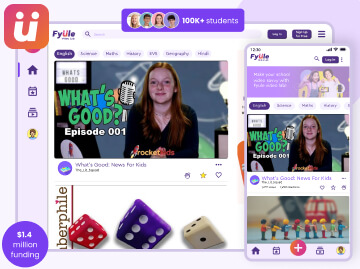
Fyule Online Learning Platform
A video-first learning platform where students submit recorded work, join contests, and track progress across schools.


 All our projects are secured by NDA




 4.8
4.8

