
 By
By 
Contents
OpenClaw is a free, open-source AI agent that transforms how professionals work. It runs directly on your personal machine without relying on any external cloud servers. The platform connects to messaging apps like WhatsApp, Telegram, Discord, and Signal. Once configured, it executes real-world tasks without needing your approval each time. You define what needs doing, and OpenClaw handles the rest autonomously.
According to Gartner, 40% of enterprise apps will feature task-specific AI agents by 2026, up from under 5% in 2025. This rapid shift signals a fundamental change in how businesses approach automation. Companies can no longer afford to ignore autonomous agent technology. OpenClaw makes this powerful capability accessible to teams of every size, without expensive licenses or corporate infrastructure.
Unlike traditional chatbots, OpenClaw actually performs actions inside your real systems. It sends emails, writes code, controls smart home devices, manages your calendar, and monitors your inbox. Think about repetitive tasks consuming your workday, the ones you could easily hand off to a capable assistant. OpenClaw eliminates these bottlenecks permanently. You reclaim those hours for higher-value strategic work.
The platform uses large language models (LLMs) to understand complex, multi-step instructions. Connecting your favorite apps happens through simple configuration steps. Basic automation requires minimal technical knowledge to set up. Advanced users can build sophisticated workflows across dozens of connected services. The infrastructure scales from personal devices all the way to full enterprise deployments.
What Exactly Is OpenClaw?
OpenClaw (formerly known as Clawdbot/Moltbot) is an open-source autonomous AI agent created by developer Peter Steinberger. It started as a small personal project in November 2025 under the name Clawdbot. By January 2026, the tool went viral across tech communities worldwide. The project was briefly renamed Moltbot before settling on its current crustacean-inspired identity. It quickly became one of the most-starred repositories in GitHub’s history.
The “open-source” label carries real weight here. Anyone can review the codebase to understand exactly how the agent operates. Developers worldwide contribute improvements, plugins, and new integrations every day. This transparency builds genuine trust among privacy-conscious users and security-focused teams. The open development model has accelerated innovation far faster than any closed commercial product could.
How OpenClaw differs from chatbots
Most AI tools answer questions and stop there. OpenClaw takes the next step by executing actions inside your real systems. It runs shell commands on your computer and controls your browser through clicks and text entry. It reads and writes files, sends emails, and calls external APIs on your behalf. This ability to take real-world action is what makes it fundamentally different from conversational tools.
| Feature | Traditional Chatbots | OpenClaw |
| Primary function | Answer questions conversationally | Execute real-world actions autonomously |
| System access | No access to your systems | Runs shell commands, reads and writes files |
| Email handling | Can draft a reply if asked | Monitors inbox, drafts, and sends emails independently |
| Browser control | Cannot interact with browsers | Clicks, fills forms, and navigates pages automatically |
| API calls | Cannot call external services | Connects to and triggers any service with a REST API |
| Task memory | Forgets context after the session ends | Retains conversation history across sessions |
| Scheduling | Requires manual prompting every time | Runs scheduled tasks automatically via heartbeat |
| Human approval | Every response needs your input | Operates autonomously, requests approval only when needed |
| Data privacy | Routes data through the vendor cloud | Runs locally, data stays on your own infrastructure |
| Cost model | Subscription or per-message pricing | Free and open-source, pay only for the chosen LLM API |
The difference comes down to conversation versus action. Chatbots give you information and leave execution to you. OpenClaw receives the instruction and completes the task end-to-end. For teams looking to eliminate manual follow-through, that distinction defines the entire value proposition.
How OpenClaw fits into your workflow
The user interface is intentionally simple and familiar. You interact through the messaging apps you already use every day. Send a message to your OpenClaw instance just like messaging a colleague. The agent processes your request, completes the task, and reports back to you. There is no new software to learn and no unfamiliar dashboard to navigate.
OpenClaw slots into your existing routine rather than replacing it. Here is how it fits across the most common daily work scenarios:
- Morning planning: Ask OpenClaw to pull your calendar, flag priority emails, and summarize overnight updates, all delivered as a single briefing before your first meeting.
- During focused work: Send a quick message to schedule a meeting, update a task status, or draft a follow-up email without switching context or opening another app.
- Team collaboration: Multiple team members can interact with the same OpenClaw instance through Slack or Discord, assigning tasks and receiving updates in shared channels.
- After-hours operations: The heartbeat scheduler keeps the agent working while you are offline, running reports, monitoring systems, and queuing tasks ready for your review the next morning.
- Ad hoc requests: Any one-off task, from researching a competitor to booking travel, can be handled by sending a single conversational message at any point in your day.
Setup is accessible to most technically confident users. You download the code from GitHub and run it on your own hardware or a private server. Then you connect your preferred messaging app and configure service access permissions. The entire process takes less than an hour in most cases. Official documentation and community tutorials make every step straightforward.
Understanding the platform’s origins and design philosophy sets the stage for exploring how it actually works. The following section breaks down the architecture powering every automation OpenClaw runs.
Automate Your Operations with OpenClaw
Discover how AI agents can eliminate repetitive tasks and unlock team productivity. Let Space-O Technologies guide your automation strategy.

How OpenClaw Works: The Architecture Behind the Agent
OpenClaw’s architecture is built around one central principle: your data, your hardware, your rules. The agent runs entirely on your own machine or a private server you control and manage. Nothing leaves your infrastructure unless you explicitly configure an outbound connection to an external service. This stands in sharp contrast to most commercial automation tools, which route your data through vendor-managed cloud environments. The local-first design gives teams complete visibility into every action the agent takes on their behalf.
The platform is not a single monolithic program. It is a collection of loosely coupled components that work together to receive instructions, reason through them, and execute the right actions. Each component handles a specific job, from interpreting your intent to running the actual system commands. Understanding how these layers connect helps you configure OpenClaw more effectively and troubleshoot faster when something does not behave as expected.
The LLM processing layer
When you send a message to OpenClaw, it first reaches the language model processing layer. This layer is responsible for understanding what you actually want the agent to do. The LLM reads your instruction, interprets the intent behind it, and determines what sequence of actions will fulfill the request. It references conversation history, so follow-up instructions make sense without full context repetition.
How the LLM interprets instructions
The LLM does not execute actions directly. It produces a structured plan describing which tools or services to invoke and in what order. This plan passes to the execution layer, which performs each step and returns results to the model. The model then evaluates the outcome and decides whether the task is complete or whether additional steps are needed. This feedback loop between planning and execution is what makes the agent genuinely autonomous rather than simply reactive.
Choosing the right language model
You choose which language model powers this layer based on your performance and cost priorities. OpenAI’s GPT-4o delivers the broadest capability for complex reasoning and nuanced instructions. Anthropic’s Claude models offer strong performance on tasks involving long documents and structured outputs. Local models through Ollama, such as Llama 3 or Mistral, run entirely on your hardware with zero API costs. The model choice affects response quality and latency, but the rest of the architecture stays identical regardless of which LLM you select.
The plugin and integration architecture
The execution layer relies on a modular plugin system to connect OpenClaw to external tools and services. Each plugin is a self-contained module that knows how to communicate with one specific service or API. The agent calls the right plugin based on the LLM’s instruction plan, passes the required parameters, and receives the result. This architecture keeps the core agent lightweight while allowing nearly unlimited extensibility through community-built plugins.
Standard out-of-the-box integrations
Standard integrations cover the most common productivity tools immediately after setup. Email clients like Gmail and Outlook, calendar platforms, GitHub, Slack, Notion, and linear project management tools all have published plugins. Smart home systems, including Philips Hue, Home Assistant, and Elgato, work through dedicated connectors as well. The contributor community adds new integrations regularly, and the plugin registry on GitHub lists every available option with setup instructions.
Building custom plugins for specialized systems
Custom plugin development is accessible to anyone with basic Python knowledge. You define the service endpoint, authentication method, and the inputs and outputs that the plugin handles. OpenClaw’s plugin API is standardized, so your custom connector slots into the system exactly like any community-built one. This means even proprietary internal tools and legacy enterprise software can become part of your automation workflow without waiting for an official integration release.
The heartbeat scheduler
OpenClaw includes a built-in scheduling system called the heartbeat, which allows the agent to run tasks proactively without any input from you. You define a schedule using plain language or standard cron syntax, and the agent executes the associated task at the right time automatically. Morning briefings, daily reports, weekly summaries, and recurring data checks all run through this mechanism. The heartbeat is what transforms OpenClaw from a reactive assistant into a genuinely autonomous background worker.
Running conditional and time-based automations
The scheduler evaluates conditions before executing a task when you configure conditional logic. For example, you can instruct the agent to send an alert only if a server metric crosses a defined threshold. You can also configure it to generate a content brief only when a specific calendar event is marked complete. This conditional execution prevents unnecessary noise and keeps automated outputs relevant to what is actually happening in your environment.
The permission and safety controls
Every action OpenClaw can take is governed by a permission layer you configure before the agent goes live. Running the agent as a non-root user on your system is the first and most important baseline protection. This ensures that even a flawed instruction cannot access or modify system-level files outside its designated scope. The operating principle here is least privilege: the agent gets only the access it genuinely needs and nothing more.
Allowlists and human approval gates
Allowlists define the exact set of commands, file paths, and API endpoints the agent is permitted to use. Any instruction that falls outside those allowlists is blocked automatically before execution begins. Sensitive operations such as sending bulk emails, deleting files, or making financial API calls can be gated behind a human approval step. The agent pauses, sends you a confirmation request through your messaging app, and waits for your explicit go-ahead before proceeding.
Audit logging and compliance tracking
All executed actions are written to a structured log file, capturing the timestamp, instruction received, plugin called, and outcome returned. These logs are readable by both humans and monitoring tools, making them useful for compliance reviews and incident investigations. Teams operating in regulated industries can route log output to centralized SIEM systems for automated analysis and alerting. Full auditability is built into the platform from the ground up, not retrofitted as an afterthought.
With a thorough understanding of how each architectural layer functions, evaluating OpenClaw’s full feature set becomes much more straightforward. The next section walks through the specific capabilities that drive the most measurable value for real teams.
Ready to Transform Your Team’s Productivity?
Let Space-O Technologies design OpenClaw automations that match your exact workflow needs and business objectives.
Core Features and Capabilities of OpenClaw
OpenClaw packs a broad range of automation capabilities into a single, lightweight agent. These features span communication management, content production, software development, and financial monitoring. Each capability is modular, so you enable only what your specific workflow requires. The result is a highly personalized agent built around your exact needs. Here are the standout features that drive the most user value.
- Email and inbox automation: The agent monitors your inbox, drafts replies to recurring questions, categorizes messages into custom folders, and archives low-priority threads automatically.
- Calendar and scheduling management: OpenClaw checks participant availability, recommends optimal meeting times, sends invitations, and distributes post-meeting summaries without any manual input from you.
- Content research and drafting: Provide a topic and style preference, and the agent researches across the web, builds a detailed outline, and delivers a polished draft ready for final review.
- Code development and DevOps support: Developers issue commands through Slack while the agent runs test suites, checks build status, reviews pull requests on GitHub, and flags security vulnerabilities automatically.
- Smart home and IoT control: Message the agent from anywhere to adjust lighting, thermostats, and door locks, or configure weather-triggered and time-based automations across connected devices.
- Financial tracking and budget monitoring: Link bank accounts and credit cards, and the agent categorizes every transaction, tracks spending against budgets, and flags suspicious activity in real time.
- Infrastructure and system health monitoring: The agent watches server health 24/7, restarts failed services, frees disk space, and scales compute resources based on your predefined performance thresholds.
These capabilities combine to make OpenClaw one of the most versatile open-source agents available in 2026. As the contributor community grows, new integrations and improvements appear with every release cycle. The practical business impact becomes clearest when you examine how real teams use the platform across different industries.
Real-World OpenClaw Use Cases Across Industries
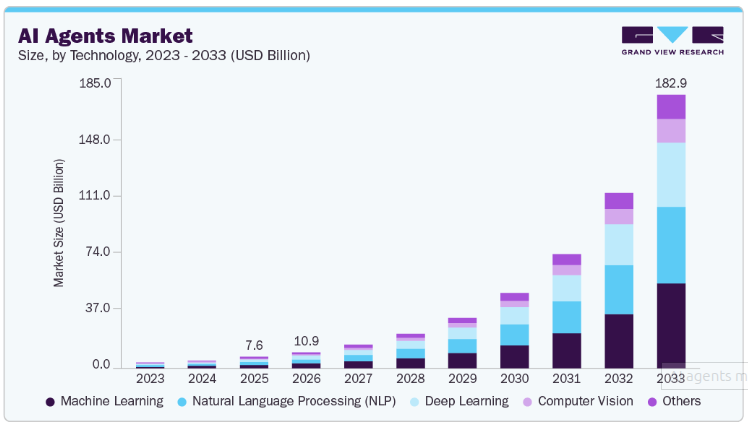
The scope of automation possibilities keeps expanding with every community release and new integration. According to Grand View Research, the global AI agents market reached USD 7.63 billion in 2025, projected to hit USD 10.91 billion by 2026 and USD 182.9 billion by 2033. Companies investing in platforms like OpenClaw today are positioning themselves well ahead of this shift.
Marketing and content teams
Content production accelerates dramatically when OpenClaw handles research and first drafts. Blog writers and content strategists commonly report saving 15 or more hours each week. The agent maintains brand consistency by referencing your previous work, tone guidelines, and style preferences. Teams can generate articles, social media posts, and email campaigns from a single well-crafted brief.
Customer support operations
Support departments use OpenClaw to reduce response times and improve service quality simultaneously. The agent handles common questions automatically, freeing human agents for complex and sensitive interactions. Escalation workflows route difficult inquiries to the right specialist without any manual triage. First-contact resolution rates typically rise by 25% or more after a well-configured deployment.
Software development teams
Engineering groups reduce on-call burden and manual overhead through continuous automated monitoring. The agent watches infrastructure around the clock and triggers alerts or corrective actions immediately. Failed services restart without human intervention, cutting mean time to recovery significantly. Developers focus on architecture and product development rather than repetitive operational maintenance.
Personal and executive productivity
Individual users receive a daily briefing that aggregates calendar events, priority emails, weather, and news. This comprehensive morning summary replaces checking four or five separate applications. Decision-making improves with consistently organized information delivered at the same time every day. Most users report recovering two or more productive hours daily through even simple personal automations.
The scope of what OpenClaw can automate keeps expanding with every community release and new integration. Before deploying it in a production environment, however, every team must carefully consider the security implications.
Security Considerations and Best Practices for OpenClaw
Security deserves serious attention when you are deploying any agent with real system access. OpenClaw can run shell commands, access files, and call external APIs entirely on your behalf. A misconfigured or compromised instance could execute harmful or irreversible actions. Thoughtful setup prevents the vast majority of risks before they ever materialize. The following OpenClaw best practices represent the standard approach for a safe production deployment.
1. Authentication and credential management
Strong API keys and encrypted credential storage protect your connected services from unauthorized access. Never hardcode passwords or tokens directly in configuration files where they could be exposed. Use environment variables to separate sensitive credentials from your main codebase. Rotate all credentials on a regular schedule to limit your exposure window if a key is ever compromised.
2. Permission and access controls
Running the agent as a non-root user limits the potential damage from any single exploit or misconfiguration. Define allowlists that restrict the agent to approved commands and authorized services only. Require human confirmation before the agent executes any sensitive, costly, or irreversible operation. Review and prune connected service permissions regularly, removing access that is no longer actively needed.
3. Audit logging and activity monitoring
Enable comprehensive logging for every action the agent takes on your behalf. Review logs on a consistent schedule to catch unusual or unexpected behavior before it escalates. Archive historical logs to support compliance audits, incident reviews, and internal accountability. Detailed records also help teams continuously improve workflows by identifying patterns and inefficiencies over time.
4. Network isolation and segmentation
Running OpenClaw on a dedicated machine eliminates any potential compromise within a limited environment. Restrict outbound network access to only the specific services the agent legitimately needs. Configure firewalls to limit inbound connections to trusted IP addresses and known services. VPN connections encrypt communication between your agent and external third-party services.
Security is an ongoing commitment, not a one-time setup task. As you add new integrations and expand your automation footprint, every new connection needs the same careful review. With a solid security posture established, you can evaluate cost and infrastructure requirements with full confidence.
Secure Your OpenClaw Implementation
Get expert guidance on security architecture, compliance, and best practices from Space-O Technologies specialists.
Cost and Infrastructure Requirements for OpenClaw
One of OpenClaw’s most compelling advantages is its remarkably low cost of entry. The software itself is completely free to download, use, and modify. You pay only for the external services and infrastructure you choose to connect. This model removes the financial barriers that typically prevent smaller teams from adopting enterprise-grade automation. Total cost of ownership depends entirely on your deployment approach and usage volume.
Running OpenClaw on existing hardware
Running the agent locally on a laptop, desktop, or Raspberry Pi costs nothing beyond electricity. No expensive servers or dedicated GPU hardware are required for most standard use cases. Existing infrastructure can be repurposed immediately without a major overhaul or capital investment. This approach is ideal for individual users, freelancers, and small teams getting started with automation.
Deploying on a cloud VPS
A small virtual private server (VPS) runs OpenClaw for as little as $3.96 per month. A medium instance supporting moderate team-level automation typically costs between $12 and $15 monthly. Larger enterprise deployments on more powerful servers scale proportionally with your workload. Most teams recover these hosting costs within the first two weeks through documented time savings alone.
Language model API costs
API costs depend on which LLM you choose to power the agent’s reasoning capabilities. Local models through Ollama eliminate API fees for teams with compatible hardware. OpenAI’s GPT API costs a few cents per average request at standard usage volumes. Heavy daily usage across a full team might add $50 to $100 monthly in API charges. Measured against the 10 or more hours saved per person each week, the return on investment is clear.
The low-cost structure makes OpenClaw accessible to startups, nonprofits, and growing businesses that cannot justify enterprise software subscriptions. That said, every deployment comes with practical constraints worth understanding before you commit to a configuration.
Limitations and Challenges to Consider Before Deploying OpenClaw
OpenClaw is a powerful platform, but understanding its boundaries leads to much more successful deployments. Setting realistic expectations upfront prevents frustration during implementation and reduces abandoned projects. Teams that account for limitations from the start consistently see better outcomes and faster time to value. Here are the most common challenges teams encounter and how to plan around them effectively.
1. Human judgment requirements
OpenClaw handles structured, repeatable tasks exceptionally well. However, it cannot reliably manage decisions involving contextual ethics, creative judgment, or nuanced stakeholder considerations. Tasks like resolving a sensitive customer complaint or making a strategic business call still require a human in the loop. Autonomous execution works best when the outcome is predictable and the rules are clearly defined.
How to overcome this
- Define a clear boundary between tasks the agent handles autonomously and those that require human review before execution.
- Configure approval gates for any action that carries reputational, financial, or legal consequences.
- Build escalation paths that route edge cases directly to the right team member without delay.
- Review agent decisions periodically to identify where judgment boundaries need tightening.
2. Legacy system integration complexity
Many businesses run critical operations on older software that was never designed to work with external automation tools. Systems without a standard REST API cannot connect to OpenClaw directly out of the box. This creates an additional development layer that adds time and technical resource requirements to your project. The complexity scales with how deeply embedded the legacy system is in your existing workflows.
How to overcome this
- Audit all target systems before starting the project to identify which ones require custom middleware.
- Prioritize modern, API-enabled tools for your first automations to build early momentum.
- Engage experienced integration developers for legacy connectors rather than attempting them internally.
- Build and test each legacy connector in isolation before connecting it to live production workflows.
3. Advanced workflow learning curve
Simple single-step automations are accessible to most users within the first hour of setup. Multi-step workflows that span several services, conditional logic, and dynamic outputs require deeper technical familiarity. Teams without programming experience will need structured training before they can build confidently. Underestimating this curve is one of the most common reasons early deployments stall.
How to overcome this
- Start every deployment with the simplest possible automation and expand gradually from there.
- Invest in structured onboarding training for both technical and non-technical team members early.
- Use community-published workflow templates as starting points rather than building from scratch.
- Assign an internal OpenClaw champion who owns documentation and supports teammates during ramp-up.
4. Performance under heavy workloads
Response times can slow noticeably when the agent is handling computationally intensive or highly concurrent tasks. Systems relying on OpenClaw for time-sensitive operations may experience delays during peak usage periods. Without fallback planning, a slow or unresponsive agent can create bottlenecks in workflows your team now depends on. Performance planning needs to happen before go-live, not after the first incident.
How to overcome this
- Size your hosting infrastructure based on projected peak load, not average usage.
- Design critical workflows with documented manual fallback procedures for downtime scenarios.
- Use task queuing to spread concurrent workloads rather than running them simultaneously.
- Monitor agent response times from day one and set alerting thresholds before issues affect users.
5. Ongoing maintenance requirements
OpenClaw does not run indefinitely without attention after the initial deployment. Connected services update their APIs, rotate authentication methods, and change data formats on their own schedules. Each change can silently break an integration until someone notices an automation is no longer producing results. Treating deployment as a finish line rather than a starting point is the fastest path to a degraded automation stack.
How to overcome this
- Schedule a monthly integration health check to verify that all connected services are responding correctly.
- Subscribe to changelog notifications from every service your agent connects to.
- Maintain clear internal documentation for each integration so any team member can troubleshoot it.
- Allocate ongoing engineering time in your roadmap specifically for maintenance and patching tasks.
These challenges are manageable with proper preparation and the right technical support. Starting with simpler automations builds team confidence and surfaces integration quirks before they affect business-critical workflows. With a clear picture of both capabilities and constraints, your team is ready to take the first practical steps toward deployment.
Overcome OpenClaw Implementation Challenges
Space-O Technologies provides expert guidance on handling legacy systems, integration complexity, and advanced workflows.
How to Get Started with OpenClaw
Getting started with OpenClaw is accessible to most technically confident users. The basic prerequisites are Python 3.8 or higher and comfort with standard command-line tools. Installation from GitHub typically takes under thirty minutes when following the official documentation. Community tutorials cover every major operating system and deployment environment. The seven-step path below gets you from zero to your first running automation.
Step 1: Check your system requirements
Before downloading anything, confirm your machine meets the minimum setup requirements. A missing dependency is the most common reason first-time installations fail halfway through.
- Python 3.8 or higher is installed and accessible from your command line.
- A Linux, macOS, or Windows system with at least 2 GB of available RAM.
- Git is installed to clone the repository directly from GitHub.
- A stable internet connection to download dependencies during the setup process.
Step 2: Download and install the platform
Clone the OpenClaw repository from GitHub onto your target machine or server. Follow the installation guide in the official documentation to set up all required dependencies. Run the built-in setup script, which handles most configuration tasks automatically. Verify the installation using the included test command before connecting any external services.
- Run git clone https://github.com/openclaw/openclaw in your terminal to pull the latest stable release.
- Navigate into the project folder and run pip install -r requirements.txt to install all dependencies.
- Execute the setup script using python setup.py to complete the initial configuration automatically.
- Run python test.py to confirm the installation is working correctly before moving to the next step.
Step 3: Choose and connect your messaging platform
Select the messaging app that best matches your daily communication habits and team preferences. Your choice here defines how you and your team will interact with the agent every day. Pick the platform your team already uses to avoid adding another tool to your stack.
- Signal for maximum privacy with full end-to-end encryption, ideal for security-sensitive deployments.
- Telegram offers a strong balance of features and straightforward initial configuration.
- Slack or Discord for developer and team-oriented environments with shared channel support.
- WhatsApp for accessibility among non-technical team members and external clients.
Step 4: Configure your LLM connection
OpenClaw needs a language model to process your instructions and plan its actions. Choose the model that best balances capability, cost, and your data privacy requirements. This decision affects response quality and your monthly running costs, so it is worth taking a few minutes to evaluate your options.
- Connect OpenAI GPT-4o via API key for the broadest reasoning capability across complex tasks.
- Use Anthropic Claude for strong performance on long documents and structured data outputs.
- Set up Ollama with Llama 3 or Mistral for fully local processing with zero API costs.
- Store your API key securely in the environment variables file, never hardcoded in the config.
Step 5: Connect services and set permissions
Start with a low-risk, high-value integration like your email account to build early confidence. Add calendar access next to unlock scheduling automation across your team immediately. Gradually expand to project management platforms, developer tools, or CRM systems as your expertise grows. Define granular permissions for each connected service before activating the integration in production.
- Grant the agent read and write access only to the specific folders and inboxes it needs.
- Use service-specific API keys rather than primary account credentials wherever possible.
- Enable human approval gates for any service that can send, delete, or modify data externally.
- Document every connected service and its permission scope in a shared internal reference file.
Step 6: Build and test your first automation
Begin with a simple daily briefing delivered at a consistent time each morning. Request a summary of your calendar agenda, inbox highlights, and priority news each day. Observe how the agent gathers and formats the information it collects. Refine your prompt based on the output before moving to anything more complex.
- Set up a morning briefing that pulls your calendar, top three priority emails, and a weather update.
- Test a scheduling automation by asking the agent to find a free slot and send a meeting invite.
- Run a file management task such as organizing downloads into labeled folders by category.
- Check the action logs after each test to confirm the agent executed exactly what you intended.
Step 7: Scale with more complex workflows
Once your first automations are running reliably, you are ready to expand scope and complexity. Scaling incrementally protects your live workflows while steadily building your team’s internal expertise. Add one new automation at a time and validate each one fully before building on top of it.
- Map out the next three to five workflows you want to automate, ranked by time saved per week.
- Introduce multi-step workflows that chain two or more services together once single-service automations are stable.
- Train team members on how to send instructions and interpret agent responses in your chosen messaging platform.
- Review automation performance monthly and retire or refine any workflow that is no longer delivering consistent results.
Starting simply and scaling gradually is the most reliable path to a successful OpenClaw deployment. Teams that attempt to automate everything at once consistently encounter avoidable integration issues. A methodical, incremental approach protects your live workflow and gives your team the time to build genuine expertise.
Plan Your OpenClaw Roadmap With Experts
Space-O Technologies helps you design long-term automation strategies aligned with emerging technologies and your business growth trajectory.
Space-O Technologies: Your OpenClaw Implementation Partner
Space-O Technologies specializes in AI agent development and custom automation solutions for growing businesses. Our team helps in deploying OpenClaw across industries ranging from funded startups to established enterprises. With 15+ years of experience, 180+ engineers, and 500+ projects delivered, we understand what reliable AI automation looks like in production. Security, performance, and long-term scalability are at the core of every engagement.
We help organizations identify high-impact automation opportunities through structured workflow analysis. Our consultants map your existing processes and prioritize areas where autonomous agents deliver the greatest measurable return. Phased implementation ensures smooth transitions with minimal disruption to live operations. Success metrics are defined upfront, so every result is trackable from day one.
Team training ensures your investment generates lasting value well beyond the initial deployment. We design tailored OpenClaw training programs for both technical and non-technical staff. Custom documentation covers your specific workflows, integrations, and internal processes. Post-launch support helps your team become fully self-sufficient over time.
Custom integration development handles even the most complex technical requirements. We build connectors for legacy systems, proprietary databases, and specialized industry software. Advanced security configurations protect regulated data environments and sensitive workflows. Every solution we deliver is designed to run reliably and securely in production from day one.
Partner with Space-O Technologies to accelerate your OpenClaw journey using a proven methodology. Our approach has reduced implementation timelines by 40% compared to typical self-managed projects. You start with quick wins and scale confidently with expert guidance at every stage. Contact us today to explore what OpenClaw can deliver for your business.
Frequently Asked Questions About OpenClaw
What is OpenClaw, and how does it differ from ChatGPT?
OpenClaw is an open-source AI agent that performs real-world tasks autonomously, such as sending emails, running code, and managing systems. Unlike ChatGPT, which provides conversational responses, OpenClaw takes direct action across tools and environments, acting as an execution layer rather than just an assistant.
Can I run OpenClaw on my personal computer?
Yes, OpenClaw can run locally on your own machine without requiring cloud infrastructure. You can download it from GitHub, configure your preferred messaging platform, and start automating tasks while maintaining full control over your setup.
Which messaging apps work with OpenClaw?
OpenClaw supports popular messaging platforms such as Signal, Telegram, Slack, Discord, and WhatsApp. The agent operates directly within these channels, allowing you to interact without switching to new tools or interfaces.
What are the main security risks, and how do I address them?
Security risks depend on configuration. Running the agent as a non-root user, using command restrictions, and enabling logging are essential practices. Additional safeguards such as network isolation and encrypted credentials help secure deployments in sensitive environments.
How much does it cost to run OpenClaw?
OpenClaw is free and open-source. Hosting costs can start as low as a few dollars per month for a basic server setup. API usage costs depend on the language model used, ranging from free local models to higher monthly costs for large-scale usage.
Can OpenClaw integrate with legacy systems?
Yes, OpenClaw can integrate with legacy systems, though systems without APIs may require custom middleware. Standard API-based systems are easier to connect, and experienced developers can simplify integration for complex environments.
What is the learning curve for new users?
Basic automations can be set up quickly with minimal technical knowledge, often within an hour. More advanced workflows may require programming skills, but documentation and community resources support all experience levels.
How does OpenClaw compare to commercial automation platforms?
OpenClaw is open-source, self-hosted, and cost-effective compared to commercial platforms. While commercial tools offer more built-in features and support, OpenClaw provides flexibility and control for teams with technical expertise.
Will OpenClaw replace our existing tools?
No, OpenClaw works alongside your current tools as an automation layer. It connects and orchestrates workflows across systems, enhancing productivity without replacing your existing software stack.
How often does OpenClaw receive updates?
OpenClaw is actively developed with frequent updates and improvements. New features, integrations, and performance enhancements are regularly released by the global open-source community.



 All our projects are secured by NDA




 4.8
4.8

