
 By
By 
Contents
- Add AI as a modular API layer inside your current product, without rebuilding the core.
- Start with one user pain point tied to a metric such as churn or support cost.
- Isolate each tenant’s data and pass an evaluation gate before any beta user sees the feature.
- Release to a small beta cohort first, then expand once quality and cost targets hold.
Key Takeaways
Add AI to an existing software-as-a-service (SaaS) platform as a modular layer, not a rebuild. Many SaaS teams fear a full rebuild before any AI feature ships. Your current stack can stay in place.
Start with one user pain point, then connect models through application programming interfaces (APIs). Each model call becomes a layer inside your current workflows. Our SaaS development services team follows this pattern without touching your core codebase.
This guide walks through five steps, from use case to rollout. It also covers data security, multi-tenant isolation, and a pre-release evaluation gate. For a broader view, read our guide to integrating AI into existing software.
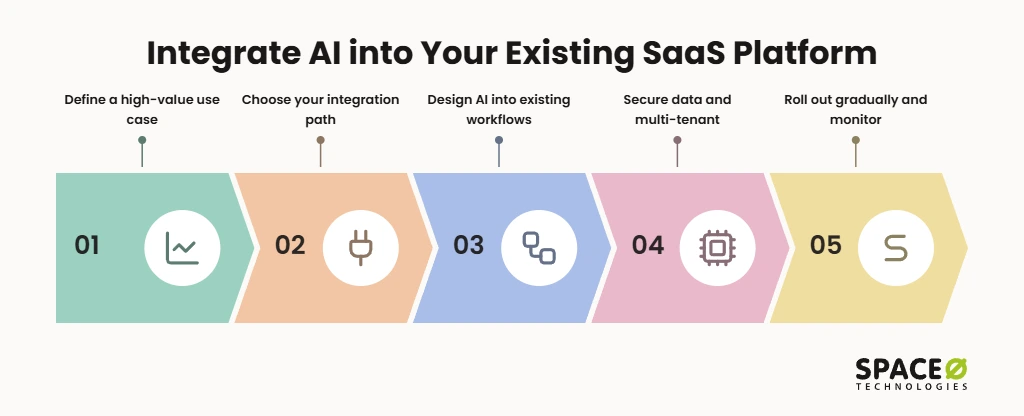
The five steps, in order:
- Define a high-value use case: Pick one user friction point and tie it to a business metric.
- Choose your integration path: Connect a model through an API, or add your own data with RAG.
- Design AI into existing workflows: Place the feature inside current screens and give users control.
- Secure data and multi-tenant infrastructure: Isolate each tenant’s data and protect customer privacy.
- Roll out gradually and monitor: Release to a small beta cohort first, then track quality and cost.
Step 1: Define a high-value AI use case
Start with a real user problem, not with a model or a vendor. Many SaaS teams add AI because competitors did. Those features rarely change retention. McKinsey’s State of AI survey found only about one-third of organizations have scaled AI across the enterprise. Our AI consulting for SaaS companies starts with the user problem instead. A feature earns its place when it removes friction your users already feel.
- Find user friction: Look for repetitive tasks users complain about (e.g., manual data entry, slow ticket sorting).
- Tie it to a metric: Link each feature to churn, conversion, or support cost before you write code.
- Skip hype features: Drop ideas that only sound good in a press release (e.g., a generic chatbot nobody asked for).
- Size the first release small: Choose one workflow you can measure within a single release cycle.
Which AI features work best as a starting point in a SaaS product?
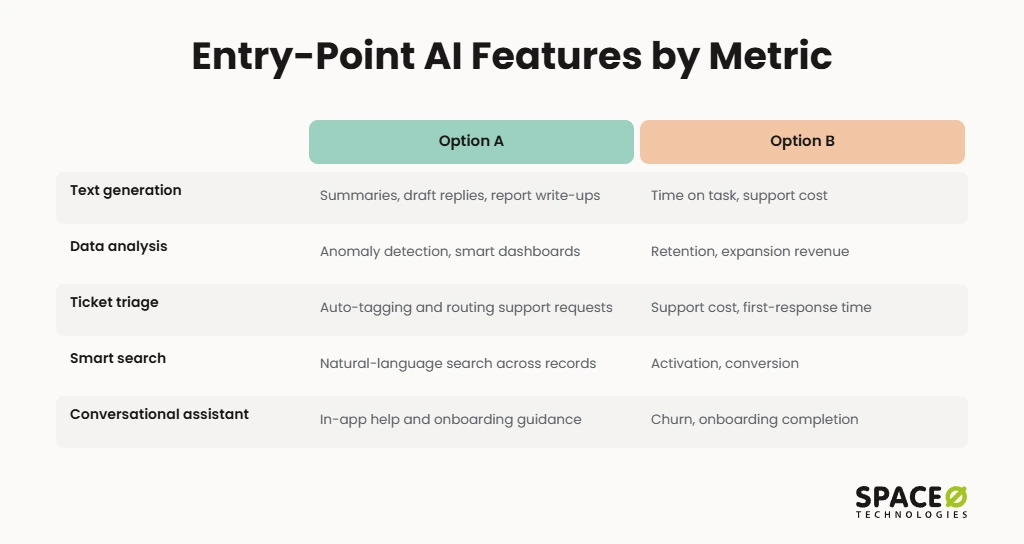
The strongest entry points automate text, data, or support tasks that users already do by hand. Each one below pairs with a metric you can track.
| Entry-point feature | Example | Business metric |
|---|---|---|
| Text generation | Summaries, draft replies, report write-ups | Time on task, support cost |
| Data analysis | Anomaly detection, smart dashboards | Retention, expansion revenue |
| Ticket triage | Auto-tagging and routing support requests | Support cost, first-response time |
| Smart search | Natural-language search across records | Activation, conversion |
| Conversational assistant | In-app help and onboarding guidance | Churn, onboarding completion |
SaaS companies scaling their product often start with smart search or summaries. SMEs tend to start with data entry automation. Regulated industry teams usually begin with internal tools before any customer-facing AI.
Step 2: Choose your integration path
Most SaaS products should connect to an AI model through an API first. This is the fastest route because it adds AI without touching your core codebase. You add an AI service layer, often as microservices, that your existing product calls.
Which AI providers should you connect to?
OpenAI, Anthropic, Google Vertex AI, and Azure OpenAI are the providers SaaS teams most often connect to through APIs. The right choice depends on your cloud setup, compliance needs, and the task.
- OpenAI: GPT models cover general text, summarization, and assistant features (e.g., draft replies, in-app help).
- Anthropic (Claude): Claude models suit long documents and careful reasoning (e.g., contract review, policy summaries).
- Google Vertex AI: This option fits teams already running on Google Cloud (e.g., analytics-heavy products).
- Azure OpenAI: Teams on Microsoft Azure get OpenAI models inside their existing cloud and governance setup.
- LangChain: This framework orchestrates prompts, tools, and data retrieval across providers (e.g., multi-step assistants).
Space-O Technologies is an OpenAI Select Partner and AWS Partner, with Claude Certified Architects on the team. Our engineers build on these providers daily, including in-app assistants through our AI chatbot development services.
API, RAG, or fine-tuning: which integration path fits your SaaS?
Pick the lightest path that solves the problem. Most teams start with an API, then add RAG when answers need their own data. Retrieval-augmented generation (RAG) feeds your data to the model at query time through a vector database.
| Integration path | Best when | Data control | Ongoing cost driver | How we decide |
|---|---|---|---|---|
| API integration (Fastest) | The task is generic (e.g., summaries, rewriting) | Data passes to the provider per request | Tokens per request | We start here when the business goal needs no private data |
| RAG + vector database (Your Data) | Answers must use your records (e.g., help docs, account data) | Data stays in your store, such as Pinecone or pgvector | Tokens plus vector storage and retrieval | We choose RAG when grounded answers solve the problem more cost-effectively than retraining |
| Fine-tuned / custom model (Most Control) | You need a specialized tone, format, or domain behavior | Highest, with training data under your governance | Training runs plus hosting | We recommend it only when RAG cannot meet the quality bar |
| Hybrid | Different features have different needs | Set per feature | Mixed | We map each feature to its own path in discovery |
Budget for more than the model itself. Data preparation takes 25% to 40% of the total project budget. AI maintenance adds 15% to 25% of build cost per year, according to our AI development cost guide.
Step 3: Design AI into existing workflows
Put the AI feature inside the screens your users already use, not in a separate tool. Users ignore features that force them to switch context. Adoption rises when AI appears at the moment of need.
- Fit existing habits: Embed AI where work already happens (e.g., inline text editors, dashboard sidebars).
- Keep users in control: Let users accept, edit, reject, or undo every AI suggestion.
- Show the source: Display citations or the records an answer came from, so users can verify it.
- Add human-in-the-loop review: Route high-stakes outputs to a person before they take effect (e.g., refunds, account changes).
- Gate by role and tier: Use role-based access control (RBAC) and plan tiers to decide who sees each feature.
- Collect feedback in place: Add a simple thumbs up or down so users can rate each output.
If you want these patterns built into a copilot or assistant, our generative AI development services team can design them with you.
Step 4: Secure data and multi-tenant infrastructure
Protect customer data and keep every tenant’s data isolated before any AI feature goes live. One leaked record can cost you a customer account. In a multi-tenant SaaS product, AI adds new paths for data to cross tenant lines.
How do you protect customer data when adding AI to SaaS?
Isolate each tenant, mask sensitive fields, and confirm the provider will not train on your data. These controls apply whatever integration path you choose.
- Enforce tenant isolation: One tenant’s data must never reach another tenant’s prompts, retrieval results, or outputs.
- Mask PII first: Strip personally identifiable information (PII) before payloads leave your system for third-party APIs.
- Opt out of vendor training: Confirm each provider’s data-use terms and opt out of training on API data.
- Encrypt everything: Encrypt data at rest and in transit, including vector embeddings.
- Map compliance early: Align with the Health Insurance Portability and Accountability Act (HIPAA) for US customers.
- GDPR for EU: Apply the General Data Protection Regulation (GDPR) only where you serve EU customers.
We deliver under NDA with HIPAA-compliant and GDPR-ready practices.
What infrastructure does an AI feature need in a SaaS product?
AI calls are slower and costlier than normal requests, so your infrastructure must absorb both. Without these controls, one heavy tenant can raise latency and bills for everyone.
- Async background jobs: Run long inference calls in queues so requests do not time out (e.g., report generation).
- Semantic caching: Reuse answers to near-identical questions to cut token spend.
- Per-tenant rate limits: Cap AI usage per tenant and per plan to protect performance.
- Token monitoring: Track token spend per feature and per tenant on a live dashboard.
- AI gateway layer: Route calls through one provider-agnostic layer, so you can switch models without lock-in.
For a closer look at token and infrastructure spend, read our LLM integration project cost guide.
Pre-release AI evaluation gate: how do you know an AI feature is safe to ship?
Set measurable release thresholds and test against them before any beta user sees the feature. Security controls alone do not prove an AI feature behaves well. Teams need a pass-or-fail gate between “secured” and “released.”
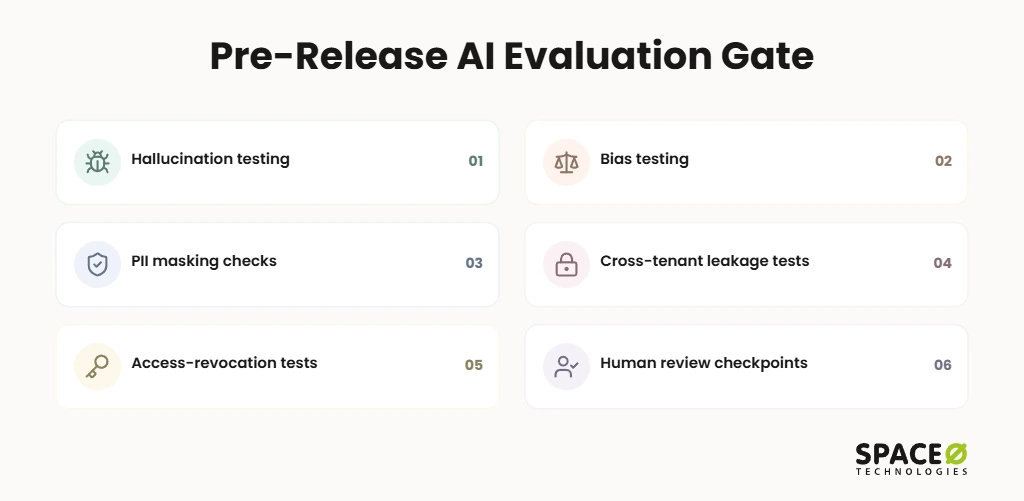
Space-O Technologies runs this gate on every AI release as part of responsible AI by default. We never train on client data.
- Hallucination testing: We test outputs against known answers and block release above a set error rate.
- Bias testing: We check outputs across user groups and content types for skewed results.
- PII masking checks: We confirm no personal data leaves your system in prompts or logs.
- Cross-tenant leakage tests: We try to pull one tenant’s data through another tenant’s session, cache, and search index.
- Access-revocation tests: We confirm cached answers and indexed data disappear when a user loses access.
- Human review checkpoints: People approve high-stakes outputs, such as lending, clinical, or billing decisions.
Every model we put into production gets an evaluation suite. It covers accuracy, hallucination rate, bias, latency, and cost, with continuous monitoring. We red-team new releases before they ship. We re-evaluate after every meaningful provider model upgrade. For our generative AI integration services, testing also covers prompts, retrieval accuracy, API interactions, and data access. It also covers security controls and workflow execution, with safeguards against prompt injection, malicious inputs, and data leakage.
Step 5: Roll out gradually and monitor
Release the AI feature to a small beta cohort of power users first, then expand. A full launch exposes every customer to early mistakes. A beta lets you fix quality issues while the stakes stay low.
- Start with power users: Invite engaged accounts that will give detailed feedback (e.g., your top 5-10 customers).
- Use feature flags: Turn the feature on per tenant, so you can pause it instantly.
- Track the business metric: Measure the churn, conversion, or support-cost target set in Step 1.
- Monitor quality and cost: Watch error reports, user edits, and token spend per tenant each week.
- Expand in stages: Widen access only after each cohort meets your quality and cost targets.
How Space-O Technologies delivers SaaS AI integration
We start with your business goal, then build the AI layer that reaches it most cost-effectively. Your team gets one partner from discovery through production support.
- Business-first discovery: We validate the use case, metric, and integration path before development starts.
- Dedicated PM: Your project manager sends daily updates, so you always know where the build stands.
- Flexible engagement models: Choose fixed cost, time and material, a dedicated team, or staff augmentation.
- Full ownership: You own all code and intellectual property (IP) from day one.
Two shipped products show the add-a-layer approach. eComChat added OpenAI-powered search to a US retailer’s existing store of 47,000+ products. It connects with Shopify, Magento, and WooCommerce. It pulls real-time pricing from the client’s CRM, CMS, and ERP systems. It eliminated zero-result searches across the catalog and reduced customer service inquiries.
MenuSnap is a generative AI food photo app for a US restaurant marketing company. It generated 40 listing-ready images from 5 source photos in one batch. It also reduced platform rejections through automated image compliance checks. Space-O Technologies reports 97% client retention.
Want a Clear Scope for Your First AI Feature?
Share your product and first use case. Our team returns a scoped plan, an integration path, and a cost range through a free, expert-reviewed estimate.

How long does it take to integrate AI into an existing SaaS platform?
Timelines depend mostly on the integration path, with API features the fastest and fine-tuned models the slowest. Data readiness and compliance reviews add time on top. We set a timeline for each feature during discovery, once the path and data are known.
Need extra capacity on your product team? Space-O Technologies matches you with the right engineer within 48 hours. You can hire AI developers who align with your tools, repositories, and workflows in the first week. The process runs 4 to 6 days from requirements to development kickoff.
Frequently Asked Questions
How do you integrate AI into an existing SaaS platform?
Connect an AI model through an API as a modular layer inside your current workflows. Start with one user pain point tied to a metric. Add retrieval-augmented generation (RAG) when answers need your own data. Release to a small beta cohort first.
Do I need to rebuild my SaaS to add AI?
No, most SaaS products add AI without a rebuild. The AI sits in a separate service layer, often built as microservices. Your current product calls that layer through an API, so the core codebase stays untouched.
Can AI replace my SaaS product’s existing functionality?
No, AI works as an assistive layer and does not replace your core product. Users accept, edit, reject, or undo each AI suggestion. High-stakes outputs, such as refunds or billing decisions, go to a person for review first.
What can RAG do that a plain model API call cannot?
RAG lets the model answer from your own records, which a plain API call cannot do. It retrieves help docs or account data from a vector database when a query comes in. A plain API call fits generic tasks such as summaries or rewriting.
Which AI provider should you connect to your SaaS product?
Pick the provider that matches your cloud setup, compliance needs, and task. OpenAI, Anthropic, Google Vertex AI, and Azure OpenAI are the most common choices. Teams already on Google Cloud or Azure often start with the matching provider.
How do you keep customer data safe when adding AI?
Isolate each tenant, mask PII, and opt out of vendor training on your data. Encrypt data at rest and in transit, including vector embeddings. Run cross-tenant leakage tests before release.



 All our projects are secured by NDA




 4.8
4.8

