
 By
By 
Contents
As enterprises grow, so does the complexity of managing internal operations, data access, and stakeholder collaboration. Disconnected systems, siloed information, and manual workflows often slow teams down and create visibility gaps across departments. This is where enterprise portals play a critical role by acting as a unified digital workspace for employees, partners, and customers.
Enterprise portal development focuses on building centralized platforms that bring together business applications, data, and workflows into a single, secure interface. From employee self-service and knowledge management to partner collaboration and enterprise analytics, these portals are designed to improve productivity, governance, and decision-making at scale.
In this guide, we break down everything you need to know about enterprise portal development. Drawing from our 15+ years of experience as a leading web portal development partner, we have shared expert insights on the concepts, business benefits, must-have features, development cost, implementation process, and best practices to build enterprise-level portals.
What is Enterprise Portal Development?
Enterprise portal development is the process of building comprehensive digital platforms that serve as centralized access points for organizational information, applications, and services. These portals integrate multiple business systems into unified interfaces that different stakeholder groups can access securely.
Unlike simple websites or basic intranets, enterprise portals provide sophisticated functionality. They connect databases, business applications, communication tools, and workflow engines into cohesive user experiences. Role-based access controls ensure users see only the information and features relevant to their needs.
Enterprise portals serve various purposes depending on organizational requirements. Employee portals streamline internal operations and human resources functions. Customer portals enable self-service account management and support. Vendor portals facilitate procurement and supply chain coordination. Partner portals support channel relationships and collaboration.
Modern enterprise portal development incorporates advanced technologies to enhance functionality. Cloud-based architectures enable scalability and remote access. Artificial intelligence powers personalization and intelligent search. Mobile responsiveness ensures users can access portal features from any device.
The next section explores why organizations invest in custom enterprise portal development over off-the-shelf alternatives.
Benefits of Developing an Enterprise Portal
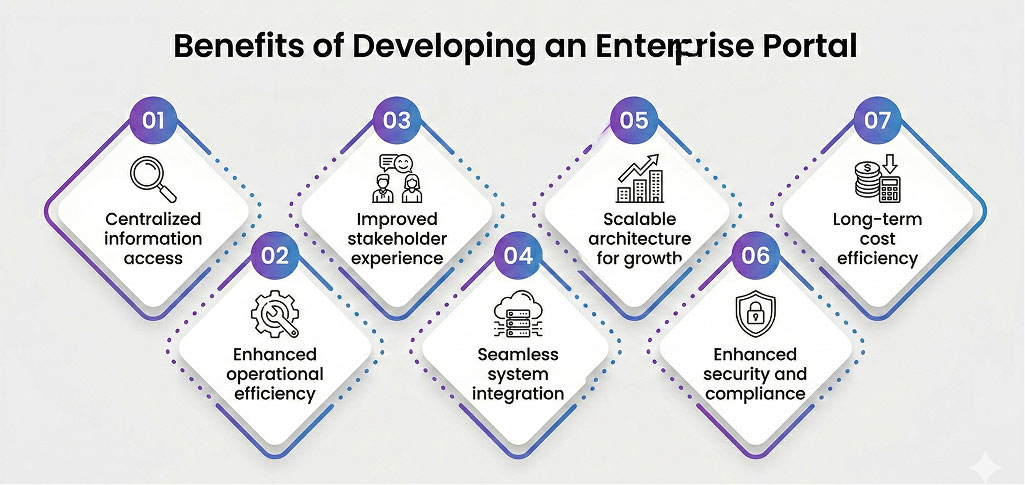
Building custom enterprise portals delivers advantages that generic solutions cannot match. Organizations gain control over their digital infrastructure while addressing specific operational needs.
1. Centralized information access
Enterprise portals eliminate information silos by bringing data from multiple sources into a single access point. Employees find policies, documents, and resources without having to search across disconnected systems. This centralization reduces the time spent locating information.
Users access everything they need from unified dashboards. Reports, communications, and tools appear in consistent interfaces. The result is improved productivity and reduced frustration.
Centralized access also improves data accuracy. Information updates in one location are automatically reflected everywhere. Duplicate and outdated content problems disappear.
2. Enhanced operational efficiency
Automation features within enterprise portals streamline routine business processes. Approval workflows route requests to appropriate stakeholders without manual intervention. Task assignments and notifications keep work moving forward efficiently.
Self-service capabilities reduce administrative burden on support teams. Employees update their own information and access services independently. Customers resolve common issues without contacting support staff.
Process standardization through portals ensures consistent execution across the organization. Every department follows the same procedures for common tasks. Compliance improves while errors decrease.
3. Improved stakeholder experience
Well-designed enterprise portals create positive experiences for all user groups. Intuitive interfaces reduce learning curves and encourage adoption. Personalized content ensures relevance for each user’s needs.
Employees appreciate easy access to the tools and information they need daily. Customers value the ability to manage accounts and resolve issues independently. Partners benefit from streamlined collaboration and communication channels.
Better experiences translate to measurable business outcomes. Employee satisfaction improves alongside productivity gains. Customer retention increases when self-service options meet their needs.
4. Seamless system integration
Enterprise portals connect disparate business systems into unified workflows. Data flows automatically between CRM, ERP, HR systems, and other applications. Manual data entry between systems becomes unnecessary.
Integration eliminates duplicate work and reduces errors. Information entered once appears everywhere it is needed. Staff productivity increases when systems work together seamlessly.
Custom development enables connections with any system your organization uses. Legacy applications integrate alongside modern cloud services. Your portal becomes the single interface for all business operations.
5. Scalable architecture for growth
Custom enterprise portal development builds scalability into the foundation. Systems handle increasing user volumes without performance degradation. New features and capabilities are added easily as requirements evolve.
Multi-location organizations benefit from scalable portal architectures. Central management, combined with location-specific customization options, enables growth through acquisition or expansion without system limitations.
Cloud-native development approaches maximize scalability potential. Resources scale automatically based on demand. Peak usage periods are handled smoothly without manual intervention.
6. Enhanced security and compliance
Enterprise portals implement security measures appropriate for sensitive business data. Role-based access controls limit information visibility based on user permissions. Encryption protects data both in storage and during transmission.
Compliance requirements are embedded directly into the portal architecture. Audit logging tracks all user activities for regulatory documentation. Data retention policies are enforced automatically based on configured rules.
Custom development addresses your specific security and compliance needs. Industry regulations and organizational policies shape security implementations. You control exactly how data protection works within your portal.
7. Long-term cost efficiency
While initial development requires significant investment, custom portals eliminate ongoing licensing fees. Per-user charges that compound annually with commercial software disappear. Organizations with large user populations achieve substantial savings over time.
Ownership eliminates vendor lock-in concerns. No surprise price increases appear at renewal time. Your organization controls the technology roadmap and associated costs.
Reduced manual processes generate additional cost savings. Staff time redirects from administrative tasks to value-adding activities. Operational efficiency gains compound year over year.
Looking to Build a Scalable Enterprise Portal Solution?
Work with experienced developers who understand complex business requirements and integration challenges. Build software that fits your organization, not the other way around.

Core Features of Enterprise Portal Development
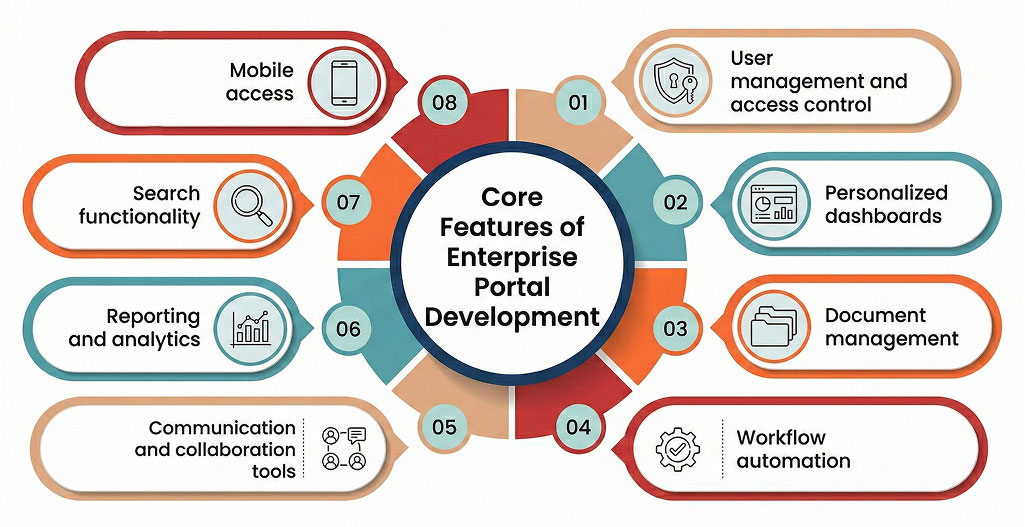
Successful enterprise portals combine foundational capabilities with features tailored to specific organizational needs. Understanding these components helps prioritize development investments effectively.
1. User management and access control
Robust user management forms the foundation of enterprise portal security. This module handles user provisioning, authentication, and authorization across all portal functions.
Essential capabilities include:
- Single sign-on integration with corporate identity providers.
- Role-based access control with granular permission settings.
- Multi-factor authentication for enhanced security.
- User provisioning automation from HR systems.
- Access request and approval workflows.
- Session management and automatic timeout features.
- Audit logging of all authentication events.
Effective user management reduces administrative overhead while maintaining security. Automated provisioning ensures new employees gain appropriate access immediately. Departing staff lose access automatically when HR systems update.
2. Personalized dashboards
Dashboard personalization ensures each user sees relevant information immediately upon login. These customizable interfaces aggregate data and tools based on user roles and preferences.
Essential capabilities include:
- Widget-based layouts with drag-and-drop customization.
- Role-specific default configurations.
- Real-time data visualization from connected systems.
- Quick access links to frequently used applications.
- Notification centers for alerts and updates.
- Saved search and filter configurations.
- Mobile-responsive dashboard designs.
Personalized dashboards improve productivity by eliminating unnecessary navigation. Users access their most important tools and information directly from the home screen.
3. Document management
Enterprise portals require sophisticated document handling capabilities. This module organizes, stores, and controls access to organizational documents and files.
Essential capabilities include:
- Hierarchical folder structures with flexible organization.
- Version control tracks all document changes.
- Check-in and check-out functionality for collaborative editing.
- Full-text search across document contents.
- Metadata tagging for enhanced discoverability.
- Retention policy automation and archival.
- Integration with common productivity applications.
Document management through portals eliminates scattered file storage across network drives and email. Central repositories improve findability while ensuring everyone accesses current versions.
4. Workflow automation
Automated workflows streamline business processes by electronically routing tasks and approvals. This capability reduces manual coordination while ensuring consistent execution of the process.
Essential capabilities include:
- Visual workflow designers for process configuration.
- Conditional routing based on data values and rules.
- Parallel and sequential approval chains.
- Escalation rules for overdue tasks.
- Email and push notification triggers.
- Integration with external systems and applications.
- Workflow analytics and bottleneck identification.
Workflow automation accelerates process completion while improving visibility. Managers track request status without having to chase participants for updates.
5. Communication and collaboration tools
Enterprise portals facilitate organizational communication through integrated messaging and collaboration features. These tools reduce email volume while improving information sharing.
Essential capabilities include:
- Announcement publishing with targeting options.
- Discussion forums for topic-based conversations.
- Instant messaging for real-time communication.
- Team workspaces for project collaboration.
- Calendar sharing and meeting scheduling.
- File sharing with commenting capabilities.
- Video conferencing integration.
Built-in communication tools keep conversations in context. Discussions about specific projects or topics remain accessible alongside related documents and tasks.
6. Reporting and analytics
Data-driven decision making requires comprehensive reporting capabilities. Enterprise portals aggregate information from connected systems into actionable insights.
Essential capabilities include:
- Configurable report builders with multiple output formats.
- Interactive dashboards with drill-down capabilities.
- Scheduled report generation and distribution.
- Data export for external analysis tools.
- Key performance indicator tracking.
- Trend analysis and comparison reporting.
- User activity and adoption analytics.
Reporting capabilities reveal operational patterns invisible in daily work. Leadership gains visibility into organizational performance across all connected systems.
7. Search functionality
Enterprise search enables users to find information across all portal content and connected systems. This capability becomes critical as portal content grows.
Essential capabilities include:
- Unified search across all content types.
- Faceted filtering by metadata attributes.
- Natural language query processing.
- Search result ranking by relevance and recency.
- Saved searches and alerts for new content.
- Search analytics for content optimization.
- Security-trimmed results based on permissions.
Effective search functionality prevents content from becoming unfindable. Users can quickly locate the information they need, regardless of where it resides within the portal ecosystem.
8. Mobile access
Mobile capabilities extend portal functionality beyond desktop computers. Responsive designs and native applications ensure access from any device.
Essential capabilities include:
- Responsive web interfaces for all screen sizes.
- Native mobile applications for iOS and Android.
- Offline access to critical information.
- Push notifications for important alerts.
- Touch-optimized interface elements.
- Camera and GPS integration for field applications.
- Secure mobile device management support.
Mobile access keeps users connected regardless of location. Field workers, traveling executives, and remote employees maintain full portal access.
How to Develop an Enterprise-Grade Portal: 6-Step Process
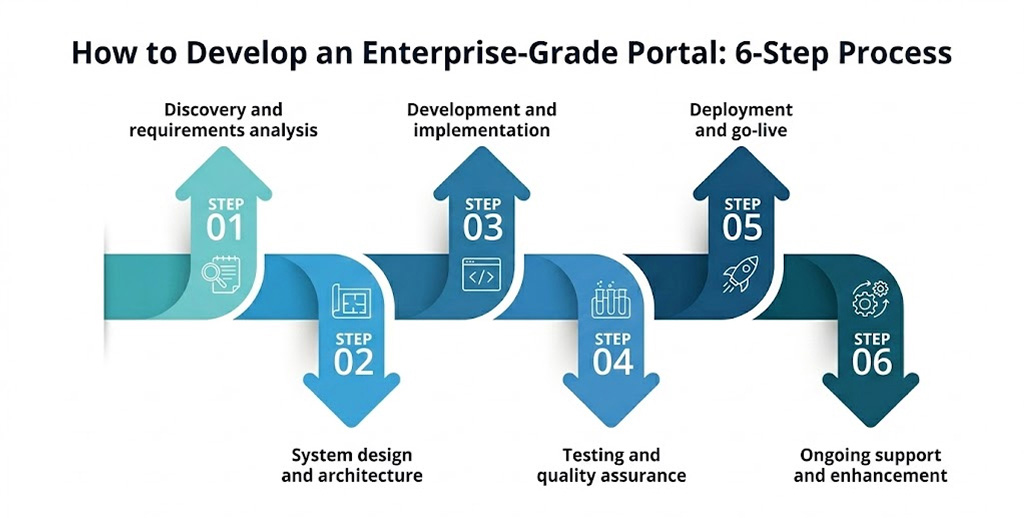
Building effective enterprise portals follows a structured process that balances thorough planning with iterative delivery. Understanding each phase helps set realistic expectations for your project.
Phase 1: Discovery and requirements analysis
Timeline: 4 to 8 weeks
Discovery establishes the foundation for everything that follows. This phase documents current processes, identifies pain points, and defines success criteria for the new portal.
Key activities
- Stakeholder interviews: Conversations with users from all departments reveal diverse perspectives on current challenges. Leadership provides strategic direction while end users identify daily friction points.
- Workflow documentation: Mapping existing processes exposes inefficiencies and integration requirements. Visual process flows clarify handoffs between departments and systems.
- Technical assessment: Evaluates current systems to identify integration requirements and the scope of data migration. Infrastructure capabilities determine deployment options.
- User research: Understanding user needs and preferences shapes interface design decisions. Persona development ensures the portal serves all stakeholder groups effectively.
- Prioritization workshops: Stakeholders rank features by business value and implementation complexity. This prioritization drives the sequencing and phasing of development.
Discovery delivers comprehensive requirements documentation and technical architecture recommendations. Rushing this phase leads to costly rework later in development.
Phase 2: System design and architecture
Timeline: 3 to 6 weeks
Design translates requirements into technical specifications and visual designs. This phase defines system structure, user interfaces, and integration approaches.
Key activities
- Architecture design: Technical architects define database structure, application layers, and infrastructure requirements. Scalability and security considerations shape foundational decisions.
- User interface design: UX designers create wireframes and interactive prototypes. User testing validates designs before development begins.
- Integration planning: Detailed specifications define how the portal connects with existing systems. API designs establish data exchange protocols with each connected application.
- Security design: Authentication mechanisms, encryption standards, and access control models are explicitly defined. Compliance requirements drive security architecture decisions.
Design deliverables include technical specifications, interface mockups, and integration documentation. Stakeholder approval of designs prevents costly changes during development.
Phase 3: Development and implementation
Timeline: 12 to 40 weeks, depending on scope
Development transforms designs into working software. Agile methodologies deliver functionality incrementally for early feedback and course correction.
Key activities
- Sprint-based development: Two-week sprints deliver testable functionality at regular intervals. Product owners review progress and adjust priorities based on emerging needs.
- Continuous integration: Automated testing validates code quality with every change. Issues surface immediately rather than accumulating for later discovery.
- Environment management: Development, testing, and staging environments mirror production configuration. Environment parity prevents deployment surprises.
- Documentation creation: Technical documentation and user guides are developed alongside the software. Training materials are prepared for deployment activities.
Development follows the prioritized roadmap while maintaining flexibility for scope adjustments. Regular demonstrations keep stakeholders informed and engaged throughout the process.
Phase 4: Testing and quality assurance
Timeline: 4 to 8 weeks overlapping with development
Comprehensive testing ensures the portal meets requirements while maintaining performance and security standards.
Key activities
- Functional testing: Test cases verify that every feature works as specified. Edge cases and error conditions receive explicit attention.
- Integration testing: End-to-end workflows validate system behavior across connected components. Data flows correctly between all integrated systems.
- Performance testing: Load testing confirms system capacity under expected and peak usage patterns. Bottlenecks receive attention before launch.
- Security testing: Penetration testing and vulnerability scanning identify security weaknesses. Compliance verification ensures regulatory adherence.
- User acceptance testing: Real users validate system behavior in realistic scenarios. Feedback drives final refinements before deployment.
Testing should not be compressed to meet deadlines. Undiscovered defects create expensive post-launch remediation and user frustration.
Phase 5: Deployment and go-live
Timeline: 2 to 4 weeks
Deployment transitions the portal from development to production use. Careful planning minimizes disruption while ensuring smooth adoption.
Key activities
- Data migration: Historical data transfers from legacy systems to the new portal. Validation confirms the accuracy and completeness of migrated information.
- Training delivery: Role-based training prepares users for new workflows. Hands-on practice builds confidence before go-live.
- Cutover planning: Detailed runbooks define every step of the production transition. Rollback procedures provide a safety net against unexpected issues.
- Go-live support: Intensive support during the initial period addresses user questions quickly. Rapid issue resolution maintains confidence in the new system.
Phased rollouts reduce risk for large implementations. Starting with a single department validates processes before broader deployment.
Phase 6: Ongoing support and enhancement
Timeline: Continuous
Post-launch support ensures system stability while enabling continuous improvement. Enterprise portals require ongoing attention to maintain value.
Key activities
- Bug fixes and patches: Production issues receive prompt resolution based on severity. Critical problems get immediate attention.
- Performance monitoring: System health metrics identify capacity needs and performance trends. Proactive intervention prevents user-facing issues.
- Enhancement development: New feature requests are added to the development backlog for prioritization. The portal evolves as business needs change.
- Security updates: Regular patching addresses emerging vulnerabilities. Compliance requirements stay up to date with regulatory changes.
Budget for ongoing support from project inception. Systems without maintenance degrade over time and eventually require costly replacement.
Enterprise Portal Development Cost Breakdown
Understanding cost components helps organizations budget accurately for portal investments. Development costs vary based on complexity, features, and development approach.
Cost by implementation scope
| Scope Level | Features Included | Development Cost Range | Timeline |
|---|---|---|---|
| Basic Portal | User management, dashboards, document storage, and basic search | $75,000 to $150,000 | 3 to 5 months |
| Standard Portal | Basic features plus workflow automation, integrations, and reporting | $150,000 to $350,000 | 5 to 9 months |
| Advanced Portal | Standard features plus AI capabilities, advanced analytics, and mobile apps | $350,000 to $700,000 | 9 to 14 months |
| Enterprise Portal | Advanced features plus multi-location support, complex integrations, and compliance modules | $700,000 to $1,500,000 or more | 12 to 20 months |
Cost breakdown by development phase
| Phase | Budget Allocation | Activities |
|---|---|---|
| Discovery and Requirements | 8% to 12% | Stakeholder interviews, workflow documentation, and technical assessment |
| Design and Architecture | 10% to 15% | UI/UX design, technical architecture, and integration planning |
| Development | 45% to 55% | Core feature development, integration implementation, and testing |
| Quality Assurance | 15% to 20% | Functional testing, security testing, and performance optimization |
| Deployment and Training | 8% to 12% | Data migration, user training, and go-live support |
| Project Management | 10% to 15% | Coordination, communication, and risk management |
Factors that increase development costs
Several variables push costs toward higher ranges in enterprise portal projects.
- Integration complexity: Each external system integration adds $15,000 to $60,000, depending on the availability of the API. Legacy systems without modern APIs require custom middleware development.
- Compliance requirements: Regulatory compliance adds 15% to 30% to baseline costs. SOC 2 certification, GDPR compliance, and industry regulations increase scope and testing.
- Custom reporting: Advanced analytics, including custom dashboards and predictive models, significantly expand the development scope.
- Mobile applications: Native iOS and Android apps multiply user interface development effort compared to responsive web solutions.
- Multi-location support: Regional customization, centralized administration, and inter-location coordination add architectural complexity.
Ongoing cost considerations
Initial development represents only part of the total ownership cost. Plan for ongoing expenses throughout the portal lifecycle.
- Annual maintenance: Budget 15% to 20% of the initial development cost for bug fixes, security patches, and minor enhancements.
- Infrastructure: Cloud hosting costs range from $1,000 to $10,000 per month, depending on user volume and data storage requirements.
- Compliance maintenance: Annual security audits, penetration testing, and compliance updates require $15,000 to $40,000 annually.
- Feature enhancements: Budget $75,000 to $200,000 annually for new functionality to maintain the competitive position.
Get an Accurate Enterprise Portal Development Estimate
Share your requirements with our technical team for a detailed cost breakdown tailored to your specific needs.
Common Challenges in Enterprise Portal Development
Enterprise portal development comes with a unique set of challenges that go beyond standard web application development. Understanding these common challenges upfront helps enterprises make informed architectural and implementation decisions.
Challenge 1: Scope creep and requirement changes
Requirements evolve as stakeholders interact with developing software. Feature requests accumulate and expand scope beyond initial estimates. This challenge threatens timelines and budgets.
How to overcome this challenge
- Establish formal change request processes that assess impact before approval.
- Build contingency budgets of 15% to 20% for approved scope additions.
- Use phased delivery to defer non-essential features to subsequent releases.
- Maintain clear prioritization criteria tied to business value.
- Document decisions thoroughly to prevent regression of requirements.
Challenge 2: Integration complexity with existing systems
Existing systems often lack modern APIs or have incomplete documentation. Data format inconsistencies and quality issues compound integration challenges. These obstacles extend timelines significantly.
How to overcome this challenge
- Conduct a thorough technical assessment of all integration targets during discovery.
- Budget additional time for legacy system reverse engineering.
- Build data validation and transformation layers to handle inconsistencies.
- Plan parallel operation periods before decommissioning legacy systems.
- Document integration specifications comprehensively for future maintenance.
Challenge 3: User adoption resistance
Staff comfortable with existing processes resist new systems. Workflow changes can be frustrating when users feel unprepared. Poor adoption undermines the project’s return on investment.
How to overcome this challenge
- Involve end users throughout development to build ownership.
- Design interfaces that minimize learning curves and align with users’ mental models.
- Provide comprehensive training tailored to different roles and skill levels.
- Identify and support champions who advocate for the new portal.
- Address concerns quickly to prevent negative sentiment from spreading.
Challenge 4: Security and compliance requirements
Regulatory requirements add complexity, extend timelines, and increase testing scope. Misunderstanding requirements leads to expensive rework. Security vulnerabilities discovered late create significant delays.
How to overcome this challenge
- Engage compliance expertise from project initiation.
- Build security architecture before feature development begins.
- Implement automated security testing in development pipelines.
- Plan for compliance audits and certification processes in timelines.
- Document compliance measures for regulatory inquiries.
Challenge 5: Data migration complexity
Moving historical data from legacy systems creates unexpected challenges. Data quality issues, format inconsistencies, and volume limitations complicate migration planning. Incomplete migrations frustrate users who cannot find historical information.
How to overcome this challenge
- Assess data quality early to identify cleanup requirements.
- Develop data transformation rules with business stakeholder input.
- Plan multiple migration test cycles before production cutover.
- Establish data validation checkpoints throughout migration.
- Maintain rollback capabilities until migration verification completes.
Challenge 6: Performance under production conditions
Systems that perform well in testing may struggle with production data volumes. Concurrent user loads reveal bottlenecks invisible during development. Performance problems damage user confidence and adoption rates.
How to overcome this challenge
- Conduct performance testing with realistic data volumes.
- Simulate peak load scenarios before production deployment.
- Implement performance monitoring from day one.
- Build horizontal scaling capabilities into the architecture.
- Plan capacity expansion before limits are reached.
Let Expert Developers Handle Portal Development Complexities
Partner with experienced development teams to build secure and scalable enterprise portal solutions backed by proven methodologies and successful project deliveries.
Best Practices for Successful Enterprise Portal Development
Following proven practices dramatically increases project success rates. These guidelines represent accumulated wisdom from successful implementations across industries.
1. Start with a thorough discovery
Invest adequate time in understanding current workflows before designing new solutions. Rushing discovery creates requirements gaps that surface as expensive changes during development.
Interview users at every level, from front desk staff to leadership. Each perspective reveals different pain points and priorities. Observe actual work rather than relying solely on described processes.
Document everything in writing. Visual process maps, requirement specifications, and decision logs provide reference points throughout development. Verbal agreements create confusion in later project phases.
2. Prioritize user experience
Enterprise portals succeed or fail based on user adoption rates. Systems that staff resist using never deliver intended benefits regardless of feature completeness.
Design interfaces that align with users’ mental models and minimize clicks for common tasks. Test designs with actual users before development begins. Iterate based on feedback rather than assumptions.
Consider the full user journey from initial login through task completion. Friction at any point reduces adoption rates. Smooth workflows encourage regular use and build positive system associations.
3. Build for compliance from the foundation
Regulatory requirements should shape architecture decisions from the beginning. Security, audit logging, and data protection integrate more effectively when designed from the start.
Engage compliance expertise early in the project. Industry-specific knowledge prevents costly compliance gaps discovered late in development.
Document compliance measures comprehensively throughout the project. Auditors require evidence of controls. Well-documented systems pass audits faster with less operational disruption.
4. Plan integrations carefully
Integration complexity often exceeds initial estimates by a significant margin. Each connected system brings its own data models, authentication requirements, and reliability characteristics.
Map all integration points during the discovery phase activities. Assess API availability, documentation quality, and vendor support responsiveness. Budget additional time for systems with poor documentation.
Build integration monitoring and error handling from day one. Integrations fail occasionally. Graceful handling and quick notification minimize downstream business impact.
5. Implement iterative delivery
Delivering functionality incrementally provides multiple benefits throughout the project. Stakeholders see progress and provide feedback early. Course corrections happen before significant investment accumulates.
Two-week sprints work well for most enterprise portal projects. Longer iterations delay feedback unnecessarily. Shorter iterations create overhead that reduces team productivity.
Prioritize the delivery of core workflows first in the development sequence. Users can begin benefiting from the system while additional features are being completed. Early value delivery builds organizational support for the project.
6. Invest in comprehensive testing
Testing shortcuts creates technical debt that compounds over time. Undiscovered defects frustrate users, damage confidence, and require expensive emergency fixes.
Automate testing wherever possible throughout development. Automated tests run consistently and frequently. Manual testing alone cannot keep pace with modern development velocity.
Include security testing throughout development, not just before launch. Vulnerability scanning, code analysis, and penetration testing each catch different types of issues.
7. Plan for ongoing evolution
Enterprise portals are never truly complete. Business needs change, regulations evolve, and user feedback reveals opportunities for improvement.
Build systems that accommodate change gracefully over time. Modular architecture, clean code practices, and comprehensive documentation enable efficient future modification.
Budget for ongoing development from project inception. Systems without enhancement resources stagnate and eventually require costly replacement projects.
Why Enterprises Choose Space-O Technologies for Portal Development
Enterprise portal development is not just about consolidating systems. It is about creating a secure, scalable foundation that enables collaboration, streamlines operations, and supports long-term digital transformation. When built with the right architecture, integrations, and governance, an enterprise portal becomes a strategic asset for the organization.
At Space-O Technologies, we bring over 15+ years of experience in enterprise portal development, having served 1,200+ clients and delivered 300+ custom software solutions across industries. Our team understands enterprise-scale challenges such as security compliance, system integrations, performance optimization, and user adoption.
Whether you are building a new enterprise portal from scratch or modernizing an existing one, we focus on aligning technology with your business goals. From requirement discovery and UI design to development, testing, and ongoing support, Space-O Technologies helps enterprises build portals that deliver measurable business value.
Connect with our consultants to discuss your enterprise portal requirements. We provide in-depth assessments, transparent cost estimates, and customized development roadmaps to help turn your enterprise portal vision into a high-performing digital reality.
FAQs on Enterprise Portal Development
1. What is enterprise portal development?
Enterprise portal development is the process of building comprehensive digital platforms that serve as centralized access points for organizational information and applications. These portals integrate multiple business systems into unified interfaces for employees, customers, vendors, and partners. Development encompasses requirements analysis, system design, coding, testing, deployment, and ongoing maintenance tailored to specific organizational needs.
2. How much does enterprise portal development cost?
Enterprise portal development costs range from $75,000 for basic systems to $1,500,000 or more for complex enterprise implementations. Basic portals with user management and document storage cost $75,000 to $150,000. Standard systems with workflow automation and integrations cost $150,000 to $350,000. Advanced platforms with AI capabilities and mobile apps cost $350,000 to $700,000. Enterprise solutions with complex integrations exceed $700,000.
3. How long does enterprise portal development take?
Development timelines vary from 3 to 5 months for basic portals to 12 to 20 months for enterprise implementations. Basic projects with core features typically take 3 to 5 months. Standard implementations requiring multiple integrations take 5 to 9 months. Advanced projects with AI capabilities require 9 to 14 months. Enterprise deployments with complex requirements take 12 to 20 months, including phased rollouts.
4. What features are essential in enterprise portals?
Essential enterprise portal features include user management with single sign-on, personalized dashboards, document management, workflow automation, search, and reporting. Communication and collaboration tools facilitate information sharing. Mobile access ensures availability from any device. Integration capabilities connect the portal with existing business systems. The specific feature set depends on organizational requirements and stakeholder needs.
5. Should we build a custom enterprise portal or buy commercial software?
The decision depends on several factors unique to your organization. Custom development suits organizations with unique workflows that commercial solutions cannot accommodate. It benefits those seeking competitive differentiation through proprietary capabilities. Organizations with large user populations save on per-seat licensing over time. Commercial solutions work better for standard requirements, limited budgets, and immediate implementation needs.
6. Can enterprise portals integrate with existing business systems?
Yes, enterprise portals integrate with virtually any business system using appropriate technologies. Common integrations include ERP systems, CRM platforms, HR applications, and financial software. Integration complexity depends on the availability of APIs and the quality of the documentation. Systems with well-documented APIs integrate more easily than legacy platforms. Custom middleware development bridges connectivity gaps when standard APIs are unavailable.



 All our projects are secured by NDA




 4.8
4.8

