
 By
By 
Contents
The demand for digital learning platforms continues to rise as organizations, educational institutions, and enterprises invest in scalable online learning solutions. According to Grand View Research, the global e-learning services market was valued at USD 299.67 billion in 2024 and is expected to surge to USD 842.64 billion by 2030. This growth highlights the rapid adoption of technology-driven learning models.
This growth reflects a shift toward centralized eLearning portals that support structured content delivery, learner engagement, and performance tracking. Traditional classroom-based or fragmented learning systems are increasingly unable to meet the flexibility, accessibility, and scalability required by modern learners.
eLearning portal development focuses on building secure and user-friendly platforms that enable learners to access courses, complete assessments, track progress, and interact with content from a single interface.
In this eLearning portal development guide, we cover everything you need to know about building an eLearning portal. Drawing from our expertise as a leading web portal development agency, we have covered expert insights on the fundamentals, key benefits, features, development process, cost, and best practices to build a future-ready eLearning portal.
What is eLearning Portal Development?
eLearning portal development is the process of designing and building a centralized digital platform that delivers online learning experiences to users in a structured and scalable way. An eLearning portal enables learners to access courses, training materials, assessments, and certifications through a single interface while allowing organizations to manage content, users, and learning progress efficiently.
Unlike simple content websites, custom eLearning portal development focuses on creating interactive, role-based experiences for learners, instructors, and administrators. This includes features such as course management, progress tracking, assessments, content delivery, and analytics, all designed to support different learning models and objectives.
A well-developed eLearning portal improves accessibility and engagement by allowing learners to study at their own pace, across devices, and from any location. For organizations, it provides better visibility into learner performance, training effectiveness, and compliance requirements while reducing the administrative effort associated with manual training processes.
What Are the Benefits of eLearning Portal Development?
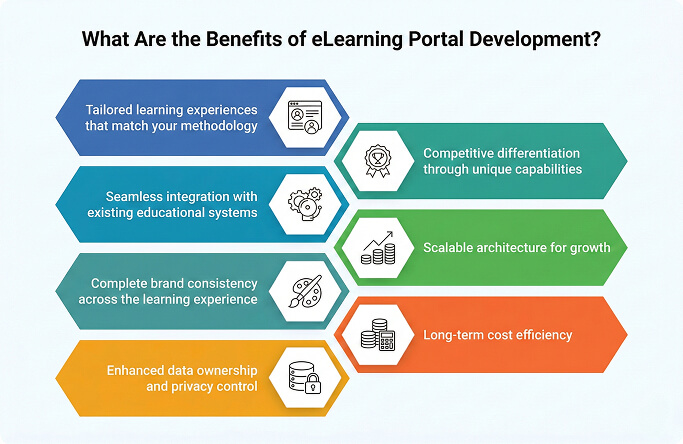
Building a custom eLearning portal delivers advantages that generic learning management systems cannot provide. Organizations gain complete control over their educational technology while addressing specific training and learning challenges.
1. Tailored learning experiences that match your methodology
Every educational organization operates differently. Custom development creates learning workflows that reflect your pedagogical approach. Your assessment methods, grading systems, and progress-tracking systems work exactly as your educators designed them.
Generic platforms force instructors to adapt their teaching methods to the limitations of the software. Custom solutions eliminate this friction. Faculty productivity increases when technology supports their natural teaching patterns.
Proprietary course structures and unique certification programs become possible. Your learning paths follow the logic your subject matter experts define, not what generic software permits.
2. Competitive differentiation through unique capabilities
Custom eLearning portals enable features that competitors using standard LMS platforms cannot replicate. Proprietary assessment engines, specialized simulation tools, and unique engagement mechanics become sustainable competitive advantages.
Educational institutions increasingly compete on the quality of the learning experience. Online degree programs, corporate training providers, and certification bodies all seek differentiation. Custom technology enables experiences that generic platforms simply cannot deliver.
Your institution’s unique strengths translate into software capabilities. This alignment strengthens brand positioning in crowded educational markets.
3. Seamless integration with existing educational systems
Most organizations operate multiple specialized tools. Student information systems, HR platforms, video conferencing solutions, and content repositories all generate data. Custom eLearning portals connect these systems into unified workflows.
Integration eliminates manual data transfer between platforms. Administrators enter information once. It reflects everywhere automatically. Error rates decrease while operational efficiency rises significantly.
Your existing technology investments continue delivering value. New capabilities can be layered onto the current infrastructure rather than requiring wholesale replacement.
4. Scalable architecture for growth
Off-the-shelf solutions hit performance limits as user bases grow. Custom development builds scalability into the architecture from day one. Your platform expands capacity without degradation as enrollments increase.
Multi-campus institutions benefit especially from custom scalability. Centralized management with location-specific customization becomes possible. You avoid purchasing additional licenses or modules as you grow.
Seasonal enrollment spikes require flexible infrastructure. Custom portals handle peak registration periods without crashing or slowing down.
5. Complete brand consistency across the learning experience
White-label solutions still carry platform limitations. Custom development ensures every interface element reflects your brand identity. Colors, typography, navigation patterns, and terminology align with institutional standards.
Learners experience seamless transitions between your main website and learning portal. Brand consistency builds trust and reinforces institutional credibility throughout the educational journey.
Custom portals eliminate competitor branding. Your learners never see another company’s logo on their educational platform.
6. Long-term cost efficiency
While initial development requires higher investment than subscription fees, custom portals eliminate ongoing per-user costs. Organizations with 500+ learners often achieve break-even within 2-3 years. Every subsequent year delivers pure savings.
No vendor lock-in means no price increases at renewal time. Your organization owns the software and controls its future direction.
Subscription costs compound annually. Custom ownership converts recurring expenses into capital investment with lasting value.
7. Enhanced data ownership and privacy control
Custom development implements security measures specific to your data sensitivity requirements. You control where learner data resides, how it is encrypted, and who accesses it.
Educational data carries significant privacy obligations. FERPA in the US and GDPR in Europe mandate strict data protection. Custom portals address these requirements precisely.
Your learner data never flows through third-party servers. Complete ownership eliminates vendor-related privacy risks.
Looking to Build a Smart eLearning Solution?
With 15+ years of EdTech development experience, we build software that fits your teaching methods, not the other way around. Start your custom development journey today.

Core Features of eLearning Portal Development
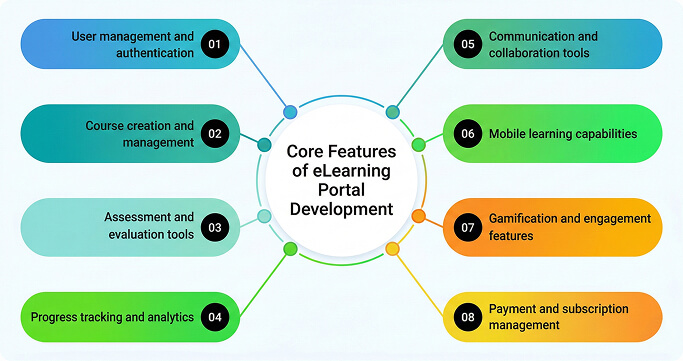
Successful eLearning portals combine foundational capabilities that every organization needs with specialized features for specific learning contexts. Understanding these components helps prioritize development investments effectively.
1. User management and authentication
The foundation of any eLearning portal handles user registration, authentication, and role-based access control. This module manages learner profiles, instructor accounts, and administrative permissions.
- Secure registration with email verification and single sign-on options.
- Role-based access control for learners, instructors, administrators, and observers.
- User profile management with custom fields for demographics and preferences.
- Bulk user import for organizational enrollments.
- Group and cohort management for class organization.
- Self-service password reset and account recovery.
Effective user management reduces administrative burden while maintaining security. Staff manage thousands of accounts efficiently through batch operations and automated workflows.
2. Course creation and management
Course management functionality enables instructors to create, organize, and deliver educational content. Modern systems support diverse content types and flexible course structures.
- Drag-and-drop course builder with modular lesson organization.
- Support for multiple content formats, including video, documents, and interactive elements.
- Learning path creation with prerequisite sequencing.
- Course versioning for content updates without disrupting active enrollments.
- Content scheduling for drip-fed course delivery.
- Course templates for rapid new course creation.
- SCORM and xAPI compliance for third-party content integration.
Advanced course management features include AI-driven content recommendations and adaptive learning paths. Intelligent systems adjust content delivery based on learner performance.
3. Assessment and evaluation tools
Assessment functionality measures learning outcomes and provides learners with feedback. Comprehensive evaluation supports a range of question types and grading approaches.
- Multiple question types, including multiple choice, essay, matching, and fill-in-the-blank.
- Question pools with randomization for assessment integrity.
- Timed assessments with proctoring integration options.
- Rubric-based grading for subjective evaluations.
- Peer assessment capabilities for collaborative learning.
- Automated grading with instant feedback delivery.
- Grade book management with weighted scoring.
- Competency mapping to track skill development.
Assessment data feeds into analytics systems for learning effectiveness analysis. Educators identify struggling learners early and intervene appropriately.
4. Progress tracking and analytics
Data-driven insights enable continuous improvement in learning outcomes. Analytics dashboards provide visibility into learner engagement and achievement patterns.
- Individual learner progress dashboards with completion tracking.
- Course-level analytics showing engagement and performance metrics.
- Instructor dashboards for class-wide performance monitoring.
- Custom report builder for specific analytical needs.
- Learning time tracking and activity logs.
- Completion certificates with automated generation.
- Predictive analytics for at-risk learner identification.
Effective analytics reveal patterns invisible in daily operations. Educators identify content gaps, engagement problems, and learning effectiveness issues.
5. Communication and collaboration tools
Learning extends beyond content consumption. Communication features enable interaction between learners, instructors, and peers for collaborative education.
- Discussion forums with threading and moderation controls.
- Direct messaging between users with notification management.
- Announcement broadcasting for course-wide communications.
- Live chat integration for real-time support.
- Video conferencing integration for virtual classrooms.
- Group workspaces for collaborative projects.
- Social learning feeds for community building.
Communication tools transform passive content consumption into active learning communities. Engagement increases significantly when learners connect with peers.
6. Mobile learning capabilities
Modern learners expect access from any device, anywhere. Mobile-responsive design or native applications extend learning beyond desktop environments.
- Responsive design that adapts to any screen size.
- Offline access to learning content without connectivity.
- Push notifications for engagement and reminders.
- Mobile-optimized video playback with adaptive streaming.
- Touch-friendly navigation and interactions.
- Progress synchronization across devices.
- Camera integration for assignment submissions.
Mobile learning increases completion rates by enabling learners to use otherwise unproductive time. Commutes, breaks, and travel become learning opportunities.
7. Gamification and engagement features
Game mechanics increase motivation and completion rates. Thoughtful gamification transforms learning from an obligation into an enjoyable experience.
- Points and experience systems for activity rewards.
- Achievement badges for milestone recognition.
- Leaderboards for competitive motivation.
- Learning streaks to encourage consistent engagement.
- Progress visualization with visual progress indicators.
- Unlockable content based on achievements.
- Social sharing of accomplishments.
Gamification increases course completion rates significantly. Learners return regularly when rewards acknowledge their progress.
8. Payment and subscription management
For commercial eLearning platforms, monetization features enable course sales, subscriptions, and financial management.
- Multiple payment gateway integrations.
- Subscription management with recurring billing.
- Coupon and promotional discount systems.
- Bundle pricing for course packages.
- Refund processing and policy enforcement.
- Revenue reporting and financial analytics.
- Tax calculation and compliance handling.
Payment features transform educational content into sustainable business models. Creators monetize expertise while learners access valuable training.
How to Develop an eLearning Portal: 6-Step Process
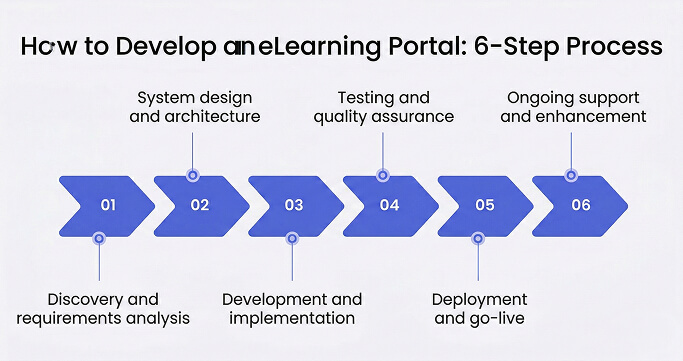
Building effective eLearning portals follows a structured process that balances thorough planning with iterative delivery. Understanding each phase helps set realistic expectations and ensures successful outcomes.
Phase 1: Discovery and requirements analysis
Timeline: 4-8 weeks
Discovery establishes the foundation for everything that follows. This phase documents learning objectives, identifies stakeholder needs, and defines success criteria for the platform.
Key activities
- Stakeholder interviews: Conversations with educators, administrators, learners, and leadership reveal diverse perspectives on current challenges and future needs.
- Learning methodology documentation: Mapping pedagogical approaches exposes content requirements and assessment needs. Visual learning flows clarify course structures and progression logic.
- Technical assessment: Evaluates current systems to identify integration requirements and data migration scope. Infrastructure capabilities determine deployment options.
- User research: Understanding target learners informs interface design and feature prioritization. Demographic analysis shapes accessibility and localization requirements.
- Prioritization workshops: Stakeholders rank features by educational value and implementation complexity. This prioritization drives development sequencing.
Discovery delivers comprehensive requirements documentation, technical architecture recommendations, and a prioritized feature roadmap. Rushing this phase creates expensive rework later in development.
Phase 2: System design and architecture
Timeline: 3-6 weeks
Design translates requirements into technical specifications. This phase defines the platform’s system structure, user interfaces, and integration approaches.
Key activities
- Architecture design: Technical architects define database structure, application layers, and infrastructure requirements. Scalability and security considerations shape foundational decisions.
- User experience design: UX designers create wireframes and prototypes that visualize system behavior. User testing validates designs before development begins.
- Integration planning: Detailed specifications define how the portal connects with existing tools. API designs establish data exchange protocols with external systems.
- Content architecture: Planning for content types, media storage, and delivery mechanisms ensures optimal learner experience across devices.
Design deliverables include technical specifications, interface mockups, and integration documentation. Stakeholder approval of designs prevents costly mid-development changes.
Phase 3: Development and implementation
Timeline: 12-40 weeks, depending on scope
Development transforms designs into working software. Agile methodologies deliver functionality incrementally, enabling early feedback and course correction.
Key activities
- Sprint-based development: Two-week sprints deliver testable functionality at regular intervals. Product owners review progress and adjust priorities based on emerging needs.
- Continuous integration: Automated testing validates code quality with every change. Issues surface immediately rather than accumulating for later discovery.
- Environment management: Development, testing, and staging environments mirror production configuration. Environment parity prevents deployment surprises.
- Documentation creation: Technical documentation, educator guides, and learner help materials develop alongside the software. Documentation debt does not accumulate.
Development follows the prioritized roadmap from discovery while maintaining flexibility for scope adjustments. Regular demonstrations keep stakeholders informed and engaged.
Phase 4: Testing and quality assurance
Timeline: 4-8 weeks (overlapping with development)
Comprehensive testing ensures the portal meets requirements while maintaining performance and security standards for educational use.
Key activities
- Functional testing: Test cases verify that every feature works as specified. Edge cases and error conditions receive explicit attention.
- Usability testing: Real learners and educators validate interface effectiveness. Feedback drives refinements before launch.
- Performance testing: Load testing confirms system capacity under expected and peak usage patterns. Concurrent user limits receive validation.
- Security testing: Penetration testing and vulnerability scanning identify security weaknesses. Compliance verification confirms regulatory adherence.
- Accessibility testing: WCAG compliance verification ensures inclusive access for learners with disabilities.
Testing should not be compressed to meet deadlines. Undiscovered defects create expensive post-launch remediation and learner frustration.
Phase 5: Deployment and go-live
Timeline: 2-4 weeks
Deployment transitions the portal from development to production use. Careful planning minimizes disruption while ensuring smooth adoption.
Key activities
- Content migration: Transferring existing courses and learner data from legacy systems to the new platform. Validation confirms accuracy and completeness.
- Training delivery: Role-based training prepares instructors and administrators for new workflows. Hands-on practice builds confidence before go-live.
- Cutover planning: Detailed runbooks define every step of the production transition. Rollback procedures provide a safety net against unexpected issues.
- Go-live support: Intensive support teams address questions and issues during the initial operational period. Quick resolution maintains user confidence.
Phased rollouts reduce risk for large implementations. Starting with pilot courses validates processes before broader deployment.
Phase 6: Ongoing support and enhancement
Timeline: Continuous
Post-launch support ensures platform stability while enabling continuous improvement. eLearning portals require ongoing attention to maintain educational value.
Key activities
- Bug fixes and patches: Issues discovered in production receive prompt resolution. Severity-based prioritization ensures critical problems get immediate attention.
- Performance monitoring: System health metrics identify capacity needs and performance degradation. Proactive intervention prevents learner-facing issues.
- Enhancement development: New feature requests are added to the development backlog for prioritization. The platform evolves as educational needs change.
- Content updates: Regular content refreshes keep courses current and engaging. Technical support enables educators to update materials efficiently.
Budget for ongoing support from project inception. Platforms without maintenance degrade over time, eventually requiring costly replacement.
Need Expert Support to Build Your eLearning Portal?
Space-O Technologies builds learning platforms tailored to educators, enterprises, and training providers.
How Much Does Custom eLearning Portal Development Cost?
Understanding cost components helps organizations budget accurately and make informed investment decisions. eLearning portal development costs vary based on complexity, features, and development approach.
Cost by implementation scope
| Scope Level | Development Cost Range | Timeline | Features Included |
|---|---|---|---|
| Basic Portal | $40,000 – $80,000 | 3-4 months | User management, course delivery, and basic assessments |
| Standard Portal | $80,000 – $200,000 | 5-8 months | Basic features + gamification, mobile support, analytics |
| Advanced Portal | $200,000 – $400,000 | 8-14 months | Standard features + AI personalization, live classes, marketplace |
| Enterprise Portal | $400,000 – $800,000+ | 12-18 months | Advanced features + multi-tenant, white-label, custom integrations |
Factors that increase development costs
Several variables push costs toward higher ranges:
- Content authoring tools: Built-in course-creation tools with rich media support add $20,000- $60,000 to development costs. Complex authoring environments require significant frontend development.
- Video streaming infrastructure: Live streaming and video-on-demand capabilities require specialized infrastructure. Media processing, adaptive bitrate streaming, and CDN integration increase costs.
- AI and personalization: Machine learning features for adaptive learning paths, content recommendations, and predictive analytics add 20-35% to baseline costs.
- Mobile applications: Native iOS and Android apps double or triple the user interface development effort compared to web-only solutions.
- Multi-language support: Localization for multiple languages requires content management complexity and translation workflows. Each language adds 10-15% to content-related costs.
- Accessibility compliance: WCAG 2.1 Level AA requires additional design considerations, development effort, and testing cycles.
Ongoing cost considerations
Initial development represents only part of the total ownership cost. Plan for ongoing expenses:
- Annual maintenance: 15-20% of the initial development cost covers bug fixes, security patches, and minor enhancements.
- Infrastructure: Cloud hosting costs range from $500 to $5,000 per month, depending on user volume and media storage requirements.
- Content delivery: Video streaming and media delivery costs scale with usage. High-volume platforms may spend $2,000- $10,000 per month on CDN services.
- Feature enhancements: Budget $40,000-$120,000 annually for new functionality to maintain competitive positioning.
Get an Accurate eLearning Portal Development Estimate
Share your requirements with our technical team for a detailed cost breakdown tailored to your specific needs.
Common Challenges in eLearning Portal Development and How to Overcome Them
eLearning portal development presents a unique set of challenges related to content delivery, user engagement, scalability, and system integration. As learner expectations and digital learning models continue to evolve, addressing these challenges becomes essential to building an effective and sustainable learning platform.
Challenge 1: Content migration from existing systems
Moving courses, learner records, and historical data from legacy platforms creates unexpected complications. Format inconsistencies, metadata gaps, and structural differences complicate migration efforts.
How to overcome this challenge
- Assess existing content early to identify format conversion requirements.
- Develop content transformation rules with educator input for accuracy.
- Plan multiple migration test cycles before production cutover.
- Establish content validation checkpoints throughout the migration process.
- Maintain parallel system access until migration verification completes.
Challenge 2: Balancing feature richness with usability
eLearning portals serve diverse users with varying technical abilities. Feature-rich platforms often overwhelm learners while oversimplified systems frustrate power users.
How to overcome this challenge
- Conduct user research to understand the target audience’s technical comfort levels.
- Implement progressive disclosure that reveals advanced features gradually.
- Create role-based interfaces that show relevant functionality for each user type.
- Provide contextual help and onboarding tours for new users.
- Test interfaces with actual learners before finalizing designs.
Challenge 3: Video content delivery at scale
Video dominates modern eLearning content. Delivering smooth video experiences across varying network conditions and devices presents technical challenges.
How to overcome this challenge
- Implement adaptive bitrate streaming that automatically adjusts quality.
- Use content delivery networks to reduce latency globally.
- Support offline video downloads for learners with connectivity limitations.
- Optimize video encoding for multiple device types and resolutions.
- Monitor playback analytics to identify and address delivery issues.
Challenge 4: Maintaining learner engagement
Online learning suffers from higher dropout rates than traditional education. Without classroom accountability, learners often drop out of courses before completion.
How to overcome this challenge
- Design micro-learning modules that deliver value in short sessions.
- Implement gamification elements that reward consistent engagement.
- Send personalized reminders based on learner behavior patterns.
- Create social learning features that build community connections.
- Track engagement metrics and intervene when patterns indicate a risk of dropout.
Challenge 5: Integration with organizational systems
Educational institutions and enterprises operate complex technology ecosystems. Integration with student information systems, HR platforms, and authentication services adds complexity.
How to overcome this challenge
- Conduct a thorough technical assessment of all integration targets during discovery.
- Budget additional time for legacy system integration development.
- Implement robust error handling for integration failures.
- Document integration specifications comprehensively for future maintenance.
- Plan parallel operation periods before decommissioning connected systems.
Challenge 6: Accessibility and compliance requirements
Educational platforms must serve learners with disabilities. WCAG compliance, Section 508 requirements, and regional accessibility laws add development complexity.
How to overcome this challenge
- Engage accessibility expertise from project initiation.
- Build accessibility into design systems before development begins.
- Test with assistive technologies throughout the development process.
- Include users with disabilities in usability testing sessions.
- Document accessibility compliance for audit requirements.
Best Practices for Successful eLearning Portal Development
Following proven practices dramatically increases project success rates. These guidelines represent accumulated wisdom from successful implementations across the educational technology sector.
1. Define learning outcomes before features
Successful eLearning portals start with clear educational objectives. Defining what learners must achieve helps prioritize features that directly support measurable outcomes and instructional goals, preventing unnecessary complexity.
2. Adopt a mobile-first design approach
Mobile devices dominate online learning consumption. A mobile-first strategy ensures intuitive navigation, fast load times, and accessible content across smartphones and tablets, even in low-bandwidth environments.
3. Design for instructor productivity
Instructor experience directly impacts platform adoption. Streamlined workflows for course creation, grading, learner communication, and reporting enable educators to focus more on teaching and less on administration.
4. Implement engagement thoughtfully
Gamification, progress tracking, and social learning features boost engagement when aligned with real learning milestones. Meaningful rewards tied to skill mastery outperform superficial incentives.
5. Enable continuous content evolution
Learning content must adapt to new research, regulations, and learner feedback. Built-in version control, approval workflows, and seamless updates ensure content stays relevant without disrupting active learners.
6. Build analytics into the foundation
Actionable insights require analytics from day one. Tracking engagement, completion rates, and assessment performance helps educators refine courses and identify learning gaps early.
Trusted eLearning Portal Development Partner for Scalable Digital Learning
Custom eLearning portals empower organizations to deliver tailored, scalable, and engaging learning experiences without the limitations of generic platforms. When aligned with pedagogy and learner behavior, they create lasting educational impact.
With 15+ years of software development expertise, a team of 200+ professionals, and 300+ successfully delivered solutions, Space-O Technologies specializes in building secure, high-performance eLearning platforms used by organizations worldwide.
Backed by ISO 27001:2022 and ISO 9001:2022 certifications, we ensure enterprise-grade security, quality, and scalability from day one. Connect with our experts to receive a detailed assessment, transparent cost estimation, and a development roadmap aligned with your educational objectives and growth plans.
FAQs on eLearning Portal Development
1. How much does it cost to develop an eLearning portal?
eLearning portal development costs range from $40,000 for basic systems to $800,000+ for enterprise-grade platforms. Basic portals with course delivery and user management cost $40,000-$80,000. Standard systems with gamification and analytics cost $80,000-$200,000. Advanced platforms with AI personalization and live classes cost $200,000 to $400,000. Enterprise portals with multi-tenant architecture exceed $400,000.
2. How long does eLearning portal development take?
Development timelines vary from 3-4 months for basic systems to 12-18 months for enterprise implementations. Basic portals with core learning features take 3-4 months. Standard implementations with engagement features take 5-8 months. Advanced projects with AI capabilities and complex integrations require 8-14 months. Enterprise deployments with custom integrations take 12-18 months, including phased rollouts.
3. What features are essential in an eLearning portal?
Essential eLearning portal features include user management with role-based access, course creation and delivery tools, assessment and evaluation capabilities, progress tracking dashboards, and communication features. Additional important capabilities include mobile learning support, gamification elements, analytics and reporting, and payment processing for commercial platforms. Specific requirements depend on the educational context and target learners.
4. Should I build a custom eLearning portal or buy an existing LMS?
The decision depends on several factors. Custom development suits organizations with unique pedagogical approaches that standard LMS platforms cannot accommodate. It also benefits those seeking competitive differentiation, institutions with 500+ learners where per-user licensing becomes expensive, and organizations requiring deep integration with existing systems. Off-the-shelf LMS solutions work better for smaller organizations with standard requirements and limited budgets.
5. What integrations does an eLearning portal typically need?
Common eLearning portal integrations include student information systems for enrollment data, single sign-on services for authentication, video conferencing platforms for live classes, content authoring tools for course creation, and payment gateways for commercial platforms. Enterprise deployments often integrate with HR systems, CRM platforms, and business intelligence tools. SCORM and xAPI compliance enable third-party content integration.
6. How do you ensure compliance with eLearning portal accessibility requirements?
Accessibility compliance requires design consideration from project inception. Key measures include semantic HTML structure for screen reader compatibility, keyboard navigation throughout the interface, color contrast ratios that meet WCAG guidelines, video captions and transcripts for hearing-impaired learners, and alternative text for all images. Regular testing with assistive technologies and users with disabilities validates compliance.
7. What ongoing maintenance does an eLearning portal require?
eLearning portals require continuous maintenance, including bug fixes, security patches, and feature enhancements. Budget 15-20% of the initial development cost annually for maintenance. Additional ongoing costs include cloud hosting ($500-$5,000 monthly), content delivery services, and feature development for new requirements ($40,000-$120,000 annually). Platforms without adequate maintenance degrade over time and eventually need costly replacement.



 All our projects are secured by NDA




 4.8
4.8

