
 By
By 
Contents
Digital commerce continues to expand at a rapid pace, with businesses investing heavily in robust online platforms to meet growing customer expectations. Today’s buyers expect seamless product discovery, secure transactions, personalized recommendations, and real time order tracking across devices.
This shift has pushed companies beyond basic online stores toward fully integrated ecommerce portals that support complex workflows and scalable growth. The scale of this opportunity is reflected in market data.
According to the U.S. Census Bureau, U.S. retail ecommerce sales reached $310.3 billion in Q3 2025 alone, representing 16.4% of total retail sales. These numbers highlight how critical it has become for businesses to build high-performance e-commerce platforms capable of handling traffic, transactions, and operational complexity.
Ecommerce portal development focuses on building scalable, feature-rich systems that centralize product management, vendor coordination, payments, inventory, and customer engagement within a unified platform.
In this guide, we explore the benefits, development process, cost factors, common challenges, and best practices involved in building a successful ecommerce portal. Drawing on our extensive experience as a custom ecommerce development company, we have curated this guide to help you understand what it takes to build a successful ecommerce portal.
What is Ecommerce Portal Development?
Ecommerce portal development is the process of designing and building a centralized digital platform that enables businesses to sell products or services online through a structured, scalable system. Unlike a basic ecommerce website, an ecommerce portal typically supports multiple user roles such as customers, vendors, administrators, and partners, within a unified interface.
An ecommerce portal integrates essential components such as product catalog management, inventory control, secure payment processing, order management, user authentication, and analytics dashboards.
In more advanced use cases, it may also include multi-vendor capabilities, role-based access control, automated workflows, CRM integrations, ERP connections, and multilingual or multi-currency support.
From a technical perspective, ecommerce portal development focuses on building a scalable architecture that can handle high traffic volumes, large product databases, and real-time transactions without compromising performance or security. It also emphasizes seamless third-party integrations, intuitive user experiences, and mobile responsiveness to support modern buying behavior.
Ecommerce website vs. ecommerce portal: Key differences
While the terms are often used interchangeably, an ecommerce website and an ecommerce portal differ significantly in scope, functionality, and operational complexity, making it important to understand which model aligns best with your business goals.
The following table highlights the key differences between the two.
| Feature | Ecommerce Website | Ecommerce Portal |
|---|---|---|
| User roles | Single role (buyer) | Multiple roles (buyer, seller, admin, vendor) |
| Dashboards | Basic account page | Role-based dashboards with analytics |
| Integrations | Limited (payment, shipping) | Deep (ERP, CRM, inventory, marketing tools) |
| Personalization | Basic recommendations | Advanced AI-driven personalization |
| Scalability | Suitable for small catalogs | Built for thousands of SKUs and high traffic |
| Vendor management | Not applicable | Multi-vendor onboarding and management |
| Data ownership | Limited analytics | Full first-party data and reporting |
As this comparison shows, an ecommerce portal is the better fit when your business needs multi-user access, complex workflows, or deep integration with existing systems. If your operations involve multiple vendors, large product catalogs, or B2B ordering workflows, an ecommerce portal gives you the flexibility and control that a basic website cannot.
8 Types of Ecommerce Portals and How They Serve Different Business Models
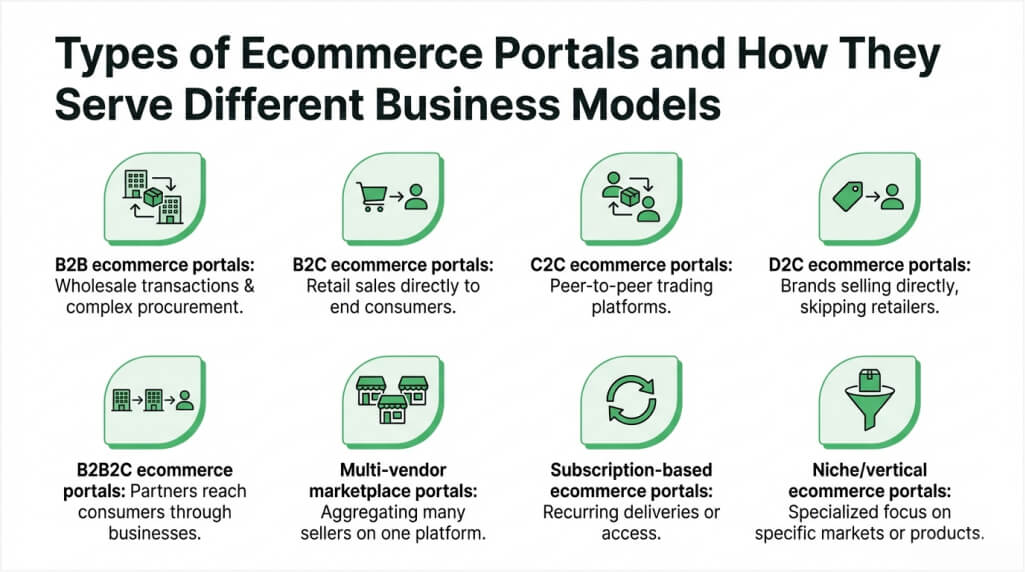
Not every ecommerce portal serves the same purpose. The type you build depends on your business model, target audience, and operational requirements. Here are the eight most common types of ecommerce portals businesses invest in.
1. B2B ecommerce portals
B2B portals serve business buyers who place bulk orders, negotiate pricing, and require structured procurement workflows. Companies in manufacturing, wholesale, and distribution rely on B2B portal development to digitize their ordering process.
Key characteristics:
- Custom catalogs with tiered and contract-based pricing
- Purchase approval workflows with role-based access for procurement teams
- Credit terms, invoice-based payments, and bulk order management
- ERP integration for real-time inventory and order sync
2. B2C ecommerce portals
B2C portals target individual consumers and focus on delivering fast, personalized shopping experiences that drive repeat purchases.
Key characteristics:
- AI-driven product recommendations and personalized homepage content
- Customer reviews, ratings, and social proof elements
- Loyalty programs, coupons, and buy now pay later (BNPL) options
- High-performance architecture built for large traffic volumes
3. C2C ecommerce portals
C2C portals connect individual sellers with individual buyers on a shared platform, where the platform earns through listing fees or transaction commissions. Platforms like eBay and Poshmark follow this model.
Key characteristics:
- Peer-to-peer payment systems with escrow protection
- Auction and bidding functionality
- Seller verification and trust scoring mechanisms
- Dispute resolution and return management workflows
4. D2C ecommerce portals
D2C portals allow brands to sell directly to consumers, cutting out intermediaries and marketplace commissions entirely. This model is ideal for brands that want direct customer relationships and full control over margins.
Key characteristics:
- Complete brand control over UI, messaging, and checkout experience
- Full ownership of customer data, purchase history, and behavior insights
- Independent pricing, promotion, and discount strategy management
- Direct-to-customer shipping and returns without third-party dependency
5. B2B2C ecommerce portals
B2B2C portals combine elements of both B2B and B2C models. Manufacturers or wholesalers sell through the portal to businesses, who then serve end consumers through the same platform.
Key characteristics:
- Dual-facing interfaces for business buyers and retail customers
- Separate pricing tiers, catalogs, and checkout flows per audience
- Complex user role management across manufacturers, resellers, and consumers
- Shared inventory and fulfillment infrastructure across both channels
6. Multi-vendor marketplace portals
Multi-vendor portals host multiple independent sellers on a single platform. Building a multi-vendor marketplace portal requires ecommerce development expertise combined with strong vendor management capabilities.
Key characteristics:
- Vendor onboarding, store management, and individual seller dashboards
- Commission-based revenue models with automated payout schedules
- Unified checkout and split payment systems across vendors
- Product moderation and quality control workflows
7. Subscription-based ecommerce portals
Subscription portals automate recurring purchases through membership tiers, auto-replenishment, and recurring billing. They are popular in industries like meal kits, beauty boxes, software, and digital media.
Key characteristics:
- Subscription management dashboards with flexible billing cycles
- Pause, cancel, upgrade, and downgrade options for customers
- Auto-replenishment and scheduled delivery management
- Churn prevention tools, including usage alerts and renewal reminders
8. Niche/vertical ecommerce portals
Vertical portals are built for specific industries like grocery, fashion, healthcare, or electronics. These portals require domain expertise during development to address unique compliance, logistics, and workflow requirements.
Key characteristics:
- Industry-specific features such as size guides, cold-chain tracking, or prescription management
- Compliance modules tailored to the industry (FDA, FSSAI, HIPAA)
- Specialized search filters, product attributes, and categorization logic
- Custom fulfillment workflows based on product type and delivery constraints
With a clear understanding of portal types, let’s explore why building a custom ecommerce portal is worth the investment for your business.
Not Sure Which Ecommerce Portal Model Fits Your Business?
Our experts help you choose the right ecommerce portal architecture based on your goals, users, and scalability requirements.

Why Invest in Custom Ecommerce Portal Development: Noteworthy Benefits
Building a custom ecommerce portal gives businesses advantages that off-the-shelf platforms and third-party marketplaces cannot match. Here are the key benefits of investing in custom ecommerce portal development.
1. Full brand control and customization
A custom ecommerce portal lets you design every element to match your brand identity and business logic. You control the user interface, checkout flow, navigation, and customer experience without template-based platform constraints limiting your vision.
2. Higher profit margins without marketplace commissions
Selling through your own portal eliminates the 15%–30% commission fees charged by marketplaces like Amazon and Flipkart. Every sale contributes directly to your revenue, and you control pricing, promotions, and discount strategies on your own terms.
3. First-party customer data and insights
Custom portals give you complete ownership of customer behavior data, purchase history, browsing patterns, and engagement metrics. This data powers smarter marketing campaigns, better product recommendations, and strategies to increase customer lifetime value.
4. Scalability to handle business growth
A well-architected custom portal scales with your business without requiring a complete rebuild. Whether you add 10,000 new SKUs, expand to new geographies, or handle traffic spikes during seasonal sales, the system adapts to your growing needs.
5. Personalized customer experiences
With first-party data, your portal delivers AI-driven product recommendations, personalized offers, and dynamic content. According to McKinsey, 88% of customers are more likely to purchase when brands offer personalized experiences tailored to their preferences.
6. Stronger integrations with existing business systems
Custom portals integrate directly with your ERP, CRM, accounting, inventory, and shipping systems through APIs. This eliminates data silos, removes manual reconciliation, and creates a single source of truth across your entire business operation.
7. Better security and compliance control
When you own the portal, you control the security architecture entirely. You implement encryption standards, access controls, and compliance measures specific to your industry, whether PCI DSS for payments, GDPR for data privacy, or HIPAA for healthcare.
8. Competitive differentiation in your market
A custom ecommerce portal lets you offer unique features, workflows, and user experiences that competitors relying on generic platforms cannot replicate. This differentiation drives customer loyalty, strengthens brand positioning, and creates lasting competitive advantages in your market.
These benefits make a strong case for investing in custom development. Now let’s look at the features that form the foundation of an effective ecommerce portal.
Core Features Every Custom Ecommerce Portal Must Have
The foundation of any successful ecommerce portal rests on a set of core features that handle the essential buying, selling, and management workflows effectively.
1. Product catalog with advanced search and filtering
Your product catalog should support thousands of SKUs with advanced filtering by category, price, brand, ratings, size, color, and custom attributes. A fast, accurate search function reduces friction and helps buyers find products quickly. Faceted search, auto-suggestions, and recently viewed products further improve the discovery experience.
2. Shopping cart and checkout system
The shopping cart must support multiple items, saved carts, quantity adjustments, and a streamlined checkout process. Minimize the number of steps between adding a product and completing payment. Guest checkout, address auto-fill, order summary previews, and progress indicators all contribute to reducing cart abandonment rates.
3. Secure payment gateway integration
Your portal needs integration with trusted payment gateways like Stripe, Razorpay, and PayPal. Support multiple payment methods, including credit cards, debit cards, net banking, UPI, and digital wallets. Every transaction must comply with PCI DSS standards to protect sensitive cardholder data during processing and storage.
4. Order and inventory management
Real-time inventory tracking prevents overselling and ensures accurate stock levels across all channels. The order management system should handle order placement, processing, shipping updates, returns, and refunds from a unified dashboard. For multi-vendor portals, the system must route orders to the correct vendor automatically.
5. Customer account management and dashboards
Each customer should have a personalized dashboard showing order history, saved addresses, wishlists, tracking updates, and communication preferences. For B2B portals, this extends to company accounts with multiple users, purchase limits, approval workflows, and bulk order management capabilities.
6. Review and rating system
Customer reviews build trust and directly influence purchasing decisions. Your portal should allow verified buyers to leave ratings, write detailed reviews, upload product photos, and respond to seller feedback. A moderation system ensures content quality remains high while preventing spam or inappropriate submissions.
These core features form the essential base of your ecommerce portal. But to outperform competitors and maximize conversions, you need advanced capabilities. Let’s explore those next.
Advanced Ecommerce Portal Features That Drive Conversions and Retention
Beyond core functionality, advanced features are what separate high-performing ecommerce portals from average ones. These capabilities directly impact conversion rates, average order value, and customer retention.
1. AI-powered product recommendations
AI algorithms analyze browsing history, purchase patterns, and user behavior to surface relevant products at the right moment. Personalized recommendations increase average order value and keep customers engaged longer. This feature is especially impactful for portals with large product catalogs where manual discovery becomes overwhelming.
2. Loyalty programs and buy now, pay later (BNPL)
Loyalty programs reward repeat customers with points, discounts, or exclusive early access to products. BNPL options like Klarna or Afterpay reduce purchase hesitation by letting customers split payments into manageable installments. Both features measurably improve retention rates and reduce checkout friction.
3. Wishlist and personalization engine
Wishlists let customers save products for later and receive alerts on price drops or restocks. Combined with a personalization engine that adapts homepage content, email campaigns, and promotional banners based on individual user behavior, this creates a tailored shopping experience that drives repeat visits and higher engagement.
4. Multi-language and multi-currency support
If you serve international markets, your portal must support multiple languages and currencies with automatic conversion. Localized content, region-specific pricing, and currency-based tax calculations make the buying experience smooth for global customers and remove barriers to international sales.
5. Cross-platform and mobile-first responsive design
Your portal must deliver a fast, optimized experience on smartphones and tablets. With the majority of ecommerce traffic now coming from mobile devices, Progressive Web App (PWA) capabilities, touch-friendly interfaces, and responsive layouts are essential requirements for any modern ecommerce portal.
With features clearly defined, the next step is understanding how the actual development process works from start to launch.
Need Help Finalizing Your Ecommerce Portal Features?
With 15+ years of eCommerce development experience and a record of building 350+ web solutions, we help you prioritize features that align with your business model, user needs, and long-term growth plans.
How to Build an Ecommerce Portal: Step-by-Step Development Process
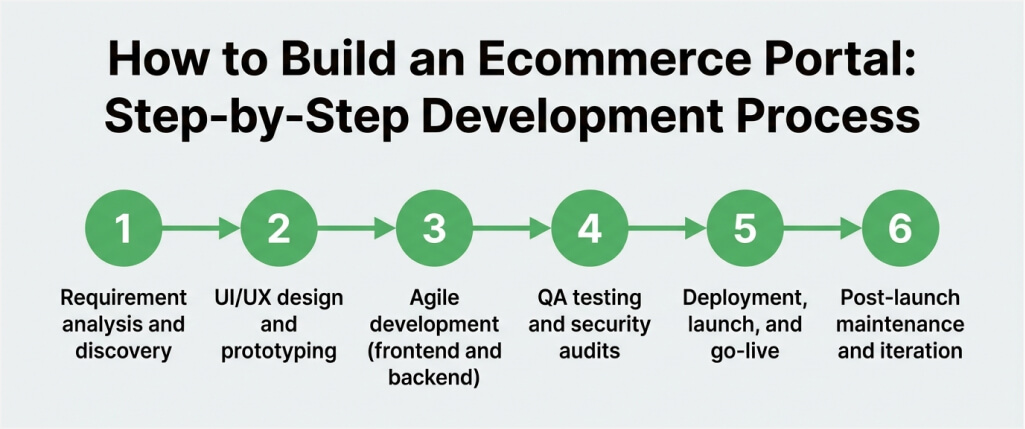
Building a successful ecommerce portal requires a structured, phased approach. Partnering with an experienced web portal development company like Space-O Techologies helps streamline the process. Such agencies bring niche expertise in ecommerce portal development to help you build your portal with zero hurdles and roadblocks.
Here is the step-by-step ecommerce portal development process that ensures your portal meets business objectives while staying on budget and timeline.
1. Requirement analysis and discovery
This phase involves understanding your business model, target users, competitors, and functional requirements in detail. The goal is to create a comprehensive project scope and feature list before any design or development begins.
Action items
- Conduct stakeholder interviews to define business goals and KPIs
- Analyze competitor portals to identify feature gaps and market opportunities
- Document functional and non-functional requirements in a specification document
- Define user roles, workflows, and all integration points
- Create a project roadmap with milestones, timelines, and deliverables
2. UI/UX design and prototyping
The design phase translates requirements into visual layouts and interactive prototypes that users can test. A strong UI/UX foundation improves usability, reduces development rework, and increases post-launch adoption across all user roles.
Action items
- Build wireframes for all key screens, including homepage, product listing, product detail, checkout, and dashboards
- Design a responsive UI that works consistently across desktop, tablet, and mobile devices
- Create interactive prototypes for user testing, feedback collection, and stakeholder validation
- Define the design system, including typography, color palette, spacing, and reusable component library
- Validate final designs with stakeholders before handing off to the development team
3. Agile development (frontend and backend)
Development follows Agile methodology with two-week sprints, enabling incremental delivery and continuous feedback loops. Frontend and backend teams work in parallel to accelerate the overall development timeline.
Action items
- Develop frontend interfaces using frameworks like React, Angular, or Vue.js
- Build backend APIs and business logic with Node.js, Laravel, Python, or .NET
- Set up the database architecture and configure cloud infrastructure for scalability
- Integrate third-party services, including payment gateways, shipping APIs, and CRM connectors
- Conduct sprint reviews and demos with stakeholders after each development cycle
4. QA testing and security audits
Testing ensures the portal is stable, secure, and performs well under real-world conditions. This phase covers functionality, performance, security, and cross-browser compatibility across all user flows.
Action items
- Run functional testing across all user roles, workflows, and edge cases
- Perform load and stress testing to validate that the portal handles peak traffic without degradation
- Execute security testing, including penetration tests and vulnerability scans
- Test payment processing in both the sandbox and live environments thoroughly
- Validate cross-browser and cross-device compatibility on all major platforms
5. Deployment, launch, and go-live
Deployment involves setting up the production environment, migrating data, and executing a controlled launch. Monitoring during the first few weeks is critical to catching and resolving issues before they impact customers.
Action items
- Configure the production server, CDN, SSL certificates, and domain settings
- Migrate product data, customer accounts, and historical order records accurately
- Run final smoke tests in the production environment to confirm everything works
- Execute a phased or full launch based on the agreed go-live strategy
- Monitor server performance, error logs, and user feedback continuously post-launch
6. Post-launch maintenance and iteration
An ecommerce portal is never truly “done.” Post-launch support includes ongoing bug fixes, feature updates, performance optimization, and security patches based on real usage data and business priorities.
Action items
- Monitor analytics dashboards to track user behavior, conversion funnels, and drop-off points
- Fix bugs and address user-reported issues promptly within defined SLA timelines
- Release new feature updates based on customer feedback and evolving business requirements
- Perform regular security updates, compliance audits, and infrastructure reviews
- Optimize page speed, database queries, and server performance continuously
With the development process mapped out, let’s address the common challenges you are likely to face during ecommerce portal development and how to overcome each one effectively.
Key Challenges in Ecommerce Portal Development and How to Overcome Them
Every ecommerce portal project comes with technical and operational challenges. Identifying them early and planning solutions from the start prevents costly delays, rework, and post-launch failures.
1. Managing complex integrations across systems
Ecommerce portals need to sync data in real time with ERP, CRM, inventory, accounting, and shipping systems. When these integrations fail or produce inconsistent data, it creates operational chaos, from overselling products to incorrect invoicing and delayed order fulfillment.
Solution
- Use API-first architecture to standardize data exchange between all connected systems
- Implement middleware or integration platforms like MuleSoft for complex multi-system workflows
- Set up real-time sync with fallback mechanisms, retry logic, and error handling alerts
- Test all integration endpoints thoroughly in staging before going live with real transactions
2. Delivering high performance at scale
As your catalog grows and traffic increases, slow page loads and server downtime directly impact revenue and customer trust. A portal that performs well with moderate traffic may struggle significantly during peak sales events.
Solution
- Use cloud-based infrastructure (AWS, Azure, or GCP) with auto-scaling capabilities
- Implement CDN for static asset delivery and caching for frequently accessed product data
- Optimize database queries, use proper indexing, and implement connection pooling for search
- Run regular load testing to identify and fix performance bottlenecks before they affect customers
3. Reducing cart abandonment and improving conversion
Cart abandonment remains one of the biggest challenges in ecommerce. A complicated checkout process, hidden costs revealed at the last step, lack of trust signals, and limited payment options all drive buyers away before they complete a purchase.
Solution
- Simplify checkout to the fewest possible steps and offer a guest checkout option
- Display shipping costs, taxes, and order total early in the checkout process
- Add trust signals like SSL badges, secure payment icons, money-back guarantees, and return policies
- Offer multiple payment methods, including credit cards, digital wallets, UPI, and BNPL options
4. Handling multi-vendor and multi-channel complexity
For multi-vendor portals, balancing the needs of buyers, sellers, and platform admins adds significant complexity. Commission structures, vendor payouts, product quality control, and unified checkout across dozens of vendors all require careful upfront planning.
Solution
- Build role-based dashboards with clear permissions and workflows for each stakeholder type
- Automate commission calculations and vendor payout schedules to reduce manual intervention
- Implement product moderation and quality control workflows to maintain catalog standards
- Use a unified checkout system that automatically splits orders by vendor and routes fulfillment
5. Maintaining a mobile-first experience
Despite mobile accounting for the majority of ecommerce traffic, many portals still deliver inconsistent mobile experiences. Buttons that are too small to tap, images that load slowly on cellular networks, and forms that frustrate mobile users all hurt conversions significantly.
Solution
- Design mobile-first and progressively enhance the experience for larger screens
- Use responsive frameworks and test on real devices across multiple screen sizes and OS versions
- Optimize images with lazy loading and next-gen formats like WebP and AVIF
- Keep forms short with auto-fill, smart defaults, input masking, and inline validation
How Much Does It Cost to Build an Ecommerce Portal?
The cost of ecommerce portal development depends on portal type, feature complexity, integration requirements, design sophistication, and the development team’s location and experience level.
The following table provides a general cost breakdown by complexity tier to help you estimate your budget.
| Complexity Tier | Features | Timeline | Cost Range |
| Basic | Product catalog, cart, payment gateway, basic admin panel | 3–4 months | $25,000–$50,000 |
| Mid-range | Multi-vendor support, advanced search, CRM integration, analytics dashboards | 4–7 months | $50,000–$120,000 |
| Enterprise-grade | AI recommendations, ERP/CRM sync, multi-currency, custom workflows, analytics | 7–12+ months | $120,000–$300,000+ |
These ranges vary based on the development team’s hourly rates, geographic location, and the specific technical requirements of your project. For a broader perspective on pricing, explore our detailed guide on web portal development cost.
Key factors that affect cost
Several factors directly influence your final ecommerce portal development cost:
- Feature scope: More features mean more development hours. B2B portals with approval workflows and tiered pricing cost more than standard B2C product catalogs.
- Design complexity: Custom UI/UX design with animations, micro-interactions, and branded components adds 15%–25% to the total development budget.
- Number of integrations: Each third-party integration with payment, shipping, ERP, CRM, or marketing tools requires dedicated development, testing, and ongoing maintenance efforts.
- Team location: Developers in the US charge $100–$200 per hour, while equally skilled teams in India charge $25–$60 per hour for comparable quality.
- Security and compliance: PCI DSS, GDPR, or industry-specific compliance requirements add development time for encryption, audit trails, access controls, and documentation.
Cost optimization tips
You can reduce ecommerce portal development costs without compromising quality by following these strategies:
- Start with an MVP that includes only core features and expand based on real user feedback and usage data
- Use phased development to spread the investment across quarters and fund later phases with early revenue
- Choose a technology stack with strong open-source ecosystem support to reduce licensing costs
- Work with an experienced web portal development company that minimizes rework, avoids common pitfalls, and delivers on schedule
Use the Space-O Technologies app cost calculator to get a quick, personalized estimate for your ecommerce portal project.
With costs understood, let’s address the most common questions businesses have about ecommerce portal development.
Get a Free Ecommerce Portal Cost Estimate
Share your requirements and receive a transparent, tailored cost breakdown from our ecommerce portal specialists.
Security and PCI Compliance for Ecommerce Portals
Security is non-negotiable for any ecommerce portal that handles customer data and payment information. A single data breach can destroy customer trust, damage your brand reputation, and result in significant financial penalties.
1. SSL certificates and data encryption
Every page on your portal must use HTTPS, and all sensitive data, including passwords, payment details, and personal information, must be encrypted both in transit and at rest using AES-256 or equivalent encryption standards. SSL certificates are the baseline security requirement for any ecommerce portal.
2. PCI DSS compliance
PCI DSS compliance is mandatory if your portal processes, stores, or transmits credit card data. This includes maintaining a secure network, protecting stored cardholder data, implementing strong access controls, regularly testing security systems, and maintaining an information security policy. Working with PCI-certified payment gateways like Stripe or Razorpay offloads a significant portion of this compliance burden from your development team.
3. Multi-layered fraud protection
Fraud protection adds a critical defense against malicious activity. This includes address verification systems (AVS), card verification value (CVV) checks, velocity filters that detect unusual purchase patterns, and AI-based fraud detection tools that flag suspicious transactions in real time before they are processed.
4. Role-based access control (RBAC)
RBAC ensures that each user, whether a customer, vendor, admin, or support agent, only accesses what they are authorized to see and modify. Granular permissions reduce the risk of unauthorized data exposure, accidental modifications, or internal security breaches.
5. GDPR and data privacy compliance
GDPR compliance is essential if you serve customers in the EU or handle personal data of any kind. This includes providing clear consent mechanisms, data portability options, the right to deletion, and transparent privacy policies. For healthcare-related ecommerce, HIPAA compliance adds another layer of data protection requirements.
6. Regular security audits
Penetration testing and vulnerability assessments should be scheduled quarterly or after every major update. Security is not a one-time setup but an ongoing, continuous practice that requires dedicated attention throughout the portal’s lifecycle.
With security foundations in place, let’s look at the integrations that make your ecommerce portal operationally effective.
Essential Third-Party Integrations for Your Ecommerce Portal
A standalone ecommerce portal is only as effective as its connections to your broader business ecosystem. The right integrations eliminate data silos, automate repetitive workflows, and improve operational efficiency across every department.
1. ERP and CRM integration
Integrating your portal with ERP systems like SAP, Oracle, or Odoo syncs inventory, procurement, and financial data in real time. CRM integration with Salesforce or HubSpot connects customer interactions, support tickets, and sales pipelines directly to your portal. Together, they create a unified view of your business operations.
2. Payment gateways and financial systems
Beyond basic payment processing, your portal should integrate with accounting software like QuickBooks or Xero, tax calculation engines, and invoicing systems. This automates financial reconciliation, tax reporting, and audit preparation, saving hours of manual work every month and reducing the risk of human error.
3. Shipping, logistics, and fulfillment platforms
Integration with shipping providers like FedEx, DHL, DTDC, and Delhivery enables real-time rate calculation, automatic label generation, and live shipment tracking directly from the portal. For multi-vendor portals, automated order routing sends each item to the correct fulfillment center based on vendor location, stock availability, and delivery speed preferences.
4. Marketing automation and analytics tools
Connect your portal with tools like Google Analytics 4, Mixpanel, Klaviyo, or Mailchimp to track user behavior, run targeted email campaigns, and measure conversion funnels accurately. Marketing automation transforms portal data into revenue by re-engaging abandoned carts, cross-selling related products, segmenting audiences, and rewarding loyal customers with personalized offers.
Build Your Ecommerce Portal with Space-O Technologies
From portal types and features to the development process, challenges, security, integrations, and cost, this guide gives you a complete blueprint for ecommerce portal development so you can plan your project with clarity and confidence.
Space-O Technologies is a software development company with 15+ years of experience and 350+ web solutions delivered for businesses worldwide. Our 97% client retention rate speaks to the consistency, reliability, and long-term partnerships we build with every client.
Ready to build your custom ecommerce portal? Contact Space-O Technologies today for a free consultation and receive a detailed project estimate and development roadmap tailored to your specific business requirements and growth goals.
Frequently Asked Questions on Ecommerce Portal Development
1. How long does it take to build a custom ecommerce portal?
A basic ecommerce portal takes 3–4 months to build. Mid-range portals with multi-vendor features and integrations require 4–7 months. Enterprise-grade portals with AI capabilities, custom workflows, and complex integrations can take 7–12 months or longer depending on project scope.
2. What is the difference between an ecommerce website and an ecommerce portal?
An ecommerce website is a storefront for listing and selling products to buyers. An ecommerce portal is a comprehensive platform with multi-user roles, personalized dashboards, backend integrations, vendor management, and advanced personalization features. Portals are built for complex business operations, not basic transactions.
3. What technologies are best for ecommerce portal development?
Common technology choices include React or Angular for frontend, Node.js or Laravel for backend, PostgreSQL or MongoDB for database, and AWS or Azure for cloud hosting. Headless commerce architecture is increasingly popular for its flexibility and omnichannel capabilities.
4. Can an ecommerce portal integrate with existing ERP and CRM systems?
Yes. Custom ecommerce portals integrate with any ERP system, like SAP, Oracle, or Odoo, and CRM platforms like Salesforce or HubSpot through APIs. These integrations sync inventory, customer data, orders, and financial records in real time to eliminate manual data entry entirely.
5. Is a custom ecommerce portal better than using Shopify or BigCommerce?
It depends on your business needs. Shopify and BigCommerce work well for small to mid-sized stores with standard requirements. Custom portals are the better choice when you need multi-vendor support, complex B2B workflows, deep integrations, or features that off-the-shelf SaaS platforms do not support.
6. How do you ensure security in an ecommerce portal?
Security measures include SSL encryption, PCI DSS compliance, role-based access control, multi-layered fraud detection, regular penetration testing, and GDPR compliance. Working with PCI-certified payment gateways and conducting quarterly security audits are essential practices for protecting customer data.



 All our projects are secured by NDA




 4.8
4.8

