
 By
By 
Contents
Every year, businesses lose thousands of hours to scattered emails, misplaced files, and repetitive client questions. The need for a centralized, secure platform to manage client interactions is growing fast. According to Research and Markets, the global client portal software market is valued at approximately $1.8 billion in 2024 and is forecast to grow to $2.6 billion by 2030.
Without a client portal, teams waste time answering the same questions, sharing files through insecure channels, and manually updating clients on project progress. Clients feel left in the dark about timelines, deliverables, and next steps, leading to frustration and churn.
Client portal development solves these problems by giving businesses and their clients a single platform for communication, document sharing, project tracking, and self-service. Whether you run a consulting firm, a legal practice, a healthcare organization, or a financial services company, a well-built portal can transform how you manage client relationships.
This blog is your complete guide ot cient portal development. With 15+ years of experience ias a leading web portal development company, we have shared insights on what a client portal is, the key benefits, types of portals, core and advanced features, the development process, common challenges, and a detailed cost breakdown.
What is Client Portal Development?
Client portal development is the process of designing and building a secure, centralized digital platform where businesses can interact, collaborate, and share information with their clients. It provides a dedicated online space that allows clients to access personalized data, track services, submit requests, exchange documents, and communicate with support teams in a structured and secure environment.
Unlike traditional communication methods such as email or scattered tools, a client portal brings all client-related interactions into one unified system. Depending on the business model, it may include features such as secure document sharing, project tracking, billing and invoice access, support ticket management, knowledge bases, and role-based dashboards.
From a technical perspective, client portal development focuses on secure authentication, data encryption, system integrations, and scalable architecture. These portals often integrate with CRM systems, ERP platforms, payment gateways, and internal workflows to ensure real time updates and operational efficiency.
How does a client portal work?
Here is how a typical client portal works:
- Secure login: Clients receive credentials or a single sign-on (SSO) link to access their personalized dashboard.
- Dashboard view: After logging in, clients see a summary of their active projects, pending tasks, recent messages, and uploaded documents.
- Document exchange: Clients can upload files, download deliverables, and access shared documents with version control.
- Communication: Built-in messaging or ticketing systems allow clients to ask questions and receive updates without switching to email.
- Task tracking: Clients can view project milestones, deadlines, and completion status in real time.
Client portal vs customer portal
Many businesses confuse client portals with customer portals. While they share similarities, there are important differences.
The following table breaks down the key distinctions between a client portal and a customer portal.
| Feature | Client Portal | Customer Portal |
|---|---|---|
| Primary audience | B2B clients, partners, agencies | B2C end customers |
| Relationship type | Long-term, project-based | Transactional, product-based |
| Core functions | Document sharing, project tracking, and invoicing | Order tracking, support tickets, and account management |
| Communication style | Collaborative, two-way | Self-service, one-way |
| Access level | Role-based, multi-user per account | Individual user accounts |
| Typical industries | Legal, consulting, finance, agencies | Retail, SaaS, telecom |
Now that you know what client portal development is, let’s explore the specific benefits it delivers to your business and clients.
6 Key Benefits of Investing in Client Portal Development
Investing in client portal development delivers measurable improvements across communication, operations, and client retention. Here are six key benefits that make a strong case for building a dedicated client portal.
1. Higher client satisfaction
Clients who have instant access to project updates, documents, and communication through a dedicated portal feel more valued and informed. This transparency builds trust and strengthens long-term client relationships.
2. Faster project completion
Centralized task management and real-time status updates eliminate delays caused by miscommunication and information gaps. Teams and clients stay aligned on priorities, deadlines, and next steps without relying on back-and-forth emails.
3. Reduced support inquiries
Self-service features like knowledge bases, FAQ sections, and automated ticket routing allow clients to resolve common questions on their own. This frees your team to focus on higher-value tasks instead of repetitive requests.
4. Centralized communication
A client portal replaces scattered emails, chat messages, and phone calls with a single communication channel. Clients and teams access the same information, reducing misunderstandings and duplicate conversations across platforms.
5. Improved data security
Custom client portals offer encryption, audit trails, and role-based access control to protect sensitive client data. This is critical for industries like healthcare, finance, and legal that must meet strict compliance standards.
6. Stronger brand professionalism
A branded client portal strengthens your company’s image. Clients perceive businesses with dedicated portals as more organized, trustworthy, and invested in the relationship compared to those relying on generic email communication.
These benefits make client portal development one of the highest-ROI investments for service-based businesses. With that in mind, let’s look at the different types of client portals we develop at Space-O Technologies.
Build a Client Portal That Delivers Real Business Value
With 15+ years of portal development experience, Space-O Technologies designs secure and scalable client portals that improve client satisfaction, streamline workflows, and support long term growth.

6 Types of Client Portals We Develop for Different Business Needs
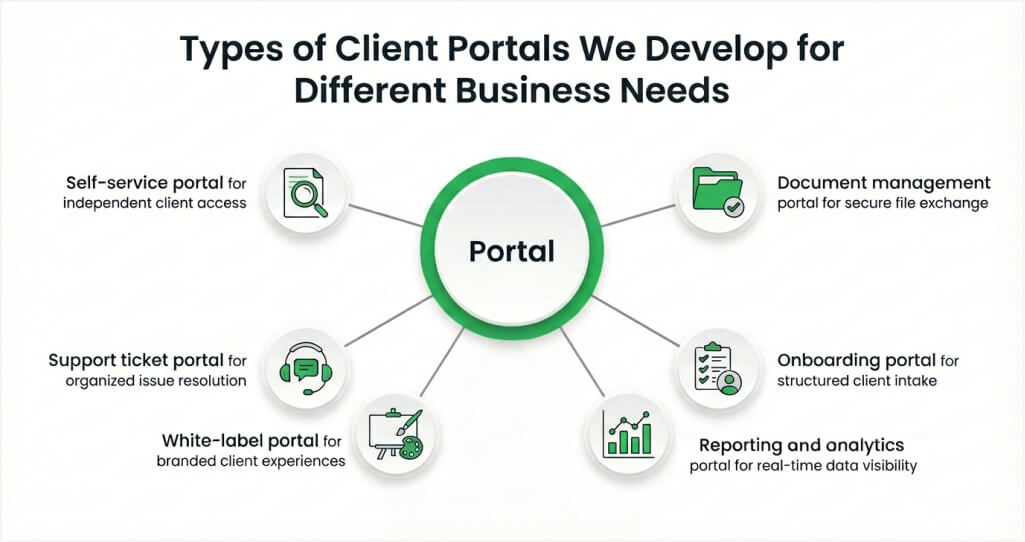
Not every business needs the same type of client portal. The right portal depends on your industry, client workflows, and the specific problems you want to solve. Here are six types of client portals we build at Space-O Technologies.
1. Self-service portal for independent client access
A self-service portal empowers clients to find answers, submit requests, and manage their accounts without contacting your support team. This reduces response times and lets your team focus on complex issues.
- Knowledge base with searchable articles and guides
- FAQ sections organized by topic
- Ticket submission and tracking
- Password resets and account management
- Automated responses for common queries
2. Document management portal for secure file exchange
A document management portal centralizes all client files in one secure location. Clients and teams can upload, download, review, and approve documents without relying on email attachments or external file-sharing tools.
- Secure file uploads and downloads with encryption
- Version control to track document changes
- Digital signature integration for approvals
- Folder organization by project, client, or category
- Access permissions to control who sees what
3. Onboarding portal for structured client intake
An onboarding portal guides new clients through your intake process step by step. It collects information, sets expectations, and ensures nothing falls through the cracks during the critical first phase of the relationship.
- Guided onboarding checklists and workflows
- Form submissions for client information
- Welcome materials and resource libraries
- Progress tracking for onboarding milestones
- Automated reminders for pending tasks
4. Reporting and analytics portal for real-time data visibility
A reporting portal gives clients real-time visibility into their project metrics, campaign performance, or financial data. Instead of waiting for manual reports, clients access dashboards updated automatically.
- Customizable dashboards with key metrics
- Automated report generation and scheduling
- Data visualization with charts and graphs
- Export options for PDF, CSV, and Excel
- Filters by date range, project, or category
5. Support ticket portal for organized issue resolution
A support ticket portal streamlines how clients submit, track, and resolve issues. It replaces unstructured email support with an organized system that prioritizes and routes tickets automatically.
- Ticket creation with categorization and priority levels
- SLA monitoring with escalation alerts
- Communication logs for each ticket
- Knowledge base integration for self-resolution
- Performance analytics on response and resolution times
6. White-label portal for branded client experiences
A white-label portal carries your brand identity throughout the client experience. It is ideal for agencies, consultancies, and SaaS companies that want a professional, branded interface without building from scratch.
- Custom logo, colors, and domain branding
- Branded email notifications and communications
- Multi-tenant architecture for managing multiple clients
- Custom workflows tailored to your processes
- API integration with your existing tools
Whether you need a single portal type or a combination, Space-O Technologies can build a solution tailored to your business. As a B2B portal development company, we design portals that align with your workflows and scale as you grow.
Now let’s dive into the specific features that make a client portal effective and user-friendly.
Must-Have Core Features Every Custom Client Portal Needs
The features you include in your client portal directly affect adoption, efficiency, and client satisfaction. Here are the essential features every custom client portal needs.
1. Secure document sharing and file management
Clients need a safe place to exchange sensitive files. Your portal should support encrypted uploads and downloads, organized folder structures, and access controls that limit who can view or edit specific documents.
2. Real-time messaging and notifications
Built-in messaging eliminates the need for external email threads. Clients can send messages directly within the portal, and automated notifications alert both parties when there are updates, new documents, or pending approvals.
3. Task management and project tracking
Clients want visibility into project progress without asking for updates. A task management module shows active tasks, milestones, deadlines, and completion status. This keeps clients informed and reduces back-and-forth communication.
4. Personalized dashboards
Every client should see a dashboard tailored to their account. Personalized dashboards display relevant projects, recent activity, upcoming deadlines, and key metrics. This gives clients a clear overview the moment they log in.
5. Version control for documents
When multiple people collaborate on documents, version control is essential. It tracks every change, allows clients to compare versions, and prevents the confusion of working with outdated files.
6. Digital signatures for approvals
Integrating digital signatures speeds up approval workflows. Clients can review and sign contracts, proposals, and deliverables directly within the portal without printing, scanning, or switching to a separate tool.
These core features form the foundation of any client portal. However, to stand out and deliver maximum value, you should also consider advanced features. Let’s explore those next.
Advanced Client Portal Features That Drive Business Growth
Beyond the basics, advanced features transform your client portal from a communication tool into a strategic business platform. Here are the capabilities that differentiate a standard portal from a high-performing one.
1. Role-based access control
Not every user should see the same data. Role-based access control (RBAC) lets you define granular permissions for each user type, whether they are a project manager, client stakeholder, team member, or admin. This ensures data security while giving everyone the right level of access.
2. Workflow automation
Automation eliminates repetitive manual tasks. Set up automated workflows for client onboarding, document approvals, task assignments, invoice generation, and notification triggers. This reduces human error and speeds up processes that previously required manual intervention.
3. CRM and ERP integration
Your client portal should connect with your existing tools. Integration with CRM systems like Salesforce or HubSpot and ERP platforms syncs client data, project information, and financial records. This eliminates data silos and ensures your team works with accurate, up-to-date information.
4. AI-powered knowledge base
An AI-powered knowledge base uses natural language processing to help clients find answers faster. Instead of searching through documentation manually, clients type a question and receive relevant articles, guides, or troubleshooting steps instantly.
5. SLA monitoring and alerting
For businesses that operate under service level agreements, built-in SLA monitoring tracks response times, resolution times, and performance metrics. Automated alerts notify your team when an SLA is at risk, allowing proactive intervention before deadlines are missed.
6. White-label and custom branding
A fully branded portal reinforces your professional image. Custom logos, color schemes, domain names, and email templates create a consistent brand experience that builds trust and credibility with every client interaction.
7. Multi-tenant architecture
For businesses managing multiple clients or divisions, multi-tenant architecture keeps each client’s data isolated and secure while running on a shared infrastructure. This is especially important for agencies, managed service providers, and enterprise software companies.
These advanced features add significant value to your client portal and create a competitive advantage. With the right feature set defined, the next step is understanding how these features apply to specific industries.
Get Guidance From Our Experts On Your Customer Portal’s Feature Selection
Join 1,200+ clients who trust Space-O Technologies for structured development processes and reliable delivery.
Types of Client Portal Solutions You Can Develop for Different Industries
Different industries have unique requirements for client portals. A legal firm needs compliance-focused document management, while a healthcare provider needs HIPAA-compliant data handling. Here is how client portal development adapts to four major industries.
1. Client portals for legal firms and law practices
Law firms handle highly sensitive documents and require strict access controls. A legal client portal centralizes case files, communications, and billing in one secure platform.
- Secure file sharing with encryption and access logs
- Compliance audit trails for regulatory requirements
- Digital signature integration for contracts and agreements
- Case status tracking with milestone updates
- Billing and invoice management with payment processing
2. Client portals for healthcare providers and clinics
Healthcare providers need client portals that meet HIPAA compliance standards while improving patient and client communication. These portals handle sensitive medical data and must maintain strict security protocols.
- Appointment scheduling and management
- Secure document uploads for medical records and forms
- Audit trails for all data access and modifications
- Patient messaging with encrypted communication
- Integration with Electronic Health Record (EHR) systems
3. Client portals for accounting and financial services
Financial service providers use client portals to share reports, collect documents during tax season, and manage ongoing advisory relationships. Security and compliance (SOC 2, PCI DSS) are top priorities.
- Real-time financial reporting dashboards
- Encrypted file sharing for tax documents and statements
- SOC 2 compliant data handling and storage
- Client approval workflows for financial decisions
- Integration with accounting software like QuickBooks and Xero
4. Client portals for consulting firms and digital agencies
Consulting firms and agencies use client portals to manage multiple projects, share deliverables, and keep clients informed on progress. Collaboration features are especially important in this space.
- Collaborative workspaces with shared documents
- Project milestone tracking and progress updates
- Commenting and feedback tools on deliverables
- Time tracking and billing integration
- Multi-client management with separate dashboards
The following table summarizes the key features and compliance requirements by industry.
| Industry | Must-Have Features | Compliance Requirements |
| Legal | Secure file sharing, audit trails, and digital signatures | Data privacy regulations, attorney-client privilege |
| Healthcare | Appointment scheduling, EHR integration, encrypted messaging | HIPAA, HITECH |
| Finance | Real-time reporting, encrypted storage, and approval workflows | SOC 2, PCI DSS, GDPR |
| Consulting | Collaborative workspaces, milestone tracking, and feedback tools | NDA compliance, data protection |
Each industry demands a tailored approach to client portal development. Understanding these requirements upfront ensures the final product meets both your needs and your clients’ expectations.
With the feature requirements clear, let’s walk through the step-by-step process of building a client portal from scratch.
7-Step Client Portal Development Process from Discovery to Launch
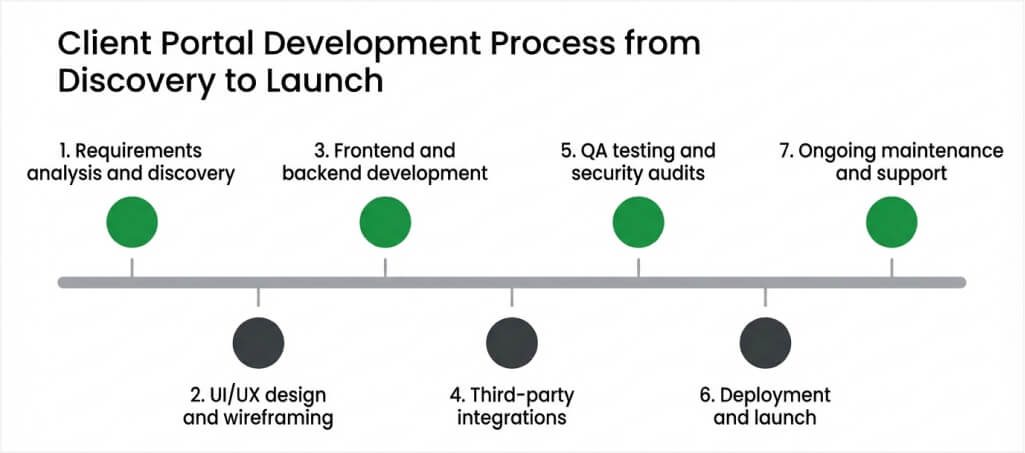
Building a client portal requires a structured approach to ensure the final product meets your business goals and client expectations. Partnering with an experienced web development company ensures each phase is handled professionally. Here is the seven-step development process we follow at Space-O Technologies.
Step 1: Requirements analysis and discovery
The discovery phase defines the scope, goals, and feature requirements of your client portal. This step aligns all stakeholders on what the portal should accomplish and ensures nothing critical is missed before design begins.
Action items
- Conduct stakeholder interviews to identify pain points and goals
- Document functional and non-functional requirements
- Define user roles and access levels
- Map client workflows and data flows
- Create a feature priority list (MVP versus future phases)
Step 2: UI/UX design and wireframing
The design phase translates requirements into visual layouts and user flows. Good design ensures clients find the portal intuitive and easy to navigate from their very first login.
Action items
- Create wireframes for all major screens and user flows
- Design the user interface following your brand guidelines
- Build interactive prototypes for stakeholder review
- Conduct usability testing with sample users
- Finalize designs based on feedback and iterations
Step 3: Frontend and backend development
Development brings the designs to life with code. The frontend handles what clients see and interact with, while the backend manages data processing, security logic, and integrations with your existing systems.
Action items
- Develop the frontend using frameworks like React, Angular, or Vue.js
- Build the backend with Node.js, Python, Laravel, or .NET
- Set up database architecture for scalable data management
- Implement authentication and authorization systems
- Follow Agile methodology with sprint-based delivery
Step 4: Third-party integrations
Most client portals need to connect with existing business tools. Integration ensures data flows between your portal, CRM, ERP, payment systems, and communication platforms without manual intervention.
Action items
- Integrate CRM systems (Salesforce, HubSpot, Zoho)
- Connect ERP and accounting tools (QuickBooks, Xero, SAP)
- Set up payment gateway integration (Stripe, PayPal)
- Configure email and notification services
- Build API connections for custom tools and databases
Step 5: QA testing and security audits
Testing ensures the portal works correctly, performs well under load, and meets security standards. This phase catches issues before your clients encounter them.
Action items
- Perform functional testing across all features and user roles
- Run security penetration testing and vulnerability assessments
- Execute performance testing under expected traffic loads
- Conduct cross-browser and cross-device compatibility testing
- Complete compliance audits (HIPAA, SOC 2, GDPR as required)
Step 6: Deployment and launch
Deployment moves the portal from the development environment to your production server. A phased rollout minimizes risk and allows you to gather early client feedback before a full launch.
Action items
- Deploy to production servers with monitoring tools
- Conduct a soft launch with a pilot group of clients
- Gather initial feedback and address any issues
- Roll out to all clients with onboarding support
- Set up analytics to track usage and engagement
Step 7: Ongoing maintenance and support
A client portal is not a one-time project. Ongoing maintenance ensures security patches are applied, features are updated, and performance stays optimal as your business and client base grow over time.
Action items
- Apply regular security updates and patches
- Monitor performance and uptime metrics
- Add new features based on client feedback
- Optimize based on usage analytics
- Provide dedicated support for bug fixes and issues
Building a client portal comes with its share of challenges. Let’s look at the most common ones and how to overcome them.
Let Our Experts Handle Your Client Portal Project
From requirement discovery to deployment and ongoing support, Space-O Technologies ensures your client portal is built with performance, security, and scalability in mind.
5 Common Client Portal Development Challenges and How To Solve Them
Every client portal development project faces obstacles. Knowing these challenges upfront helps you plan for them and avoid costly setbacks. Here are four common challenges and practical solutions.
1. Data security and compliance
Handling sensitive client data brings significant security and compliance responsibilities. A breach can damage trust, trigger legal action, and result in regulatory fines. Industries like healthcare, finance, and legal have strict standards that your portal must meet from day one.
Solution
- Implement end-to-end encryption for data in transit and at rest
- Set up role-based access control to limit data exposure
- Maintain detailed audit trails for all user actions
- Conduct regular security audits and penetration testing
- Ensure compliance with HIPAA, SOC 2, GDPR, or PCI DSS as applicable
2. Integration with existing systems
Most businesses already use CRM, ERP, accounting, and communication tools. Connecting your portal with these systems without creating data silos or breaking existing workflows is one of the biggest technical challenges in portal development.
Solution
- Map all integration points during the discovery phase
- Use REST APIs or webhooks for real-time data synchronization
- Test integrations thoroughly in a staging environment before launch
- Plan for data migration from legacy systems to the new portal
- Build fallback mechanisms for third-party service outages
3. User adoption and change management
Building a portal is only half the battle. If your clients do not use it, the investment delivers zero return. Low adoption often results from poor onboarding, confusing navigation, or insufficient communication about the portal’s benefits.
Solution
- Design an intuitive UI based on client feedback and usability testing
- Create onboarding guides, video tutorials, and FAQs for clients
- Communicate the benefits clearly before and during the launch
- Start with a pilot group to identify and fix adoption barriers early
- Track usage metrics and follow up with inactive clients
4. Scalability as your client base grows
A portal that works for 50 clients may struggle with 500 or 5,000. Without proper architecture planning, performance degrades, response times increase, and the system becomes unreliable during peak usage.
Solution
- Use cloud infrastructure (AWS, Azure, or Google Cloud) for elastic scaling
- Design with a microservices architecture for independent component scaling
- Implement caching and content delivery networks (CDNs) for faster performance
- Plan database architecture for horizontal scaling from the start
- Run load testing to identify bottlenecks before they affect clients
5. Cost overruns and scope creep
Client portal projects often expand beyond the original scope as stakeholders request additional features during development. Without clear boundaries and a structured change management process, budgets balloon and timelines stretch far beyond initial estimates.
Solution
- Define a clear MVP feature set before development begins
- Use phased delivery to launch core features first and add enhancements later
- Implement a formal change request process with cost and timeline impact analysis
- Set budget buffers of 15–20% for unexpected requirements
- Review the scope against business goals at the end of each sprint
Addressing these challenges during planning and development prevents expensive rework later. With the right partner and a structured process, these obstacles become manageable steps rather than project blockers.
Now, let’s look at what client portal development costs and how long it takes.
How Much Does Client Portal Development Cost?
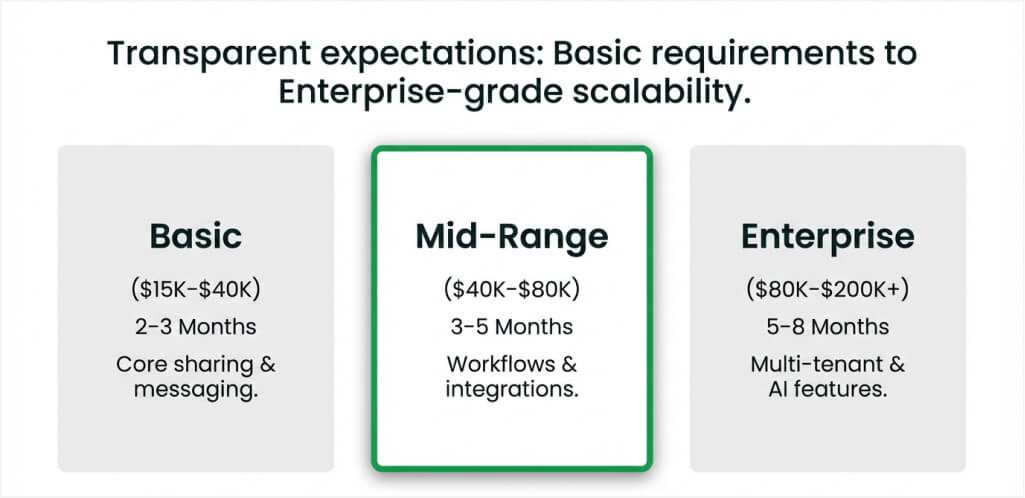
The cost of client portal development depends on several factors, including complexity, features, integrations, and your development team’s location. For a broader overview, read our detailed guide on web portal development cost. Here is a breakdown to help you plan your budget.
The following table outlines typical cost ranges by portal complexity.
| Portal Complexity | Features Included | Timeline | Cost Range |
|---|---|---|---|
| Basic | Login, document sharing, messaging, basic dashboard | 2–3 months | $15,000–$40,000 |
| Mid-range | Role-based access, workflow automation, CRM integration, reporting | 3–5 months | $40,000–$80,000 |
| Enterprise | Multi-tenant, AI features, advanced analytics, compliance, white-label | 5–8 months | $80,000–$200,000+ |
These ranges vary based on several key factors that influence the final project cost. Here is what each tier typically includes.
Basic tier ($15,000–$40,000): Suitable for small businesses and startups that need a straightforward portal with core functionality. This tier covers client login, document sharing, basic messaging, and a simple dashboard. It works well when you have a limited number of clients and standard workflows without complex integrations.
Mid-range tier ($40,000–$80,000): Ideal for growing businesses that need deeper functionality and third-party integrations. This tier adds role-based access control, workflow automation, CRM integration, and custom reporting dashboards. It suits companies managing 100+ clients with multi-step processes and multiple user roles.
Enterprise tier ($80,000–$200,000+): Designed for large organizations with advanced security, compliance, and scalability requirements. This tier includes multi-tenant architecture, AI-powered features, advanced analytics, white-label branding, and compliance certifications like HIPAA or SOC 2. It supports thousands of concurrent users across multiple regions.
Key factors affecting development cost
- Feature complexity: More features and custom workflows increase development hours and overall cost.
- Design requirements: Custom UI/UX design costs more than template-based approaches but improves client adoption.
- Integrations: Connecting with CRM, ERP, payment, and communication platforms adds complexity and development time.
- Security and compliance: Meeting HIPAA, SOC 2, or GDPR standards requires additional development, testing, and documentation.
- Team location: Development rates vary by region. US developers charge $100–$250/hour, while developers in India charge $20–$50/hour.
- Ongoing maintenance: Budget 15–20% of the initial build cost annually for updates, security patches, and feature enhancements.
Timeline estimates
- Basic portal: 2–3 months (MVP with core features)
- Mid-range portal: 3–5 months (full feature set with integrations)
- Enterprise portal: 5–8 months (advanced features, compliance, multi-tenant setup)
For a personalized cost estimate, contact our team for a free project consultation.
With cost and timeline covered, let’s address the most common questions businesses ask about client portal development.
Get a Detailed Cost Estimate for Your Client Portal
Share your portal requirements with Space-O Technologies and receive a transparent cost breakdown with timeline, features, and integration details.
Partner with Space-O Technologies — Customer Portal Development Backed by 15+ Years of Experience
A well-built client portal centralizes communication, improves collaboration, and secures sensitive data across every client interaction. It replaces scattered emails and manual updates with a single, reliable system that improves visibility, accountability, and client experience.
Choosing the right development partner is critical to building a portal that aligns with your workflows, compliance requirements, and long-term scalability goals. Reviewing proven implementations helps you understand what is possible, what features drive adoption, and how successful portals evolve with growing business needs.
Space-O Technologies is a trusted web portal development company with 15+ years of experience and 350+ successful projects delivered. Our 80+ in-house web developers build secure, scalable client portals for healthcare, education, finance, and enterprise businesses, ensuring performance, reliability, and long-term maintainability.
From discovery and UX design to development, integration, and ongoing support, we follow a structured, agile-driven process focused on measurable outcomes. Contact us to discuss your requirements, explore the right portal approach, and get a clear roadmap to build a secure, scalable client portal for your business.
Frequently Asked Questions on Client Portal Development
1. How much does it cost to build a custom client portal?
The cost of building a custom client portal ranges from $15,000 to $200,000+, depending on complexity, features, integrations, and team location. A basic portal with document sharing and messaging starts around $15,000–$40,000, while enterprise portals with advanced analytics and compliance features can exceed $200,000.
2. How long does client portal development take?
Client portal development typically takes 2–8 months. Basic portals with core features take 2–3 months, mid-range portals with CRM integration and workflow automation take 3–5 months, and enterprise-grade portals with compliance requirements take 5–8 months.
3. Can a client portal integrate with my existing CRM?
Yes, a custom client portal can integrate with popular CRM platforms like Salesforce, HubSpot, and Zoho. API-based integration syncs client data, project information, and communication logs between your portal and CRM in real time, eliminating manual data entry.
4. What industries benefit most from client portal development?
Legal, healthcare, finance, consulting, and agency businesses benefit the most from client portal development. These industries manage sensitive client data, handle multiple ongoing projects, and need secure communication channels. Client portals streamline these workflows while maintaining compliance with industry regulations.
5. What are the must-have features of a client portal?
Essential features include secure document sharing, real-time messaging, task management, personalized dashboards, role-based access control, and digital signatures. Advanced portals also include workflow automation, CRM/ERP integration, AI-powered knowledge bases, and SLA monitoring.
6. Should I build a custom client portal or use SaaS software?
SaaS tools like Softr or ShareFile work for basic needs with limited customization. Choose custom development when you need specific workflows, advanced integrations, compliance with industry regulations, white-label branding, or the ability to scale features as your business grows. For guidance on selecting the right development partner, read our guide on how to hire a software development company.
7. Is client portal development suitable for small businesses and startups?
Yes. Client portal development is suitable for small businesses and startups because you can start with a basic portal that includes secure login, document sharing, and messaging, then scale features like CRM integration, workflow automation, and analytics as your business grows.
8. Can a custom client portal support mobile users?
Yes. A custom client portal can be built as a responsive web application that works on mobile devices or as a dedicated mobile app for iOS and Android. This allows clients to access documents, messages, and project updates anytime, from any device.



 All our projects are secured by NDA




 4.8
4.8

