
 By
Contents
- Savings are largest on repeatable work such as boilerplate code, testing, debugging, and documentation.
- Token fees, data preparation, integration, and yearly maintenance offset gross savings.
- Net savings equal verified savings minus total AI cost and remediation.
- Model year-one and year-two net savings against a pre-AI baseline before approving any build.
Key Takeaways
Cost savings from AI integration in software look large on paper. Published estimates range from single digits to far higher on coding tasks. Most gains come from boilerplate code, testing, debugging, and documentation.
The hard part is proving how much of that gross gain reaches your budget. Token fees, integration work, and maintenance offset part of it. Our guide to AI integration cost shows where those costs begin.
This guide maps where AI saves money, what offsets it, and the net result. It also compares AI seats, an in-house team, and a build partner. Our generative AI integration services start with cost planning before any code is written.
Key Areas Where AI Integration Cuts Software Costs
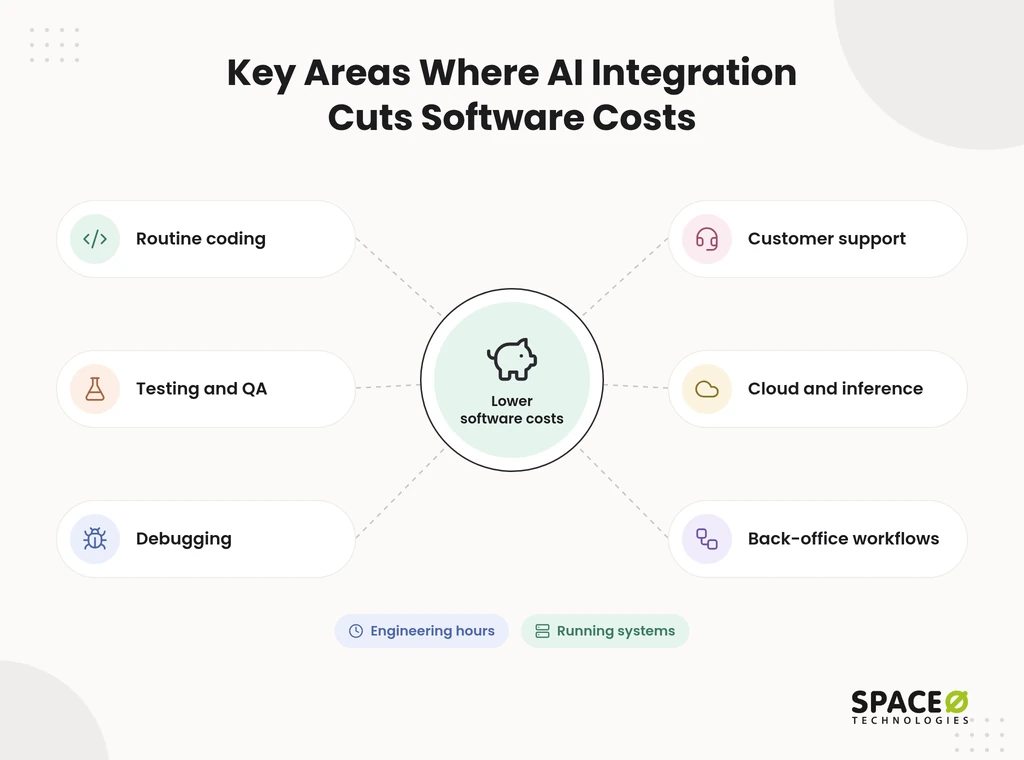
AI cuts the most cost where people repeat the same work: coding, testing, support, and infrastructure. Your biggest software costs are engineering hours and the systems those hours keep running. AI lowers both by automating repeatable tasks, which our AI app development services build into products.
What do published savings estimates say?
Published estimates range from single digits enterprise-wide to much higher on development tasks, depending on scope. Each figure measures something different. Read the label before you compare them.
- Enterprise operations: Enterprise-wide estimates put operational savings at 5-20%. That range covers whole operations, not one engineering team.
- Development tasks: EncodeDots, a development vendor, estimates AI lowers software development costs. The source measures cost per output, not total project spend.
- Technology costs: Albiorix reports AI can reduce technology costs by up to 30%. It credits coding assistance, resource use, predictive maintenance, and lower testing costs.
- Agentic delivery: SJ Innovation reports cutting project delivery time and cost sharply with AI plus developer oversight. That figure is one company’s result, not a benchmark.
- Adoption signal: A majority of AI-using businesses in software engineering and manufacturing report cost decreases. AI Statistics Center compiles that figure from secondary research.
Where does AI cut software development costs?
AI cuts development costs by speeding up routine coding, debugging, testing, and documentation. These savings land on your engineering budget across the software development lifecycle (SDLC).
- Boilerplate scaffolding: EncodeDots estimates AI handles most boilerplate scaffolding. A feature that previously took five days may now take three.
- Coding speed: In a controlled GitHub Copilot experiment, developers finished a single task 55.8% faster than a control group. The study measured one task, not a full project.
- Debugging: The same EncodeDots estimate cuts a 3-hour debugging session to 30-45 minutes. AI coding assistants trace the problem faster, and a developer still confirms the fix.
- Automated testing and QA: AI-generated tests cut quality assurance (QA) costs. They run in the delivery pipeline on every commit. Teams also catch defects before production, which costs far less to fix.
- Documentation: McKinsey’s controlled study, as summarized by IBM, found large time savings on documentation. Gains were far smaller on high-complexity tasks.
- Team throughput: Field data from Microsoft and Accenture showed an increase in completed pull requests. NN Group research, compiled by AI Statistics Center, reports programmers completing substantially more weekly projects.
Where does AI cut operational costs?
AI cuts operational costs by absorbing support volume, IT tickets, cloud waste, and back-office steps. These savings recur every month, so they compound over a system’s life.
- Customer support: AI agents resolve routine queries, and human agents handle complex and sensitive cases. BCG reports chatbots can cut some service costs by up to 90%.
- IT ticket handling: Agile Companies reports a notable reduction in repetitive information technology (IT) ticket handling. It also reports a lower incident management cost.
- Cloud and inference: Agile Companies reports meaningful savings from cloud optimization. Right-sizing, quantization, and spot instances work on Amazon Web Services (AWS), Microsoft Azure, and Google Cloud.
- Hardware and maintenance: Agile Companies reports reduced hardware replacement. Naitive’s case roundup cites predictive maintenance cutting unplanned downtime by 50% and maintenance costs by 25%.
- Workflow automation: AI agents handle approvals, data entry, and reporting steps. The savings come from labor hours rather than new software seats.
- Software licenses: AI-driven software asset management (SAM) and digital employee experience (DEX) tools flag unused software as a service (SaaS) licenses. Consolidating them, and any shadow SaaS, removes untracked spend.
Every figure above is a gross saving. The next sections show what companies report in practice and what offsets the gains.
Real-World Benchmarks of AI Cost Savings
Published company results show AI cutting costs inside specific, well-scoped workflows. Use these benchmarks to understand potential opportunities, not to forecast savings for your own project.
- IBM: Reported USD 4.5 billion in productivity gains through AI, hybrid cloud, automation, and consulting expertise.
- JPMorgan Chase: Its COiN platform analyzed annual commercial credit agreements in seconds. Manual review had taken far longer.
- Airbnb: Migrated nearly 3,500 test files in six weeks using large language models (LLMs) and automation. The original estimate was 1.5 years of engineering work.
- Dropbox: Reported that 78% of surveyed employees said AI tools made them more productive.
- BCG research: AI leaders achieve three times greater cost reduction than their peers. They also post 1.6 times higher earnings before interest and taxes (EBIT) margins. These findings reflect cross-company research, not outcomes for individual projects.
Each benchmark reflects one well-scoped, high-volume workflow. Savings at company scale follow from that kind of scoping rather than from broad adoption. Our OpenAI-powered eCommerce search case study is one example of a build scoped to a single workflow.
Two Ways AI Saves Money in Software: Building It Faster Vs. Building AI Into It
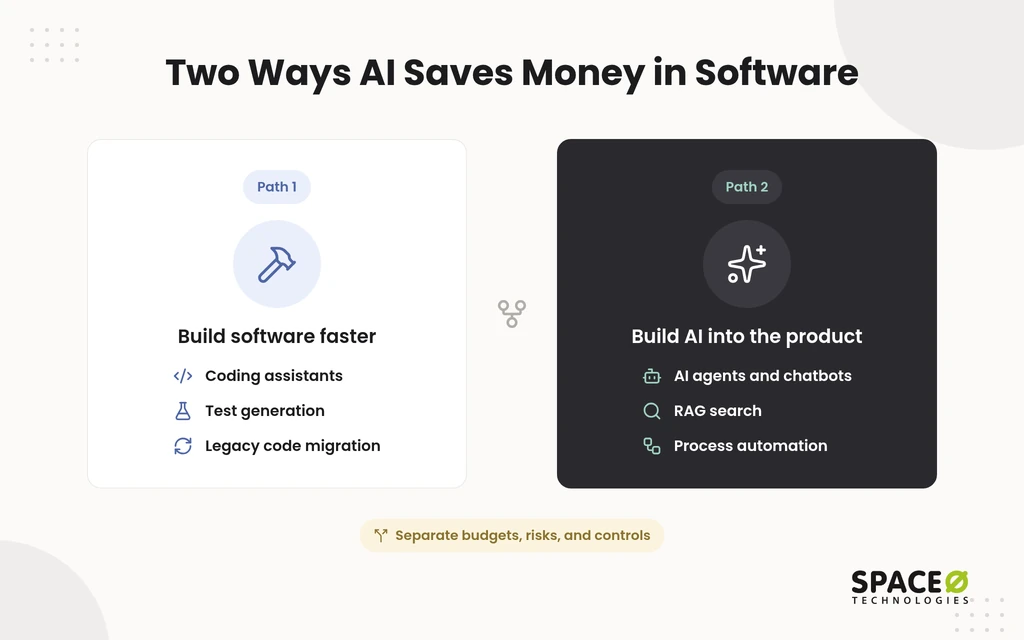
AI saves money in two places: how you build software, and what that software does once it runs. Many leaders budget both as one “AI” line item. The two paths have different savings, risks, and controls, so they need separate plans.
Path 1: How does AI-assisted delivery save money?
AI-assisted delivery saves engineering hours through coding assistants, test generation, and AI-assisted migration.
- Where savings land: Fewer hours on routine code, test writing, and legacy code migration.
- Main cost risk: Per-developer token fees and the review time AI-generated code requires.
- Control lever: Team-level usage budgets and mandatory human code review before merge.
Path 2: How do AI features inside your product save money?
AI features cut operating costs by automating support, internal queries, and manual workflows. Examples include AI agents, chatbots, retrieval-augmented generation (RAG) search, and process automation when you build an AI app.
- Where savings land: Support volume, manual data handling, and time spent searching internal documents.
- Main cost risk: Inference fees that scale with every user, plus data preparation and legacy integration work.
- Control lever: Choosing RAG or fine-tuning by cost, right-sizing the model, and adding human review on high-stakes outputs.
Space-O Technologies works on both paths. We add engineers to delivery teams and build AI features into products. Each path carries its own offsets, which come next.
Hidden Costs That Offset AI Savings
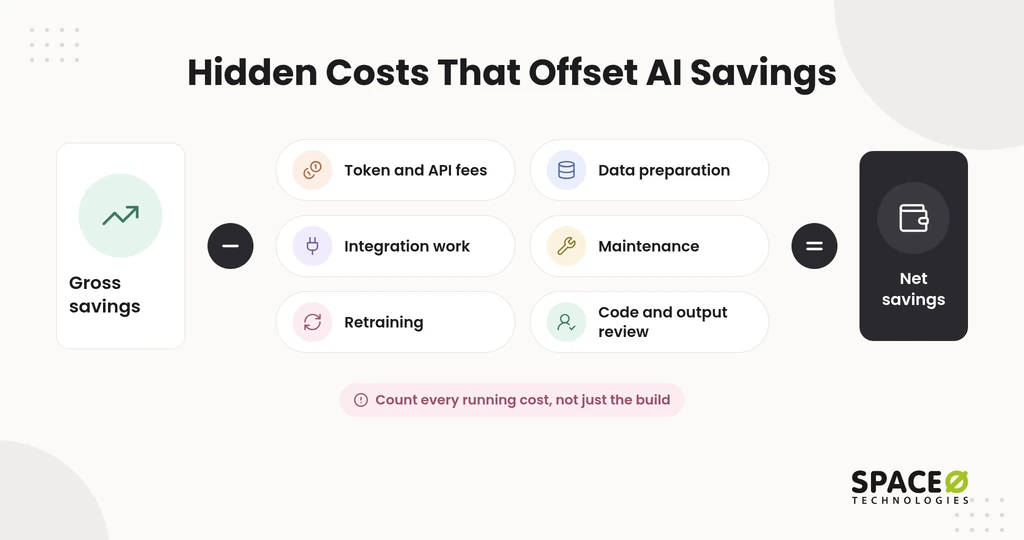
Token fees, upfront builds, data preparation, integration, maintenance, and review time offset gross AI savings. Most AI business cases count the gains in full but count only part of the running costs. Put these line items in your estimate before you approve the project.
Why does inference break the old software cost model?
Traditional software scaled at near-zero marginal cost, while AI features pay for inference on every call. MSP Radio describes the old software margin structure, where scaling incurred negligible incremental costs. With AI, token costs grow with every user, prompt, and agent step.
- Token and API fees: Gartner found that a notable share of tech leaders spend heavily on AI coding tools. Costs run to hundreds of dollars per developer each month.
- Rising token forecast: Gartner projects that AI coding token costs will rise sharply in the coming years.
- Usage-based pricing: Application programming interface (API) costs rise with every call. Per-seat SaaS pricing stays flat as usage grows.
- Output tokens: Mozaic Works notes that output tokens cost 3-5 times more than input tokens. Verbose responses and long agent loops raise bills fastest.
- Pilot to production: A McKinsey speaker notes AI spend can grow four times when a pilot moves into production. Budget for production volume, not demo volume.
What does an AI build cost upfront?
Upfront AI builds range from about $5,000 for simple models to $500,000+ for complex systems. Future Processing puts simple AI models at around $5,000 and larger systems from $50,000 to over $500,000. Smartexe publishes these tiers by scope.
| Tier | Typical scope | Published range (USD) |
|---|---|---|
| Simple AI feature | One AI capability added to an existing app | $10,000-$50,000 |
| Internal assistant | Employee-facing assistant on company data | $40,000-$120,000 |
| Workflow automation | Multi-step process automation across systems | $80,000-$300,000+ |
| AI-first product | A product built around AI | $300,000-$1.5M+ |
Our AI development cost guide puts AI development at $25,000 to $500,000+ in 2026. Treat every tier as a starting range, because data and integration scope move the final number.
Which costs sit outside the build quote?
Data preparation, maintenance, retraining, integration, and human review often sit outside the headline quote.
- Data preparation: Harvard Business School (HBS) identifies data preparation as among the largest and most underestimated AI expenses. Our cost guide puts it at 25% to 40% of the total project budget.
- Maintenance: Annual maintenance runs 15% to 25% of the original build cost, per our cost guide.
- Retraining: Each retraining cycle is a recurring offset, so subtract US $15,000 to US $60,000 a year from net savings for models that need it.
- Year-one and year-two drift: Digisoft reports higher first-year costs and maintenance rising sharply by year two. Treat both as signals to budget beyond launch.
- Integration: Connecting AI to legacy, customer relationship management (CRM), and enterprise resource planning (ERP) systems adds engineering work. Our LLM integration project cost guide shows what that work adds to a budget.
- Rework and review: InfoWorld advises reviewing AI-generated code like a pull request from an unknown programmer. Every merged line still needs a human check.
- Human-in-the-loop time: Reviewing high-stakes AI outputs takes staff hours. Budget them as a running cost, not as a one-time setup task.
These lines explain why most organizations struggle to turn productivity into lower expenses. Speed alone does not close that gap, as the next section shows.
Why Faster Development Is Not Proportionally Cheaper
Task-level speed gains shrink at the firm level, so faster coding does not cut the project bill one-to-one.
- Firm-level output: Executives report only a modest output gain per worker, far smaller than task-level gains, per Keyhole’s compilation.
- Experienced developers: A METR study found experienced developers took longer on their own repositories with AI tools. Keyhole’s compilation reports the same pattern.
- Cost per output: The headline development estimate measures cost per output. A team can ship more features without spending less in total.
- Task mix: McKinsey’s gains drop sharply on high-complexity tasks. Architecture-heavy and integration-heavy projects save less than boilerplate work. Scope matters when you choose an AI app development company.
- Review load: The headline Copilot speedup came from a single task. Review and rework hours on real codebases offset part of that gain.
The speed is real, but budget savings need a net model. That model follows.
A Net-Savings Model for Year One and Year Two
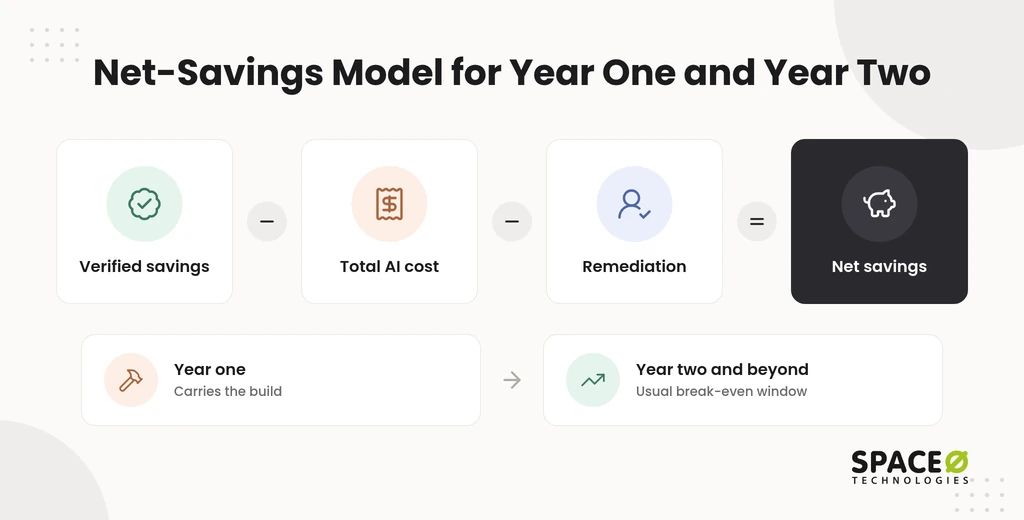
Net savings equal verified gross savings minus build, data preparation, maintenance, token spend, and human review. Published answers list gross percentages and caveats separately. This model combines them so you can see your break-even point.
What is the net-savings formula?
Net savings = verified savings − total AI cost − remediation.
- Verified savings: The workflow’s measured cost before AI, minus its measured cost after AI.
- Total AI cost: Build, data preparation, maintenance, token or API fees, and hosting.
- Remediation: Review, rework, and human-in-the-loop hours, priced at your loaded staff rate.
Track delivery with DevOps Research and Assessment (DORA) metrics, such as lead time and change failure rate. They show whether review load is eating the speed gain.
How does an illustrative $40,000 build work out?
An illustrative $40,000 support assistant must remove $46,000-$76,000 of baseline cost to break even in year one. The example uses the low end of the published internal-assistant tier. It applies Space-O Technologies’ published cost figures and is illustrative, not a quote.
| Cost line | Basis | Year one | Year two |
|---|---|---|---|
| Build (one-time) | Internal-assistant tier, low end | $40,000 | $0 |
| Data preparation | 25-40% of budget, inside the build | $10,000-$16,000 (included in build) | $0 |
| API fees | 10,000 conversations a month cost $500 to $3,000 in API fees | $6,000-$36,000 | $6,000-$36,000 |
| Maintenance | 15-25% of build per year, after launch | Starts after launch | $6,000-$10,000 |
| Human review | Your review hours × loaded rate | Measure against baseline | Measure against baseline |
| Total before review | Sum of the lines above | $46,000-$76,000 | $12,000-$46,000 |
Treat these figures as a starting point. Higher data or maintenance shares raise the year-two total.
What should the model tell you before you approve a build?
The model shows whether a workflow has enough volume to repay the build, and when.
- Break-even timing: Year one carries the build, so break-even usually lands in year two or later.
- Biggest variable: Token spend has the widest range, so cap it before launch.
- Cost-line removal: Productivity gains only lower expenses when you remove a cost line, such as contractor hours or ticket volume.
- Payback signal: Support chatbots often pay back within 3 to 6 months at high ticket volumes.
Gartner explains why generative AI projects stall after the proof of concept. A net model built before the pilot avoids that stall point.
See What AI Integration Would Save Your Team
Enter your scope in our software cost calculator to size the build line, then add the token and maintenance costs from the model above before you commit budget.

How to Protect Net Savings in Production
Net savings hold when you route tasks to the right model, cache repeat calls, cap loops, and set budgets. Many systems are affordable at launch and lose their margin as usage grows. IBM, Mozaic Works, and DevelopersLatam publish these levers in their cost guidance.
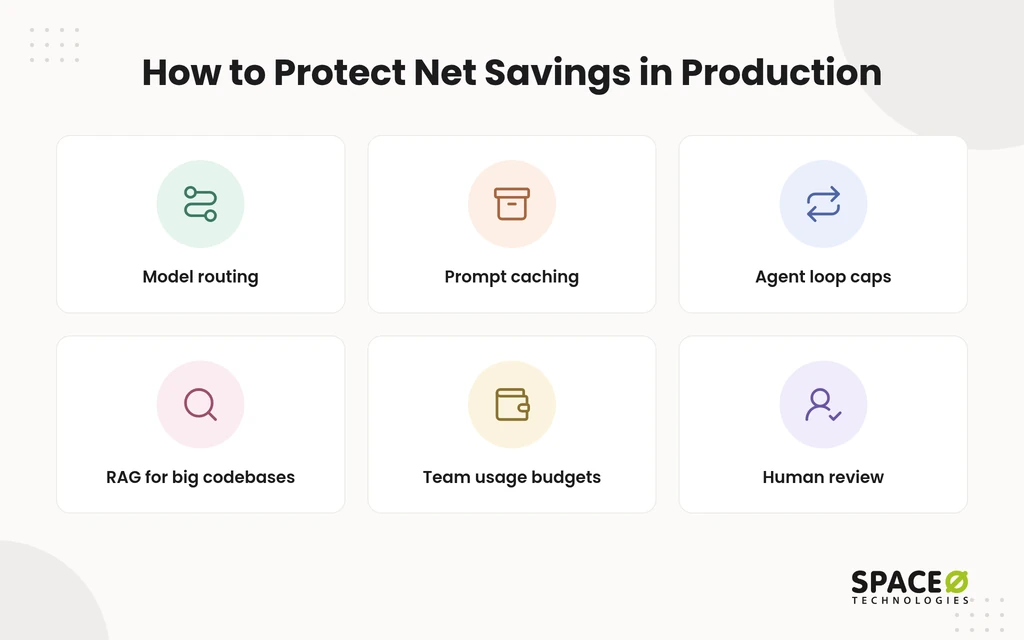
- Model routing: IBM warns that routing repeatable work to a heavyweight reasoning model wastes money. Match each task to the smallest model that meets its accuracy bar.
- Prompt caching: Mozaic Works reports cached input can be up to 10 times cheaper. LiteLLM is one gateway that provides response caching across model providers.
- Loop caps: Agentic loops need stop conditions, step limits, and per-task token ceilings. Without them, a stuck agent keeps adding to the token bill.
- RAG for large codebases: RAG sends only the relevant code and documents to the model. That keeps context windows and input tokens small.
- Usage budgets: Set team-level token budgets with alerts on AI coding tools and product features. Review spend against your net-savings model every month.
- Human review: Make code review mandatory before merge. People approve consequential decisions in finance, healthcare, and other high-stakes workflows using human-in-the-loop approval.
The table below matches each savings area to its main offset and the control that protects it.
| Area | Where the saving lands | Hidden-cost offset | Control lever |
|---|---|---|---|
| AI coding assistants | Fewer hours on routine code | Per-developer token fees, review time | Team usage budgets, mandatory code review |
| Test generation and QA | Lower QA spend, earlier defect detection | Test upkeep as code changes | Tests generated inside CI/CD, flaky-test review |
| Support agents and chatbots | Routine queries resolved without staff | Per-conversation inference fees, escalations | RAG grounding, clear human handoff rules |
| Generative features in products | New capability without new headcount | Costs that scale with users | Model right-sizing, response caching, batching |
| Legacy modernization | Faster code migration | Integration with existing CRM and ERP | API-first integration, phased cutover |
| Cloud and inference | Lower AWS and Azure bills | Engineering time spent tuning | Right-sizing, quantization, spot instances |
| High-stakes decisions | Faster processing of routine cases | Human review overhead | Review checkpoints, personally identifiable information (PII) masking |
How does Space-O Technologies protect AI savings in production?
We protect your savings by choosing the most cost-effective technology for the problem, then building cost controls in early. Space-O Technologies has built AI-powered custom software since 2010, with 140+ in-house developers.
- Business-first scoping: We start from your cost target and pick the technology that meets it most cost-effectively.
- RAG vs. fine-tuning advice: We recommend RAG or fine-tuning based on cost and accuracy for your use case.
- Evaluation before release: Before launch, a test suite checks accuracy, hallucination rate, bias, latency, and cost, and monitoring continues afterward so rising token spend is caught early.
- Human review: Automation handles the volume, but a qualified human reviews and approves before any output influences a final decision.
- Compliance posture: Our compliance posture covers ISO 27001 alignment and HIPAA-ready frameworks for healthcare AI engagements.
These controls work best when the delivery model fits your team. The next section compares the three main options.
Off-the-Shelf AI Seats, an In-House AI Team, or a Build Partner?
Each option trades off total cost, token control, data work, integration depth, and code ownership differently. Compare them on what adoption requires, not on the license price alone. Our guide to custom AI development vs. off-the-shelf compares the routes in more depth.
What do off-the-shelf AI seats require?
Off-the-shelf AI seats require license administration and per-user fees, and the vendor controls the model.
- Price: Microsoft 365 Copilot is billed per user per month.
- Token spend control: Pricing is fixed per seat. You pay for each seat whether or not it is used.
- Data preparation burden: The upfront burden is low, but answers draw only on data the vendor’s connectors reach.
- Data privacy: Data handling follows the vendor’s terms and your plan tier.
- Integration: Integration is limited to the connectors the vendor supports.
- Ownership: You get no code or model ownership.
- Engagement flexibility: Seats scale per user under the vendor’s plan terms.
What does an in-house AI team require?
An in-house AI team requires hiring, retaining, and managing specialist staff before any savings appear. For adoption benchmarks, see Deloitte’s State of AI in the Enterprise report.
- Price: Machine learning (ML) salaries span a wide range.
- Token spend control: You get full control, provided the team builds monitoring and budgets.
- Data preparation burden: Your team carries the full data preparation load.
- Data privacy: Data stays within your own governance.
- Integration: Integration can go as deep as your team’s skills allow.
- Ownership: You own the code and models in full.
- Engagement flexibility: Headcount is fixed, so scaling means another hiring cycle.
What does custom integration with a build partner require?
A build partner requires a clear scope and a discovery phase, then delivers integration without a hiring cycle.
- Price: Space-O Technologies quotes a scoped project or dedicated team after discovery and bills by milestone. A basic MVP starts at $15,000, and a feature-rich one runs to $50,000+, which sets the build line in your net-savings model.
- Token spend control: Caps and caching are designed into the architecture.
- Data preparation burden: The work is shared, with data scope set during discovery.
- Data privacy: Privacy is set by contract and the partner’s security controls. Space-O Technologies signs an NDA before starting a project.
- Integration: Integration is built directly into your existing CRM, ERP, and APIs.
- Ownership: With Space-O Technologies, all source code, data, and IP transfer to you at completion.
- Engagement flexibility: Space-O Technologies offers Dedicated Team, Time & Material, Fixed Cost, and Staff Augmentation models.
Seats suit quick, light adoption, while deeper savings need integration with your own systems. That is where net savings are easiest to prove.
Best Fit: Adding AI to Software You Already Run
Net savings are easiest to prove when AI joins existing custom software with a known cost baseline. Legacy systems, CRM and ERP platforms, and internal APIs already carry measurable costs per ticket, record, or release. That baseline makes the net-savings model above checkable.
- Legacy applications: These suit AI when each record still needs heavy manual handling.
- CRM and ERP workflows: These suit AI when staff repeat data entry or approvals.
- Customer-facing products: These suit AI when support volume is high enough to cover token fees.
Our API integration services connect AI features to the systems your team already runs. Start with one workflow, prove the net figure, then expand.
Get a Net-Savings Estimate for Your Software
Your next step is a scoped estimate that shows net savings, not just gross speed gains. Share your current workflow, monthly cloud bills, and support volume. We map savings after token fees, integration, and maintenance, then prepare your free, expert-reviewed AI integration estimate.
Frequently Asked Questions
How can you reduce AI usage costs?
Route each task to the smallest model that still meets the accuracy you need, and cache repeated calls. Mozaic Works reports cached input can cost up to 10 times less. Put step limits and per-task token ceilings on agent loops. Use retrieval-augmented generation (RAG) so the model receives only the relevant code and documents. Give teams token budgets with alerts, and compare spend against your net-savings model every month.
How does AI save costs in software?
AI saves money by automating repeatable work such as coding, debugging, testing, documentation, support, and IT tickets. McKinsey found large time savings on documentation but far smaller gains on high-complexity tasks, per an IBM summary. These are gross savings, and token fees, integration, and maintenance offset part of them.
How do I review AI-generated code before it is merged?
Review it like a pull request from an unknown programmer, as InfoWorld advises, and require human review before merge. Generate tests inside CI/CD so they run on every commit. Track DORA metrics like lead time and change failure rate to see if review load erodes speed gains. Budget review hours as a running cost.
How much can AI integration save on software costs?
Savings depend on your workflow, so measure them against your own pre-AI baseline. Gross speed gains on routine coding are larger than net project savings. Token fees, data preparation, integration, review, and maintenance all reduce the net figure.
How long does AI integration take to pay for itself?
Break-even usually lands in year two or later, because year one carries the build. Support chatbots often pay back within 3 to 6 months at high ticket volumes. Savings only count when you remove a real cost line, such as contractor hours.
What hidden costs reduce AI savings?
Token fees, data preparation, integration, maintenance, and code review time reduce AI savings. Data preparation can take 25% to 40% of the total project budget. Annual maintenance runs 15% to 25% of the original build cost.
How do you calculate net savings from AI integration?
Net savings equal verified savings minus total AI cost minus remediation. Total AI cost covers token fees, maintenance, data preparation, and review time. Measure each line against a pre-AI baseline for the same workflow.
Is it cheaper to buy AI seats or build custom AI?
Seats cost less to start, while a custom build gives you control of the model. Off-the-shelf seats carry per-user fees, and the vendor controls the model. A custom build costs more upfront but fits your workflow and systems.



 All our projects are secured by NDA




 4.8


