
 By
Contents
- A chatbot answers questions, while an AI agent plans steps and completes the task.
- Agents call tools such as APIs, databases, and email. Chatbots mostly generate text.
- Choose by goal, ticket volume, and how many systems one fix touches.
- Plan for upkeep from day one, because both options keep costing money after launch.
Key Takeaways
Many teams ask about AI agent vs chatbot before they build anything. The two tools sound alike but solve different problems. A chatbot answers questions, while an AI agent finishes the task.
A support bot can reply fast, yet the ticket may still reach a person. An AI agent development company builds bots that close the ticket themselves. That is the core of this comparison.
Some teams only need a lightweight AI chatbot development project for answers and lookups. Others need an agent that works across several systems. Space-O Technologies wrote this guide to help you choose by goal and readiness.
Core Differences Between an AI Agent and a Chatbot
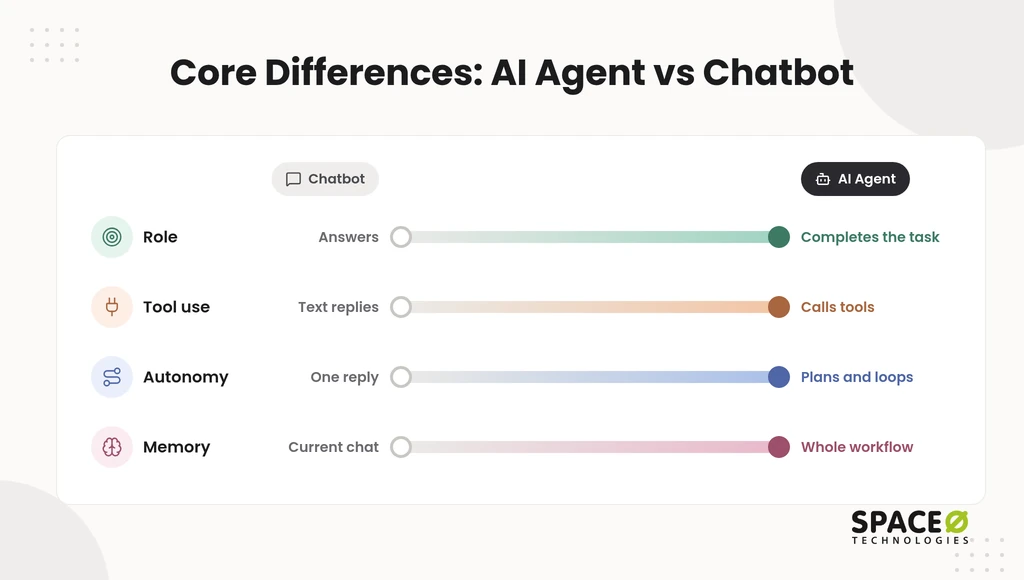
An AI agent and a chatbot differ on four axes: role, tool use, execution and autonomy, and memory and state. Teams usually notice the gap when a bot answers well, but the work still lands on staff. Each axis below shows where the line falls.
1. Primary role: does it answer or complete the task?
A chatbot answers, while an AI agent completes the task.
Chatbot: It handles requests like checking store hours, guides users, and points them to the right page or person. Its job ends when the user has the information.
AI Agent: It works as a goal-oriented worker. It takes a high-level goal, such as an order exchange or a billing dispute, and keeps working until it is done.
2. Action and tool use: text or tools?
A chatbot generates text, while an AI agent calls tools.
Chatbot: It generates text replies or triggers pre-scripted workflows that a developer wired in advance. It cannot pick a new tool in the middle of a conversation.
AI Agent: It uses tool calling to reach APIs, databases, and email. It chooses the tool each step needs, then reads the result before moving on.
3. Execution and autonomy: one reply or a plan?
A chatbot stops after one reply, while an AI agent plans and runs steps in a loop.
Chatbot: It stops after one reply or follows a decision tree. When a request falls outside the branches, the chatbot hands off to a human.
AI Agent: It breaks a goal into a multi-step plan, runs each step in a loop, and adapts to edge cases. It makes independent decisions within limits you set, and checks progress before it escalates.
4. Memory and state: what does it remember?
A chatbot remembers little, while an AI agent keeps state across the whole workflow.
Chatbot: It is stateless or limited to the immediate conversation history. A new session usually starts from zero.
AI Agent: It keeps context across extended workflows, including steps taken, tool results, and pending actions. That state lets the agent pause, resume, and finish later. Teams design it as part of AI agent architecture.
AI Agent vs Chatbot at a Glance
The table below compares a chatbot and an AI agent on eight rows a buyer should weigh before building. Capability is only half the decision. Handoffs, integrations, and upkeep decide what each option costs your team, as the AI agent development cost guide shows.
| Axis | Chatbot | AI Agent |
|---|---|---|
| Role | Answers questions and guides users to information | Completes a goal on the user’s behalf |
| How it works | Single replies, scripted flows, or a decision tree | Multi-step plan run in a loop that adapts to edge cases |
| Tool and systems access | Text output, plus pre-wired workflow triggers | Tool calling into APIs, databases, email, and back-end systems |
| Handoff behavior | Hands off to a human representative when the script ends | Escalates to a person only for approvals or true exceptions |
| Resolution scope | Provides information or collects details for a ticket | Carries the request through to a verified resolution |
| Memory and state | Stateless or limited to the current conversation | Keeps context across extended workflows and sessions |
| Integration need | Low: a knowledge source and a ticketing hook | High: API-accessible systems with scoped permissions |
| Maintenance effort | Content updates and occasional flow changes | Tool, API, prompt, and evaluation upkeep, plus monitoring |
Practical Example: A Food Ordering App
In the same food app, a chatbot finds open restaurants, while an AI agent places the whole order.
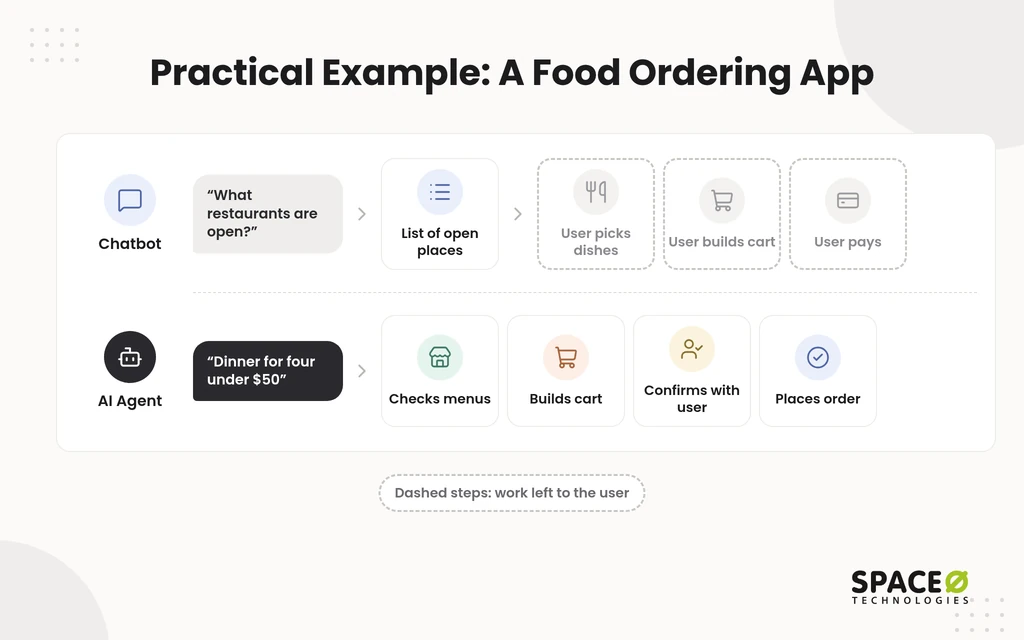
Chatbot: A user asks, “What restaurants are open?” The chatbot returns a list of open restaurants. The user still picks dishes, builds the cart, and pays.
AI Agent: A user says, “Order dinner for four people under $50.” The agent checks menus, builds a cart within budget, and confirms with the user. Then it places the order. Many apps already run an online food ordering system that an agent can call.
Real-World Customer Service Examples
The difference between an AI agent and a chatbot for customer service is handoff versus resolution. Support leaders feel this when the bot replies quickly, but the ticket still reaches a person. Chatbots retrieve information and respond. AI agents execute across connected back-end systems and aim to resolve the request.
1. Order tracking: “Where’s my order?”
For order tracking, a chatbot reports the status, while an AI agent acts on the delay.
Chatbot: The customer shares a tracking number. The chatbot looks it up and replies with the current shipping status.
AI Agent: The agent checks the status and spots a carrier delay. It contacts the shipping API, updates the address, or issues a refund or discount code. Then it messages the customer without human intervention.
2. Open-ended problems that do not fit a form
For messy, open-ended problems, a chatbot collects fields and hands off, while an AI agent works toward resolution.
Chatbot: It collects predefined fields, serves a help article, or hands off to a human representative. The customer then waits in the queue.
AI Agent: It interprets messy context and asks clarifying questions. It then executes changes across tools and verifies that the issue is resolved.
3. Account changes that touch CRM, ERP, and ServiceNow
When one request spans several business systems, a chatbot routes it, while an AI agent carries it across them.
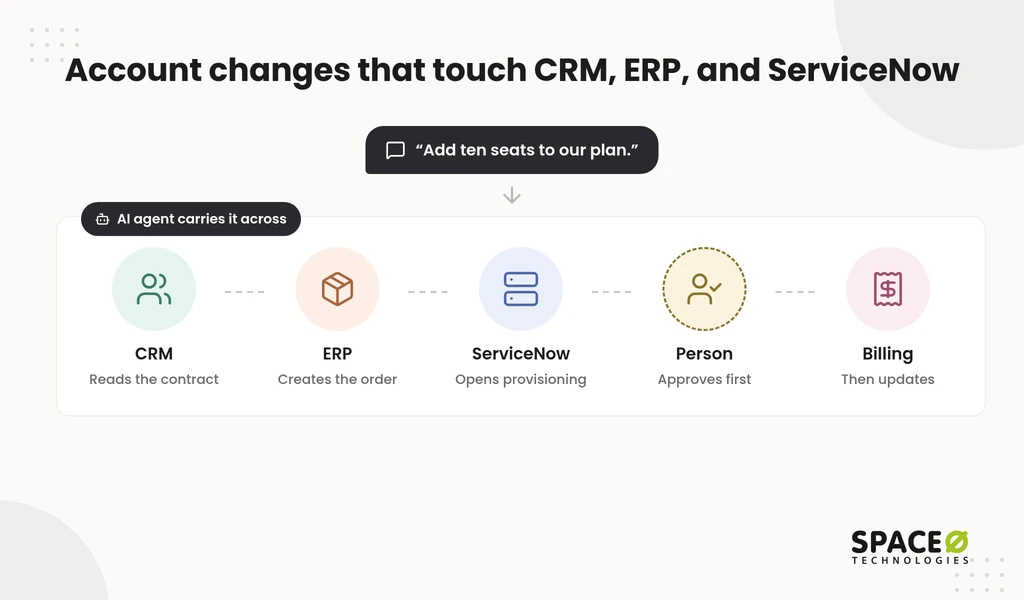
A business customer writes, “Add ten seats to our plan.”
Chatbot: It shares the upgrade form or opens a ticket. A human representative then checks the contract and makes the change by hand.
AI Agent: It reads the contract in the customer relationship management (CRM) system. It creates the order in the enterprise resource planning (ERP) system. It then opens a ServiceNow provisioning request. A person approves the change before billing updates.
Agents like this rely on LLM agent tool use across CRM, ERP, and API layers.
They also depend on the platform underneath. Our ServiceNow implementation services set up the workflows an agent can safely call.
Which One Do You Need?
Start from the goal: pick a chatbot to answer, an AI agent to act. Choose both when your work needs each. Your team also carries the build, the integrations, and the upkeep. The sections below cover all three.
When is a chatbot enough?
A chatbot is enough when your users mainly need answers and simple lookups. Policy questions, product information, and order status checks fit here. One knowledge source and a ticketing hook usually cover it.
When is an AI agent justified?
An AI agent is justified when the same multi-step task repeats and resolving it needs several systems. Refunds, account changes, and exception handling are common candidates. The payoff comes from closed tickets, not faster replies. Teams with a live bot often upgrade an AI chatbot to an AI agent in stages, starting with read-only tools.
What does each option cost to own after launch?
Both options keep costing money after launch, so plan for upkeep from day one. Our AI development cost guide states that annual AI maintenance typically runs 15% to 25% of the original development cost. Use that range as a planning factor for a chatbot and an agent alike.
Chatbots and virtual assistants typically cost $25,000 to $100,000 to build. Overall AI development ranges from $25,000 to $500,000+ in 2026. Infrastructure, API usage, and maintenance add to that total.
An agent needs more upkeep than a chatbot. You maintain its tools, APIs, prompts, and test suites, and you monitor every action it takes.
Is your back end ready for an AI agent?
An AI agent can only act on systems it can reach, so integration readiness decides whether it can work. Check three things before you commit:
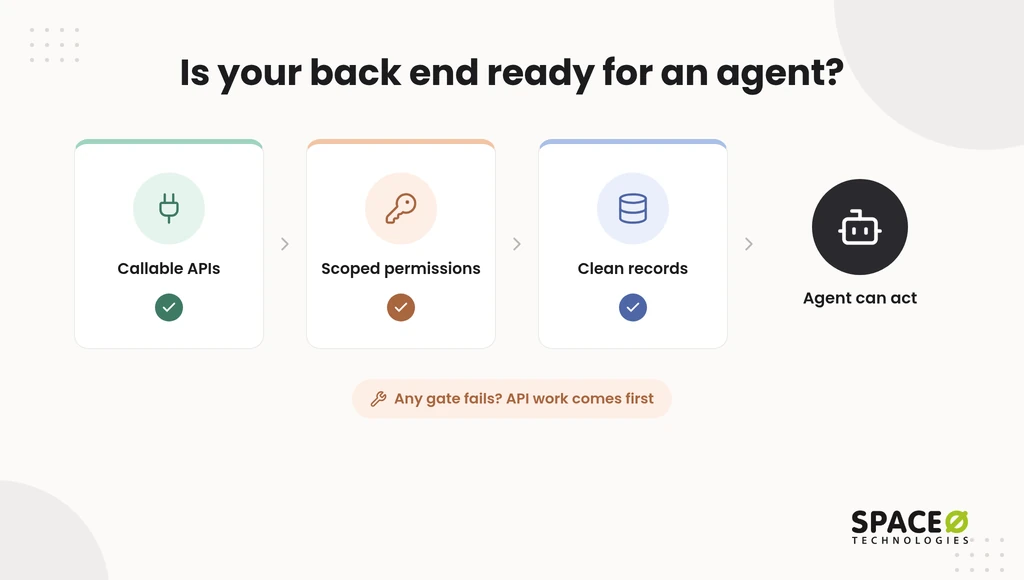
- Your CRM, ERP, and order systems expose APIs the agent can call.
- Permissions can be scoped so the agent touches only what its task needs.
- Records are clean enough that the agent reads the right customer and order.
If the answer is no, API work comes first. Our API integration services connect those systems before any agent goes live.
What guardrails should an AI agent have before it acts?
An agent that acts in external systems needs human review checkpoints, guardrails, and testing before release. We wrap every production model in an evaluation suite. It covers accuracy, hallucination rate, bias checks, latency, and cost, with continuous monitoring in place.
Let the agent handle volume, and keep a person in the approval loop for refunds, contract changes, and other high-impact actions. Finance and healthcare workflows need stricter accuracy testing on top. Learn how an AI agent hallucinating and taking wrong actions happens, then design each checkpoint around that risk.
Decision checklist by ticket volume and system complexity
Score your use case on two things: how often tickets repeat, and how many systems one fix touches.
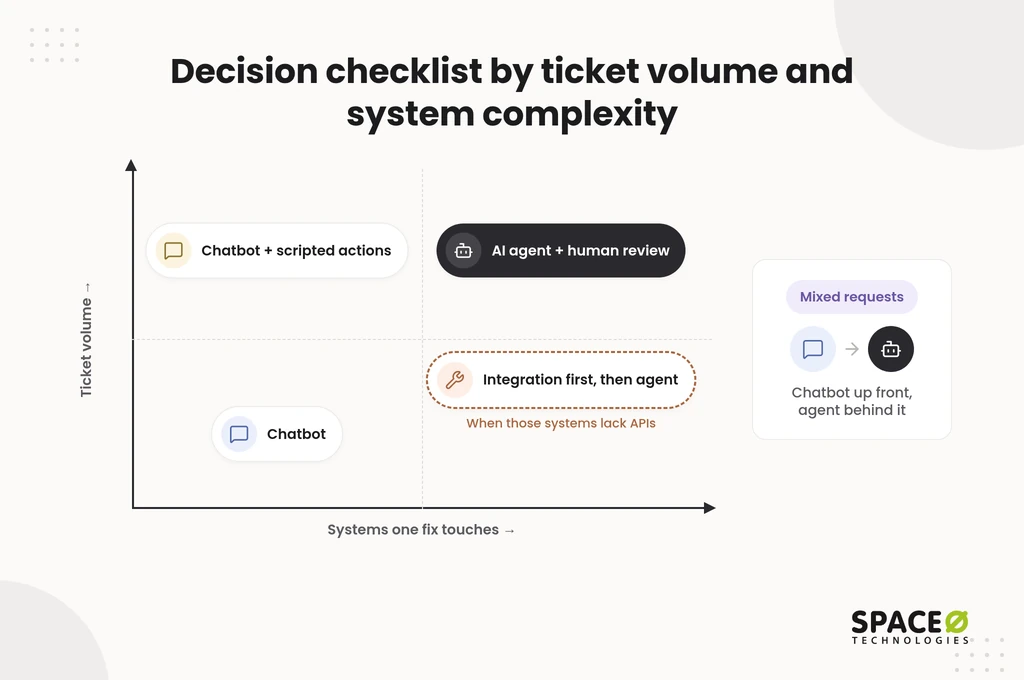
- Low volume, one system: a chatbot is enough.
- High volume, simple lookups: a chatbot, possibly with a few pre-scripted actions.
- High volume, fixes span several API-ready systems: an AI agent with human review checkpoints.
- Fixes span systems without APIs: integration work first, then an AI agent.
- Mixed requests: a chatbot up front, with an agent behind it for requests that need action.
Not Sure Which Fits Your Support Team?
Share your ticket volume and the systems behind it. Our team will map a chatbot, an AI agent, or both, and send you a free estimate.

Next Step: Plan Your Chatbot or AI Agent With Space-O Technologies
Space-O Technologies helps you choose the right option, build it, and keep it running. Since 2010, we have developed 300+ software solutions. Our team includes 140+ in-house developers, and our client retention stands at 97%.
We hold ISO 27001 and ISO 9001 certifications and offer HIPAA-ready frameworks for healthcare AI work. You can choose from four engagement models: Dedicated Team, Time & Material, Fixed Cost, and Staff Augmentation.
Share your use case and get a free, expert-reviewed estimate for your chatbot or AI agent.
Frequently Asked Questions
How to build an AI chatbot for customer service?
Scope it to answers and lookups first. Connect a single source of policies and product information. Wire a ticketing hook so anything outside that scope reaches a person. Leave resolution for a later phase, because it requires the API-accessible back end and scoped permissions covered above.
Can a chatbot be upgraded into an AI agent?
Yes, if the back end allows it. Treat the three readiness checks above as a gate. If even one fails, fund API integration work before any agent build. In the meantime, keep the chatbot answering up front, as in the mixed-requests row of the decision checklist.
Why can’t AI agents run enterprise workflows entirely on their own?
Because a wrong action costs more than a wrong answer. An agent writes to live systems. The review checkpoints described above therefore stay in place after release, not just during testing. The higher the stakes, as in finance or healthcare, the more outputs should route through a person.
What budget should I plan before starting an AI agent project?
AI development ranges from $25,000 to $500,000+ in 2026, and chatbots typically cost $25,000 to $100,000. Plan annual maintenance at 15% to 25% of build cost. Add infrastructure and API usage fees on top.
What is the main difference between an AI agent and a chatbot?
A chatbot answers questions with text or scripted replies. An AI agent plans multi-step work, calls tools, and completes a goal across systems. The core difference is answering versus acting.
Is an AI agent better than a chatbot for customer service?
Not always. A chatbot is enough for policy questions and order status checks. An AI agent fits repeat tasks that need several systems, such as refunds and account changes.
Do AI agents use large language models?
Most do. The language model reads the request and plans the steps. Tool calling then lets the agent act in APIs, databases, and email. Chatbots may use a language model or fixed rules.
Can an AI agent hand off to a human?
Yes. A well-built agent escalates to a person for approvals and true exceptions. It passes along the steps taken and the tool results so the person does not start from zero.



 All our projects are secured by NDA




 4.8


