
 By
By 
Contents
- The AI agent development process defines the key stages for turning a business use case into a functional AI agent.
- Testing, deployment, and security are not optional add-ons, since they determine whether an agent survives contact with real users and real data.
- Cost and timeline depend entirely on scope and integrations, so any flat estimate without stated assumptions deserves real caution.
Key Takeaways
Building an AI agent is more than connecting a language model to a set of tools. A poorly planned agent can make incorrect decisions, trigger unintended actions, or fail when real-world conditions change. A structured AI agent development process helps teams move from an initial idea to a reliable production system.
The process typically involves defining the use case, selecting the right architecture and model, designing agent workflows, integrating tools and data, and establishing security controls. These steps become especially important as businesses move beyond experimentation. McKinsey reports that nearly two-thirds of enterprises have experimented with AI agents, but fewer than 10% have scaled them to deliver tangible value.
Bridging that gap requires more than experimenting with an AI model. Teams need to translate business requirements into a suitable agent architecture, connect the right tools and data, and validate how the agent behaves before deployment. For organizations that need specialized expertise, an AI agent development company can help manage these technical requirements from planning through production.
So, what does the AI agent development process actually look like from start to finish? This guide breaks it down into 8 practical steps, from defining the agent’s purpose and choosing its technology stack to testing, deployment, and ongoing optimization.
What Is the AI Agent Development Process?
The AI agent development process is a structured workflow for designing, building, testing, and deploying AI agents. It enables agents to understand inputs, reason through tasks, use tools, and take actions to achieve specific goals.
The process typically includes planning the agent, choosing an AI model, designing its architecture, integrating tools and data, testing its behavior, and deploying it. Teams then monitor and improve the agent to maintain reliable performance.
The AI agent development lifecycle at a glance
| Step | Core Question |
|---|---|
| Business problem | What problem should the agent actually solve? |
| Use case | Does this workflow genuinely need an agent? |
| Workflow mapping | How should the agent move step by step? |
| Architecture | What structure fits the risk and complexity? |
| Data and context | What information does the agent need? |
| Technology stack | Which model, tools, and framework fit best? |
| Build and integrate | How does the agent take real action? |
| Test, deploy, improve | Is the agent reliable enough for production? |
Each row above gets a full breakdown in the step-by-step section that follows.
Build an AI Agent That Fits Your Workflow
Have a defined use case but need the right expertise to build it? Space-O Technologies can help you design, develop, integrate, and deploy AI agents around your business requirements.

AI Agent Development Process: 8 Key Steps
Developing an AI agent involves these connected steps, starting with the business problem and ending with ongoing optimization. Each step below explains what happens, why it matters, the key decisions involved, and what commonly goes wrong.
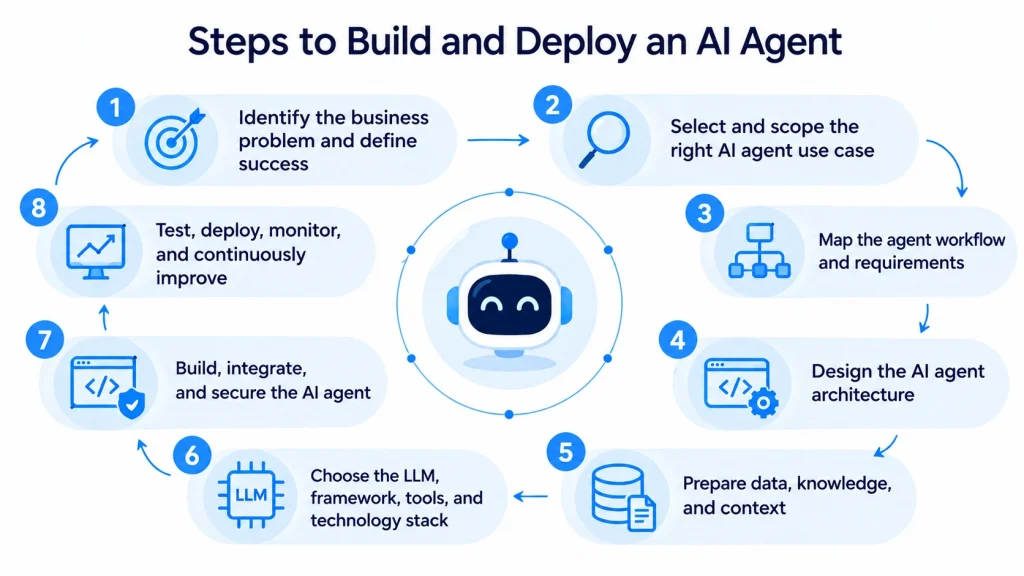
The same structure repeats deliberately across all eight steps, since the same questions matter at every stage. Reading them in order mirrors how a real project actually unfolds, not how a textbook organizes the topic.
Step 1. Identify the business problem and define success
Every AI agent project should start with a clear business problem, not a model or framework choice. Teams that begin with technology selection often build something impressive that solves the wrong problem entirely.
The stage involves mapping the existing workflow and identifying real, specific bottlenecks. Teams should document exactly who the target users are and what outcome they need. Clear KPIs, paired with defined success and failure criteria, give the project a measurable target from day one.
The key decision here is scope: how narrow or broad the initial problem statement should be. A narrow, well-defined problem is far easier to build, test, and prove out quickly. Getting this step wrong is costly, since every later decision inherits an unclear or overly broad goal.
A vague objective, such as “improve customer service,” invites scope creep once development actually starts. A specific goal, such as “cut average ticket response time by 40 percent,” keeps the team focused throughout the build. The expected output of this stage is a written, one-page problem statement everyone agrees on.
For example, a logistics company might state the goal as reducing manual shipment-status lookups by half. A single sentence like that already tells the team which data, users, and systems matter most.
Teams without a clear roadmap can also lean on generative AI consulting services to validate the opportunity first.
Step 2. Select and scope the right AI agent use case
Not every workflow needs an AI agent, so scoping the right use case comes before any technical planning. The stage determines whether an agent is genuinely the correct tool for the identified problem.
Strong candidates for an AI agent typically share several traits.
- The workflow repeats often enough to justify automation effort.
- The task depends on data the agent can access reliably.
- Genuine decision-making or reasoning is required, not fixed rules.
- The agent needs access to specific tools or business systems.
- Outcomes are measurable, so success gets tracked over time.
Simple, rule-based tasks often work better served by traditional automation instead. A workflow needing only scripted, single-turn replies is often better served by chatbot development services than a full agent. Building an agent for a task with no real decision-making usually adds cost without adding real value. The key risk at this stage is mismatched expectations, where stakeholders expect far more nuance than the agent can handle.
Scoping correctly here saves significant rework during later development stages. The expected output is a documented use case, including why it qualifies for an agent rather than simpler automation.
A simple order-status lookup, for instance, rarely needs an agent, since a scripted workflow already handles it well. A support request requiring judgment across multiple systems is a far stronger candidate.
Step 3. Map the agent workflow and requirements
Mapping the workflow defines exactly how the agent should move from a trigger to a completed action. The stage turns a rough idea into functional requirements a developer can actually build against.
A typical agent workflow follows a recognizable pattern.
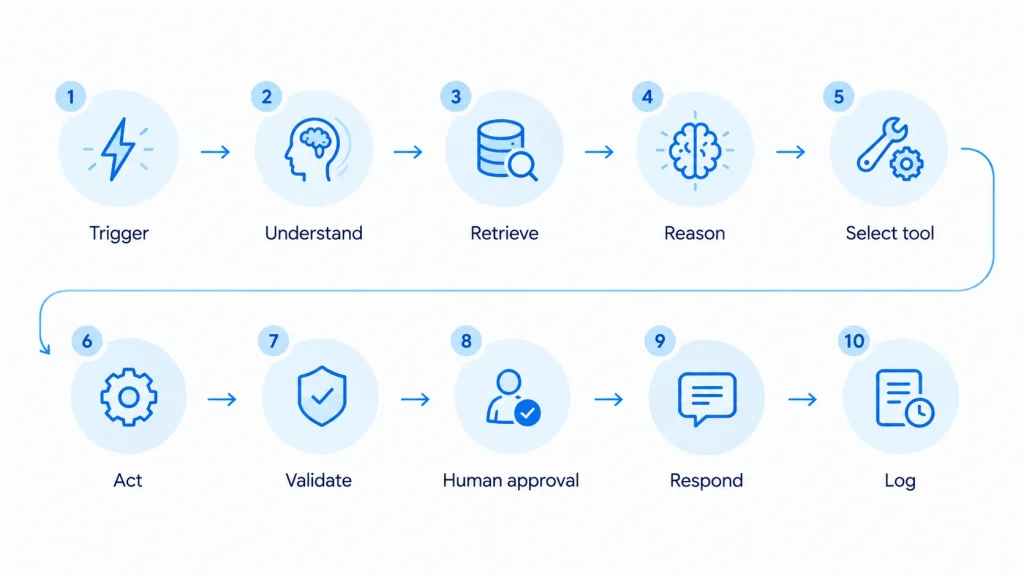
Teams should document expected inputs, outputs, and every point where a human needs to approve an action. Escalation paths matter here too, since agents need a defined fallback when they cannot complete a task confidently. Performance requirements, such as acceptable response time, should also get set at this stage rather than left for later.
The key decision at this stage is where human checkpoints belong in the flow. Placing too few risks unsafe autonomous actions, while placing too many slows the agent down unnecessarily. A common mistake is mapping only the “happy path” and ignoring what happens when a step fails.
The expected output here is a documented workflow diagram, along with a written requirements list developers can reference directly.
A refund-processing agent, for example, might reason through eligibility automatically but still route large approvals to a human. Mapping that threshold early avoids a difficult retrofit after launch.
4. Design the AI agent architecture
Architecture should get selected based on workflow complexity, required autonomy, and business risk, not personal preference. A support agent answering simple questions needs a very different setup than an agent processing financial transactions.
Common architecture decisions include the following choices.
- Single-agent design for narrow, well-defined tasks.
- Multi-agent design for complex workflows split across specialized roles.
- Tool-using architecture for agents that call external systems.
- Retrieval-based architecture for agents needing external or changing knowledge.
- Human-in-the-loop design for actions carrying meaningful risk.
Reviewing current AI frameworks and tools at this stage helps teams pick an architecture their chosen stack actually supports. Orchestration and state management decisions also belong here, since they shape how the agent tracks progress across multiple steps.
The main risk at this stage is over-engineering a simple task with unnecessary multi-agent complexity. Complexity should scale with the workflow, not with what feels technically impressive. The expected output is an architecture diagram paired with a short explanation of why each choice fits the workflow.
A simple FAQ-answering agent rarely needs a multi-agent setup with several coordinating roles. A workflow spanning research, drafting, and review, however, often benefits from splitting those responsibilities across specialized agents.
5. Prepare data, knowledge, and context
Preparing accurate, accessible data determines whether an agent produces reliable answers or confident, incorrect ones. Poor data quality remains one of the most common causes of unreliable agent behavior in production.
The stage covers several closely related tasks.
- Identifying relevant internal documents, databases, and knowledge bases.
- Reviewing access permissions for every connected data source.
- Cleaning and structuring data the agent will reference directly.
- Setting up embeddings and vector storage where retrieval is needed.
- Defining how much context the agent keeps across a conversation.
Retrieval-augmented generation is not automatically required for every single agent. Retrieval matters most when the agent needs current or frequently changing information beyond what the model already knows. Teams handling structured business data, such as CRM or ERP records, should confirm data access rules before development begins.
A common mistake here is assuming existing data is clean and ready without actually auditing it. The expected output of this stage is a verified, permission-scoped data source list the build team can rely on.
A knowledge base full of outdated pricing pages, for example, will confidently feed an agent wrong answers. Auditing content freshness before development avoids launching an agent that sounds right while being wrong.
6. Choose the LLM, framework, tools, and technology stack
Technology choices should follow directly from the use case and architecture already defined, not the other way around. Selecting a model first often forces the team to redesign the workflow around its limitations later.
The table below outlines what to evaluate at each layer of the stack.
| Technology Layer | What to Evaluate |
|---|---|
| LLM | Reasoning ability, tool use, latency, and cost |
| Orchestration | Workflow complexity and state management needs |
| Knowledge layer | Retrieval accuracy and context requirements |
| Tools and APIs | Business-system access and permission scope |
| Monitoring | Evaluation, logging, and observability support |
| Infrastructure | Scalability, security, and overall reliability |
A closer look at OpenAI models for app development helps clarify which option fits a given reasoning or cost requirement. Framework choice should support the orchestration pattern the workflow already requires, rather than working against it.
The key decision here involves balancing capability against cost and response speed. A larger, more capable model adds cost and latency that may not be necessary for a simple task. The expected output is a documented stack decision, along with the specific reasoning behind each choice.
A straightforward internal FAQ agent may run perfectly well on a smaller, cheaper model. A multi-step research agent handling ambiguous requests usually justifies the added cost of a stronger reasoning model.
7. Build, integrate, and secure the AI agent
Building an agent involves far more engineering work than writing a single prompt. The stage covers agent logic, system instructions, tool definitions, and the integrations that let the agent take real action.
Core build activities typically include the following work.
- Writing system instructions that define the agent’s behavior and limits.
- Defining tools and connecting them to internal or external APIs.
- Building memory handling for context across multi-step conversations.
- Adding error handling, retries, and clear failure recovery paths.
- Setting permission scopes so the agent only accesses what it needs.
- Adding guardrails and human approval steps for higher-risk actions.
Teams lacking in-house integration skills often turn to specialized generative AI integration services to connect the agent with CRMs. Security review belongs in this stage, not as an afterthought once development finishes. A frequent mistake is treating guardrails as optional polish rather than a core requirement.
An agent connected to a billing system, for instance, needs explicit limits on which actions it can take unsupervised. Defining those limits during the build stage prevents a costly mistake from ever reaching production. Failure recovery deserves the same attention, since a silent failure is far harder to trust than a loud, safe one. Getting the underlying prompt and reasoning design right also calls for specialized skill. Some teams choose to hire prompt engineers specifically for that piece of the work.
The expected output is a working agent, fully integrated, with guardrails and permissions already in place.
8. Test, deploy, monitor, and continuously improve
Development does not end once the agent works correctly in a demo environment. The final stage covers testing, deployment, monitoring, and ongoing optimization, each explored in detail further below.
Briefly, testing confirms the agent behaves reliably across normal and unexpected inputs alike. Deployment moves the agent from a controlled pilot into full production carefully and gradually. Monitoring and optimization then keep the agent accurate, cost-efficient, and aligned with changing business needs.
Treating deployment as the finish line is one of the most damaging mistakes in this entire process. Agent behavior can shift as models, prompts, and underlying data all change over time. The expected output of this stage is a stable, monitored agent that keeps improving after launch.
An agent performing well at launch can drift months later if the underlying model provider updates its system quietly. Ongoing monitoring is what catches that drift before users notice a decline in quality.
Businesses still comparing options can review this roundup of leading AI agent development companies for scope, pricing, and delivery approach. Whichever path a team chooses, following this lifecycle in order remains the strongest predictor of a reliable, production-ready result.
Turn Your AI Agent Idea Into a Working Solution
Not sure which architecture, model, or workflow fits your use case? Our AI experts can help you validate the idea, define the right approach, and plan the development process.
What Should You Include in an AI Agent Development Plan?
A solid development plan answers 10 practical questions before any development work begins. Skipping this planning stage is one of the most common reasons agent projects stall midway through. A plan does not need to be lengthy, but it does need to be written down and shared.
| Planning Area | Question to Answer |
|---|---|
| Business goal | What problem will the agent actually solve? |
| Users | Who will interact with the agent directly? |
| Workflow | What specific actions will the agent perform? |
| Data | What information does the agent need access to? |
| Tools | Which systems and APIs can the agent call? |
| Autonomy | What actions can happen without human approval? |
| Security | What access restrictions and safeguards are required? |
| KPIs | How will the team measure success after launch? |
| Infrastructure | Where will the agent run once deployed? |
| Monitoring | What metrics need ongoing tracking after launch? |
Answering these questions upfront turns a vague idea into a scoped, buildable project. Teams that document this plan before development also find stakeholder alignment discussions move much faster. A written plan also gives developers a single reference point instead of scattered verbal instructions.
Revisiting this plan periodically during the build helps catch scope drift early. A plan created once and never reviewed again tends to drift away from the original business goal.
A team building an internal HR assistant might discover mid-build that payroll questions need far stricter data access. Catching that during a plan review is far cheaper than catching it during a security audit.
How Do You Test an AI Agent Before Deployment?
Testing an AI agent requires far more coverage than testing typical software, since agent behavior varies across similar inputs. Each testing type below checks a distinct kind of risk before launch. Running all seven together, rather than picking just one or two, gives a much clearer picture of readiness.
Functional and task-completion testing
Functional testing confirms the agent completes its intended task correctly across common, everyday scenarios. Reviewers should check whether the final output actually solves the request, not merely whether the agent responded at all. Testing against a wide range of real request phrasings catches gaps a single sample query would miss.
Tool and integration testing
Tool testing verifies that API calls, permissions, and external-system responses all behave as expected. Failures here often reveal timeout issues or permission gaps that only surface under real, live conditions. Testing each connected tool in isolation first makes failures much easier to trace.
Accuracy and hallucination testing
Accuracy testing checks whether the agent’s responses stay factually correct and properly grounded in real data. Reviewers should specifically look for confident-sounding but incorrect claims, since these carry the highest business risk. Comparing agent output against a known correct answer set helps quantify this risk clearly.
Security and adversarial testing
Security testing probes the agent for prompt injection, unauthorized actions, and unintended data exposure. Deliberately adversarial inputs, designed to break the agent’s logic, often reveal gaps that standard testing misses entirely. Security review should happen before launch, not after a real incident forces the issue.
Edge-case and failure-recovery testing
Edge-case testing checks how the agent handles missing data, unavailable tools, and ambiguous requests. A well-tested agent fails gracefully instead of producing a confusing or incorrect response to the user. Deliberately disabling a tool during testing reveals whether the fallback path actually works.
User acceptance testing
User acceptance testing puts the agent in front of real users completing real, unscripted workflows. Real usage often surfaces usability issues that internal testing, run mostly against clean scenarios, tends to miss. Feedback gathered here should feed directly back into prompt and workflow refinement.
Regression testing after updates
Regression testing re-checks agent behavior after any change to prompts, models, tools, or data. Skipping this step after an update is a frequent cause of agents that suddenly perform noticeably worse. Automated regression suites make this check far faster once the agent reaches production.
How Do You Deploy an AI Agent Into Production?
Deploying an agent means moving it carefully from a controlled pilot into full production use. Rushing this transition is one of the most common causes of early, avoidable agent failures. Deployment should be treated as its own project phase, not a quick final step after development.
A responsible deployment typically follows a phased path.
- Run an internal pilot with a small, controlled group of users.
- Expand to a limited rollout before opening full access.
- Confirm authentication, authorization, and permission settings are correct.
- Set rate limits and cost controls before wider usage begins.
- Enable full logging and monitoring ahead of the production launch.
- Prepare a rollback plan in case a serious issue appears.
Production readiness also depends on confirming the agent handles expected traffic without slowing down noticeably. Scalability planning at this stage prevents performance problems once real usage starts growing.
Teams sometimes skip the pilot phase entirely to save time, which usually backfires later. A short, well-monitored pilot almost always surfaces issues far cheaper to fix before wide rollout. Treating deployment as a gradual process, rather than a single launch event, reduces the risk of a public, costly failure.
A phased rollout might start with ten internal users, expand to one department, and only then open company-wide. Each phase gives the team a natural checkpoint to catch problems before they affect a larger audience.
Need Experts to Build Your AI Agent?
Bring experienced developers into your project without building an in-house AI team. You can hire AI agent developers from Space-O Technologies to build and integrate your agent.
How Much Does It Cost to Develop an AI Agent?
AI agent development costs can range from $10,000 for a rule-based assistant to $500,000 for an enterprise-grade system. It depends mainly on complexity, integrations, data preparation, and ongoing model usage. There is no single universal price, since these factors vary significantly between projects and industries. A narrow internal tool and a customer-facing, multi-system agent rarely land anywhere near the same budget.
Several factors typically drive the final cost figure.
- The number of systems the agent needs to integrate with.
- How much data cleaning and preparation the project requires.
- Which model or models the agent relies on for reasoning.
- How much security review and testing the use case demands.
- Ongoing infrastructure, monitoring, and model usage costs after launch.
A detailed breakdown of AI agent development cost covers these factors in far more depth than one figure ever could. Teams should treat any flat estimate they receive with real caution unless it explains these underlying assumptions clearly.
Ongoing costs also deserve attention, since model usage and monitoring fees continue well past the initial launch. A cheaper initial build can become expensive later if usage volume was never properly estimated.
Two agents with similar scope can still land at very different price points. An agent calling a paid model thousands of times daily costs far more than one used occasionally.
How Long Does It Take to Develop an AI Agent?
Most AI agent projects take anywhere from a few weeks to several months, depending on scope. A narrow, single-task agent with minimal integrations moves much faster than a complex, multi-system deployment. Timeline estimates should always follow scoping, never come before it.
Several factors influence the actual project timeline.
- The number of workflows and integrations the agent needs to support.
- How ready existing data and systems are for connection.
- The complexity of required security review and testing.
- How many stakeholder review cycles the project requires before launch.
Teams should treat any universal timeline promise with the same caution applied to a flat cost estimate. Realistic timelines come from scoping the actual workflow carefully, not from a generic industry average. Projects that skip early planning often take longer overall, since teams end up redoing work mid-build.
A narrow internal tool with one integration might reach production in four to six weeks. A customer-facing agent touching several business systems often needs several months of design, testing, and phased rollout.
What Are the Common Mistakes in AI Agent Development?
Most AI agent failures trace back to a small set of avoidable planning and process mistakes. Recognizing these patterns early helps teams avoid expensive rework later in the project. Most of these mistakes are easy to spot once a team knows what to look for.
| Common Mistake | Why It Happens | How to Fix It |
|---|---|---|
| Starting with the model, not the problem | Teams get excited about technology first | Define the business goal before any tool choice |
| Automating a workflow that doesn’t need an agent | Simple tasks feel more impressive as agents | Confirm the workflow needs real decision-making |
| Giving the agent too many tools | Teams try to cover every possible scenario | Start narrow, then expand access gradually |
| Using poor-quality or inaccessible data | Data readiness gets assumed, not verified | Audit data quality and access before building |
| Skipping security and human approval | Teams prioritize speed over safety review | Add guardrails and approval before launch |
| Testing only ideal scenarios | Demos rarely reflect messy, real-world input | Test edge cases and adversarial inputs directly |
| Deploying without observability | Monitoring gets treated as optional | Enable logging and monitoring before launch |
| Treating deployment as the finish line | Teams assume the project ends at launch | Plan for ongoing monitoring and optimization |
Most of these mistakes share a common root cause: skipping a planning step to save time early on. Each one becomes far more expensive to fix once the agent already reaches production. Reviewing this list before kicking off a new project helps a team avoid repeating the same avoidable errors.
Teams that review this table during their own planning stage often catch a risk already creeping into their project. A five-minute review here regularly saves weeks of rework further down the line.
AI Agent Development Best Practices
Following a short set of proven practices significantly improves the odds of a successful AI agent launch. These points summarize the habits that separate reliable agents from fragile prototypes.
- Start with one high-value workflow instead of many at once.
- Keep the initial toolset small, then expand it gradually.
- Use permission-controlled data throughout every stage of development.
- Add human approval for any action carrying meaningful risk.
- Build evaluation and testing into development, not just before launch.
- Monitor cost, latency, and accuracy continuously after deployment.
A dedicated guide on AI agent development best practices explores each of these habits in far more depth. Coverage there includes guardrail design, memory management, and full monitoring setup for production agents.
These habits apply regardless of industry or use case, from internal tools to customer-facing agents. Teams that build them into the process from the start spend far less time firefighting after launch.
Not Sure Where to Start With AI Agents?
Get expert guidance on your use case, architecture, technology stack, and development roadmap before investing in the build.
Ready to Build Your AI Agent?
Turning an AI agent development plan into a reliable working solution requires the right technical expertise. Space-O Technologies helps businesses design, develop, integrate, and deploy AI agents tailored to their workflows and business goals.
Our team can support every stage, from defining the use case and selecting the right AI models to integrating tools, testing agent behavior, and monitoring performance after launch. This helps businesses address technical risks early and build agents that can perform real-world tasks reliably.
If you already have a defined use case but need specialized expertise to build it, you can hire AI agent developers from Space-O Technologies. Our developers can work with your existing team to build, integrate, and test AI agents around your specific workflows. This approach gives your team access to experienced developers without the overhead of building a dedicated AI team internally.
Whether you need a complete AI agent development team or specialized developers to extend your existing capabilities, Space-O Technologies can help turn your AI agent concept into a production-ready solution.
Frequently Asked Questions
What is the AI agent development process?
The AI agent development process is the structured lifecycle that turns a business problem into a working AI agent. The lifecycle covers planning, architecture, data preparation, development, testing, deployment, and ongoing optimization. Skipping any stage tends to surface as a reliability problem later.
What are the main steps in developing an AI agent?
The main steps are defining the problem, scoping the use case, mapping the workflow, and designing the architecture. Development continues through data preparation, technology selection, building, and finally testing, deployment, and optimization. Each step feeds directly into the one that follows it.
How long does it take to develop an AI agent?
Development timelines typically range from a few weeks to several months, depending on project scope. Integrations, data readiness, and required testing all directly affect how long the full build actually takes. Complex, multi-system agents naturally take considerably longer than narrow, single-task ones.
How much does it cost to develop an AI agent?
Cost depends mainly on complexity, integrations, model choice, and ongoing infrastructure and monitoring needs. Simple, narrow agents cost significantly less than agents handling sensitive or high-stakes business decisions. Ongoing usage and maintenance fees also add to the total over time.
What technology is used to develop AI agents?
Most AI agents combine a foundation model, an orchestration framework, and connected tools or APIs. Additional layers, such as vector databases and monitoring tools, get added based on the specific use case. The exact stack should follow the workflow, not the reverse. No single technology stack works equally well for every agent.
What is the best architecture for an AI agent?
The best architecture depends on workflow complexity, required autonomy, and the level of business risk involved. Simple tasks often suit a single-agent design, while complex workflows may need multiple coordinated agents. Retrieval and human-in-the-loop layers get added only where the task actually needs them.
How do you test an AI agent?
Testing an AI agent covers functional accuracy, tool integrations, security, edge cases, and real user acceptance. Regression testing after every model, prompt, or data change also remains essential once the agent goes live. Skipping any of these categories leaves a real gap in coverage.
Can AI agents integrate with existing business systems?
Yes, AI agents commonly integrate with CRMs, ERPs, ticketing systems, and other internal business tools. These integrations happen through APIs, with permission scopes controlling exactly what data the agent can access. Poorly scoped permissions remain a common source of security risk. Testing each integration individually before launch helps catch these gaps early.
When should an AI agent use RAG?
An AI agent should use retrieval-augmented generation when it needs current or frequently changing external knowledge. Agents relying only on stable, well-known information often perform well without this added complexity. Adding retrieval unnecessarily increases both cost and response time.
Do AI agents need human approval?
Yes, most AI agents need human approval for actions carrying real financial, legal, or safety risk. Low-risk, well-tested tasks can often run with greater autonomy once the agent proves consistently reliable. Approval requirements should decrease gradually as trust in the system grows.



 All our projects are secured by NDA




 4.8
4.8

