
 By

Contents
- Most production failures come from the system around the model, not the model itself.
- Test on real historical cases, not hand-picked demos, and rerun them after every change.
- Trace every step and treat an empty tool response as a failure, never as success.
- Gate costly or irreversible actions with human approval, and promote only after a go-live check.
Key Takeaways
“Our AI agent works in demo but fails in production” is a common complaint. The model is rarely the real cause. Demos use clean, scripted inputs, while production brings messy data and tool failures.
The failure usually sits in the system around the model. That means state, tools, verification, policy, and observability. As an AI agent development company, we see the same root causes repeatedly.
The same gap appears when you take a Custom GPT prototype to production. This guide explains why the gap appears and how to triage your symptoms. It also walks through the AI agent development process that moves a prototype to production.
Why AI Agents Work in Demos but Fail in Production
AI agents fail in production because the conditions they were tested under stop holding. A demo follows a short, scripted happy path with friendly data. Production runs longer paths on real data, against systems that misbehave. The same five causes show up again and again.
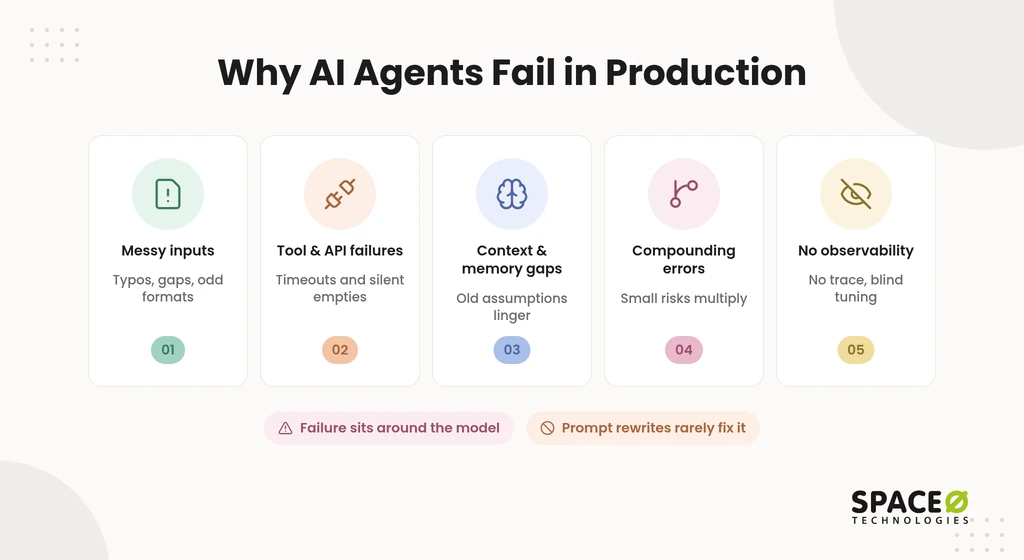
- Messy inputs: Real users send typos, missing fields, odd formats, and edge cases nobody scripted. An agent tuned on clean examples starts guessing, and its guesses sound confident.
- Tool and API failures: Tools call application programming interfaces (APIs). In production, those calls hit timeouts, rate limits, schema changes, and expired sessions. Silent tool errors do the most damage. The agent receives an empty or broken response and continues as if the call succeeded.
- Context and memory gaps: Demos rarely test what the agent remembers across turns, sessions, or hand-offs. The slow version of this problem is often called context debt. Your data and policies change, while the agent keeps reasoning from old assumptions.
- Compounding errors: Each step multiplies risk. Small per-step error rates compound, so a long multi-step run often fails even when each step looks reliable.
- No observability: Without a trace of inputs, tool calls, retrievals, and outputs, a wrong answer has no visible cause. Teams then tune prompts blindly while the real fault sits in a tool or a data source.
Each cause belongs to the system rather than the prompt, so rewriting prompts rarely fixes the agent. Gartner expects over 40% of agentic AI projects to be canceled by 2027 for cost, value, and risk reasons. The same lesson applies to a Custom GPT that needs to grow up.
Custom GPT Versus Production AI Agent
A Custom GPT answers and drafts while a person makes the call. A production AI agent acts inside live systems. It can reach outside services through Actions, which call an API described in an OpenAPI schema.
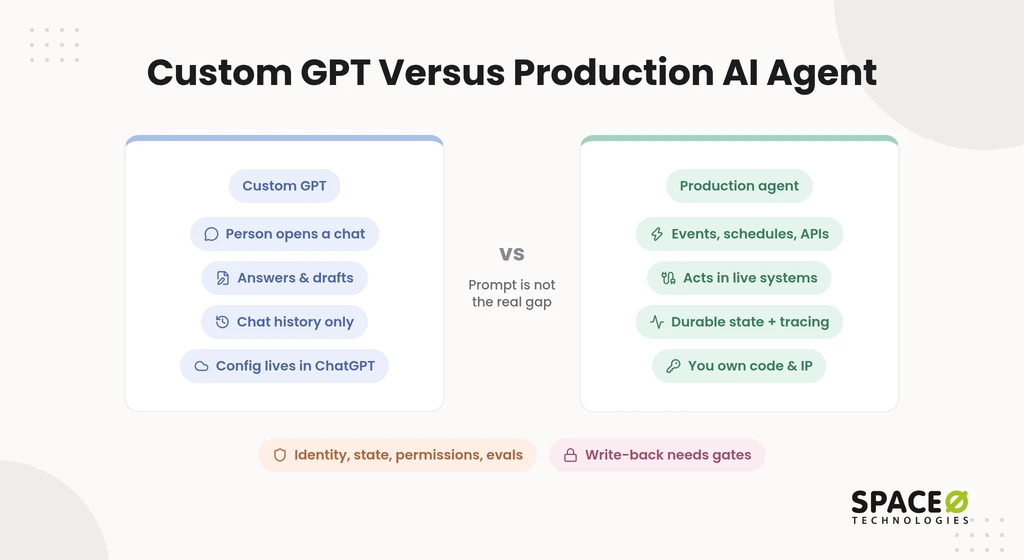
Production guides frame the gap the same way. What changes is identity, state, permissions, evals, and write-back. Prompt quality is not the gap.
| Capability | Custom GPT | In-house build on raw API or framework | Build with Space-O Technologies |
|---|---|---|---|
| Identity and permissions | Runs through the ChatGPT user | Your team designs service identities and access rules | Defined with your security team during discovery |
| Trigger | A person opens a chat and types | Events, schedules, or API calls your engineers wire up | Events, schedules, or API calls mapped to your workflow |
| State | Conversation history and uploaded files | Durable state your team builds and runs | Durable state designed for your multi-step runs |
| Approval gates | A person reads every output | Built into your orchestration code | A qualified human approves before any output influences a final decision |
| Audit trail | Chat history | Tracing and logs your team sets up | Tracing with continuous monitoring in place |
| Write-back | Limited to configured Actions | Direct writes to your systems through tools | Direct writes, gated by validation and review |
| Code and intellectual property (IP) ownership | Configuration lives inside ChatGPT | Your team owns the code | You own all source code, data, and IP at completion |
| Maintenance | Manual edits to instructions and files | Your team carries the upkeep | Planned support with a named owner |
Once you know what has to change, the next question is what is breaking right now.
Symptom Triage: What Is Breaking and What to Check First
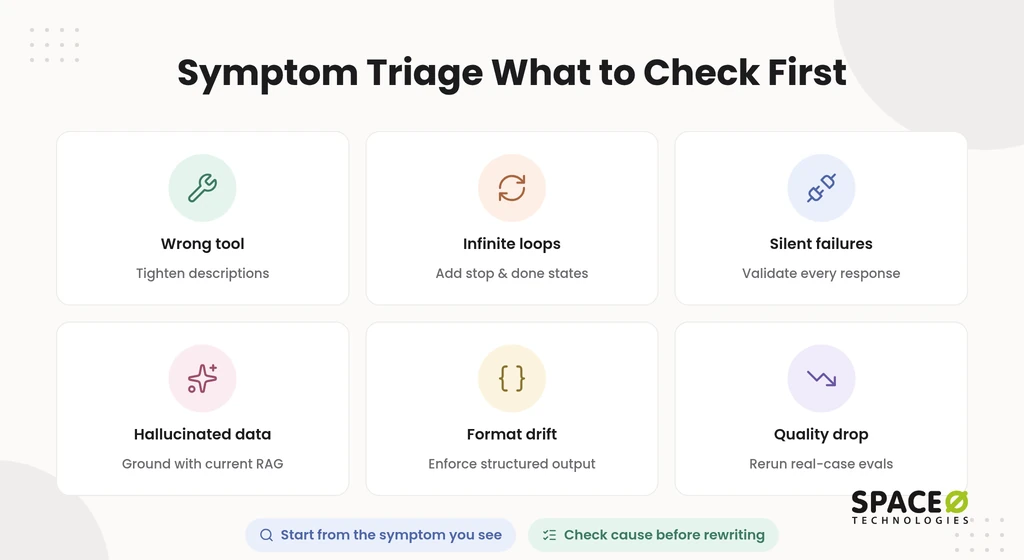
Start from the symptom you can see, and check its most likely cause before you rewrite anything. Most escalations arrive as a symptom, not a root cause. This table maps each common symptom to a likely cause, a first check, and a fix.
| Symptom | Likely cause | First check | Fix |
|---|---|---|---|
| Wrong tool choice | Overlapping tool descriptions or too many tools on one agent | Trace which tools the agent considered and selected | Tighten tool descriptions and split work across specialist agents under a supervisor |
| Infinite loops | No clear stop condition or done state | Look for repeated identical tool calls in the trace | Add step limits, explicit done states, and a fallback exit |
| Timeouts or silent failures | Tool responses are never validated | Compare raw API responses with what the agent reported | Add schema validation, retries with backoff, and fallbacks |
| Hallucinated data | Missing or stale grounding | Check whether retrieval returned a source for each claim | Ground answers with retrieval-augmented generation (RAG) over current data and score faithfulness |
| Bad output format | Free-text output where a schema is expected | Validate a sample of outputs against the target schema | Enforce structured outputs and reject invalid ones |
| Quality degrades after launch | Model drift, data changes, or context debt | Rerun your real-case evaluation set against current behavior | Run evals on every change and monitor quality continuously |
Each row has a deciding signal that tells you where to look:
- Wrong tool choice: If the right tool was available but skipped, fix the tool descriptions or tool count. Do that before you blame the model.
- Infinite loops: Repeated identical calls mean the agent cannot tell that its work is finished.
- Timeouts or silent failures: A gap between the API’s response and the agent’s claim means nothing is validating outputs.
- Hallucinated data: An answer with no retrieved source behind it points to grounding, not to the choice of model.
- Bad output format: Format errors that vary from run to run mean nothing enforces the schema.
- Quality degrades after launch: A drop on an unchanged evaluation set means something shifted underneath the agent.
Once you know the cause, the fixes follow a consistent pattern.
How to Fix an AI Agent That Fails in Production
Fixing a production agent means hardening the system around the model, one change at a time. If you rebuild everything at once, you cannot tell which change helped. These five fixes match what production teams consistently recommend.
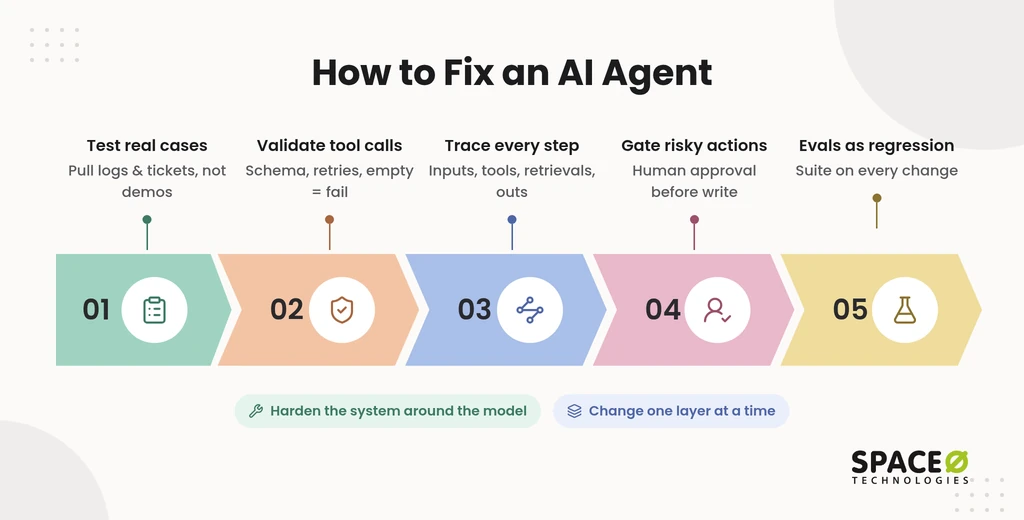
- Test on real historical cases: Pull real cases from logs or tickets, not hand-picked demo inputs. Practitioners advise keeping real failure cases and rerunning them on every change.
- Validate every tool call: Define explicit success and failure states for each tool. Apply schema validation, retries with backoff, and fallbacks, and treat an empty response as a failure. Make writes idempotent so that a retry never repeats an action.
- Trace every step: Record the inputs, tool calls, retrievals, and outputs for each run. Tools such as Langfuse, LangSmith, and Arize Phoenix let you inspect each failure.
- Gate costly or irreversible actions: Put human-in-the-loop approval in front of high-impact, irreversible, or regulated actions. The agent parks its state, notifies a reviewer, and resumes only after explicit approval.
- Run evals as a regression suite: Turn the real-case set into automated evals with a tool such as DeepEval. Every prompt, model, or tool change runs against the suite before release.
Guardrails also belong outside the prompt, where the model cannot talk its way past them. Apply AI agent security best practices to access and deployment controls. The same hardening applies when the agent started life as a Custom GPT.
From Custom GPT Prototype to Production AI Agent
Moving a Custom GPT to production means rebuilding the system around your instructions, in five steps. Many teams assume they can copy the GPT into code and ship it. The steps below keep what works and replace what the chat interface was hiding.
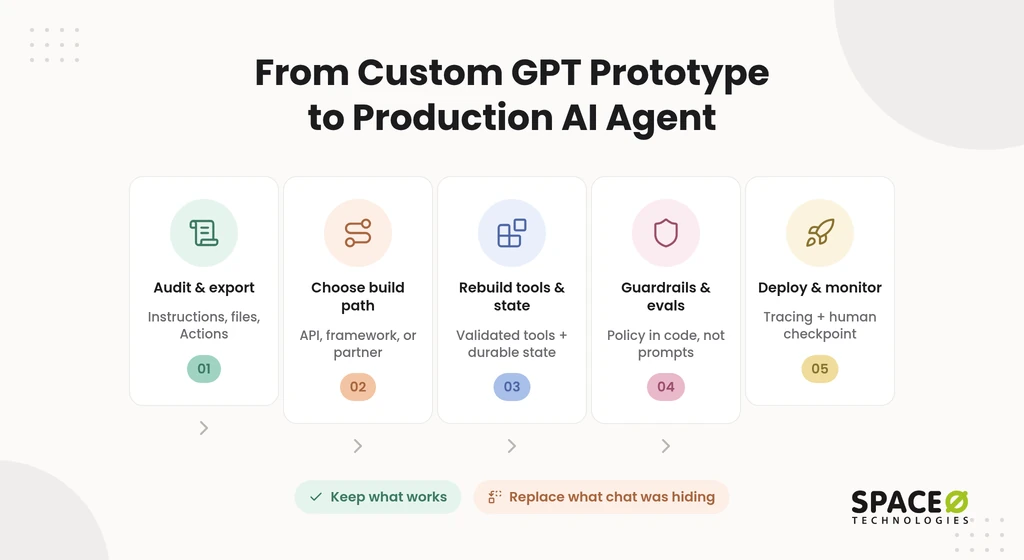
Step 1: audit and export instructions, knowledge files, and Actions
Start by exporting everything that makes the Custom GPT behave the way it does. Copy the system instructions, list every uploaded knowledge file, and document each Action with its OpenAPI schema. Note which outputs a person currently checks before anyone uses them. Add authentication and version control to the Actions endpoints before other systems depend on them.
Common failure: treating the export as complete when key behavior actually lived in users’ follow-up prompts.
Step 2: choose raw API, framework, or partner
Pick the build path by workflow risk and state needs, not by framework popularity. A narrow, low-risk workflow can run directly on the OpenAI API with function calling. Stateful, multi-step flows fit a durable workflow engine such as Temporal. Other AI agent frameworks include LangGraph, CrewAI, AutoGen, and smolagents.
Route work to models by task. Simple retrieval or intent tasks can use a smaller, faster model. Harder tasks may need a more capable model.
Common failure: choosing a path before mapping which actions need state, retries, or approval.
Step 3: rebuild tools, state, and retrieval
Turn each Action into a validated tool, add durable state, and move knowledge files into managed retrieval. Each tool gets a typed input schema, explicit error states, and a timeout. Knowledge files move into RAG backed by a vector database such as Pinecone, pgvector, or Qdrant. Your team can then update and cite the content. Model Context Protocol (MCP) gives tools a standard interface when several agents share them.
Common failure: loading files into a vector database with no plan to keep them current.
Step 4: add guardrails and evals
Put policy checks and evaluation in code, outside the prompt. Validate inputs and outputs, mask personally identifiable information (PII) where needed, and enforce permissions in the tool layer. Build the real-case evaluation set before launch, and run it on every change.
Common failure: writing guardrails as prompt instructions that the model can ignore on unusual inputs.
Step 5: deploy, monitor, and maintain
Deploy behind tracing and a human checkpoint, then run the agent as a product. Start with a limited rollout and watch traces, eval scores, and cost per completed task. Model updates, API changes, and data drift will shift behavior over time.
Common failure: switching off tracing after launch to save money, just as real failures begin.
With the path mapped out, the remaining decision is who does the work.
Fix It In-House, Add Tooling, or Bring In a Partner?
The right path depends on workflow risk, the number of systems involved, and who owns the agent in production. Leaders often frame this choice as build versus buy. In practice, there are five options, and each one fits a different situation.
| Option | Fits when | What it requires |
|---|---|---|
| Raw API | The workflow is narrow and low-risk, and you have strong in-house engineers | Your team builds validation, tracing, and state from scratch |
| Framework or orchestration (LangGraph, Temporal) | Flows are stateful and multi-step, or you lack visibility into runs | Engineers who can operate the framework in production |
| Low-code (n8n, Make, Zapier) | You need light integrations between a few tools | Accepting limits on custom logic, testing, and control |
| Fixed workflow | Paths are predictable, and an agent adds little | Clear rules and stable inputs |
| Partner | Decisions are high-stakes, many systems are involved, work is regulated, or no one owns production | A partner with a production track record, human review practice, and clear code ownership terms |
When you compare partners, check their production track record, human review practice, ownership of code and IP, and engagement model. To keep the work in-house, you can hire AI agent developers who join your sprints.
The promotion decision gate
Choose one of three outcomes based on what failed and who will own the result.
- Promote the existing build: Choose this when the core logic holds on real cases and the gaps are in tooling, tracing, or gates.
- Rebuild in-house: Choose this when your team has production engineers and the workflow touches few systems.
- Build with a partner: Choose this when decisions are high-stakes, many systems are involved, the data is regulated, or no one owns production.
For regulated-industry teams, promotion also means PII masking, audit trails, and human review of high-stakes outputs. Healthcare workflows need Health Insurance Portability and Accountability Act (HIPAA)-compliant builds from the first sprint.
What promotion costs
Budget for the build and for every year the agent runs after it. A basic MVP can start from $15,000, while more feature-rich MVPs can go up to $50,000 or more. Payments are milestone-based and tied to deliverables.
Annual maintenance typically costs 15% to 25% of the original build cost, according to our AI development cost guide. Data preparation can take 25% to 40% of the total project budget. Once the budget is clear, scope your specific agent.
Not Sure Whether to Promote or Rebuild?
Share what your agent does, where it breaks, and which stack it runs on. Get a free, expert-reviewed fix plan for taking your agent safely to production. Talk to Our Engineers

The Go-Live Gate and Who Owns the Agent After Launch
An agent should go live only when five conditions hold, and one person should own it afterward. Many agents launch because a demo impressed someone, not because the system was ready. Use this gate before any agent touches real users or records.
- Named owner: One person answers for quality, cost, and incidents after launch.
- Real-case evaluation set: A versioned set of historical cases passes at an agreed threshold.
- Tracing: Every input, tool call, retrieval, and output is recorded and searchable.
- Human checkpoint: A reviewer approves costly, irreversible, or regulated actions.
- Cost budget per outcome: Spend is measured per completed task, with an alert when it drifts.
Ownership also covers model updates, tool and API changes, and upkeep of the evaluation set. Without an owner, an agent drifts until a customer finds the problem first.
How Space-O Technologies Helps Teams Promote Agents Safely
We take agents from demo to production with grounding, evaluation, and human review built in. Space-O Technologies has built AI-powered custom software since 2010 and has served 1,200+ clients. Our 140+ in-house developers have delivered 300+ software solutions, and we report 97% client retention. Our work includes AI recruitment software such as GPT Vix.
Each agent we ship is evaluated before release. We test accuracy, hallucination rate, bias, latency, and cost, then monitor it after launch. A qualified human reviews and approves outputs before they influence a final decision.
We sign a non-disclosure agreement (NDA) before every project. All source code, data, and IP transfer to you at completion. You can work with us through Dedicated Team, Time & Material, Fixed Cost, or Staff Augmentation models. We work from offices in Mesa, Arizona; Brampton, Ontario; and Ahmedabad, India.
Frequently Asked Questions
What is the difference between a demo agent and a production agent?
A demo agent runs scripted paths on clean data while a person watches. A production agent acts on real data across live systems, with state, tracing, and approval gates.
Can I use ChatGPT to create an AI agent?
Yes. You can prototype an agent as a Custom GPT, using written instructions and uploaded knowledge files. Actions let it call outside services through an API. That works for a demo. Production use means rebuilding tools, state, retrieval, guardrails, and evals in code.
Why does my AI agent work in demo but fail in production?
Demos use clean, scripted inputs. Production brings messy data, tool timeouts, rate limits, and long multi-step runs. Most failures come from the system around the model, not the model itself.
How do I move a Custom GPT to production?
Follow five steps. Export the instructions, files, and Actions. Choose a build path. Rebuild tools, state, and retrieval. Add guardrails and evals. Deploy behind tracing and a human checkpoint.
How do I test an AI agent before production?
Pull real historical cases from logs or tickets. Run them on every prompt, model, or tool change. Treat any drop in score as a regression.
What are silent tool errors in AI agents?
A silent tool error is an empty or broken tool response that the agent treats as success. Schema validation and retries catch it. Treat every empty response as a failure.
How much does it cost to maintain an AI agent?
Annual maintenance typically costs 15% to 25% of the original development cost. Data preparation can take 25% to 40% of the total project budget.
When should an AI agent need human approval?
Require approval for costly, irreversible, or regulated actions. The agent parks its state, notifies a reviewer, and resumes only after approval.



 All our projects are secured by NDA




 4.8


