
 By

Contents
- Start with one workflow and an assistive co-pilot, then widen autonomy as evaluation results hold.
- Set escalation triggers for negative sentiment, failed attempts, payment disputes, legal questions, and authorization limits.
- Budget yearly maintenance as a share of the build cost once the agent is live.
- Enforce refund caps in code outside the model so customers cannot talk past them.
Key Takeaways
A custom customer service AI agent resolves tickets instead of only answering questions. Space-O Technologies builds these goal-driven agents on large language models (LLMs). Each agent reasons through multi-step workflows and hands hard cases to people.
Most support teams already run a chatbot that stops at simple questions. It cannot look up an order or apply a refund within policy. Our AI agent development company has built agents on live systems since 2010.
This page covers custom customer service AI agent development, from stack to guardrails. It also covers our five-step process and what an agent costs to run. For use-case tools and benefits, read our AI agent for customer service guide.
If-Then Chatbots Stall Where Real Support Work Begins
Rule-based chatbots handle scripted questions, but they fail the moment a customer needs something done. A decision tree cannot read an order history, weigh a refund policy, or notice a frustrated tone. The customer then repeats the whole story to a person, and your cost per ticket barely moves.
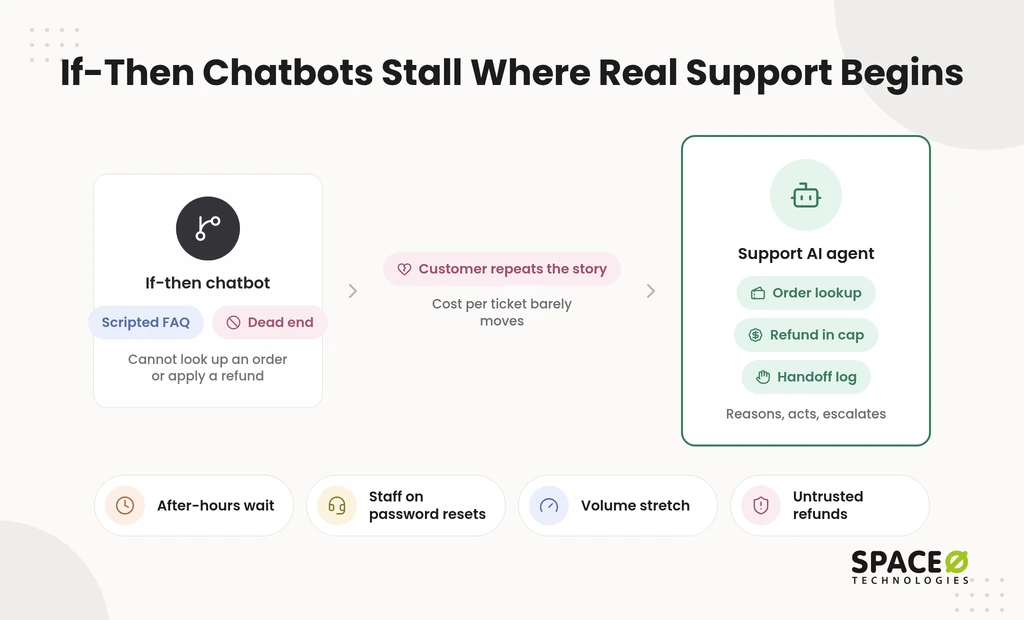
That gap shows up across the support operation:
- After-hours customers wait until morning for a first reply.
- Skilled staff spend their shifts on order status and password resets instead of complex cases.
- Wait times stretch as volume grows, and every new language means new hires.
- Pilots impress in demos, then stall because nobody trusts them with live refunds.
- Packaged connectors cannot reach a customized enterprise resource planning (ERP) system or ServiceNow instance.
Risk grows in regulated industries. A support agent that touches payment or health data needs personally identifiable information (PII) masking and audit logs. It also needs a person approving consequential actions. A smarter script does not fix this. You need an agent built around your systems, your rules, and your people.
What We Build Into Your Customer Service AI Agent
We build each agent as five connected layers, then match its autonomy and guardrails to your risk. The layers decide what the agent knows, what it can reach, and what it may do alone. Here is each part of the build, from the stack to the controls that keep it honest.
A five-layer stack built around your systems
Your agent is only as useful as the systems it can reach, so we design the stack around them. Each layer is swappable, so you can change models as pricing and quality shift without a rebuild.
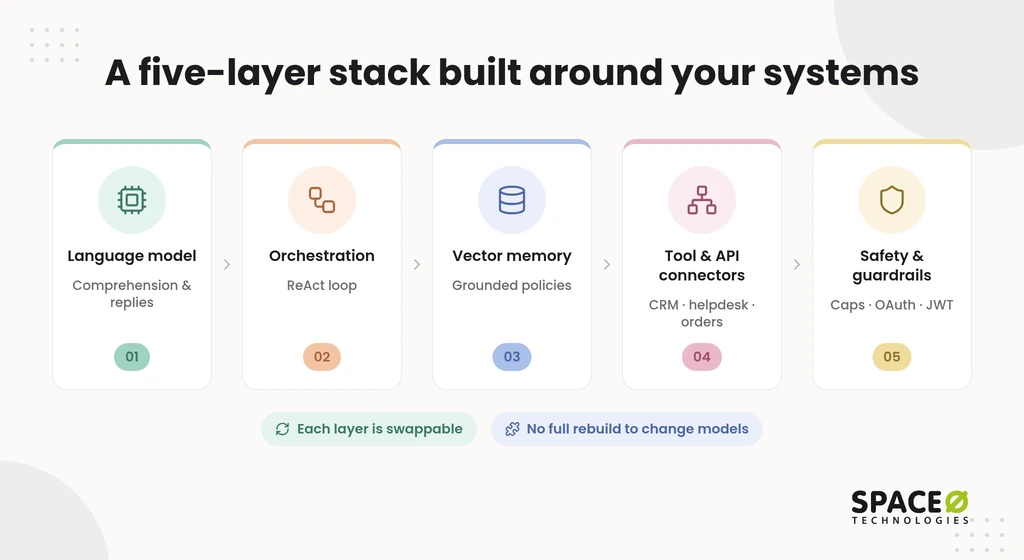
- Language model layer. An LLM such as GPT-4o, Claude, or Mistral handles comprehension, context tracking, and response generation. We choose the model by testing accuracy, latency, and cost on your own past tickets. A high-volume order-status flow might run on a lighter model, while billing disputes run on a stronger one.
- Orchestration layer. Frameworks such as LangGraph and AutoGen manage the agent’s ReAct (reasoning and acting) loop. In that loop, the agent reasons, acts, and checks the result before its next move. A return request, for example, runs as order lookup, eligibility check, label creation, and confirmation.
- Vector memory layer. A vector database such as Pinecone, Chroma, or FAISS stores your help center articles, PDFs, and policies. The agent retrieves the right passage before it answers, so replies stay grounded in company knowledge. A warranty question pulls the current warranty policy instead of a guess from general training data.
- Tool and API connector layer. Application programming interface (API) connectors link the agent to Salesforce, Zendesk, HubSpot, Slack, and your back-office systems. Through them, the agent looks up orders, updates tickets, and issues refunds within its limits. Each connector carries scoped permissions, so the agent can read an order without editing a price.
- Safety and guardrail layer. OAuth 2.0 and JSON Web Token (JWT) authentication control what the agent can access. Business rules and refund caps limit what it can do on its own. A refund above your cap goes to a person for approval, regardless of what the customer types.
Orchestration choices shape cost and reliability more than most buyers expect. Our comparison of AI agent frameworks explains how we choose between them. With the stack in place, the next decision is how much the agent should do alone.
Four agent types along an autonomy gradient
Not every support task should run unsupervised, so we match the agent type to the risk of the work. Teams adopting AI agents for customer support automation usually start with one type and add others as results hold.
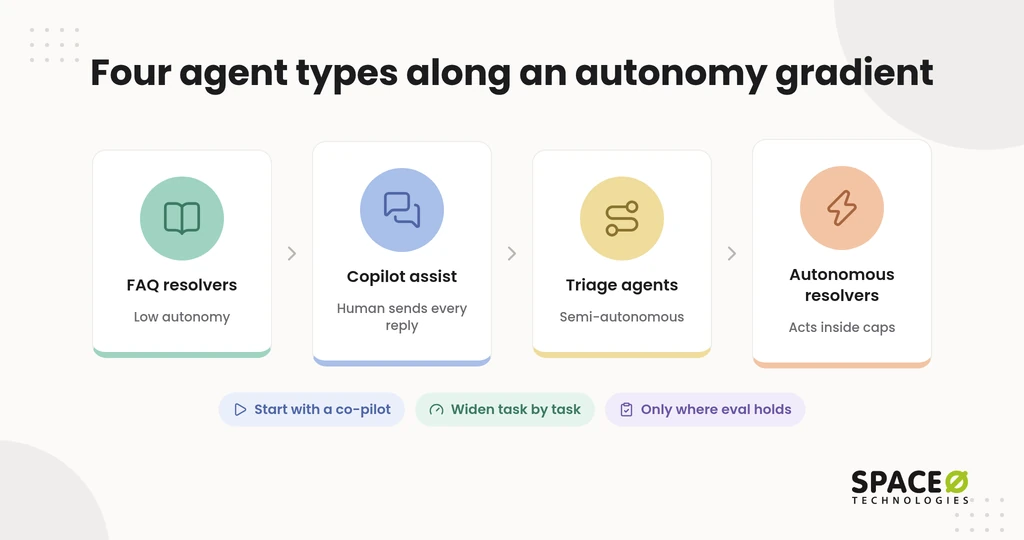
- Conversational and FAQ resolvers. These agents answer frequently asked questions (FAQs) from your knowledge base with low autonomy. They suit shipping times, return windows, and product details, where a wrong answer is easy to correct.
- Copilot and agent assist. These agents draft replies, summarize ticket history, and suggest next steps inside the helpdesk. A human agent reviews and sends every response, so quality rises without handing over control.
- Decisioning and triage agents. These agents classify, prioritize, and route tickets with semi-autonomy. They tag a billing dispute as urgent, attach the order record, and send it to the right queue.
- Autonomous resolvers. These agents act independently on defined tasks such as refunds, account resets, and order tracking. They work inside caps and hand off the moment an escalation trigger fires.
The gradient runs from low autonomy for FAQs, through semi-autonomous triage, to fully independent resolution. The real scoping choice sits at the two ends:
| Factor | Autonomous resolver | Assistive co-pilot |
|---|---|---|
| Scope | Completes defined tasks end to end within set limits. | Prepares answers and actions for a person to finish. |
| Human involvement | People review exceptions and every escalated case. | A person approves every customer-facing reply. |
| Best-fit workflows | Order tracking, account resets, and refunds under a cap. | Billing disputes, complaints, and regulated account questions. |
Starting with a co-pilot lets your team see the agent’s judgment before it acts alone. Autonomy then expands task by task, only where the evaluation results justify it.
Escalation triggers and guardrails your team controls
An agent earns trust by knowing when to stop, so we write the escalation rules with your support leads. Each trigger hands the conversation to a person with a full context log. Nobody has to ask the customer to repeat anything.
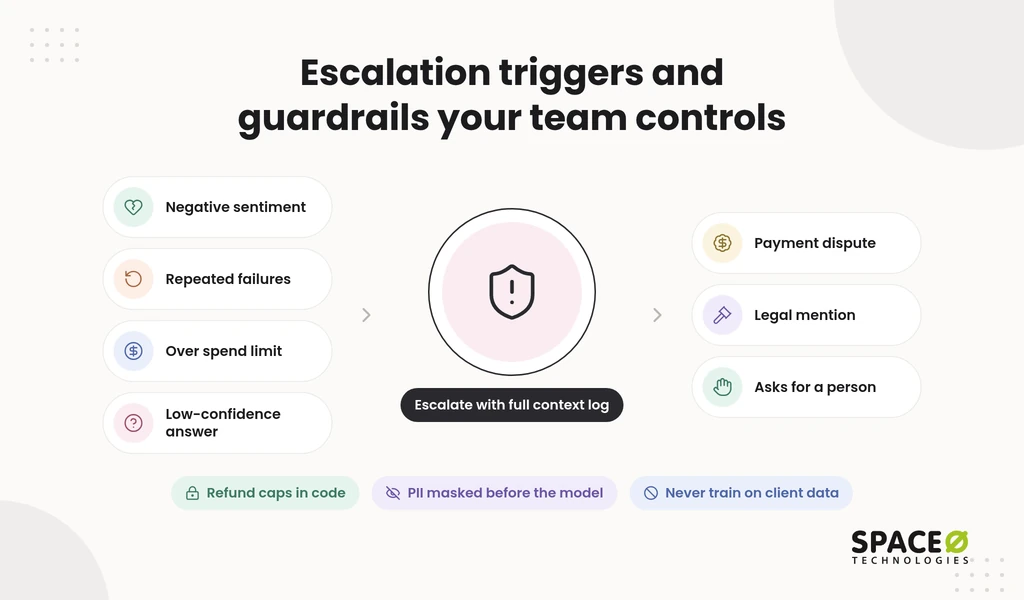
Our merged escalation checklist covers seven triggers:
- Negative sentiment spikes during the conversation.
- Repeated failed attempts to resolve the same issue.
- Requests beyond the agent’s financial authorization limit.
- Low-confidence matches against the knowledge base.
- Payment disputes of any size.
- Legal inquiries or mentions of legal action.
- Angry customers who ask for a person.
Beyond triggers, we enforce refund caps in code outside the model, so a persuasive message cannot raise them. We mask PII before it reaches the model, and we never train on client data. High-stakes outputs in finance or healthcare get human review checkpoints. Automation handles the volume, but a qualified human reviews and approves before any output influences a final decision.
Testing and monitoring that continue after launch
A pilot that answers well in a demo can still fail on real tickets. So we test before release and keep measuring after. It covers accuracy, hallucination rate, bias checks, latency, and cost, with continuous monitoring in place.
- Sandbox pilots replay real historical tickets before any customer sees the agent.
- Latency and hallucination rates are tracked per workflow, not as one blended score.
- Human edits to agent drafts feed back into prompts, retrieval, and test sets.
Each correction a support agent makes becomes a test case for the next release, so quality compounds over time. The next section shows how these pieces come together in order.
How We Build Your Support Agent in Five Steps
Our process moves from one scoped workflow to a monitored production agent, with your team approving each stage. Each step ends in a concrete output, so you always know what you are paying for. It follows our wider AI agent development process, tuned for support queues and helpdesk data.
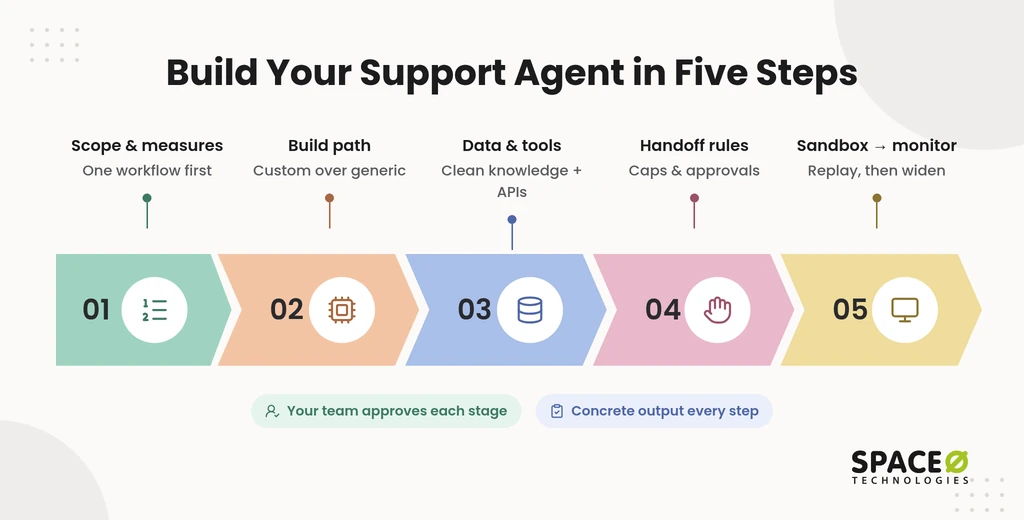
1. Define the scope and success measures
We start by choosing one workflow worth automating and agreeing on how to measure it. Order status inquiries are a common first pick because they are high in volume and low in risk. Together we set the autonomy level, the channels (chat, voice, or a co-pilot inside your helpdesk), and the success measures. Those measures include answer accuracy, latency, and escalation rate per workflow.
2. Choose the build path
For support agents that touch private data, we recommend custom code over a generic builder. We write the agent in Python or Node.js, using LangGraph or custom APIs. That path gives you control over data privacy, multi-agent collaboration, and conversation state. For example, a triage agent can pass a refund case to a resolver agent that keeps the full conversation history.
3. Connect data and tools
An agent without clean knowledge and working connectors starts guessing, so this step gets real engineering time. We load help center articles, PDFs, and policies into the vector store, then remove outdated and conflicting versions. Two return policies from different years would produce two different answers, so only the current one stays. Next, we build connectors to your helpdesk, CRM, and order system with scoped permissions.
4. Set handoff triggers and approval points
Before the agent talks to a customer, your team signs off on exactly when it must stop. We turn the escalation checklist into coded rules, confidence thresholds, and routing paths. Your leads decide the refund cap, which queue receives legal inquiries, and who approves exceptions. Each handoff carries the full context log, so the receiving person can act at once.
5. Test in a sandbox, then monitor in production
We release only after the agent passes its evaluation suite on replayed tickets. Rollout then starts small, for example, after-hours chat on one queue, before it widens to more traffic. Monitoring dashboards track accuracy, hallucination rate, latency, and cost from day one. Your team reviews human edits regularly, and the findings shape each release.
Map Your First Support Workflow With Our Engineers
Tell us about your help desk and your top ticket types. Tell us where people must approve. We return a scoped plan, a build path, and a free, expert-reviewed estimate. Scope My Agent

Production Results Behind Our Support Agent Work
Support leaders need evidence that an agent stays accurate on real questions, not just in a demo. The results below come from AI systems we have shipped and the clients who rely on them. Each one maps to a layer of the support agent stack described earlier on this page.
GPT Vix cut unsupported answers through grounding
On GPT Vix, retrieval-augmented generation (RAG) grounding sharply cut the rate of unsupported answers. Human graders scored each answer against source documents, and faithfulness was measured with the RAGAS framework. The same grounding approach sits under the vector memory layer of every support agent we build.
Stronger compliance for a medical devices client
We built a custom software system for a medical devices company to strengthen its data protection and compliance processes. That work used the same controls a support agent needs: masked data, logged actions, and people approving consequential decisions.
Delivery numbers since 2010
Space-O Technologies has served 1,200+ clients since 2010 and reports 97% client retention. You can read their feedback in our client testimonials. That track record backs every support agent we build.
See how a grounded, governed support agent would fit your stack.
Why Support Leaders Choose Space-O Technologies
A support agent becomes part of your customer experience for years. So the build partner matters as much as the model. Here is what sets our team apart for this kind of work.
Certified AI engineers on every agent build
Your agent is designed by engineers who build production AI every day. Space-O Technologies is an OpenAI Select Partner and an AWS Partner, and our team includes Claude Certified Architects. We run 50+ AI systems in production. With 140+ in-house developers, we can staff a full agent team. You can also hire AI agent developers who join your own sprints. A dedicated project manager (PM) sends daily updates, so non-technical stakeholders stay informed.
One partner across every system your agent touches
Support agents break most often at the integration seams, so one team owning both sides helps. We build software, CRM, ERP, and ServiceNow solutions as well as AI agents. The engineers who write your connectors understand the systems on the other end. You avoid juggling a model vendor, an integrator, and a CRM consultant when a refund flow fails.
When a custom agent beats a packaged platform
Packaged support platforms work well for standard FAQ deflection inside a single helpdesk, and we say so. A custom build earns its cost when one or more of these needs apply:
- Integration. The agent must reach a customized ERP, ServiceNow, or legacy order system that standard connectors cannot.
- Governance. Your refund caps, PII masking, and review checkpoints must be enforced in code you can audit.
- IP ownership. You want the agent’s code, prompts, and test sets as your own asset.
- Engagement. You need a team that adapts scope and staffing as the agent grows.
We start from your goals and pick the technology that solves the problem most cost-effectively. If a packaged tool fits your queue better, our scoping call will tell you.
Commercial Terms and Data Protection Stated Up Front
Buyers ask three things before signing: who owns the agent, what it costs to run, and where the data goes. We answer each in writing before the build starts. The details below cover engagement, run cost, and protection.
Four engagement models with milestone payments
You choose how we work together, and payments are milestone-based, tied to deliverables. Each model suits a different stage of your agent roadmap:
| Engagement model | When it fits |
|---|---|
| Dedicated Team | A long-term agent roadmap with several support workflows. |
| Time & Material | A scope that will change as pilot results come in. |
| Fixed Cost | A clearly scoped first agent with a set budget and timeline. |
| Staff Augmentation | An in-house team that needs agent engineers inside its sprints. |
We never quote hourly rates for agent work. Instead, you get a scoped range in a free, expert-reviewed estimate after we review your workflow.
What it costs to keep a support agent running
A support agent keeps incurring costs after launch, so we plan those costs before you approve the build. Our AI development cost guide puts annual maintenance at 15% to 25% of the original build cost. For a customer service agent, the run cost breaks into these lines:
- LLM token usage, which scales with conversation volume and reasoning loop length.
- Hosting for the agent, the vector database, and the connectors.
- Production monitoring (the dashboards set up in step 5), which runs for the life of the agent.
- Model updates and retraining as your policies and products change.
- Connector changes when your helpdesk or CRM updates its API.
- Governance reviews of escalation rules, audit logs, and human review checkpoints.
Escalation design also shapes run cost. A clear trigger list ends failing loops early, which saves tokens and sends the case to a person sooner. Your estimate shows each line separately, so finance sees the full cost before approving the build.
Full ownership and protected data in every contract
You own everything we build, and your customer data stays protected from kickoff onward. We sign a non-disclosure agreement (NDA) before every project. All source code, data, and intellectual property (IP) built during the project transfer to you at completion.
Space-O Technologies holds ISO 27001 and ISO 9001 certifications. Our healthcare AI engagements use HIPAA-ready frameworks. HIPAA is the Health Insurance Portability and Accountability Act.
Start With One Workflow and a Clear Plan
The fastest route to a trusted support agent is one well-scoped workflow, not a full rollout. Two questions shape that scope. First, which helpdesk or CRM does your team use today? Second, do you need chat, voice, or a co-pilot, and should it assist agents or automate fully? Bring your answers, and we will map the stack, the guardrails, and the run cost. You also get a free, expert-reviewed estimate.
Frequently Asked Questions
How to automate customer support with AI?
Start with one high-volume, low-risk workflow such as order status. Set the autonomy level, channel, and success measures, then connect your knowledge, systems, and handoff rules. Test on replayed historical tickets in a sandbox, then roll out to a small slice of traffic while monitoring.
Is AI going to replace customer service?
No, AI is not set to replace customer service staff in the cases that matter most. Well-built support agents hand off to people. They escalate on negative sentiment, repeated failures, payment disputes, legal inquiries, low-confidence answers, spending-limit breaches, and requests for a person. In finance and healthcare, a qualified human reviews and approves outputs before they influence a final decision.
How much does it cost to build a custom customer service AI agent?
A proof of concept starts near $15,000, and enterprise platforms can go past $500,000. The final figure depends on the number of integrations and the compliance scope. A custom agent runs on five layers: a language model, orchestration, vector memory, tool connectors, and guardrails. Your free, expert-reviewed estimate shows each cost line separately.
What do I need in place before starting a custom support agent build?
You need to know which helpdesk or CRM your team uses. You also need to decide between chat, voice, or a co-pilot, and whether it assists agents or automates fully. You also need current help center articles, PDFs, and policies, with outdated and conflicting versions removed. Historical tickets are useful for replaying in a sandbox test. Your leads should also be ready to set a refund cap and escalation rules.
How is a custom customer service AI agent different from a chatbot?
A custom agent reasons through multi-step workflows and acts in your systems. A rule-based chatbot only follows scripted if-then paths. The agent can look up an order, check a refund policy, and issue a refund within its cap. It uses an LLM, memory, and tool integration to do this. When a trigger fires, it hands the case to a person with the full context log.
How much does it cost to keep a customer service AI agent running?
Annual maintenance typically costs 15% to 25% of the original build cost every year. The run cost has several lines: LLM token usage, hosting, production monitoring, model updates, connector changes, and governance reviews. Token usage scales with conversation volume and reasoning loop length. A clear escalation trigger list ends failing loops early, which saves tokens.
How long does it take to build a custom customer service AI agent?
The timeline depends on the number of integrations, the quality of your knowledge base, and the compliance scope. We start with one workflow, so a sandbox pilot comes before any wider rollout. Your free, expert-reviewed estimate sets the schedule after we review your workflow.
What are the benefits of AI agents for customer support automation?
Agents answer customers after hours and handle order status and password resets. Your staff then spend their shifts on complex cases. New languages no longer mean new hires. When a trigger fires, the agent hands the case to a person with the full context log.



 All our projects are secured by NDA




 4.8


