
 By
Contents
- A generative AI platform launches in days to weeks, with subscription or per-token pricing and low upfront cost.
- Custom AI development takes months but gives you ownership, data control, and on-premises or private-cloud compliance.
- Budget a recurring yearly share of the build cost to maintain a custom AI system after launch.
- Run commodity tasks on a platform and build custom only where your data creates an advantage.
Key Takeaways
Generative AI platform vs custom AI development comes down to speed, cost, and control. A platform rents pre-trained models through APIs and launches in days. Custom development builds on your own data and takes months.
The hard part is the growing per-token bill, fixed vendor terms, and audits. Space-O Technologies has built AI-powered custom software since 2010. Our AI development services cover both paths, from hosted models to owned builds.
This guide compares both paths, then covers pros, cons, and year-three costs. It also explains where RAG and fine-tuning fit between them. Teams already running a hosted model can extend it with generative AI integration services.
Quick Comparison: Generative AI Platform Versus Custom AI Development
On every axis, a platform trades control for speed, and a custom build trades speed for ownership. The rows follow the order most decisions run in: speed, then cost, then control, then upkeep. Use the table to help narrow down your choice before reading the detail.
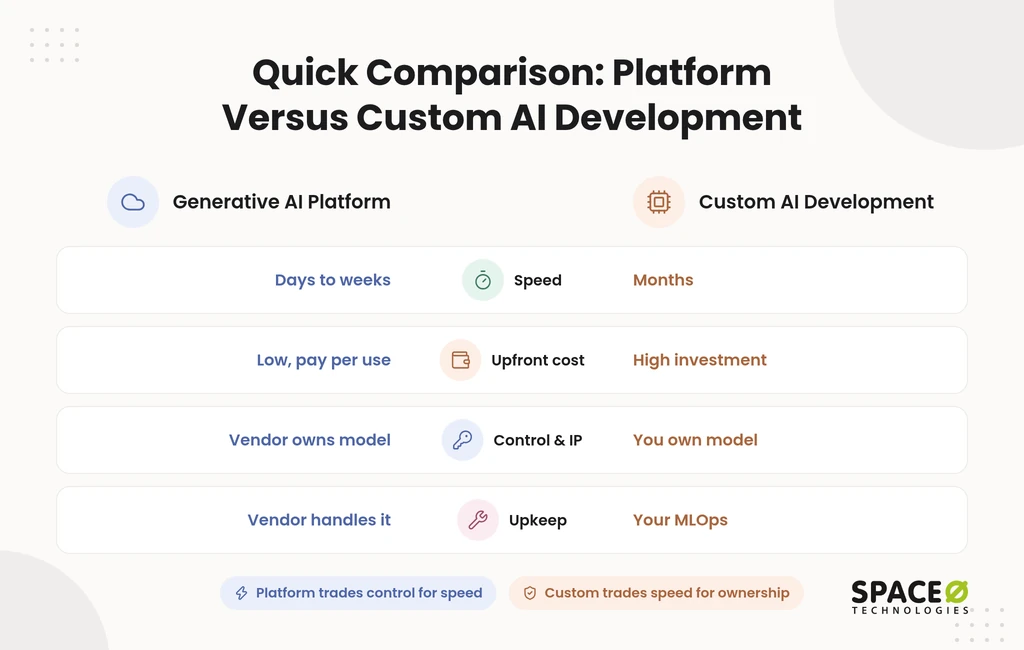
| Factor | Generative AI platform (off-the-shelf / API-based) | Custom AI development (build / fine-tune) |
|---|---|---|
| Time to launch | Days to weeks | Months |
| Upfront cost | Low; subscription or per-token pricing | High initial investment |
| Cost at scale | Grows with every call and token | Can be cheaper at high volume; no per-call vendor fees |
| Data control | Subject to vendor data-use and residency terms | Full control, including on-premises or private-cloud hosting |
| Customization | Limited to vendor options; outputs often generic without RAG or fine-tuning | Built to your workflows and data |
| Ownership and IP | You license access; the vendor owns the model | You own the code, data pipelines, and model |
| Integration | Strongest inside the vendor’s own ecosystem | Deep links to your CRM, ERP, and legacy systems |
| Compliance fit | General; varies by vendor and plan tier | Built around HIPAA, GLBA, or GDPR obligations |
| Differentiation | Low; competitors can buy the same tools | High; hard to replicate |
| Maintenance | Handled by the vendor | Ongoing MLOps, monitoring for model drift, retraining |
| Talent needed | Developers who can work with APIs | ML engineers, data engineers, and MLOps skills |
| Engagement model | Not applicable; you subscribe | Choice of four delivery models |
| Best for | Standard tasks: support chatbots, drafting, summarization, coding help | Proprietary data, regulated workflows, AI as the product |
The table gives the shape of the trade-off. Teams short on skills can also compare generative AI development companies before choosing. The next two sections explain what sits behind each column.
Generative AI Platforms (Off-the-Shelf / API-Based)
A generative AI platform is ready-to-use software that serves existing foundation models through an API, interface, or subscription. Your team consumes the model instead of building it, so features ship without a training phase. Think of the platform as a managed layer between raw foundation models and the people who use them.
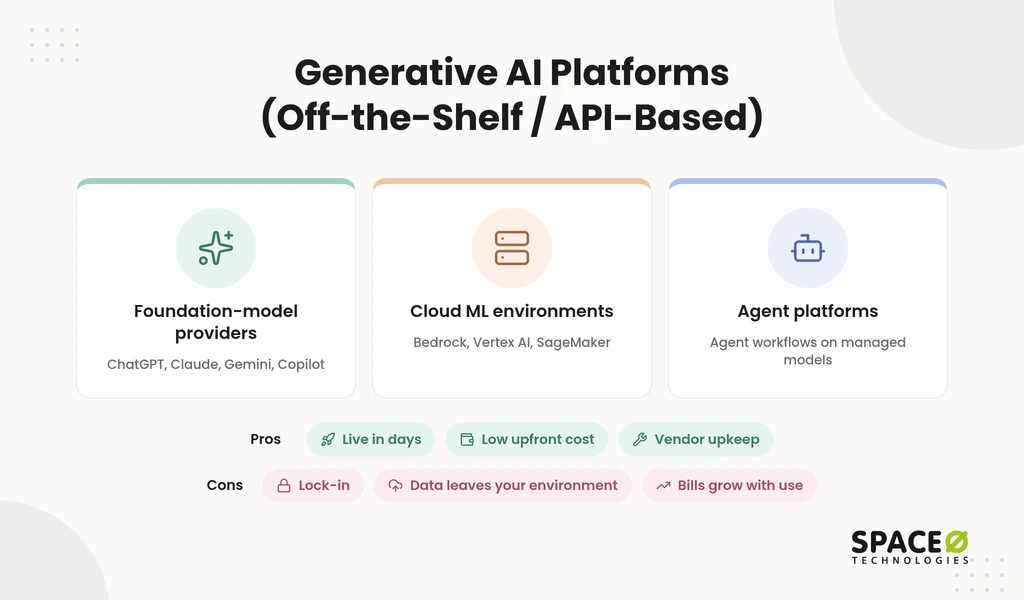
Three kinds of products count as a platform
The word “platform” covers three product types, and the right one depends on what your team builds. All three share the trade-offs listed below, but they suit different buyers.
- Foundation-model providers: OpenAI’s ChatGPT, Anthropic Claude, and Google Gemini give teams frontier models directly, and OpenAI API integration connects them to your apps. GitHub Copilot fits here for coding help.
- Cloud ML environments: Amazon Bedrock, Google Vertex AI, and AWS SageMaker host models for teams building applications. Microsoft Azure Machine Learning and IBM watsonx do the same.
- Agent platforms: Google’s Gemini Enterprise Agent Platform sits alongside the cloud ML environments for teams building agent workflows.
Pros of a generative AI platform
A platform’s main strength is speed to value with little money at risk. These advantages hold across all three product types.
- Fast deployment: A generative AI platform goes live in days to weeks because no model-training phase is needed.
- Lower upfront cost: A platform bills through a monthly subscription or consumption-based, per-token pricing.
- Managed upkeep: The platform vendor maintains, secures, and upgrades the foundation model for you.
- Frontier access: Platform customers get new model versions when the vendor releases them.
Best for: Standard, well-established use cases such as customer-service chatbots, content drafting, summarization, and basic coding help.
Cons of a generative AI platform
A platform’s weaknesses show up later, as usage grows and data gets more sensitive. These are the points to test before you commit.
- Vendor lock-in: A platform team’s prompts, integrations, and workflows grow around one provider’s APIs, which makes switching costly.
- Third-party data exposure: Platform prompts and files leave your environment, so vendor data-use and residency terms decide what happens next.
- Generic outputs: A platform model built for market averages often needs RAG or fine-tuning before it reflects your business.
- Limited differentiation: Competitors can buy the same platform, so the tool alone rarely becomes an advantage.
- Usage-based bills: Platform costs rise with every call, which matters once volume is high.
When those limits start to bind, the conversation turns to building.
Custom AI Development (Build / In-House Fine-Tuning)
Custom AI development is engineering a tailored AI system built specifically for your own organization. Teams turn to it when a platform cannot meet their data, integration, or audit needs. It means training a model, or fine-tuning an open-source LLM such as Meta Llama, Mistral, or Falcon. It can also mean applying retrieval-augmented generation (RAG).
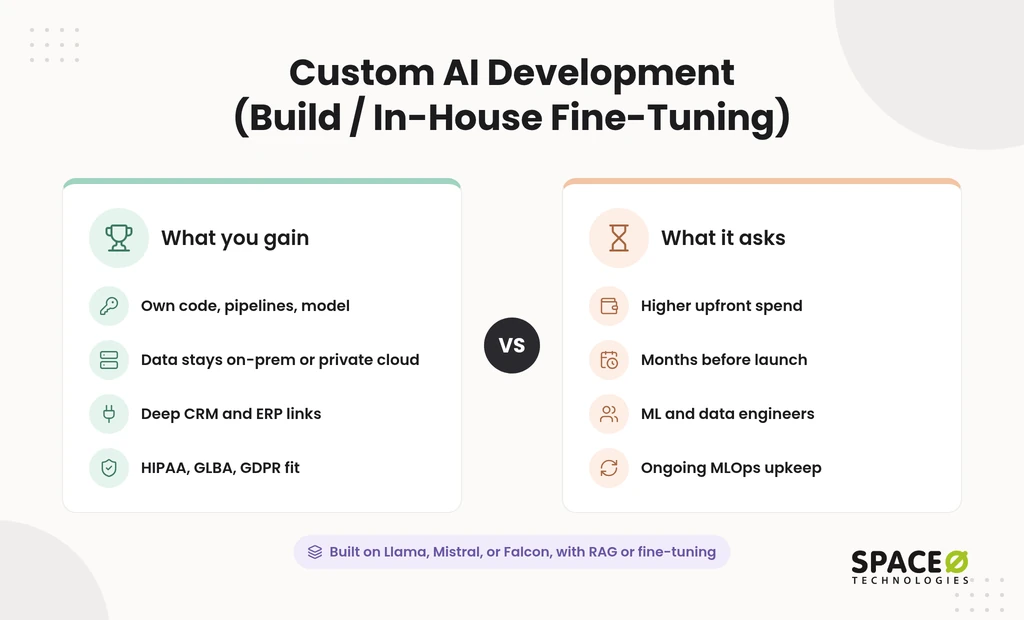
RAG means feeding a model your own documents at query time. Answers then reflect your data, not just the model’s general training.
Pros of custom AI development
Custom AI development gives you control over the model, the data, and the roadmap. These gains grow as AI moves closer to your core product.
- Ownership and IP: Custom AI development leaves you owning the code, data pipelines, and model, with no vendor roadmap to follow.
- Data control and privacy: A custom system can run on-premises or in a private cloud, so sensitive data stays in your environment.
- Deeper integration: A custom build connects directly to your CRM, ERP, and legacy systems and follows your real workflows.
- Compliance fit: A custom system can be designed around HIPAA, GLBA, or GDPR requirements, with audit logs you control.
- Cost at scale: A self-hosted model avoids per-call vendor fees, which can make high-volume workloads cheaper over time.
Cons of custom AI development
Custom AI asks for more money, time, and skill before it returns anything. Plan for these costs from the start.
- Higher upfront cost: Custom AI development front-loads the investment, and data preparation is often the largest single line.
- Longer timeline: A custom build takes months because data preparation, experimentation, and testing come before launch.
- Specialist talent: Custom AI needs data-science and ML engineers, or outside consulting support.
- Ongoing maintenance: A custom model needs MLOps for training pipelines, deployment environments, and monitoring for model drift.
Best for: Regulated US workflows in healthcare, fintech, and insurance that need audit controls and human review of high-stakes decisions. Proprietary-data workflows and products where AI is the product also fit.
Between renting a platform and building from scratch, there is a middle path.
Take, Shape, or Make: Where RAG and Fine-Tuning Fit
Most organizations choose among three levels of effort, not two: take, shape, or make. The platform-versus-custom split hides the middle tier, where much of the business value sits. Eric Lamarre of McKinsey, quoted by CIO.com, describes these as taking, shaping, and making generative AI.
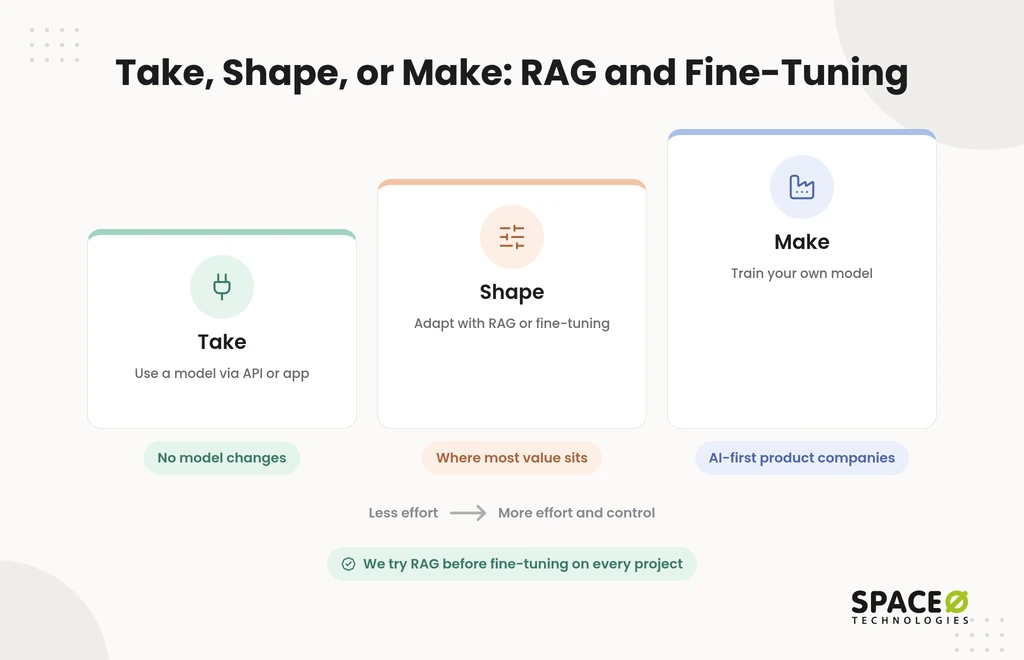
- Take: A taker consumes generative AI through an API or a ready-made interface, with no changes to the model.
- Shape: A shaper adapts existing foundation models with company data through RAG-based AI application development or fine-tuning.
- Make: A maker trains its own model, which suits few organizations beyond AI-first product companies.
How we choose between RAG and fine-tuning
Retrieval-augmented generation is tried before fine-tuning on every project we ship. RAG keeps answers tied to current documents and is easier to update when your data changes. Fine-tuning changes how the model behaves, which suits consistent formats, tone, or domain language.
We pick whichever option solves the problem most cost-effectively, and that choice shapes the budget covered in the next section. For the full breakdown of service types, see Types of AI Software Development Services.
What the Comparison Leaves Out: Year-One Versus Year-Three Cost
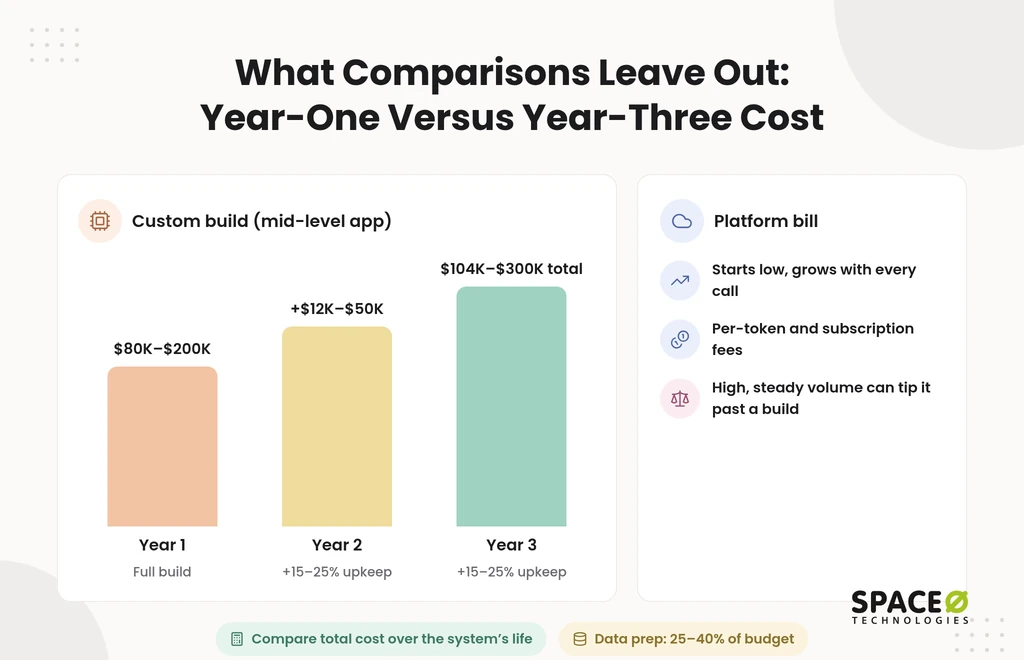
A custom AI build costs the most in year one, then 15%-25% of the build every year after. Most comparisons stop at “higher upfront cost” and never show a figure. Here are the ranges we use when scoping builds, and what they add up to over three years.
What a custom build costs in year one
AI development cost varies widely in 2026, depending on scope. Year one carries the full build, so tier choice matters most here.
| Build tier | Typical cost (USD) | What it covers |
|---|---|---|
| Proof of concept | Starts near $15,000 | Validates one use case before a larger commitment |
| MVP | $15,000 to $50,000+ | A basic MVP starts from $15,000; feature-rich MVP development runs up to $50,000+, with milestone-based payments |
| AI chatbot or virtual assistant | $25,000-$100,000 | Customer support, FAQ automation, internal assistance |
| Mid-level AI application | $80,000-$200,000 | Typically 4-7 months to build |
| Enterprise AI platform | Beyond $500,000 | Custom models, deep integrations, compliance controls, and ongoing monitoring built for your own stack, rather than a generative AI platform’s standard setup |
Data preparation can consume 25%-40% of the total project budget, per our AI development cost guide. That makes it the largest cost driver in an AI build. On an $80,000 build, that means $20,000-$32,000 goes to data work. High-stakes outputs in finance or healthcare also need stricter accuracy testing and often human review.
What years two and three add
After launch, maintenance alone typically costs 15%-25% of the original build every year. Cloud infrastructure, model or API usage fees, and monitoring sit on top of that.
Take a mid-level AI application built for $80,000-$200,000. Two years of maintenance at 15%-25% adds $24,000-$100,000. That puts three-year spend at $104,000-$300,000 before infrastructure and API fees.
Where a platform bill overtakes a custom build
A platform costs little in year one, but its bill grows with every call. Per-token and subscription charges scale with usage, so a busy workload pays more each month. At high, steady volume, a self-hosted model can cost less because it avoids per-call vendor fees. Token spend adds up fast, as our LLM integration cost breakdown shows.
The crossover depends on call volume, tokens per call, and hosting costs. Model both paths with your real usage. Compare total cost over the system’s life, not the first invoice. Gartner forecasts worldwide AI spending of $2.5 trillion in 2026, which makes a careful cost model worth the effort.
With a cost picture in hand, the choice itself gets simpler.
Get a Three-Year Cost View for Your Build
Share your use case, data sources, and compliance scope. Our team returns an expert-reviewed estimate covering build, maintenance, and infrastructure, so you can compare it against platform fees.

Which Should You Choose?
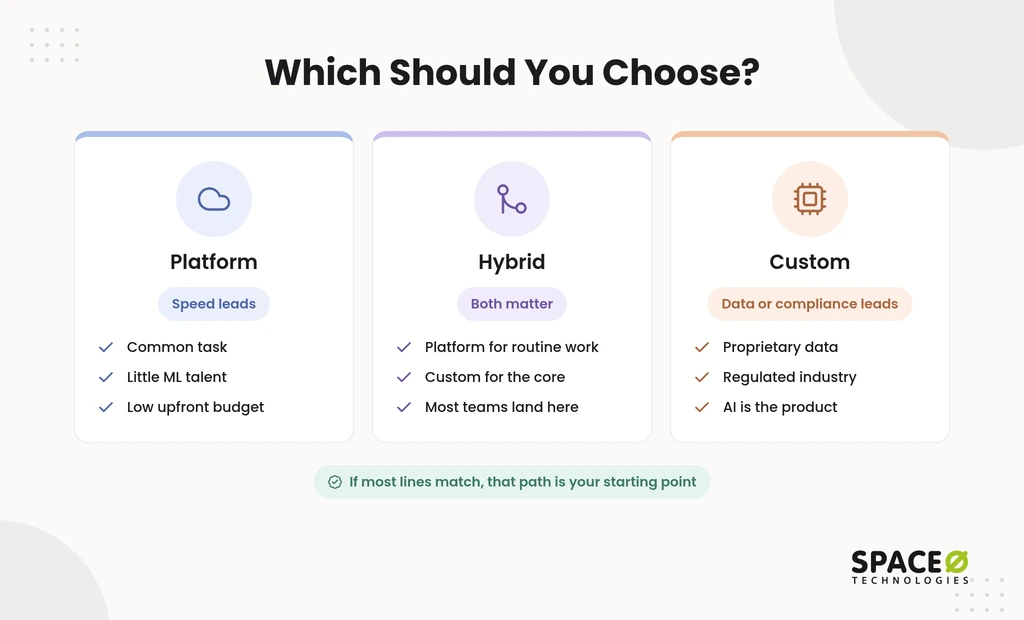
Choose a platform when speed leads, custom when data or compliance leads, and hybrid when both matter. Each checklist below describes one path. If most lines match your situation, that path is your starting point.
When a generative AI platform is the right call
A platform fits when the task is common, and the data is not sensitive.
- Your use case follows established patterns such as chatbots, drafting, summarization, or coding help.
- Your work lives mainly inside one vendor’s ecosystem, such as your CRM, office suite, or helpdesk.
- Time-to-market is the primary constraint.
- Internal ML talent is limited.
- Budget favors a low, predictable upfront spend.
When custom AI development is the right call
Custom fits when your data, your rules, or your product make AI a strategic asset.
- Proprietary data creates a defensible advantage.
- You operate in a regulated industry with strict data-governance or IP requirements.
- AI is core to your product, not a supporting feature.
- Call volume is high enough that per-call vendor fees outgrow a build.
- You need full ownership of the model, code, and data pipeline.
When a hybrid setup works best
Most organizations end up hybrid: a platform for routine tasks, custom for the core logic. A platform covers commodity work such as internal chatbots and drafting. A custom build owns the high-value, defensible core where your data matters.
Teams weighing the wider build-versus-buy question can compare custom AI vs. off-the-shelf options in more depth.
The practical question then becomes who takes a pilot all the way to production.
How Space-O Technologies Approaches the Decision
We start from your business goal and pick the path that solves the problem most cost-effectively. Sometimes that is a platform, sometimes a custom build, and often both. We have served 1,200+ clients with 140+ in-house developers.
From validated pilot to production
A full-cycle partner turns a validated platform pilot into a production build grounded in your own data. That spans requirements analysis, UI/UX, agile development, QA, deployment, and maintenance under one roof. The pilot becomes the specification for the production build.
Controls built into production AI
Every model we put into production is wrapped in an evaluation suite, with continuous monitoring in place. The suite covers accuracy, hallucination rate, bias checks, latency, and cost. Automation handles the volume, but a qualified human reviews and approves before any output influences a final decision.
Our compliance posture covers HIPAA-ready frameworks for healthcare AI engagements. Every build runs under NDA with full code and IP transfer.
Engagement models for the build
How you staff a custom build is a decision no platform-versus-custom table addresses. Space-O Technologies offers four engagement models: Dedicated Team, Time & Material, Fixed Cost, and Staff Augmentation. A startup can take a fixed-cost MVP, while an enterprise runs a dedicated team.
Which path fits which team
The right path depends as much on your team’s stage as on the technology.
- Startups and founders: A scoped, fixed-cost AI MVP validates the use case before you fund a larger build.
- SMEs: A platform covers routine tasks, while custom AI connects to the CRM or ERP you already run.
- Enterprises: Custom AI integrates with legacy systems and cloud deployments on AWS, Azure, or GCP.
- Regulated industry teams: A custom build keeps protected data in your environment, with human review on consequential decisions.
- CTOs adding capacity: Staff Augmentation adds vetted AI engineers into your existing sprints.
Still Deciding? Answer These Two Questions
Choosing between the two comes down to your use case and how sensitive your data is. Answer these two questions:
- Is your use case a standard task? Drafting, summarizing, or support replies that a general model already handles well point to a platform. A workflow that needs your own logic, systems, or domain behavior points to custom.
- How sensitive is your data? No sensitive data points to a platform. Proprietary or regulated data that must stay in your environment points to custom.
Two platform answers mean a platform. Two custom answers mean a custom build. A mix points to hybrid.
Share your use case and data constraints, and get a scoped recommendation from our AI team.
Frequently Asked Questions
Which option fits a regulated industry like healthcare or finance?
A custom build usually fits regulated US workflows in healthcare, fintech, and insurance best. It can run on-premises or in a private cloud. You can design it around HIPAA, GLBA, or GDPR duties. Audit logs stay under your control, and humans review high-stakes decisions. A hybrid setup can keep routine tasks on a platform and sensitive workloads in your own environment.
Is a generative AI platform always cheaper than custom AI development?
No. It is cheaper to start, not necessarily cheaper to run. Custom AI costs more upfront and needs yearly maintenance, while platform fees scale with usage. A practical decision rule: project your platform bill over three years at real call volume and tokens per call. Then compare it with the build cost plus annual maintenance and hosting. If the platform total is higher, the crossover described above applies to you.
What do I need in place before starting custom AI development?
You need data that can be prepared for training or retrieval, plus the right skills. Data preparation can take 25%-40% of the project budget, so the data matters as much as the model. You also need ML engineers, data engineers, and MLOps skills, or an outside partner. Finally, set a maintenance budget of 15%-25% of the build per year. Know your compliance needs before you scope the build.
What vendor terms should we check before sending company data to a generative AI platform?
Check the vendor’s data-use and data-residency terms first. Prompts and files leave your environment, so those terms decide what happens to them. Confirm which compliance coverage applies at your plan tier, since it varies by vendor and plan. Also assess lock-in: prompts, integrations, and workflows built around one provider’s APIs make switching costly later.
Can we start on a platform and move to a custom build later?
Yes, and a platform pilot is a low-risk way to prove the use case first. Move to custom when per-call fees outgrow a build, regulated data enters the workflow, or AI becomes core. Keeping the pilot loosely coupled to any single vendor’s APIs makes that later migration cheaper.
How do I monitor a custom AI model after it goes live?
Wrap the model in an evaluation suite with continuous monitoring. Track accuracy, hallucination rate, bias, latency, and cost. Custom models also need MLOps to watch for model drift. Have a qualified human review outputs before they influence final decisions.
Who owns the model and the code in a custom AI build?
You do. Every Space-O Technologies project starts with an NDA. Full code and IP ownership transfers to you at handover. That ownership covers the code, data pipelines, and model. A platform differs: you license access, and the vendor owns the model. Confirm in your contract that all three are named in the handover.
How long does custom AI development take compared with a generative AI platform?
A platform goes live in days to weeks. A custom build takes months, because data preparation, experimentation, and testing come before launch. A mid-level AI application typically takes 4-7 months to build.



 All our projects are secured by NDA




 4.8


