
 Back
BackThe Observant Mom: Week-by-Week Baby Milestone Tracker
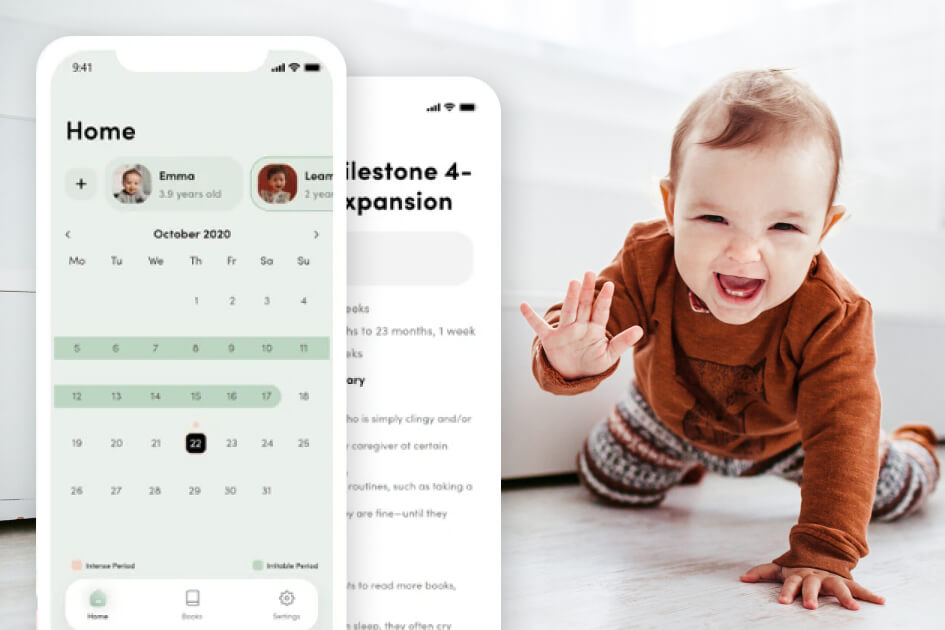
Our client is a US author who spent years documenting her three children’s development week by week. Her book series covered the material, and her website carried it, but parents wanted something they could check in the moment. Space-O Technologies built The Observant Mom as a mobile application tracking milestones from birth through four years. Parents enter a child’s name and birth date, and a color-coded calendar shows which weeks bring irritability and which bring intensity. Tapping any week opens the full milestone summary for that stage. The app shipped on iOS and Android in 2.5 months, matching the deadline set before development started.
Industry
Parenting and Child Development
Client From
USA
Platform
iOS and Android
About The Observant Mom
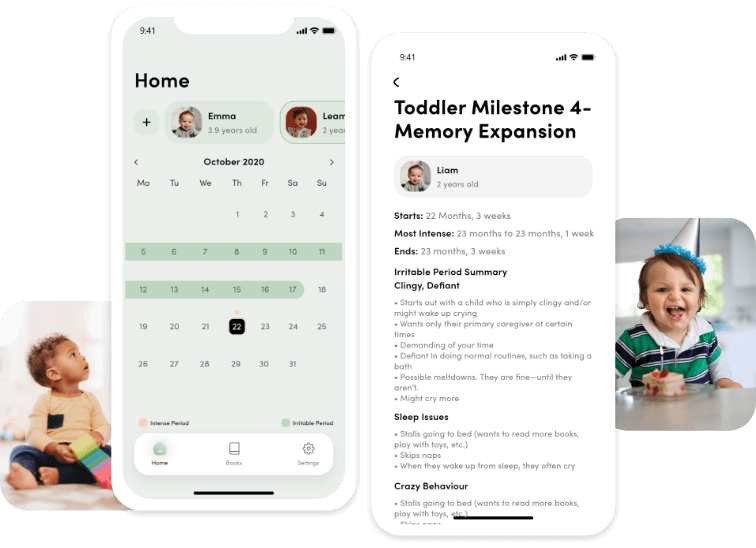
The Observant Mom tells parents whether a child’s development is on track and what mood to expect in the week ahead. Setup takes one screen. Parents enter a name, a birth date, and optionally a photo.
The calendar does the rest. Irritable periods appear in yellow and intense periods in pink, so a parent sees at a glance what kind of week is coming. Tapping either one opens the complete milestone summary for that stage.
The summaries cover cognition, gross and fine motor skills, and sensory development. Parents track behavior, understand what each milestone means, and recognize mental leaps as they happen rather than afterward. The app sells for $1.99 and is available worldwide on both stores.
How We Built the Baby Milestone Tracker App
Our client had approached another company first, and that engagement did not work out. She found Space-O Technologies through Upwork, reviewed the portfolio, checked developer experience across domains, and met the team before committing. Her specifications were unusually well defined, which shifted the difficulty from scoping to execution.
Age Calculation and Custom Calendar View
Requirement:
The calendar had to display a child’s exact age against the matching milestone. A child born on 21 February 2021 needed to show one year and one week on 28 February 2022, with the milestone content for that precise stage.
Solution:
The calculation logic was the hardest part of the build. Our developers researched approaches, ran trials, and tested against edge cases until the age arithmetic held across every birth date and every point in the four years. The calendar then maps each calculated week to its milestone content automatically.
Milestone Data Conversion
Requirement:
The client’s milestone research arrived as Excel and document files. Static files of that kind cannot be used directly inside a mobile application.
Solution:
Our developers converted the complete dataset into JSON, a text-based format for structured data. The conversion made years of documented research queryable inside the app. Every milestone summary a parent reads traces back to that original body of work, restructured for software rather than rewritten.
Color-Coded Irritable and Intense Periods
Requirement:
Parents needed to understand what kind of week was ahead without reading through content first.
Solution:
The calendar marks irritable periods in yellow and intense periods in pink. A parent opening the app sees the pattern immediately. That visual layer is what makes the app usable during a difficult week, since a tired parent gets an answer at a glance rather than after several taps.
Child Profile Creation and Management
Requirement:
Development tracking depends entirely on an accurate birth date, and parents need to correct or update details later.
Solution:
Profile creation captures name, date of birth, and an optional photo. Everything remains editable afterward. The profile drives every calculation in the app, so keeping it simple to create and easy to amend removes the most common source of wrong results.
Multiple Child Support
Requirement:
Families rarely track one child at a time. Parents need several profiles running in parallel without switching accounts.
Solution:
One user creates profiles for multiple children and moves between them freely. Each child carries an independent calendar, age calculation, and milestone timeline. A parent with a toddler and a newborn sees both without maintaining separate installations.
Settings, Author Content, and Support
Requirement:
The app extended an existing body of published work, so it needed to connect back to the author and her books.
Solution:
Settings carry author information, frequently asked questions, and links to the client’s two-book series. Parents share the app, rate it, and contact the team directly from the same place. The app grows the audience for the books, and the books give the app its authority.
Know What’s On Track and What’s Not
Create real-time visibility across milestones, deadlines, and deliverables so project teams can respond to delays faster.
Key Features ofMilestone Tracker App
Track Baby’s Growth
Tap any intense or irritable week to see development progress at that exact age, from two months through four years.
Complete Milestone Summary
Read what to expect across the first four years, including milestone name, start and end weeks, and an illustrated checklist.
Child Profile Creation
Add a photo, name, and date of birth to build a profile, then edit or update those details at any time.
Multiple Children
Create profiles for several children under one account and follow each child’s weekly milestones independently.
Intense and Irritable Week View
See intense periods marked in pink and irritable periods in yellow on the calendar, showing how a child reacts week to week.
Developmental Skill Insights
Understand cognition, gross and fine motor skills, and sensory development at each stage of the timeline.
Author Information and Books
Access details about the author and her two-book series covering behavior and educational activities for growth.
Settings and Support
Find answers to frequently asked questions, share the app, submit a rating, or contact the team with a query.
Who This Milestone Tracking App Serves
Parents of Newborns and Infants
First-Time Mothers and Fathers
Caregivers and Nannies
Parents Tracking Multiple Children
Authors Building Apps Around Published Work
Parenting and Child Development Educators
Pediatric Support Communities
Family Wellness App Publishers
Technology Stack We Used
iOS App
 Swift
Swift
Database
 MySQL
MySQL
Server Environment
 Linux
Linux Ubuntu
Computing Architecture
Cloud Infrastructure
 AWS
AWS
Our Role in The Observant Mom Project
Space-O Technologies handled this project from idea validation through launch on both stores.
Market Research and Idea Validation
Business Analysis, Estimation, and Technical Specification
UI/UX Design
Data Structuring and QA Testing
Ready to Turn Your Expertise Into an App?
Talk to our team about your idea. We validate the concept, structure your existing content, and build an app your audience will actually use daily.
Related Case Studies
Fyule Online Learning Platform
A video-first learning platform where students submit recorded work, join contests, and track progress across schools.
Baloora: School Bus Tracking App
A vehicle tracking system that follows school buses in real time and alerts parents by notification in case of rerouting or emergencies.

ReadGenie: OpenAI-based Image-to-Text App
ReadGenie is a reading assistant app that extracts text from images using OCR and the GPT 3.5 model.


 All our projects are secured by NDA




 4.8
4.8

