
 By
Contents
- Define one business problem and measurable KPIs before choosing any model or tool.
- Data preparation can take 25% to 40% of an AI project budget.
- Choose RAG for data that changes; fine-tune only for stable domains needing deep specialization.
- Budget 15% to 25% of the build each year for maintenance after launch.
Key Takeaways
Building a custom AI solution takes seven steps, from problem to live monitoring. Space-O Technologies has built AI-powered custom software since 2010. These steps to build a custom AI solution follow the order in which real projects run.
The hard part is rarely the model. It is making the system safe, grounded, and reliable for real users. Our AI development services cover each step in this guide.
We compare Retrieval-Augmented Generation (RAG) and fine-tuning, then show where the budget goes. Each step names the decisions, risks, and checks you need. If you are unsure whether to build, weigh custom AI development vs. off-the-shelf first.
1. Define the Problem and Success Metrics
Start by naming one business problem in a single sentence, plus the numbers that prove it is solved. Projects that start with the technology tend to drift, because nobody agreed on what success looks like. This step fixes the target before any money goes into a build.
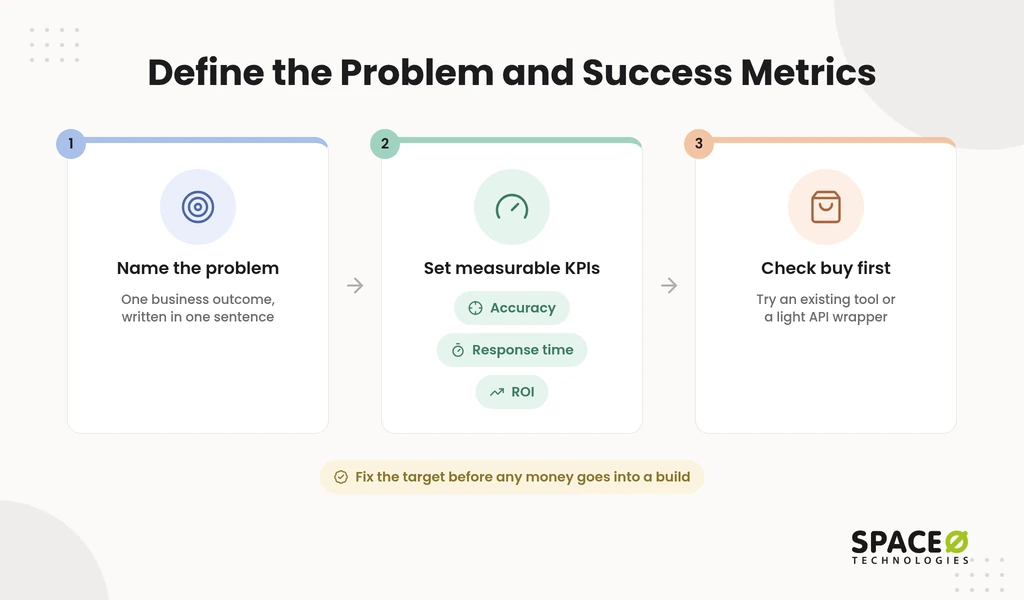
- Name the problem: Write the outcome you want, such as lower support response time or faster claims review. Tie it to a workflow your team runs every week.
- Set measurable KPIs: Set key performance indicators (KPIs) before building. Examples include accuracy, response time, and return on investment (ROI). Without a measurable target, you cannot tell when the AI is ready for production.
- Check buy first: Try an existing tool first. A lightweight wrapper over an application programming interface (API), such as GPT or Claude, often works. The decision table later in this guide shows when each path fits.
We start from your goals and pick the technology that solves the problem most cost-effectively. If you are unsure where to begin, pick the first use case that is small and measurable. With the target set, the next question is whether your data can support it.
2. Collect and Prepare Your Data
Gather the data your use case needs, clean it, and decide how the model will reach it. This is where most projects stall. Gartner expects 60% of AI projects without AI-ready data to be abandoned through 2026.
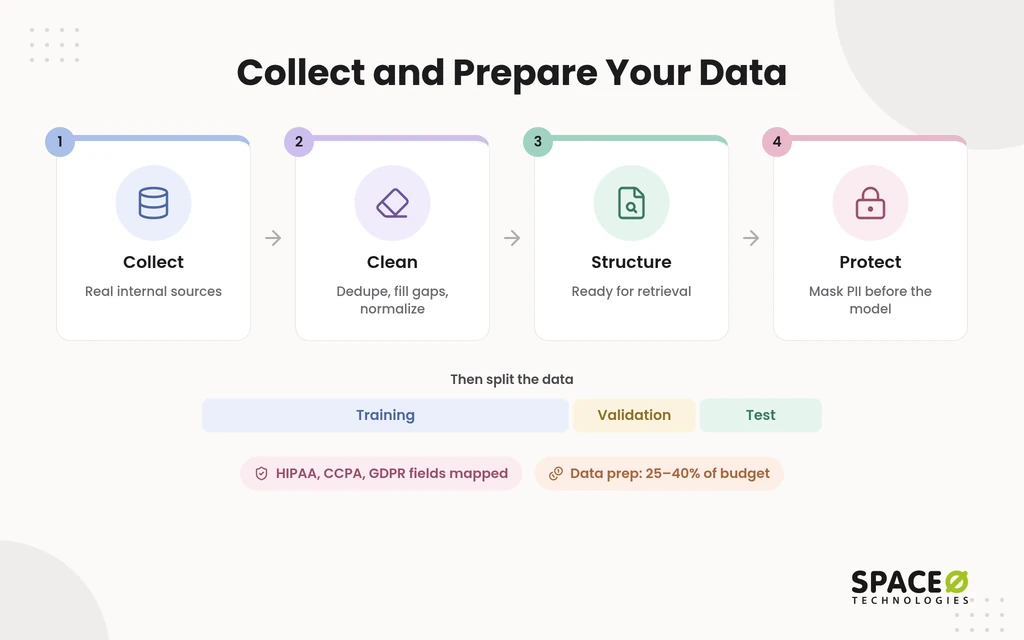
- Collect from real sources: Pull from the internal databases, documents, and records your team already owns. Note who owns each source and how often it changes, because both affect upkeep later.
- Clean the data: Remove duplicates, handle missing values, and normalize formats. Then split the data into training, validation, and test sets so later evaluation reflects real performance.
- Structure for retrieval: Organize documents and records so the system can look them up reliably at answer time. This groundwork is what makes RAG accurate once the solution goes live.
- Compliance checkpoint: Mask personally identifiable information (PII) before it reaches a model. Map which fields fall under HIPAA, CCPA, or GDPR.
Data preparation is also the largest single cost line, covered in the budget section below. A clear AI development project roadmap schedules the data work before the build starts. Once the data is ready, you can choose how the AI will use it.
3. Choose Your Approach and Tech Stack
Pick the approach first, then the model, tools, and cloud that serve it. Teams that pick a model before an approach often pay for capability they never use. Settle the approach, and the rest of the stack follows.
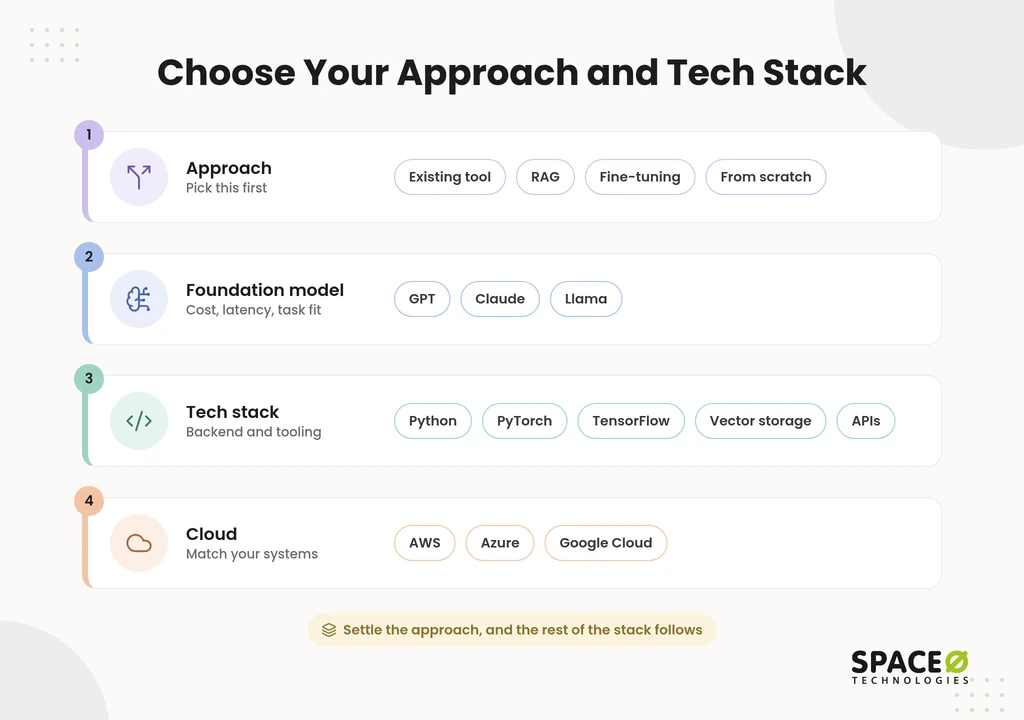
- Pick the approach: Choose between an existing tool, RAG, fine-tuning, or a model trained from scratch. The comparison table after step 7 weighs all four on data, cost, and retraining burden.
- Pick the foundation model: A foundation model is a large pre-trained language model (LLM). GPT, Claude, and Llama are common choices, weighed on cost, latency, and fit for your task.
- Choose the stack: Python is the common language for AI backends, with PyTorch or TensorFlow for custom models. Add the AI agent frameworks, vector storage, and APIs the solution needs.
- Choose the cloud: Amazon Web Services (AWS), Azure, and Google Cloud all host production AI. Pick the one that matches your existing systems, data residency needs, and security review process.
With the stack chosen, the goal of the next step is the smallest build that proves value.
4. Build and Train a First Version
Build the simplest version that solves the problem, then expand it once it works. Large first builds take months and often solve the wrong problem. A narrow first version gets real feedback in weeks. Our explainer on AI software development shows where this first version fits in the wider lifecycle.
- Start minimal: Begin with a minimal first version that covers one workflow from start to finish. Once the concept is proven, enrich and expand it with more workflows and integrations.
- Build the orchestration layer: Route each request and add the right context. Enforce guardrails on what the AI can do. Every model call adds cost, so this layer also controls spend.
- Write the system instructions: Define the AI’s role, tone, and boundaries so responses stay on task and in scope. Split complex jobs into smaller steps instead of forcing everything into one giant prompt.
- Enforce structured outputs: Require responses in a fixed schema and validate them before they reach other systems. Schema validation makes the output testable and stops malformed data from spreading downstream.
A working first version is not a finished one, so testing comes next.
5. Test and Evaluate
Test against real cases and edge cases before release, and expect accuracy to improve over several rounds. A demo that impresses on ten examples can fail quietly on the thousandth. First-pass accuracy usually sits below production quality, so plan for iteration.
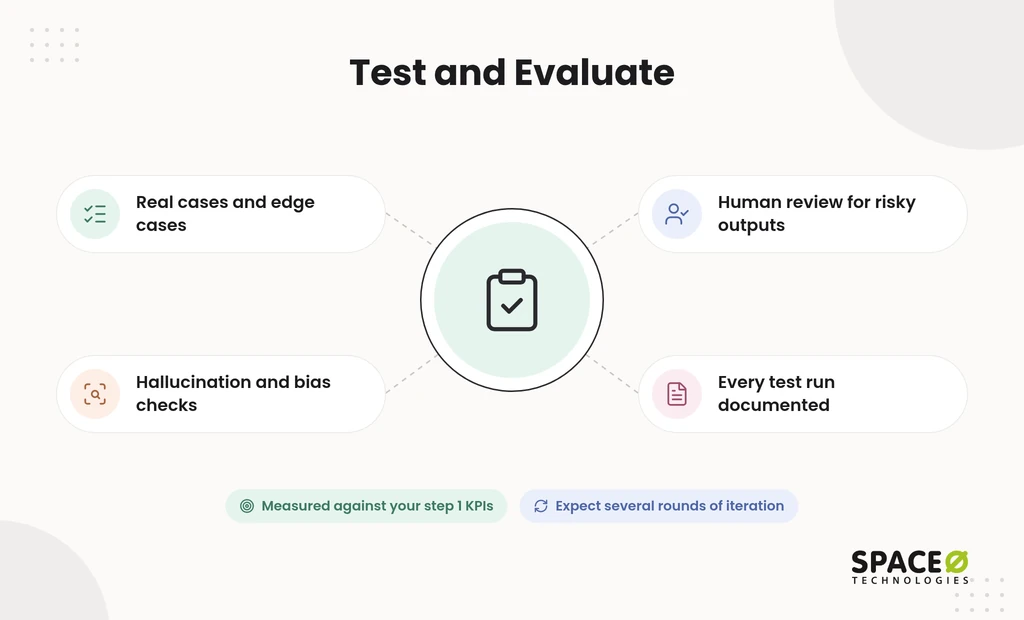
- Test with real cases: Run the AI against real inputs and known edge cases from your workflow. Measure results against the KPIs you set in step 1, not against a demo script.
- Test for hallucinations and bias: A hallucination is a fact the AI invents. Red-team each new release and reject outputs that fail validation before any user sees them.
- Route risky outputs to people: Send low-confidence or high-risk outputs to human review. Automation handles the routine volume, and a qualified reviewer approves each output before it shapes a final decision.
- Compliance checkpoint: High-stakes outputs in finance or healthcare also need stricter accuracy testing and often human review. Document every test run so auditors can see how the system was validated.
Every model we ship is tested for accuracy, hallucination rate, bias, latency, and cost, with continuous monitoring. Our AI agent development best practices guide goes deeper on guardrails. Once the evaluation results hit your targets, the system is ready to ship.
6. Deploy and Integrate
Ship the AI into the systems your team already uses, with access controls and an automated release path. An AI that lives in a separate tab gets ignored. Integration is what turns a working model into a working process.
- Automate releases: Use continuous integration and continuous delivery (CI/CD) pipelines so updates ship through tested, repeatable steps. Containers keep environments consistent from staging through to production.
- Integrate with existing systems: Connect the AI to your CRM or ERP tools through APIs. Older platforms often need a dedicated layer to integrate AI into existing software.
- Control access: Apply role-based access control so each user and service sees only what it needs. Keep keys and credentials out of the codebase and rotate them on a schedule.
- Compliance checkpoint: Log every model action in an audit trail. Before go-live, confirm your handling of protected health information meets HIPAA rules, since reviewers ask for access logs first.
Deployment starts the work rather than ending it, so the last step never finishes.
7. Monitor and Improve
After launch, track drift, accuracy, and costs, then retrain or update the solution. Quality slips quietly as customers, products, and data change. Monitoring catches the slip before your users do.
- Watch for model drift: Model drift is quality dropping as real-world data moves away from the training data. Check accuracy against your step 1 KPIs on a fixed schedule.
- Track cost per task: Monitor token usage, infrastructure, and API spend alongside accuracy. A cheap answer that is wrong still costs money to fix, and maintenance costs after launch keep recurring.
- Trace and log every run: Record inputs, outputs, and tool calls. Any failure can then be traced to its cause. Standard tracing and logging are enough for most teams to start.
- Retrain or update: Feed user feedback into scheduled updates. RAG systems refresh when you update the source data, while fine-tuned models need a new training run.
Those seven steps hold for every custom AI build. The choice that changes cost the most is which path you take in step 3.
Choose Your Path: Off-the-Shelf Tool, RAG, Fine-Tuning, or Training from Scratch
Choose the lightest path that meets your accuracy, privacy, and integration needs. Many teams overbuild because they pick a technique before checking what the problem needs. The table compares the four paths on the factors that drive cost and upkeep.
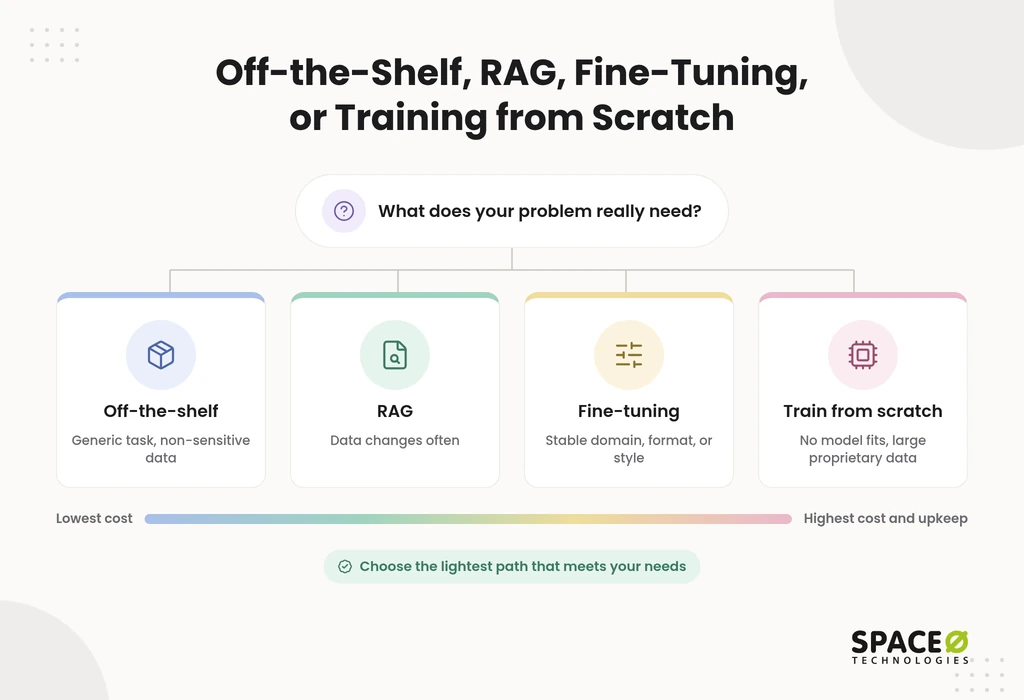
| Path | Best when | Data needed | Relative cost and effort | Retraining burden |
|---|---|---|---|---|
| Off-the-shelf tool or API | The task is generic, and the data is not sensitive. | Little or none of your own. | Lowest. | None; the vendor updates the model. |
| RAG | Data changes often and answers must reflect current internal facts. | Your documents and records, indexed for retrieval. | Moderate. | None; you update the source data. |
| Fine-tuning | The model must master a stable domain, format, or style. | A curated set of labeled examples. | Higher. | Retrain when the data or domain changes. |
| Training from scratch | No existing model fits, and you own large proprietary datasets. | Large volumes of labeled data. | Highest. | Full retraining cycles. |
Fine-tuning bakes knowledge into the model and needs retraining when data changes. RAG pulls current data at answer time without retraining. Many production systems use RAG first because it is cheaper to update.
When a custom build is the right call
Custom makes sense for proprietary workflows, strict data privacy, or legacy integration. If none of those apply, an existing tool is usually the faster path. Our guide to prebuilt vs. custom AI models covers the trade-offs in more depth.
Working with a development partner
If your team lacks AI engineers, the engagement model shapes cost and control as much as the technology does. Space-O Technologies offers four engagement models: Dedicated Team, Time & Material, Fixed Cost, and Staff Augmentation. We sign an NDA before every project, and all source code, data, and IP transfer to you at completion. Space-O Technologies has developed 300+ software solutions and reports 97% client retention.
Not Sure Which Path Fits Your Use Case?
Our AI engineers review your problem, data, and compliance needs with you. You leave with a recommended path, a first version scope, and a realistic budget range.

Whichever path you choose, the budget follows a similar pattern.
Where the Budget Goes in a Custom AI Build
Data preparation, not the model, is usually the largest cost line in a custom AI build. Most cost guides quote a single build price and stop there. The figures below show where the money actually goes, including the years after launch.
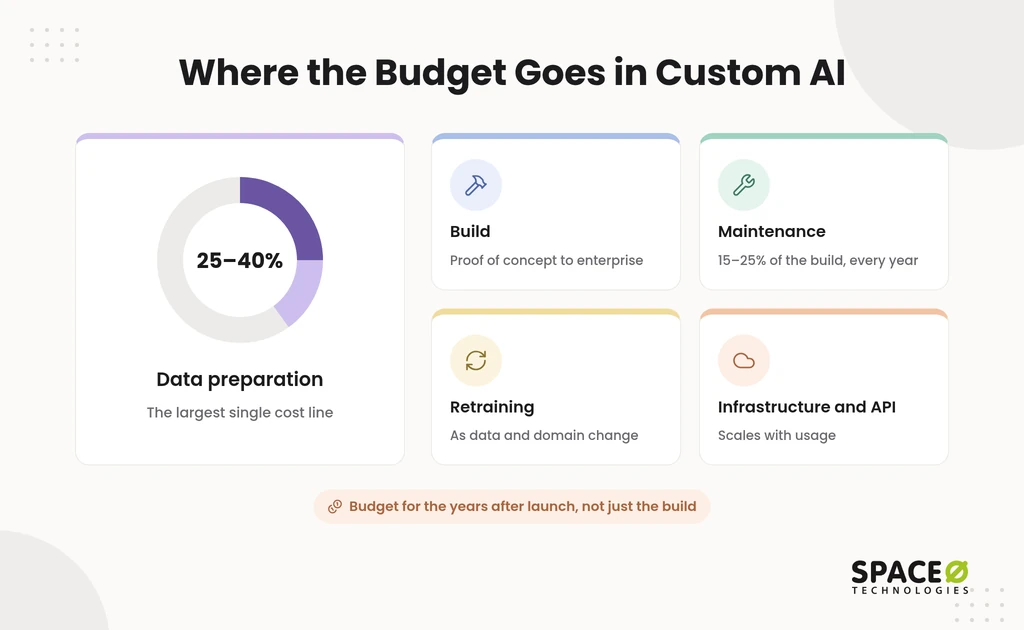
Data preparation can consume 25% to 40% of the total project budget, making it the single largest cost driver in an AI build. The table puts that figure next to the other lines a buyer should plan for.
| Cost item | Typical figure (USD) | What drives it |
|---|---|---|
| Data preparation | 25%-40% of the total project budget | Collection, cleaning, labeling, and structuring for retrieval. |
| Proof of concept | Starts near $15,000 | One narrow workflow built to test feasibility. |
| Basic minimum viable product (MVP) | Starts from $15,000 | Core features for first users, paid by milestones. |
| Feature-rich MVP | Up to $50,000+ | More workflows, integrations, and polish. |
| AI chatbots and virtual assistants | $25,000-$100,000 | Customer support, FAQ automation, and internal assistance. |
| Mid-level AI application | $80,000-$200,000 | Multiple workflows and system integrations. |
| Enterprise AI platform | Well past $500,000 | Custom models, deep integrations, and compliance controls. |
| Annual maintenance | 15%-25% of the original build, every year | Monitoring, updates, and fixes after launch. |
| Retraining cycles | $15,000-$60,000 per year | Refreshing models as the data and domain change. |
| Infrastructure and API usage | Scales with usage | Cloud hosting, model or API fees, and token volume. |
The takeaway is to budget for the data work and the years after launch, not just the build. Starting with a minimal first version keeps the early spend small while you prove the use case.
Who We Build Custom AI For
We build production AI for teams that need it running inside real workflows, not stuck in pilots. Space-O Technologies serves startups, SMEs, enterprises, and regulated teams in healthcare, fintech, lending, and insurance. SaaS companies can also get AI consulting for SaaS companies. Each group starts the seven steps from a different place.
- Startups and founders: Add AI features that set an MVP apart for investors and users. We built Glovo, a unicorn on-demand delivery app with 50M+ downloads.
- Small and mid-sized businesses (SMEs): Automate manual work with AI agents and chatbots connected to existing tools through APIs.
- Enterprises and regulated teams: Deploy generative AI, machine learning, and computer vision under documented compliance controls. Our compliance posture covers HIPAA-ready frameworks for healthcare AI engagements.
Clients rate our delivery on GoodFirms, and the same team supports your AI after launch. Tell us the problem you want AI to solve, and we will suggest the approach and stack that fit. Get a scoped plan for your custom AI build and a clear first step.
Frequently Asked Questions
How much does it cost to create an AI program?
A custom AI build costs from about $15,000 for a proof of concept to over $500,000 for an enterprise platform. A basic MVP starts at $15,000, and a feature-rich MVP can reach $50,000 or more. Mid-level AI applications run $80,000 to $200,000. Data preparation typically takes 25% to 40% of the budget. Maintenance adds 15% to 25% of the original build each year.
How to make artificial intelligence?
Define one problem with measurable KPIs, prepare data, choose an approach, build, test, deploy, and monitor. Pick the lightest path, such as RAG or fine-tuning, that meets your accuracy, privacy, and integration needs.
What are the 7 steps of AI?
The seven steps are: define the problem, prepare data, choose an approach, build a first version, test, deploy, and monitor. The order matters because each step sets up the next. Measurable KPIs from step 1 become the yardstick for testing in step 5 and monitoring in step 7.
Should I build a custom AI solution or buy an existing tool?
Start by checking whether a ready-made tool or a simple API wrapper solves the problem. Build custom only when off-the-shelf options cannot handle your workflow, data control, or compliance needs. Validating first reduces wasted spend before you commit a budget to development.
What is RAG and why does it matter for custom AI?
Retrieval-Augmented Generation (RAG) lets an AI model look up facts from your own files and databases. It does this at the moment it answers. It grounds the model in your proprietary data, which cuts hallucinations and keeps answers current. It also updates without retraining, so it fits data that changes often.
How long does it take to build a custom AI solution?
A proof of concept takes 4 to 8 weeks, and a basic AI feature takes 2 to 4 months. A mid-level AI application takes 4 to 7 months. A multi-workflow production system with human review and audit controls takes longer. We estimate your timeline from your scope during the define phase.
How do you stop a custom AI from making things up?
You ground it with RAG, test for hallucinations and bias before release, and monitor for model drift after launch. For high-stakes decisions, a person reviews the output before it takes effect. These controls work together because grounding alone is not enough.
Who owns the model and the code when Space-O Technologies builds your custom AI?
With Space-O Technologies, all source code, data, and IP transfer to you at completion, under an NDA. Rights to a foundation model you call through an API depend on the provider’s terms. So we confirm ownership terms during the definition phase.



 All our projects are secured by NDA




 4.8


