
 By

Contents
- Diagnose which layer is failing before touching prompts, because re-prompting only moves symptoms around.
- Move routing, math, and if/else rules out of the model and into deterministic, testable code.
- Check row-level security, client-side keys, and role enums before real users touch sensitive data.
- Revert to a clean Git checkpoint or rebuild the feature when each patch breaks something else.
Key Takeaways
To fix a poorly built AI application, find the failing layer first. The layers are code, prompts, data, security, and scale. Our AI development services team fixes the root cause, not the symptom.
AI tools like Cursor, Replit, Claude, Lovable, and Bolt generate working-looking code fast. They often skip clean data, isolated components, and a durable spec. Gartner predicted at least 30% of GenAI projects would be abandoned after proof of concept.
This guide gives you a symptom triage table and five fix stages. It also covers a security checklist and a patch-or-rebuild decision. Legacy apps follow the same sequence through our application modernization services.
Match the Symptom to the Failing Layer
Start by matching what you see to the layer most likely causing it. Most failing AI apps show a small set of symptoms, and each one points to a different repair. Use this table to choose your first check before you change any code.
| Symptom you see | Likely failing layer | First check |
|---|---|---|
| Wrong or invented answers | Prompts, context, or data | Is the model guessing outside its knowledge base? |
| Same input, different routing or math | Logic inside the model | Is the rule in code? |
| Fixing one bug breaks another feature | Code and architecture | Are features isolated and covered by behavior tests? |
| Users can see other users’ records | Security | Is row-level security enabled on every exposed table? |
| App freezes or times out under traffic | Scale | Are slow AI calls queued, rate-limited, and load-tested? |
| Agent loses track during long tasks | Context and state | Is state saved outside the chat? |
| Interface looks generic or cluttered | User experience | Is the layout locked, with one focal point? |
| Answers get worse over months | Model behavior | Are evals and drift monitoring running in production? |
Once you know the likely layer, the five stages below repair it in the order that limits damage.
1. Diagnose the Root Failure and Reproduce It
Find the root cause before you change anything, because arguing with the model moves symptoms without fixing them. Telling the AI “you’re wrong, try again” is not a repair. These five steps turn a vague complaint into a defect you can fix.
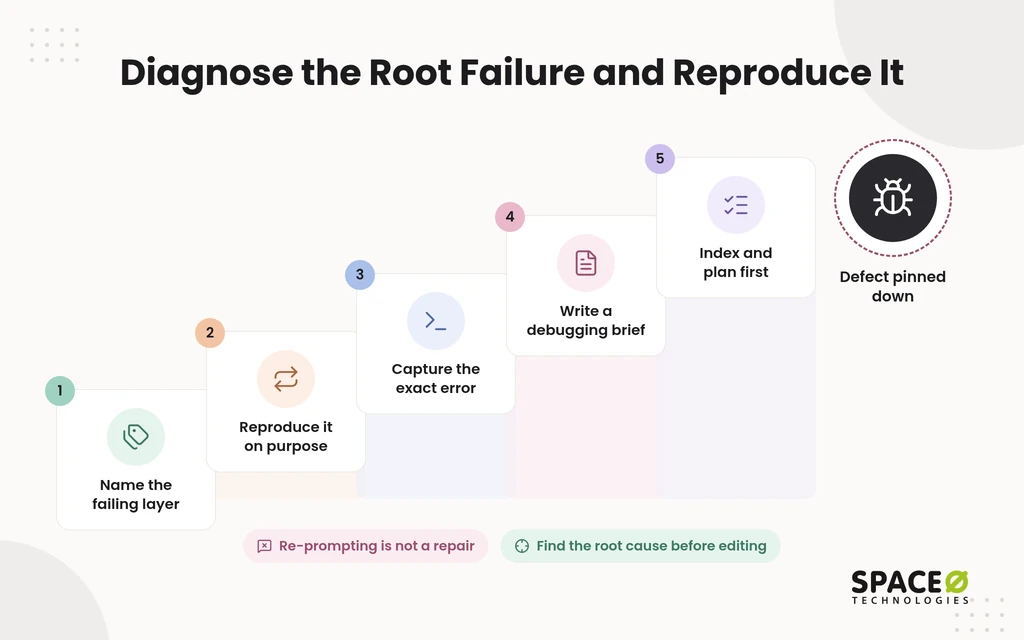
- Name the failing layer: Problem: teams re-prompt for every bug, whatever its cause. Fix: use the triage table above to label each defect by layer before anyone edits anything.
- Reproduce it on purpose: Problem: fixes for bugs nobody can trigger tend to spawn two new ones, a “hydra” cycle. Fix: find the exact input and steps that trigger the failure, then isolate it before editing.
- Capture the exact error: Problem: describing a symptom in vague words gives the AI nothing to work with. Fix: press F12 to open developer tools. Copy the console error and failed requests, then paste them in word for word.
- Write a debugging brief: Problem: one-line bug reports produce guesses. Fix: state the goal, expected behavior, exact error, and steps to reproduce. Then list what you tried and attach the relevant code.
- Index and plan before editing: Problem: AI tools change code they have not read. Fix: have the tool index the codebase and write a checklist file. Then build and test each change in small sections.
With the defect reproduced and documented, the next stage fixes what the model is told and what it reads.
2. Fix the Prompts, Context, and Data
Most wrong answers come from what the model is told and reads, so repair those inputs first. The data underneath it decides whether those prompts can ever work.
Prompts and context
Give each AI component one narrow job and explicit rules. A monolithic system prompt that tries to do everything fails everywhere. Effective agents do one job, not scheduling, policies, FAQs, and reporting at once.
- Give it one job: Problem: one assistant handles scheduling, policies, FAQs, and reporting, and blends them. Fix: split it into separate components with their own prompts, tools, and tests. Then route requests between them in code.
- Spell out rules and forbid guessing: Problem: the model fills gaps with plausible inventions. Fix: treat it like a junior intern and write firm boundaries. Tell it to answer “I don’t know” when the context lacks the fact.
- Trim bloated context: Problem: uploading extra material “just in case” makes the model slower and more confused. Fix: keep the system prompt minimal. Link to documentation and pass only the records the task needs.
- Supply your tribal knowledge: Problem: without your business rules, AI output stays generic. Fix: write down the rules and edge cases your team knows, such as refund limits or approval thresholds. Then feed them in.
- Refine rules, not code: Problem: teams rewrite code when the model misreads a policy. Fix: update the instruction document first and retest against the same cases. Change code only when the rule cannot express the fix.
If accuracy still lags, separate retrieval from reasoning. You can also test a smaller or different model against the same eval set. Some apps improve once search runs as its own step and the model only reasons over the results.
Data and the knowledge base
Fix the data the model and the app depend on, because broken data poisons every layer above it. AI-generated schemas often store everything in one flat table. That design duplicates records and silently corrupts them.
- Rebuild flat tables: Problem: one giant table stores customers, orders, and products together. Fix: split it into linked tables keyed by unique IDs, so records join cleanly instead of duplicating across rows.
- Enforce referential integrity: Problem: AI-generated schemas copy names and values into every row. Fix: let unique IDs connect related records. Then a customer’s renamed account updates once instead of drifting across hundreds of rows.
- Clean the RAG knowledge base: Problem: retrieval-augmented generation (RAG) systems retrieve contradictory or badly formatted documents. Fix: remove outdated versions, resolve conflicting facts, and standardize formats before re-indexing.
- State what the data does not cover: Problem: the model answers questions its knowledge base was never meant to handle. Fix: add negative constraints that name the topics out of scope, which cuts hallucination on those questions.
- Plan the migration: Problem: AI builders skip moving existing records into the new schema. Fix: map, test, and migrate data in stages across AWS, Azure, or GCP, with a rollback point at each stage.
If your app began on a no-code builder, plan the data export before you plan the rebuild. With clean inputs in place, the code that uses them comes next.
3. Repair the Code and Architecture
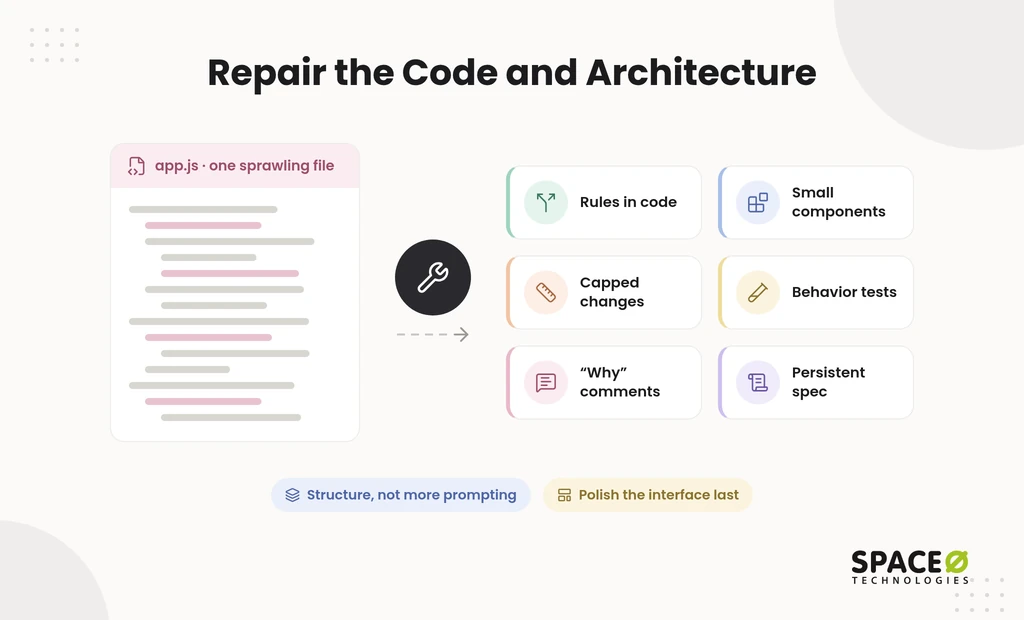
Restructure AI-generated code so deterministic logic, small components, and human-readable intent replace one sprawling file. Large single-file features cannot be tested, debugged, or extended safely. The fix is structure, not more prompting.
Separate logic and isolate components
Keep rules in code and keep every change small enough to review. An LLM (large language model) is a poor place for routing or arithmetic. Deterministic code gives the same answer every time and costs nothing per call.
- Move rule-based logic into code: Problem: the model decides routing, if/else branches, pricing, or math, and gets it wrong sometimes. Fix: write those rules as plain functions. Let the model handle only language tasks, such as summarizing free text.
- Isolate building blocks: Problem: one feature touches every file. Fix: rebuild each feature as a small component with a clear interface. Then you can test, replace, or roll it back alone.
- Keep changes atomic and capped: Problem: huge AI-generated diffs hide defects. Fix: keep functions under roughly 50 lines and most changes under 200 lines. Cap any pull request (PR) at 300 lines and flag AI-written files for review.
- Test behavior, not implementation: Problem: tests tied to internals break on every refactor. Fix: test what the feature does, not how it works. One example: “an order over the limit needs approval,” so internals can change safely.
Make the code understandable to people and tools
Code that works but that nobody understands is debt you will pay later. Ghost technical debt is AI-generated code that runs, but that no one on the team can explain. The fixes below keep intent written down where both humans and AI tools can read it.
- Write human “why” comments: Problem: nobody knows why AI-generated code makes a given choice. Fix: have developers, not the AI, write JSDoc (JavaScript documentation) comments. Add short “why” comments on business logic, such as “rounds down to match the invoice system”.
- Add a project context file. Problem: AI tools recreate helpers that already exist. Fix: keep a CLAUDE.md-style file listing existing utilities, naming conventions, and folder rules. Every session then reuses that code.
- Keep a persistent spec outside the chat: Problem: long chats compact their context, and the model forgets earlier decisions. Fix: maintain a spec file that states what each feature does and the rules it must follow.
Fix the interface layer last
Lock the layout and spec before you polish the interface. AI-generated interfaces drift with every prompt and often look generic. Freeze the page layout first. Then apply a spacing scale in multiples of 4 or 8 pixels, such as 8, 16, 24, and 32 px. Make one element the clear focal point. Where a chatbot adds friction, an auto-suggest field or a “magic fill” button may serve users better.
With the code readable and structured, the next stage closes the gaps attackers look for first.
4. Close the Security and Data Protection Gaps
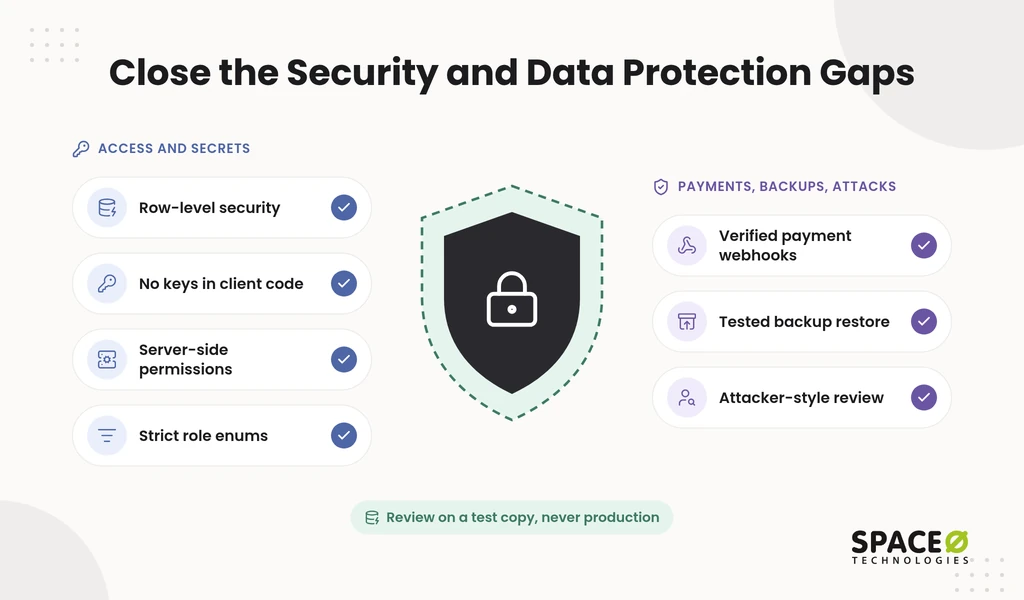
Review authorization, secrets, payments, and backups before real users or sensitive data reach the app. AI-built apps often ship with no privacy rules, permission checks only in the browser, and no tested recovery. These gaps stay invisible until someone exploits them. This checklist is a code-level review, not a penetration test, which is a separate engagement.
Access and secrets checks
The riskiest AI-built app gaps are data anyone can read and keys anyone can copy. Run these four checks on every table, environment file, and role field.
- Row-level security (RLS): Check that every table in an exposed schema has RLS enabled with explicit policies. A table without RLS is readable and writable by any role with a grant on it.
- Secrets in client code: Check that no API keys or service secrets ship in the browser bundle. Vite’s documentation warns that VITE_* variables should not contain sensitive information such as API keys, so move them server-side.
- Browser-only permission checks: Check that the server enforces every permission the interface enforces. Hiding a button does not stop anyone who calls your API directly. That is how AI-built apps can expose every user’s data to every user.
- Strict enums for role fields: Check that role fields accept only listed values. A role validated as any string, such as z.string() instead of z.enum([“user”, “admin”]). The first form lets a user submit “admin” and escalate their own privileges.
Payment, backup, and attacker checks
Assume something will go wrong, and confirm you can detect it and recover. These three checks cover the moments when money moves, data is lost, or someone probes the app.
- Payment webhooks: Check: your server verifies the signature on every Stripe webhook before acting on it. Without verification, an attacker can send fake payment events that mark unpaid orders as paid.
- Backups with a tested restore: Check: daily backups run, and someone has restored one into a test database. A backup nobody has restored is an assumption, not a recovery plan.
- Attacker-style review: Check: someone reviews the app like an attacker, trying other users’ IDs, skipped checkout steps, and oversized inputs. Run the review against a test copy of the database, never against production.
These checks are one layer of broader web application security best practices. Once access is locked down, the final stage proves the app holds up under real traffic.
Get a Root-Cause Audit Before Your Next Patch
We review prompts, code, data, and security layer by layer. Then we rank every fix by user impact so your team repairs the riskiest gap first.

5. Test, Scale, and Monitor Before Real Users Arrive
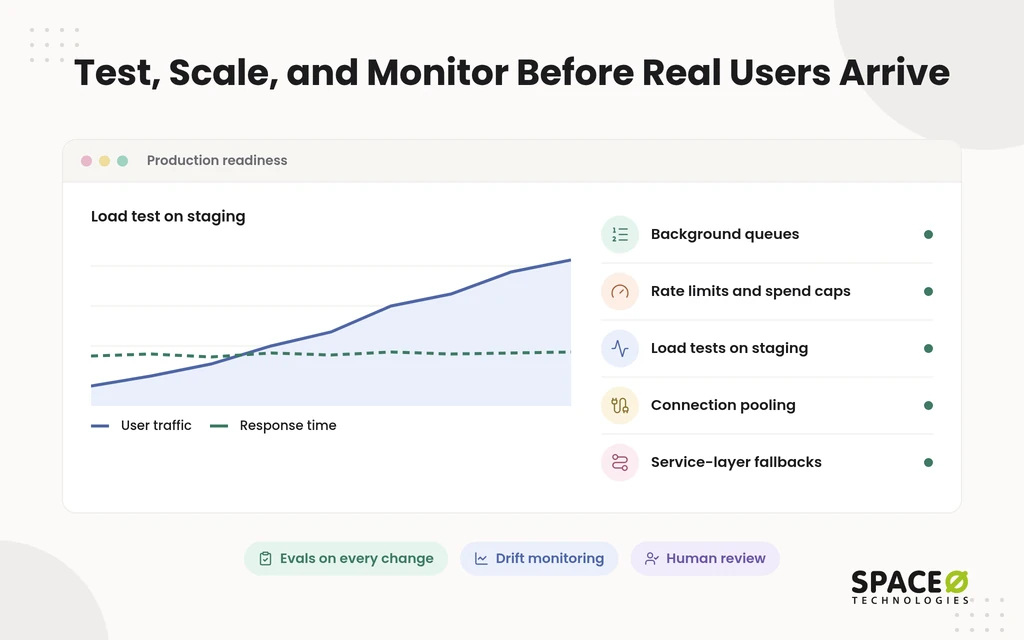
Prove the app survives real traffic, long tasks, and months of use before you call it fixed. Demos hide connection leaks, slow model calls, and gradual drift. This stage surfaces them on purpose.
Load and resilience fixes
Slow AI calls must never block the request a user is waiting on. These fixes keep the app responsive when traffic or model latency spikes.
- Background queues: Problem: slow model calls block requests and freeze the screen. Fix: move them to background jobs or queues, return immediately, and notify the user when the result is ready.
- Rate limits, retries, and spend caps: Problem: one busy user or retry loop can run up model bills. Fix: rate-limit paid endpoints, cap retries with backoff, and set spending limits with your model provider.
- Load tests on staging: Problem: leaks and timeouts stay hidden at demo traffic. Fix: run realistic load on staging with K6 or Artillery. Then confirm results through web application performance testing before launch.
- Connection pooling and cleanup: Problem: every request opens a new database connection until the database refuses more. Fix: add a connection pooler, close connections, clear timeouts, and cache repeated reads.
- Service layer with fallbacks: Problem: the UI calls the model directly, so one failure takes down the screen. Fix: route calls through a service layer with a timeout and a cached or rule-based fallback.
A worked example: the assistant that froze under load
This illustrative case shows every scale failure at once, and the fix touches three layers. Its AI drafted a reply on every ticket save, inside the same request. At demo traffic this worked, but real volume stacked up calls until saves timed out. The team moved drafting to a queue and capped retries. They also rate-limited the endpoint and load-tested before re-release.
Long agent tasks that derail
Keep agent state outside the chat so long tasks do not lose their place. As context bloats, agents skip steps or repeat them, a failure often called execution derailment. Gartner predicts over 40% of agentic AI projects will be canceled by the end of 2027. Model the workflow as a directed graph, where each step is a node with defined inputs and outputs. Write intermediate state to files or a database, so any step can resume without the full conversation.
Evals and drift monitoring
Define what a good answer looks like, then measure it on every change and in production. Evaluations (evals) are concrete examples of correct and incorrect output that you run before shipping. Observability logs each prompt, output, latency, and cost, so you can trace a bad answer to its cause. Drift monitoring flags when quality slips over time and triggers rule updates or retraining. A simple thumbs-up or thumbs-down control gives users a way to report bad answers.
Human review and governance
Decide who owns the outcome, who can halt the system, and who fixes it when the AI is wrong. AI accelerates a broken process rather than fixing it. Governance turns a working app into one you can trust.
- Name the owner: Assign one person accountable for the app’s outcomes. A bad result then has a clear place to land.
- Define the halt condition: Decide who can stop the system and under what circumstances. Settle it before a production failure forces the question.
- Set the error path: Document how a user reports a wrong answer, who investigates it, and how the fix is tested and released. Errors then close instead of recurring.
- Keep a human in the loop on consequential calls: On hiring, lending, clinical, and legal decisions, a person approves the outcome.
With all five layers tested, one decision remains: whether to patch, refactor, or rebuild.
Patch, Refactor, or Rebuild: How to Decide
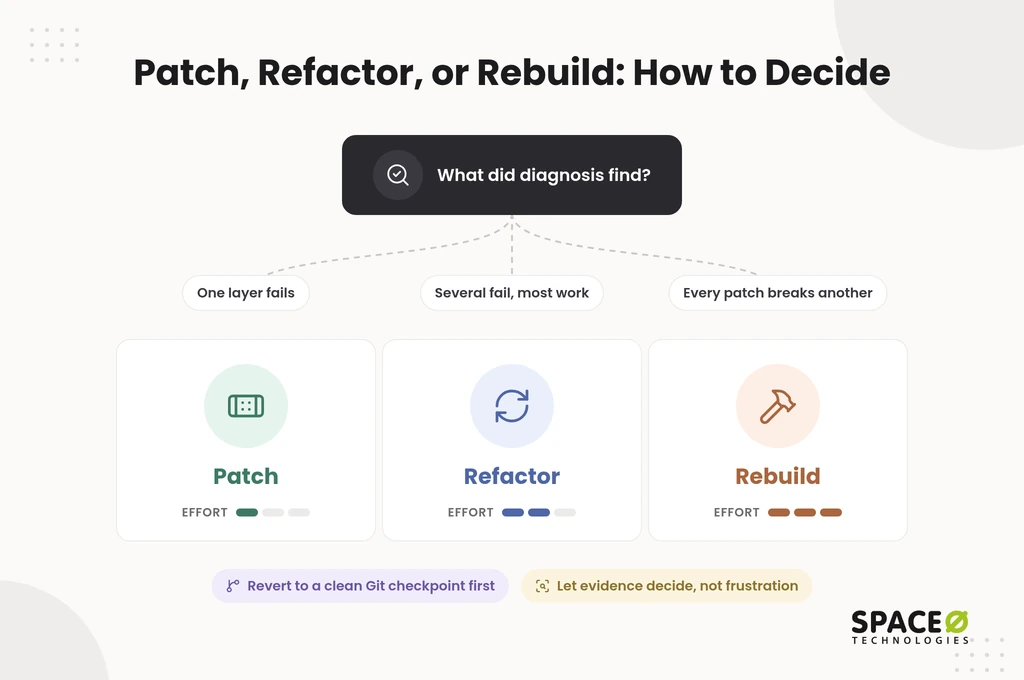
Patch when one layer fails, refactor when several fail, and rebuild when every patch breaks something else. The evidence from your diagnosis should make this choice, not frustration. One rule of thumb: if most of the app already works, refactor rather than rebuild.
| Option | When the evidence points here | Effort | Risk | What you own afterward |
|---|---|---|---|---|
| Patch in-house | One isolated defect in one layer, a known root cause, and tests already in place. | Low | Low with tests, high once patches start stacking. | The same codebase with one documented fix. |
| Audit and refactor with a partner | Several layers failing, most features working, and security gaps found. | Medium, scoped by the audit. | Lower, because each defect is traced to a root cause before it is fixed. | Refactored code, tests, and documentation. With Space-O Technologies, you own all source code and IP. |
| Rebuild | Flat data, no tests, and fixes that break other features, with no clean checkpoint to return to. | High | Highest in the short term, but it ends up compounding debt. | New code built from a clear spec, fully owned by you. |
Revert before you rebuild. If one feature is beyond repair, sync to a known-good Git checkpoint and rebuild that feature with a different approach. Stripping the broken feature out entirely is destructive, but it is often the cleanest path.
Bring in senior engineers for execution-order and state bugs. These defects hide across files and resist AI tools that read one file at a time. You can hire AI developers to join your sprints, or hand the full repair to a partner.
Before you choose, weigh an AI development company vs. a freelancer on ownership and accountability.
What Stays in the Model and What Moves to Code
The most durable fix decides, task by task, what the model should never decide. Here is the split we apply when we restructure an AI-built app. The test is simple: if a wrong answer is unacceptable and the rule can be written down, it belongs in code.
| Task in the app | Keep in the model | Move to deterministic code |
|---|---|---|
| Routing a request to a team or workflow | Only when the request is free text with unclear intent. | Whenever routing follows fixed categories or fields. |
| Prices, totals, tax, and limits | Never. | Always, with unit tests. |
| Permission and role checks | Never. | Always, enforced on the server. |
| Summarizing or classifying free text | Yes, with evals and grounding. | Post-checks such as length, format, and banned terms. |
| Drafting replies or documents | Yes, as a draft. | The approval step, which a person signs off. |
We also gate every fix before it reaches production. Every model we deploy sits inside an evaluation suite covering accuracy, hallucination rate, bias, latency, and cost. We also keep monitoring after launch. Automation handles the volume, but a qualified human reviews and approves before any output influences a final decision.
What a Dedicated Team Does When an AI-Built App Breaks at Scale
When an AI-built MVP works in a demo but fails under real users, more prompts will not help. The fix is a sequenced production-hardening remediation under one team. Space-O Technologies runs it as a full cycle: requirement analysis, UI/UX, agile development, QA, deployment, and maintenance.
- Audit: We diagnose the failing layers and document the root cause of each defect.
- Secure: We close authorization and secrets gaps first, because a leaked record is unrecoverable.
- Load test: We push the app to realistic traffic to surface hidden leaks and timeouts.
- Harden: We add the error-handling, fallback, and evaluation layers the build skipped.
- Migrate and modernize: We move data into a relational schema and code into maintainable services.
Space-O Technologies has built 300+ software solutions for 1,200+ clients since 2010. Our 140+ in-house developers start work after we sign an NDA. We report 97% client retention, and all source code, data, and IP transfer to you at completion.
Plan for annual AI maintenance of 15% to 25% of build cost, per our AI development cost guide.
Match Your AI App’s Symptom to the Right Fix
Tell us the specific failure, and we will map it to the layer that needs fixing. Is the app giving wrong answers, leaking data, freezing under traffic, or breaking a feature with every patch? It also helps to know which tool or stack built it, such as Cursor, Replit, Lovable, or Bolt. Share your symptom with our engineers for a scoped, expert-reviewed repair plan, and keep full ownership of your code.
Frequently Asked Questions
What AI can fix code?
AI coding tools can fix code when you give them the exact console error and relevant files. They work best when the codebase is indexed, and a written plan exists. They struggle with execution-order and state bugs that span several files. Those defects usually need a senior engineer.
How do I get my AI-built app audited?
Have two things ready: the specific symptom and the tool that built the app. Symptoms include wrong answers, data leaks, freezing under traffic, or features breaking with each patch. Tools include Cursor, Replit, Lovable, or Bolt. Also prepare a test copy of the database, because attacker-style reviews never run against production.
How do you fix a poorly built AI application?
Diagnose which layer is failing first. Then fix prompts, context, and data, repair the code structure, and close security gaps. Test under load and add human review before release.
What should you fix first in an AI-built app?
Fix security gaps first when real users or sensitive data are involved. Otherwise, fix the layer your diagnosis names as the root cause. A database repair only helps when bad data causes the failure.
How do you stop an AI coding tool from forgetting earlier decisions?
Write a persistent spec that lives outside the chat. Long chats compact their context and drift. A spec file describing features and rules gives every new chat the same memory.
How much does it cost to fix an AI-built app?
Cost depends on what an audit finds, so no flat price applies. Per Space-O Technologies’ AI development cost guide, annual AI maintenance typically runs 15% to 25% of build cost. Space-O Technologies offers a free, expert-reviewed estimate scoped to your app.
When should you hire a team instead of fixing it yourself?
Hire a team when real users, sensitive data, or traffic are involved. Security gaps and load failures need an audit and testing, not more prompting. Space-O Technologies works under four engagement models: Dedicated Team, Time & Material, Fixed Cost, and Staff Augmentation.
Should you patch, refactor, or rebuild a poorly built AI app?
Patch when one layer fails and you know the root cause. Refactor when several layers fail but most features work. Rebuild when every patch breaks something else, and no clean checkpoint exists.



 All our projects are secured by NDA





 4.8


