
 By
By 
Contents
People use computer vision wherever a machine needs to read an image, a video frame, or a scanned document. Computer vision use cases include detecting objects, checking for defects, recognizing patterns, tracking activity, extracting text, and automating visual inspections. The technology can also measure processes and analyze visual data to support faster, more accurate decisions.
Loads of businesses use computer vision systems to cut out slow manual checks and free data from paper documents. Our computer vision guide covers how the pipeline works before you get to specific applications. Applications of computer vision now span manufacturing, retail, logistics, healthcare, finance, and heavy industry.
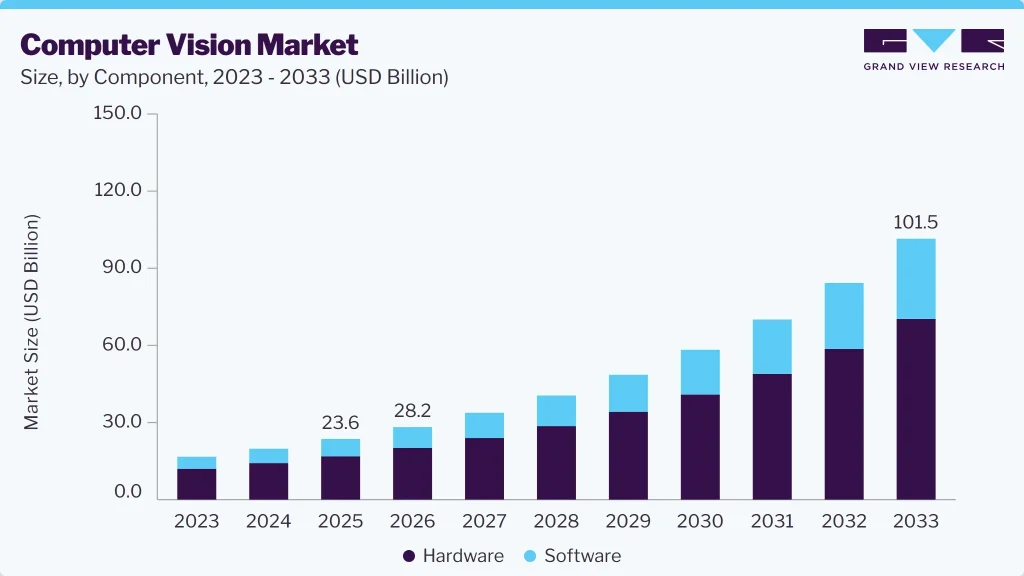
Grand View Research valued the global computer vision market at USD 23.6 billion in 2025. The market is estimated to reach USD 28.2 billion in 2026 and is projected to reach USD 101.5 billion by 2033, growing at a 20.1% CAGR from 2026 to 2033.
The right application depends on the business problem you are trying to solve, not the specific model. A warehouse tracking boxes and a hospital reviewing medical imaging both use computer vision. Each will be after a very different level of accuracy.
Not every team knows which application fits their operation, which is where computer vision consulting services come in. What follows covers where the technology fits, how to pick a use case, and what it costs.
Top 9 Computer Vision Use Cases and Applications
Within artificial intelligence, computer vision is the part that lets machines figure out what is going on in an image. Modern computer vision systems bring together deep learning, image processing, and feature extraction to turn raw pixels into useful output.
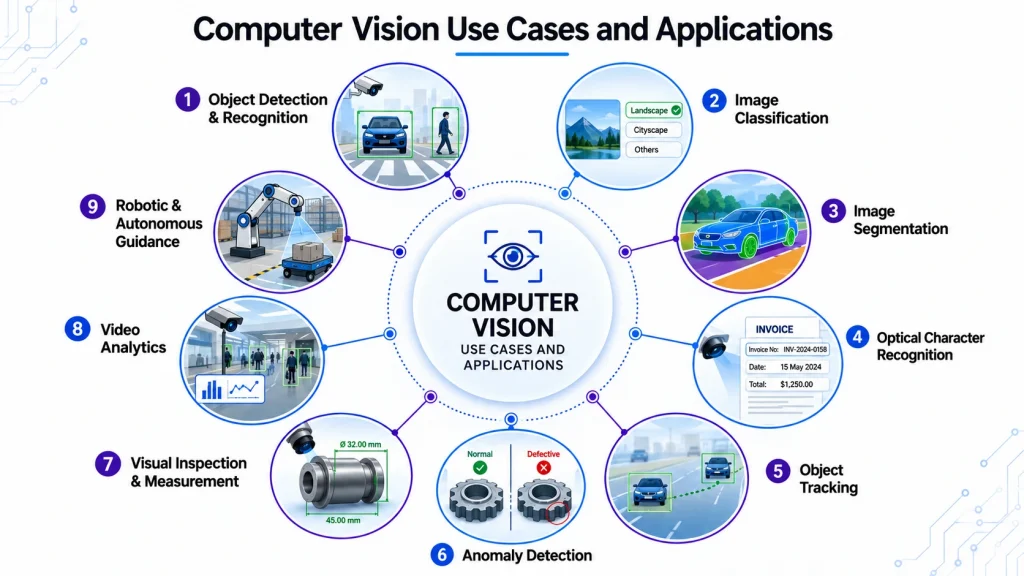
The top 9 main computer vision use cases cover most commercial computer vision applications. Understanding how computer vision works at the task level makes the industry sections a lot easier to evaluate. Machine learning pipelines handle the training that sits behind them.
1. Object detection and recognition
Object detection answers two really important questions all at once: what is present, and where is it? A model will then draw a box around people, vehicles, or products, and label each one.
Vision systems can identify objects in a still image, or follow multiple objects around as they move in a video.
2. Image classification
Image classification is a really simple concept. A model is given a whole image, and it has to assign a label to it. Digital images get sorted into classes such as damaged or undamaged.
Locating individual items in the picture is not the job here.
Convolutional neural networks are really good at learning feature extraction from training data. Image classification is also one of the most widely used computer vision tasks.
3. Image segmentation
Segmentation goes a step further than object detection. Rather than getting a box around an object, a model will label every single pixel in the image.
Segmentation is really useful for medical imaging, where you might be trying to measure the volume of a lesion. Image processing steps like denoising come first.
4. Optical character recognition
Optical character recognition is used to extract text from scans, forms, labels, and identity documents. The model will locate the text regions and then convert them into machine-readable characters.
Modern OCR is way better at handling handwriting and poor image quality than older template matching systems. Finance teams use it to read invoices, and logistics teams use it to read shipping labels.
5. Object tracking
Object tracking is all about following the same item across multiple video frames and giving it a unique identity. Detection confirms that something exists, while tracking works out where it went.
Tracking is really useful for measuring things like dwell time, queue length, and traffic flow. Shops use it to track shopper paths, and cities use it to model traffic flow.
6. Anomaly detection
Anomaly detection is all about flagging visual patterns that are not normal. Rather than learning every possible fault, the model learns to recognize patterns that represent correct output.
Manufacturers use it to detect defects, where human error tends to rise across long shifts.
7. Visual inspection and measurement
Visual inspection is all about checking whether a product meets spec. Measurement adds in dimensions, gaps, and fill levels.
Quality control teams rely on computer vision for automated inspection to ensure consistency. On assembly lines, computer vision verifies part presence and seal integrity in next to no time.
8. Video analytics
Video analytics is all about interpreting activity in a video, rather than just looking at individual frames. Models recognize patterns like loitering, falls, crowd density, and unsafe movement near machinery.
Continuous monitoring turns existing feeds into an alerting layer. Security systems use it to give perimeter alerts, and site managers use it to check safety protocols.
9. Robotic and autonomous guidance
Visual inputs give robots the spatial awareness they need to grip, place, and navigate. Autonomous vehicles use a combination of cameras, radar, and lidar to read lanes and pedestrians.
Onboard vision systems have to analyze visual data in milliseconds. Self-driving cars and warehouse robots both need to read the physical world inside complex environments.
Loads of teams are unsure which capability fits their needs. Many scope the problem properly before committing any budget.
Get a Working System, Not a Model in a Notebook
Our engineers build the annotation pipeline, deploy at the edge, and post results into your ERP. Low-confidence frames route to human review.

What Business Problems Can Computer Vision Solve?
Capability alone is not a good enough reason to start a project. You need to be solving a real operational problem with a clear owner.
Automating manual visual inspections
Manual inspection breaks down when volume increases, and every single unit needs checking at line speed. Computer vision can analyze visual data continuously without slowing down production.
Inspectors then move on to exception handling, where judgment actually adds value.
Reducing human error in visual tasks
Attention levels drop across a shift, and two inspectors will rarely apply the same threshold. A computer vision model applies the same criteria to every frame, so human error falls.
Detecting defects and anomalies
Some defects appear only once in ten thousand units, and manual sampling misses them. Anomaly models trained on correct examples will spot unusual patterns without a labeled example of every fault.
Extracting information from visual data
Invoices, delivery notes, and inspection photos all hold data trapped inside images. Computer vision systems will convert that content into structured fields that your software can query.
Monitoring people, products, and assets
Knowing where things are is a constant problem in warehouses and yards. Camera-based tracking gives near real-time position, without the need to tag every item.
Vision systems take a closer look at the visual data you already own. Inventory management gets a whole lot easier as a result.
Improving safety and compliance
You cannot fix a problem if you do not know it exists. Vision systems are always on the lookout for those small violations that nobody ever writes down.
Cameras spot missing protective gear or people wandering into restricted zones. Alerts come through while there is still time to fix things.
Increasing operational visibility
Managers are often stuck with reports that are way out of date. Computer vision turns your installed cameras into a live data source.
You can see exactly what is going on and what is slowing you down. Measuring throughput and getting a handle on equipment status becomes a lot easier.
The more you measure, the more you can do about improving operational efficiency across multiple sites.
Supporting real-time decision-making
Some decisions have a very short shelf life. A part out of alignment or a blocked aisle is a good example. If you do not act fast, things can get out of hand in a hurry.
Real-time computer vision solutions can give you a heads-up quickly enough to respond in time.
Turn Your Camera Feeds Into Usable Data
Talk through your visual data, accuracy targets, and site conditions with an engineer who scopes vision projects.
Computer Vision Use Cases by Industry
The applications for computer vision are all over the place, which is why they look so different in each industry. A production line camera and a CT scanner both produce images, yet accuracy targets and regulations vary widely.
Manufacturing
Manufacturing is one of the earliest industries to adopt computer vision at scale. Common applications include visual inspection, defect detection, assembly verification, and production monitoring. Cameras can check part presence, surface finish, and seal integrity as products move along assembly lines.
Quality control is a major computer vision use case in manufacturing. Automated inspection reduces repetitive manual work while creating a consistent and reliable audit trail for production processes.
Retail and e-commerce
Retail teams use computer vision for tasks such as shelf monitoring, planogram compliance, stock counting, checkout automation, and customer behavior analysis. Cameras can identify stock gaps faster than employees walking through aisles. Queue analytics can also alert staff when lines become too long, helping them open additional registers.
These retail computer vision applications help improve store operations, inventory visibility, and customer experiences.
Automotive
The automotive industry is where artificial intelligence, computer vision, and hard real-time constraints all come together at high speed. Driver assistance systems are reading lane markings, signs, and pedestrians all the time.
Driver monitoring cameras are watching out for drowsiness inside the cabin. On the production line, vision systems are inspecting paint finish and weld quality.
Autonomous driving is the holy grail here. The stack has to take camera data and fuse it with radar, lidar, and other sensor inputs.
Self-driving cars are the hardest case of all. The system needs to interpret visual data with no human fallback at any point.
Supply chain and logistics
Logistics teams use computer vision to identify packages, read labels, monitor warehouses, and verify loads. A camera at a dock door can confirm carton counts and read shipping labels as packages move through the facility. It can also detect visible package damage during loading and unloading, helping teams catch issues earlier.
These computer vision applications in supply chain help improve warehouse visibility, shipment accuracy, package handling, and overall operational efficiency.
Security and public safety
Video analytics in security systems is all about detecting events, rather than just recording them. Intrusion detection, perimeter monitoring, and abandoned object alerts all rely on object detection and tracking.
License plate recognition supports access control at gates and parking lots. Incident detection can shorten response times because the operator gets a heads-up instead of finding the problem later.
Deployments like this all raise data privacy concerns, so you need to define your retention rules first.
Healthcare
The global computer vision in healthcare market was valued at USD 3.7 billion in 2025. It is estimated to reach USD 4.4 billion in 2026 and is projected to reach USD 15.2 billion by 2033. Medical diagnostics remain a major driver, largely because healthcare generates vast amounts of medical imaging data. Deep learning models can analyze these images to support diagnostic workflows, patient triage, and monitoring.
These computer vision applications in healthcare can help healthcare providers improve imaging analysis while supporting clinical workflows and patient care.
Agriculture
Agriculture is a big source of visual data, from tractors, drones, and satellites. Computer vision takes that imagery and turns it into field-level decisions.
Crop health monitoring is all about identifying stress before symptoms are visible at ground level. Plant disease detection can identify leaf lesions early enough to contain outbreaks.
Weed detection lets you target your spraying, which means you can cut back on chemicals and save on operational costs. Packhouses use the same image recognition logic to inspect produce after harvest.
Finance and insurance
Financial services use computer vision to verify identities, process documents, inspect claims, and streamline routine workflows. Insurers can assess damage from customer-submitted photos, helping speed up claims processing. Banks can also use facial recognition to match a customer’s selfie with their identity document, with the customer’s consent.
These computer vision in financial services applications help institutions improve verification, automate document processing, and accelerate claims and other operational workflows.
Construction
Construction sites are constantly changing, which makes continuous monitoring a real game-changer. Fixed cameras and drone flights all help build up a visual record of progress.
Protective equipment detection flags up any missing safety gear in real time. Progress tracking lets you compare what is going on in the field against the schedule.
Safety protocols become measurable when you are observing compliance all the time.
Energy and utilities
Energy assets are often out of reach, which is why drone-mounted cameras come in handy. You can inspect power lines, pipelines, and even solar farms from the air.
Industrial automation programs bundle all these up into scheduled flights. Computer vision systems can then rank findings by severity.
Find the Right Computer Vision Use Case
Have a visual business problem to solve? Get expert guidance on feasibility, technology, development, and deployment.
Computer Vision Use Cases in Real-World Environments
Real-world applications really start to make sense when you see the full chain from camera to action. Getting a feel for how computer vision works from start to finish beats any list of capabilities.
A typical computer vision application goes through four stages: the environment, the visual input, the processing, and the action.
Production line inspection
- Environment: a blistering-fast packaging line.
- Visual input: cameras on the ceiling and to the side grab shots of every unit.
- Processing: a computer vision model compares each frame against good examples learned beforehand.
- Action: a reject arm pulls the offending unit out and logs the defect type. Operators get a real-time defect rate rather than a shift-end sample.
Warehouse and package tracking
- Environment: the dock and sortation area.
- Visual input: cameras look down on the conveyors and dock doors.
- Processing: detection software locates the cartons, and character recognition sorts out the labels.
- Action: the warehouse system gets an update, and any mismatches get flagged at the dock.
Store and shelf monitoring
- Environment: a grocery aisle that keeps getting more foot traffic.
- Visual input: shelf-mounted cameras stare down at the rows of products.
- Processing: models identify objects on the shelf and compare what they see against the planogram.
- Action: a replenishment task goes to the nearest associate. Out-of-stock times drop sharply because detection no longer waits for a store walk.
Road and traffic monitoring
- Environment: a busy signalized urban intersection.
- Visual input: pole-mounted cameras look out over each of the approaches.
- Processing: vehicles get detected, classified, and tracked across different frames.
- Action: signal timing gets adjusted on the fly, giving planners continuous traffic flow data.
Infrastructure inspection
- Environment: a power line crossing some pretty rough terrain.
- Visual input: high-resolution drone footage, all following a fixed route.
- Processing: computer vision algorithms detect corrosion, cracks, and overgrowth.
- Action: flagged assets enter a maintenance queue with location and severity noted. Instead of sending out a crew for routine sweeps, you dispatch them to actual problems.
How to Pick the Right Computer Vision Use Case for Your Business
You have got seven checks that tell you whether an idea is worth funding. The alternative is an expensive experiment.
1. Start by defining the business problem
Write this as a sentence about the operation at hand, rather than about artificial intelligence. Think about what is currently slow, inconsistent, or just plain invisible to your team.
Choosing the model first is why most pilots never end up in production.
2. Identify what visual data is available to you
Computer vision only works on pictures of the thing that is of real interest to you. Models can only really understand visual data that someone actually captured.
Take stock of the images, video archives, camera feeds, scanned documents, and medical imaging studies you have got lying around. Data quality matters more than volume here.
3. Determine just how accurate you need to be
Your accuracy targets should match up with the cost of being wrong. Missing a blemish is not the same as missing a crack in something that has to hold pressure.
A false negative that lets a defect slip through is one problem. A false positive that stops the whole line is a different kind of headache.
4. Consider real-time requirements
You need to split this requirement into three buckets. Real-time means milliseconds, as with autonomous vehicles. Near real-time means seconds, and batch means minutes or hours.
Latency ends up driving infrastructure cost a lot more than anything else.
5. Evaluate the operating environment
Lighting, motion blur, occlusion, weather, and vibration are the most common computer vision challenges in live deployments.
Take a walk around the site before you start scoping anything out. Fixing image quality at the camera end is a heck of a lot cheaper than compensating in software.
6. Put a business value on what you are planning
You need to quantify the outcome in terms your finance team will actually understand. Maybe that is manual hours removed, scrap reduced, or claims processed per day.
Cost savings and revenue gains are both of interest. Systems that streamline operations across different sites are a good reason to throw more engineering at a problem.
7. Decide between an API, a pretrained model, and a custom model
A hosted API will do for generic tasks like text extraction or object recognition. With a pretrained model, you get a bit more control at a lower cost.
Fine-tuning with transfer learning is a good idea when your domain is specific and labeled data is limited. Start at the cheapest option that gets you past your accuracy bar.
What Technology Do You Need to Implement a Computer Vision Use Case?
A successful computer vision system needs more than a trained AI model. It requires the right combination of cameras, data, processing infrastructure, integration, and monitoring. The following components form the core technology stack for implementing a computer vision use case.
| Technology Component | What It Does | Key Considerations |
|---|---|---|
| Cameras and Image Sources | Captures images or video for the vision system. | Consider resolution, frame rate, shutter type, lens, and lighting. Use global shutter cameras for fast-moving objects and thermal sensors when visible light is insufficient. |
| Data Collection and Annotation | Converts raw images into labeled training data using boxes, masks, and classes. | Include edge cases and real-world conditions to improve model performance. |
| Computer Vision Models | Detects, classifies, and segments objects or regions in images. | Common architectures include CNNs and transformers. Choose the model based on the required computer vision task. |
| Cloud vs. Edge Processing | Determines where images are processed and analyzed. | Cloud offers scalable computing and easier updates. Edge processing reduces latency and works well when data must remain on-site. |
| APIs and Backend Integration | Connects model outputs with business systems and workflows. | Define event schemas, confidence scores, timestamps, and integration requirements early. |
| Model Testing and Validation | Measures how well the model performs on unseen, real-world data. | Track precision, recall, and commercially important error cases. Test under actual operating conditions. |
| Monitoring and Model Improvement | Tracks model performance and supports ongoing retraining. | Monitor confidence scores and performance drift. Retrain models using corrected examples as conditions change. |
These components work together to turn a computer vision model into a reliable production system. The right stack depends on your use case, data volume, accuracy requirements, processing needs, and existing infrastructure. Planning these requirements early can reduce development risks and avoid costly changes later.
Not Sure Which Approach Your Use Case Needs
Get an honest read on API versus custom model, edge versus cloud, and what your existing camera footage can deliver.
How to Implement a Computer Vision Use Case
Eight steps take computer vision applications from problem statement to a monitored production system.
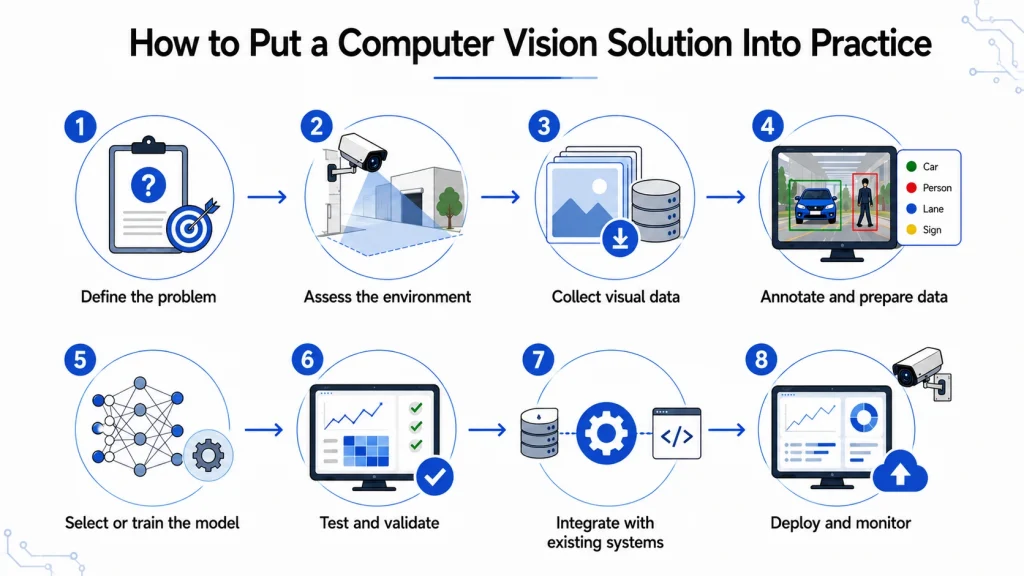
Step 1. Define the problem
You need to write down the actual operational decision the system will support. Note what a correct output is supposed to look like.
Agree on the accuracy threshold and the kind of error you are willing to live with, in the same conversation.
Step 2. Assess the environment
Snap some photos of the site as the camera is actually going to see it. Record the lighting levels throughout the day, and figure out what reflections and obstructions are in the way.
Any environmental fixes you make now will reduce the complexity of the model and cut costs later.
Step 3. Collect visual data
Get some captures from the actual camera position, since lab data usually does not make it to production.
Make sure to cover every variation the system is going to see. Get deliberate examples of things that rarely happen.
Step 4. Annotate and prepare data
Create an annotation guide with worked examples of the ambiguous cases before the labeling even starts.
Split the dataset into training, validation, and test sets. Make sure that none of them share clips from the same source.
Step 5. Select or train the model
Try out a hosted API or a pretrained model first, and see how it compares to your accuracy threshold.
Where it falls short, adapt a pretrained network. Train models in an iterative fashion, and keep track of the results from every run.
Step 6. Test and validate
Evaluate on data the model has never seen before, then run a shadow deployment alongside the current process.
Compare the model against what a human would do. Confirm that the inference speed is actually good enough for production hardware.
Step 7. Integrate with existing systems
Get the model output connected to the system that actually acts on it. Build the interface that lets operators override things if needed.
Define what happens on low confidence, camera failure, and network loss.
Step 8. Deploy and monitor
Roll it out to one line or one site first. Measure against the metric you agreed on in step one.
For teams that do not have in-house expertise, computer vision development services usually take over the build and handover.
Benefits of Implementing Computer Vision
Each benefit below points back to computer vision applications already covered.
1. Automate repetitive visual tasks
Label checks, carton counts, and form transcription can consume hours and hours of skilled attention. Automating those visual tasks frees people up for work that actually needs some judgment.
2. Improve inspection and accuracy
Camera-based checking applies one standard at full line speed. Defect detection improves in all sorts of areas where manual sampling only covered a tiny fraction of output.
3. Enable real-time monitoring
Live monitoring of aisles, docks, and work zones surfaces problems while they are still correctable.
4. Improve operational visibility
Cameras become a measurement layer. Dwell time, throughput, and equipment status become actual planning metrics.
5. Support faster decisions
An alert at detection is a heck of a lot better than a report tomorrow morning. Faster decisions cut operational costs and support operational efficiency in high-throughput environments.
6. Scale visual analysis
A hundred cameras do not need a hundred inspectors. Computer vision applications scale with compute, so efficiency gains compound pretty quickly.
Together, these benefits show how computer vision can turn visual data into faster, more consistent, and scalable business operations. If you are evaluating providers, compare top computer vision companies based on their industry expertise, technical capabilities, and development experience.
When Do You Need to Hire Computer Vision Developers?
Vision engineering is a lot different from general application development. Model behavior, data pipelines, and camera realities sit way outside standard web skill sets.
Consider bringing in dedicated developers when your project involves:
- Building and training a custom computer vision model on proprietary data
- Optimizing for accuracy or inference speed on constrained hardware
- Integrating detection output into enterprise applications
- Developing real-time systems with very tight latency budgets
- Deploying and maintaining models at the edge across multiple sites
Space-O Technologies works with 140+ in-house developers and has served 1,200+ clients with a 97% client retention rate. Teams needing this capability quickly can hire computer vision developers on a dedicated basis.
Find the Vision Project Worth Your Time
Show us your footage and target outcome. Our engineers will tell you what is feasible, what it takes, and what it costs.
FAQs About Computer Vision Use Cases
What are the most common computer vision use cases?
People use computer vision for visual inspection, object detection, text extraction, video analytics, and identity verification. Manufacturers inspect their products, logistics teams read labels, and retailers monitor shelves. Healthcare providers also use computer vision for medical imaging analysis.
What industries use computer vision?
Manufacturing, retail, logistics, healthcare, finance, automotive, agriculture, construction, security, and energy are major computer vision adopters. Any sector that produces large volumes of visual data can benefit from computer vision applications. Adoption often starts where visual monitoring is repetitive.
What problems can computer vision solve?
Computer vision solves problems involving manual visual checking, inconsistent judgment, and inaccessible document data. Typical outcomes include consistent inspection, fewer mistakes, faster document processing, and real-time alerting. The technology fits situations where decisions depend on someone visually examining something.
What are some real-world examples of computer vision?
Real-world examples include reject systems on packaging lines and label reading at dock doors. Other examples include shelf gap detection and drone-based power line inspection. A camera captures the scene, a model interprets it, and the output triggers an action.
What is the difference between computer vision applications and use cases?
An application describes the technical capability, while a use case describes the business situation where it is applied. Object detection is an application, while counting pallets at a yard gate is a use case. Buyers evaluate use cases, while engineers build applications.
Can computer vision be customized for a specific business?
Yes, models can be trained on your own images to recognize products, defects, or environments unique to your operation. Customization usually involves fine-tuning an existing model with labeled business-specific data.
How do I choose the right computer vision use case?
Start with the operational problem, then check whether you already have usable visual data. Set an accuracy threshold based on the cost of making a wrong decision. Assess the environment and estimate the potential business value before choosing a model.
Do I need a custom computer vision model?
Not always, and starting with a custom model is usually unnecessary. Test a hosted API or pretrained model against your required accuracy threshold first. Custom development is justified when the visual problem is highly specific or existing models cannot meet your requirements.
How is computer vision used with generative AI?
Generative and multimodal AI can enhance computer vision by adding reasoning and context to visual outputs. A vision model identifies what appears in an image, while a multimodal system combines that information with contextual knowledge to trigger or support a workflow.
How do you implement a computer vision solution?
Implementing a computer vision system involves eight stages: define the goal, assess the environment, collect data, and annotate it. After that, choose a model, validate it, integrate it, and deploy it. Data collection and annotation often take the longest during implementation.



 All our projects are secured by NDA




 4.8
4.8

