
 By
By 
Contents
- Add AI through an API, middleware, or orchestration layer instead of rewriting the core system.
- Five patterns cover most cases: API wrappers, middleware, sidecars, MCP, and RPA.
- Start with read-only access, run in shadow mode, and scale only when the metrics hold.
- Quick takeaway: choose the pattern by what your legacy system can expose.
Key Takeaways
AI integration with legacy applications adds AI to old systems without a full rewrite. An API, middleware, or orchestration layer translates between legacy formats and AI services. Your system of record keeps running while AI adds new capability.
Mainframes, ERPs, and CRMs still run daily operations. Their data sits in silos, and few have modern APIs. Teams that integrate AI into legacy software through application modernization services often stall at this point.
A rewrite costs years and puts live operations at risk. This guide covers five patterns, four challenges, and a seven-step rollout plan. Space-O Technologies builds the integration layer and the governance controls around it.
Core Integration Patterns for Adding AI to Legacy Systems
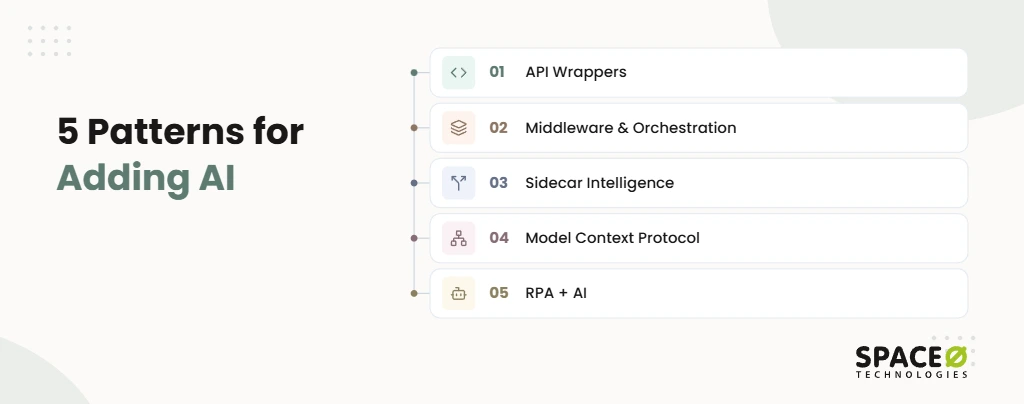
Five patterns let you add AI without rewriting the core: API wrappers, middleware, sidecars, MCP, and RPA.
Your mainframe or enterprise resource planning (ERP) suite still runs the business. The same goes for your customer relationship management (CRM) platform. The trouble is that these systems use protocols modern AI cannot read. Each pattern below closes that gap in a different way.
- API Wrappers: A representational state transfer (REST) application programming interface (API) sits over the legacy core. It exposes core functions as clean, documented endpoints (built in Node.js or Python Flask, documented in Swagger). AI services call the wrapper and never touch the core directly.
- Middleware & Orchestration Layers: Middleware translates old protocols and data formats into ones AI models can use. Those models include machine learning, natural language processing (NLP), and generative AI, which machine learning development services can build and tune. The layer also handles authentication, queueing, and routing. Event streams (Apache Kafka) keep legacy and AI systems in sync without tight coupling.
- Sidecar Intelligence: The AI runs beside the system of record, not inside it. It classifies, scores, or summarizes records and returns results through an approved interface. The legacy business logic stays untouched.
- Model Context Protocol (MCP): MCP gives AI agents one shared client-server hub for reaching legacy tools and data. It replaces fragile point-to-point links between each agent and each system.
- RPA + AI: Robotic process automation (RPA) drives the user interface when a system has no API. Treat it as a fallback only. Direct APIs are more reliable because screen-scraping breaks whenever a screen layout changes.
Key Challenges and Solutions
Most legacy AI projects stall on four problems: siloed data, missing APIs, security gaps, and limited compute. Each one has a proven fix that leaves the core system in place. Deloitte’s State of AI in the Enterprise report says legacy data architectures cannot power real-time, autonomous AI.
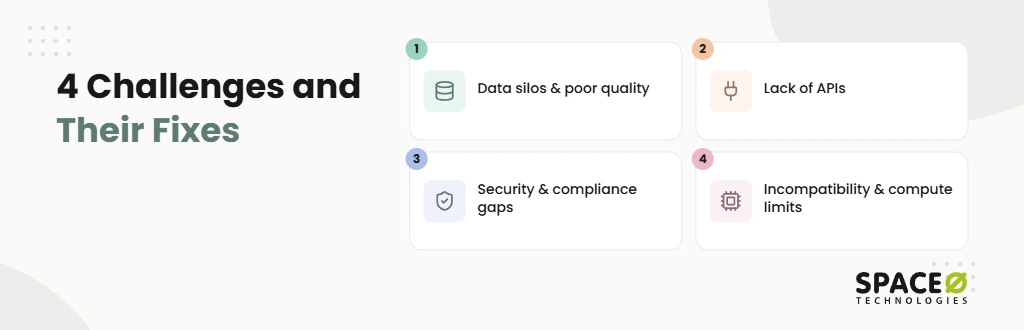
- Data silos & poor quality
Challenge: Records sit in siloed databases with duplicates and inconsistent naming.
Solution: Extract, transform, load (ETL) pipelines (Talend or Informatica) clean the data. They then move it into a data lake or warehouse (Snowflake or Microsoft Fabric).
- Lack of APIs
Challenge: Many mainframe and COBOL applications were never built to share data with outside services.
Solution: Use API integration services to add a wrapper or middleware layer exposing only the functions AI needs.
- Security & compliance gaps
Challenge: Older systems often lack audit trails and fine-grained access control. Many also lack masking of personally identifiable information (PII).
Solution: Enforce zero trust, role-based access control (RBAC), audit logging, and PII masking at the integration layer.
- Technical incompatibility & compute limits
Challenge: Legacy hardware cannot run modern models, and old runtimes clash with new libraries.
Solution: Package AI services in containers (Docker, Kubernetes) and run inference on cloud compute.
AI-Assisted Legacy Code Understanding
Large language models (LLMs) can read legacy code and documentation, then explain what a system does before anyone changes it. The biggest risk is often business logic nobody remembers writing. The original developers may be gone, and the documentation may be out of date.
- Business rule extraction: LLMs read source code (COBOL, RPG, Java) and logs, then state the rules in plain English.
- Dependency mapping: The model traces which programs, tables, and jobs call each other.
- Change impact assessment: Teams see the “blast radius” of a change before they make it.
- Architecture diagrams: The model generates Mermaid diagrams that show how the legacy system fits together.
- User stories: Extracted logic becomes user stories that product owners can review and prioritize.
An engineer reviews every output against characterization tests before it guides a real change. The AI speeds up understanding. People still own the decisions.
Step-by-Step Implementation
A safe rollout starts with an audit and one narrow pilot. Scale only after the AI proves itself in shadow mode. The payoff is real: PwC’s 2026 AI Jobs Barometer finds productivity growth is 40% higher at the companies most exposed to AI.
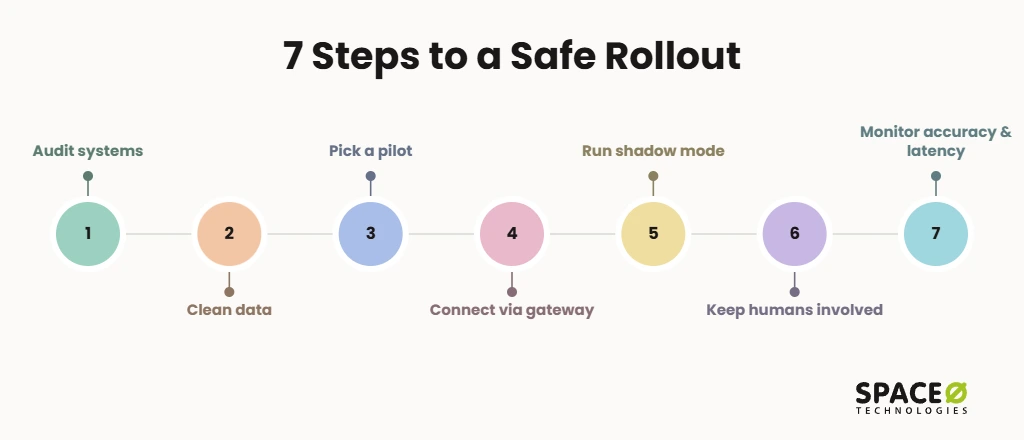
- Audit systems and map dependencies: List every legacy application, database, and job the AI might touch.
- Clean and standardize data: Remove duplicates and normalize naming conventions in the data the pilot needs.
- Pick one low-risk, high-impact pilot: Good candidates include ticket triage, anomaly detection, and inventory forecasting.
- Connect through an API gateway or middleware: Route AI traffic through the integration layer, never by altering the core database.
- Run in shadow mode: The AI produces outputs next to the existing workflow, and nothing acts on them yet.
- Keep humans in the loop: People approve high-stakes decisions, even after the pilot succeeds.
- Monitor accuracy and latency, then scale: Expand to the next use case only when the metrics hold. Use this guide to scale AI proof-of-concept projects when you expand beyond the first pilot.
Governed AI on Legacy Systems: What the AI May Read, Recommend, or Change
Governed AI means deciding before launch what the AI may read, what it may recommend, and what it may change. On legacy systems, a read connection can quietly grow into write access. One bad write to a system of record can corrupt years of records.
What are the three permission levels?
Every AI integration should sit at one of three explicit permission levels.
- Read: The AI queries masked data and returns answers. It cannot alter any record.
- Recommend: The AI drafts an action, such as a claim decision or a code fix. A person accepts or rejects it.
- Change: The AI writes back to the legacy system, but only through approved API endpoints, with full audit logging.
Most integrations should start at Read and move up only one level at a time. Our AI development services team works this way, with evidence required at each step before moving up.
How does Space-O Technologies govern AI by default?
We apply Responsible AI controls to every legacy integration before it reaches production.
- No training on client data: Your records never improve someone else’s model.
- PII masking: Sensitive fields are masked before any model sees them.
- Hallucination and bias testing: We evaluate outputs from our generative AI development services against grounded source data before release.
- Human review for high-stakes decisions: People approve lending, clinical, and other consequential outcomes.
US data residency is available for regulated workloads.
AI Integration by Legacy Stack
The right approach depends on what your legacy system can expose: an API, a database, or only a screen.
How do you add AI to COBOL and mainframe systems?
Wrap mainframe transactions in REST APIs and let AI work through that layer. LLMs first document the COBOL logic so engineers know what each program does. The mainframe keeps processing transactions as it always has.
How do you add AI to IBM AS400 and RPG applications?
Expose AS400 data through middleware or an API wrapper, then run AI as a sidecar. LLMs can explain RPG programs that few current staff can read. Where no interface exists, RPA can bridge the gap while an API is built.
How do you add AI to an on-premises ERP?
Connect through the ERP’s existing APIs or an integration layer, never by editing core tables. ERP integration services let AI forecast inventory, flag invoice anomalies, or summarize supplier records. Results return to the ERP through approved endpoints.
How do you add AI to legacy SQL or Microsoft Access databases?
Copy data into a cleaned store and point AI at the copy, not the live database. ETL pipelines or change data capture (CDC) keep the copy current. Vector databases can then support search and question-answering over that data.
How do you add AI to monolithic.NET or Java applications?
Add AI as a separate containerized service that the monolith calls through an API. This avoids breaking a large shared codebase. LLMs can also map the monolith’s dependencies before any refactoring begins.
How do you add AI to legacy desktop applications?
Expose the desktop app’s data through a backend API, or use RPA when that isn’t possible. Many desktop tools store data in local databases that a wrapper can reach. This step often comes alongside a wider on-premises-to-cloud move.
AI Integration by AI Feature
Most legacy AI features fall into four groups, and each one maps to a preferred pattern. Our guide to AI integration in software development covers the wider picture.
Can you add an AI chatbot to a legacy system?
Yes, a chatbot can answer from legacy data through an API wrapper or MCP hub. It starts with read-only access to order, account, or policy records. Any transaction it suggests goes to a person for approval.
How does automated data extraction work with legacy systems?
AI reads documents, emails, or forms and enters structured data through an API. This replaces manual re-keying into ERP or CRM screens. RPA handles entry only where no API exists.
Can AI predict maintenance needs from legacy data?
Yes, a sidecar model can score equipment or job logs and flag likely failures. It reads history from the legacy database or a data lake. Alerts go to existing work-order systems.
Can AI help refactor legacy code?
AI can propose refactoring steps, but engineers must review and test every change. LLMs explain the code, map dependencies, and suggest modern equivalents. Characterization tests confirm that behavior stays identical.
How to Choose the Right Pattern for Your Legacy System
Pick the pattern by what your legacy system can expose, then set the AI’s permission level and rollback path. Each constraint below gives the recommended pattern, what the AI may do, and how to roll it back.
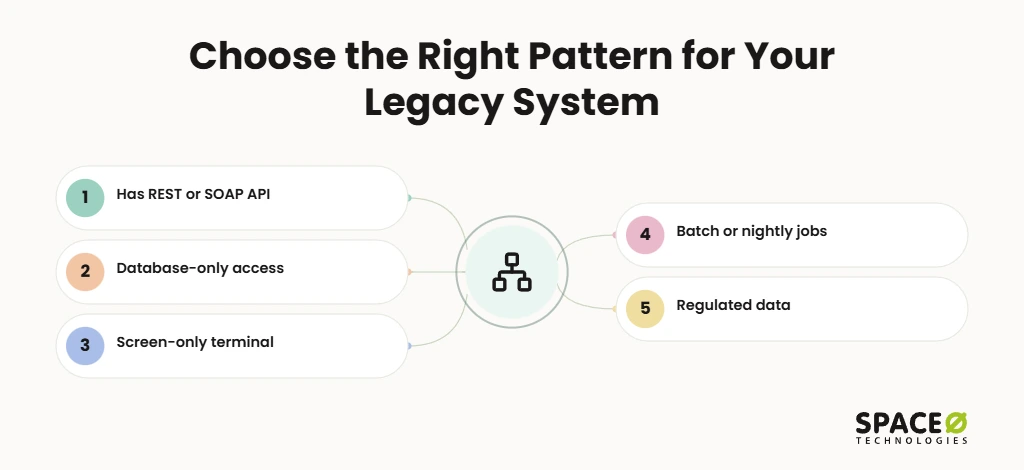
- Has a REST or SOAP API: Pattern: API wrapper or MCP hub. AI may: read and recommend, with write-back through existing endpoints after approval. Rollback: disable the AI route at the gateway.
- Database-only access: Pattern: sidecar intelligence fed by CDC or ETL into a separate store. AI may: read and recommend, with no direct writes to core tables. Rollback: stop the sidecar while the legacy workflow continues unchanged.
- Screen-only terminal: Pattern: RPA + AI as a temporary bridge while an API is built. AI may: read and recommend, while a person executes any change. Rollback: switch the bot off and return to manual entry.
- Batch or nightly jobs: Pattern: middleware with event streaming (Apache Kafka) or batch scoring. AI may: recommend, with results loaded in the next batch run. Rollback: exclude AI outputs from the next batch.
- Regulated data: Pattern: any of the above, with PII masking and RBAC at the integration layer. AI may: read masked data and recommend only. Rollback: revoke the integration’s access role. Review gate: human approval for every consequential decision.
The same review gate applies to every row. Space-O Technologies routes low-confidence outputs to a qualified person for review. Hiring, lending, clinical, and legal decisions need a qualified person’s approval.
Cost depends on scope, data readiness, and the chosen pattern. Data preparation takes 25% to 40% of the total project budget. Yearly AI maintenance runs 15% to 25% of build cost, per our AI development cost guide.
Not Sure Which Pattern Fits Your Legacy System?
Our engineers review your stack, data, and risk limits. You get a recommended pattern, permission level, and a free, expert-reviewed estimate with a clear rollback plan.

Why Space-O Technologies for AI Integration with Legacy Applications
You need a partner that has shipped AI to production and also understands the systems it connects to. Space-O Technologies has built software since 2010 for 1,200+ clients worldwide.
- Production AI track record: 50+ AI systems in production, built by 30+ AI engineers within 140+ in-house developers.
- Verified AI partnerships: OpenAI Select Partner, AWS Partner, and Claude Certified Architects.
- Legacy and integration depth: We modernize legacy desktop and on-premises systems through API modernization services and move them to the cloud. We also build API integrations with CRMs, ERPs, and payment systems.
- One partner across the stack: Software, AI, ERP, CRM, and ServiceNow work stays with one team.
- Flexible engagement: Choose fixed cost, time and materials, or a dedicated team, with a dedicated project manager and daily updates.
Frequently Asked Questions
Can AI be integrated into legacy systems without replacing them?
Yes, AI connects to legacy systems through an API, middleware, or orchestration layer, so no rewrite is needed. The layer translates between legacy formats and modern AI services. The legacy system stays the system of record while AI adds new capability around it.
What is the Model Context Protocol (MCP) and how does it apply to legacy systems?
MCP (Model Context Protocol) is a client-server protocol that gives AI agents one shared hub to legacy tools and data. Teams connect each system to the hub instead of building fragile direct links between every agent and system.
Can agentic AI work with legacy systems?
Yes, agentic AI works with legacy systems when agents reach them through a controlled layer, not the core directly. Use an MCP hub or an API wrapper as that layer. Give each agent an explicit permission level: read, recommend, or change. Allow write-back only through approved endpoints with full audit logging.
What can AI do with a legacy application that has no API?
AI can still work with a legacy system that has no API of its own. It can do this through RPA, or through a sidecar model that works alongside the system. RPA with AI can drive the application’s user interface to read screens and enter data, acting as a temporary bridge. A sidecar model can also work from a copy of the data pulled by ETL or change data capture. Both routes should start at read or read-and-recommend permissions, with a person executing any change.
What do I need in place before connecting AI to a legacy system?
Before connecting AI, you need an application inventory, a dependency map, clean pilot data, and an integration layer. The layer can be an API gateway or middleware. Security controls belong there too: zero trust, role-based access control, audit logging, and PII masking.
How do you secure legacy data when connecting it to AI?
Enforce security at the integration layer, because older systems often lack audit trails and access controls. Apply zero trust, role-based access control, audit logging, and PII masking there. Mask sensitive fields before any model sees them.



 All our projects are secured by NDA




 4.8
4.8

