
 By
Contents
- Slack and Teams each offer native agents, but each route stays inside one platform.
- One agent with platform adapters serves both, rendering Block Kit in Slack and Adaptive Cards in Teams.
- Managed platforms are faster, but they add a third party and its permission scopes to review.
- A governed rollout needs scoped permissions, human review, PII masking, and testing before launch.
- Choose native, managed, or custom by control, data ownership, and cross-platform reach.
Key Takeaways
Your team lives in chat, and your AI agent should too. But many companies run both Slack and Microsoft Teams. That often means two agents, two setups, and two sets of risks.
AI agent integration with Slack and Microsoft Teams starts with one choice. You can use native agents, a managed platform, or a custom build. Each route trades speed against control, data ownership, and cross-platform reach.
Space-O Technologies has built AI-powered custom software since 2010. This guide compares the three routes and shows how to govern each rollout. For deeper agent design, see our AI agent development company page.
What are the native ways to run an AI agent in Slack and Microsoft Teams?
Each platform offers its own native agent route. Your first option is to use what Slack and Microsoft already provide.
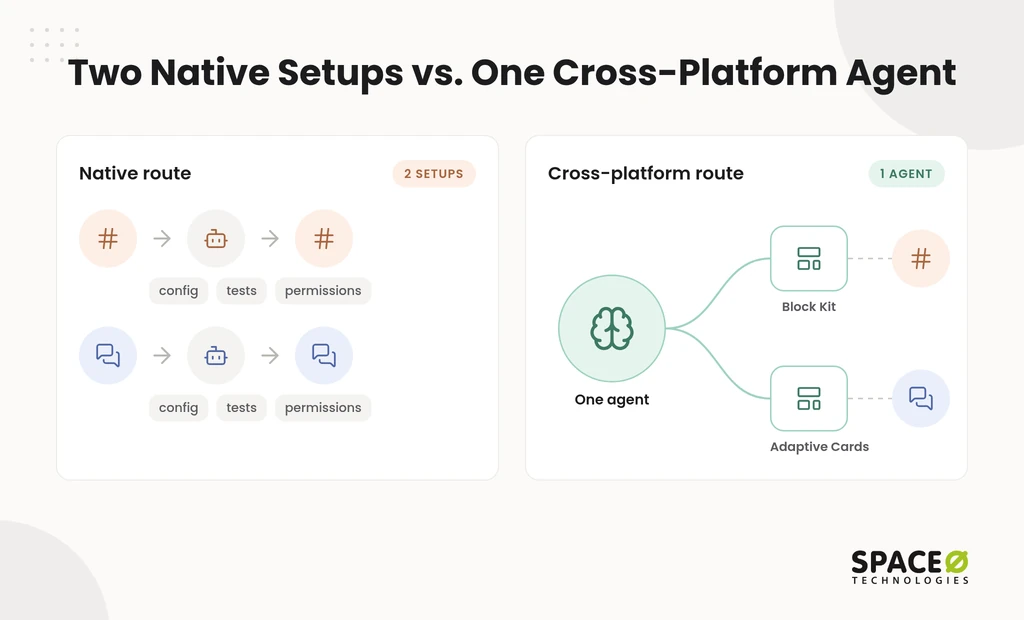
Most teams start here because nothing needs to be built. The trade-off is that each route stays inside one platform’s limits. If your company runs both Slack and Teams, you manage two separate setups.
Which native agents work inside Slack?
Slack offers built-in AI plus a Marketplace for third-party agents.
- Slack AI and Salesforce Agentforce. This is the native Slack route. Agentforce brings customer relationship management (CRM) and external data into channels when users @mention it.
- ChatGPT Agents via the Slack Marketplace. This is the third-party agent route in Slack. A workspace admin installs the agent and approves its permissions.
- Workplace commands such as OfficeSpace. Users type /find in Slack to locate people, desks, and rooms.
Which native agents work inside Microsoft Teams?
Teams pairs Microsoft Copilot with options for custom-built agents.
- Microsoft Teams with Copilot. This is the Teams-native assistant route. It includes meeting facilitators that support live Teams meetings.
- Custom Azure and Bot Framework integrations. Your developers build these agents and register them for Teams.
- Workplace commands such as OfficeSpace. In Teams, users type “find” for the same lookup.
Adopting a native route takes three things. An admin must enable it, your plan must include it, and you must accept that vendor’s data handling.
How do you build one AI agent for both Slack and Microsoft Teams?
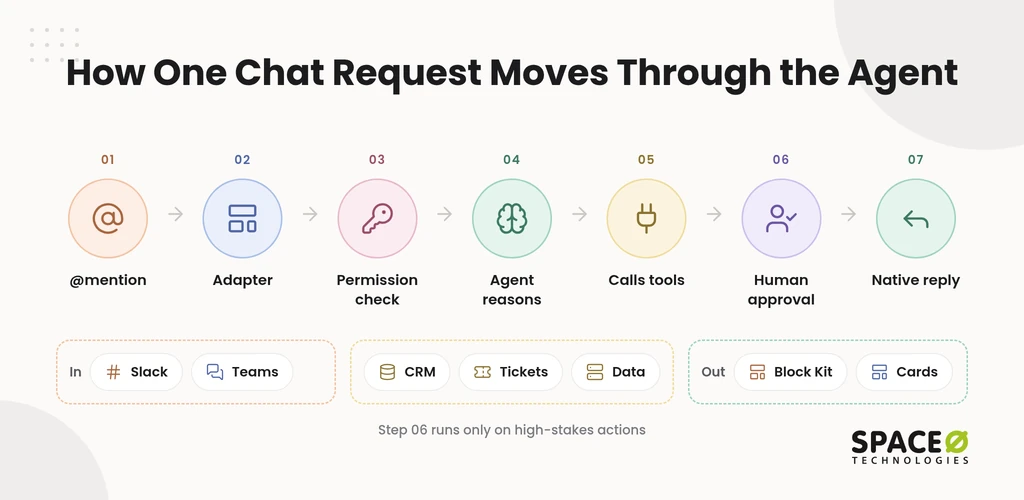
You write the agent logic once and use a translation layer that renders its output in each platform’s format.
Running two codebases doubles testing and maintenance, and the two agents drift apart over time. Cross-platform tooling avoids this by separating what the agent decides from how each chat app displays it.
- CopilotKit Channels SDK. This MIT-licensed software development kit (SDK) uses the AGUI protocol. It renders output as Slack Block Kit messages and Teams Adaptive Cards. It works with agents built in LangGraph, CrewAI, and Pydantic AI.
- Microsoft Slack-Plus-Teams. This compatibility layer, published on GitHub, runs the same bot logic across both platforms.
- Slack Bolt, Microsoft Bot Framework, and Botpress. These are the frameworks developers use to stand up multi-platform bots faster.
What does a production architecture for both platforms look like?
A production agent has four layers: a reasoning core, a tool layer, platform adapters, and a governance layer.
- Reasoning core. One agent holds the prompts, logic, and model choice, built in a framework such as LangGraph or CrewAI.
- Tool layer. Application programming interfaces (APIs) connect the agent to your CRM, ticketing, and data systems.
- Platform adapters. These render the agent’s answers in each platform’s native message format.
- Governance layer. This layer applies permissions, masking, and approvals before any action runs.
The tool layer is usually where the effort goes, so plan it through our API integration services.
Map Your Agent’s Four Layers With Us
Our engineers review your tools, permissions, and chat platforms before any build starts. You leave discovery with a scoped plan for both Slack and Teams.

Should you use native agents, a managed platform, or a custom build?
Choose by how much control, data ownership, and cross-platform reach your use case needs.
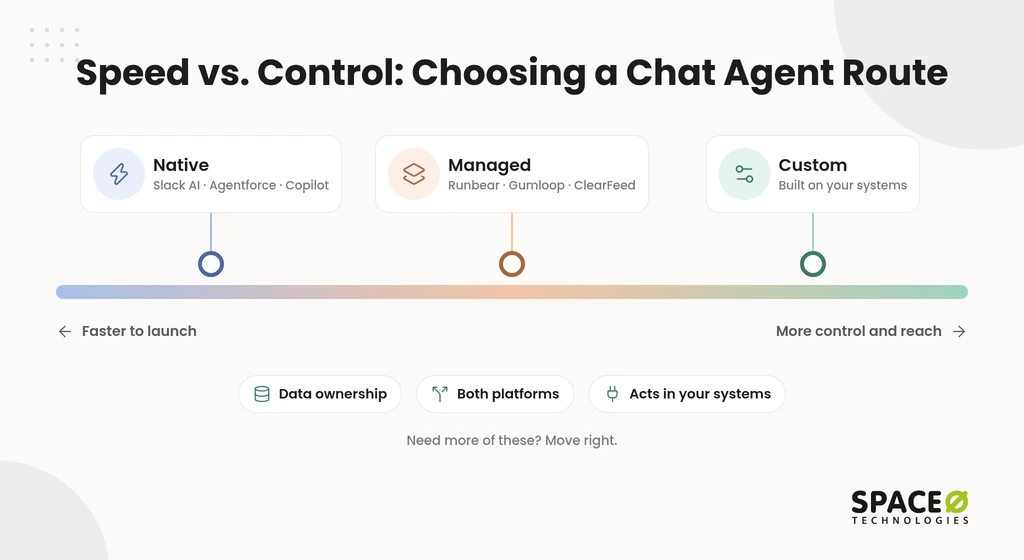
Managed platforms such as Runbear, Gumloop, and Clear Feed sit between the native and custom routes. They connect Claude, GPT, and Gemini to chat apps, with memory that carries across platforms. They are the faster, less customized path compared with a custom build.
Adopting a managed platform has two requirements. First, you grant the vendor access to your workspace. Second, you work within the configuration that vendor exposes.
| Aspects | Native (Slack AI, Agentforce, Copilot) | Managed platform (Runbear, Gumloop, Clear Feed) | Custom build with Space-O Technologies |
|---|---|---|---|
| Control | You configure only what each platform exposes. | You configure only what the vendor exposes. | You own the logic, tools, and adapters. |
| Data handling | The platform vendor’s terms apply. | Data passes through an additional third party. | Data stays in your environment, with no training on client data and with personally identifiable information (PII) masking. |
| Security review | You review one platform feature per app. | You review an extra vendor and the scopes it requests. | Permissions are scoped and documented per tool. |
| Time to production | Shortest, once an admin enables it. | Faster than a custom build, with less customization. | Longest; the timeline is set during discovery. |
Native and managed routes fit use cases that match what those products expose. A custom build pays off when the agent must act across your own systems. See custom AI development vs off-the-shelf for the wider trade-off. It also fits when the agent must work in both platforms under your security rules.
What do teams like and worry about with AI agents in chat?
Teams value fewer tab switches, but they worry about unpredictable answers, alert overload, and permission risk.
Practitioner discussions in community forums tend to split along the same lines.
- Less tab-switching. Supporters like getting Jira, Confluence, and Amazon Web Services (AWS) alerts inside the channel where they already work.
- Non-determinism. Critics note that an agent can answer the same question differently twice.
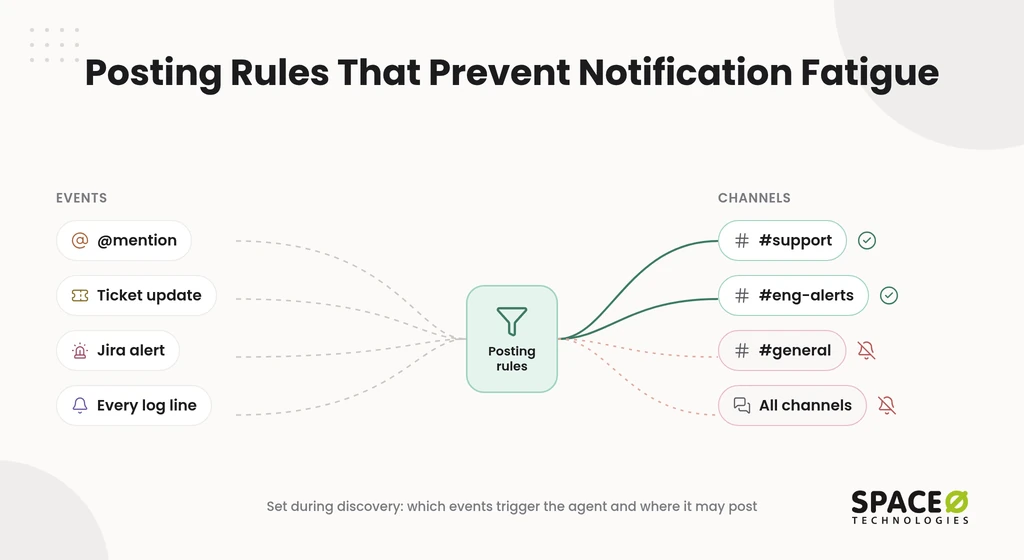
- Notification fatigue. An agent that posts too often trains people to ignore the channel.
- Third-party permission and security risk. Installed agents may request broad workspace access that nobody reviews.
These concerns appear in the public discussion but rarely get a direct answer. The next section shows how each one shapes our rollout.
How does Space-O Technologies run a governed rollout in Slack and Teams?
We answer each community concern with a named control, in place before the agent posts in its first channel.
The risk is rarely the model alone. It comes from what the agent can read, what it can change, and who checks its work. These controls are our standard delivery approach on every AI build.
| Concern raised by teams | Control we build in | What your team gets |
|---|---|---|
| Permission risk | Scoped permissions per tool and channel | The agent touches only what each task needs. |
| Consequential actions | Human review on high-stakes actions | People approve decisions before the agent acts on them. |
| Sensitive data in chat | PII masking | Personal data is masked before it reaches the model. |
| Data reuse | No training on client data | Your conversations never train a model. |
| Non-determinism | Hallucination testing before release | Answers are tested against your sources before launch. |
Notification fatigue is a design decision rather than a model problem. During discovery, set the channels the agent may post in and the events that trigger it.
What changes for regulated environments?
Regulated teams need every agent action to be traceable, reviewable, and limited to approved data.
In lending, healthcare, and insurance, human review applies to decisions such as approvals and clinical guidance. We sign an NDA before every project, so the scoping conversation is protected from day one.
Space-O Technologies holds ISO 27001 and ISO 9001 certifications. We confirm your data-residency and compliance needs during discovery.
What does a Slack and Teams AI agent cost, and how do you engage us?
AI chatbots and virtual assistants built by Space-O Technologies typically cost $25,000-$100,000.
AI chatbots and virtual assistants for customer support, FAQ automation, and internal assistance typically cost $25,000-$100,000. An enterprise platform costs more with custom models, many integrations, strict security, and compliance controls. The AI chatbot development services page explains what drives each scope.
Running costs come on top of the build. Annual maintenance typically adds 15% to 25% of the build cost, as covered in our AI development cost guide. Model API fees depend on conversation volume and the model you choose.
You choose from four engagement models:
- Dedicated Team for a long-running agent program.
- Time & Material when the scope will change after early user feedback.
- Fixed Cost for a clearly defined first agent.
- Staff Augmentation when your in-house team needs AI engineers.
Our ISTQB-certified QA team tests each agent before release, and we have developed 300+ software solutions.
Get a free, expert-reviewed estimate scoped to your Slack and Teams use case: talk to our AI team.
Should you build an AI agent from scratch or integrate an existing tool?
Integrate an existing model when it already handles your task. Build when the agent must act inside your own systems.
Many teams connect ChatGPT, Claude, or a custom large language model (LLM) to Slack and Teams first. If that is your path, our generative AI integration services page covers the connection work. Budget this route with our LLM integration project cost guide. If your in-house team will own the build, you can add vetted AI agent developers to your sprints.
Frequently Asked Questions
What are Block Kit and Adaptive Cards, and why do they matter for a cross-platform agent?
Block Kit is the message format Slack uses, and Adaptive Cards is the format Microsoft Teams uses. Because they differ, a cross-platform agent needs an adapter per platform. The agent logic stays in one place, so you avoid maintaining two codebases.
What do I need before enabling a native or managed AI agent in Slack or Teams?
Use the requirement lists in the native and managed sections as a checklist. The deciding question is usually data handling. A native route keeps you under the platform vendor’s terms. A managed platform adds a third party whose scopes your security team must review. For a Marketplace agent, budget time for the admin’s permission approval.
Do I need developer skills to build an AI agent for Slack or Teams?
Not for native routes, but a custom build does need developers. Native options such as Slack AI or Microsoft Copilot need only an admin to enable them. A custom agent uses the frameworks and cross-platform tooling listed in the build section, plus registration for Teams.
What are common use cases for AI agents in Slack and Microsoft Teams?
Common use cases are support, FAQ answers, and internal assistance. Teams also routes tool alerts into channels and pulls CRM data on @mention with Agentforce.
What does grounding an agent in company data change in practice?
Grounding, often called retrieval-augmented generation (RAG), ties each answer to your own documents, which lowers unsupported answers. We test answers against your sources before launch.
Should you build an AI agent from scratch or integrate an existing tool?
Integrate an existing model when it already handles your task, since there is then nothing to build. Build when the agent must act inside your systems, since native and managed routes expose vendor-limited access.



 All our projects are secured by NDA




 4.8


