
 By
Contents
- Treat AI app development as five steps; most effort sits around the model, in data and upkeep.
- Data preparation can consume 25% to 40% of the total project budget, so audit data readiness first.
- Start with pre-trained models, and train a custom model only when your data justifies it.
- Budget 15% to 25% of the build cost every year for monitoring, retraining, and maintenance after launch.
Key Takeaways
The AI app development process turns an idea into a working AI-powered app. It follows five steps, from defining the problem to deploying and monitoring the app. Unlike traditional software, it relies on data pipelines, model training, evaluation, and continuous learning.
Most AI projects do not stall at the demo. They stall when real data, real users, and real running costs arrive. Leaders comparing AI development services should weigh the whole lifecycle before the model.
This guide covers the five steps, then the seven lifecycle stages. It also shows where budget and ownership go, which most guides skip. Teams new to AI software development will find each stage explained in plain terms.
What Is the AI App Development Process?
In practice, it is a five-step path that turns one business problem into an AI feature. That feature keeps learning after launch.
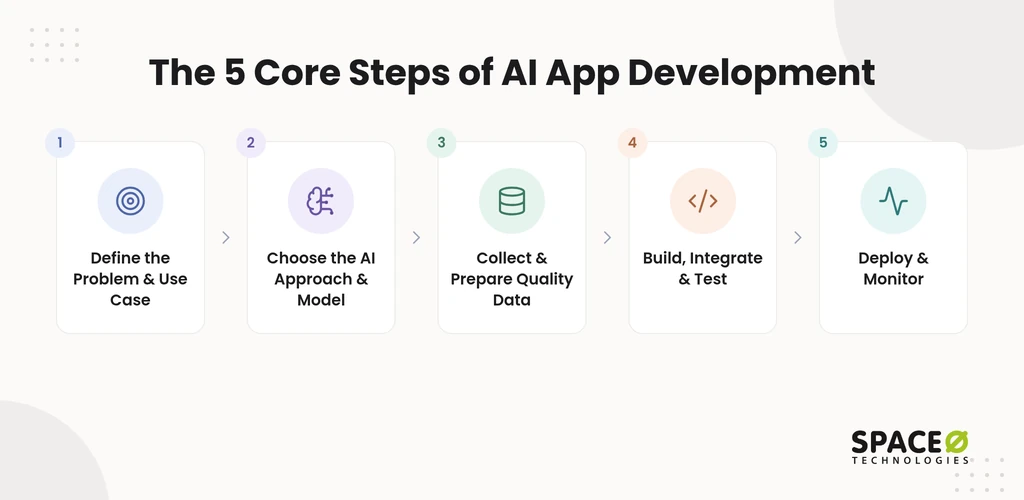
Here are the five core steps at a glance:
- Define the problem and use case. Decide what the AI must achieve and how you will measure it.
- Choose the AI approach and model. Pick a pre-trained model through an application programming interface (API) or a custom model.
- Collect and prepare quality data. Gather, clean, label, and split the data the model will use.
- Build, integrate, and test the app. Connect the model to the product and test AI output, not just code.
- Deploy and monitor the app. Release it, watch for drift, and retrain it on new data.
The order matters. Teams that pick a model before they define the problem often build an impressive feature nobody needs. Teams that skip data work end up with a model that performs in testing and fails with live users.
Why an AI app needs a different process
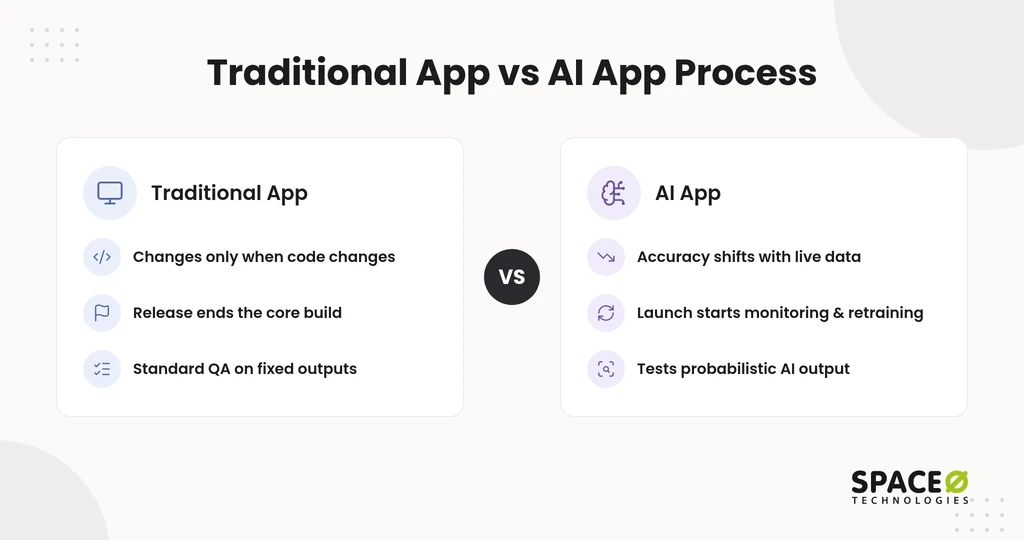
An AI app changes after release, while traditional software changes only when developers change it. A standard software development process treats release as the end of the core build. An AI app’s accuracy depends on live data, so it can decline without changing a single line of code. That one difference adds data pipelines, model evaluation, and retraining to every plan.
Next come the five steps in more detail. Each one carries a decision a business leader should own.
The 5 Core Steps of AI App Development
Each step answers one business question before the next step spends money. The steps below follow the order most AI builds use: problem, approach, data, build, and launch. Each one ends with the decision that gates the next step.
Step 1: Define the problem and use case
Step 1 is where you name the business problem the AI must solve and confirm AI is the right fix. The quality check is simple: you should be able to measure success before any code exists.
- Use case: Pick one job, such as automated customer support, predictive analytics, or personalized recommendations.
- Success measure: Set the target metric, the data you need, and the legal limits you must respect.
Some problems are better served by a simpler workflow than by AI. Saying no at this step is the least expensive outcome the process can produce.
Step 2: Choose the AI approach and model
Step 2 decides whether your app calls a pre-trained model or trains a custom model on your own data. The risk check is fit: the choice must match your data, budget, latency needs, and privacy rules.
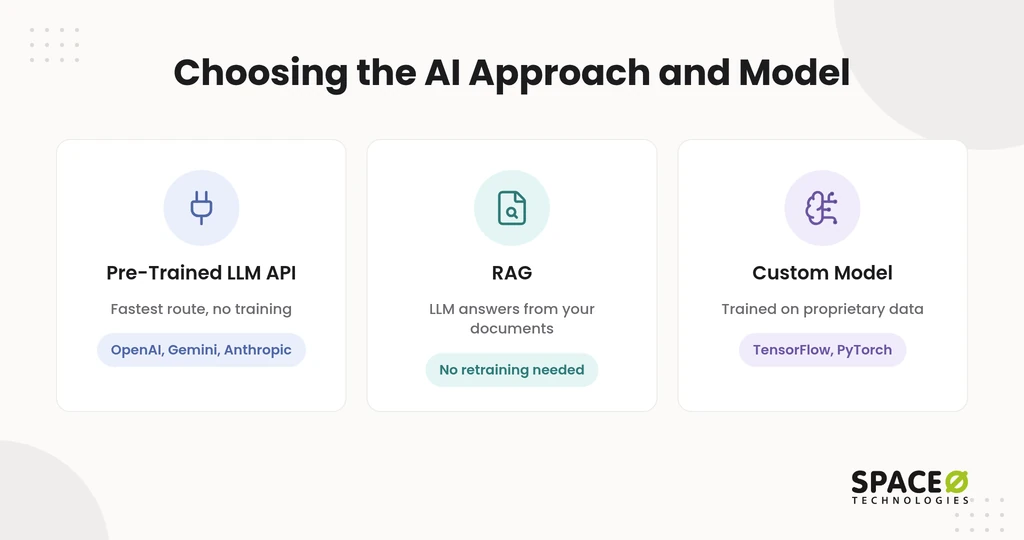
- Pre-trained models and APIs: Large language models (LLMs) from OpenAI, Gemini, or Anthropic deliver features fast, without training.
- Custom model: Your team trains its own model in TensorFlow or PyTorch when proprietary data creates the edge.
The approach also depends on the AI type, such as machine learning, natural language processing, or computer vision. A middle route, retrieval-augmented generation (RAG), lets an LLM answer from your own documents without retraining. If you choose the OpenAI route, our AI app development using OpenAI service covers that build path.
Step 3: Collect and prepare quality data
Step 3 gathers compliant data and turns it into a clean, labeled set the model can learn from. The quality check is relevance and volume, because noisy or biased data produces confident wrong answers.
- Preparation: Clean, label, and normalize records, then reduce bias before training starts.
- Data pipeline: Build a repeatable pipeline so new data flows in the same way after launch.
Data preparation is the single largest cost driver in most AI builds, and machine learning development services follow the same pattern. Treat data readiness as a budget question, not only a technical one.
Step 4: Build, integrate, and test the app
Step 4 builds the frontend and backend and connects them to the model or LLM API. The quality check goes beyond standard QA because AI outputs are probabilistic rather than fixed.
- AI output testing: Check accuracy, edge cases, hallucination, bias, and latency, then test with real users.
- Data protection: Mask personally identifiable information (PII) and add human review for high-stakes decisions.
In our builds, including AI integration services for software, we wrap every model we put into production in an evaluation suite. It covers accuracy, hallucination rate, bias checks, latency, and cost, with continuous monitoring in place.
Step 5: Deploy and monitor the live app
Step 5 releases the app to the cloud, edge devices, the web, or app stores, then tracks how it performs. The risk check is drift: accuracy fades as real-world data moves away from the training data.
- Deployment: Ship with scalability and low latency planned from the first release.
- Monitoring: Track usage, collect feedback, and retrain the model on new data.
Launch is a starting line, not a finish line. Monitoring, retraining, and review continue for as long as the app runs.
These five steps answer the core question. The lifecycle view below splits the same path into seven stages for teams that plan budgets and staffing in detail.
Not Sure Which AI Approach Fits Your App?
Our AI engineers review your use case, data, and budget. They then recommend pre-trained APIs, fine-tuned models, or custom training, with clear costs and timelines for each.

The 7 AI App Development Lifecycle Stages
The seven AI app development lifecycle stages expand the five steps so training and integration each get their own stage. The lifecycle runs in this order: problem definition, data collection, model selection, training, integration, deployment, and monitoring. Data comes before model selection here, because the data you hold often decides which models are realistic.
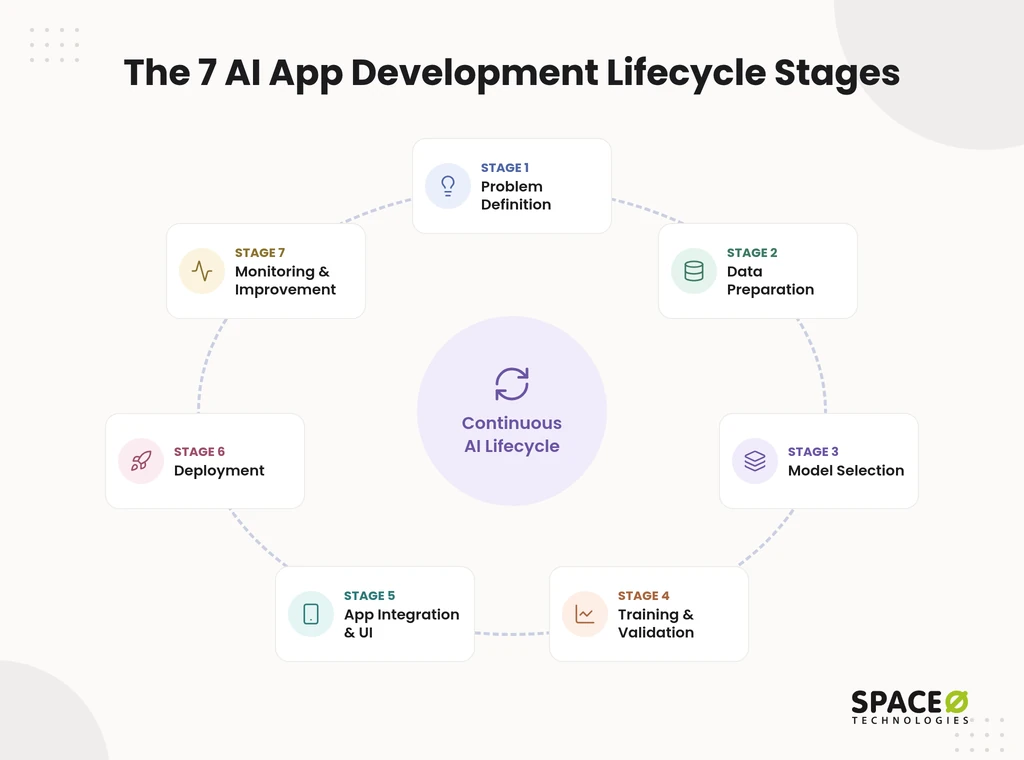
Each stage below opens with what happens, then the quality check, then the tasks and the decision.
1. Problem definition and feasibility analysis
Problem definition and feasibility analysis tests whether AI can solve the problem with the data you have. The risk check is data availability, because feasibility fails without usable data.
- Tasks and tools: Write the problem statement, set key performance indicators (KPIs), and audit available data sources.
- Decision or deliverable: A go or no-go call, backed by a feasibility note and agreed success targets.
Record ethical and regulatory constraints at this stage, following responsible AI development practice, including decisions that will need human sign-off. Documenting them early prevents a costly redesign after the model is built.
2. Data collection and preparation (preprocessing)
Data collection and preparation is the stage where raw records become training-ready data. The risk check is quality: biased or mislabeled data teaches the model the wrong lesson.
- Tasks and tools: Gather compliant data, clean it, normalize fields, label or annotate it, and detect bias.
- Decision or deliverable: Separate training, validation, and test sets, plus a documented data pipeline.
Splitting data before training keeps the test set honest. A model judged on data it has already seen always looks better than it is. When data sits in silos across several systems, consolidation becomes part of this stage’s scope.
3. Model selection and architecture design
Model selection and architecture design picks the algorithm or LLM and maps how data flows through the app. The risk check is production fit, because ignoring latency or cost breaks the app under real traffic.
- Tasks and tools: Compare algorithms, frameworks such as TensorFlow and PyTorch, and generative AI or LLM options against your KPIs.
- Decision or deliverable: A written architecture covering data flow, model hosting, and the serving pattern.
Decide here whether predictions run in real time or in batch mode. Real-time suits chat and search, while batch suits overnight scoring and reports.
4. Model training and validation
Model training and validation is the stage where the model learns from training data and proves itself on unseen data. The risk check is fit: overfitting memorizes training data, while underfitting misses the pattern entirely.
- Tasks and tools: Train the model, tune hyperparameters, and validate it against the held-out data.
- Decision or deliverable: Precision, recall, and F1-score results that meet the release threshold set in Stage 1.
For apps built on a pre-trained LLM, this stage shifts from full training to prompt and output evaluation. The same rule applies either way: no release without measured results against agreed thresholds.
5. App integration and user interface (UI) development
App integration and UI development is the stage where the model meets the product your users touch. The risk check is experience: a strong model inside a slow or confusing app still fails.
- Tasks and tools: Build the frontend and backend, then connect the app to the model or LLM API.
- Decision or deliverable: A working app tested with real users, including edge cases and response times.
Design the UI to capture user feedback on AI answers. That feedback becomes training signal in Stage 7.
6. Deployment
Deployment is the stage where the tested app moves into production on cloud, edge, web, or app store channels. The risk check is load: the release must hold scalability and low latency under live traffic.
- Tasks and tools: Package with Docker, orchestrate with Kubernetes, and automate releases through continuous integration and continuous delivery (CI/CD) pipelines.
- Decision or deliverable: A hosting choice between cloud, which scales easily, and edge, which cuts latency and keeps data on the device.
A staged rollout limits the impact if the model behaves differently with live traffic. Start with a small user group, compare results with the validation scores, then widen access.
7. Monitoring, maintenance, and continuous improvement
Monitoring, maintenance, and continuous improvement is the stage where you keep the live model accurate as users and data change. The risk check is drift: model drift and data drift erode accuracy without throwing errors.
- Tasks and tools: Track model drift, data drift, inference latency, and usage, then collect user feedback.
- Decision or deliverable: A retraining schedule, plus alerts that fire when metrics cross set thresholds.
Repeat the ethical and regulatory review on a fixed schedule rather than once. In our production builds, confidence scoring sends any output below an acceptable threshold to a human-review checkpoint.
Together, these stages describe one loop rather than a straight line. The table below condenses them into outputs, checks, and tools.
AI Lifecycle Stages at a Glance
Use this table to check what each stage must produce before the next one starts. It works as a handoff checklist between your business team and your engineering partner.
| Stage | Key output | Quality check | Tools |
|---|---|---|---|
| 1. Problem definition and feasibility analysis | Problem statement, KPIs, go or no-go decision | Data availability and regulatory limits | Data audit, KPI framework |
| 2. Data collection and preparation (preprocessing) | Training, validation, and test sets | Labels, bias, and relevance | Data pipeline, labeling tools |
| 3. Model selection and architecture design | Architecture and serving plan | Latency and cost fit | TensorFlow, PyTorch, LLM APIs |
| 4. Model training and validation | Validated model | Precision, recall, F1-score, overfitting | TensorFlow, PyTorch |
| 5. App integration and UI development | Working app tested with users | AI output accuracy, edge cases, latency | Frontend and backend frameworks, LLM APIs |
| 6. Deployment | Production release | Scalability and low latency | Docker, Kubernetes, CI/CD |
| 7. Monitoring, maintenance, and continuous improvement | Retraining schedule and alerts | Model drift, data drift, inference latency | Monitoring dashboards, feedback loops |
The stages show what gets built. The next question for most leaders is what each stage costs and who controls the result.
Where the Budget and Ownership Go
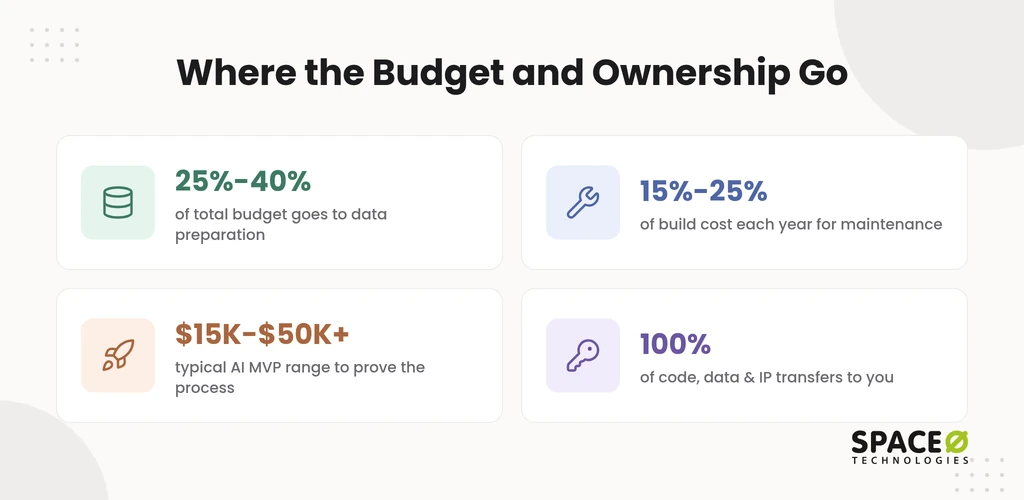
Most AI budgets go to data and upkeep, not to the model itself. Founders and CTOs also need to know where money and control sit at each step. In most of our projects, data work, integrations, and production engineering cost more than the model.
1. Data preparation is the largest cost driver
Data preparation can consume 25%-40% of the total project budget, making it the highest single cost in an AI build. That figure comes from our AI development cost analysis, and it maps to Step 3 and Stage 2. The share rises when data is unlabeled, duplicated, or spread across systems. Your best control sits in Stage 1: audit data readiness before you approve the build budget.
2. Maintenance continues every year after launch
Annual maintenance for an AI build typically costs 15%-25% of the build cost, every year. That range comes from the same cost analysis. It funds Step 5 and Stage 7: monitoring, drift response, retraining, and updates. Plan it as a recurring operating line, not a one-time reserve. A leader who budgets only for the build leaves upkeep unfunded.
3. An MVP proves the process before full spend
A basic minimum viable product (MVP) starts from $15,000, and a feature-rich MVP runs up to $50,000+. These ranges are listed on our MVP development services page. Payments are milestone-based and tied to deliverables. An MVP runs all seven stages on one narrow use case, so real data and drift costs surface early.
4. You keep the code, data, and IP
All source code, data, and IP built during a Space-O Technologies project transfer to the client at completion. We also sign a nondisclosure agreement (NDA) before every project starts. Ownership matters most at Stage 7. The owner of the model and pipeline can retrain it, switch vendors, or go in-house.
Budget and ownership set the boundaries. The final piece is how a delivery team runs the stages inside them.
How Space-O Technologies Runs These Stages
We validate the idea and the tech stack before development, so budget goes to the stages that need it. Many leaders weighing the benefits of outsourcing AI development arrive with a model in mind and no data audit. We start from the business goal and work back to the most cost-effective technology. Since 2010, Space-O Technologies has served 1,200+ clients and developed 300+ software solutions with 140+ in-house developers.
Each engagement model fits a different point in the lifecycle:
- Fixed Cost: Fits a scoped MVP with clear deliverables and milestone payments.
- Time and Material: Fits Stages 3 to 5, when model results can reshape the scope.
- Dedicated Team: Fits long-term builds where an AI development team stays on through monitoring and retraining.
- Staff Augmentation: Fits in-house teams that need to hire AI developers for one or two stages.
The right model depends on how settled your scope is. A fixed budget suits a defined MVP, while open research questions suit a flexible model.
Get a Stage-by-Stage Estimate for Your AI App
Share your idea, data sources, and target users. We map each lifecycle stage to scope, cost, and ownership terms, then send a free estimate.
Frequently Asked Questions
How long does it take to build an AI app?
A simple MVP takes about 4 to 8 weeks. A more complex one with multiple integrations or custom functionality takes 3 to 4 months. A reliable estimate depends on the required functionality, data, integrations, technology stack, security requirements, and deployment environment.
Is it safe to use an AI app?
Safety comes from how the app was built and governed, not from AI itself. Before launch, ask to see the Step 4 output tests and the Stage 7 human-review checkpoint.
How much does it cost to build an AI app?
A basic MVP starts at $15,000, and a feature-rich MVP runs up to $50,000+. Data preparation can consume 25% to 40% of the total project budget. Annual maintenance typically costs 15% to 25% of the build cost.
Which technologies are used to build an AI app?
Most AI apps use a mix of model, app, and release tools. For models, teams use LLMs from OpenAI, Gemini, or Anthropic, or train their own in TensorFlow or PyTorch. For release, they use Docker, Kubernetes, and CI/CD pipelines.
Do I need my own data to build an AI app?
Not always. A pre-trained model through an API delivers features fast, without training. You need your own data to train a custom model. Retrieval-augmented generation (RAG) is a middle route, where an LLM answers from your own documents without retraining.
What are the limitations of AI apps?
An AI app can lose accuracy after launch, even when no code changes. Live data moves away from the training data, which causes model drift and data drift. AI outputs are also probabilistic, so they can carry errors, bias, or hallucinations. Ongoing monitoring and retraining are needed.
How do I start building an AI app?
Start with one clear business problem and a way to measure success. Then audit your data readiness before you approve the build budget. A narrow MVP is a practical first release because it surfaces real data and drift costs early.



 All our projects are secured by NDA




 4.8


