
 By

Contents
- Autonomous agents perceive context, plan steps, and act across business tools, while people set the goals and limits.
- Let an agent decide alone only when logic is explicit, data is reliable, and consequences are bounded.
- Separate the decision from the execution: the model proposes, then rules, validation, and approvals decide what runs.
- Start with one low-risk decision, add audit trails and approval gates, and widen autonomy only when results hold.
Key Takeaways
AI agents that make decisions autonomously for business are software that reasons toward a goal. They read a ticket, check the rules, and act without waiting for a person. The real question is which decisions you can safely hand over.
An autonomous agent perceives context, plans multi-step work, and acts through your tools. Those tools include customer relationship management (CRM) and enterprise resource planning (ERP) systems. Space-O Technologies provides AI agent development with approval gates built in.
This guide shows how agents decide, which decisions they may own, and who signs off. You will also see architecture, guardrails, build-versus-buy options, and cost ranges. Teams still choosing a first use case often begin with AI consulting.
What Are Autonomous AI Agents for Business?
Autonomous business AI agents share four traits: a goal, a reasoning engine, tool access, and bounded authority. Teams set goals and limits; the agent chooses steps, calls systems, and reports, per agentic AI trends.
- Goal-driven: The agent works toward an outcome, such as a closed ticket or a matched invoice, not a single reply.
- Reasoning engine: A large language model (LLM) interprets unstructured input like emails, tickets, and documents, then plans the next step.
- Tool-connected: The agent works inside CRMs, ERPs, Structured Query Language (SQL) databases, and information technology service management (ITSM) platforms.
- Bounded: Permissions, business rules, and approval gates define what the agent may decide without a person.
Gartner predicts that by 2028, agentic AI will autonomously make at least 15% of daily work decisions. That is a rise from 0% in 2024, so the shift is already forecast rather than hypothetical.
How Do AI Agents Make Decisions Autonomously?
AI agents make decisions autonomously by running a four-step loop that starts with perceive and plan. The agent then moves to decide and act, and ends with a final evaluate step. Each pass narrows the problem. The loop repeats until the goal is met or the agent hands off to a person, and the evaluate step helps catch an AI agent hallucinating before it acts.
- Perceive: The agent gathers context from the request, connected systems, and memory before choosing anything.
- Plan: The LLM breaks the goal into ordered steps and picks the tool each step needs.
- Decide and act: The agent commits to an action, checks it against rules, and executes it through an application programming interface (API).
- Evaluate: The agent checks the result, logs it, and then moves on, retries, or escalates to a human.
What does an autonomous decision look like in practice?
An information technology (IT) ticket about a failed sign-in shows the full loop in seconds. An employee reports they cannot log in. The agent resolves the ticket without a technician:
- The agent parses the ticket and identifies the user and the failing system.
- The agent queries the identity management system through its API.
- The agent finds that the user’s security certificate expired overnight.
- The agent issues a new certificate and pushes it to the user’s device.
- The agent confirms sign-in works, logs each step, and closes the ticket.
AI Agents vs. Chatbots vs. RPA: What Is the Difference?
Chatbots reply with text, robotic process automation (RPA) follows fixed if/then scripts, and AI agents pursue a goal across systems. RPA breaks when an input format changes. Agents handle unstructured input and adjust the plan, which is the basis of agentic workflow automation, within the limits you set.
The table compares how each one handles a business decision.
| Aspects | Chatbot | RPA bot | AI agent |
|---|---|---|---|
| What it does | Answers questions in text | Repeats a scripted task | Plans and completes a multi-step goal |
| Who decides | The user acts on the answer | The script author, in advance | The agent, within rules and approval gates |
| Input it handles | Conversational text | Structured, predictable fields | Unstructured emails, documents, and tickets |
| When input changes | Gives a generic reply | Fails or stops | Re-plans or escalates to a person |
| Systems access | Limited lookups | Fixed screens and fields | APIs into CRM, ERP, and ITSM |
Business Use Cases by Function
Autonomous decision agents pay off when a single decision repeats often and follows known business logic, with human approval gates limiting what the agent can act on alone. The same decision also touches several systems, such as a CRM, an ERP, and an ITSM tool. The functions below are where these agents show up most often, and they are good candidates when you pick the first use case for an AI agent. Each example names a trigger, a decision, and an action.
- IT operations: Agents resolve routine access, password, and certificate failures through identity and ITSM APIs.
- Supply chain: An agent watches weather, port traffic, and cargo delays, then reroutes shipments that would miss delivery dates.
- Lending and credit: An agent gathers applicant data, checks it against credit policy, and prepares a recommendation for an underwriter.
- Finance operations: An agent matches invoices to purchase orders (POs) and receipts, posts clean matches, and flags mismatches.
- Sales: An agent scores inbound leads against your ideal customer profile and routes qualified ones to the right rep.
- HR onboarding: An agent creates accounts, assigns training, and schedules first-week tasks across human resources (HR) and IT tools.
Core Architecture of Decision-Making AI Agents for Enterprise
Decision-making AI agents for enterprise combine a probabilistic reasoning layer with a deterministic control plane. The LLM proposes an action. Rules, validation, and approvals decide whether the action runs. Enterprises need both: flexible reasoning for messy input and predictable control for consequential actions.
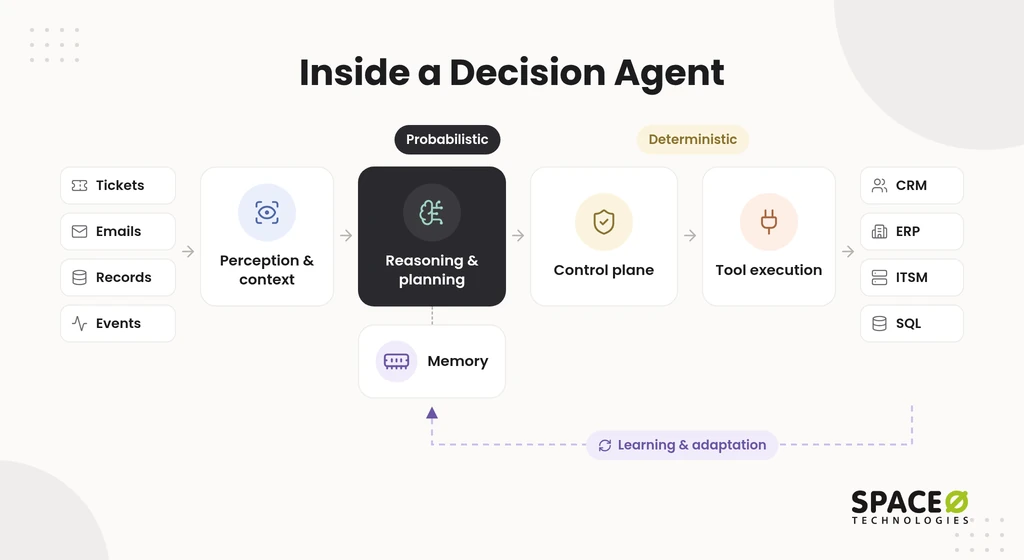
What are the core components?
Five components appear in nearly every production decision agent. Each one has a distinct job in the loop.
- Perception & Context: Connectors pull tickets, emails, records, and events into a structured view the agent can reason over.
- Reasoning & Planning: The LLM layer that runs the plan step of the loop above.
- Memory: Short-term memory holds the current task state. Long-term memory stores history, policies, and past outcomes.
- Tool Execution: Scoped API calls, which can run through an enterprise MCP server, let the agent read and write inside the connected business systems.
- Learning & Adaptation: Logged outcomes and reviewer corrections feed evaluation sets and rule updates over time.
Why separate the decision from the execution?
Separating the decision from the execution stops a wrong proposal before it reaches a live system. The agent outputs a structured proposal, usually in JavaScript Object Notation (JSON). Deterministic code then checks it before any API call fires.
- Propose: The agent returns a JSON action naming the target system, the fields, and its reasoning.
- Validate: The system checks the proposal against an expected schema and rejects malformed output.
- Apply rules: Deterministic business rules confirm limits, policies, and eligibility.
- Approve: Proposals above a set risk level wait for a named human approver.
- Execute and log: The system calls the API and writes the audit record.
Confidence scores can add a routing signal. They supplement the rules. They do not replace them.
Autonomous Decision AI Agent Development: How We Build One with Validation and Human Approval
Autonomous decision AI agent development starts with one low-risk decision. We widen autonomy only when results support it. Most stalled enterprise AI agent pilots try to automate too much at once. We scope the first decision narrowly and build its controls alongside its reasoning.
What are the key development steps?
Seven steps take a decision agent from scoping to production.
- Pick the pilot decision: Choose a frequent, reversible, low-risk decision with clear success criteria.
- Map decision rights and data: Agree which outcomes the agent may decide, propose, or never touch.
- Design scoped tools: Give each tool the narrowest permission its task needs.
- Build the control plane: Implement the propose-validate-approve-log sequence above around every action.
- Isolate execution: Run tool actions in sandboxed, ephemeral containers that close after each task.
- Evaluate before release: We wrap every production model in an evaluation suite. The suite covers accuracy, hallucination rate, bias checks, latency, and cost.
- Monitor and widen autonomy: Continuous monitoring tracks drift and overrides. A decision moves up a tier only when results hold.
We pick frameworks such as LangGraph, CrewAI, AutoGen, or the OpenAI Agents SDK. The choice follows your stack and hosting rules.
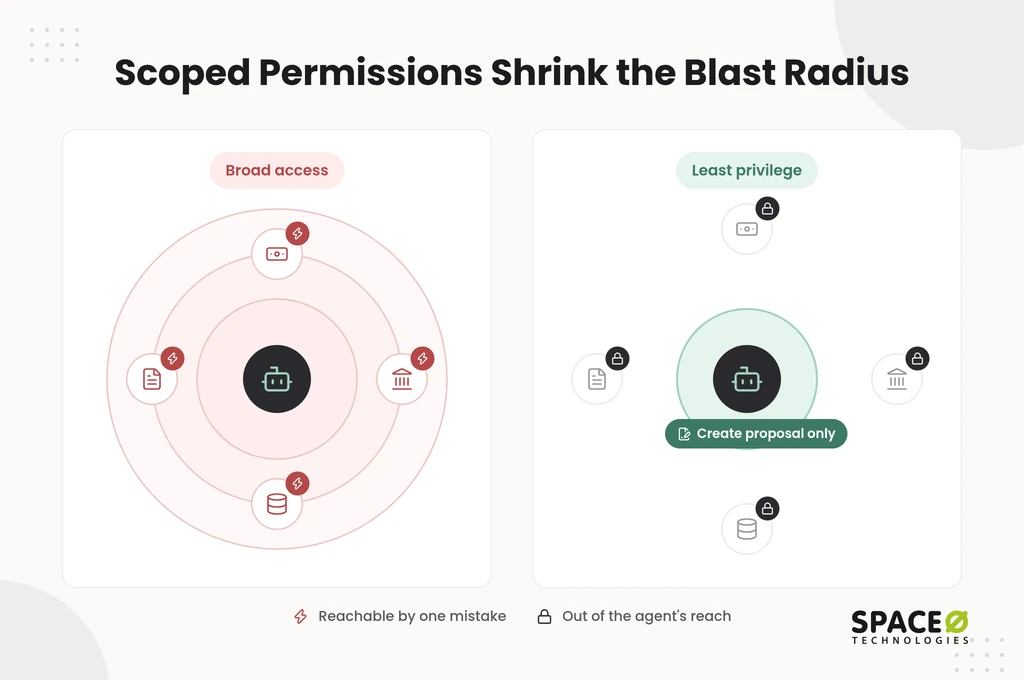
How does least privilege limit an agent’s blast radius?
Least privilege limits the blast radius by giving an agent only the permissions one task requires. A finance agent can create a payment proposal but cannot release funds. A procurement agent can read supplier records but cannot edit bank details. If the agent misreads a request, the damage stays small and reversible.
Planning Your First Decision Agent Pilot Today?
Share the decision you want to automate first. Our team will map its decision rights, controls, and a scoped pilot plan, with a free estimate.

Which Decisions Should an Agent Make Alone?
An agent should decide alone only when the decision has explicit logic, reliable data, and bounded consequences. Every other decision routes to a person, either for approval or for the whole call. Teams often describe a five-step spectrum: fully autonomous, human-on-the-loop, human-in-the-loop, human-initiated, and human-only. The matrix compresses that spectrum into three placements.
The matrix applies that test to five common business decisions. Thresholds are set per client during discovery.
| Decision type | Agent decides alone | Agent proposes, human approves | Human only | Escalation trigger | Controls |
|---|---|---|---|---|---|
| Refund | Eligible orders within a set amount | Above the amount or outside policy | Disputed or legal cases | Amount, policy exception, low confidence | Rules check, approval gate, audit log |
| Purchase-order match | Invoice, PO, and receipt agree within tolerance | Quantity, price, or vendor mismatch | Changes to vendor bank details | Variance beyond tolerance, new vendor | Schema validation, rules check, audit log |
| Lead qualification | Scoring and routing of inbound leads | Pricing or contract commitments | Not needed for routine leads | Strategic account, unusual deal size | Rules check, audit log |
| Policy change | Never | Drafting proposed wording | Approving and publishing the change | Any policy change | Approval gate, audit log |
| Loan or claim decision | Never | Assembling evidence and a recommendation | Adverse or exception decisions | Every final decision | Schema validation, rules check, approval gate, audit log |
Three triggers move a decision out of the “alone” column:
- Confidence: A low-confidence proposal routes to review, as a supplement to the rules check.
- Financial amount: Values above a client-set threshold require a named approver.
- Irreversibility: Actions that cannot be undone, such as payments or published policy, stay behind an approval gate.
By default, we enable human review checkpoints for lending and other high-stakes decisions. Automation handles the volume. A qualified human reviews and approves, through human-in-the-loop approval, before any output influences a final decision.
Guardrails, Risks, and Governance
Governance makes an autonomous agent acceptable to your auditors, regulators, and risk team. The risks are well known: wrong actions, opaque reasoning, data exposure, and vendor dependence. Each risk has a matching control. Weak controls are costly: Gartner predicts over 40% of agentic AI projects will be canceled by the end of 2027 because of rising costs, unclear business value, or inadequate risk controls.
- Human approval: Approval gates enforce the escalation triggers in the decision-rights matrix above.
- Audit trail: Every action records who or what proposed it, who approved it, and what changed where. You can see how this works in our guide to AI agent audit logs and observability.
- Non-deterministic testing: The same input can produce different outputs, so testing uses repeated runs and scenario suites.
- Privacy: Deep data access raises privacy questions. We mask personally identifiable information (PII) and never train models on client data.
- Ownership and lock-in: Agents built inside one vendor’s platform tie your decision logic to that vendor’s roadmap.
High-stakes outputs in finance or healthcare also need stricter accuracy testing and often human review. Our compliance posture includes International Organization for Standardization (ISO) 27001 and ISO 9001 certifications. Healthcare AI engagements use Health Insurance Portability and Accountability Act (HIPAA)-ready frameworks.
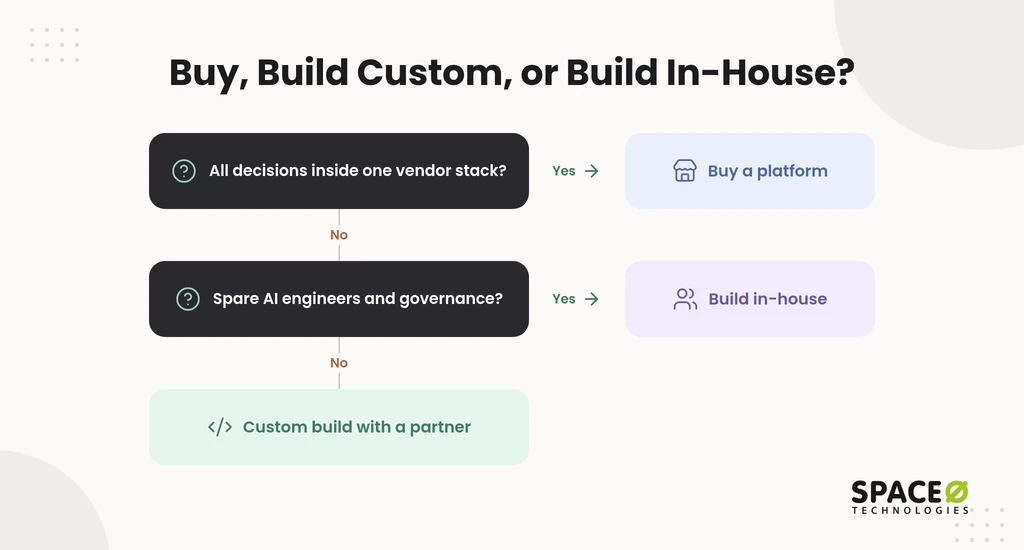
Build Custom, Buy a Platform, or Build In-House?
Buying a platform is the faster start when you already run one vendor’s stack. A custom build fits better when decisions span several systems and legacy software. Building in-house suits teams with spare AI engineering capacity.
What does adopting an agent platform require?
Each platform assumes you already run its wider ecosystem.
- Salesforce Agentforce: Runs inside Salesforce, so your customer data and administrators need to live there already.
- UiPath: Extends an existing UiPath automation estate. Value depends on the bots and orchestration you already run.
- Microsoft Copilot Studio: Builds agents inside the Microsoft environment. Licensing and admin setup follow Microsoft’s plans.
When does a custom build make sense?
A custom build makes sense when decisions cross your own workflows, legacy systems, and existing rules. Many enterprises already hold decision logic in IBM Operational Decision Manager (ODM) or workflows in ServiceNow. A custom agent can sit in front of those systems and call them through API integration instead of replacing them. All source code, data, and intellectual property (IP) built during the project transfer to you at completion.
Building in-house keeps everything internal, but it needs AI engineers, evaluation tooling, and governance capacity. Teams short on specialists can add vetted AI agent developers to their own sprints.
What Does “Decide” Mean for an AI Agent?
To decide means to make a final choice or judgment about something after thinking carefully about the possibilities. It also means to settle a question, dispute, or contest.
- Synonyms: Determine fixes an outcome. Settle ends a dispute with authority. Resolve signals firm intent. Rule implies a formal judgment.
- Patterns: Decide on, decide against, decide between, and decide for oneself.
- Outcome sense: An event can decide a result, as when one mistake decides a game.
- Origin: From Latin dēcīdere, which means to cut off.
The Latin root fits software well. A decision agent cuts off alternatives and commits to one action. That commit point is where your rules check and approval gate belong.
Cost and Engagement Models
A first decision agent is usually budgeted against MVP benchmarks before it grows into a wider program. A basic minimum viable product (MVP) can start from $15,000, while more feature-rich MVPs can go up to $50,000 or more. Payments are milestone-based and tied to deliverables. Your full budget also includes cloud infrastructure, model or API usage fees, and annual maintenance.
Four engagement models are available:
- Fixed Cost: A defined scope, timeline, and budget, suited to a tightly scoped pilot.
- Time & Material: Flexible scope for agents whose decision rights evolve during discovery.
- Dedicated Team: A long-term team for a multi-agent program.
- Staff Augmentation: Vetted engineers who join your in-house team’s tools and sprints.
How Space-O Technologies Builds Decision-Making Agents
Space-O Technologies has built AI-powered custom software since 2010. Business leaders need a partner who ships working systems, not demos. The figures below are reported by Space-O Technologies.
- Track record: 1,200+ clients served and 300+ software solutions developed.
- Team: 140+ in-house developers across offices in Mesa (Arizona), Brampton (Ontario), and Ahmedabad (India).
- Retention: Space-O Technologies reports 97% client retention.
- Confidentiality: A non-disclosure agreement (NDA) is signed before every project starts.
Our AI agent development team applies the decision-rights matrix, including its default human-review checkpoints, during discovery.
Before You Scope an Agent: Three Questions to Answer
Three answers shape every decision agent’s scope, cost, and controls.
- Which workflow or decision do you want to automate first?
- Which systems must the agent connect to: ERP, CRM, SQL databases, or ServiceNow?
- How high-stakes are those decisions, and who approves them today?
Frequently Asked Questions
What is agentic development in AI?
Agentic development is building AI agents that pursue a goal across business systems, not single prompts. The build covers the reasoning layer, the control plane, and an evaluation suite. The suite tests accuracy, hallucination rate, bias, latency, and cost before release. After launch, autonomy widens one tier at a time, only when drift and override rates hold.
What are intelligent agents and how are they used in AI?
An intelligent agent is software that perceives its environment, plans, decides, and acts toward a goal through connected business tools. The practical test that separates it from a chatbot or RPA bot is what happens when input changes. An RPA script fails or stops, while an agent re-plans or escalates. As a rule of thumb, structured, predictable inputs suit scripted RPA; unstructured emails, documents, and tickets suit an agent.
Does enterprise use AI agents?
Yes. Enterprises use them in IT operations, supply chain, lending, finance, sales, and HR onboarding. Start where a decision repeats often, follows known logic, and touches several systems. Final calls such as loan or claim decisions and policy approvals stay human-only.
Why can’t a large language model be trusted to make business decisions on its own?
A large language model is probabilistic, so the same input can produce different outputs. Its reasoning can also be opaque. That is why the model only proposes, and the control plane decides. Two triggers always bring in a human besides low confidence. One is an amount above a client-set threshold. The other is any irreversible action, such as a payment or published policy.
What ongoing costs should I budget for after an AI agent is built?
Plan for cloud infrastructure, model or API usage fees, retraining cycles, and annual maintenance. Maintenance alone typically costs 15% to 25% of the build every year.
Can an AI agent approve refunds on its own?
Yes, within limits. An agent can approve eligible orders within a set amount. Refunds above that amount or outside policy go to a human for approval. Disputed or legal cases stay human-only.
What is human-in-the-loop for AI agents?
Human-in-the-loop means a person approves the agent’s proposal before it runs. Human-on-the-loop means a person monitors the agent and can step in. Low-confidence, high-amount, and irreversible actions go to a human in the loop.
How can AI automate business processes?
Agents automate a process by running the perceive, plan, decide, and act, evaluate loop. They read unstructured input, call connected systems through APIs, and log each step. Good starting points are IT tickets, invoice matching, lead scoring, and HR onboarding.



 All our projects are secured by NDA




 4.8


