
 By
Contents
- Replace fixed if-then logic with goal-driven agents, but keep stable rule steps in place wherever rules already work.
- Start with one bounded workflow, set a baseline, and pilot in shadow mode before you widen agent autonomy.
- Connect agents to your CRM, ERP, and other systems through permissioned APIs, with human approval for high-risk actions.
- Budget for the yearly run cost and the phase gates that control autonomy, not only for the build.
Key Takeaways
Manual processes slow every enterprise team that depends on them. Rigid rule-based automation helps, but it breaks on exceptions nobody coded. Enterprises now follow an agentic AI roadmap to move from manual processes to AI agents.
A safe move starts with one mapped workflow, not a company-wide rollout. Agents connect to your customer relationship management (CRM) and enterprise resource planning (ERP) systems. They reach those systems through permissioned application programming interfaces (APIs).
Guardrails and human approval cover every high-risk action. Space-O Technologies has built AI-powered custom software since 2010. This guide shows how our AI agent development team runs that path.
What Manual Work Do AI Agents Replace First?
AI agents first replace repetitive manual work: data entry, copy-paste between tools, paper forms, spreadsheets, and email approvals. Your team re-keys the same fields into several systems. Approvals stall in inboxes. Moving that work to workflow automation pays back in four ways:
- Error reduction: Agents read source documents and post data directly, so routine work no longer depends on manual re-keying.
- Time savings: Staff stop moving fields between email, spreadsheets, and the ERP. They spend their hours on exceptions instead.
- Scalability without linear admin headcount: Case volume can grow while the review team stays the same size, because agents absorb the routine cases.
- Real-time visibility: Every action lands in a system of record, so managers see status without waiting for a spreadsheet update.
Core Comparison: Rule-Based Workflows vs Reasoning AI Agents
Autonomous systems that can reason replace fixed if-then logic with agents that pursue a goal. Rule-based tools, including robotic process automation (RPA), ask one question: “When X happens, what should I do?” A reasoning agent asks a different one: “Given this desired outcome and the tools available, what steps get me there?”
The difference shows when inputs change. A fixed rule breaks on an exception or a new format. An agent reads the change, plans a response, and escalates when unsure, even inside CRM workflow automation that used to depend on fixed triggers. The table compares both approaches on six axes.
| Axis | Rule-based workflows and RPA | Reasoning AI agents |
|---|---|---|
| Input handling | Structured fields in a fixed format | Unstructured documents, PDFs, and emails |
| Exceptions | Stop or fail on cases nobody coded | Reason through them or escalate to a person |
| Maintenance | Each format or screen change needs a rule update | Prompts, tools, and test sets change instead |
| Governance and review | Fully predictable fixed logic | Permission limits plus human approval for high-risk actions |
| Integration via APIs | Screen clicks or fixed connectors | Tools and APIs into CRM, ERP, and databases |
| Audit trail | Logs which rule fired | Logs input, reasoning, proposed action, and approver |
How does a reasoning agent work through a task?
A reasoning agent runs a loop: understand → reason → act → verify. First, it understands the goal and the input, such as an email with a PDF attached. Then it reasons about the next step. That reasoning is often grounded through retrieval-augmented generation (RAG) on your standard operating procedures (SOPs). Next, it acts by calling an external tool or API. Finally, it verifies the result before moving on. The ReAct (reasoning and acting) pattern describes this same mix of thinking and tool use.
How do agents improve over time?
A second loop, perceive → reason → act → learn, describes how an agent gets better across many runs. The agent perceives new inputs, reasons, acts, and records the outcome for evaluation. In production, “learn” means your team reviews errors and updates prompts, tools, or retrieval sources. The large language model (LLM) should never rewrite its own business rules without a person reviewing the change.
Where Enterprises Start: The Maturity Ladder
Each workflow sits somewhere on a five-level ladder, and Level 4 is the practical ceiling. Knowing a workflow’s level tells you which step comes next.
- Level 0, manual: People key in data, route emails, and track approvals in spreadsheets.
- Level 1, rule-based: If-then workflows and RPA bots handle fixed, structured steps.
- Level 2, assisted: Task-specific assistants draft, summarize, or classify, and a person takes the action.
- Level 3, supervised agents: Agents plan and act through tools, and a human approves each consequential action.
- Level 4, bounded autonomy: Agents run multi-step work inside permission limits and escalate exceptions to people.
The ladder stops at Level 4 on purpose. Consequential actions still need a person accountable for them. Gartner predicts that by 2028, at least 15% of day-to-day work decisions will be made autonomously through agentic AI, up from 0% in 2024.
Step-by-Step: How to Implement AI Agents in Enterprise Workflows
To implement AI agents in enterprise workflows, follow six steps. Map the work, pick one bounded workflow, connect systems, and choose orchestration. Then add governance, pilot, and scale. Teams that skip the early steps tend to automate a broken process. Each step below stands on its own.
1. Map and document the workflow
Map and document the workflow before automating it, and simplify it first. Write down every step, input, decision, and system the work touches. Task mining tools can show where the hours actually go. Remove steps that exist only because data lives in two places. Cutting those steps now costs less than teaching an agent to work around them later.
2. Pick a bounded first workflow and set a baseline
Pick one high-volume, measurable workflow with recurring exceptions, and record its baseline. A goal as broad as “automate finance” gives the pilot no finish line. Choose a workflow with clear inputs, a named owner, and enough volume to measure results. Apply these criteria when you pick the first use case for an AI agent in your enterprise. Record cost per case, cycle time, and error rate first, so you can prove return on investment (ROI) later.
3. Connect agents to systems of record through permissioned APIs
Connect agents to systems of record and SOPs through permissioned APIs, not through a standalone chat window. Access to the CRM, ERP, and databases is what lets an agent act instead of only advise. Use direct APIs, an integration platform as a service (iPaaS), or connectors such as Model Context Protocol (MCP). Give each agent its own scoped identity. Our API integration services connect older systems that lack clean endpoints.
4. Choose orchestration and start with a single agent
Choose an orchestration style, decide which rule steps stay, and start with a single agent. Classic orchestration follows auditable, topic-based flows. Generative orchestration lets the model choose the next step. Regulated steps usually suit the classic style. Teams build either style with frameworks such as LangGraph or CrewAI, or with platforms such as Microsoft Copilot Studio. Move to a multi-agent design with a supervisor or triage agent only once one agent is stable.
5. Add governance, schema validation, and human-in-the-loop gates
Add guardrails before the agent writes to any system. Those guardrails are schema validation, permission limits, and human approval. In this design, the agent proposes an action. Validation checks it, and a person approves anything high-risk. Building these gates, including human-in-the-loop approval, before the pilot is far cheaper than retrofitting them after an incident. The governance section of this guide sets out each control.
6. Pilot in shadow mode, measure, and scale
Pilot in shadow mode, measure against the baseline, and then widen autonomy in stages. The rollout runs read-only shadowing → human-in-the-loop → bounded autonomy, also called progressive autonomy. In shadow mode, the agent proposes while people still do the real work. Compare its proposals with their decisions. Widen access only when reliability clears the bar, not because the agent seems capable. Then scale to the next workflow.
Run a Shadow-Mode Pilot Before Agents Touch Production
Space-O engineers wire one bounded workflow into your CRM and ERP, let the agent propose while your team decides, and compare results before granting any autonomy.

How to Replace Manual Back Office Work with AI Agents
AI agents replace back-office work by reading documents, emails, and PDFs and making context-aware decisions. They act across ERP, CRM, APIs, and databases. Exceptions go to a person with the full context attached. Back-office teams lose whole days moving data between inboxes and systems. Our ERP integration services connect agents to the ERP your finance team already runs.
How AI agents differ from RPA and rule-based tools
RPA repeats recorded steps, while an AI agent works toward an outcome and handles variation. The right choice depends on how messy the inputs are and how much the workflow is unique to your business. The table compares four common options.
| Axis | RPA or rule-based | Workflow integration (iPaaS) | Off-the-shelf agent | Custom agent |
|---|---|---|---|---|
| Handles messy inputs | No, needs fixed formats | Limited, needs structured payloads | Yes, within supported document types | Yes, tuned to your documents |
| Adapts to format change | No, breaks when fields or screens move | Needs mapping updates | Partly, depends on vendor updates | Yes, with regression tests per change |
| Human-review checkpoints | Manual queues outside the bot | Approval steps you configure | Vendor-defined approval steps | Placed where your process needs them |
| Fits your ERP/CRM | Through the user interface | Through prebuilt connectors | Through the vendor’s connectors | Built against your systems and legacy endpoints |
| Code and IP ownership | Your scripts on a licensed platform | Your flows on a licensed platform | You license the vendor’s platform | Set by your build contract |
| Best for | Stable, fixed-format, high-volume steps | Moving clean data between systems | Tasks matching the vendor’s template | Unusual workflows spanning several systems |
Back-office work AI agents take over
Finance and accounting is the clearest first area, starting with invoice processing, matching, and reconciliation. Other back-office functions follow once that pattern is proven.
- Invoice processing and matching: The agent reads invoices in any layout, matches them to purchase orders and receipts, and flags mismatches for review.
- Reconciliation and billing: The agent compares bank and ledger entries, proposes matches, prepares billing runs, and routes unexplained gaps to an accountant.
- Document and inbox triage: The agent classifies incoming emails and PDFs, extracts the key fields, and routes each item to the correct queue.
- Procurement and human resources (HR) onboarding: Agents compare request for proposal (RFP) responses against requirements. They also gather new-hire documents for HR to approve.
- Compliance and reporting: Agents assemble recurring reports and evidence from systems of record. A named person signs off before anything is filed.
How to roll out safely
Roll out back-office agents in five steps, and keep a person in control until the numbers prove otherwise.
- Map one process: Start with a single document flow, such as supplier invoices from one business unit, rather than the whole department.
- Run in shadow mode: The agent processes copies of real cases while your team keeps doing the work. Then you compare the two sets of results.
- Grant read-only access, then write access: Start with a read-only database role. Then add write rights for one action type at a time.
- Set confidence thresholds with escalation: For example, route anything below a set model-confidence threshold to a reviewer. Confidence is a signal, not authorization, so high-value actions still need approval.
- Log every action and test against a high reliability bar: Keep a full audit trail. Rerun your test set after every prompt, model, or tool change.
Get a Pilot Outline for Your Workflow
Tell us your department and the core systems you run, such as CRM, ERP, and ticketing. Our team will outline a pilot scoped to your workflow.
Keep, Hybridize, or Upgrade Rule-Based Workflows to Reasoning AI Agents?
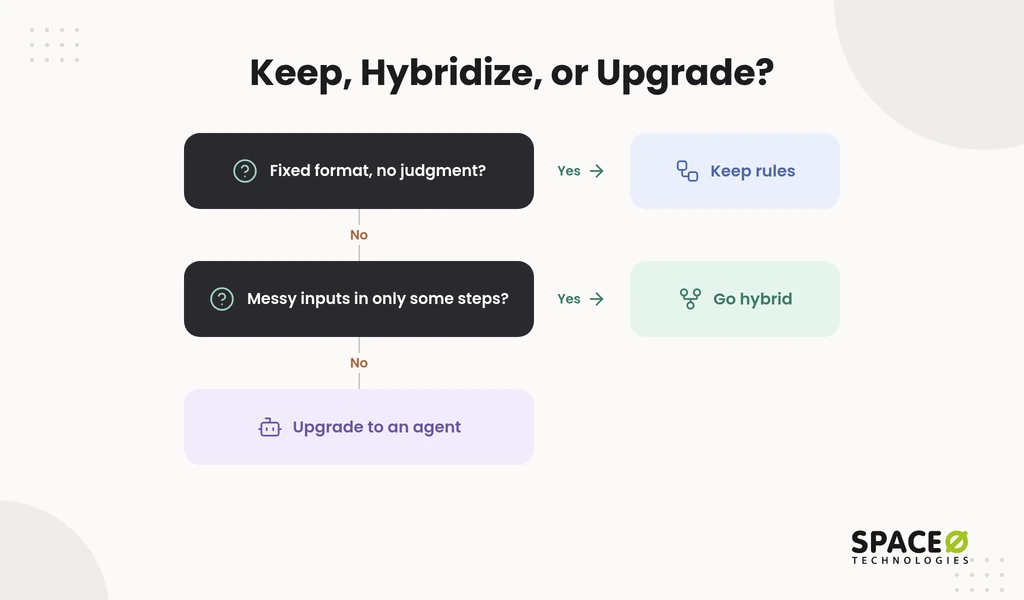
Most enterprises upgrade rule-based workflows to reasoning AI agents through incremental hybrid migration, not rip-and-replace. Stable steps keep their deterministic rules or RPA bots. Agents take the exceptions and the unstructured inputs that those rules cannot read. Deterministic guardrails wrap the agent, so existing logic keeps doing what it does well.
When should rules and scripts stay?
Keep RPA or scripts for simple, static tasks with fixed formats and no judgment. A script costs less per run than an agent. It is fully predictable and easy to audit. Scheduled file transfers and fixed-field data syncs are typical examples. Adding an agent to such a step adds cost and risk without adding value.
Which path fits: extend, buy, or build?
Enterprises choose among three paths: extend an existing platform, adopt an off-the-shelf agent, or build custom with a partner. Judge each path on fit, legacy integration, code and IP ownership, and engagement flexibility.
- Extend RPA or an existing platform: This path suits teams already licensed on tools such as UiPath or Azure Logic Apps. It needs platform administrators. Legacy reach depends on the connectors available.
- Adopt an off-the-shelf agent: This path suits workflows that match the vendor’s template. Adoption means fitting your process to the vendor’s design, plan limits, and connectors. You license the vendor’s platform rather than own it.
- Build custom with a partner: This path suits workflows that span several systems, including legacy ones. You fund the build and the upkeep. In return, you set ownership terms and the engagement model by contract.
Governance and Human Review
Governance keeps agent autonomy bounded through four controls. Those controls are least-privilege access and a split between decision and execution. The other two are human approval for consequential actions and a full audit trail. A wrong action posted to an ERP costs more than a wrong answer in a chat window. That risk is why controls come before scale.
How do you separate decision from execution?
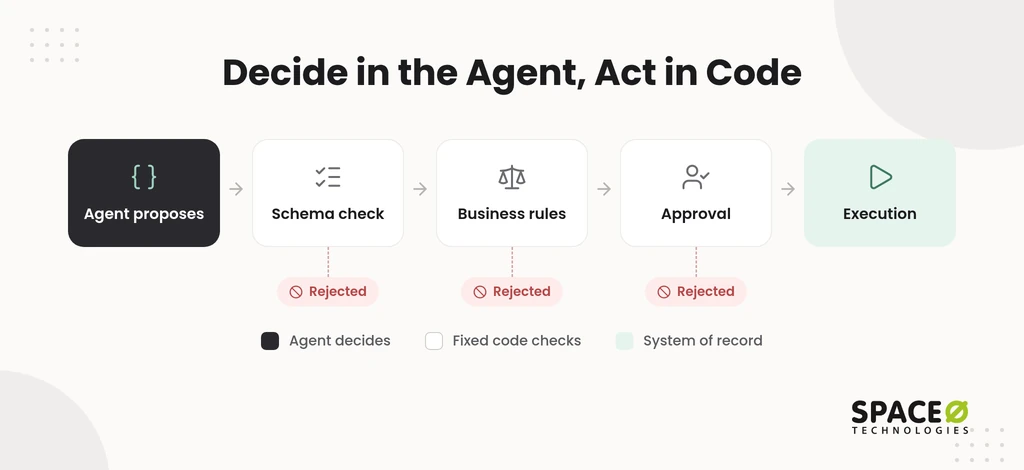
The agent decides what to do, and separate code acts. The agent outputs a structured JavaScript Object Notation (JSON) action. That action then passes through a fixed chain: Request → Schema validation → Business-rule check → Approval → Execution. A malformed or out-of-policy action is rejected before it reaches any system. A model error becomes a rejected proposal, not a posted transaction.
What access should an agent have?
Each agent should get role-based, least-privilege access, scoped per agent and per action. Give every agent its own identity, such as a managed identity in Microsoft Entra. Grant read-only access by default. Add write rights one action type at a time. Permissions for AI agents must hold even if a prompt instruction says otherwise, as the guide to role-based access and permissions for AI agents explains.
Where does a human stay in the loop?
Human-in-the-loop approval applies to actions that are high-risk, high-value, or low-confidence. Typical examples include payments above a set limit, changes to master data, and customer-facing commitments. Regulated decisions belong on this list too. Each escalation should carry the full context, so the reviewer can decide quickly. Log every input, proposed action, approval, and result. Tracing tools such as OpenTelemetry or LangSmith make those AI agent audit logs searchable.
What It Costs to Reach Production, to Run, and to Cut Over
Moving off manual work costs more than the build. Plan for the yearly running bill and for the gates that control how fast autonomy widens. Most buyers price the build first, yet these projects tend to live or die on run cost and cut-over discipline. Gartner predicts that over 40% of agentic AI projects will be canceled by the end of 2027, due to escalating costs, unclear business value, or inadequate risk controls.
What does it cost to reach production?
A first agent pilot usually begins as a proof of concept, priced by Space-O Technologies at $15,000 to $40,000. That range takes 4 to 8 weeks, as of July 2026. The next stage, a basic minimum viable product (MVP), also starts at $15,000, and a feature-rich MVP can reach $50,000 or more. Our MVP development services page explains how milestone payments tie to deliverables.
An enterprise moving several workflows to agents should expect a wider band. As of November 2026, Space-O Technologies quotes $25,000 to $500,000+ for broader AI development, and platforms that need custom models, deep integrations, and compliance controls exceed $500,000. These are our own figures, not a market-wide price for any agent.
What does it cost to run each year?
Yearly run cost has five parts: LLM tokens, hosting, monitoring, maintenance, and retraining. As of November 2026, Space-O Technologies advises planning for US $15,000 to US $60,000 per year on retraining cycles. Maintenance is a recurring yearly share of the original build cost, so ask for that share in writing with every quote.
Once staff hand work to the agent, the budget also has to carry infrastructure and API usage. Model API fees run $500 to $3,000 a month per 10,000 conversations, as of September 2026. Maintenance adds roughly 15% to 25% of the build cost each year.
To test the business case, use the ROI formula:
ROI = Business Value Generated − Total Cost of AI Agent Operations
In that formula, total cost of operations equals the build cost plus the yearly run cost. The yearly run cost includes maintenance, calculated as your maintenance share × build cost. Business value is measured against the step 2 baseline: cost per case, cycle time, and error rate.
When should an agent move to the next phase?
An agent moves to the next phase only when it passes a written scorecard and a named owner signs off. Score the same five criteria at every gate:
- Task adherence: This is the share of cases where the agent followed the documented SOP from start to finish.
- Error rate: This is the share of proposed actions that a reviewer rejected or later corrected.
- Escalation rate: This is the share of cases the agent routed to a person, tracked as a trend over time.
- Run cost per task: This is the token, hosting, and review cost per completed case, compared with the manual baseline.
- Named sign-off owner: This is the one accountable person, usually the process owner, who approves each move to the next phase.
Apply these criteria at two gates: shadow → human-in-the-loop, and human-in-the-loop → bounded autonomy. Thresholds must come from production deployments, not from vendor benchmarks.
Timelines follow these gates, not a calendar promise. A scoped project estimate gives you a range for your specific workflow.
How Space-O Technologies builds it
We build custom agents that connect through APIs to your ERP, CRM, ServiceNow, or legacy systems. Human review is on by default. Off-the-shelf agents rarely reach older systems or unusual workflows. That gap is where a build partner helps.
- Track record: Space-O Technologies reports 1,200+ clients served, 300+ software solutions delivered, and 97% client retention.
- Team: Your project is built by our 140+ in-house developers, from offices in Mesa (Arizona), Brampton (Ontario), and Ahmedabad (India).
- Production controls: Every agent runs inside an evaluation suite that scores accuracy, hallucination rate, bias, latency, and cost, and it is monitored continuously after go-live.
- Security and ownership: An NDA is signed before work begins, and at completion you receive all source code, data, and IP.
- Compliance: Healthcare AI engagements use HIPAA-ready frameworks, and our posture is aligned with ISO 27001.
- Engagement: Pick Dedicated Team, Time & Material, Fixed Cost, or Staff Augmentation to match how you plan to retire manual work.
Where to Start
Two questions define your first pilot. Which department carries the most repetitive manual work today? Which core systems does that work touch: your CRM, your ERP, a ticketing tool, or a legacy application? Your answers show which workflow to map first and which integrations the agent will need.
Frequently Asked Questions
What is meant by rule-based system?
A rule-based system is automation that follows fixed if-then logic, asking “When X happens, what should I do?” Robotic process automation (RPA) bots and scripted workflows are common examples. They work well on structured, fixed-format inputs but stop or fail on exceptions nobody coded. Each format or screen change also needs a rule update.
Is rule-based AI actually AI?
Rule-based automation is better described as deterministic logic than as reasoning AI. It runs the rules it was given and cannot pursue a goal, read an unfamiliar format, or plan a response to a new case. A reasoning AI agent asks what steps reach a desired outcome with the tools available, and it escalates to a person when unsure.
How do autonomous systems work?
An autonomous AI agent runs a loop: it understands the goal and input, reasons about the next step, acts by calling a tool or API, and verifies the result. Across many runs, a second loop of perceive, reason, act, and learn applies. In production, “learn” means people review errors and update prompts, tools, or retrieval sources. The model does not rewrite its own business rules.
Can you provide some examples of agentic workflows?
Common agentic workflows include reading invoices in any layout and matching them to purchase orders and receipts. Others include comparing bank and ledger entries to propose reconciliations, and classifying incoming emails and PDFs and routing each to the right queue. Agents also compare RFP responses against requirements, gather new-hire documents for HR approval, and assemble recurring compliance reports for a named person to sign off.
How can I use AI in my business?
The clearest first uses are back-office tasks: finance and accounting work such as invoice matching and reconciliation, document and inbox triage, procurement and HR onboarding support, and recurring compliance reporting. Agents read documents and emails, act across your ERP, CRM, and databases, and send exceptions to a person with full context. Keep simple, fixed-format steps as plain scripts, since an agent adds cost there without adding value.
What documentation and test assets should I prepare before piloting an agent?
Prepare a written map of the workflow covering every step, input, decision, and system, plus your standard operating procedures (SOPs) so the agent can be grounded on them. Record a baseline for cost per case, cycle time, and error rate, and name a process owner. Build a test set you can re-run after every change, and set up audit logging of each input, proposed action, approval, and result.
How much does it cost to move a workflow to an AI agent?
A first agent pilot usually begins as a proof of concept priced by Space-O Technologies at $15,000 to $40,000 and takes 4 to 8 weeks. A basic minimum viable product (MVP) also starts at $15,000. Plan for yearly maintenance and retraining on top of the build.



 All our projects are secured by NDA




 4.8


