
 By
By 
Contents
Dental clinics have unique operational needs that differ significantly from general healthcare facilities. From managing treatment plans and imaging records to tracking insurance claims and appointment scheduling, dentists require specialized digital solutions tailored to their workflows.
While generic EHR systems may cover basic patient documentation, they often lack features such as odontograms, dental charting, treatment history visualization, imaging integrations, and multi-chair scheduling. This is why many dental clinics are investing in HIPAA-compliant EHR development built specifically for dental practices.
Developing a dental EHR system allows clinics to:
- Streamline patient record management
- Improve appointment scheduling and billing workflows
- Integrate digital imaging and radiography systems
- Ensure HIPAA-compliant data security
- Enhance patient engagement and communication
- Scale operations across multiple clinic locations
In this guide, we will walk you through the complete process of dental EHR software development. With 15+ years of experience as a leading EHR software development partner, we have shared insights on the benefits, must-have features, cost breakdown, development steps, and challenges with practical solutions. Whether you run a single dental clinic or a growing chain, this blog will help you plan your EHR development strategy effectively.
What Is EHR Development for Dental Clinics?
EHR development for dental clinics involves building custom electronic health record software tailored to the unique workflows of dental practices. Unlike general healthcare systems—or even specialized solutions like pediatric EHR platforms—dental EHRs are designed to manage patient data, treatment histories, imaging records, and billing with a strong focus on procedure-driven care. These systems include specialty-specific clinical tools that support the visual and operational nature of dentistry.
Custom dental EHR platforms integrate odontogram charting, periodontal measurements, and imaging workflows natively. They support CDT coding for dental billing instead of standard medical procedure codes. Patient scheduling, recall management, and insurance verification are handled through a unified interface. Every feature aligns with how dental teams actually deliver care in practice.
Building a dental EHR from scratch gives practices complete control over functionality and workflows. Off-the-shelf solutions often include unnecessary features while missing critical dental capabilities. A custom platform scales with your practice as patient volumes and service offerings expand.
Why Dental Clinics Need Custom EHR Solutions: 5 Key Benefits
Dental workflows differ fundamentally from general medical practice operations in several key ways. Standard healthcare platforms rarely accommodate these differences without significant workarounds. Below are the most compelling reasons dental practices invest in building custom EHR software solutions.
1. Dental-specific clinical documentation
General medical platforms use text-heavy documentation suited primarily for narrative clinical notes. Dental care requires visual, interactive charting that mirrors traditional paper odontograms instead. Custom EHR platforms display tooth conditions, restorations, and treatment areas on-screen. This visual approach matches how dentists think and document their clinical findings naturally.
2. Seamless imaging integration
Dental practices rely heavily on X-rays, panoramic scans, and intraoral photographs every day. A custom platform connects directly to digital sensors from brands such as Dexis and Carestream. Clinicians can instantly view all images linked to specific teeth in the patient’s chart. This connection eliminates the need to switch between disconnected imaging applications entirely.
3. Specialized treatment planning tools
Dentists present patients with multiple treatment options, each with different timelines and cost breakdowns. Custom systems generate side-by-side comparisons and automatically calculate insurance for each plan. Patients understand their choices clearly through on-screen visualizations. This capability consistently improves treatment acceptance rates and overall patient satisfaction scores.
4. Dental-specific billing and insurance management
Dental billing uses CDT codes and tracks each patient’s annual insurance maximum. General platforms handle medical billing codes that do not apply to dental procedures. A tailored system automates eligibility checks, benefit tracking, and claims submission for dental coverage. Practices reduce claim rejections and accelerate revenue collection through accurate coding workflows.
5. Improved patient communication and scalability
Custom portals let patients view treatment plans, upcoming appointments, and payment histories online. Automated reminders via SMS and email significantly reduce no-show rates for scheduled visits. A custom EHR also grows alongside your practice as you expand to new office locations. New modules, locations, and providers integrate smoothly into the existing platform architecture.
These benefits highlight why dental practices require purpose-built EHR systems that align closely with their clinical and operational workflows. Similar to how other specialties demand tailored solutions—such as those explored in EHR development for mental health—a one-size-fits-all approach often falls short in delivering efficiency and usability. Investing in a custom dental EHR ensures better clinical accuracy, streamlined operations, and a scalable foundation for long-term growth.
Need a Custom EHR System Built for Your Dental Practice?
Access experienced healthcare developers who understand dental workflows, imaging, and compliance requirements. Build a secure, scalable platform tailored to your clinical needs today.
Essential Features of a Dental EHR System
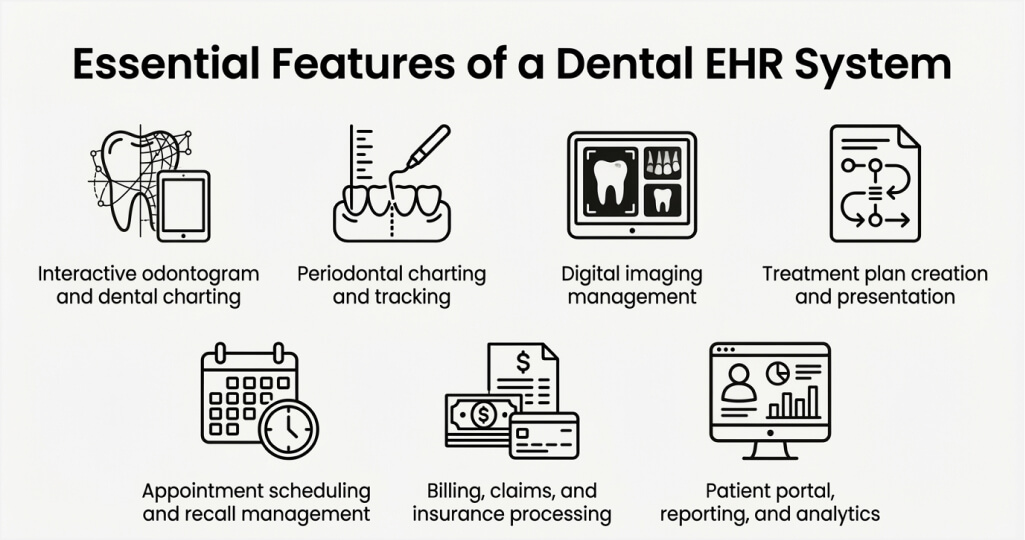
A well-designed dental EHR platform includes features that support clinical, administrative, and compliance needs. Prioritizing the right feature set ensures your investment delivers maximum value over time. Below are the most critical features every dental EHR system should include.
1. Interactive odontogram and dental charting
The odontogram is the centerpiece of any dental EHR platform for clinical documentation. It provides a visual map of all teeth with conditions, restorations, and treatment notes. Clinicians tap or click specific teeth to record findings, mark existing work, and plan procedures. AI-powered autochart features can identify existing restorations automatically for faster documentation.
2. Periodontal charting and tracking
Comprehensive periodontal tools accurately record pocket depths, gingival margins, mobility, and bleeding on probing. The system overlays historical charts to show treatment progress over multiple patient visits. Voice-enabled charting allows dentists to efficiently complete periodontal exams without assistant help. Comparative views help clinicians communicate results to patients more effectively during consultations.
3. Digital imaging management
The platform should integrate natively with intraoral cameras, digital X-ray sensors, and 3D scanners. Images are attached to specific teeth and displayed chronologically within the patient’s chart for reference. Annotation tools allow clinicians to highlight findings and share visuals directly with patients. Before-and-after comparison features comprehensively support case documentation and patient education.
4. Treatment plan creation and presentation
Multi-phase treatment planning tools let dentists build complex care sequences with associated costs. The system calculates insurance coverage, copays, and out-of-pocket expenses for each proposed option. Visual presentation modes help patients clearly understand recommended treatments during consultations. Acceptance tracking monitors which plans patients approve, decline, or defer for future follow-up.
5. Appointment scheduling and recall management
Smart scheduling tools optimize chair time and prevent gaps in the daily clinical calendar. Automated recall systems track overdue patients and proactively send reminders for routine checkups. Color-coded views help front desk staff efficiently manage multiple providers and operatories. Online booking allows patients to schedule appointments outside regular office hours.
6. Billing, claims, and insurance processing
Built-in CDT coding support ensures accurate procedure documentation for all dental claims submitted. Electronic claims submission significantly reduces processing time and minimizes rejection rates for the practice. Real-time eligibility verification confirms patient coverage before treatment begins at each visit. Payment tracking and outstanding balance management keep revenue cycles flowing smoothly throughout the month.
7. Patient portal, reporting, and analytics
Secure patient portals provide access to records, treatment plans, and financial statements through browsers. Two-way messaging allows patients to ask questions without calling the front desk. Practice analytics dashboards clearly reveal production trends, collection rates, and treatment acceptance metrics. Data-driven insights help practice owners make informed business decisions based on real numbers.
These features form the foundation of a high-performing dental EHR platform. Clinics should prioritize capabilities that address their most pressing operational challenges first—an approach commonly recommended for EHR development for small practices, where resources and scalability must be carefully balanced. A phased feature rollout ensures each module receives proper development attention and thorough testing.
Key Steps in Developing an EHR for Dental Practices
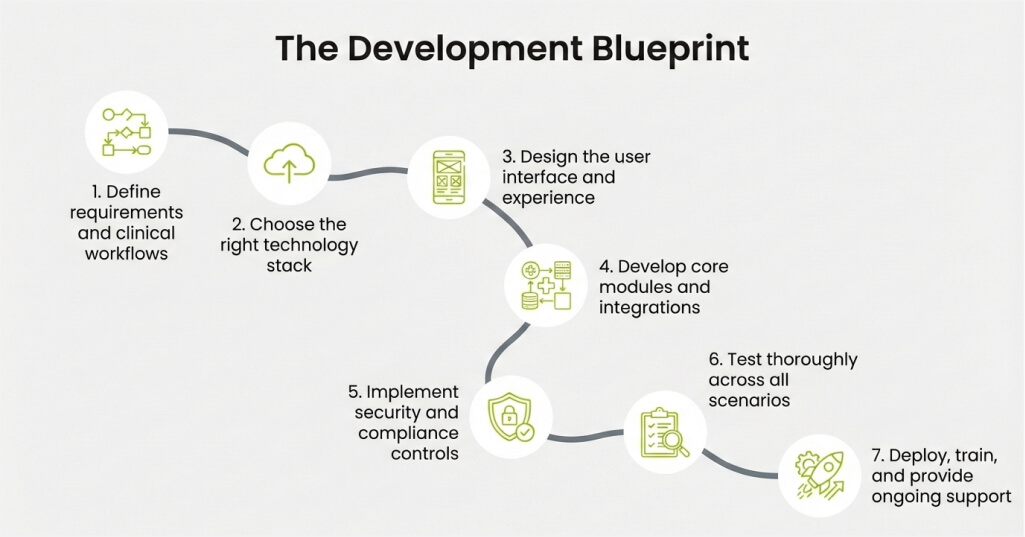
Building a custom dental EHR requires a structured development approach from start to finish, similar to the methodologies used by experienced EHR development companies. Each phase plays a critical role in delivering a reliable, secure, and user-friendly clinical product. Skipping any step often leads to costly revisions and delays.
Step 1: Define requirements and clinical workflows
Start by documenting every workflow your dental practice uses in daily patient care. Identify pain points in current systems and list features that would resolve them specifically. Interview dentists, hygienists, and administrative staff to capture their requirements comprehensively. Clear documentation prevents scope creep and keeps the project focused throughout the development cycle.
Step 2: Choose the right technology stack
Select development frameworks, databases, and hosting platforms that support healthcare applications securely. Cloud-based architectures offer scalability, remote access, and lower upfront infrastructure costs for practices. Over 80% of new dental EHR implementations in 2026 use cloud-based deployment models successfully.
Step 3: Design the user interface and experience
Create wireframes and prototypes that dental professionals can review before any coding begins. Design the odontogram, charting screens, and scheduling views for maximum usability and speed. Gather feedback from actual dental staff to refine the interface before official development begins.
Step 4: Develop core modules and integrations
Build clinical documentation, scheduling, billing, and imaging modules precisely in accordance with approved designs. Integrate with dental imaging hardware, payment processors, and insurance clearinghouses for connectivity. Use FHIR and HL7 standards where medical data exchange with external providers becomes necessary. Develop APIs that enable future connections with third-party dental tools and partner services.
Step 5: Implement security and compliance controls
Encrypt all patient data in transit and at rest using industry-standard protocols without exception. Build role-based access controls that restrict data visibility to authorized personnel within the practice. Create comprehensive audit trails that automatically log every data access and modification event.
Step 6: Test thoroughly across all scenarios
Execute functional, performance, and security testing before deploying to any production environment. Validate clinical workflows with actual dental staff to fully confirm accuracy and usability standards. Resolve all identified issues before proceeding to the official launch phase.
Step 7: Deploy, train, and provide ongoing support
Launch the platform with dedicated support staff available for immediate troubleshooting at the practice. Comprehensively train all clinical and administrative users on system features and daily workflows. Establish maintenance routines that keep the platform updated, secure, and performing at its best.
A disciplined development process protects your investment and significantly accelerates time to value. Invest in each step to build a dental EHR that serves your practice reliably for years.
Ready to Start Your Dental EHR Development Project?
Collaborate with Space-O Technologies to build a compliant, feature-rich EHR platform designed for dental workflows. Discuss your requirements with our development experts today.
HIPAA Compliance in Dental EHR Development
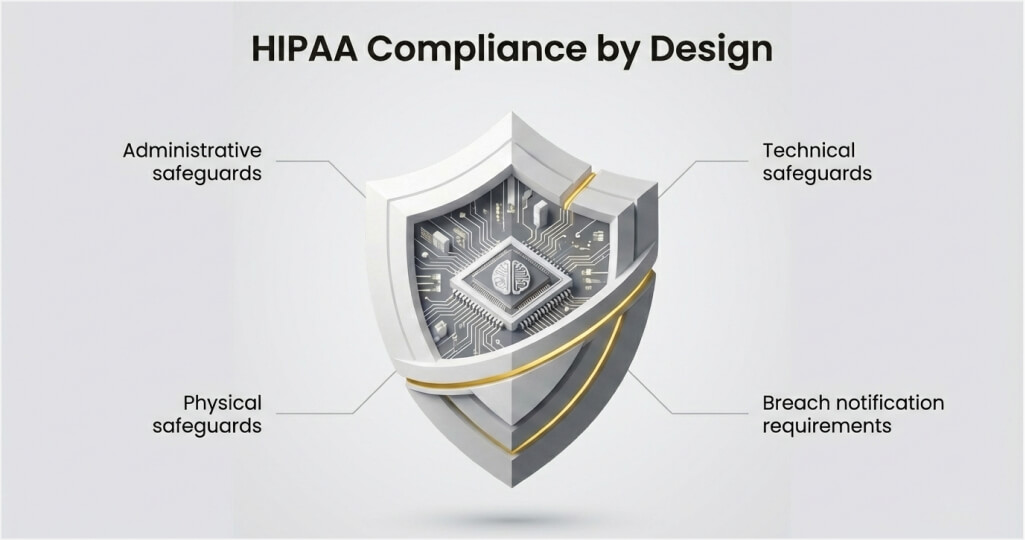
Every dental practice that transmits health information electronically must fully comply with HIPAA regulations. Building compliance into your EHR from the start costs far less than retrofitting it afterward. Below are the critical compliance areas your dental EHR must address without compromise.
Administrative safeguards
Appoint a dedicated privacy and security officer responsible for compliance oversight at your practice. Conduct regular risk assessments to identify vulnerabilities in your systems and operational processes. Thoroughly train every staff member on HIPAA policies, data handling, and breach reporting procedures. Maintain all compliance documentation for at least six years, as federal regulations strictly require.
Technical safeguards
Implement robust identity and access management to prevent unauthorized access to the system at all levels. Encrypt all protected health information stored in databases and transmitted between connected systems. Create event logs that automatically record every login, data view, modification, and export action. Deploy automatic session timeouts that protect unattended workstations from unauthorized use by visitors.
Physical safeguards
Secure physical access to servers, workstations, and any devices that store patient data directly. Restrict server room access to authorized IT personnel via badge access or similar controls. Ensure that portable devices containing patient information use full-disk encryption for complete protection. Establish disposal procedures that permanently destroy data on decommissioned hardware and storage drives.
Breach notification requirements
Dental practices must notify affected patients within 60 days of discovering any data breach. Breaches affecting 500 or more individuals require notification to HHS and local media outlets. Maintain an incident response plan that outlines specific steps for breach containment and public reporting. Regular breach simulation drills prepare your team to respond quickly and minimize patient impact effectively.
HIPAA compliance is not optional for dental practices handling electronic patient records today. Penalties range from $100 to $50,000 per violation, with a maximum of $1.5 million per category per year. Building compliance into your development process protects patients and your practice.
Common Challenges in Dental EHR Development and Solutions
Developing a custom dental EHR involves obstacles that can delay delivery and inflate project costs—particularly when dealing with system connectivity and data exchange, as highlighted in the EHR integration guide. Below are the most frequent hurdles and practical approaches to overcome them with confidence.
Challenge 1: Resistance to change among dental staff
Many dental professionals prefer familiar paper-based or legacy digital workflows they already know. Staff members may view new systems as disruptive rather than beneficial to their daily routines. This resistance can significantly slow adoption and reduce the return on your technology investment.
How to overcome this challenge
- Involve dental staff in the requirements gathering and design phases from the very beginning.
- Demonstrate how specific features save time on tasks they perform repeatedly each working day.
- Provide hands-on training sessions that build user confidence before the system goes live.
- Assign in-office champions who help colleagues navigate new workflows during the transition period.
Challenge 2: Complex imaging system integrations
Dental practices use imaging hardware from multiple manufacturers with different communication protocols. Connecting these devices to a unified platform requires specialized technical knowledge and extensive testing. Failed imaging integrations frustrate clinicians and undermine confidence in the entire system.
How to overcome this challenge
- Choose development partners with proven experience in integrating dental imaging hardware.
- Test integrations with every imaging device model your practice currently operates in the office.
- Build adapter layers that support multiple manufacturer protocols within a single software framework.
- Plan for future imaging technology upgrades by designing a flexible and modular integration architecture.
Challenge 3: Ensuring data migration accuracy
Practices switching from legacy systems must transfer years of patient records to the new platform. Inaccurate data migration creates clinical risks and immediately erodes staff confidence in the system. Missing records, duplicate entries, and formatting errors require extensive manual correction afterward.
How to overcome this challenge
- Thoroughly audit existing data quality before beginning any migration activities or transfers.
- Build automated validation scripts that check migrated records against source data for accuracy.
- Run parallel systems during the transition period to verify data completeness and correctness.
- Assign dedicated team members to promptly handle migration exceptions and edge cases.
These challenges are manageable with proper planning and experienced development partners. Address each obstacle early to keep your project on schedule and within your approved budget.
Struggling with Dental EHR Development Challenges?
Our experienced teams deliver reliable, HIPAA-compliant dental EHR platforms on time and within budget. Leverage our proven processes and technical expertise to get your project on track.
How Much Does Dental EHR Development Cost?
Custom EHR development costs depend on project scope, feature complexity, and compliance needs. Simple platforms for single-location practices cost significantly less than multi-site enterprise systems. Understanding these cost drivers helps practice owners budget accurately for their technology projects.
Factors that influence development cost
- Feature complexity: Advanced modules like AI-powered charting and voice-enabled documentation increase the overall development effort.
- Number of integrations: Each connection to an imaging device, clearinghouse, or third-party tool adds scope to the project.
- Compliance requirements: HIPAA security controls, encryption layers, and audit trail features add to the total budget.
- Platform type: Cloud-based deployments typically cost less upfront than on-premises infrastructure for clinics.
- Design complexity: Custom user interfaces with interactive odontograms require specialized design expertise and testing.
- Data migration scope: Transferring historical records from legacy systems requires careful planning and validation.
- EHR system modernization: Upgrading or replacing legacy dental software to meet current performance, security, and interoperability standards can significantly impact development timelines and costs.
Ultimately, the total cost of dental EHR development comes down to how well you balance functionality, scalability, and compliance requirements from the outset. Many practices choose to outsource EHR software development to experienced teams who can optimize costs while ensuring high-quality delivery. With the right approach, you can build a solution that meets your current needs while remaining flexible for future growth.
Typical dental EHR development cost ranges
| Project Scope | Estimated Cost Range | Timeline |
|---|---|---|
| Basic dental EHR (single location) | $40,000 to $100,000 | 3 to 6 months |
| Mid-range platform (multi-provider) | $100,000 to $250,000 | 6 to 10 months |
| Enterprise dental EHR (multi-location) | $250,000 to $500,000+ | 10 to 18 months |
| Legacy system migration with new EHR | $150,000 to $350,000 | 8 to 14 months |
Cloud-based dental EHR solutions typically cost $150 to $800 per provider per month. Practices that invest in custom development often achieve full ROI within two to three years. Working with experienced partners prevents budget overruns caused by rework and unexpected scope changes.
Planning an EHR Build? Get Your Cost Here
Select your deployment model, specialty modules, and HL7/FHIR integration needs from the form. Receive an accurate cost estimate with zero commitment.
Best Practices for Dental EHR Development
Following proven strategies increases the likelihood of delivering a successful dental EHR platform—especially when starting with a focused EHR MVP software development approach to validate core features early. These guidelines reflect lessons from real-world implementations of dental technology across global markets. Apply them from the start to avoid common pitfalls and prevent wasted resources entirely.
1. Prioritize the dental workflow above everything
Design every screen, button, and data flow around how dental teams actually work with patients. Map clinical workflows before writing any code to ensure the platform fits naturally into routines. A system that mirrors existing dental processes leads to faster adoption among all staff members. Technology should adapt to the clinician, never the other way around.
2. Build for compliance from day one
Integrating HIPAA safeguards into the architecture before developing any clinical features for users and retrofitting security controls into a finished product costs significantly more than building them in early. Encrypt data, enforce access controls, and create audit trails during the earliest development phase. Compliance-first development protects your practice and builds patient confidence from the start.
3. Design for dental-specific usability
Dental professionals need visual, intuitive interfaces that minimize keyboard input during patient care. Touch-friendly odontograms and one-click charting reduce documentation time between clinical procedures. Test every interface element with actual dental staff to validate usability before the launch date. Poor design choices lead to workarounds that completely negate the benefits of digital record-keeping.
4. Invest in training and change management
Allocate a dedicated budget for comprehensive staff training before and after the platform launch day. Create role-specific training materials for dentists, hygienists, and front desk teams independently. Schedule regular refresher sessions to reinforce system proficiency and introduce new platform features. Organizations that underinvest in training experience lower adoption rates and diminished system value.
Adopting these best practices ensures your dental EHR platform is not only functional but also aligned with real-world clinical needs and long-term scalability goals. To execute these strategies effectively, many organizations choose to hire EHR software experts who bring domain-specific knowledge and proven implementation experience. With the right expertise in place, your practice can confidently build a system that delivers efficiency, compliance, and lasting operational value.
Partner with Space-O Technologies for Custom Dental EHR Development
Custom EHR development for dental clinics is a strategic investment in operational efficiency and the quality of patient care. The right platform eliminates paper-based bottlenecks and strengthens clinical workflows across your practice. Purpose-built features like odontogram charting, imaging connectivity, and dental billing deliver value that generic tools cannot match. Success requires careful planning, dental domain expertise, and a commitment to HIPAA compliance throughout.
Space-O Technologies specializes in custom healthcare software development for organizations of all sizes globally. Our experienced development teams bring deep expertise in dental workflows, FHIR standards, and HIPAA compliance. We help dental practices, DSOs, and healthtech companies confidently build secure, scalable EHR platforms while enabling smooth interoperability with our EHR integration services. By eliminating data silos, we help improve operational efficiency and patient outcomes. From initial requirements through deployment and ongoing support, we deliver reliable, future-ready solutions.
We work side by side with your dental staff to map workflows, reduce operational friction, and define the exact features your clinic needs. From architecture to interface design, our team develops scalable EHR systems that support performance, security, and long-term usability. To avoid costly rework and ensure compliance from day one, hire EHR software developers with proven experience in healthcare software.
If you are ready to develop a dental EHR system tailored to your clinic’s needs, consult our healthcare software experts today. Let Space-O Technologies help you build a secure, compliant, and future-ready dental EHR solution.
FAQs on Developing EHR Systems for Dental Practice
1. How is a dental EHR different from a medical EHR?
Dental EHR platforms use visual charting tools, such as odontograms, instead of narrative clinical notes. They support CDT billing codes, dental imaging connections, and periodontal tracking specifically for dentistry. Medical systems focus on diagnosis-based documentation and ICD procedure coding for general healthcare. Dental platforms also manage insurance features like annual maximums and coverage by procedure category.
2. How long does it take to develop a custom dental EHR?
Development timelines depend directly on feature complexity, integration requirements, and practice size. Basic single-location platforms typically require three to six months of focused development work. Enterprise systems with advanced features may take 10 to 18 months to complete. Thorough planning and phased delivery help prevent costly delays throughout the entire project lifecycle.
3. How much does dental EHR development cost?
Costs range from $40,000 for basic platforms to $500,000 or more for enterprise-grade solutions. Major cost drivers include feature complexity, imaging integrations, and compliance requirements for the practice. Cloud-based deployment models typically reduce upfront infrastructure investment needs significantly for clinics. Working with experienced partners helps control spending while maintaining high standards of development quality.
4. Is HIPAA compliance required for dental EHR systems?
Yes. Any dental practice that transmits electronic health information must fully comply with HIPAA regulations. Compliance requires administrative, technical, and physical safeguards to protect patient data at all levels. Penalties for violations range from $100 to $50,000 per incident, up to $1.5 million annually. Building compliance into development from day one remains essential for every dental EHR project.



 All our projects are secured by NDA




 4.8
4.8

