
 By
By 
Contents
Digital transformation is no longer limited to large hospitals and enterprise healthcare networks. Small medical practices are increasingly adopting electronic health record systems to improve efficiency, compliance, and patient care.
According to Grand View Research, the global EHR market reached $33.43 billion in 2024 and is projected to reach $43.36 billion by 2030. This steady growth highlights the rising demand for digital health infrastructure across practices of all sizes.
However, small clinics and independent practitioners face unique challenges when implementing EHR systems. Limited budgets, smaller administrative teams, and highly specific workflows require solutions that are practical, affordable, and easy to use.
Developing a custom EHR system tailored to the needs of a small practice allows providers to streamline scheduling, documentation, billing, and patient communication while maintaining regulatory compliance and scalability.
In this blog, we will explore how to develop an EHR system tailored for small practices. Drawing from our experience as a trusted EHR software development company, we shed light on the benefits, must-have features, step-by-step development process, common challenges, and cost considerations to help you make informed decisions about building a practical and future-ready solution.
What Is EHR Development for Small Practices?
EHR development for small practices involves building custom electronic health record platforms for independent clinics. These solutions address the specific needs of lean medical teams with limited IT resources. Custom platforms align directly with daily clinical workflows instead of forcing staff to adapt. The result is a system that fits your office rather than the other way around.
Unlike enterprise-grade products, MVP development for EHR solutions prioritizes simplicity and usability. They include only the features that independent providers actually need and use regularly. This focused approach reduces training time and significantly accelerates team adoption. Staff members spend less time navigating complex menus and more time caring for patients.
Custom EHR development also gives practice owners full control over their digital infrastructure. Clinics choose which modules to include based on their specialty and patient volume. They avoid vendor lock-in and retain full ownership of their clinical data assets. This flexibility proves especially valuable as facilities grow or expand into new service areas.
Why Small Practices Need Custom EHR Solutions
Generic software often creates more problems than it solves for independent medical offices. The needs of a five-physician family clinic differ vastly from those of a 500-bed hospital. Custom development addresses these differences with precision and purpose. Below are the most compelling reasons to invest in a tailored solution.
1. Generic platforms overload lean teams
Most commercial EHR products target large health systems with dedicated IT departments. Small offices lack the staff to manage feature-heavy platforms built for enterprise environments. Clinicians waste hours navigating unnecessary modules that clutter their daily workflow. A custom solution eliminates this burden by including only relevant functionality.
2. Off-the-shelf pricing strains tight budgets
Subscription costs for major EHR vendors can reach $40,000 to $90,000 per provider annually. Independent clinics cannot absorb these expenses without sacrificing other operational priorities. Custom development offers predictable investment costs with lower ongoing maintenance fees. Practice owners gain financial clarity and avoid surprise pricing increases from vendors.
3. Workflow alignment improves clinical efficiency
Every medical office has unique processes for scheduling, charting, and billing activities. Pre-built software forces staff to change their routines to match rigid system designs. Custom platforms adapt to existing workflows instead of disrupting established team habits. This alignment reduces errors and speeds up daily operations for the entire office.
4. Specialty-specific features enhance care delivery
Dermatology clinics need image-heavy charting. Behavioral health offices require session-based documentation tools. Generic platforms rarely support these specialized requirements without costly add-on modules. Tailored solutions include specialty-specific templates and tools from the very start. Providers document patient encounters faster and with greater clinical accuracy.
5. Data ownership protects long-term independence
Vendor-hosted platforms store your clinical data on servers you do not control directly. Switching providers becomes expensive when your records sit in proprietary databases. Custom development ensures your practice retains full ownership of all patient information. This independence gives you negotiating power and flexibility for future technology decisions.
6. Scalability supports growth without disruption
Growing clinics need platforms that expand alongside their patient volume and service offerings. Off-the-shelf products often require expensive upgrades to unlock additional capacity or features. Custom-built applications scale gradually based on your actual growth trajectory. You add new modules only when your practice genuinely requires them.
These reasons demonstrate why independent providers increasingly choose custom development paths. The right tailored solution transforms daily operations and strengthens patient care delivery. Investing in purpose-built software creates lasting competitive advantages for smaller healthcare teams.
Looking to Build a Custom EHR Built for Your Small Practice?
Work with an experienced EHR development company to build a system that aligns perfectly with your practice workflows and growth plans.

Essential Features for a Small Practice EHR System
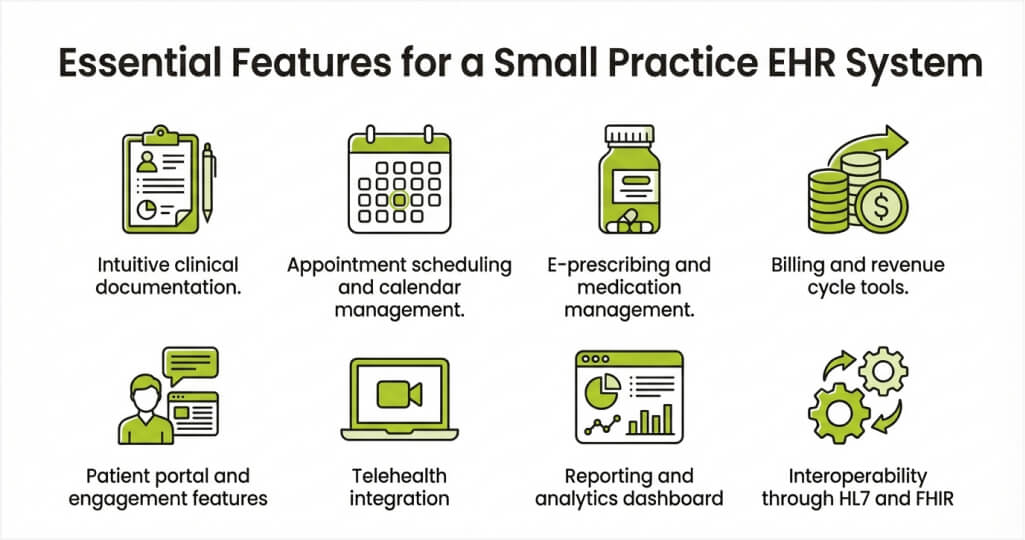
Building an EHR platform requires carefully selecting features based on clinical and operational priorities. Including too many capabilities increases cost and complexity without adding value. The features below represent the core functionality every independent medical office needs. Each one directly impacts care quality, efficiency, or regulatory compliance.
1. Intuitive clinical documentation
Charting should feel natural and require minimal clicks to complete each patient encounter. Customizable templates let providers document visits using formats that match their specialty. Voice-to-text and AI-powered scribing tools reduce manual typing significantly for busy clinicians. Fast documentation keeps providers focused on their patients rather than their screens.
2. Appointment scheduling and calendar management
Integrated scheduling eliminates the need for separate booking software or paper calendars. Patients receive automated reminders through text or email to reduce no-show rates. Staff view provider availability in real time and manage cancellations with just a few clicks. Smart scheduling algorithms optimize time slots based on visit types and durations.
3. E-prescribing and medication management
Electronic prescribing sends orders directly to pharmacies without paper scripts or phone calls. The system checks drug interactions, allergies, and dosage limits before each submission. Providers can access complete medication histories within the patient chart to make informed decisions. This feature alone saves significant time and reduces prescription-related errors daily.
4. Billing and revenue cycle tools
Built-in billing modules capture charges automatically from clinical documentation entries. The platform generates claims, tracks submissions, and flags denials for quick resolution. Integrated eligibility verification confirms insurance coverage during patient check-in procedures. Clinics collect revenue faster and reduce outstanding balances with automated follow-up reminders.
5. Patient portal and engagement features
Secure portals give patients direct access to their health records and test results online. Individuals schedule visits, request prescription refills, and message their care team conveniently. This self-service approach reduces front desk phone volume and boosts satisfaction scores. Engaged patients follow treatment plans more consistently and keep appointments more reliably.
6. Telehealth integration
Virtual visit capabilities should exist natively within the EHR rather than as separate add-on tools. Providers launch video consultations directly from the patient chart with a single click. Visit notes flow automatically into the health record without creating duplicate documentation. Remote care options expand your reach to patients who cannot visit the office physically.
7. Reporting and analytics dashboard
Data-driven insights help practice owners track performance metrics and identify opportunities for improvement. Clinical quality reports support regulatory submissions and participation in value-based care programs. Financial dashboards display revenue trends, collection rates, and outstanding claims at a glance. Actionable analytics transform raw data into decisions that strengthen both care and profitability.
8. Interoperability through HL7 and FHIR
Standards-based connectivity enables seamless data sharing with labs, pharmacies, and referring providers. FHIR APIs support modern health information exchanges mandated by federal regulations and play a key role in EHR system modernization initiatives. HL7 v2 interfaces maintain connections with legacy platforms that are still in use across many healthcare settings, ensuring continuity during transitions. Interoperable systems reduce duplicate testing and improve care coordination across all providers.
Selecting the right features prevents scope creep and keeps your development budget focused. Start with these core capabilities and add specialized modules as your clinic evolves. A streamlined platform outperforms bloated software every single day in a busy medical office.
Step-by-Step EHR Development Process for Small Practices
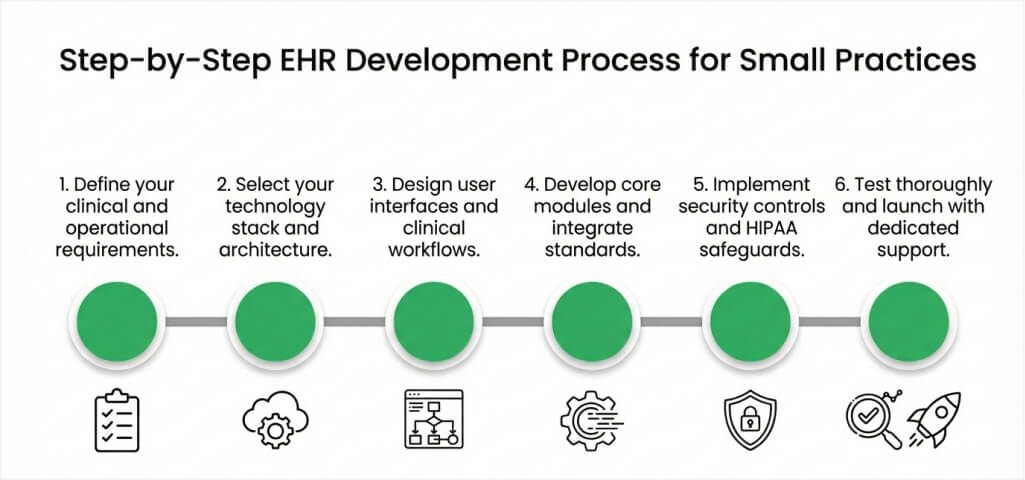
A structured development process keeps your project on track and within budget constraints. Following these phases reduces risk and produces a platform that genuinely serves your clinical team. Each step builds upon the previous one to create a solid technical foundation. Rushing any phase often leads to costly corrections and frustrating delays.
Step 1: Define your clinical and operational requirements
Start by documenting every workflow your office performs, from patient intake to billing completion. Identify pain points in your current processes that technology can effectively address. Consult with physicians, nurses, and front desk staff to capture all functional needs. This requirements document guides every subsequent development decision your team makes.
Step 2: Select your technology stack and architecture
Choose between cloud-hosted and on-premise deployment based on your budget and IT capabilities. Cloud platforms reduce infrastructure costs and provide automatic updates for lean teams. Select programming languages, databases, and frameworks that support healthcare data standards. Your architecture decisions directly affect platform performance, security, and future scalability.
Step 3: Design user interfaces and clinical workflows
Create wireframes and prototypes that visually map each user interaction within the platform. Prioritize minimal clicks and intuitive navigation to keep clinicians productive during visits. Test interface designs with actual staff members to gather feedback before coding begins. Good design reduces training needs and accelerates adoption across your entire team.
Step 4: Develop core modules and integrate standards
Build functionality in phases, starting with clinical documentation and scheduling modules first. Implement HL7 and FHIR interfaces to enable data sharing with external labs and pharmacies. Add billing, e-prescribing, and patient portal features in subsequent development cycles. Phased delivery lets your team test and refine each module before adding the next one.
If you’re evaluating broader enterprise solutions, exploring top companies for EHR development can also help you align your healthcare systems with scalable business processes.
Step 5: Implement security controls and HIPAA safeguards
Embed encryption, access controls, and audit logging into every layer of the application. Configure role-based permissions to restrict data visibility by staff responsibilities. Conduct vulnerability assessments and penetration testing before deploying the platform publicly. Security must be foundational, not an afterthought applied after development finishes.
Step 6: Test thoroughly and launch with dedicated support
Execute comprehensive testing that covers functionality, performance, security, and user acceptance criteria. Involve clinical staff in testing sessions to validate that workflows function correctly. Deploy the platform during a low-volume period and provide on-site support for the first weeks. Gather user feedback continuously and release updates that promptly address real-world issues.
A disciplined process protects your investment and produces a reliable clinical platform. Many organizations choose to outsource EHR software development to ensure each phase is executed efficiently with expert oversight. Providers who skip steps frequently face rework that doubles their original project scope. Commit to each phase and build a system that serves your practice for years ahead—especially when planning pediatric EHR software development, where precision and adaptability are critical.
Need Expert Guidance for Your EHR Development Project?
Work with Space-O Technologies to plan and execute your development roadmap with confidence. Our healthcare specialists deliver compliant, user-friendly platforms on schedule.
How Much Does Custom EHR Development Cost for Small Practices?
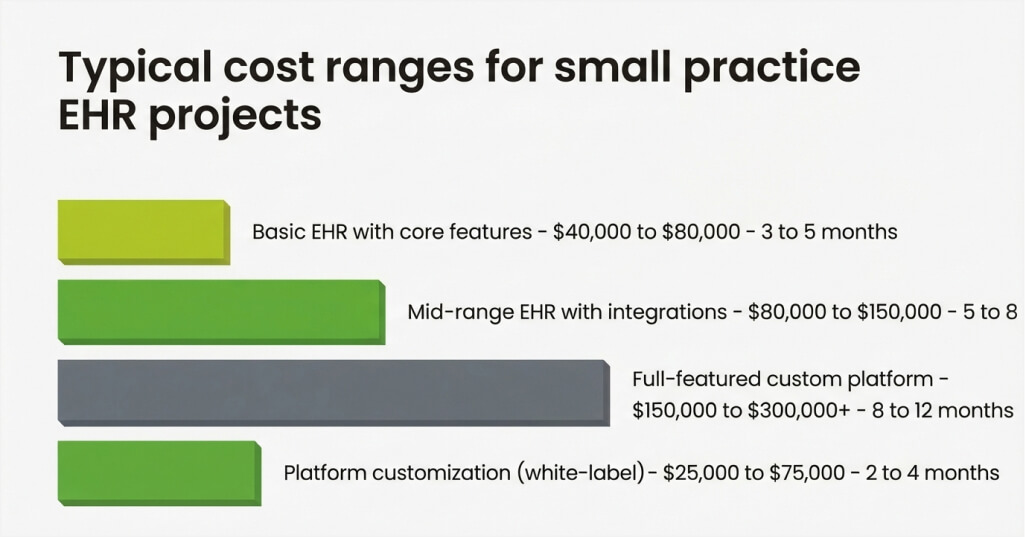
EHR development costs vary significantly based on project scope, feature set, and technical complexity. Simple platforms with basic charting and scheduling cost far less than fully integrated suites. Understanding the key cost drivers helps practice owners budget accurately for their projects.
Factors that influence your investment
- Feature count and complexity: Each additional module adds design, development, and testing expenses to your total budget.
- EHR integration: Connecting with labs, pharmacies, and billing clearinghouses increases project scope and cost.
- Compliance needs: HIPAA security controls, encryption, and audit trail features require specialized development expertise.
- Platform type: Cloud-based architectures typically cost less up front than on-premises server deployments.
- Design and UX requirements: Custom interface design, informed by user research, adds to the overall project investment.
- Ongoing maintenance: Post-launch support, updates, and hosting contribute to annual total ownership costs.
Typical cost ranges for small practice EHR projects
| Project Scope | Estimated Cost Range | Timeline |
|---|---|---|
| Project Scope | Estimated Cost Range | Timeline |
| Basic EHR with core features | $40,000 to $80,000 | 3 to 5 months |
| Mid-range EHR with integrations | $80,000 to $150,000 | 5 to 8 months |
| Full-featured custom platform | $150,000 to $300,000+ | 8 to 12 months |
| Platform customization (white-label) | $25,000 to $75,000 | 2 to 4 months |
According to an IBM report, the United States reported the highest average breach cost of any country, at USD 9.48 million per incident. This staggering figure highlights why investing in secure development saves enormous costs later. Cutting corners on security during the build phase creates risks that far outweigh any short-term savings. Smart budgeting includes robust security measures from the very beginning of your project.
What Will Your EHR System Cost?
Define your specialty modules, deployment model, and data migration needs. Get priced free.
HIPAA Compliance Essentials in EHR Development
Every electronic health record platform that handles patient data must comply with HIPAA regulations. Non-compliance exposes practices to severe financial penalties and reputational damage. Building HIPAA-compliant EHR development into your development process from day one costs far less than retrofitting later. Below are the critical requirements every small practice EHR must address.
1. Data encryption standards
Encrypt all patient information both in transit and at rest using AES-256. Secure all API connections with TLS 1.2 or higher for data exchanges. Encryption prevents unauthorized access even if attackers breach your network perimeter. This safeguard forms the foundation of every HIPAA-compliant health record system.
2. Access control and authentication
Implement role-based access controls that limit data visibility to authorized personnel only. Front desk staff can view scheduling details, while clinicians can access full clinical records. Multi-factor authentication adds a second verification layer for all user login attempts. These controls ensure that only the right people view sensitive patient information.
3. Audit trail and activity logging
Automatically record every data access event, modification, and user action within the platform. Audit logs provide evidence of compliance during regulatory inspections and reviews. They also help identify suspicious activity patterns that could indicate security threats. Comprehensive logging demonstrates your commitment to protecting patient privacy and data integrity.
4. Business Associate Agreements
Sign BAAs with every third-party vendor that accesses or processes protected health information. Cloud hosting providers, billing services, and integration partners all require formal agreements. These contracts define each party’s responsibilities for safeguarding patient data. Missing BAAs are among the most common HIPAA violations regulators find.
5. Regular risk assessments
Conduct annual security risk assessments to identify vulnerabilities across your entire platform. Address gaps promptly and document all remediation efforts for compliance records. The proposed 2025 HIPAA Security Rule update will make many previously optional controls mandatory. Proactive assessment keeps your practice ahead of evolving regulatory requirements.
HIPAA compliance protects both your patients and your practice from costly security incidents. Building these safeguards into your development process ensures lasting regulatory adherence. A compliant platform significantly builds patient trust and strengthens your professional reputation.
Common Challenges in Small Practice EHR Development and Solutions
Building a custom platform presents obstacles that can delay timelines and unexpectedly inflate budgets. Anticipating these issues enables proactive solutions rather than reactive crisis management. Below are the most frequent challenges and proven strategies for addressing them effectively.
Challenge 1: Limited budget and resources
Independent clinics operate on tighter margins than large hospital networks and health systems. Development costs can escalate quickly if the project scope expands beyond initial requirements.
How to overcome this challenge
- Define a minimum viable product with essential features, and launch it on a lean platform first.
- Add advanced modules incrementally as your practice generates returns from the initial deployment.
- Prioritize features based on clinical impact and select a phased development approach.
- Consider white-label customization to reduce upfront costs while maintaining platform quality.
Challenge 2: Staff resistance to new technology
Clinical teams often resist unfamiliar platforms that disrupt their established daily routines. Poor adoption significantly undermines the value of your development investment.
How to overcome this challenge
- Involve staff members in the design process from the earliest planning stages onward.
- Provide comprehensive training programs before launch and assign support champions within each department.
- Gather continuous feedback and implement interface adjustments based on real user experiences.
- Schedule the go-live during periods of lower patient volume to minimize operational disruption.
Challenge 3: Ensuring interoperability with external systems
Connecting your custom platform with outside labs, pharmacies, and referring clinics requires careful planning. Different organizations use varied data formats and communication protocols daily.
How to overcome this challenge
- Build on FHIR and HL7 standards from the start to ensure broad compatibility.
- Partner with experienced integration specialists who thoroughly understand healthcare data exchange.
- Test all external connections in sandbox environments before deploying to production systems.
- Document every integration endpoint and maintain updated configuration records.
These challenges are manageable with proper planning and experienced development partners. Providers who address them proactively build more resilient and effective clinical platforms.
Overcome EHR Development Barriers With Experts
From compliance to integration and budget constraints, our team helps small practices navigate challenges and build scalable EHR systems.
Best Practices for Successful Small Practice EHR Development
Following proven strategies dramatically increases your chances of delivering a reliable clinical platform. These guidelines reflect lessons from successful healthcare technology projects across diverse settings. Apply them from the start to avoid common mistakes and protect your investment. Each recommendation addresses a specific risk that can derail projects without proper attention.
1. Start with user research and workflow analysis
Study how your clinical team works before writing a single line of code for your platform. Shadow providers during patient visits and observe front desk operations for several days. Map every workflow step to identify bottlenecks that technology can genuinely resolve. User-centered design produces platforms that staff actually want to use every day.
2. Choose cloud-first architecture
Cloud deployment reduces infrastructure costs and removes the need for on-site server maintenance. Automatic updates keep the platform current without constant IT intervention. Cloud-based EHR systems are widely adopted because they offer flexibility, reliability, and ease of management. Scalable cloud hosting allows clinics to grow without costly hardware upgrades.
3. Build modular and extensible systems
Design your platform with independent modules that function separately yet connect seamlessly together. This architecture lets you add new features without rebuilding existing functionality each time. Modular design also simplifies testing, debugging, and future maintenance tasks considerably. Your platform evolves alongside your practice without requiring complete system overhauls.
4. Plan for training and change management
Even the best-designed platform fails without proper training and support for organizational change. Develop training materials that address the specific responsibilities of each role within the new system. Schedule practice sessions before launch day and provide refresher courses during the first months. Effective change management converts skeptical staff members into confident, productive platform users.
5. Establish ongoing maintenance and support plans
Software requires continuous updates, security patches, and performance monitoring after initial deployment. Assign clear responsibilities for maintaining integrations, resolving issues, and applying regulatory updates. Build alerting systems that detect failures and performance degradation automatically across the platform. Neglected software deteriorates over time and can fail during critical moments of patient care.
These practices help independent offices build dependable, secure, and scalable digital platforms. A disciplined approach delivers lasting value from every development dollar you invest.
Develop a Scalable and Cost-Effective EHR with Space-O Technologies
Developing a small practice EHR system s a strategic investment in better care and smarter operations. The right custom platform eliminates workflow friction and strengthens compliance across your office. Purpose-built software gives independent clinics the tools they need without enterprise-level complexity. Success requires careful planning, experienced developers, and a commitment to security throughout.
Space-O Technologies specializes in custom software development for healthcare providers and clinics. Our experienced development teams bring deep expertise in FHIR, HL7, HIPAA compliance, and clinical workflow design. We help small medical offices build secure, user-friendly platforms that staff genuinely enjoy using. From initial requirements through deployment and ongoing support, we consistently deliver reliable solutions.
Our healthcare technology experts work closely with your team to understand your day-to-day clinical workflows. From selecting the right architecture to designing intuitive interfaces, we build compliant EHR platforms that stay reliable as your practice grows.
If you’re ready to reduce development risk, control costs, and simplify long-term maintenance, hire EHR software developers who understand real clinical requirements. Talk to our specialists and start building your ideal EHR platform today.
If you’re planning to build a custom EHR system for your small practice, it’s essential to start by understanding how to hire EHR software developers who align with your technical and compliance needs. Connect with our healthcare software experts to guide you through the process and help you build a secure, efficient, and scalable EHR solution tailored to your practice’s growth.
FAQs on EHR Development for Small Practices
1. What is EHR development for small practices?
EHR development for small practices involves building custom electronic health record platforms for independent clinics. These solutions address the specific workflow, compliance, and budgetary needs of lean medical teams. Custom platforms include only relevant features rather than overwhelming staff with unnecessary tools. They offer better usability and lower long-term costs than generic commercial products.
2. How much does it cost to build a custom EHR for a small practice?
Costs typically range from $40,000 for basic platforms to $300,000 or more for fully featured solutions. Major cost drivers include feature complexity, integration requirements, and compliance safeguards. White-label customization offers a budget-friendly alternative starting around $25,000 for smaller offices. Working with experienced healthcare developers helps control spending while maintaining quality standards.
3. How long does EHR development take for a small practice?
Development timelines depend on project scope, feature count, and integration complexity requirements. Basic platforms with core features typically require 3 to 5 months of development work. Full-featured custom solutions with extensive integrations may take 8 to 12 months to complete. Phased development approaches help deliver usable functionality faster while continuing to build advanced modules.
4. Is HIPAA compliance mandatory for custom EHR development?
Yes. Every platform that stores or transmits protected health information must fully comply with HIPAA regulations. Non-compliance can result in fines ranging from $100 to $50,000 per violation occurrence. Building security controls into the development process from the start is far more cost-effective. Partnering with HIPAA-experienced developers ensures your platform meets all regulatory requirements confidently.



 All our projects are secured by NDA




 4.8
4.8

