
 By

Contents
- RPA runs fixed scripts on structured data, while AI agents plan toward a goal and read messy inputs.
- Do not replace RPA outright, add agents where bots break and keep the deterministic backbone.
- Score each workflow on input variability, error cost, auditability, volume, and API availability.
- Put a person before any step that moves money, decides eligibility, or cannot be undone.
Key Takeaways
AI agents and robotic process automation (RPA) both automate work, but they work in very different ways. RPA follows fixed scripts on structured data. AI agents plan toward a goal and read messy inputs.
Many teams now ask whether agentic automation should replace their bots. The better answer is a hybrid, where agents think, and RPA executes. An experienced AI agent development company can help you design that split.
This guide compares both on architecture, data, decisions, and failure behavior. It also covers why bots break and where agentic AI trends are heading. You get a scoring method that routes each workflow to the right tool.
Core Differences: Architecture, Data, Decisions, and Failure Behavior
RPA and AI agents differ in how they work, what they read, how they decide, and how they fail. They handle one click and keystroke at a time. AI agents own the what and the why. You give an AI agent in business a goal, not a script.
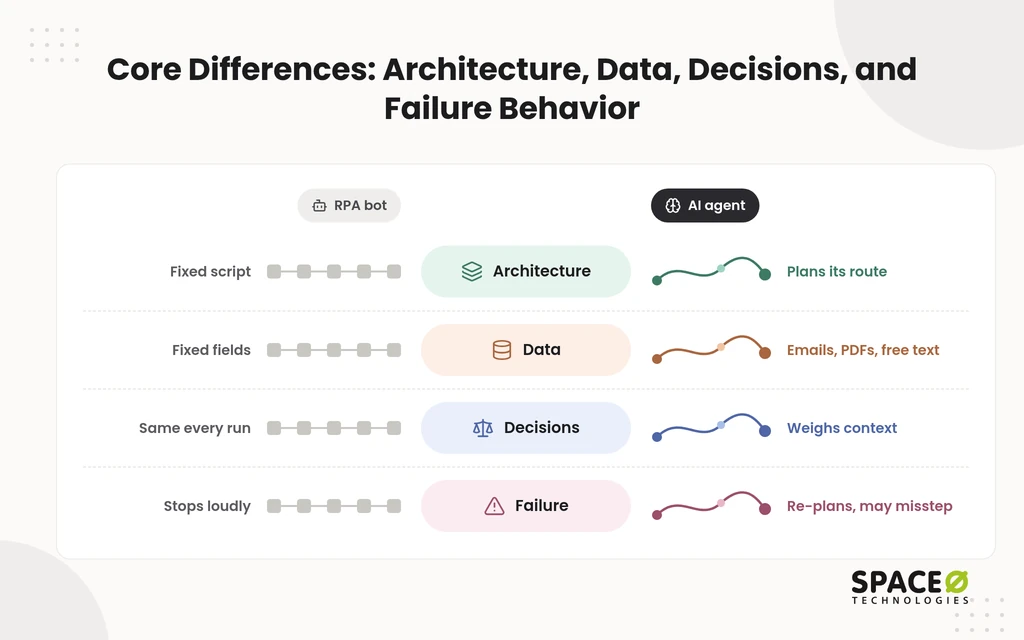
These four axes also settle the AI agent vs. traditional workflow automation question. Traditional workflow tools follow predefined rules, just as RPA does.
Architecture: how does each one work?
RPA is imperative and step-by-step, while AI agents are declarative and plan their own route.
- RPA: A bot follows a recorded script. It mimics keystrokes, clicks, and data entry through user interface (UI) selectors. Every step is written in advance.
- AI agents: An agent runs on a large language model (LLM). It takes a goal and plans the steps. It calls tools and application programming interfaces (APIs), and it adapts when a step fails.
Data: what can each one read?
RPA needs structured data, while AI agents handle unstructured and semi-structured inputs.
- RPA: A bot reads fixed fields in spreadsheets, forms, and databases. Input that does not match the expected shape stops it.
- AI agents: An agent reads emails, PDFs, contracts, chat logs, and free text. It pulls out meaning even when the wording and layout vary.
Decisions: how much control and predictability do you get?
RPA is deterministic, so the same input always gives the same output. AI agents are context-aware, so their outputs can vary.
- RPA: Identical runs make audits simple. The bot never improvises. It also never handles a case that nobody wrote a rule for.
- AI agents: An agent weighs context and handles exceptions. That flexibility means outputs vary between runs. High-risk decisions therefore need human oversight.
Failure behavior: what happens when something changes?
RPA stops when its environment changes. AI agents adapt, but they can adapt in the wrong direction.
- RPA: A moved button or a renamed field breaks the run. The failure is loud and easy to spot.
- AI agents: An agent tries another route when a step fails. The risk is a confident wrong action. That is why agents are harder to test than bots.
Comparison at a Glance
This table compares RPA, AI agents, and a hybrid on every factor that affects your decision. The AI agents column reflects AI agent architecture for enterprise systems, where an LLM plans and tools act.
| Factor | RPA / rule-based automation | AI agents | Hybrid |
|---|---|---|---|
| Focus | The how: execute predefined steps | The what and why: reach a goal | Agents decide, RPA executes |
| Architecture | Imperative scripts and UI selectors | Declarative, LLM-powered planning with tools | Agent orchestrates, bots and workflows run fixed steps |
| Data | Structured only | Unstructured and semi-structured | Agent reads documents, bot posts structured results |
| Decision-making | Fixed if-this-then-that rules | Context-aware reasoning | Rules for routine cases, reasoning for exceptions |
| Predictability | Same input, same output | Outputs vary between runs | Predictable backbone, variable exception path |
| Edge cases and failure | Breaks when a UI, label, or format changes | Re-plans, but can act wrongly with confidence | Exceptions go to the agent or a person |
| Best for | High-volume, structured, audit-heavy tasks | Ambiguity, exceptions, and multi-tool tasks | End-to-end processes that contain both kinds of work |
| Drawbacks | Brittle, with frequent upkeep | Harder to test and costlier to run | More components to govern |
| API integration | Works through the UI where APIs are missing | Calls APIs and tools by intent | APIs where they exist, bots where they do not |
| Governance and human review | Audit trail comes from fixed steps | Human-in-the-loop, drift monitoring, and credential controls | Human review at high-stakes hand-offs |
| Total cost to run | Bot repairs each time a screen changes | LLM usage, evaluation, and monitoring | Agent cost limited to cases that need judgment |
How They Work Together: Agents as the Brain, RPA as the Hands
The hybrid model makes agents the brain and RPA or deterministic workflows the hands. The brain, built from LLM-powered agents, reasons, reads unstructured documents, and orchestrates the work. The hands run critical, predictable steps. They also reach legacy enterprise resource planning (ERP) systems that lack modern APIs.
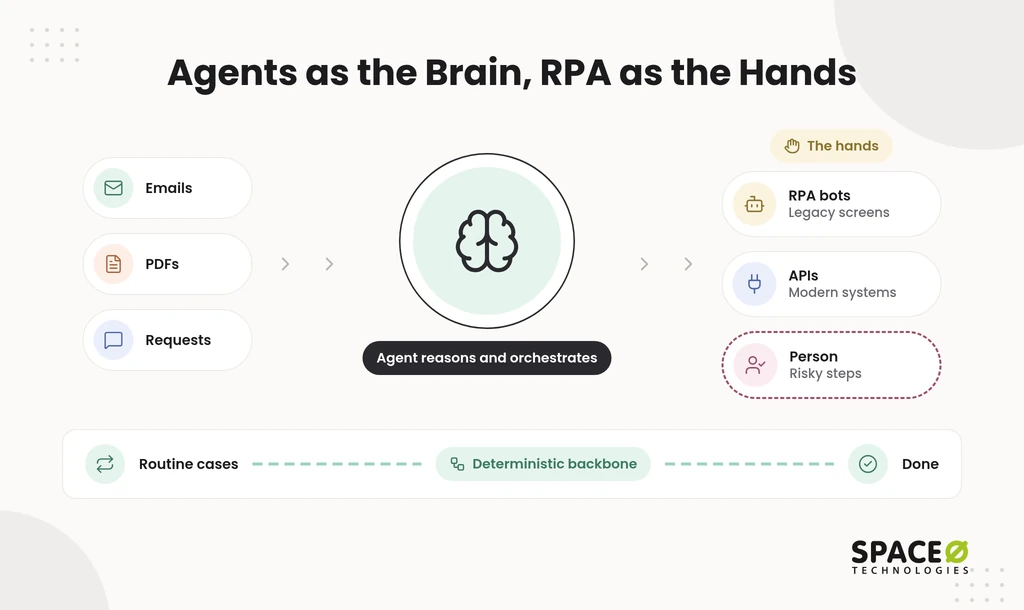
In practice, you keep a deterministic backbone and send only exceptions to agents. Routine cases flow through fixed rules at low cost. Unusual cases go to an agent, and risky ones go to a person.
The market uses three overlapping names for this blend:
- Hyperautomation: combining RPA, AI, and workflow tools to automate as much of a process as possible.
- Intelligent Process Automation (IPA): RPA extended with AI that reads documents and makes simple judgments.
- Agentic Process Automation: agentic AI plans and orchestrates, while bots and APIs carry out the steps.
Vendors are moving the same way. Major RPA platforms now offer agentic automation next to classic bots.
Should We Replace RPA With Agentic Automation?
You should not completely replace RPA with agentic automation; instead, you should blend and evolve them together. Removing working bots trades cheap, predictable runs for costlier, variable ones. The better move is to add agents where your bots struggle, following an agentic AI transformation roadmap.
When should you keep RPA?
Keep RPA wherever the work is predictable, high-volume, and structured.
- Invoice posting, bank reconciliations, and data scraping from fixed sources.
- Legacy systems that offer only a UI, where bots work through screen clicks.
- Processes where strict, transparent audit trails are mandatory.
- Simple logic, where running an LLM wastes money.
When should you add agentic automation?
Add agents where the input is messy, or the path is unclear.
- Unstructured data, such as emails, chat logs, contracts, and images.
- Ambiguous requests and frequent exceptions that rules cannot anticipate.
- Orchestration across modern tools and APIs, driven by intent rather than a fixed sequence.
What governance does an agent need?
Agents need tighter controls than bots because their outputs vary.
- Human-in-the-loop approval for high-risk decisions.
- Monitoring for model drift as data and conditions change.
- Credential management, so each agent can reach only the systems its task requires.
Plan for heavier testing than RPA needs. Gartner predicts over 40% of agentic AI projects will be canceled by the end of 2027, citing costs, unclear value, and weak risk controls. Space-O Technologies wraps every production model in an evaluation suite. It covers accuracy, hallucination rate, bias checks, latency, and cost, and continuous monitoring follows launch.
Why RPA Bots Keep Breaking and Need Smarter Automation
RPA bots break because they rely on rigid, pixel-level UI mapping and hardcoded selectors. Those selectors fail when an application layout, field label, or document format changes. Your team patches the script, and the next update starts the cycle again.
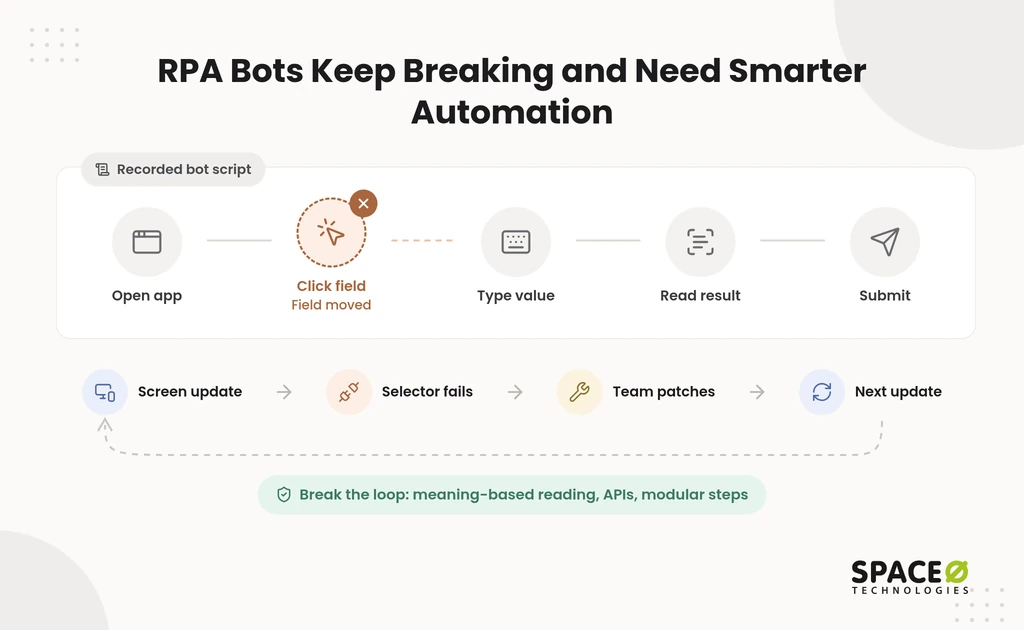
Five upgrades, in order
Apply these five upgrades in this order.
- Add Intelligent Document Processing (IDP): read documents by meaning, so new layouts no longer stop intake.
- Introduce agentic automation: let an agent handle exceptions and re-plan through agentic workflow automation, so one odd case does not halt the queue.
- Replace UI steps with API calls: move data directly between systems, so screen redesigns stop mattering.
- Target fields semantically: locate elements by label or description instead of pixel coordinates, so moved fields still resolve.
- Split bots into modular, single-purpose steps: isolate each task, so a failure stays small and fixes stay local.
Which cause needs which fix?
Match each failure to its root cause before you pick a fix.
| What breaks | Root cause | Fix |
|---|---|---|
| A new document format stops intake | Fixed templates | IDP |
| Unexpected cases stall the queue | No rule exists for the exception | Agentic automation |
| A screen redesign breaks the run | Dependence on the UI | API calls |
| A moved or renamed field gets missed | Pixel or hardcoded selector targeting | Semantic targeting |
| One error takes down the whole process | A single, monolithic bot | Modular steps |
Rule-Based Automation vs Autonomous AI Agents in Action
The gap between rule-based automation and autonomous AI agents fits in one line each.
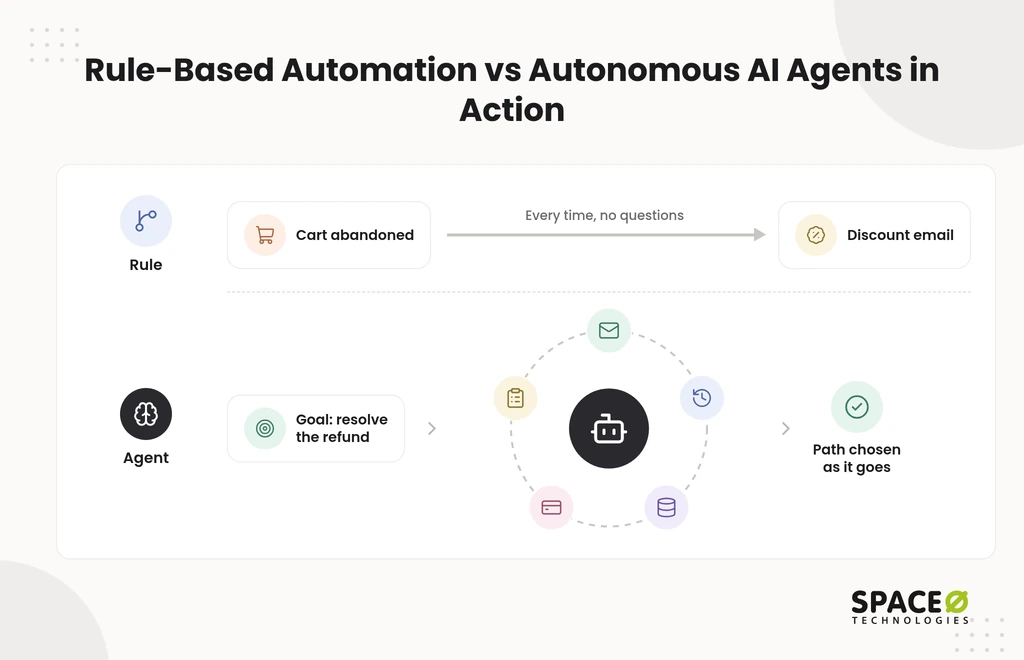
Rules: “Do this when that happens.”
Agents: “Figure out what should happen next to reach the goal.”
What does a rule-based workflow look like?
A rule-based workflow fires the same action every time its trigger occurs. An online store’s script watches for abandoned carts. When a shopper abandons a cart, it emails a discount code. It never asks whether the discount makes sense for that shopper.
The same pattern runs invoice processing, employee onboarding, and ticket categorization.
What does an autonomous agent look like?
An autonomous agent works toward a goal and picks its tools as it goes. Picture a support agent whose goal is to resolve refund requests:
- It reads the customer’s email and works out the request.
- It checks the order history.
- It queries the database for policy and payment details.
- It issues the refund through the payment API.
- It logs every action for review.
Nobody scripted that path in advance. This is how AI agents make decisions autonomously for business. The same reasoning loop powers agents for deep research and code debugging.
How to Choose, Workflow by Workflow
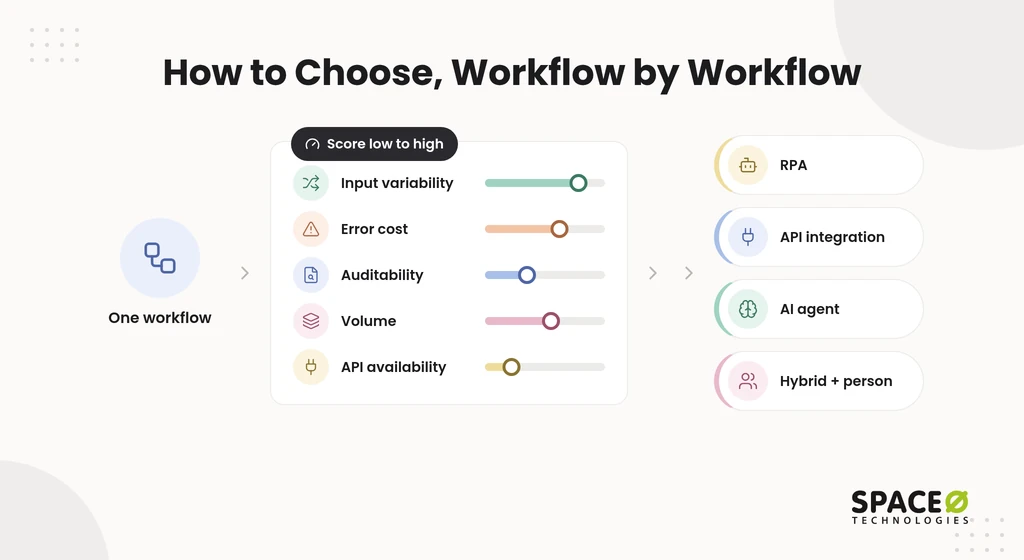
Decide for each workflow, not for the whole company. Score each process, then route it to RPA, an agent, API integration, or a hybrid. Most guidance stops at “use both.” That leaves your team without a sequence, a third path, or a running-cost line. This framework supplies all three.
How do you score a workflow?
Rate each workflow low or high on five factors.
| Factor | A low score points toward | A high score points toward |
|---|---|---|
| Input variability | RPA or API integration | An agent |
| Error cost | Automation with spot checks | Human review before action |
| Auditability needs | An agent with full logging | Deterministic steps |
| Volume | A light agent or manual handling | RPA or API integration |
| API availability | RPA through the UI | API integration |
Which path does each profile get?
Four profiles cover most workflows.
| Workflow profile | Route it to |
|---|---|
| Stable inputs, high volume, no API | RPA |
| Stable inputs, API available | API integration, retiring the UI bot |
| Variable inputs, low error cost | An agent with sampled human checks |
| Variable inputs, high error cost or strict audit | Hybrid: the agent proposes, a deterministic step executes, and a person approves |
API integration is the path most comparisons skip. When a system exposes an API, a direct call is more reliable than either a bot or an agent. Our API integration services cover that path. For systems with no API, application modernization can add one, which makes the bot optional.
When is a workflow ready for an agent?
Ship an agent only when every go criterion is met.
Go when:
- You have a set of real past inputs to test against.
- Success is defined in measurable terms, such as accuracy or resolution rate.
- A named person owns exceptions and approvals.
- Every tool call and output is logged.
Do not ship when:
- The step must produce identical output every time for an auditor.
- The logic is simple enough for a rule.
- Nobody can review the agent’s work after launch.
Where do human-review checkpoints belong?
Put a person before any step that moves money, decides eligibility, or cannot be undone. Refunds, payouts, denials, and account changes all qualify. The agent prepares the case, and a qualified reviewer approves it. Automation handles the volume, and people own the consequential decisions.
Should you repair a broken bot or rebuild it?
Repair the bot when a screen changed. Rebuild the step when the inputs changed.
- If a bot fails because a UI moved, repair it. Swap that step for an API call or semantic targeting.
- If it fails because documents or requests vary, rebuild that step with IDP or an agent.
- If fixes keep landing on the same step, rebuild that step alone and keep the rest of the bot.
What order should the migration follow?
Migrate in five steps, starting with the bots that fail most.
- List every bot along with its failure log.
- Score each workflow on the five factors.
- Swap UI steps for API calls wherever an API exists.
- Add IDP or an agent to exception-heavy steps, with human review.
- Keep the deterministic backbone, monitor drift, and budget for upkeep.
Example: insurance claims intake
Claims intake shows how the hybrid works in a regulated workflow. Claims arrive as emails, photos, and PDFs. An agent reads each package, extracts the facts, and flags missing items. A deterministic step then posts the structured claim to the policy system through an API or a bot.
A claims adjuster approves every payout or denial before it is issued. The agent speeds up triage, the rules keep posting consistent, and the adjuster keeps the decision.
What does it cost to keep an automation running?
Budget for the running cost, not only the build. Annual maintenance for an AI build typically costs 15% to 25% of the original development cost each year, according to Space-O Technologies’ AI development cost guidance. Infrastructure and model or API usage fees come on top of that.
Per-run cost matters too, because an agentic step usually costs more than the same step written as deterministic code. Model and API fees scale with usage, so track the cost per run from the first pilot. Set a spending cap for each agent before launch.
Our software maintenance services keep both bots and agents current after launch.
How Space-O Technologies Builds This
Space-O Technologies starts from your business goal, then picks agents, RPA, integration, or a mix, based on cost-effectiveness. We do not lead with a favorite tool. If a workflow needs an API call, it gets an API call, not an agent.
Our AI agent development team builds for exception-heavy, multi-tool work. Our AI consulting team scores your workflows and sets the migration sequence before any build starts.
Space-O Technologies has built AI-powered custom software since 2010:
- 1,200+ clients served and 300+ software solutions developed.
- Space-O Technologies has 140+ in-house developers and reports 97% client retention.
- 50+ AI systems running in production.
Your project is protected from day one. We sign a non-disclosure agreement (NDA) before every project. All source code, data, and intellectual property (IP) transfer to you at completion.
For healthcare AI engagements, we add Health Insurance Portability and Accountability Act (HIPAA)-ready frameworks.
Our responsible AI rules apply by default. We never train on client data, and we mask personally identifiable information (PII). People approve high-stakes decisions.
You choose one of four engagement models: Dedicated Team, Time & Material, Fixed Cost, or Staff Augmentation.
Share Your Most Fragile Bot With Us
Tell us which workflow breaks most often. Space-O Technologies reviews it and returns a free, expert-reviewed routing plan and estimate for agents, RPA, or APIs.

Frequently Asked Questions
What is RPA process automation?
RPA (robotic process automation) is software that automates predictable, structured tasks by mimicking how people use screens. A bot follows a recorded script of keystrokes, clicks, and data entry through user interface selectors. Every step is written in advance, so it works best on structured data and stable screens.
Is agentic AI the same as a bot?
No. A bot, such as an RPA bot, executes predefined steps. Agentic AI pursues a goal, plans its own route, and adapts when a step fails.
What is the difference between RPA and AI?
The main difference is autonomy. RPA is deterministic: it follows predefined if-this-then-that rules, so the same input gives the same output. It also needs structured data. AI agents work toward a goal, read unstructured inputs, and decide in context, so their outputs can vary between runs. Traditional workflow tools also follow predefined rules, as RPA does.
What is the difference between LLMs and AI agents?
An AI agent runs on a large language model (LLM) but adds goal-directed behavior. It takes a goal, plans the steps, calls tools and APIs, and adapts when a step fails. The LLM is the model underneath, and the agent wraps it in planning, tool use, and action.
Is RPA part of agentic AI?
Not by itself, but the two work well together. In a hybrid model, agents act as the brain by reasoning, reading unstructured documents, and orchestrating the work. RPA acts as the hands by running predictable steps and reaching legacy systems that lack modern APIs. Some platforms now offer agentic automation alongside classic bots.
Should a team with fragile RPA bots start by adding AI agents?
Not necessarily. First, identify why the bots break. If a screen changed, the cheaper fix is usually an API call or semantic field targeting. If documents or requests vary, document processing (IDP) or an agent fits better. If one odd case halts the queue, an agent for exceptions helps. Start with the bots that fail most often, and keep the deterministic backbone.



 All our projects are secured by NDA




 4.8


