
 By
Contents
- An AI agent plans, extracts, validates, and routes document data instead of only reading text.
- Invoices need fast, high-volume posting, while contracts need clause-level reasoning and legal review.
- Low-confidence fields go to a named reviewer before anything posts to your finance system.
- A custom agent adds yearly upkeep, so compare building and buying on ownership.
Key Takeaways
Your team still keys invoice and contract data into systems by hand. Templates break whenever a vendor changes a layout. Teams exploring AI software development often start with this exact bottleneck.
An AI agent for document processing goes beyond optical character recognition (OCR) and rigid templates. It uses large language models (LLMs) to plan, extract, validate, and route data. A person reviews uncertain fields before data reaches your enterprise resource planning (ERP) system.
This guide covers how agents handle invoices and contracts, plus ownership costs. Space-O Technologies has built AI-powered custom software since 2010 through our AI development services. We design document agents that run inside the systems your team already uses.
Core Capabilities of a Document Processing Agent
A document processing agent has five core capabilities, from reading a page to delivering structured data.
Your team likely keys data from PDFs, scans, and emails by hand. Template-based tools also break whenever a vendor changes a layout. An agent handles that variety with five capabilities:
- Vision-first parsing: The agent reads layouts, tables, charts, and handwriting directly from scans, PDFs, and images.
- Autonomous classification and routing: The agent identifies each document’s type and sends it to the right workflow or work queue.
- Multi-agent orchestration: In a multi-agent system, a supervisor agent assigns sub-agents to classify, extract, and validate each document in sequence.
- Human-in-the-loop (HITL) validation: Low-confidence fields are flagged for side-by-side review, with alerts in Microsoft Teams or Slack.
- Structured output: Validated data lands as JSON (JavaScript Object Notation), database records, or markdown for retrieval-augmented generation (RAG).
How does human-in-the-loop validation work in a document agent?
Human-in-the-loop validation sends any field below a set confidence threshold to a reviewer before it posts.
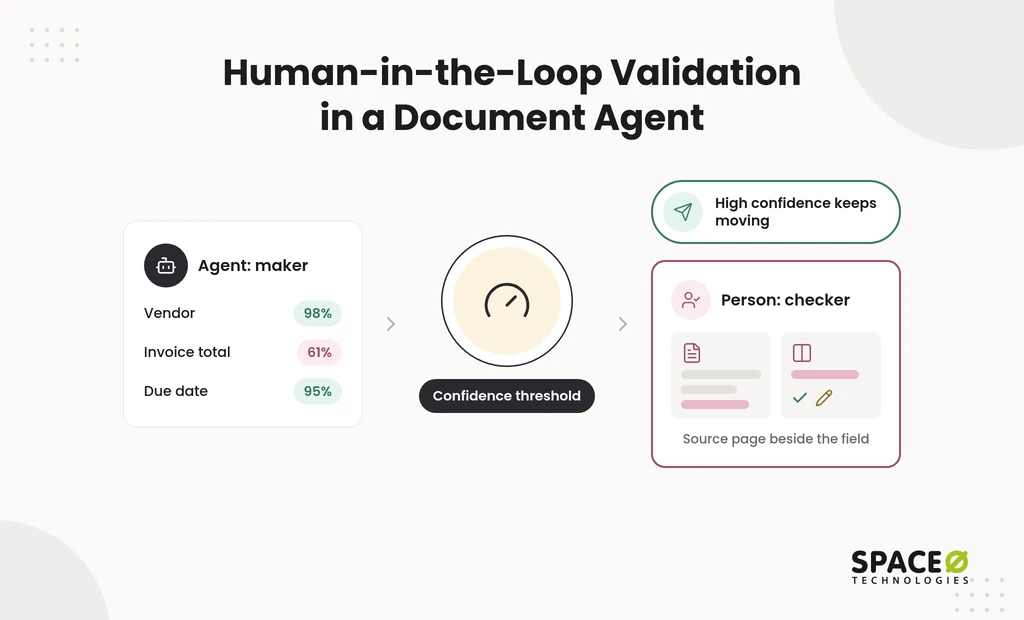
Fully automatic extraction is risky when one wrong total reaches your ledger. A maker-checker design handles that risk. The agent acts as the maker and proposes each value with a confidence score. A person acts as the checker for anything below the threshold.
The reviewer sees the source page beside the extracted field. They then confirm or correct the value. High-confidence documents keep moving, so people spend time only where judgment matters.
Intelligent Document Processing AI Agent for Invoices and Contracts: How It Handles Each
An intelligent document processing (IDP) agent combines OCR, natural language processing (NLP), and LLMs. It reads, classifies, extracts, and validates data from invoices, contracts, and other unstructured documents.
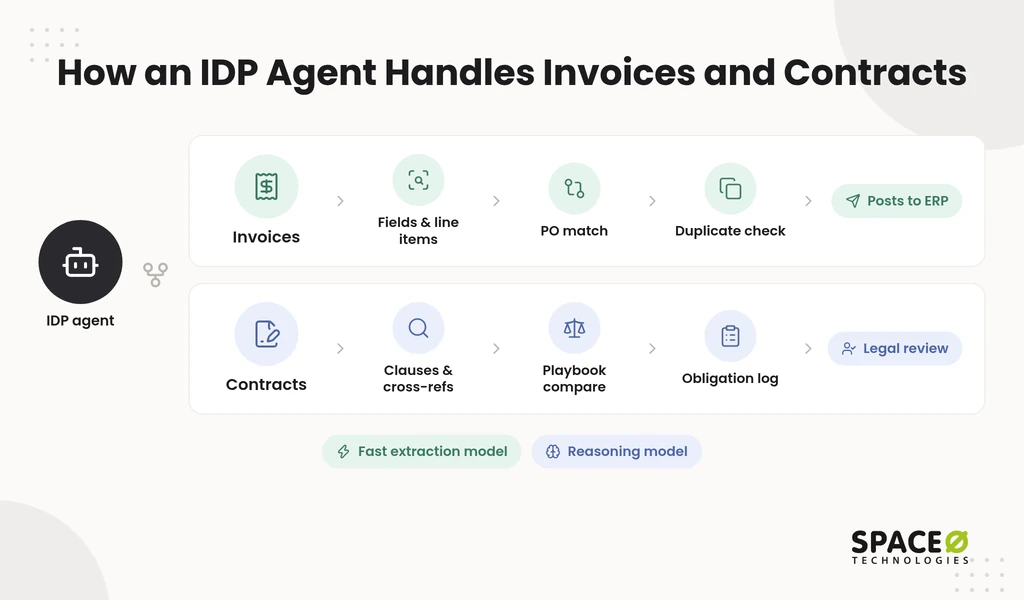
Finance and legal teams often expect one setup to serve both document types. In practice, invoices and contracts need different tasks, models, and agentic workflow automation.
| Dimension | Invoices | Contracts |
|---|---|---|
| Volume | High volume, repeated daily | Low volume, reviewed case by case |
| Unit of work | Fields and line items | Clauses and cross-references |
| Core goal | Accurate, fast posting to accounts payable (AP) | Risk visibility and obligation tracking |
| Typical end state | Straight-through processing into the ERP | Flags and summaries for legal review |
| Model choice | Fast, lower-cost extraction models | Advanced reasoning models |
How does an IDP agent process invoices?
An IDP agent extracts invoice fields, checks them against purchase orders, and posts clean invoices to your ERP.
- Core tasks: The agent extracts the vendor name, invoice number, date, line items, and tax amounts from each invoice.
- Workflow: It matches each invoice to its purchase order (PO) and runs duplicate checks. Clean invoices post to your ERP or AP system.
- Model choice: Fast, lower-cost extraction models fit invoices because the work is high-volume and repetitive.
Invoices that pass every check move through straight-through processing, with no manual touch. Mismatches and suspected duplicates go to an AP reviewer instead.
How does an IDP agent process contracts?
An IDP agent analyzes contract clauses across many pages and flags terms that need legal attention.
- Core tasks: The agent reads multi-page contracts and follows cross-references to locate indemnity, renewal triggers, and payment obligations.
- Workflow: It compares clauses against your negotiation playbook, flags risky deviations, and logs obligations for tracking.
- Model choice: Advanced reasoning models fit contracts because clause meaning depends on context spread across the document.
Every flag goes to a person in legal or contract operations. The agent prepares the review, and counsel makes the call.
How does an IDP agent keep extractions auditable?
Governance controls let you trace every extracted value back to its source and review step.
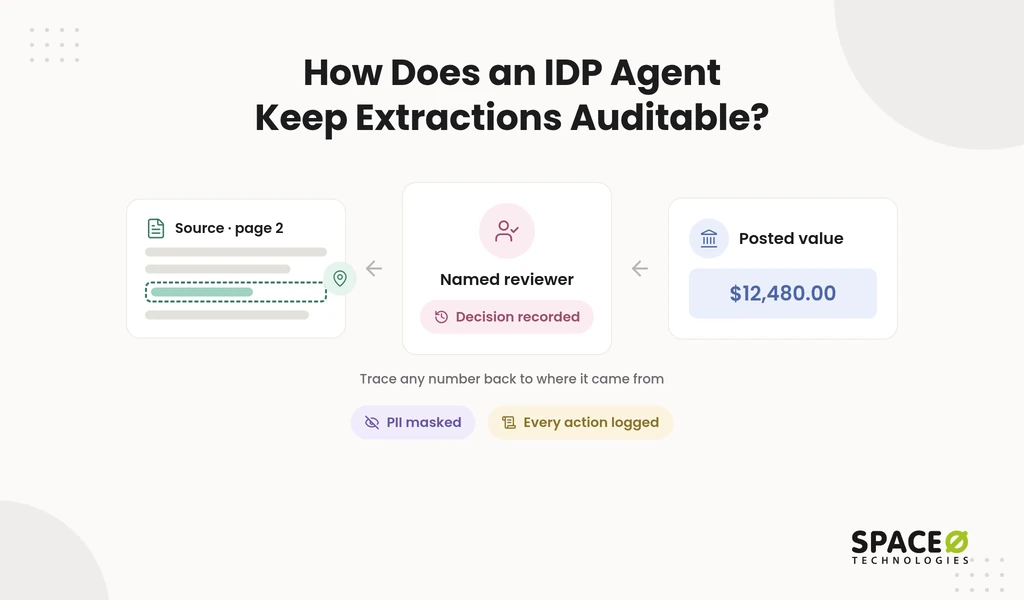
Auditors and controllers need to see where each number came from. Three controls provide that view:
- Field-level provenance: Each extracted value links to its page and location in the original document.
- Confidence-threshold routing: Fields below the threshold go to a named reviewer, and that decision is recorded.
- PII masking with execution logs: Personally identifiable information (PII) is masked, and every agent action is logged for audit.
Custom-Built Agent vs. Packaged Platform
The choice depends on where your documents need to go and who controls the agent after launch.
Many teams try a packaged tool first and then hit a limit. It may not fit a customized ERP, a custom CRM, or a review rule unique to the business. Teams with a bespoke ERP often work with specialist ERP development companies to extend it. The table below compares the two paths on the points that decide long-term fit.
| Decision point | Custom agent built by Space-O Technologies | Packaged platform |
|---|---|---|
| Integration into your existing ERP/CRM | Built against your systems’ APIs, including customized ERP, CRM, or ServiceNow instances | Works through the connectors the vendor supports |
| Ownership of code and IP | Client owns all source code, data, and IP at completion | Vendor owns the platform; you license access |
| Human-review design | Review steps and thresholds shaped to your approval chain | Review uses the platform’s built-in queues, set up by your admins |
| Data handling | NDA signed before every project; no training on client data | Data handled under the vendor’s terms of service |
| Engagement model | Dedicated Team, Time & Material, Fixed Cost, or Staff Augmentation | Plan-based subscription managed by your team |
What does adopting a packaged document platform require?
Each packaged option needs setup work, administrators, or developers on your side.
- Microsoft Copilot Studio: Builds document-processing agents inside the Microsoft ecosystem, configured by your Microsoft administrators.
- AWS Bedrock Data Automation and AWS IDP for financial services: Extracts document data and supports KYC and compliance workflows. Engineers assemble it with AWS services such as Lambda and DynamoDB.
- Azure Document Intelligence: Offers key-value, table, and structure-extraction APIs. Developers connect the output to downstream systems.
- Celigo AI AP Invoice Ingestion Agent: Ingests invoices and creates NetSuite vendor bills, configured within Celigo’s integration environment.
- Sema4.ai: Provides Document Understanding Agents and multi-agent orchestration, deployed and maintained by your team.
- LlamaIndex: Supplies developer tooling for document agents that your engineers build and host.
- Landing AI: Provides document extraction capabilities accessed and integrated by your developers.
Document Agent Use Cases by Industry
Document agents fit any workflow where people re-key data from documents into a system of record.
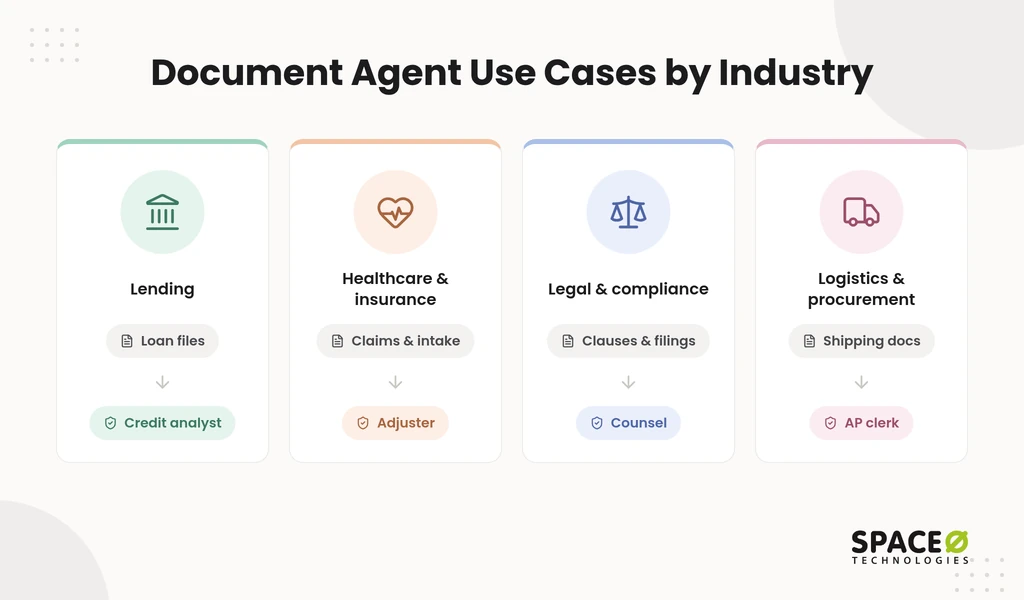
Each use case below keeps a human-review checkpoint, because a misread document can cost money or create compliance exposure.
- Lending: The agent extracts data from loan applications, pay stubs, and bank statements for lending software workflows. Review checkpoint: A credit analyst confirms any file where stated and extracted income differ.
- Healthcare and insurance: The agent reads claims and intake forms while masking PII. Review checkpoint: An adjuster or billing specialist approves flagged claims before payment or submission.
- Legal and compliance: The agent compares contract clauses and regulatory filings against your internal policies. Review checkpoint: Counsel approves every risk flag before it reaches a negotiation or filing.
- Logistics and procurement: The agent matches shipping documents and delivery receipts against purchase orders. Review checkpoint: An AP clerk resolves quantity or price exceptions before payment.
How Space-O Technologies Builds Document Agents
We build each document agent around your documents, your destination system, and your approval rules.
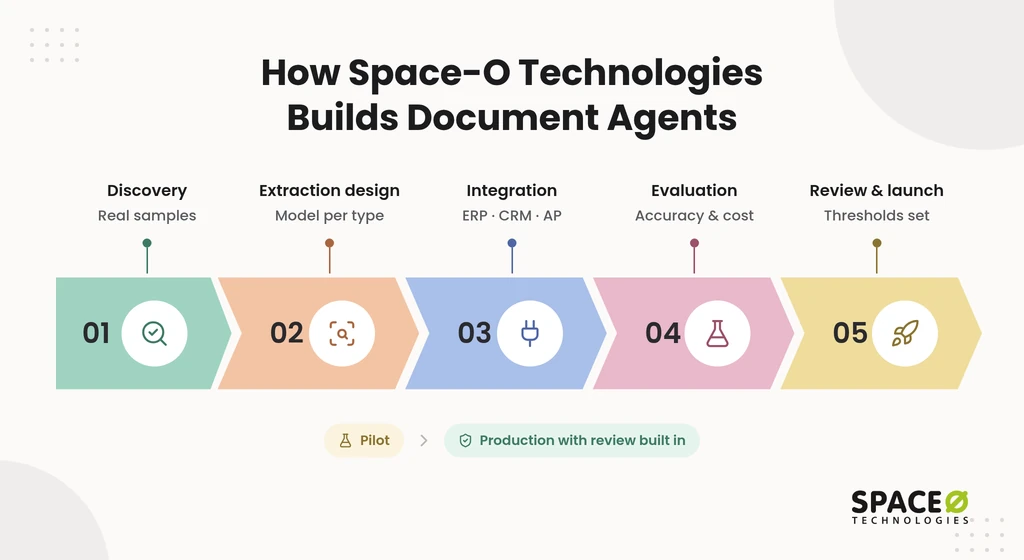
Many document AI pilots perform well in a demo but stall before production. The usual causes are messy real-world inputs, missing integrations, and no plan for review. Our process addresses each cause in five steps:
- Discovery: We sample your real documents, measure volume, and map the system each field must reach.
- Extraction design: We choose the parsing approach and model per document type. For image-heavy inputs, that draws on our computer vision development services.
- Integration: We connect the agent to your ERP, CRM, or AP system through our ERP integration services.
- Evaluation: We test every production model for accuracy, hallucination rate, bias, latency, and cost.
- Review and launch: We set confidence thresholds with your team, go live, and keep continuous monitoring in place.
These five steps move a pilot into production with review built in.
What responsible-AI controls ship with every document agent?
Every document agent ships with four controls that protect your data and keep people in charge of decisions.
- PII masking: Personal data is masked before it reaches a model or a log.
- No training on client data: Your documents are never used to train models.
- Hallucination testing: Each release is tested for unsupported values before it goes live.
- Human review for high-stakes decisions: Automation handles the volume, but a qualified human approves before any output influences a final decision.
Our security practice follows recognized frameworks. Space-O Technologies holds ISO 27001 and ISO 9001 certifications. We also build HIPAA-ready frameworks for healthcare AI engagements.
Who builds your agent, and how can you engage us?
You work with an in-house team and choose the engagement model that fits your scope.
- Track record: Space-O Technologies has served 1,200+ clients and developed 300+ software solutions.
- AI delivery: We run 50+ AI systems in production.
- Team: 140+ in-house developers, and Space-O Technologies reports 97% client retention.
- Confidentiality: We sign an NDA before starting any project.
- Locations: Offices in Mesa (Arizona), Brampton (Ontario), and Ahmedabad (India).
- Engagement models: Dedicated Team, Time & Material, Fixed Cost, or Staff Augmentation. To extend your own team, you can hire AI agent developers.
What Does a Custom Document Agent Cost to Own?
Owning a custom document agent means paying for the build plus yearly upkeep. Our AI development cost guide puts annual maintenance at 15% to 25% of the original build cost.
Most build-vs-buy comparisons stop at the launch price. That misses the larger question: what you pay, and what you own, in years two and three.
Which costs follow a document agent after launch?
Three cost lines continue after go-live: maintenance, model or API usage, and infrastructure.
- Maintenance: Model updates, threshold tuning, and fixes for new document layouts, at the yearly upkeep share cited above.
- Model or API usage: Usage fees for the models that extract and reason over each document. Document volumes need their own estimate.
- Infrastructure: Cloud hosting, storage, and the monitoring that keeps accuracy visible.
How should you weigh building against buying?
Compare the two paths on four points before you compare any price.
- Destination fit: Check whether your ERP, CRM, or ServiceNow instance is customized beyond standard connectors.
- Document mix: Note whether you process only invoices or also clause-heavy contracts that need reasoning models.
- Review rules: Decide whether your approval chain must be built into the agent or can follow a generic queue.
- Ownership: With a custom build, all code and IP transfer to you at completion. That ends license dependency for the agent itself.
How are payments structured?
Payments are milestone-based and tied to deliverables you can review.
You fund discovery, extraction, integration, and launch as separate milestones. Each payment follows a deliverable your team has seen working. We never quote a price before scoping, because volume and integrations drive the cost.
Three Questions to Answer Before You Scope a Document Agent
Three answers define the scope of any document agent build.
- Document type: Are you automating invoices, contracts, or another document type?
- Volume: How many documents arrive each month, and how much does that vary?
- Destination system: Which ERP, CRM, or AP system must receive the data?
Get Your Document Agent Scoped Fast
Share a sample of your invoices or contracts with our AI engineers. We will map your systems, review rules, and volumes, then send a free estimate.

Frequently Asked Questions
What is an AI agent for document processing?
An AI agent for document processing reads documents, extracts the data, checks it, and routes it to the right system. It uses language and vision models to read layouts and understand context. When a field looks uncertain, the agent sends it to a person for review. Clean data then reaches your finance or contract system as structured output.
How is an AI agent different from traditional OCR?
OCR only converts images into text. It does not understand what the text means. An agent also classifies the document, validates the values, and routes the data to your ERP or work queue. It keeps working when a vendor changes a layout.
Can one agent process both invoices and contracts?
Yes, but each type needs its own tasks and model. Invoices need fast field extraction and purchase order matching. Contracts need clause-level reasoning and legal review. One agent platform can run both, with separate workflows and review rules for each.
How do AI agents keep extracted data accurate?
Each field gets a confidence score. Low-scoring fields go to a human reviewer before they post. Field-level provenance links every value back to its source page. Auditors can then trace any posted number to the original document.
Does a document agent replace human reviewers?
No. The agent handles volume, and people approve flagged fields and high-stakes decisions. A qualified human reviews before any output influences a final decision. Reviewers spend their time on exceptions instead of routine data entry.
Which systems can a document agent connect to?
It connects to ERP, CRM, and accounts payable systems through their APIs. ServiceNow instances are one example. A customized system may need extra integration work, so confirm your destination system before scoping.
What does it cost to maintain a custom document agent?
A custom agent adds yearly upkeep after the build. Annual maintenance typically runs 15% to 25% of the original build cost. Plan for this cost alongside the build price when you compare building and buying.
What review rules must finance and legal define before a document agent goes live?
Set the confidence threshold below which a field goes to a person. Name the reviewer for each document type. List the exceptions that block posting, such as PO mismatches or suspected duplicates. For contracts, define which clauses need counsel approval. Record each reviewer’s decision so auditors can trace values to their source.



 All our projects are secured by NDA





 4.8


