
 By
Contents
- AI agent architecture for enterprise systems is a six-layer stack that lets autonomous agents act safely inside legacy software.
- The six layers are experience and access, orchestration, agentic, model, knowledge, and tools and action.
- Single-agent, vertical, horizontal, and hybrid patterns set how much orchestration and governance an agent program needs.
- Add logging, cost controls, and state ownership, then decide to build, buy, or integrate one layer at a time.
Key Takeaways
AI agent architecture for enterprise systems structures autonomous agents that reason through multi-step goals. Enterprise agents use tools, manage state, and connect to legacy business software. The work is organized into six layers, four coordination patterns, and three governance controls.
Many enterprise agent pilots stall at the same point. The demo works, then fails against real permissions, real data, and real legacy systems. According to Gartner, over 40% of agentic AI projects will be canceled by the end of 2027. The cited causes are escalating costs, unclear business value, and inadequate risk controls.
The architecture below is how you design past that point. Our AI agent development services apply the same layered approach to the systems you already run.
Core architectural layers
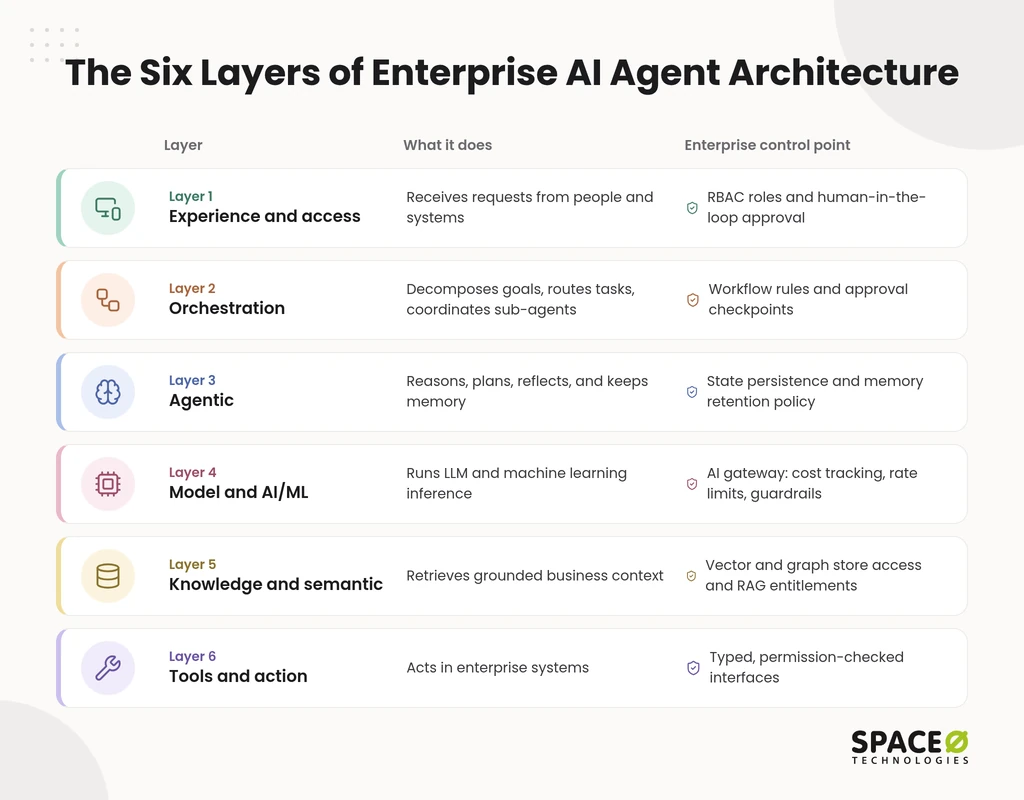
An enterprise agent stack has six layers, starting with experience and access, then orchestration, then agentic. The remaining three layers are model and AI/ML, knowledge and semantic, and tools and action. Each layer answers a question your security, finance, or IT team will eventually ask. Each layer owns one job and one control point.
1. Experience and access layer
The experience and access layer is where people and systems reach the agent, governed by role-based access control (RBAC). It covers chat, portal, and API entry points. It checks who is asking and what that role may trigger. It also hosts human-in-the-loop approval screens, where a person signs off before a consequential action runs.
2. Orchestration layer
The orchestration layer turns a business request into a plan and assigns the work. It handles goal decomposition, which breaks one request into ordered tasks. It runs task routing, which sends each task to the right agent or tool. It also manages sub-agent coordination and pauses the flow at human-in-the-loop checkpoints.
3. Agentic layer
The agentic layer is the reasoning core, where each agent thinks, acts, and remembers. Agents run ReAct (reasoning and acting) loops. Each loop reasons about the next step, acts through a tool, and reads the result. Planning and self-reflection let an agent check its own output. Short-term memory holds the current task. Long-term memory and state persistence let work survive restarts and handoffs.
4. Model and AI/ML layer
The model and AI/ML layer supplies the large language models (LLMs) and machine learning models behind every decision. Enterprises route model calls through an AI gateway instead of calling providers directly. The gateway handles cost tracking, rate limiting, and safety guardrails on inputs and outputs. Adding or swapping a model then becomes a gateway change, not an application rewrite.
5. Knowledge and semantic layer
The knowledge and semantic layer grounds agents in your company’s own data. Vector stores hold embedded documents for semantic search by meaning, not keywords. Graph stores hold relationships, such as which customer owns which contract. Business-aware retrieval-augmented generation (RAG) draws on both, so answers reflect your terms, products, and access rules.
6. Tools and action layer
The tools and action layer is how agents change things in the real business. Agents call enterprise application programming interfaces (APIs) and microservices. Robotic process automation (RPA) bots cover screens that have no API. Every tool sits behind a typed and safe interface. That interface fixes the inputs, validates the outputs, and blocks actions outside the agent’s permissions.
How do the six layers compare?
Each layer has one job and one place where your enterprise keeps control.
| Layer | What it does | Enterprise control point |
|---|---|---|
| Experience and access | Receives requests from people and systems | RBAC roles and human-in-the-loop approval |
| Orchestration | Decomposes goals, routes tasks, coordinates sub-agents | Workflow rules and approval checkpoints |
| Agentic | Reasons, plans, reflects, and keeps memory | State persistence and memory retention policy |
| Model and AI/ML | Runs LLM and machine learning inference | AI gateway: cost tracking, rate limits, guardrails |
| Knowledge and semantic | Retrieves grounded business context | Vector and graph store access and RAG entitlements |
| Tools and action | Acts in enterprise systems | Typed, permission-checked interfaces |
Key coordination patterns
Enterprise agents coordinate in four patterns: single-agent, vertical or hierarchical, horizontal or peer, and hybrid. The pattern you choose sets how much orchestration you need. It also sets how hard a failure is to trace.
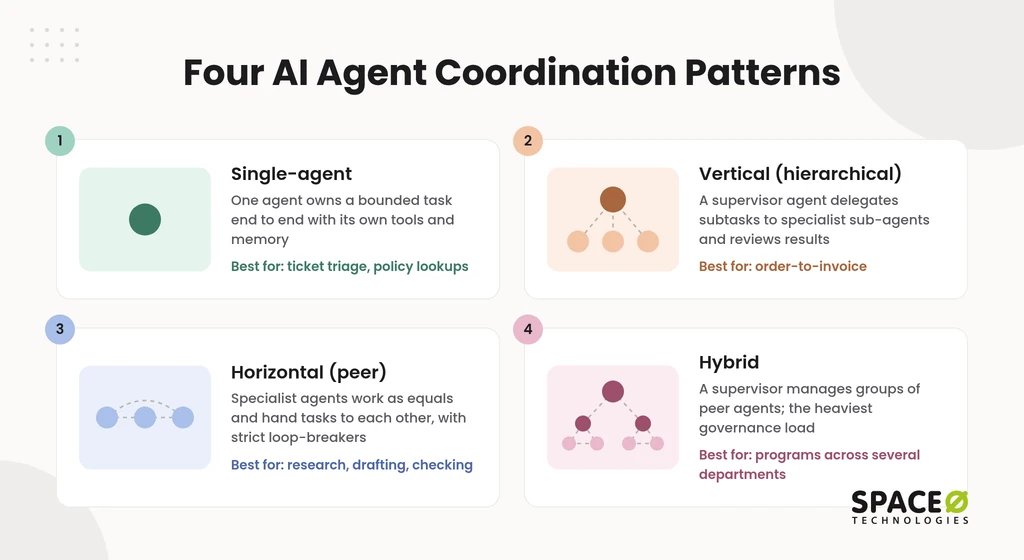
- Single-agent: One agent owns a bounded task end to end, with its own tools and memory. It suits narrow workflows such as ticket triage or policy lookups. It is the simplest pattern to test, log, and govern.
- Vertical (hierarchical): A supervisor agent decomposes the goal and delegates subtasks to specialist sub-agents. Results flow back to the supervisor for review. It suits multi-step processes with one clear owner, such as order-to-invoice.
- Horizontal (peer): Specialist agents work as equals and hand tasks to each other directly. It suits cross-functional work such as research, drafting, and checking. It needs strict loop-breakers, because no single agent ends the exchange.
- Hybrid: A supervisor manages groups of peer agents, mixing central control with peer collaboration. It suits programs that span several departments. It also carries the heaviest governance load of the four.
Enterprise governance and cross-cutting concerns
Three controls cut across every layer: observability and logging, cost and run controls, and explicit state and boundary ownership. Without them, an agent that passes testing becomes a production risk. Production agents also need grounding in your data, evaluation before release, and human review wherever people must approve consequential decisions.
- Observability and logging (the “black box recorder”): Record every prompt, plan, tool call, model response, and approval with a timestamp. When an agent gives a wrong answer, your team can replay its exact path. The same logs show auditors who approved what, and when.
- Cost and run controls: Set token caps per task, rate limiters per workflow, and loop-breakers that stop repeated steps. These limits keep a runaway loop from becoming a surprise invoice. The AI gateway in the model layer enforces most of them.
- Explicit state and boundary ownership: Write permission contracts stating which agent owns which data and actions, and which systems it may read. Each contract says when to ask a person, and clear ownership stops agents from overwriting the same record.
Build, buy, or integrate: a layer-by-layer decision guide
For legacy-heavy enterprises, the answer differs by layer, so build where your process is unique. Buy where the layer is commodity, and integrate with the systems where your data already lives. Many teams ask “build or buy” once, for the whole stack. That question is too coarse. Deciding per layer puts your budget where your business actually differs.
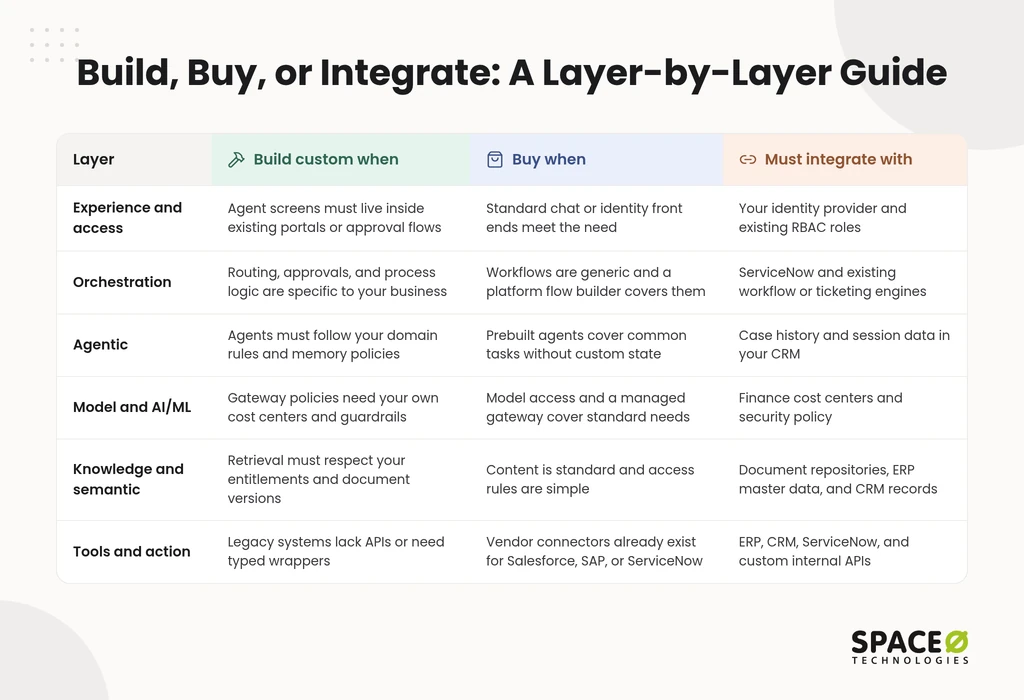
| Layer | Build custom when | Buy when | Must integrate with |
|---|---|---|---|
| Experience and access | Agent screens must live inside existing portals, or approval flows | Standard chat or identity front ends meet the need | Your identity provider and existing RBAC roles |
| Orchestration | Routing, approvals, and process logic are specific to your business | Workflows are generic, and a platform flow builder covers them | ServiceNow and existing workflow or ticketing engines |
| Agentic | Agents must follow your domain rules and memory policies | Prebuilt agents cover common tasks without custom state | Case history and session data in your CRM |
| Model and AI/ML | Gateway policies need your own cost centers and guardrails | Model access and a managed gateway cover standard needs | Finance cost centers and security policy |
| Knowledge and semantic | Retrieval must respect your entitlements and document versions | Content is standard, and access rules are simple | Document repositories, ERP master data, and CRM records |
| Tools and action | Legacy systems lack APIs or need typed wrappers | Vendor connectors already exist for Salesforce, SAP, or ServiceNow | ERP, CRM, ServiceNow, and custom internal APIs |
Here, ERP means enterprise resource planning and CRM means customer relationship management.
What does each custom layer cost to own?
Every layer you build carries a yearly cost after launch. Annual maintenance for an AI build typically runs as a share of the original development cost. That cost scales with the original development spend and keeps recurring every year after launch. Price that cost into every layer you choose to build. Buying or integrating a layer moves part of that cost to a vendor’s subscription instead.
Want this table filled in for your own stack? Book a free architecture scoping consultation and leave with a layer-by-layer plan.
Connecting agents to your existing systems
Answer two questions before you design anything: which use case you are automating, and which systems your agents must reach. Those answers decide your coordination pattern, your tools layer, and your integration budget.
Which use case are you automating?
Start with one use case that has a clear owner, steady volume, and a known approval rule. Strong first candidates are repetitive, rules-heavy workflows. Examples include ticket triage, invoice matching, and policy lookups. A bounded use case fits the single-agent pattern. It lets your team prove logging, cost controls, and approvals before you scale.
Which existing systems must your agents connect to?
Most enterprise agents must reach Salesforce, SAP, ServiceNow, or custom internal APIs before they deliver value. Each system shapes the tools layer differently.
- Salesforce: Agents read accounts, cases, and opportunities, then write updates through Salesforce APIs under a scoped role.
- SAP: Agents read master data and post transactions through governed interfaces. Financial postings should pass a human approval step.
- ServiceNow: Agents open, route, and update incidents and requests, so this is the system most tightly tied to the orchestration layer, and our ServiceNow integration services cover that connection.
- Custom internal APIs: Wrap each API in a typed interface with input validation. Our API integration services handle this wrapping work. Where no API exists, RPA can bridge the gap until application modernization replaces the old screens.
How Space-O Technologies approaches enterprise agent architecture
We design agents around the systems you already run instead of asking you to replace them. Since 2010, Space-O Technologies has delivered 300+ software solutions for 1,200+ clients. Our 140+ in-house developers cover agent design, enterprise integration, and modernization in one team.
Our approach fits enterprises that are integrating AI agents into existing legacy systems and APIs:
- Integration depth: We build the tools layer against your live ERP, CRM, and ServiceNow environments. Our AI agent development services start from that integration map.
- Model-layer choices: We work with OpenAI, Anthropic, AWS Bedrock, and self-hosted open-weight models. We mask PII before any third-party model sees it. Provider contracts prohibit training on your inputs or outputs.
- Knowledge-layer choices: We decide between RAG and fine-tuning during discovery. We review that choice every quarter.
- Production record: We run 50+ AI systems in production and are SOC 2 certified. We hold OpenAI Select Partner and AWS Partner status.
- Human review in high-stakes workflows: We place approval checkpoints in the orchestration layer wherever an action is consequential.
- Flexible engagement: We offer four models: Dedicated Team, Time & Material, Fixed Cost, and Staff Augmentation. You can also hire AI agent developers to extend your own team.
- Confidentiality and ownership: We sign an NDA before every project, and all source code, data, and IP transfer to you at completion.
Clients stay with us, too: Space-O Technologies reports 97% client retention. For agents that sit inside broader platforms, our enterprise software development team builds the surrounding systems.
Frequently Asked Questions
What are enterprise AI agents?
Enterprise AI agents autonomously pursue multi-step goals, use tools, track state, and connect to legacy business software. They run inside a governed architecture of access controls, orchestration, models, knowledge stores, and tool interfaces.
Why ground enterprise agents with RAG before considering fine-tuning?
RAG traces answers to a specific document version, and re-indexing updates them instead of retraining. On a field-service assistant built on updated manuals, retrieval came first and fine-tuning only enforced response format.
How are tool access and permissions managed for AI agents?
Permissions are managed in layers, and the first layer is role-based access control at the entry point. Typed, permission-checked tool interfaces and written permission contracts make up the remaining two layers in this approach. A contract spells out which systems an agent can read and which actions it can take. It also sets the specific points where the agent must pause and check with a person. Agents typically write to systems such as Salesforce through a scoped role.
What is an example of an enterprise AI agent?
Commonly, one agent handles ticket triage, invoice matching, or policy lookups: repetitive, rules-heavy workflows with clear owners. A larger example is order-to-invoice: a supervisor decomposes the goal, delegates to specialist sub-agents, and reviews results.
What does a human-review checkpoint look like in a real production agent?
In one lending client’s loan-origination workflow, the model drafts an approve/decline recommendation with a rationale. A human underwriter signs off on every high-value decision; the model stops at drafting and evidence retrieval.



 All our projects are secured by NDA




 4.8


